2BVAN-VNTT10car navigation
On Course Tech LLC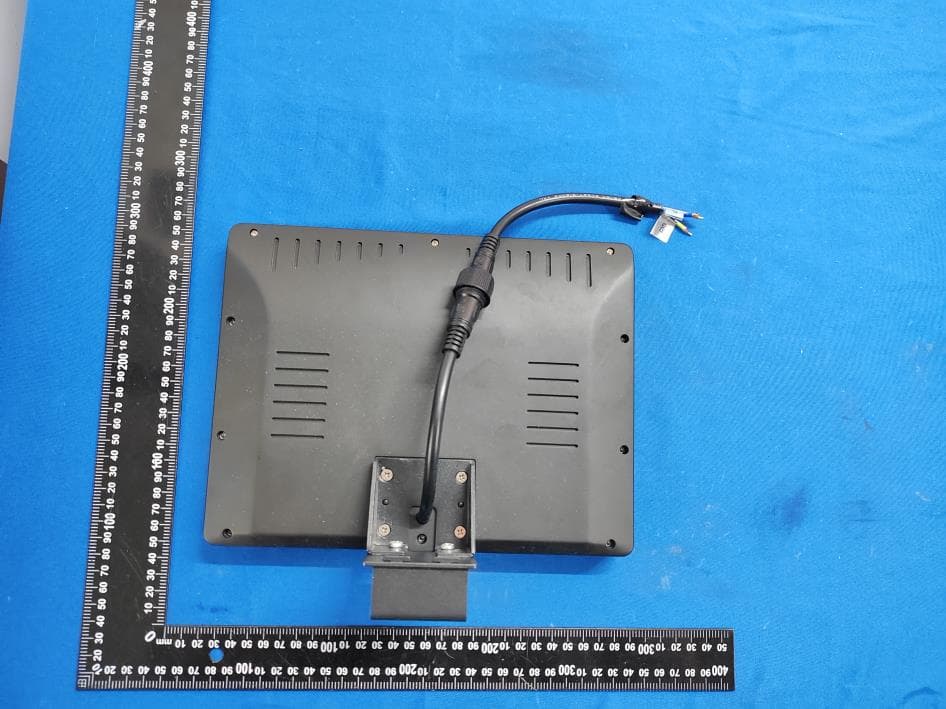
Click to zoom
Application Details
- Equipment Class
- PCB - PCS Licensed Transmitter
- Date of Grant
- Apr 01, 2026
- Application Purpose
- Original Equipment
- Equipment Note
- car navigation
- Frequency Range
- 824.00000000 - 849.00000000
- Company
- On Course Tech LLC
- Country
- United States
Documents & Files
Document Text
Text extracted from the exhibit documents filed with the FCC. Open a document above to read the original.
Users Manual
car navigation – User Guide– Welcome to the VANTAGE Experience This guide will help you quickly set up the device and start enjoying your game with advanced GPS, food ordering, and entertainment features. VNT-T10 Table of Contents Getting Started & Setup.................................... Understanding the Interface........................... On the Course: GPS & Hole View................... Food & Beverage Ordering............................... Bluetooth Audio Setup....................................... Course Selection................................................... Warnings & Safety Alerts................................... Marshal Features (Restricted Settings)....... 1 3 4 5 7 8 9 10 Getting Started & Setup Power On and Connection Upon the first boot of the device, the system needs to pair with the course system. -1- Authorization: You may see a screen stating "This device is unauthenticated." Tap Send Connection Request to pair with the web platform. Map Update:The application will automatically update the map with the latest course information. Please wait while the map updates. -2- 1 Start Your Round: Once the "Welcome to [Club Name]" screen appears, simply tap the Start button or move the cart to launch into Golfing Mode. 2 Getting Started & Setup Understanding the Interface Main Menu & Controls When Golfing Mode is active, the Home Screen serves as your central hub. Hole Selection: Tap any number (1-18) on the map to enter the specific Hole View. Bottom Navigation Bar: Home: Return to the main map. Dining (Fork & Knife): Access Food & Beverage ordering. Music (Note Icon): Open Bluetooth pairing settings. Course (Grid Icon): Select different course loops (e.g., Highland, Parkland). Settings (Gear Icon): Access Restricted/Marshal settings (Requires PIN). -3- On the Course: GPS & Hole View Master Your Game Tap on any hole number or drive to a tee box to view detailed GPS data. -4- Food & Beverage Ordering Order from the Cart Hungry? Order lunch or snacks directly from the tablet. -5- 1.Open Menu: Tap the Dining icon on the bottom bar. 2.Browse Items: Filter by "Burgers," "Beverages," or "Snacks." Select an item (e.g., Spicy Deluxe Crispy Burger) to see details. 3.Add to Cart: Select quantity and tap Add to Cart. 4.Checkout: Tap the Cart button in the top right. Review your order total and tap Proceed to Checkout. -6- Online: Scan the displayed QR code with your phone to pay immediately. In Person: Select Pay in Person to settle the bill at the clubhouse. Food & Beverage Ordering Payment Bluetooth Audio Setup Connect Your Music Pair your smartphone to play music or podcasts through the cart's speakers. -7- 1.Open Bluetooth: Tap the Music icon (Note symbol) on the bottom menu. 2.Pair New Device: Ensure your phone is in pairing mode. The tablet will scan for "Available devices". 3.Select Your Device: Tap your phone's name (e.g., "iPhone 14 Pro Max") from the list to connect. 4.Success: The screen will show "The needed device is paired." You can now control audio from your phone. 5.Disconnect: Tap Unpair to disconnect your device. 123 Course Selection Switching Courses If your club has multiple courses (e.g., 18 holes vs. 9 holes), tap the Grid Icon on the bottom menu. Select the correct course (e.g., Highland, Parkland, or Fairway) to update the map. Note: GPS location usually overrides this selection automatically. -8- Warnings and Alerts The screen may block your view with important messages: Game Pace Warning (Manual): If you fall behind schedule, a message will appear: "You are behind the pace... Please, catch up." Tap OK to dismiss. No-Go Zone Alert (Automatic): If you drive into a restricted area, a warning triangle appears: "You have entered a restricted zone. Please go back." This alert clears only when you move back to a safe area. Warnings and Alerts Warnings -9- When using the app, the user may receive messages sent by the connected webplatform. These will block the entire screen until dismissed. These can also showup automatically based on device location. Warning Message (Manual)Location Based (Automatic) Marshal Features (Restricted Settings) -10- Staff & Maintenance Settings These settings are password-protected for course marshals and staff. 1.Access: Tap the Settings (Gear) icon. 2.Login: Enter the 4-digit PIN using the keypad. 3.Available Functions: o Ignore No-Go Zones: Toggle this ON to drive the cart into restricted areas without stopping or alarms (useful for marshals). o Reset Game Session: Tap Reset to clear the current round data, hole timers, and cart assignments. This readies the cart for the next player. o Log Out: Tap Log out in the top right to return to user mode. -11- Password EntrySettings Takes user back to home page Marshal Features (Restricted Settings) Restricted Settings This device complies with part 15 of the FCC Rules. Operation is subject to the following two conditions: (1) This device may not cause harmful interference, and (2) this device must accept any interference received, including interference that may cause undesired operation. Any Changes or modifications not expressly approved by the party responsible for compliance could void the user's authority to operate the equipment. Note: This equipment has been tested and found to comply with the limits for a Class B digital device, pursuant to part 15 of the FCC Rules. These limits are designed to provide reasonable protection against harmful interference in a residential installation. This equipment generates uses and can radiate radio frequency energy and, if not installed and used in accordance with the instructions, may cause harmful interference to radio communications. However, there is no guarantee that interference will not occur in a particular installation. If this equipment does cause harmful interference to radio or television reception, which can be determined by turning the equipment off and on, the user is encouraged to try to correct the interference by one or more o…
Text truncated - open the document above for the full version.
Test Report
Report ANNEX 1 FCC ID: 2BVAN-VNTT10 Applicant: On Course Tech LLC Address: 2225 Eddie Williams Rd.Johnson City, TN, U.S.A Manufacturer: Huizhou Boxinliye Technology Co., Ltd. Address: 2floor#1Buliding Qiaoxing Industrial Park, JinquanRoad, XiaoTieShanZi Village, Xiao Jinkou, Huicheng District, Huizhou City. Product Name: car navigation Trade Mark: N/A Model Number: VNT-T10 Date of Receipt: Jan. 22, 2026 Test Date: Jan. 22, 2026 - Mar. 13, 2026 Date of Report: Mar. 13, 2026 Prepared By: Shenzhen DL Testing Technology Co., Ltd. Address: 101-201, Comprehensive Building, Tongzhou Electronics Longgang Factory Area, No.1 Baolong Fifth Road, Baolong Community, Baolong Street, Longgang District, Shenzhen, China Applicable Standards: FCC CFR Title 47 Part22 Subpart H FCC CFR Title 47 Part24 Subpart E FCC CFR Title 47 Part27 ANSI/ TIA/ EIA-603-E-2016 FCC KDB 971168 D01 Power Meas. License Digital Systems v03v01 ANSI C63.26:2015 Test Result: Pass Report 03 Peak-to-Average Ratio Band Bandwidth (MHz) UL Channel RB Size RB Position Modulation Result (dB) high Limit (dB) Verdict Band2 1.4 18607 1 #0 QPSK 5.01 13 PASS Band2 1.4 18607 1 #Mid QPSK 4.89 13 PASS Band2 1.4 18607 1 #Max QPSK 5.03 13 PASS Band2 1.4 18607 3 #0 QPSK 5.20 13 PASS Band2 1.4 18607 3 #Max QPSK 5.25 13 PASS Band2 1.4 18607 6 #0 QPSK 5.65 13 PASS Band2 1.4 18607 1 #0 QAM16 5.94 13 PASS Band2 1.4 18607 1 #Mid QAM16 5.82 13 PASS Band2 1.4 18607 1 #Max QAM16 5.91 13 PASS Band2 1.4 18607 3 #0 QAM16 6.09 13 PASS Band2 1.4 18607 3 #Max QAM16 6.18 13 PASS Band2 1.4 18607 6 #0 QAM16 6.48 13 PASS Band2 1.4 18900 1 #0 QPSK 5.13 13 PASS Band2 1.4 18900 1 #Mid QPSK 5.04 13 PASS Band2 1.4 18900 1 #Max QPSK 5.15 13 PASS Band2 1.4 18900 3 #0 QPSK 5.37 13 PASS Band2 1.4 18900 3 #Max QPSK 5.38 13 PASS Band2 1.4 18900 6 #0 QPSK 5.79 13 PASS Band2 1.4 18900 1 #0 QAM16 6.05 13 PASS Band2 1.4 18900 1 #Mid QAM16 5.94 13 PASS Band2 1.4 18900 1 #Max QAM16 6.09 13 PASS Band2 1.4 18900 3 #0 QAM16 6.27 13 PASS Band2 1.4 18900 3 #Max QAM16 6.31 13 PASS Band2 1.4 18900 6 #0 QAM16 6.60 13 PASS Band2 1.4 19193 1 #0 QPSK 5.02 13 PASS Band2 1.4 19193 1 #Mid QPSK 4.87 13 PASS Band2 1.4 19193 1 #Max QPSK 4.99 13 PASS Band2 1.4 19193 3 #0 QPSK 5.25 13 PASS Band2 1.4 19193 3 #Max QPSK 5.20 13 PASS Band2 1.4 19193 6 #0 QPSK 5.61 13 PASS Band2 1.4 19193 1 #0 QAM16 6.01 13 PASS Band2 1.4 19193 1 #Mid QAM16 5.79 13 PASS Band2 1.4 19193 1 #Max QAM16 5.97 13 PASS Band2 1.4 19193 3 #0 QAM16 6.26 13 PASS Band2 1.4 19193 3 #Max QAM16 6.10 13 PASS Band2 1.4 19193 6 #0 QAM16 6.50 13 PASS Band2 3 18615 1 #0 QPSK 5.07 13 PASS Band2 3 18615 1 #Mid QPSK 4.90 13 PASS Band2 3 18615 1 #Max QPSK 5.14 13 PASS Band2 3 18615 8 #0 QPSK 5.36 13 PASS Band2 3 18615 8 #Max QPSK 5.50 13 PASS Band2 3 18615 15 #0 QPSK 5.74 13 PASS Report Band2 3 18615 1 #0 QAM16 5.97 13 PASS Band2 3 18615 1 #Mid QAM16 5.78 13 PASS Band2 3 18615 1 #Max QAM16 6.01 13 PASS Band2 3 18615 8 #0 QAM16 6.23 13 PASS Band2 3 18615 8 #Max QAM16 6.30 13 PASS Band2 3 18615 15 #0 QAM16 6.60 13 PASS Band2 3 18900 1 #0 QPSK 5.13 13 PASS Band2 3 18900 1 #Mid QPSK 4.98 13 PASS Band2 3 18900 1 #Max QPSK 5.16 13 PASS Band2 3 18900 8 #0 QPSK 5.53 13 PASS Band2 3 18900 8 #Max QPSK 5.55 13 PASS Band2 3 18900 15 #0 QPSK 5.80 13 PASS Band2 3 18900 1 #0 QAM16 6.03 13 PASS Band2 3 18900 1 #Mid QAM16 5.88 13 PASS Band2 3 18900 1 #Max QAM16 6.04 13 PASS Band2 3 18900 8 #0 QAM16 6.45 13 PASS Band2 3 18900 8 #Max QAM16 6.47 13 PASS Band2 3 18900 15 #0 QAM16 6.68 13 PASS Band2 3 19185 1 #0 QPSK 5.00 13 PASS Band2 3 19185 1 #Mid QPSK 4.74 13 PASS Band2 3 19185 1 #Max QPSK 4.91 13 PASS Band2 3 19185 8 #0 QPSK 5.42 13 PASS Band2 3 19185 8 #Max QPSK 5.38 13 PASS Band2 3 19185 15 #0 QPSK 5.65 13 PASS Band2 3 19185 1 #0 QAM16 5.98 13 PASS Band2 3 19185 1 #Mid QAM16 5.76 13 PASS Band2 3 19185 1 #Max QAM16 5.84 13 PASS Band2 3 19185 8 #0 QAM16 6.32 13 PASS Band2 3 19185 8 #Max QAM16 6.27 13 PASS Band2 3 19185 15 #0 QAM16 6.55 13 PASS Band2 5 18625 1 #0 QPSK 5.09 13 PASS Band2 5 18625 1 #Mid QPSK 4.93 13 PASS Band2 5 18625 1 #Max QPSK 5.13 13 PASS Band2 5 18625 12 #0 QPSK 5.38 13 PASS Band2 5 18625 12 #Max QPSK 5.48 13 PASS Band2 5 18625 25 #0 QPSK 5.81 13 PASS Band2 5 18625 1 #0 QAM16 5.96 13 PASS Band2 5 18625 1 #Mid QAM16 5.93 13 PASS Band2 5 18625 1 #Max QAM16 6.04 13 PASS Band2 5 18625 12 #0 QAM16 6.40 13 PASS Band2 5 18625 12 #Max QAM16 6.44 13 PASS Band2 5 18625 25 #0 QAM16 6.62 13 PASS Band2 5 18900 1 #0 QPSK 5.07 13 PASS Band2 5 18900 1 #Mid QPSK 4.95 13 PASS Report Band2 5 18900 1 #Max QPSK 5.09 13 PASS Band2 5 18900 12 #0 QPSK 5.45 13 PASS Band2 5 18900 12 #Max QPSK 5.49 13 PASS Band2 5 18900 25 #0 QPSK 5.81 13 PASS Band2 5 18900 1 #0 QAM16 5.84 13 PASS Band2 5 18900 1 #Mid QAM16 5.79 13 PASS Band2 5 18900 1 #Max QAM16 5.91 13 PASS Band2 5 18900 12 #0 QAM16 6.33 13 PASS Band2 5 18900 12 #Max QAM16 6.41 13 PASS Band2 5 18900 25 #0 QAM16 6.64 13 PASS Band2 5 19175 1 #0 QPSK 4.98 13 PASS Band2 5 19175 1 #Mid QPSK 4.77 13 PASS Band2 5 19175 1 #Max QPSK 4.85 13 PASS Band2 5 19175 12 #0 QPSK 5.36 13 PASS Band2 5 19175 12 #Max QPSK 5.34 13 PASS Band2 5 19175 25 #0 QPSK 5.60 13 PASS Band2 5 19175 1 #0 QAM16 5.71 13 PASS Band2 5 19175 1 #Mid QAM16 5.56 13 PASS Band2 5 19175 1 #Max QAM16 5.61 13 PASS Band2 5 19175 12 #0 QAM16 6.27 13 PASS Band2 5 19175 12 #Max QAM16 6.25 13 PASS Band2 5 19175 25 #0 QAM16 6.45 13 PASS Band2 10 18650 1 #0 QPSK 5.10 13 PASS Band2 10 18650 1 #Mid QPSK 4.92 13 PASS Band2 10 18650 1 #Max QPSK 5.31 13 PASS Band2 10 18650 25 #0 QPSK 5.42 13 PASS Band2 10 18650 25 #Max QPSK 5.48 13 PASS Band2 10 18650 50 #0 QPSK 5.82 13 PASS Band2 10 18650 1 #0 QAM16 5.93 13 PASS Band2 10 18650 1 #Mid QAM16 5.72 13 PASS Band2 10 18650 1 #Max QAM16 5.74 13 PASS Band2 10 18650 25 #0 QAM16 6.37 13 PASS Band2 10 18650 25 #Max QAM16 6.40 13 PASS Band2 10 18900 1 #0 QPSK 4.91 13 PASS Band2 10 18900 1 #Mid QPSK 4.87 13 PASS Band2 10 18900 1 #Max QPSK 5.09 13 PASS Band2 10 18900 25 #0 QPSK 5.39 13 PASS Band2 10 18900 25 #Max QPSK 5.42 13 PASS Band2 10 1890…
Text truncated - open the document above for the full version.
Test Setup Photos
Shenzhen DL Testing Technology Co., Ltd. EUT TEST PHOTO Radiated Measurement Photos ※※※※※ END OF REPORT ※※※※※
Test Report
Shenzhen DL Testing Technology Co., Ltd. Report No.: DLE-260122038R Test Report Tel: 400-688-3552 Web:www.dl-cert.com Email: [email protected] Page 1 of 33 FCC Test Report FCC ID: 2BVAN-VNTT10 Applicant: On Course Tech LLC Address: 2225 Eddie Williams Rd.Johnson City, TN, U.S.A Manufacturer: Huizhou Boxinliye Technology Co., Ltd. Address: 2floor#1Buliding Qiaoxing Industrial Park, JinquanRoad, XiaoTieShanZi Village, Xiao Jinkou, Huicheng District, Huizhou City. Product Name: car navigation Trade Mark: N/A Model Number: VNT-T10 Date of Receipt: Jan. 22, 2026 Test Date: Jan. 22, 2026 - Mar. 13, 2026 Date of Report: Mar. 13, 2026 Prepared By: Shenzhen DL Testing Technology Co., Ltd. Address: 101-201, Comprehensive Building, Tongzhou Electronics Longgang Factory Area, No.1 Baolong Fifth Road, Baolong Community, Baolong Street, Longgang District, Shenzhen, China Applicable Standards: FCC CFR Title 47 Part22 Subpart H FCC CFR Title 47 Part24 Subpart E FCC CFR Title 47 Part27 ANSI/ TIA/ EIA-603-E-2016 FCC KDB 971168 D01 Power Meas. License Digital Systems v03v01 ANSI C63.26:2015 Test Result: Pass Report Number: DLE-260122038R Prepared (Test Engineer): Alisa Song Reviewer (Supervisor): Jack Bu Approved (Manager): Jade Yang This test report is based on a single evaluation of one sample of above mentioned products. It is not permitted to be duplicated in extracts without written approval of Shenzhen DL Testing Technology Co., Ltd. Shenzhen DL Testing Technology Co., Ltd. Report No.: DLE-260122038R Test Report Tel: 400-688-3552 Web:www.dl-cert.com Email: [email protected] Page 2 of 33 TABLE OF CONTENTS Test Report Declaration Page 1. TEST SUMMARY .......................................................................................................................................... 3 2. GENERAL PRODUCT INFORMATION ........................................................................................................ 4 2.1. Description of Device (EUT) .................................................................................................................. 4 2.2. Product Function ................................................................................................................................... 5 2.3. Independent Operation Modes .............................................................................................................. 5 3. TEST SITES ................................................................................................................................................... 6 3.1. Test Facilities ......................................................................................................................................... 6 3.2. Measurement Uncertainty ..................................................................................................................... 6 3.3. List of Test and Measurement Instruments ........................................................................................... 7 4. TEST SET-UP ................................................................................................................................................ 8 4.1. Principle of Configuration Selection ...................................................................................................... 8 4.2. Block Diagram of Test Set-up ............................................................................................................... 8 4.3. Test Environment: ................................................................................................................................. 8 5. EMISSION TEST RESULTS ......................................................................................................................... 9 5.1. Conducted RF Output Power ................................................................................................................ 9 5.2. -26dB and 99% Occupied Bandwidth ................................................................................................. 14 5.3. Peak to Average Radio ....................................................................................................................... 15 5.4. Frequency Stability .............................................................................................................................. 16 5.5. Conducted Spurious Emissions .......................................................................................................... 19 5.6. Conducted Out of Band Emissions ..................................................................................................... 20 5.7. Transmitter Radiated Power (EIRP/ERP) .............................................................................................. 21 5.8. Radiated Out of Band Emissions........................................................................................................... 26 6. PHOTOGRAPHS OF TEST SET-UP .......................................................................................................... 33 7. PHOTOGRAPHS OF THE EUT .................................................................................................................. 33 Shenzhen DL Testing Technology Co., Ltd. Report No.: DLE-260122038R Test Report Tel: 400-688-3552 Web:www.dl-cert.com Email: [email protected] Page 3 of 33 1. TEST SUMMARY Test Items Test Requirement Result Conducted RF Output Power 2.1046 PASS Peak to Average Radio 2.1055,22.355 24.235,27.54 PASS 99% & -26 dB Occupied Bandwidth 2.1049, 22.917 24.238, PASS Frequency Stability 2.1055, 22.355 24.235, 27.54 PASS Conducted Out of Band Emissions 2.1051,2.1057 22.917, 24.238 27.53(h) /27.53(m) PASS Band Edge 2.1051,2.1057 22.917, 24.238 27.53(h) /27.53(m) PASS Transmitter Radiated Power (EIPR/ERP) 22.913, 24.232 27.50(d)(4)/27.50(h)(2) PASS Radiated Out of Band Emissions 2.1053,2.1057 22.917, 24.238 27.53(h) /27.53(m) PASS Shenzhen DL Testing Technology Co., Ltd. Report No…
Text truncated - open the document above for the full version.
Test Report
Manufacturer: Dongguan Kema Electronics Co., Ltd. Address: 4th Floor, No. 7, Fu Dong Second Road, Daling Town, Dongguan City
Test Report
Report Band5 QAM16 BW=10MHz Channel=20450 RB Size=25 Position=#Max Band5 QPSK BW=10MHz Channel=20600 RB Size=1 Position=#0 Report Band5 QPSK BW=10MHz Channel=20600 RB Size=1 Position=#Max Band5 QPSK BW=10MHz Channel=20600 RB Size=25 Position=#0 Report Band5 QPSK BW=10MHz Channel=20600 RB Size=25 Position=#Max Band5 QPSK BW=10MHz Channel=20600 RB Size=50 Position=#0 Report Band5 QAM16 BW=10MHz Channel=20600 RB Size=1 Position=#0 Band5 QAM16 BW=10MHz Channel=20600 RB Size=1 Position=#Max Report Band5 QAM16 BW=10MHz Channel=20600 RB Size=25 Position=#0 Band5 QAM16 BW=10MHz Channel=20600 RB Size=25 Position=#Max Report 06 Out-of-band emissions Band Bandwidth (MHz) UL Channel RB Size RB Position Modulation Spur Freq (MHz) Spur Level (dBm) Limit (dBm) Verdict Band2 1.4 18607 6 #0 QPSK 19894.55 -36.32 -13 PASS Band2 1.4 18607 6 #0 QAM16 19465.15 -36.53 -13 PASS Band2 1.4 18900 6 #0 QPSK 1830.30 -32.53 -13 PASS Band2 1.4 18900 6 #0 QAM16 1831.25 -35.39 -13 PASS Band2 1.4 19193 6 #0 QPSK 17474.90 -36.71 -13 PASS Band2 1.4 19193 6 #0 QAM16 19658.00 -35.62 -13 PASS Band2 3 18615 15 #0 QPSK 19879.35 -37.20 -13 PASS Band2 3 18615 15 #0 QAM16 17491.53 -37.15 -13 PASS Band2 3 18900 15 #0 QPSK 19745.88 -37.06 -13 PASS Band2 3 18900 15 #0 QAM16 18858.10 -36.75 -13 PASS Band2 3 19185 15 #0 QPSK 19012.48 -36.44 -13 PASS Band2 3 19185 15 #0 QAM16 18904.18 -36.74 -13 PASS Band2 5 18625 25 #0 QPSK 18781.63 -36.74 -13 PASS Band2 5 18625 25 #0 QAM16 19582.00 -36.51 -13 PASS Band2 5 18900 25 #0 QPSK 19544.00 -36.78 -13 PASS Band2 5 18900 25 #0 QAM16 19813.80 -37.14 -13 PASS Band2 5 19175 25 #0 QPSK 19649.93 -36.74 -13 PASS Band2 5 19175 25 #0 QAM16 18900.38 -37.09 -13 PASS Band2 10 18650 50 #0 QPSK 18737.45 -36.97 -13 PASS Band2 10 18650 50 #0 QAM16 18817.73 -36.63 -13 PASS Band2 10 18900 50 #0 QPSK 18744.10 -37.13 -13 PASS Band2 10 18900 50 #0 QAM16 19833.75 -36.58 -13 PASS Band2 10 19150 50 #0 QPSK 19496.03 -36.81 -13 PASS Band2 10 19150 50 #0 QAM16 18421.10 -36.97 -13 PASS Band2 15 18675 75 #0 QPSK 18848.60 -36.98 -13 PASS Band2 15 18675 75 #0 QAM16 19503.15 -36.93 -13 PASS Band2 15 18900 75 #0 QPSK 19396.75 -36.91 -13 PASS Band2 15 18900 75 #0 QAM16 19700.75 -36.24 -13 PASS Band2 15 19125 75 #0 QPSK 2518.58 -23.33 -13 PASS Band2 15 19125 75 #0 QAM16 19887.90 -36.24 -13 PASS Band2 20 18700 100 #0 QPSK 18755.03 -36.16 -13 PASS Band2 20 18700 100 #0 QAM16 19691.73 -37.03 -13 PASS Band2 20 18900 100 #0 QPSK 18831.03 -36.56 -13 PASS Band2 20 19100 100 #0 QPSK 0.10 -28.68 -13 PASS Band2 20 19100 100 #0 QAM16 0.56 -29.28 -13 PASS Band5 1.4 20407 6 #0 QPSK 0.59 -31.58 -13 PASS Band5 1.4 20407 6 #0 QAM16 0.59 -31.07 -13 PASS Band5 1.4 20525 6 #0 QPSK 2518.53 -29.84 -13 PASS Band5 1.4 20525 6 #0 QAM16 0.58 -31.45 -13 PASS Band5 1.4 20643 6 #0 QPSK 0.59 -31.81 -13 PASS Band5 1.4 20643 6 #0 QAM16 0.59 -32.30 -13 PASS Report Band5 3 20415 15 #0 QPSK 2519.65 -31.73 -13 PASS Band5 3 20415 15 #0 QAM16 0.10 -31.82 -13 PASS Band5 3 20525 15 #0 QPSK 0.58 -31.05 -13 PASS Band5 3 20525 15 #0 QAM16 0.59 -32.01 -13 PASS Band5 3 20635 15 #0 QPSK 0.10 -32.19 -13 PASS Band5 3 20635 15 #0 QAM16 0.10 -32.06 -13 PASS Band5 5 20425 25 #0 QPSK 0.10 -32.45 -13 PASS Band5 5 20425 25 #0 QAM16 0.10 -32.36 -13 PASS Band5 5 20525 25 #0 QPSK 0.10 -31.75 -13 PASS Band5 5 20525 25 #0 QAM16 0.10 -31.85 -13 PASS Band5 5 20625 25 #0 QPSK 0.10 -31.90 -13 PASS Band5 5 20625 25 #0 QAM16 0.10 -32.46 -13 PASS Band5 10 20450 50 #0 QPSK 0.10 -31.46 -13 PASS Band5 10 20450 50 #0 QAM16 2613.93 -25.12 -13 PASS Band5 10 20525 50 #0 QPSK 0.10 -31.80 -13 PASS Band5 10 20525 50 #0 QAM16 0.10 -31.97 -13 PASS Band5 10 20600 50 #0 QPSK 0.10 -31.71 -13 PASS Band5 10 20600 50 #0 QAM16 0.10 -31.53 -13 PASS Report Band2 QAM16 BW=1.4MHz Channel=18607 RB Size=6 Position=#0 Band2 QAM16 BW=1.4MHz Channel=18900 RB Size=6 Position=#0 Report Band2 QAM16 BW=1.4MHz Channel=19193 RB Size=6 Position=#0 Band2 QAM16 BW=10MHz Channel=18650 RB Size=50 Position=#0 Report Band2 QAM16 BW=10MHz Channel=18900 RB Size=50 Position=#0 Band2 QAM16 BW=10MHz Channel=19150 RB Size=50 Position=#0 Report Band2 QAM16 BW=15MHz Channel=18675 RB Size=75 Position=#0 Band2 QAM16 BW=15MHz Channel=18900 RB Size=75 Position=#0 Report Band2 QAM16 BW=15MHz Channel=19125 RB Size=75 Position=#0 Band2 QAM16 BW=20MHz Channel=18700 RB Size=100 Position=#0 Report Band2 QAM16 BW=20MHz Channel=19100 RB Size=100 Position=#0 Band2 QAM16 BW=3MHz Channel=18615 RB Size=15 Position=#0 Report Band2 QAM16 BW=3MHz Channel=18900 RB Size=15 Position=#0 Band2 QAM16 BW=3MHz Channel=19185 RB Size=15 Position=#0 Report Band2 QAM16 BW=5MHz Channel=18625 RB Size=25 Position=#0 Band2 QAM16 BW=5MHz Channel=18900 RB Size=25 Position=#0 Report Band2 QAM16 BW=5MHz Channel=19175 RB Size=25 Position=#0 Band2 QPSK BW=1.4MHz Channel=18607 RB Size=6 Position=#0 Report Band2 QPSK BW=1.4MHz Channel=18900 RB Size=6 Position=#0 Band2 QPSK BW=1.4MHz Channel=19193 RB Size=6 Position=#0 Report Band2 QPSK BW=10MHz Channel=18650 RB Size=50 Position=#0 Band2 QPSK BW=10MHz Channel=18900 RB Size=50 Position=#0 Report Band2 QPSK BW=10MHz Channel=19150 RB Size=50 Position=#0 Band2 QPSK BW=15MHz Channel=18675 RB Size=75 Position=#0 Report Band2 QPSK BW=15MHz Channel=18900 RB Size=75 Position=#0 Band2 QPSK BW=15MHz Channel=19125 RB Size=75 Position=#0 Report Band2 QPSK BW=20MHz Channel=18700 RB Size=100 Position=#0 Band2 QPSK BW=20MHz Channel=18900 RB Size=100 Position=#0 Report Band2 QPSK BW=20MHz Channel=19100 RB Size=100 Position=#0 Band2 QPSK BW=3MHz Channel=18615 RB Size=15 Position=#0 Report Band2 QPSK BW=3MHz Channel=18900 RB Size=15 Position=#0 Band2 QPSK BW=3MHz Channel=19185 RB Size=15 Position=#0 Report Band2 QPSK BW=5MHz Channel=18625 RB Size=25 Position=#0 Band2 QPSK BW=5MHz Channel=18900 RB Size=25 Position=#0 Report Band2 QPSK BW=5MHz Channel=19175 RB Size=25 Position=#0 Band5 QAM16 BW=1.4MHz Channel=20407 RB Size=6 Position=#0 Report Band5 QAM16 BW=1.4MHz Channel=20525 RB Size=6 Position=#0 Band5 QAM16 BW=1.4MHz Channel=20643 RB Size=6 Position…
Text truncated - open the document above for the full version.
Test Report
Report Band2 QPSK BW=1.4MHz Channel=19193 RB Size=1 Position=#0 Band2 QPSK BW=1.4MHz Channel=19193 RB Size=1 Position=#Max Report Band2 QPSK BW=1.4MHz Channel=19193 RB Size=3 Position=#0 Band2 QPSK BW=1.4MHz Channel=19193 RB Size=3 Position=#Max Report Band2 QPSK BW=1.4MHz Channel=19193 RB Size=6 Position=#0 Band2 QAM16 BW=1.4MHz Channel=19193 RB Size=1 Position=#0 Report Band2 QAM16 BW=1.4MHz Channel=19193 RB Size=1 Position=#Max Band2 QAM16 BW=1.4MHz Channel=19193 RB Size=3 Position=#0 Report Band2 QAM16 BW=1.4MHz Channel=19193 RB Size=3 Position=#Max Band2 QAM16 BW=1.4MHz Channel=19193 RB Size=6 Position=#0 Report Band2 QPSK BW=3MHz Channel=18615 RB Size=1 Position=#0 Band2 QPSK BW=3MHz Channel=18615 RB Size=1 Position=#Max Report Band2 QPSK BW=3MHz Channel=18615 RB Size=8 Position=#0 Band2 QPSK BW=3MHz Channel=18615 RB Size=8 Position=#Max Report Band2 QPSK BW=3MHz Channel=18615 RB Size=15 Position=#0 Band2 QAM16 BW=3MHz Channel=18615 RB Size=1 Position=#0 Report Band2 QAM16 BW=3MHz Channel=18615 RB Size=1 Position=#Max Band2 QAM16 BW=3MHz Channel=18615 RB Size=8 Position=#0 Report Band2 QAM16 BW=3MHz Channel=18615 RB Size=8 Position=#Max Band2 QAM16 BW=3MHz Channel=18615 RB Size=15 Position=#0 Report Band2 QPSK BW=3MHz Channel=19185 RB Size=1 Position=#0 Band2 QPSK BW=3MHz Channel=19185 RB Size=1 Position=#Max Report Band2 QPSK BW=3MHz Channel=19185 RB Size=8 Position=#0 Band2 QPSK BW=3MHz Channel=19185 RB Size=8 Position=#Max Report Band2 QPSK BW=3MHz Channel=19185 RB Size=15 Position=#0 Band2 QAM16 BW=3MHz Channel=19185 RB Size=1 Position=#0 Report Band2 QAM16 BW=3MHz Channel=19185 RB Size=1 Position=#Max Band2 QAM16 BW=3MHz Channel=19185 RB Size=8 Position=#0 Report Band2 QAM16 BW=3MHz Channel=19185 RB Size=8 Position=#Max Band2 QAM16 BW=3MHz Channel=19185 RB Size=15 Position=#0 Report Band2 QPSK BW=5MHz Channel=18625 RB Size=1 Position=#0 Band2 QPSK BW=5MHz Channel=18625 RB Size=1 Position=#Max Report Band2 QPSK BW=5MHz Channel=18625 RB Size=12 Position=#0 Band2 QPSK BW=5MHz Channel=18625 RB Size=12 Position=#Max Report Band2 QPSK BW=5MHz Channel=18625 RB Size=25 Position=#0 Band2 QAM16 BW=5MHz Channel=18625 RB Size=1 Position=#0 Report Band2 QAM16 BW=5MHz Channel=18625 RB Size=1 Position=#Max Band2 QAM16 BW=5MHz Channel=18625 RB Size=12 Position=#0 Report Band2 QAM16 BW=5MHz Channel=18625 RB Size=12 Position=#Max Band2 QAM16 BW=5MHz Channel=18625 RB Size=25 Position=#0 Report Band2 QPSK BW=5MHz Channel=19175 RB Size=1 Position=#0 Band2 QPSK BW=5MHz Channel=19175 RB Size=1 Position=#Max Report Band2 QPSK BW=5MHz Channel=19175 RB Size=12 Position=#0 Band2 QPSK BW=5MHz Channel=19175 RB Size=12 Position=#Max Report Band2 QPSK BW=5MHz Channel=19175 RB Size=25 Position=#0 Band2 QAM16 BW=5MHz Channel=19175 RB Size=1 Position=#0 Report Band2 QAM16 BW=5MHz Channel=19175 RB Size=1 Position=#Max Band2 QAM16 BW=5MHz Channel=19175 RB Size=12 Position=#0 Report Band2 QAM16 BW=5MHz Channel=19175 RB Size=12 Position=#Max Band2 QAM16 BW=5MHz Channel=19175 RB Size=25 Position=#0 Report Band2 QPSK BW=10MHz Channel=18650 RB Size=1 Position=#0 Band2 QPSK BW=10MHz Channel=18650 RB Size=1 Position=#Max Report Band2 QPSK BW=10MHz Channel=18650 RB Size=25 Position=#0 Band2 QPSK BW=10MHz Channel=18650 RB Size=25 Position=#Max Report Band2 QPSK BW=10MHz Channel=18650 RB Size=50 Position=#0 Band2 QAM16 BW=10MHz Channel=18650 RB Size=1 Position=#0 Report Band2 QAM16 BW=10MHz Channel=18650 RB Size=1 Position=#Max Band2 QAM16 BW=10MHz Channel=18650 RB Size=25 Position=#0 Report Band2 QAM16 BW=10MHz Channel=18650 RB Size=25 Position=#Max Band2 QPSK BW=10MHz Channel=19150 RB Size=1 Position=#0 Report Band2 QPSK BW=10MHz Channel=19150 RB Size=1 Position=#Max Band2 QPSK BW=10MHz Channel=19150 RB Size=25 Position=#0 Report Band2 QPSK BW=10MHz Channel=19150 RB Size=25 Position=#Max Band2 QPSK BW=10MHz Channel=19150 RB Size=50 Position=#0 Report Band2 QAM16 BW=10MHz Channel=19150 RB Size=1 Position=#0 Band2 QAM16 BW=10MHz Channel=19150 RB Size=1 Position=#Max Report Band2 QAM16 BW=10MHz Channel=19150 RB Size=25 Position=#0 Band2 QAM16 BW=10MHz Channel=19150 RB Size=25 Position=#Max Report Band2 QPSK BW=15MHz Channel=18675 RB Size=1 Position=#0 Band2 QPSK BW=15MHz Channel=18675 RB Size=1 Position=#Max Report Band2 QPSK BW=15MHz Channel=18675 RB Size=36 Position=#0 Band2 QPSK BW=15MHz Channel=18675 RB Size=36 Position=#Max Report Band2 QPSK BW=15MHz Channel=18675 RB Size=75 Position=#0 Band2 QAM16 BW=15MHz Channel=18675 RB Size=1 Position=#0 Report Band2 QAM16 BW=15MHz Channel=18675 RB Size=1 Position=#Max Band2 QPSK BW=15MHz Channel=19125 RB Size=1 Position=#0 Report Band2 QPSK BW=15MHz Channel=19125 RB Size=1 Position=#Max Band2 QPSK BW=15MHz Channel=19125 RB Size=36 Position=#0 Report Band2 QPSK BW=15MHz Channel=19125 RB Size=36 Position=#Max Band2 QPSK BW=15MHz Channel=19125 RB Size=75 Position=#0 Report Band2 QAM16 BW=15MHz Channel=19125 RB Size=1 Position=#0 Band2 QAM16 BW=15MHz Channel=19125 RB Size=1 Position=#Max Report Band2 QPSK BW=20MHz Channel=18700 RB Size=1 Position=#0 Band2 QPSK BW=20MHz Channel=18700 RB Size=1 Position=#Max Report Band2 QPSK BW=20MHz Channel=18700 RB Size=50 Position=#0 Band2 QPSK BW=20MHz Channel=18700 RB Size=50 Position=#Max Report Band2 QPSK BW=20MHz Channel=18700 RB Size=100 Position=#0 Band2 QAM16 BW=20MHz Channel=18700 RB Size=1 Position=#0 Report Band2 QAM16 BW=20MHz Channel=18700 RB Size=1 Position=#Max Band2 QPSK BW=20MHz Channel=19100 RB Size=1 Position=#0 Report Band2 QPSK BW=20MHz Channel=19100 RB Size=1 Position=#Max Band2 QPSK BW=20MHz Channel=19100 RB Size=50 Position=#0 Report Band2 QPSK BW=20MHz Channel=19100 RB Size=50 Position=#Max Band2 QPSK BW=20MHz Channel=19100 RB Size=100 Position=#0 Report Band2 QAM16 BW=20MHz Channel=19100 RB Si…
Text truncated - open the document above for the full version.
Contact Information
Applicant
Storm Hatley
[email protected]Fax: 142 393 0419 ext. 5
Test Firm
Shenzhen DL Testing Technology Co., Ltd.Jade Yang
Technical Specifications
| # | Rule Parts | Frequency Range | Power Output | Emission | Tolerance |
|---|---|---|---|---|---|
| 1 | 24E | 1.85 GHz - 1.91 GHz | 93.00 mW | 18M0G7D | 0.0947ppm |
| 2 | 24E | 1.85 GHz - 1.91 GHz | 95.00 mW | 18M0W7D | 0.0521ppm |
| 3 | 22H | 824 MHz - 849 MHz | 88.00 mW | 9M02G7D | 0.104ppm |
| 4 | 22H | 824 MHz - 849 MHz | 88.00 mW | 9M02W7D | 0.1064ppm |