2BVLG-ZEN-C50RThermal imaging device
Zentron LLC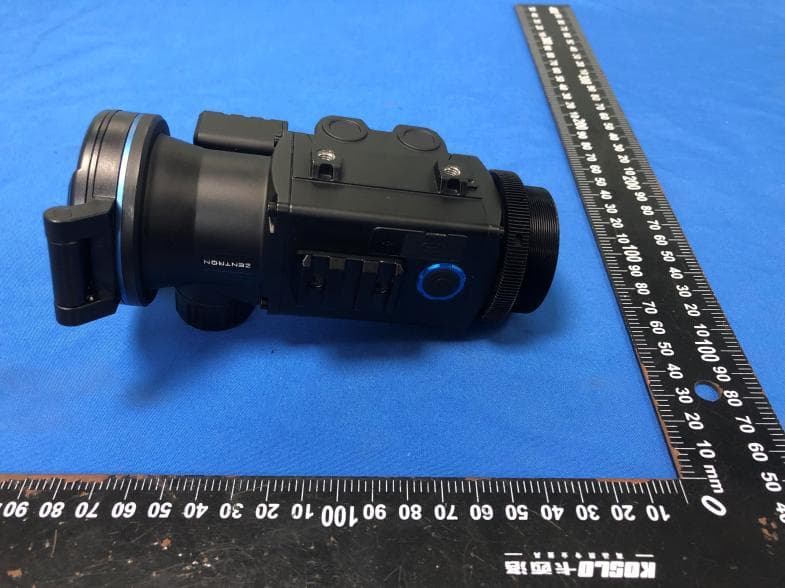
Click to zoom
Application Details
- Equipment Class
- DTS - Digital Transmission System
- Date of Grant
- Jul 03, 2026
- Application Purpose
- Original Equipment
- Equipment Note
- Thermal imaging device
- Frequency Range
- 2402.00000000 - 2480.00000000
- Company
- Zentron LLC
- Country
- United States
Documents & Files
Document Text
Text extracted from the exhibit documents filed with the FCC. Open a document above to read the original.
Users Manual
9 10.StatusBarOverview NO.Description 1NUCShutter 2Electroniccompass 3Profile 4Battery 5Wi-Fi 6Bluetooth 7Scenemode 8Time 11.Zeroing ZENCseriesfeaturetousethe“Freeze”zeroingmethod.Thedetailed stepsareasfollows: ●Inthemainmenuscreen,chooseaprofile. 10 ●Selectthezeroingfunctiontoenterthezeroingscreenandthe coordinatepositionofthereticle(Xaxis,Yaxis)isdisplayedinthe centerofthescreen. ●SetUpaStableShootingPosition:Findastableshootingposition, suchasashootingbenchorsandbags,toresttheirrifleon. Consistencyiskeyforaccuracy. ●FireaShot:Fireasingleshotattheirchosentarget.Aimforthe center. ●Ifthebulletholeandtheaimingpoint(thecenterpointofthe reticle)donotmatchwitheachother,keeptheaimingpositionstill. Donotmovetheirreticle. ●Makesurethecenteroftheirreticleisontheaimingpoint.Then Press‘freeze’tomakethescreenfrozen. ●Pressthemenubuttontotogglebetweenthexandyaxes,then usetheupanddownbuttonstoalignthecrosshairwiththebullet holefromtheirshot. ●Pressandholdthemenubuttonagaintoexitthemainmenuand savethesetting. ●ShootAgain:Fireanothershotatthesametargetafteradjusting. ●ConfirmZero:Oncetheyconsistentlyhitthetargetattheirdesired distance,theirthermalscopeiszeroed.Confirmthisbyshootinga fewmoreroundstoensureconsistency. 12.Calibration NUC(Non-UniformityCorrection): ●Auto:Triggeredregularlybydevice. ●Manual:LongpressZoombutton. ●External:Closelenscap,longpressZoombutton. 11 13.Photographing&VideoRecording TakePhoto: ●Shortpresstheshutterbutton→brieffreezewithphotoicon. Note: Makesurethedeviceisproperlyzeroedbeforeactivatingthevirtualreticle function. RecordVideo: ●LongpressCapturebutton→recordingiconandtimer. ●Pressagaintostop. RAVMode: ●Automaticallyrecords10to30secondsbeforeand10to30 secondsafterarecoilevent. Allmediasavedininternal32GB/64GBmemory. 12 14.MeasureDistance(C50R) C50RisequippedwithanintegratedLRFmodule,whichcanbeusedto measurethedistancetoatarget.Whenmeasuringdistance,pleasehold thedevicesteadyandavoidshakingtoensuremeasurementaccuracy. Thisfeatureprovidestwodistancemeasurementmodes:Continuousand Single.Theoperationdiffersdependingontheselectedmode.Youcan switchmodesviaMainMenu>AdvancedSettings>LRF. Warning:Laserradiationemittedbythisdevicecancauseeyeinjuries,skin burns,origniteflammablematerials.Ensurenopersonorflammable materialispositionedinfrontofthelaserlensbeforeactivatingthelaser rangingfunction. Thedevice’sbatteryisbelow5%,LRFwillbeautomaticallydisabled. 12345 679108 1 2 Continuous:ShortpressthePalettesbuttontostartmeasuring.The devicewillperformcontinuousmeasurementsforapresetduration andthenstopautomatically.Youcanalsostopitearlybyshort pressingthePalettesbuttonagain. Single:ShortpressthePalettesbuttontoperformasingledistance measurementeachtime. Position:Top、Mid Unit:Meter、Yard 13 Mode:Continuous、Single Duration:15、30、45、60sec 15.BallisticCalculation(C50R) Beforeusingthisfunction,pleasenotethefollowingtwopoints: 1.Ensuretherangefindingfunctionisworkingproperly.Fordetailed instructionsonusingtherangefinder,refertotheprevioussection. 2.BallisticparametersmustbesetintheZENLINKApp.Thespecificsteps areasfollows: ConnecttheC50RintheZENLINKApp.Onceconnected,tapthe BallisticCalculationfunctionicon. 14 Onthispage,selectthecorrespondingBallisticProfile,enterthe parameters,andtapSaveaftercompletingthesetup. Aftersaving,thedatawillbeautomaticallytransmittedtoand storedintheC50R.Ifyouneedtomodifytheparametersinthe BallisticProfilelater,youmustreconnecttotheZENLINKAppand repeattheabovesteps. Openthedevice’smainmenutovieworswitchBallisticProfilesin theBallisticCalculationmenu. Oncetheabovesetupiscomplete,youcanstartusingtheBallistic Calculationfunction.Followthestepsbelow: Aimatadistanttarget.Thefunctionwillnotworkatcloserange. ShortpressthePalettesbuttontostartrangefinding.Afterashort moment,thescreenwilldisplaythecalculatedballisticdata. Adjustthemuzzleelevationaccordingtothedisplayeddatato accuratelyhitthetarget. 15 Adjustthemuzzleelevationaccordingtothedisplayeddatatohit thetargetaccurately.Forexample,ifthescreenshows"3MIL",use thereticleonthedayscopeasareferenceandraisethemuzzleby 3MIL. ShortpressthePalettesbuttonagaintoturnofftherangefinding andballisticcalculationfunctions. 16.QuickMenu PressMenubrieflytoenter: ●Palettes. ●SceneMode. ●ScreenBrightness(1–15). ●Contrast(1–5). UsePalettes/Capturetonavigate,Menutomodify,longpressMenuto saveandexit. 17.MainMenu TheMainMenuprovidesfullcontrolofalladvancedsettings.Accessitby longpressingtheMenubuttononthehomescreen.Navigatewiththe Palettes/Capturebuttons,shortpresstheMenubuttontoeditorentera submenu,andlongpresstheMenubuttontosaveandreturntothe previouslevel. UIStyle Switchbetweentwomenudisplaystyles:NormalandEasy. ●Normal:Displaysmenuitemswithstandard-sizedtextandicons. Multiplemenuitemsarevisibleatonce. 16 ●Easy:Enlargestextandiconsforimprovedreadability.Onlyone menuitemisshownatatime,creatingasimplifieduserinterface. Wi-Fi ThisoptionenablesordisablesWi-Fi,allowingthedevicetoconnectto mobileapps(e.g.,ZENLINK)forremotecontrol,imagepreview,and firmwareupdates.Whenenabled,thedevicewillbroadcastitsSSIDfor connection. Togglewirelessconnectionforappcontrolandfiletransfers. ●On/Off. NOTE:DisplaysSSIDonactivation.YoucanchecktheWi-Finame (SSID)inAdvancedSettings>Wi-Fi.Thedefaultpasswordis 12345678.Ifforgotten,gotoAdvancedSettings>Wi-Fi>ResetPIN toresetthepassword. 17 Bluetooth Bluetoothallowspairingwithexternalaccessoriessuchaslaser rangefindersorremotecontrols.Oncepaired,thedevicewillrecognize andshowtheconnectionstatus. Pairwithcompatibleexternaldevices(e.g.rangefinder). ●On/Off. Palettes Thermalpalettescontrolhowthedevicetranslatesheatdifferencesinto visualcolors.Userscanswitchbetweenvariousfalse-colorschemesfor bettertargetvisibilityunderdifferentenvironmentalconditions. Changethermaldisplaycolorschemes. ●WhiteHot/BlackHot/RedMono/Rainbow/Arctic/IronRed/ GreenWhite/Tint/Sepia/Fulgurite/ColdGreen/White Highlight. DisplaySettings Adjustscreenbrightness,menuscale,statusbarvisibility,andlocationto ensureoptimaldisplayreadabil…
Text truncated - open the document above for the full version.
Users Manual
0 1 TableofContents 1.ImportantSafetyInformation............................................................2 2.Specifications...................................................................................2 3.Features ..........................................................................................4 4.ComponentsandControls.................................................................4 5.ButtonOperation .............................................................................5 6.BatteryChargingInstructions.............................................................5 7.Installation.....................................................................................6 8.Startup&Standby ............................................................................8 9.Focusing..........................................................................................8 10.StatusBarOverview........................................................................9 11.Zeroing ..........................................................................................9 12.Calibration...................................................................................10 13.Photographing&VideoRecording ..................................................11 14.MeasureDistance(C50R)...............................................................12 15.BallisticCalculation(C50R).............................................................13 16.QuickMenu ..................................................................................15 17.MainMenu..................................................................................15 UIStyle ................................................................................15 Wi-Fi ...................................................................................16 Bluetooth............................................................................17 Palettes ...............................................................................17 DisplaySettings....................................................................17 SceneMode.........................................................................18 Profile .................................................................................19 Media..................................................................................20 NUCShutter .........................................................................20 MIC.....................................................................................20 MenuSorting.......................................................................20 CompassCalibration.............................................................21 Prerecord .............................................................................21 AutoSleep...........................................................................21 PixelCorrection ....................................................................22 Time/Date...........................................................................22 Language.............................................................................23 ResetSettings......................................................................23 EraseMedia .........................................................................23 About..................................................................................23 18.ConnectingtoZENLINKApp ..........................................................23 19.FirmwareUpgrade........................................................................24 20.FileTransfertoPC.........................................................................25 21.Maintenance&Cleaning ...............................................................26 22.Troubleshooting(FAQ)..................................................................26 23.Legal&Compliance .......................................................................26 24.Caution........................................................................................27 25.RegulatoryInformation .................................................................27 26.Contact&Support ........................................................................28 2 1.ImportantSafetyInformation 1.1EnvironmentalWarnings ●Avoiddirectexposureoflenstointenselightsourcessuchasthe sunorlasers. ●Operatingtemperature:-20°Cto+50°C ●Donotstoreatextremetemperatures. ●Whenusedinextremelycoldenvironments,thebatterylifeofthe devicewillbereduced.Thisisnormalanddoesnotindicatea malfunctionofthedevice. 1.2ErgonomicsandHandling ●Takebreaksduringextendedusetoavoidfatigue. ●Keepoutofreachofchildren–smallpartsmaybehazardous. ●Afterusingthedevice,pleaseclosethelenscoverofthedeviceto preventsharpobjectsfromscratchingthelensofthedevice. ●Disassemblingorrepairingequipmentthroughunofficialchannels willinvalidatetherepairpolicy. 1.3BatteryandChargingSafety ●Useonlymanufacturer-approved18350batteries. ●Donotreversebatterypolarity. ●Onlychargebetween0°Cand50°C. ●Neverleavebatteriesunattendedduringcharging. ●Whenthedeviceisidleforalongtime,thebatteryshouldbe removed. ●Donotuse18350batterieswithUSBcharginginterface,asitwill damagethedevicechargingcompartment. 2.Specifications CategoryC50RC50C35 DetectorTypeVOxUncooledVOxUncooledVOxUncooled Resolution640x512640x512384x288 PixelSize12μm12μm12μm Framerate50Hz50Hz50Hz 3 SpectralRange8~14μm8~14μm8~14μm NETD≤18mK≤20mK≤20mK Safetyclassfor laser Class1-- Wavelength905nm-- Max.measuring range 1200m(1312 yards) -- Measurement accuracy ±1-- Min.measuring range 5m(5.47yards)-- ObjectiveLens50mmf1.050mmf1.035mmf1.0 FieldofView8.7°(H)x7°(V)8.7°(H)x7°(V)7.5°(H)x5.6°(V) Close-upRange5m(5.47yards)5m(5.47yards)5m(5.47yards) Detection Range 2600m(2800 yards) 2600m(2800 yards) 1800m(1950 yards) Optical Magnification 1x1x1x E-Zoom Clip-onmode: 1x;Monocular mode: 2.3~18.4x Clip-onmode: 1x;Monocular mode: 2.3~18.4x Clip-onmode: 1x;Monocular mode: 2.3~18.…
Text truncated - open the document above for the full version.
RF Exposure Info
Shenzhen CTA Testing Technology Co., Ltd. Room 106, Building 1, Yibaolai Industrial Park, Qiaotou Community, Fuhai Street, Bao’an District, Shenzhen, China Shenzhen CTA Testing Technology Co., Ltd. Room 106, Building 1, Yibaolai Industrial Park, Qiaotou Community, Fuhai Street, Bao’an District, Shenzhen, China Tel:+86-755 2322 5875 E-mail:[email protected] Web:http://www.cta-test.cn RF Exposure MPE Report Reference No. ..................... : FCC ID............................................. : CTA25121200603 2BVLG-ZEN-C50R Compiled by ( position+printed name+signature) . : File administrators Zoey Cao Supervised by ( position+printed name+signature) . : Project Engineer Ace Chai Approved by ( position+printed name+signature) . : RF Manager Eric Wang Date of issue .................................... : Mar. 17, 2026 Testing Laboratory Name .............. : Shenzhen CTA Testing Technology Co., Ltd. Address............................................ : Room 106, Building 1, Yibaolai Industrial Park, Qiaotou Community, Fuhai Street, Bao’an District, Shenzhen, China Applicant’s name ............................ : Zentron LLC Address............................................ : 60 SOUTH VINEDO AVE PASADENA. CA 91107 Standard ........................................... : 47CFR §1.1310 47CFR §2.1091 KDB447498 D01 General RF Exposure Guidance v06 Shenzhen CTA Testing Technology Co., Ltd. All rights reserved. This publication may be reproduced in whole or in part for non-commercial purpses as long as the Shenzhen CTA Testing Technology Co., Ltd. is acknowledged as copyright owner and source of the material. Shenzhen CTA Testing Technology Co., Ltd. takes no responsibility for and will not assume liability for damages resulting from the reader's interpretation of the reproduced material due to its placement and context. Test item description ..................... : Thermal imaging device Trade Mark ....................................... : ZENTRON Manufacturer .................................... : Shenzhen Zentron Technology Co.,Ltd. Model/Type reference ...................... : C50R Listed Models ................................... : Q50R, C50, Q50, Q635 Ratings ............................................. : DC 3.7V From battery and DC 5.0V From external circuit Result ............................................... : PASS Report No.: CTA25121200603 Page 2 of 9 Shenzhen CTA Testing Technology Co., Ltd. Room 106, Building 1, Yibaolai Industrial Park, Qiaotou Community, Fuhai Street, Bao’an District, Shenzhen, China Tel:+86-755 2322 5875 E-mail:[email protected] Web:http://www.cta-test.cn T E S T R E P O R T Equipment under Test : Thermal imaging device Model /Type : C50R Listed Models : Q50R, C50, Q50, Q635 Model difference : The PCB board, circuit, structure and internal of these models are the same, Only model number and accessories are different for these model.So the tests were performed on model C50R and the difference tests were performed on listed Models. C50R and C50 have the same accessories, while Q50R, Q50, and Q635 have the same accessories C50R\C50: Used with monocular eyepiece, Q50R\Q50\Q635:Used with 12x magnification eyepiece Different model names are available to meet market demand. Applicant : Zentron LLC Address : 60 SOUTH VINEDO AVE PASADENA. CA 91107 Manufacturer : Shenzhen Zentron Technology Co.,Ltd. Address : 3F Sinotrans Building, 46 Futian South Road, Futian District, Guangdong, 518045 Test Result: PASS The test report merely corresponds to the test sample. It is not permitted to copy extracts of these test result without the written permission of the test laboratory. Report No.: CTA25121200603 Page 3 of 9 Shenzhen CTA Testing Technology Co., Ltd. Room 106, Building 1, Yibaolai Industrial Park, Qiaotou Community, Fuhai Street, Bao’an District, Shenzhen, China Tel:+86-755 2322 5875 E-mail:[email protected] Web:http://www.cta-test.cn Contents 1 TEST STANDARDS ............................................................................................................ 4 2 SUMMARY .......................................................................................................................... 5 2.1 General Remarks ..................................................................................................... 5 2.2 Product Description ................................................................................................. 5 2.3 Special Accessories ................................................................................................. 5 2.4 Modifications ............................................................................................................ 6 3 TEST ENVIRONMENT ....................................................................................................... 7 3.1 Address of the test laboratory .................................................................................. 7 3.2 Test Facility .............................................................................................................. 7 3.3 Statement of the measurement uncertainty ............................................................. 7 4 Test limit .............................................................................................................................. 8 4.1 Requirement ............................................................................................................ 8 4.2 MPE Calculation Method ......................................................................................... 8 4.3 Conducted Power Results ....................................................................................... 8 4.4 Manufacturing tolerance .......................................................................................... 9 4.5 Standalone MPE Result ........................................................................................... 9 4.6 Simultaneous Transmission for MPE Result .................................…
Text truncated - open the document above for the full version.
Test Setup Photos
FCCID:2BVLG-ZEN-C50R
Test Report
1 FCC Appendix RF Test Data for BLE FCC ID : 2BVLG-ZEN-C50R Company : Zentron LLC EUT : Thermal imaging device Model Number : C50R Report No. : CTA25121200601 Reviewed By : Eric Wang 2 Appendix A: DTS Bandwidth Test Result TestMode Antenna Freq(MHz) DTS BW [MHz] FL[MHz] FH[MHz] Limit[MHz] Verdict BLE_1M Ant1 2402 0.660 2401.680 2402.340 0.5 PASS 2440 0.640 2439.688 2440.328 0.5 PASS 2480 0.632 2479.700 2480.332 0.5 PASS 3 Test Graphs BLE_1M_Ant1_2402 BLE_1M_Ant1_2440 BLE_1M_Ant1_2480 4 5 Appendix B: Occupied Channel Bandwidth Test Result TestMode Antenna Freq(MHz) OCB [MHz] FL[MHz] FH[MHz] Limit[MHz] Verdict BLE_1M Ant1 2402 1.0047 2401.5173 2402.5220 --- --- 2440 1.0112 2439.5156 2440.5268 --- --- 2480 1.0124 2479.5131 2480.5255 --- --- 6 Test Graphs BLE_1M_Ant1_2402 BLE_1M_Ant1_2440 BLE_1M_Ant1_2480 7 8 Appendix C: Maximum conducted output power Test Result Peak TestMode Antenna Freq(MHz) Conducted Peak Powert[dBm] Conducted Limit[dBm] Verdict BLE_1M Ant1 2402 -6.50 ≤30 PASS 2440 -6.88 ≤30 PASS 2480 -7.00 ≤30 PASS 9 Appendix D: Maximum power spectral density Test Result TestMode Antenna Freq(MHz) Result[dBm/3kHz] Limit[dBm/3kHz] Verdict BLE_1M Ant1 2402 -22.51 ≤8.00 PASS 2440 -22.76 ≤8.00 PASS 2480 -22.32 ≤8.00 PASS 10 Test Graphs BLE_1M_Ant1_2402 BLE_1M_Ant1_2440 BLE_1M_Ant1_2480 11 12 Appendix E: Band edge measurements Test Result TestMod e Antenn a ChNam e Freq(MHz ) RefLevel[dBm ] Result[dBm ] Limit[dBm ] Verdic t BLE_1M Ant1 Low 2402 -6.88 -57.95 ≤-26.88 PASS High 2480 -7.83 -57.79 ≤-27.83 PASS 13 Test Graphs BLE_1M_Ant1_Low_2402 BLE_1M_Ant1_High_2480 14 Appendix F: Conducted Spurious Emission Test Result TestMode Antenna Freq(MHz) FreqRange [MHz] RefLevel [dBm] Result[dBm] Limit[dBm] Verdict BLE_1M Ant1 2402 Reference -6.84 -6.84 --- PASS 30~1000 -6.84 -68.39 ≤-26.84 PASS 1000~26500 -6.84 -51.22 ≤-26.84 PASS 2440 Reference -7.82 -7.82 --- PASS 30~1000 -7.82 -68.2 ≤-27.82 PASS 1000~26500 -7.82 -45.6 ≤-27.82 PASS 2480 Reference -7.47 -7.47 --- PASS 30~1000 -7.47 -62.71 ≤-27.47 PASS 1000~26500 -7.47 -53.9 ≤-27.47 PASS 15 Test Graphs BLE_1M_Ant1_2402_0~Reference BLE_1M_Ant1_2402_30~1000 BLE_1M_Ant1_2402_1000~26500 16 BLE_1M_Ant1_2440_0~Reference BLE_1M_Ant1_2440_30~1000 17 BLE_1M_Ant1_2440_1000~26500 BLE_1M_Ant1_2480_0~Reference BLE_1M_Ant1_2480_30~1000 18 BLE_1M_Ant1_2480_1000~26500 19 Appendix G: Duty Cycle Test Result TestMode Antenna Freq(MHz) ON Time [ms] Period [ms] X DC [%] xFactor Limit Verdict BLE_1M Ant1 2402 0.41 0.62 0.6613 66.13 1.80 --- --- 2440 0.41 0.62 0.6613 66.13 1.80 --- --- 2480 0.41 0.62 0.6613 66.13 1.80 --- --- 20 Test Graphs BLE_1M_Ant1_2402 BLE_1M_Ant1_2440 BLE_1M_Ant1_2480 21 22 Appendix H: Emissions in Restricted Bands Test Result TestMode Antenna ChName Freq(MHz) Detector Freq [MHz] Result [dBm] Gain [dB] DC Factor [dB] Result [dBuV/m] Limit [dBuV/m] Verdict BLE_1M Ant1 Low 2402 AV 2310.000 -60.46 4.8 1.80 41.34 ≤54 PASS AV 2366.990 -58.69 4.8 1.80 43.11 ≤54 PASS AV 2390.000 -59.94 4.8 1.80 41.86 ≤54 PASS Peak 2310.000 -52.08 4.8 0.00 47.92 ≤74 PASS Peak 2347.460 -49.21 4.8 0.00 50.79 ≤74 PASS Peak 2390.000 -51.38 4.8 0.00 48.62 ≤74 PASS High 2480 AV 2483.500 -58.57 4.8 1.80 43.23 ≤54 PASS AV 2495.760 -58.39 4.8 1.80 43.41 ≤54 PASS AV 2500.000 -59.51 4.8 1.80 42.29 ≤54 PASS Peak 2483.500 -51.01 4.8 0.00 48.99 ≤74 PASS Peak 2484.800 -48.05 4.8 0.00 51.95 ≤74 PASS Peak 2500.000 -51.75 4.8 0.00 48.25 ≤74 PASS Note: 1. The limit in dBm for average detector is conversion from 54dBuV/m, according to 15.209(a). The limit in dBm for peak detector is 20dB above the limit of average detector in dBm. 23 Test Graphs BLE_1M_Ant1_Low_2402_AV BLE_1M_Ant1_Low_2402_Peak BLE_1M_Ant1_High_2480_AV 24 BLE_1M_Ant1_High_2480_Peak
Test Report
Shenzhen CTA Testing Technology Co., Ltd. Room 106, Building 1, Yibaolai Industrial Park, Qiaotou Community, Fuhai Street, Bao’an District, Shenzhen, China Shenzhen CTA Testing Technology Co., Ltd. Room 106, Building 1, Yibaolai Industrial Park, Qiaotou Community, Fuhai Street, Bao’an District, Shenzhen, China Tel:+86-755 2322 5875 E-mail:[email protected] Web:http://www.cta-test.cn FCC PART 15 SUBPART C TEST REPORT FCC PART 15.247 Report Reference No. ...................: FCC ID. ......................................... : CTA25121200601 2BVLG-ZEN-C50R Compiled by ( position+printed name+signature) : File administrators Zoey Cao Supervised by ( position+printed name+signature) : Project Engineer Ace Chai Approved by ( position+printed name+signature) : RF Manager Eric Wang Date of issue ...................................: Mar. 17, 2026 Testing Laboratory Name .............: Shenzhen CTA Testing Technology Co., Ltd. Address ..........................................: Room 106, Building 1, Yibaolai Industrial Park, Qiaotou Community, Fuhai Street, Bao’an District, Shenzhen, China Applicant’s name...........................: Zentron LLC Address ...........................................: 60 SOUTH VINEDO AVE PASADENA. CA 91107 Test specification ......................... : Standard ..........................................: FCC Part 15.247 Shenzhen CTA Testing Technology Co., Ltd. All rights reserved. This publication may be reproduced in whole or in part for non-commercial purposes as long as the Shenzhen CTA Testing Technology Co., Ltd. is acknowledged as copyright owner and source of the material. Shenzhen CTA Testing Technology Co., Ltd. takes no responsibility for and will not assume liability for damages resulting from the reader's interpretation of the reproduced material due to its placement and context. Equipment description ................ : Thermal imaging device Trade Mark ......................................: ZENTRON Manufacturer ...................................: Shenzhen Zentron Technology Co.,Ltd. Model/Type reference .....................: C50R Listed Models ..................................: Q50R, C50, Q50, Q635 Modulation ......................................: GFSK Frequency .......................................: From 2402MHz to 2480MHz Ratings ............................................: DC 3.7V From battery and DC 5.0V From external circuit Result ..............................................: PASS Report No.: CTA25121200601 Page 2 of 43 Shenzhen CTA Testing Technology Co., Ltd. Room 106, Building 1, Yibaolai Industrial Park, Qiaotou Community, Fuhai Street, Bao’an District, Shenzhen, China Tel:+86-755 2322 5875 E-mail:[email protected] Web:http://www.cta-test.cn T E S T R E P O R T Equipment under Test : Thermal imaging device Model /Type : C50R Listed Models : Q50R, C50, Q50, Q635 Model difference : The PCB board, circuit, structure and internal of these models are the same, Only model number and accessories are different for these model.So the tests were performed on model C50R and the difference tests were performed on listed Models. C50R and C50 have the same accessories, while Q50R, Q50, and Q635 have the same accessories C50R\C50: Used with monocular eyepiece, Q50R\Q50\Q635:Used with 12x magnification eyepiece Different model names are available to meet market demand. Applicant : Zentron LLC Address : 60 SOUTH VINEDO AVE PASADENA. CA 91107 Manufacturer : Shenzhen Zentron Technology Co.,Ltd. Address : 3F Sinotrans Building, 46 Futian South Road, Futian District, Guangdong, 518045 Test Result: PASS The test report merely corresponds to the test sample. It is not permitted to copy extracts of these test result without the written permission of the test laboratory. Report No.: CTA25121200601 Page 3 of 43 Shenzhen CTA Testing Technology Co., Ltd. Room 106, Building 1, Yibaolai Industrial Park, Qiaotou Community, Fuhai Street, Bao’an District, Shenzhen, China Tel:+86-755 2322 5875 E-mail:[email protected] Web:http://www.cta-test.cn Contents 1 TEST STANDARDS ...................................................................................................................................... 4 2 SUMMARY .................................................................................................................................................... 5 2.1 General Remarks .............................................................................................................................. 5 2.2 Product Description* .......................................................................................................................... 5 2.3 Equipment Under Test ....................................................................................................................... 5 2.4 Short description of the Equipment under Test (EUT) ...................................................................... 5 2.5 EUT configuration .............................................................................................................................. 5 2.6 EUT operation mode ......................................................................................................................... 5 2.7 Block Diagram of Test Setup ............................................................................................................. 6 2.8 Related Submittal(s) / Grant (s) ......................................................................................................... 6 2.9 Modifications ...................................................................................................................................... 6 3 TEST ENVIRONMENT ................................................................................................................................. 7 3.1 Address of the test laboratory............................................................................................................ 7 3.2 Test Facility ............…
Text truncated - open the document above for the full version.
Test Report
21 11N20SISO_Ant1_High_2462 22 Appendix F: Conducted Spurious Emission Test Result TestMode Antenna Frequency[MHz] FreqRange [Mhz] RefLevel [dBm] Result [dBm] Limit [dBm] Verdict 11B Ant1 2412 Reference 1.24 1.24 --- PASS 30~1000 1.24 -68.41 ≤-18.76 PASS 1000~26500 1.24 -54.71 ≤-18.76 PASS 2437 Reference 1.67 1.67 --- PASS 30~1000 1.67 -67.68 ≤-18.33 PASS 1000~26500 1.67 -55.22 ≤-18.33 PASS 2462 Reference 1.46 1.46 --- PASS 30~1000 1.46 -67.9 ≤-18.54 PASS 1000~26500 1.46 -54.86 ≤-18.54 PASS 11G Ant1 2412 Reference -3.02 -3.02 --- PASS 30~1000 -3.02 -68.56 ≤-23.02 PASS 1000~26500 -3.02 -55.24 ≤-23.02 PASS 2437 Reference -5.05 -5.05 --- PASS 30~1000 -5.05 -68.46 ≤-25.05 PASS 1000~26500 -5.05 -54.75 ≤-25.05 PASS 2462 Reference -3.32 -3.32 --- PASS 30~1000 -3.32 -68 ≤-23.32 PASS 1000~26500 -3.32 -54.81 ≤-23.32 PASS 11N20SISO Ant1 2412 Reference -3.15 -3.15 --- PASS 30~1000 -3.15 -68.2 ≤-23.15 PASS 1000~26500 -3.15 -48.47 ≤-23.15 PASS 2437 Reference -3.06 -3.06 --- PASS 30~1000 -3.06 -68.06 ≤-23.06 PASS 1000~26500 -3.06 -54.83 ≤-23.06 PASS 2462 Reference -3.16 -3.16 --- PASS 30~1000 -3.16 -67.29 ≤-23.16 PASS 1000~26500 -3.16 -55.45 ≤-23.16 PASS 23 Test Graphs 11B_Ant1_2412_0~Reference 11B_Ant1_2412_30~1000 11B_Ant1_2412_1000~26500 24 11B_Ant1_2437_0~Reference 11B_Ant1_2437_30~1000 25 11B_Ant1_2437_1000~26500 11B_Ant1_2462_0~Reference 11B_Ant1_2462_30~1000 26 11B_Ant1_2462_1000~26500 11G_Ant1_2412_0~Reference 27 11G_Ant1_2412_30~1000 11G_Ant1_2412_1000~26500 11G_Ant1_2437_0~Reference 28 11G_Ant1_2437_30~1000 11G_Ant1_2437_1000~26500 29 11G_Ant1_2462_0~Reference 11G_Ant1_2462_30~1000 11G_Ant1_2462_1000~26500 30 11N20SISO_Ant1_2412_0~Reference 11N20SISO_Ant1_2412_30~1000 31 11N20SISO_Ant1_2412_1000~26500 11N20SISO_Ant1_2437_0~Reference 11N20SISO_Ant1_2437_30~1000 32 11N20SISO_Ant1_2437_1000~26500 11N20SISO_Ant1_2462_0~Reference 33 11N20SISO_Ant1_2462_30~1000 11N20SISO_Ant1_2462_1000~26500 34 Appendix G: Duty Cycle Test Result TestMode Antenna Frequency[MHz] Transmission Duration [ms] Transmission Period [ms] Duty Cycle [%] DC Factor [dB] T Factor [dB] 11B Ant1 2412 8.35 8.40 99.40 0.03 0.12 2437 8.35 8.40 99.40 0.03 0.12 2462 8.35 8.40 99.40 0.03 0.12 11G Ant1 2412 0.14 0.19 73.68 1.33 7.14 2437 0.15 0.20 75.00 1.25 6.67 2462 0.15 0.20 75.00…
Text truncated - open the document above for the full version.
Contact Information
Applicant
guangyu Qin(supply chain management)
[email protected]Fax: /
Technical Contact
Zentron LLCguangyu Qin
60 SOUTH VINEDO AVE · PASADENA, California, 91107 · United States
Test Firm
SHENZHEN CTA TESTING TECHNOLOGY CO., LTD.Eric Wang
Technical Specifications
| # | Rule Parts | Frequency Range | Power Output |
|---|---|---|---|
| 1 | 15C | 2.40 GHz - 2.48 GHz | 200.00 µW |
| 2 | 15C | 2.41 GHz - 2.46 GHz | 26.10 mW |
Other Applications from Zentron LLC
2BVLG-MEGA-CQ25R
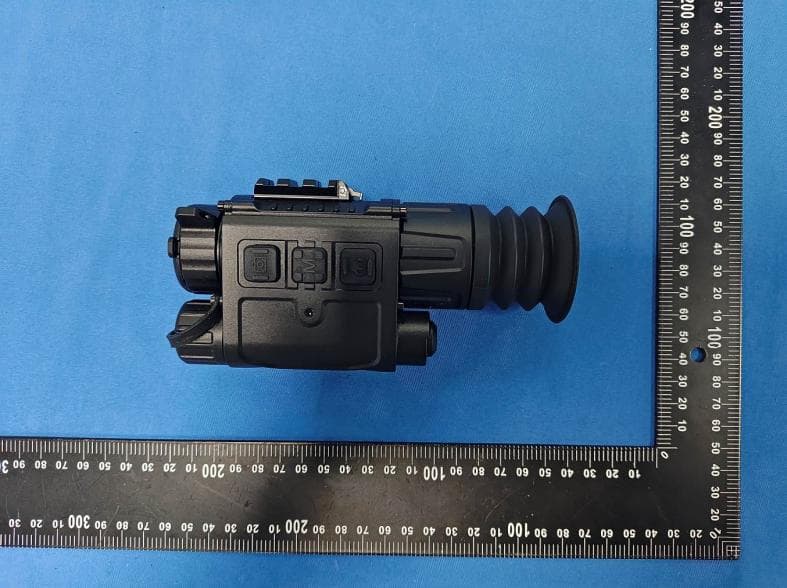
Aug 06, 2026Thermal imaging device
Equipment Class
DTS - Digital Transmission System