2BX3W-TF-4-B-WNTime frame
Driftwood Studio, LLC.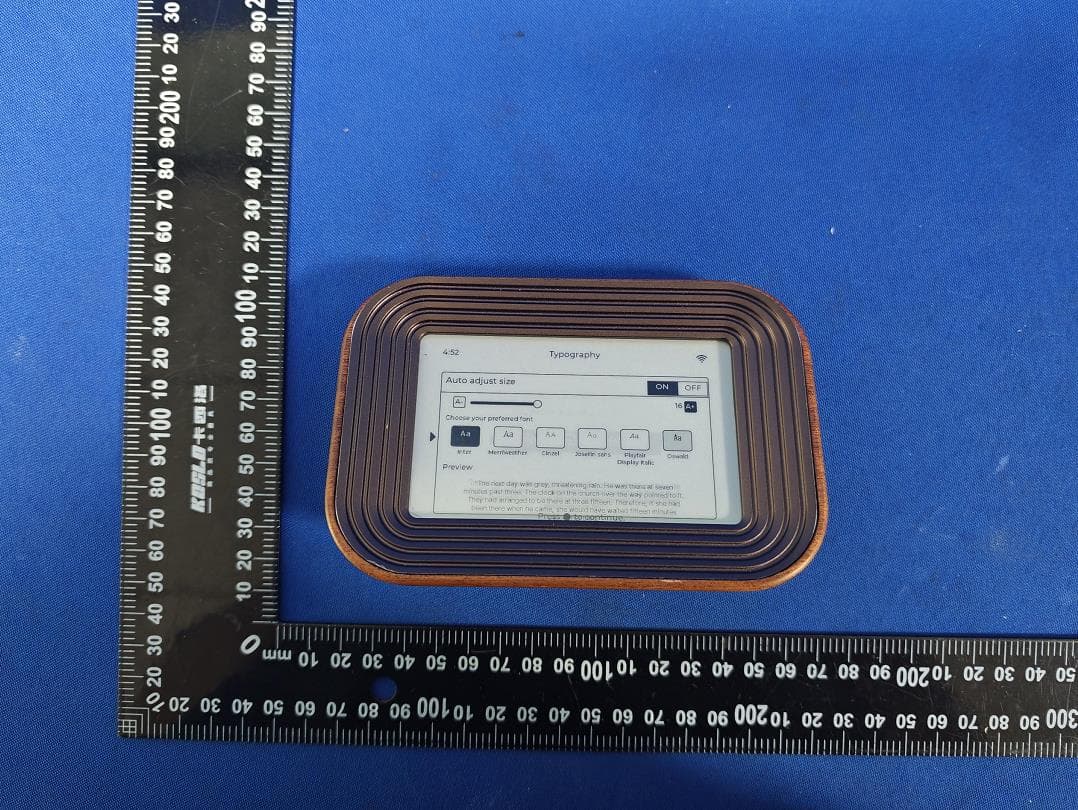
Click to zoom
Application Details
- Equipment Class
- DTS - Digital Transmission System
- Date of Grant
- Sep 15, 2026
- Application Purpose
- Original Equipment
- Equipment Note
- Time frame
- Frequency Range
- 2402.00000000 - 2480.00000000
- Company
- Driftwood Studio, LLC.
- Country
- United States
Documents & Files
Document Text
Text extracted from the exhibit documents filed with the FCC. Open a document above to read the original.
Users Manual
TimeFrame | User Manual User Manual E-Ink Bible Verses & Themed Quotes Clock gettimeframe.com | Page 1 TimeFrame | User Manual Version 1.0 | gettimeframe.com Table of Contents Table of Contents 2 1. What's in the Box 3 2. Getting to Know Your TimeFrame 4 2.1 Front of the Device 4 2.2 Back / Side of the Device 4 2.3 Power 4 3. Setting Up Your TimeFrame 5 3.1 Power On 5 3.2 Connect Your Phone or Computer to the Clock 5 3.3 Connect to Your Home Wi-Fi 5 3.4 Create Your Account 6 3.5 Configure Your Clock 6 Bible Version 6 Display Preferences 6 Update Interval 6 3.6 Setup Complete 7 4. Using Your TimeFrame 8 4.1 What the Display Shows 8 4.2 Navigating On-Device Settings 8 5. Managing Your Clock Online 9 5.1 Logging In 9 5.2 Your Account Dashboard 9 5.3 Changing Clock Settings 9 6. Adding Additional Clocks 10 7. Using TimeFrame Offline 11 7.1 What Works Offline 11 7.2 When It Reconnects 11 8. Resetting Your TimeFrame 12 8.1 Soft Reset (Minor Issues / Freeze) 12 8.2 Factory Reset 12 How to Factory Reset 12 9. Warranty 13 9.1 What Is Covered 13 9.2 What Is Not Covered 13 9.3 Viewing Your Warranty 13 9.4 Making a Claim 13 10. Troubleshooting 14 11. Safety & Care 15 12. Contact & Support 16 gettimeframe.com | Page 2 TimeFrame | User Manual 1. What's in the Box Your TimeFrame package includes: • TimeFrame E-Ink Clock device • Power adapter and cable • Quick-Start card • TimeFrame User Manual WARNING WARNING: This product can expose you to chemicals including Cobalt lithium nickel oxide (or Lithium Cobalt Oxide), Metallic Nickel, and Carbon Black , which are known to the State of California to cause cancer, and Cobalt lithium nickel oxide (or Lithium Cobalt Oxide), Lead, and Phthalates (DEHP, DBP, BBP) , which are known to the State of California to cause birth defects or other reproductive harm. For more information go to www.P65Warnings.ca.gov. Note: Keep the original packaging in case you need to return or ship the device. 2. Getting to Know Your TimeFrame 2.1 Front of the Device gettimeframe.com | Page 3 TimeFrame | User Manual The front of your TimeFrame features a glare-free E-Ink display — similar to a Kindle — that shows the current time and a matching Bible verse or other themed quote. 2.2 Back / Side of the Device Your TimeFrame has four physical controls: Control Function Arrows (Up & Down) Tap up or down to navigate the device menus and display options. Selection Button Short press (< 2 seconds): Select option (menu choice or configuration) Long press (> 5 seconds): Go back to previous screen Reboot Button Press the button for >5 seconds to manually reboot the device. No settings will be lost. gettimeframe.com | Page 4 TimeFrame | User Manual 2.3 Power Connect the included power cable to the port on the device. No power adapter is included. Use a USB-C adapter to connect the power cable to a power source. 3. Setting Up Your TimeFrame Setup takes about 5–10 minutes. You will need a smartphone or computer with Wi-Fi, and access to your home Wi-Fi network password. 3.1 Power On 1. Connect the power cable to your TimeFrame. 2. The E-Ink screen will display a welcome message and instructions for connecting to your local WiFi and creating an account. gettimeframe.com | Page 5 TimeFrame | User Manual 3.2 Connect Your Phone or Computer to the Clock The TimeFrame temporarily acts as a Wi-Fi hotspot during setup. 3. On your phone or computer, open Wi-Fi settings. 4. Look for a network named "TimeFrame-XXXX" (where XXXX is your device's unique ID — shown on the clock screen). 5. Connect to that network. The password is also shown on the clock screen. 6. Once connected, a setup webpage will open automatically. If it does not open, type the address shown on the clock screen into your browser. gettimeframe.com | Page 6 TimeFrame | User Manual 3.3 Connect to Your Home Wi-Fi 7. The setup page will display a list of available Wi-Fi networks. 8. Select your home Wi-Fi network. 9. Enter your Wi-Fi password and tap Connect. 10. The clock will connect to your home network. A confirmation message will appear on both the clock screen and the webpage. Connection failed? Double-check your Wi-Fi password and try again. Make sure you are connecting to a 2.4 GHz network — some 5 GHz networks are not supported. If you only see one network option available it will usually have both 2.4 GHz and 5 GHz and will automatically default to 2.4 GHz for your TimeFrame device. 3.4 Create Your Account 11. After connecting, you will be prompted to create a TimeFrame account or log in. 12. Enter your email address and full name. Phone number is optional. 13. Check the box to accept the Terms of Service and Privacy Policy. 14. A 6-digit code will be sent to your email. Enter it on screen to verify your account. 15. There is no need to create a password. TimeFrame will send you a unique code each time to log in to your online account. This code acts as your password. Note: Your account lets you manage settings, add more content, view warranty information, and manage multiple devices from any browser at gettimeframe.com. gettimeframe.com | Page 7 TimeFrame | User Manual 3.5 Configure Your Clock Now personalize how your TimeFrame displays content: Device Name Choose a nickname for your device. This will help you know which device you are configuring if you have more than one TimeFrame clock. Bible Version Choose the Bible translation you prefer. Available versions include: • King James Version (KJV) • World English Bible (WEB) • Berean Standard Bible • American Standard Version • Douay-Rheims • And more — see the full list at https://app.gettimeframe.com/content Display Preferences • Show/hide the current time on screen • Select between 12 and 24 hour mode • Font type: Select your preferred font • Font size: Small, Medium, Large, Extra Large • Dynamic font sizing: automatically adjusts text to fit the screen Update Interval Choose how often the verse changes: • Every 1 minute (default) • Every 5 minutes • Every 15 minutes • Random mod…
Text truncated - open the document above for the full version.
Attestation Statements
Driftwood Studio, LLC. 2.911 (d)(5)(i) Equipment Type Attestation v1.2 Section 2.911(d)(5)(i) Certification – Equipment Type Company name: Driftwood Studio, LLC. Address: 11326 South Winds Crossing Orland Park, Illinois 60467, USA Product Name: Time frame FCC ID: 2BX3W-TF-4-B-WN Model(s): TF-4-B-WN 2.911(d)(5)(i) Equipment Type We, [Driftwood Studio, LLC.] (“the applicant”) certify that the equipment for which authorization is sought through certification is not: Prohibited from receiving an equipment authorization pursuant to § 2.903; of the FCC rules. Identified as an equipment type in the “Covered List” NOTE 1 Yours sincerely, Name: Date: September 8, 2026 Title and Company name: President / Founder / Driftwood Studio, LLC. NOTE 1 “Covered List”; is the List of Equipment and Services Covered By Section 2 of The Secure Networks Act, available at https://www.fcc.gov/supplychain/coveredlist References; 1) 986446 D01 Covered Equipment v01 https://apps.fcc.gov/oetcf/kdb/forms/FTSSearchResultPage.cfm?switch=P&id=325672 2) Federal Register document 2022-28263 published on 02/06/23 https://www.federalregister.gov/documents/2023/02/06/2022-28263/protecting-against-national-security-threats-to-the-com munications-supply-chain-through-the `
Attestation Statements
Driftwood Studio, LLC. 2.911 (d)(5)(ii) Applicant Attestation v1.3 Section 2.911(d)(5)(ii) Certification – Applicant (Covered List ) Company name: Driftwood Studio, LLC. Address: 11326 South Winds Crossing Orland Park, Illinois 60467, USA Product Name: Time frame FCC ID: 2BX3W-TF-4-B-WN Model(s): TF-4-B-WN 2.911(d)(5)(ii) Applicant filing We, [Driftwood Studio, LLC.] (“the applicant”) certify that, as of the date of the filing of the application, the applicant is is not identified NOTE 1 on the “Covered List” NOTE 2 , established pursuant to § 1.50002 of this chapter, as an entity producing covered communications equipment. Yours sincerely, Name: Date:September 8, 2026 Title and Company name: President / Founder / Driftwood Studio, LLC. NOTE 1 Delete option not applicable to this application. NOTE 2 “Covered List”; is the List of Equipment and Services Covered By Section 2 of The Secure Networks Act, available at https://www.fcc.gov/supplychain/coveredlist References; 1) 986446 D01 Covered Equipment v01 https://apps.fcc.gov/oetcf/kdb/forms/FTSSearchResultPage.cfm?switch=P&id=325672 2) Federal Register document 2022-28263 published on 02/06/23 https://www.federalregister.gov/documents/2023/02/06/2022-28263/protecting-against-national-security-threats-to-the-com munications-supply-chain-through-the
Attestation Statements
1/1 US Agent for Service of Process LETTER OF ATTESTATION TO: Office of Engineering Technology Federal Communications Commission 7435 Oakland Mills Road Columbia, MD 21046 US Agent for Service of Process: Company name: Driftwood Studio, LLC. FRN: 0038853198 Contact Name: Jeff Dryfhout Address: 11326 South Winds Crossing Orland Park, Illinois 60467, USA Telephone No: +001 708 557 7495 Email: [email protected] Applicant: Company name: Driftwood Studio, LLC. Grantee Code: 2BX3W FCC ID: 2BX3W-TF-4-B-WN FRN: 0038853198 Contact Name: Jeff Dryfhout Address: 11326 South Winds Crossing Orland Park, Illinois 60467, USA Telephone No: +001 708 557 7495 Fax No: +001 708 557 7495 Email: [email protected] Driftwood Studio, LLC. certifies that, as of the date of this filing of the application with the TCB, [Driftwood Studio, LLC.] is our designated US agent for service of process for the above referenced FCC ID. Driftwood Studio, LLC. accepts to maintain an agent for no less than one year after the grantee has terminated all marketing and importation or the conclusion of any commission related proceeding involving equipment. [Driftwood Studio, LLC.] accepts, as of the date of the filing of the application, the obligation of the designated US agent for service of process for the above reference FCC ID. The US Agent for Service of Process is aware of and agrees to comply with the requirements outlined in the FCC Equipment Authorization Program, Report and Order FCC 22-84, and clause § 2.911. The Applicant is aware of and agrees to comply with the requirements outlined in the FCC Equipment Authorization Program, Report and Order FCC 22-84, and clause § 2.911. Date: 2026-09-08 Applicant’s Name: Jeff Dryfhout US Agent’s Name: Jeff Dryfhout Title: President / Founder Title: President / Founder Signature: Signature:
Cover Letter(s)
Driftwood Studio, LLC. Letter of Authorization Company: Driftwood Studio, LLC. Address: 11326 South Winds Crossing Orland Park, Illinois 60467, USA Product Name: Time frame Model Number(s): TF-4-B-WN Product Description: Time frame FCC ID: 2BX3W-TF-4-B-WN We authorize MiCOM Labs Inc., 575 Boulder Court, Pleasanton, California 94566, USA, to act on our behalf on all matters concerning the certification of above named equipment. We declare that MiCOM Labs Inc. is allowed to forward all information related to the approval and certification of equipment to the regulatory agencies as required and to discuss any issues concerning the approval application. Any and all acts carried out by MiCOM Labs on our behalf shall have the same effect as acts of our own. Signature: Date: September 8, 2026 Name: Jeff Dryfhout Title: President / Founder Company: Driftwood Studio, LLC.
Cover Letter(s)
Driftwood Studio, LLC. Office of Engineering Technology Federal Communications Commission 7435 Oakland Mills Road Columbia, MD 21046 USA Date: September 8, 2026 Subject; Request for Confidentiality FCC ID: 2BX3W-TF-4-B-WN To Whom It May Concern, Pursuant to the provisions of the Commission’s rules Title 47 Sections §0.457 and §0.459, we are requesting the Commission to withhold the following attachment(s) as confidential documents from public disclosure indefinitely. These documents contain detailed system and equipment descriptions and are considered as proprietary information in operation of the equipment. The public disclosure of these documents might be harmful to our company and would give competitors an unfair advantage in the market. Schematic Diagram Block Diagram Parts List Operational Description Tune-up Procedure In additional to above mentioned documents, in order to comply with the marketing regulations in Title 47 CFR §2.803 and the importation rules in Title 47 CFR §2.1204, while ensuring that business sensitive information remains confidential until the actual marketing of newly authorized devices, we request Short Term Confidentiality of the following attachment(s); External Photos Test Setup Photos Internal Photos User Manual For 45 days, pursuant to Public Notice DA 04-1705. OR For 180 days pursuant to KDB 726920 D01. It is our understanding that all measurement test reports, FCC ID label format and correspondence during the certification review process cannot be granted as confidential documents and this information will be available for public review once the grant of equipment authorization is issued. Sincerely, Signature: Name: Jeff Dryfhout Title: President / Founder
External Photos
Page 1 of 4 Report No.: psi2608157-C01-R01 Shenzhen PSI Testing Co., Ltd. Tel: 0755-23011775 | E-mail: [email protected] | http://www.psi-lab.com Add: 1-2/F., Building 5, Yudafu Industrial Park, No.10, Xingye West Road, Shajing Subdistrict, Bao'an District, Shenzhen, Guangdong, China Appendix II external photos FCC ID: 2BX3W-TF-4-B-WN Page 2 of 4 Report No.: psi2608157-C01-R01 Shenzhen PSI Testing Co., Ltd. Tel: 0755-23011775 | E-mail: [email protected] | http://www.psi-lab.com Add: 1-2/F., Building 5, Yudafu Industrial Park, No.10, Xingye West Road, Shajing Subdistrict, Bao'an District, Shenzhen, Guangdong, China Page 3 of 4 Report No.: psi2608157-C01-R01 Shenzhen PSI Testing Co., Ltd. Tel: 0755-23011775 | E-mail: [email protected] | http://www.psi-lab.com Add: 1-2/F., Building 5, Yudafu Industrial Park, No.10, Xingye West Road, Shajing Subdistrict, Bao'an District, Shenzhen, Guangdong, China Page 4 of 4 Report No.: psi2608157-C01-R01 Shenzhen PSI Testing Co., Ltd. Tel: 0755-23011775 | E-mail: [email protected] | http://www.psi-lab.com Add: 1-2/F., Building 5, Yudafu Industrial Park, No.10, Xingye West Road, Shajing Subdistrict, Bao'an District, Shenzhen, Guangdong, China ------End------
ID Label/Location Info
Label and Location Material: Silk-screen Font color: Black Size: L: 2cm*W: 1cm Label and Location W FCC ID: 2BX3W-TF-4-B-WN Model No.: TF-4-B-WN L
Internal Photos
Page 1 of 8 Report No.: psi2608157-C01-R01 Shenzhen PSI Testing Co., Ltd. Tel: 0755-23011775 | E-mail: [email protected] | http://www.psi-lab.com Add: 1-2/F., Building 5, Yudafu Industrial Park, No.10, Xingye West Road, Shajing Subdistrict, Bao'an District, Shenzhen, Guangdong, China Appendix III internal photos FCC ID: 2BX3W-TF-4-B-WN Page 2 of 8 Report No.: psi2608157-C01-R01 Shenzhen PSI Testing Co., Ltd. Tel: 0755-23011775 | E-mail: [email protected] | http://www.psi-lab.com Add: 1-2/F., Building 5, Yudafu Industrial Park, No.10, Xingye West Road, Shajing Subdistrict, Bao'an District, Shenzhen, Guangdong, China Page 3 of 8 Report No.: psi2608157-C01-R01 Shenzhen PSI Testing Co., Ltd. Tel: 0755-23011775 | E-mail: [email protected] | http://www.psi-lab.com Add: 1-2/F., Building 5, Yudafu Industrial Park, No.10, Xingye West Road, Shajing Subdistrict, Bao'an District, Shenzhen, Guangdong, China Page 4 of 8 Report No.: psi2608157-C01-R01 Shenzhen PSI Testing Co., Ltd. Tel: 0755-23011775 | E-mail: [email protected] | http://www.psi-lab.com Add: 1-2/F., Building 5, Yudafu Industrial Park, No.10, Xingye West Road, Shajing Subdistrict, Bao'an District, Shenzhen, Guangdong, China Page 5 of 8 Report No.: psi2608157-C01-R01 Shenzhen PSI Testing Co., Ltd. Tel: 0755-23011775 | E-mail: [email protected] | http://www.psi-lab.com Add: 1-2/F., Building 5, Yudafu Industrial Park, No.10, Xingye West Road, Shajing Subdistrict, Bao'an District, Shenzhen, Guangdong, China Page 6 of 8 Report No.: psi2608157-C01-R01 Shenzhen PSI Testing Co., Ltd. Tel: 0755-23011775 | E-mail: [email protected] | http://www.psi-lab.com Add: 1-2/F., Building 5, Yudafu Industrial Park, No.10, Xingye West Road, Shajing Subdistrict, Bao'an District, Shenzhen, Guangdong, China 2.4G WIFI and BT ANT Page 7 of 8 Report No.: psi2608157-C01-R01 Shenzhen PSI Testing Co., Ltd. Tel: 0755-23011775 | E-mail: [email protected] | http://www.psi-lab.com Add: 1-2/F., Building 5, Yudafu Industrial Park, No.10, Xingye West Road, Shajing Subdistrict, Bao'an District, Shenzhen, Guangdong, China Page 8 of 8 Report No.: psi2608157-C01-R01 Shenzhen PSI Testing Co., Ltd. Tel: 0755-23011775 | E-mail: [email protected] | http://www.psi-lab.com Add: 1-2/F., Building 5, Yudafu Industrial Park, No.10, Xingye West Road, Shajing Subdistrict, Bao'an District, Shenzhen, Guangdong, China ------End------
RF Exposure Info
Page 1 of 2 Report No.: psi2608157-C01-R01 Shenzhen PSI Testing Co., Ltd. Tel: 0755-23011775 | E-mail: [email protected] | http://www.psi-lab.com Add: 1-2/F., Building 5, Yudafu Industrial Park, No.10, Xingye West Road, Shajing Subdistrict, Bao'an District, Shenzhen, Guangdong, China Appendix IV MPE FCC ID: 2BX3W‑TF-4-B-WN Prediction of MPE at a given distance 1. Limits The criteria listed in the following table shall be used to evaluate the environment impact of human exposure to radio frequency (RF) radiation as specified in 1.1307(b) KDB Test Methodology: KDB 447498 D01 v06. 2. Test Procedure Equation from page 18 of OET Bulletin 65, Edition 97-01 Where: S = power density P = power input to the antenna G = numeric gain of the antenna in the direction of interest relative to an isotropic radiator R = distance to the centre of radiation of the antenna Page 2 of 2 Report No.: psi2608157-C01-R01 Shenzhen PSI Testing Co., Ltd. Tel: 0755-23011775 | E-mail: [email protected] | http://www.psi-lab.com Add: 1-2/F., Building 5, Yudafu Industrial Park, No.10, Xingye West Road, Shajing Subdistrict, Bao'an District, Shenzhen, Guangdong, China 3. Result Mode Frequency (MHz) Prediction distance (cm) RF output power(Max) (dBm) Tune-up power (Max) MPE (mW/cm 2 ) Limit (mW/cm 2 ) SAR Test Exclusion dBm mW BT LE 2402-2480 20 0.65 1 1.2589 0.0003 1.0000 Yes 2.4G WIFI 2412-2462 20 15.81 16 39.8107 0.0089 1.0000 Yes BT: Internal antenna, Maximum Gain is 0.51dBi, 1.12(numeric). 2.4G WiFi: Internal antenna, Maximum Gain is 0.51dBi, 1.12(numeric). Maximum Simultaneous transmission MPE Ratios for BT+WIFI Max MPE Ratio BT/Limit Max MPE Ratio WIFI/Limit ∑MPE Ratios Limit Result 0.0003/1 0.0089/1 BT+ WIFI 1 PASS 0.0003 0.0089 0.0092 1 PASS Then SAR evaluation is not required.
Test Report
德仕勤科技有限公司 - 承认书 深圳市德仕勤科技有限公司 Dosking MicroElectronics Co.,Ltd 地址:深圳市南山区西丽大学城民企科技园2栋(港鸿基大厦)西座403 TEL:0755-88602767 FAX:0755-82793883 1 规格承认书 Approval Sheet 客户名称 (Customer Name) 产品名称 Wifi/BT天线 (Specification) 客户料号 (Customer P/N) 产品料号 (O/I) 送样日期 2026-08-19 (Date) 频段 版本 A 射频 陈美队 确认 结构 阳国军 客户确认 日期 德仕勤科技有限公司 - 承认书 深圳市德仕勤科技有限公司 Dosking MicroElectronics Co.,Ltd 地址:深圳市南山区西丽大学城民企科技园2栋(港鸿基大厦)西座403 TEL:0755-88602767 FAX:0755-82793883 2 目 录 1.项目图片 2.测试治具 3.匹配电路 4. S11测试电器性能 4.1 S11测试方法说明规格标准 4.2 S11参数图片 5.功率和灵敏度测试 5.1 测试数据 6.结构图纸 德仕勤科技有限公司 - 承认书 深圳市德仕勤科技有限公司 Dosking MicroElectronics Co.,Ltd 地址:深圳市南山区西丽大学城民企科技园二栋西座403 TEL:0755-88602767 FAX:0755-82793883 3 1.项目图片(仅供参考) 2.无源测试 目的:尽可能准确测试天线的无源参数。 方法:此治具是用一根50欧姆的同轴电缆,一端连在手机主板的匹配电路后端 (射频测试孔前段)的测试点上,另一段连接SMA接头。具体如下图: 下表是为G4频量产天线的性能的测试指标: SD06-WIFI 天线 频率 (MHz) VSWR 频率 (MHz) VSWR 频段 发射端 接收端 2.4G WIFI 2400-2550 ≤3.0 2400-2550 ≤3.0 3. 匹配电路 主天线(匹配无更改) 4. S11测试 4.1 S11测试方法说明规格标准 VSWR 测试装置依次的连接为:HDS10K753ES网络分析仪→50欧姆的同轴 Cable→120mm长的铜管→测试治具。 测试治具的处理:从手机PCB上天线50欧姆测试点处用一根硬质电缆引出 Element 匹配值 E1(0201) E2(0201) 0 E3(0201) 德仕勤科技有限公司 - 承认书 深圳市德仕勤科技有限公司 Dosking MicroElectronics Co.,Ltd 地址:深圳市南山区西丽大学城民企科技园二栋西座403 TEL:0755-88602767 FAX:0755-82793883 4 SMA-J接头,与套有扼流圈的铜管连接,再依次连接其他装置。 测试示意图 4.2 S11 德仕勤科技有限公司 - 承认书 深圳市德仕勤科技有限公司 Dosking MicroElectronics Co.,Ltd 地址:深圳市南山区西丽大学城民企科技园二栋西座403 TEL:0755-88602767 FAX:0755-82793883 5 5.功率和灵敏度测试 5.1 测试数据 2.4无源效率/增益 Passive Test For 2400-2500 Freq Effi Gain (MHz) (%) (dBi) 2400 28.52 0.5 2410 27.61 0.35 2420 28.12 0.35 2430 27.44 0.03 BAND CHANNEL TRP TIS CHANNEL TRP TIS WIFI 11b 1 12.1 -80.66 6 12.16 -80.04 11 12.34 -80.12 WIFI A 36 10.05 -70.55 60 10.4 -70.03 165 10.31 -70.57 德仕勤科技有限公司 - 承认书 深圳市德仕勤科技有限公司 Dosking MicroElectronics Co.,Ltd 地址:深圳市南山区西丽大学城民企科技园二栋西座403 TEL:0755-88602767 FAX:0755-82793883 6 2440 26.92 -0.24 2450 27.27 -0.04 2460 27.89 0.05 2470 28 0.26 2480 27.68 0.51 2490 27.26 0.6 2500 28.01 0.68 2.4G/BT-2D/3D图 德仕勤科技有限公司 - 承认书 深圳市德仕勤科技有限公司 Dosking MicroElectronics Co.,Ltd 地址:深圳市南山区西丽大学城民企科技园二栋西座403 TEL:0755-88602767 FAX:0755-82793883 7 6. 结构图纸
Test Report
Shenzhen PSI Testing Co., Ltd. Tel: 0755-23011775 | E-mail: [email protected] | http://www.psi-lab.com Page 1 of 47 Add: 1-2/F., Building 5, Yudafu Industrial Park, No.10, Xingye West Road, Shajing Subdistrict, Bao'an District, Shenzhen, Guangdong, China FCC TEST REPORT FCC ID: 2BX3W-TF-4-B-WN On Behalf of Driftwood Studio, LLC. Time frame Model No.: TF-4-B-WN Prepared for : Driftwood Studio, LLC. Address : 11326 South Winds Crossing Orland Park, Illinois 60467, USA Prepared By : Shenzhen PSI Testing Co., Ltd. Address : 1-2/F., Building 5, Yudafu Industrial Park, No.10, Xingye West Road, Shajing Subdistrict, Bao'an District, Shenzhen, Guangdong, China Report Number : psi2608157-C01-R01 Date of Receipt : August 21, 2026 Date of Test : August 21, 2026- September 1, 2026 Date of Report : September 1, 2026 Version Number : V0 Page 2 of 47 Report No.: psi2608157-C01-R01 Shenzhen PSI Testing Co., Ltd. Tel: 0755-23011775 | E-mail: [email protected] | http://www.psi-lab.com Add: 1-2/F., Building 5, Yudafu Industrial Park, No.10, Xingye West Road, Shajing Subdistrict, Bao'an District, Shenzhen, Guangdong, China TABLE OF CONTENTS Description Page 1. Summary Of Standards And Results ---------------------------------------------------------- 6 1.1. Description of Standards and Results ---------------------------------------------------- 6 2. General Information --------------------------------------------------------------------------------- 7 2.1. Description of Device (EUT) ---------------------------------------------------------------- 7 2.2. Accessories of Device (EUT) --------------------------------------------------------------- 8 2.3. Tested Supporting System Details--------------------------------------------------------- 8 2.4. Block Diagram of Connection Between EUT and Simulators ---------------------- 8 2.5. Test Mode Description ------------------------------------------------------------------------ 9 2.6. Software test version and power setting information ------------------------------- 11 2.7. Test Conditions ------------------------------------------------------------------------------- 12 2.8. Test Facility ------------------------------------------------------------------------------------ 12 2.9. Measurement Uncertainty ----------------------------------------------------------------- 12 2.10. Test Equipment List-------------------------------------------------------------------------- 13 3. Spurious Emission --------------------------------------------------------------------------------- 14 3.1. Test Limits -------------------------------------------------------------------------------------- 14 3.2. Block Diagram of Test setup -------------------------------------------------------------- 15 3.3. Test Procedure -------------------------------------------------------------------------------- 16 3.4. Test Results------------------------------------------------------------------------------------ 17 4. Power Line Conducted Emission ------------------------------------------------------------- 23 4.1. Test Limits -------------------------------------------------------------------------------------- 23 4.2. Test Procedure -------------------------------------------------------------------------------- 23 4.3. Test Setup -------------------------------------------------------------------------------------- 23 4.4. Test Results------------------------------------------------------------------------------------ 24 5. Out-of-band Emissions --------------------------------------------------------------------------- 27 5.1. Test Limits -------------------------------------------------------------------------------------- 27 5.2. Test Procedure -------------------------------------------------------------------------------- 27 5.3. Test Setup -------------------------------------------------------------------------------------- 27 5.4. Test Results------------------------------------------------------------------------------------ 27 6. Conducted Maximum Output Power --------------------------------------------------------- 33 6.1. Test limits --------------------------------------------------------------------------------------- 33 6.2. Test Procedure -------------------------------------------------------------------------------- 33 6.3. Test Setup -------------------------------------------------------------------------------------- 33 6.4. Test Results------------------------------------------------------------------------------------ 33 7. Peak Power Spectral Density ------------------------------------------------------------------ 36 7.1. Test limits --------------------------------------------------------------------------------------- 36 7.2. Test Procedure -------------------------------------------------------------------------------- 36 7.3. Test Setup -------------------------------------------------------------------------------------- 36 7.4. Test Results------------------------------------------------------------------------------------ 36 8. Bandwidth --------------------------------------------------------------------------------------------- 39 8.1. Test limits --------------------------------------------------------------------------------------- 39 8.2. Test Procedure -------------------------------------------------------------------------------- 39 8.3. Test Setup -------------------------------------------------------------------------------------- 39 8.4. Test Results------------------------------------------------------------------------------------ 39 Page 3 of 47 Report No.: psi2608157-C01-R01 Shenzhen PSI Testing Co., Ltd. Tel: 0755-23011775 | E-mail: [email protected] | http://www.psi-lab.com Add: 1-2/F., Building 5, Yudafu Industrial Park, No.10, Xingye West Road, Shajing Subdistrict, Bao'an District, Shenzhen, Guangdong, China 9. Band Edge Test ------------------------------------------------------------------------------------- 44 9.1. Test Limit ---…
Text truncated - open the document above for the full version.
Test Report
Shenzhen PSI Testing Co., Ltd. Tel: 0755-23011775 | E-mail: [email protected] | http://www.psi-lab.com Page 1 of 85 Add: 1-2/F., Building 5, Yudafu Industrial Park, No.10, Xingye West Road, Shajing Subdistrict, Bao'an District, Shenzhen, Guangdong, China FCC TEST REPORT FCC ID: 2BX3W-TF-4-B-WN On Behalf of Driftwood Studio, LLC. Time frame Model No.: TF-4-B-WN Prepared for : Driftwood Studio, LLC. Address : 11326 South Winds Crossing Orland Park, Illinois 60467, USA Prepared By : Shenzhen PSI Testing Co., Ltd. Address : 1-2/F., Building 5, Yudafu Industrial Park, No.10, Xingye West Road, Shajing Subdistrict, Bao'an District, Shenzhen, Guangdong, China Report Number : psi2608157-C01-R02 Date of Receipt : August 21, 2026 Date of Test : August 21, 2026- September 1, 2026 Date of Report : September 1, 2026 Version Number : V0 Page 2 of 85 Report No.: psi2608157-C01-R02 Shenzhen PSI Testing Co., Ltd. Tel: 0755-23011775 | E-mail: [email protected] | http://www.psi-lab.com Add: 1-2/F., Building 5, Yudafu Industrial Park, No.10, Xingye West Road, Shajing Subdistrict, Bao'an District, Shenzhen, Guangdong, China TABLE OF CONTENTS Description Page 1. Summary Of Standards And Results ----------------------------------------------------------------------------------- 6 1.1. Description of Standards and Results --------------------------------------------------------------------------- 6 2. General Information --------------------------------------------------------------------------------------------------------- 7 2.1. Description of Device (EUT) --------------------------------------------------------------------------------------- 7 2.2. Accessories of Device (EUT) -------------------------------------------------------------------------------------- 8 2.3. Tested Supporting System Details-------------------------------------------------------------------------------- 8 2.4. Block Diagram of Connection Between EUT and Simulators ---------------------------------------------- 8 2.5. Test Mode Description ----------------------------------------------------------------------------------------------- 9 2.6. Software test version and power setting information------------------------------------------------------- 16 2.7. Test Conditions ------------------------------------------------------------------------------------------------------ 16 2.8. Test Facility ----------------------------------------------------------------------------------------------------------- 17 2.9. Measurement Uncertainty ---------------------------------------------------------------------------------------- 17 2.10. Test Equipment List ------------------------------------------------------------------------------------------------ 18 3. Spurious Emission --------------------------------------------------------------------------------------------------------- 19 3.1. Test Limits ------------------------------------------------------------------------------------------------------------ 19 3.2. Block Diagram of Test setup ------------------------------------------------------------------------------------- 20 3.3. Test Procedure ------------------------------------------------------------------------------------------------------ 21 3.4. Test Results ---------------------------------------------------------------------------------------------------------- 22 4. Power Line Conducted Emission -----------…
Text truncated - open the document above for the full version.
Contact Information
Applicant
Jeff Dryfhout(President / Founder)
[email protected]Fax: +001 708 557 7495
Technical Contact
Driftwood Studio, LLC.Jeff Dryfhout
11326 South Winds Crossing · Orland Park, 60467 · United States
Test Firm
Shenzhen PSI Testing Co., Ltd.Simple Guan
Technical Specifications
| # | Rule Parts | Frequency Range | Power Output |
|---|---|---|---|
| 1 | 15C | 2.40 GHz - 2.48 GHz | 1.16 mW |
| 2 | 15C | 2.41 GHz - 2.46 GHz | 38.11 mW |