2BX4K-ZZKJ-T113IWireless Touchscreen Car Stereo
Shenzhen Zhongze Technology Co., Ltd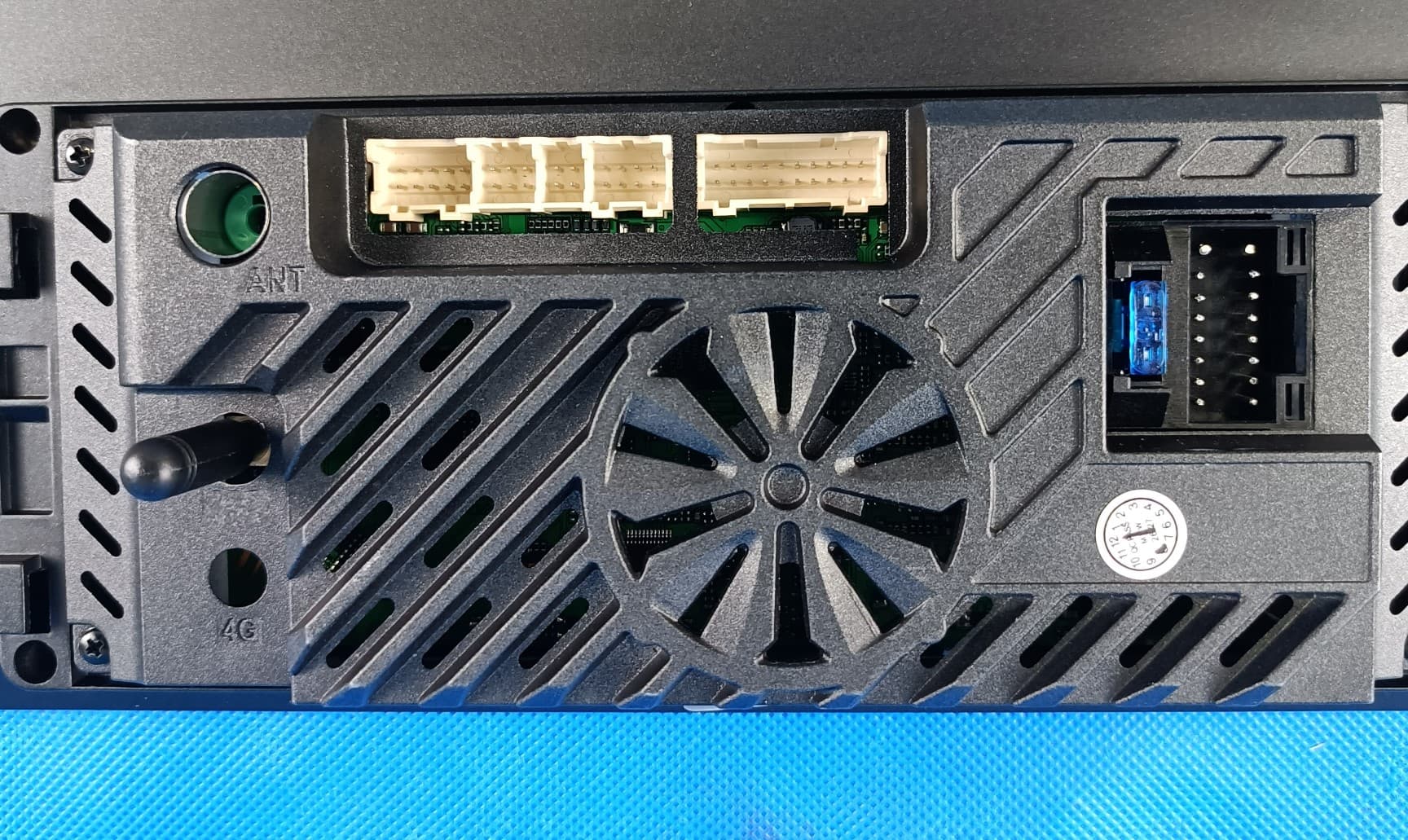
Click to zoom
Application Details
- Equipment Class
- DTS - Digital Transmission System
- Date of Grant
- Sep 03, 2026
- Application Purpose
- Original Equipment
- Equipment Note
- Wireless Touchscreen Car Stereo
- Frequency Range
- 2402.00000000 - 2480.00000000
- Country
- China
Documents & Files
Document Text
Text extracted from the exhibit documents filed with the FCC. Open a document above to read the original.
Users Manual
Linux System ZZKJ-T113-i Instruction Manual Disclaimer: 1. Do not install or repair this product by yourself. Installation or repair of this product by unauthorized or untrained personnel may lead to dangerous situations. 2. For your and others' personal safety, do not operate this product while driving a car. 3. Do not let this product come into contact with liquids. Liquids may cause damage to this product, smoke from the machine, and short circuits in the circuit, etc. 4. The built-in functions of this product are only provided as an auxiliary prompt for you when driving a vehicle. They do not imply that you can be distracted, careless or lose your judgment while driving. Any safety accidents caused thereby are not the responsibility of our company. 5. The pictures used in this manual are for reference only. Any misunderstandings arising therefrom are not the responsibility of our company. 6. If this product malfunctions or fails to work properly, please consult your local dealer or contact our after-sales service technical specialist. Product Details Introduction: 1. Home Page: Click to return to the main menu. 2. Dashboard: Click to enter the LCD dashboard display interface. 3. Screen Off: Click to turn off the screen display. Click the screen again to restore the screen display. 4. Original Vehicle: Click to enter the original vehicle system display interface. 5. CarLink: Apple Carplay function. Turn on Bluetooth and WIFI on your iPhone, then connect the car's Bluetooth device on your iPhone. The phone will pop up a box asking you to select "Pair" or "Use Carplay in the Vehicle". 6. Audroid Auto: Turn on the Bluetooth and WIFI on your phone, connect the car's Bluetooth device, and the phone will pop up a box asking you to select "Pair" or "Allow". 7. Yilian: Click to enter the QR code download APP, and use the APP to scan the QR code to connect the device. 8. HUAWEI HiCar: When a Huawei phone is brought close to the car's central control unit, it detects the vehicle's in-car device and prompts the user to enter the connection code for the first verification. 9. Bluetooth: Search for Bluetooth devices to establish a connection, and you can make calls or play Bluetooth music. 10. Music: Click to enter and you can play the music stored on a USB device. 11. Video: Click to play the videos inside the USB device. 12. System: Enter to make settings for voice, brightness, audio, original vehicle parameters, Bluetooth and WIFI, version information (you can click "Restart System" or "Restore Factory Settings" on the version information interface). system settings: Language settings Brightness setting Audio settings 1. Resolution: Set the original vehicle display resolution. Click "Auto Adjust" and it will automatically identify the original vehicle resolution. 2. Original Vehicle Video: Switch for displaying the original vehicle. Keep it on if you want to retain the original vehicle, and turn it off if you don't want to. 3. EVO Type: Select based on the size of the original vehicle screen of the EVO model. (Installation of BMW EVO models requires setting.) 4. IDrive Type: This is the setting for the CCC system knob protocol. It is divided into IDrive_A and IDrive_B. (Installation of BMW CCC models requires setting.) 5. CIC/CCC: Select CCC or CIC according to the original BMW system. (Installation of BMW CCC models or CICC models requires setting.) 1. AUX automatic switch: Turn on for automatic AUX audio switching, and turn off for manual AUX audio switching. 2. Original vehicle reverse: The original vehicle reverse camera needs to be turned on when using it. For aftermarket installed cameras, this option should be turned off. 3. Audio output: You can choose either "AUX" or "Bluetooth transmission". For BMW EVO models, Mercedes-Benz 5.0/5.5/6.0 models, choose "Bluetooth transmission", while for other models, choose "AUX". 4. Parking radar: When turned on, the reverse view will display the radar on the same screen. When turned off, the reverse view will not have the radar displayed on the same screen. 5. 360-degree panoramic view: This option requires checking the machine configuration. It only works if it has the 360-degree panoramic function. 1. Driving position: Choose according to the driving position of the left or right vehicle. 2. Camera mirroring: This option needs to be enabled for the right vehicle, but not for the left vehicle. 3. Forced full screen: After enabling this option, the original vehicle system screen will be fully displayed. 4. Door reminder: Enable this option to have a door status prompt box pop up in the middle of the screen when opening the door. 5. FL audio: This option refers to the audio broadcast from the left speaker before switching between navigation sounds and Bluetooth phone sounds. 1. HUAWEI HiCar Connection Management: The interface for managing the connection list of the Huawei HiCar function. 2. Wi-Fi: The list of connected Wi-Fi networks. 3. Bluetooth: Click to enter the Bluetooth connection interface. 1. Wireless Upgrade: Remote OTA upgrade can be performed by connecting to the network. 2. Factory Settings 3. Restart System 4. Restore Factory Settings 1. WIFI antenna 2. Rearview video input 3. 6P USB interface 4. 4P USB interface 5. Front left speaker control, reverse detection line and ILL small light line 6. TX/RX signal line 7. RCA audio output 8. Power plug 9. Original vehicle screen LVDS signal input Accessories: Power cord 4P USB cable 6P USB cable RCA audio cable Reverse video input cable Original LVDS small board (depending on the vehicle model) Note: When installing the machine for the first time, you need to enter the settings, click "Restore Factory Settings", initialize the original vehicle resolution, and then long press the "Original Vehicle" option to enable adaptive resolution for the original vehicle. Only by entering the "Original Vehicle" option can the original vehicle system screen be displayed normally; otherwise, it will not be d…
Text truncated - open the document above for the full version.
Attestation Statements
Rev 1/26/2023 Shenzhen Zhongze Technology Co., Ltd Federal Communications Commission Authorization and Evaluation Division 7435 Oakland Mills Road Columbia, MD 21046 USA Date: 2026-09-02 Ref: Attestation Statements Part 2.911(d)(5)(i) Filing FCC ID:2BX4K-ZZKJ-T113I Shenzhen Zhongze Technology Co., Ltd certifies that the equipment for which authorization is sought is not“covered” equipment prohibited from receiving an equipment authorization pursuant to section 2.903 of the FCC rules. Shenzhen Zhongze Technology Co., Ltd certifies that the equipment for which authorization is sought does not include cybersecurity or anti-virus software produced or provided by Kaspersky Lab, Inc. or any of its successors and assignees, including equipment with integrated Kaspersky Lab, Inc. (or any of its successors and assignees) cybersecurity or anti-virus software pursuant to DA-24-886 and KDB 986446 D01 Covered Equipment Guidance section B(2a). Device is inherently compliant based on hardware limitations or software controls. or A Software Bill of Materials (SBOM) is provided to the TCB for review, and The end-user or third parties cannot install additional software on this device. Sincerely, (Applicant signature) (Qiuyue Mo) Rev 1/26/2023 Shenzhen Zhongze Technology Co., Ltd Federal Communications Commission Authorization and Evaluation Division 7435 Oakland Mills Road Columbia, MD 21046 USA Date: 2026-09-02 Ref: Attestation Statements Part 2.911(d)(5)(ii) Filing FCC ID:2BX4K-ZZKJ-T113I Shenzhen Zhongze Technology Co., Ltd certifies that, as of the date of the filing of the application, the applicant is not identified on the Covered List (as a specifically named entity or any of its subsidiaries or affiliates) as an entity producing “covered” equipment. Sincerely, (Applicant signature) (Qiuyue Mo)
Attestation Statements
2BX4K-ZZKJ-T113I
Cover Letter(s)
Shenzhen Zhongze Technology Co., Ltd. Office of Engineering Technology Federal Communications Commission 7435 Oakland Mills Road Columbia, MD 21046 USA Date: September 2, 2026 Subject; Request for Confidentiality FCC ID:2BX4K-ZZKJ-T113I To Whom It May Concern, Pursuant to the provisions of the Commission’s rules Title 47 Sections §0.457 and §0.459, we are requesting the Commission to withhold the following attachment(s) as confidential documents from public disclosure indefinitely. These documents contain detailed system and equipment descriptions and are considered as proprietary information in operation of the equipment. The public disclosure of these documents might be harmful to our company and would give competitors an unfair advantage in the market. Schematic Diagram Block Diagram Parts List Operational Description FCC Software Security Requirements for UNII devices In additional to above mentioned documents, in order to comply with the marketing regulations in Title 47 CFR §2.803 and the importation rules in Title 47 CFR §2.1204, while ensuring that business sensitive information remains confidential until the actual marketing of newly authorized devices, we request Short Term Confidentiality of the following attachment(s); External Photos Test Setup Photos Internal Photos User Manual For 45 days, pursuant to Public Notice DA 04-1705. OR For 180 days pursuant to KDB 726920 D01. It is our understanding that all measurement test reports, FCC ID label format and correspondence during the certification review process cannot be granted as confidential documents and this information will be available for public review once the grant of equipment authorization is issued. Sincerely, Signature: Name: Qiuyue Mo Title: Manager
Cover Letter(s)
Shenzhen Zhongze Technology Co., Ltd Product Similarity Declaration Product name: Wireless Touchscreen Car Stereo Model name: ZZKJ-T113-i, ZZKJ_LINUX_EVO, ZZKJ_LINUX_NBT, ZZKJ_LINUX_CIC, ZZKJ_LINUX_CCC, ZZKJ_LINUX_6.0, ZZKJ_LINUX_5.5, ZZKJ_LINUX_5.0, ZZKJ_LINUX_4.5, ZZKJ_LINUX_4.0, ZZKJ_LINUX_MMI3G, ZZKJ_LINUX_MMI2G, ZZKJ_LINUX_MIB, ZZKJ_LINUX_MIB2, ZZKJ_QCM6115, ZZKJ_QCM6225, ZZKJ_QCM6225-AD, ZZKJ_LINUX_MRC, ZZKJ_LINUX_HN-R, ZZKJ_LINUX_HN+R, ZZKJ_LINUX_JEEP, ZZKJ_LINUX_GMC, ZZKJ_LINUX_FORD, ZZKJ_LINUX_TOYOTA, ZZKJ_LINUX_HONDA, ZZKJ_LINUX_HYUNDAI, ZZKJ_LINUX_LEXUS, ZZKJ_LINUX_VW, ZZKJ_LINUX_NISSAN, ZZKJ_LINUX_KIA, ZZKJ_LINUX_CADILLAC, ZZKJ_LINUX_LAND ROVER FCC ID:2BX4K-ZZKJ-T113I We (Shenzhen Zhongze Technology Co., Ltd) hereby state that all the models are electrical identical including the same software parameter and hardware design (i.e., circuit design, PCB Layout, RF module/circuit, antenna type(s) and antenna location, components on PCB, etc.,), same mechanical structure and design (including product enclosure, materials, etc.,), the only difference is the model name . Sincerely yours, Applicant Signature Printed Name: Qiuyue Mo Title:Manager Address: Room 101, Building 6, Phase I, Huangtian Yangbei Industrial Park, Huangtian Community, Hangcheng Subdistrict, Bao'an District, Shenzhen, 518000, China Email: [email protected]
Cover Letter(s)
Effective Date: April 2, 2020 QSF 7.6.4-8 – Agent Authorization Letter Template Page 1 of 1 Revision Date: Revision: 0 Shenzhen Zhongze Technology Co., Ltd Date:2026-09-02 Product Model Number: ZZKJ-T113-I, ZZKJ_LINUX_EVO, ZZKJ_LINUX_NBT, ZZKJ_LINUX_CIC, ZZKJ_LINUX_CCC, ZZKJ_LINUX_6.0, ZZKJ_LINUX_5.5, ZZKJ_LINUX_5.0, ZZKJ_LINUX_4.5, ZZKJ_LINUX_4.0, ZZKJ_LINUX_MMI3G, ZZKJ_LINUX_MMI2G, ZZKJ_LINUX_MIB, ZZKJ_LINUX_MIB2, ZZKJ_QCM6115, ZZKJ_QCM6225, ZZKJ_QCM6225-AD, ZZKJ_LINUX_MRC, ZZKJ_LINUX_HN-R, ZZKJ_LINUX_HN+R, ZZKJ_LINUX_JEEP, ZZKJ_LINUX_GMC, ZZKJ_LINUX_FORD, ZZKJ_LINUX_TOYOTA, ZZKJ_LINUX_HONDA, ZZKJ_LINUX_HYUNDAI, ZZKJ_LINUX_LEXUS, ZZKJ_LINUX_VW, ZZKJ_LINUX_NISSAN, ZZKJ_LINUX_KIA, ZZKJ_LINUX_CADILLAC, ZZKJ_LINUX_LAND ROVER FCC ID:2BX4K-ZZKJ-T113I To whom it may concern, Re: Product Certification Representative Authorization Letter We authorize QAI Laboratories Ltd. 3980 North Fraser Way, Burnaby B.C. Canada V5J 5K5 to act on our behalf on all matters concerning the above named equipment. This shall include the following: Testing Approval applications and procedures We declare that QAI Laboratories Ltd. is allowed to forward all information related to the approval project to the applied certification body and to the notification entities and to discuss any issues concerning the approval application. Any and all acts carried out byQAI Laboratories Ltd. on our behalf shall have the same effect as acts of our own. By: Qiuyue Mo Contact Listed on FCC Wesbite Title: Manager Email: [email protected] On behalf of: Shenzhen Zhongze Technology Co., Ltd.
External Photos
Ext Photos Model: ZZKJ-T113-i Photo 1 Photo 2 Photo 3 Photo 4 Label&location Photo 5 Photo 6 Photo 7 Photo 8
ID Label/Location Info
Label and Label Location Label: Wireless Touchscreen Car Stereo Model NO.: ZZKJ-T113-i FCC ID:2BX4K-ZZKJ-T113I Size:35*25mm Label Location: The label shown shall be permanently affixed at a conspicuous location on the device and be readily visible to the user at the time purchase (Labeling requirements per 2.925) Label&location
Internal Photos
Int Photos Model: ZZKJ-T113-i Photo 1 Photo 2 Photo 3 Photo 4 BT ANT Photo 5 Photo 6 2.4Gwifi ANT
RF Exposure Info
- Page 1 of 10 - Report No.:HB20260702004E-02 Add:Room 102, 201, Building 2, Yuanwanggu RFID Industrial Park, Tongguan Road, Tianliao Community, Yutang Street, Guangming District, Shenzhen,China Tel: (86-755) 29989321 Fax: (86-755) 29985110 Web:www.sz-hongbiao.com RF EXPOSURE Test Report Product: Wireless Touchscreen Car Stereo Trade Mark: N/A Model Number: ZZKJ-T113-i FCC ID: 2BX4K-ZZKJ-T113I Prepared for Shenzhen Zhongze Technology Co., Ltd Room 101, Building 6, Phase I, Huangtian Yangbei Industrial Park, Huangtian Community, Hangcheng Subdistrict, Bao'an District, Shenzhen, 518000, China Prepared by Shenzhen HongBiao Certification& Testing Co., Ltd Room 102, 201, Building 2, Yuanwanggu RFID Industrial Park, Tongguan Road, Tianliao Community, Yutang Street, Guangming District, Shenzhen, China Tel.: +86-755-2998 9321 Fax.: +86-755-2998 5110 Website: http://www.sz-hongbiao.com - Page 2 of 10 - Report No.:HB20260702004E-02 Add:Room 102, 201, Building 2, Yuanwanggu RFID Industrial Park, Tongguan Road, Tianliao Community, Yutang Street, Guangming District, Shenzhen,China Tel: (86-755) 29989321 Fax: (86-755) 29985110 Web:www.sz-hongbiao.com Table of Contents 1 GENERAL DESCRIPTION ..................................................................................................................................... 5 1.1 DESCRIPTION OF EUT ................................................................................................................................................ 5 1.2 TEST MODE .............................................................................................................................................................. 6 1.3 TEST SETUP .............................................................................................................................................................. 6 2 TEST FACILITIES AND ACCREDITATIONS .............................................................................................................. 7 2.1 TEST LABORATORY ..................................................................................................................................................... 7 2.2 ENVIRONMENTAL CONDITIONS ..................................................................................................................................... 7 2.3 MEASUREMENT UNCERTAINTY ..................................................................................................................................... 7 2.4 TEST SOFTWARE ........................................................................................................................................................ 7 3 LIST OF TEST EQUIPMENT .................................................................................................................................. 8 4 RF EXPOSURE..................................................................................................................................................... 9 4.1 STANDALONE SAR TEST EXCLUSION CONSIDERATIONS........................................................................................................ 9 Limit ........................................................................................................................................................................... 9 Test Result .................................................................................................................................................................. 9 - Page 3 of 10 - Report No.:HB20260702004E-02 Add:Room 102, 201, Building 2, Yuanwanggu RFID Industrial Park, Tongguan Road, Tianliao Community, Yutang Street, Guangming District, Shenzhen,China Tel: (86-755) 29989321 Fax: (86-755) 29985110 Web:www.sz-hongbiao.com TEST RESULT CERTIFICATION Applicant’s Name ................. : Shenzhen Zhongze Technology Co., Ltd Address ................................. : Room 101, Building 6, Phase I, Huangtian Yangbei Industrial Park, Huangtian Community, Hangcheng Subdistrict, Bao'an District, Shenzhen,518000, China Manufacturer's Name .......... : Shenzhen Zhongze Technology Co., Ltd Address ................................. : Room 101, Building 6, Phase I, Huangtian Yangbei Industrial Park, Huangtian Community, Hangcheng Subdistrict, Bao'an District, Shenzhen,518000, China Product description Product name ........................ : Wireless Touchscreen Car Stereo Model Number ....................... : ZZKJ-T113-i Standards ............................. : FCC CFR 47 PART 1, 1.1310 Test procedure ....................... : KDB 447498 D01 General RF Exposure Guidance v06 This device described above has been tested by Shenzhen HongBiao Certification& Testing Co., Ltd and the test results show that the equipment under test (EUT) is in compliance with the EMC requirements. And it is applicable only to the tested sample identified in the report. Date of Test ........................................... : Date (s) of performance of tests ............. : Jan 25, 2026~ Jul.16, 2026 Test Result .............................................. : Pass Testing Engineer : ( Z o e S u ) Technical Manager : ( G a r y L u ) Authorized Signatory : ( L e o S u ) - Page 4 of 10 - Report No.:HB20260702004E-02 Add:Room 102, 201, Building 2, Yuanwanggu RFID Industrial Park, Tongguan Road, Tianliao Community, Yutang Street, Guangming District, Shenzhen,China Tel: (86-755) 29989321 Fax: (86-755) 29985110 Web:www.sz-hongbiao.com Revision History Revised No. Date of Issue Description 01 Jul.16, 2026 Original - Page 5 of 10 - Report No.:HB20260702004E-02 Add:Room 102, 201, Building 2, Yuanwanggu RFID Industrial Park, Tongguan Road, Tianliao Community, Yutang Street, Guangming District, Shenzhen,China Tel: (86-755) 29989321 Fax: (86-755) 29985110 Web:www.sz-hongbiao.com 1 General Description 1.1 Description of EUT Product name: Wireless Touchscreen Car Stereo Model name: ZZKJ-T113-i Series Model: ZZKJ_LINUX_EVO, ZZKJ_LINUX_NBT, ZZKJ_LINUX_C…
Text truncated - open the document above for the full version.
Test Report
- Page 1 of 61 - Report No.:HB20260702004E E-01 Add:Room 102, 201, Building 2, Yuanwanggu RFID Industrial Park, Tongguan Road, Tianliao Community, Yutang Street, Guangming District, Shenzhen,China Tel: (86-755) 29989321 Fax: (86-755) 29985110 Web:www.sz-hongbiao.com Test Report Product: Wireless Touchscreen Car Stereo Trade Mark: N/A Model Number: ZZKJ-T113-i FCC ID: 2BX4K-ZZKJ-T113I Prepared for Shenzhen Zhongze Technology Co., Ltd Room 101, Building 6, Phase I, Huangtian Yangbei Industrial Park, Huangtian Community, Hangcheng Subdistrict, Bao'an District, Shenzhen, 518000, China Prepared by Shenzhen HongBiao Certification& Testing Co., Ltd Room 102, 201, Building 2, Yuanwanggu RFID Industrial Park, Tongguan Road, Tianliao Community, Yutang Street, Guangming District, Shenzhen, China Tel.: +86-755-2998 9321 Fax.: +86-755-2998 5110 Website: http://www.sz-hongbiao.com - Page 2 of 61 - Report No.:HB20260702004E E-01 Add:Room 102, 201, Building 2, Yuanwanggu RFID Industrial Park, Tongguan Road, Tianliao Community, Yutang Street, Guangming District, Shenzhen,China Tel: (86-755) 29989321 Fax: (86-755) 29985110 Web:www.sz-hongbiao.com Table of Contents 1 GENERAL DESCRIPTION .................................................................................................................... 6 1.1 DESCRIPTION OF EUT ................................................................................................................................................ 6 1.2 TEST MODE .............................................................................................................................................................. 7 1.3 OPERATION CHANNEL LIST ........................................................................................................................................... 7 1.4 TEST SETUP .............................................................................................................................................................. 9 1.5 POWER SETTING CONFIGURATION PARAMETERS ............................................................................................................... 9 1.6 ANCILLARY EQUIPMENT .............................................................................................................................................. 9 2 SUMMARY OF TEST RESULT ..............................................................................................................................10 3 TEST FACILITIES AND ACCREDITATIONS .............................................................................................................11 3.1 TEST LABORATORY ................................................................................................................................................... 11 3.2 ENVIRONMENTAL CONDITIONS ................................................................................................................................... 11 3.3 MEASUREMENT UNCERTAINTY ................................................................................................................................... 11 3.4 TEST SOFTWARE ...................................................................................................................................................... 12 4 LIST OF TEST EQUIPMENT .................................................................................................................................13 5 TEST ITEM AND RESULTS ...................................................................................................................................15 5.1 ANTENNA REQUIREMENT .......................................................................................................................................... 15 5.1.1 Standard Requirement ............................................................................................................................. 15 5.1.2 Test Result ................................................................................................................................................. 15 5.2 CONDUCTED EMISSION ............................................................................................................................................. 16 5.2.1 Limits ........................................................................................................................................................ 16 5.2.2 Test Procedures ......................................................................................................................................... 16 5.2.3 Test Setup .................................................................................................................................................. 17 5.2.4 Test Result ................................................................................................................................................. 17 The EUT is an automotive product, So this test item not applicable..................................................................... 17 5.3 RADIATED EMISSION ................................................................................................................................................ 18 5.3.1 Limits ........................................................................................................................................................ 18 5.3.2 Test Procedures ......................................................................................................................................... 18 5.3.3 Test Setup .................................................................................................................................................. 18 5.3.4 Test Result ................................................................................................................................................. 19 5.3.5 Radiated Band Edge ...................................................................…
Text truncated - open the document above for the full version.
Test Report
Glue Stick Antenna Shenzhen Zhongze Technology Co., Ltd Add: Room 101, Building 6, Phase I, Huangtian Yangbei Industrial Park, Huangtian Community, Hangcheng Subdistrict, Bao'an District, Shenzhen,518000, China Antenna type:Glue Stick Antenna
Test Report
深圳市飞敏科技有限公司 SHENZHEN FEIMIN TECHNOLOGY CO.,LTD. 2026-8-18 天线测试报告 Antenna test report SHENZHEN FEIMIN TECHNOLOGY CO.,LTD. TEL:0755-23035723 Mail:[email protected] URL:www.fmant.cn PCB Antenna Data:_ Antenna type: 测试设备和测试环境 Test equipment and test environment SHENZHEN FEIMIN TECHNOLOGY CO.,LTD. TEL:0755-23035723 Mail:[email protected] URL:www.fmant.cn 测试设备 Test equipment SHENZHEN FEIMIN TECHNOLOGY CO.,LTD. TEL:0755-23035723 Mail:[email protected] URL:www.fmant.cn 测试设备 Test equipment SHENZHEN FEIMIN TECHNOLOGY CO.,LTD. TEL:0755-23035723 Mail:[email protected] URL:www.fmant.cn 天线外形 Antenna appearance SHENZHEN FEIMIN TECHNOLOGY CO.,LTD. TEL:0755-23035723 Mail:[email protected] URL:www.fmant.cn 天线增益与效率 Antenna gain and efficiency SHENZHEN FEIMIN TECHNOLOGY CO.,LTD. TEL:0755-23035723 Mail:[email protected] URL:www.fmant.cn Freq(MHz) Efficiency (%) Gian(dBi) 2400 MHz 25.83 1.21 2410 MHz 27.16 1.28 2420 MHz 28.72 1.36 2430 MHz 26.42 1.60 2440 MHz 27.09 1.82 2450 MHz 27.37 1.93 2460 MHz 27.80 1.80 2470 MHz 26.49 1.69 2480 MHz 25.24 1.47 2490 MHz 24.74 1.29 2500 MHz 24.15 1.06 板载天线 插入图片1 插入图片2 插入图片3 插入图片4 天线辐射方向图 Antenna Radiation Pattern SHENZHEN FEIMIN TECHNOLOGY CO.,LTD. TEL:0755-23035723 Mail:[email protected] URL:www.fmant.cn 板载天线 深圳市宝安区西乡固戍恒南一路C栋303 TEL:(86)755-23035723. FAX:0755-23036702 E-mail:[email protected] ADD: 303,building C,GUSHU Hengnan Road,Xixiang,Baoan district Shenzhen Thanks for your support! 感谢您的支持!
Test Setup Photos
Ext Photos Model:ZZKJ-T113-i Radiated Emission Below 1000MHz Radiated Emission Above 1000MHz
Contact Information
Applicant
Qiuyue Mo
[email protected]Fax: +8613530254465
Technical Contact
Test Firm
Shenzhen HongBiao Certification& Testing Co., LtdLeo Su
Technical Specifications
| # | Rule Parts | Frequency Range | Power Output |
|---|---|---|---|
| 1 | 15C | 2.40 GHz - 2.48 GHz | 1.31 mW |
| 2 | 15C | 2.41 GHz - 2.46 GHz | 18.49 mW |