A3L9513A
Samsung Electronics Co Ltd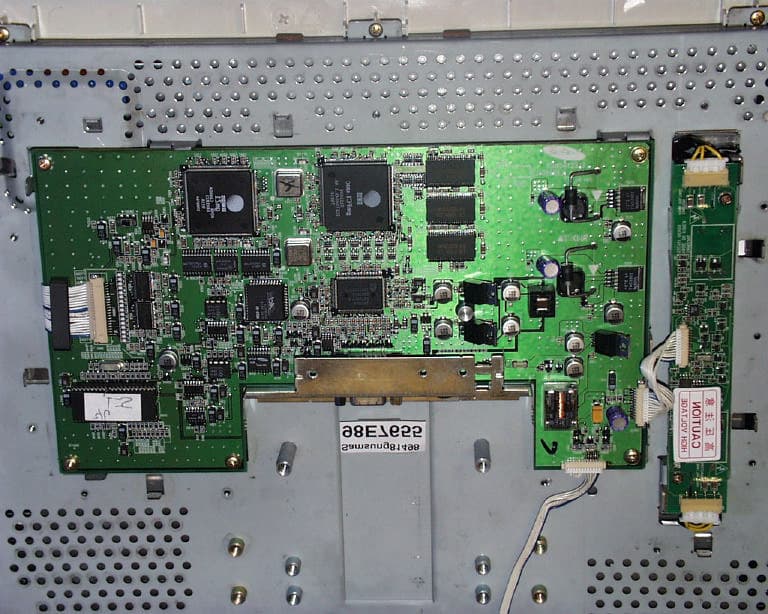
Click to zoom
Application Details
- Equipment Class
- JBP - Part 15 Class B Computing Device Peripheral
- Date of Grant
- Sep 28, 1998
- Application Purpose
- Original Equipment
- Date of Application
- Aug 17, 1998
- Company
- Samsung Electronics Co Ltd
- Country
- United States
Documents & Files
Document Text
Text extracted from the exhibit documents filed with the FCC. Open a document above to read the original.
Users Manual
These user’s setup instructions cover typical user environments. The on-screen messages may differ depending on the level of your hardware and software. In some cases you may need to vary the setup procedures. For more information, refer to your computer or operating system manuals or consult your system administrator or dealer. Ces instructions de configuration d’exploitation s’appliquent aux environnements d’utilisation types. Les messages affichés à l’écran peuvent varier en fonction du niveau de votre matériel et de vos logiciels informatiques. Dans certains cas, vous pouvez être amenés à changer de procédures de configuration. Pour de plus amples informations à ce sujet, veuillez vous reporter aux manuels de votre ordinateur et de votre système d’exploitation, ou consultez l’administrateur de votre système ou votre revendeur. Diese Anweisungen für die Einstellung durch den Benutzer gelten für typische Betriebsumgebungen. Die Bildschirmmeldungen können je nach Art der verwendeten Hardware und Software auch anders lauten. In einigen Fällen müssen die Einstellungsschritte unter Umständen abgeändert werden. Weitere Informationen finden Sie im Computer- oder Betriebssystemhandbuch, oder wenden Sie sich an Ihren Systemadministrator oder Fachhändler. En estas instrucciones de configuración se describen entornos de usuarios típicos. Los mensajes en pantalla, pueden diferir según sea el nivel del hardware y del software. En algunos casos, necesitará seguir otros procedimientos para la configuración. Para obtener más información, puede consultar los manuales del ordenador o del sistema operativo o ponerse en contacto con el administrador del sistema o con el distribuidor. Queste istruzioni di configurazione per l’utente coprono gli ambienti operativi comuni. I messaggi che appaiono sul video possono differire a seconda dell’hardware e del software utilizzati. In alcuni casi potrebbe essere necessario variare le procedure di configurazione. Per ulteriori informazioni, fare riferimento ai manuali del computer o del sistema operativo, o consultare il proprio amministratore di sistema o il concessionario. T55A.book Page 1 Monday, July 20, 1998 7:49 PM 2 T55A.book Page 2 Monday, July 20, 1998 7:49 PM DANGER To avoid shock hazard: •Do not remove the covers. •Do not operate this product unless the stand is attached. •Do not connect or disconnect this product during an electrical storm. •The power cord plug must be connected to a properly wired and grounded power outlet. •Any equipment to which this product will be attached must also be connected to properly wired and grounded power outlets. •To isolate the monitor from the electrical supply, you must remove the plug from the power outlet. The power outlet should be easily accessible. Handling: •Your colour monitor is heavy, so handle it with care. If heavier than 18 Kg, IBM recommends that the monitor is moved or lifted by two people. DANGER Pour éviter les risques d’électrocution : •Ne retirez pas les capots du moniteur. •N’utilisez pas ce produit si le socle n’est pas fixé. •Ne connectez, ni ne déconnectez ce produit pendant un orage. •Le câble d’alimentation doit être connecté à une prise électrique correctement mise à la terre et en bon état de marche. •Tout équipement auquel ce produit est relié doit être également connecté à une prise correctement mise à la terre et en bon état de marche. •Pour isoler le moniteur de la source d’alimentation électrique, vous devez le débrancher de la prise électrique. Cette prise doit être facile d’accès Manutention : •Votre moniteur couleurs est lourd et doit donc être manipulé avec soin. Si son poids dépasse 18 kg, IBM vous conseille de le déplacer ou de le porter à deux. GEFAHRENHINWEIS Um die Gefahr eines elektrischen Schlags zu vermeiden, folgendes beachten: •Unter keinen Umständen die Abdeckungen abnehmen. •Das Produkt nicht in Betrieb nehmen, wenn der Sockel nicht montiert ist. •Das Gerät nicht während eines Gewitters an eine Steckdose anschließen oder von ihr trennen. •Das Netzkabel ist an eine ordnungsgemäß verdrahtete und geerdete Steckdose anzuschließen. •Jedes Gerät, mit dem dieses Produkt verbunden wird, muß ebenfalls an eine ordnungsgemäß verdrahtete und geerdete Steckdose angeschlossen werden. •Um den Monitor von der Stromversorgung zu trennen, muß der Stecker aus der Steckdose gezogen werden. Die Steckdose sollte leicht zugänglich sein. Handhabungshinweis: •Ihr Farbbildschirm ist schwer, gehen Sie vorsichtig damit um. Wenn er schwerer als 18 kg ist, empfiehlt IBM, daß der Bildschirm von zwei Personen getragen bzw. gehoben wird. T55A.book Page c Monday, July 20, 1998 7:49 PM GEVAAR Ga als volgt te werk om het gevaar van een elektrische schok te voorkomen: •Verwijder in geen enkel geval de kap. •Stel dit produkt alleen in werking als de voet is bevestigd. •Sluit dit apparaat niet aan op, of verbreek de aansluiting van dit apparaat niet van een contactdoos tijdens onweer. •Het netsnoer moet worden aangesloten op een geaarde contactdoos met correcte bedrading. •Ook alle apparatuur waarop dit produkt wordt aangesloten moet zijn aangesloten op een contactdoos met correcte bedrading. •Om het beeldscherm te ontkoppelen van de netvoeding, dient u de stekker uit de contactdoos te trekken. De contactdoos dient goed toegankelijk te zijn. Verplaatsing: •De kleurenmonitor is zwaar. Doe dus voorzichtig. Indien de monitor zwaarder is dan 18 kilo, raadt IBM aan de monitor door twee mensen te laten tillen. PELIGRO Para evitar riesgos de descargas eléctricas: •No retire bajo ningún concepto las cubiertas. •No maneje el monitor sin antes acoplar el soporte. •No conecte ni desconecte el equipo de una toma de alimentación durante una tormenta eléctrica. •El cable de alimentación debe estar conectado a un enchufe debidamente cableado y con toma de tierra. •Cualquier equipo al que se vaya a conectar este producto también debe estar conectado a tomas de alimentación cableadas y conectadas a tierra correctamente. •Para a…
Text truncated - open the document above for the full version.
ID Label/Location Info
FCC ID LABEL LOCATION Applicant : Samsung Electronics Co., Ltd. FCC ID: A3L9513A FCC ID LABEL LOCATION
Test Report
FCC CFR47 PART 15 DIGITAL DEVICE TEST REPORT FOR 15" TFT MONITOR W/ MAX. RESOLUTION OF 1024X768 NON-INTERLACED (60 KHz) MODEL: 9513-A** FCC ID: A3L9513A REPORT NUMBER: 98E7655 ISSUE DATE: AUGUST 03, 1998 Prepared for SAMSUNG ELECTRONICS CO., LTD. 416 MAETAN DONG, PALDAL GU SUWON SHI, KOREA Prepared by COMPLIANCE ENGINEERING SERVICES, INC. 1366 BORDEAUX DRIVE SUNNYVALE, CA 94089, USA TEL: (408) 752-8166 FAX: (408) 752-8168 REPORT NO:98E7655 DATE:AUGUST 03, 1998 FCC ID:A3L9513A EUT: 15" TFT MONITOR W/ MAX. RESOLUTION OF 1024X768 NON-INTERLACED (60 KHz) COMPLIANCE CONSULTING SERVICESDOCUMENT NO:CCSUP4002B2 1366 BORDEAUX DRIVE SUNNYVALE, CA 94089 USA TEL:(408) 752-8166 FAX:(408) 752-8168 This report shall not be reproduced except in full, without the written approval of CCS. TABLE OF CONTENTS PAGE 1........................................................................................................1 2.PRODUCT DESCRIPTION.......................................................................................................................2 3.TESTED SYSTEM DETAILS....................................................................................................................2 4.TEST FACILITY........................................................................................................................................3 5.ACCREDITATION AND LISTING..........................................................................................................3 6.MEASUREMENT INSTRUMENTATION................................................................................................3 7.MEASURING INSTRUMENT CALIBRATION.......................................................................................4 8.UNITS OF MEASUREMENT....................................................................................................................4 9.ANTENNAS................................................................................................................................................5 10.CLASSIFICATION OF DIGITAL DEVICE.............................................................................................5 11. RADIATED EMISSION LIMITS..............................................................................................................5 12. CONDUCTED EMISSION LIMITS..........................................................................................................6 13. CONDUCTED EMISSION TEST PROCEDURE....................................................................................8 14. RADIATED EMISSION TEST PROCEDURE........................................................................................8 15. AMBIENT CONDITIONS........................................................................................................................9 16. SYSTEM TEST CONFIGURATION.......................................................................................................9 17. EQUIPMENT MODIFICATIONS.........................................................................................................10 18. EUT SETUP PHOTOS...........................................................................................................................11 19. TEST EQUIPMENT LIST......................................................................................................................12 20. TEST RESULT SUMMARY..................................................................................................................13 APPENDICES....................................................................................................................................................15 .EXTERNAL I/O CABLE CONSTRUCTION DESCRIPTION .CONFIGURATION BLOCK DIAGRAM .EUT PHOTOGRAPHS REPORT NO:98E7655 DATE:AUGUST 03, 1998 FCC ID:A3L9513A EUT: 15" TFT MONITOR W/ MAX. RESOLUTION OF 1024X768 NON-INTERLACED (60 KHz) 1 OF 15 COMPLIANCE CONSULTING SERVICESDOCUMENT NO:CCSUP4002B2 1366 BORDEAUX DRIVE SUNNYVALE, CA 94089 USA TEL:(408) 752-8166 FAX:(408) 752-8168 This report shall not be reproduced except in full, without the written approval of CCS. 1.VERIFICATION OF COMPLIANCE COMPANY NAME:SAMSUNG ELECTRONICS CO., LTD. 416 MAETAN DONG, PALDAL GU SUWON SHI, KOREA CONTACT PERSON:BEN KIM / MANAGER TELEPHONE NO:408-544-5124 MODEL NO/NAME:9513-A** SERIAL NO:N/A DATE TESTED:AUGUST 03, 1998 TYPE OF EQUIPMENT:INFORMATION TECHNOLOGY EQUIPMENT (ITE) MEASUREMENT DISTANCE:( ) 3 METER (X) 10 METER TECHNICAL LIMIT:CLASS B FCC RULES:PART 15 MEASUREMENT PROCEDUREANSI C63.4:92 / EN 55022 EQUIPMENT AUTHORIZATION PROCEDURECERTIFICATION MODIFICATIONS MADE ON EUT YES NO DEVIATIONS FROM MEASUREMENT PROCEDURE YES (refer to section 21 for comments) NO RADIATED EMISSION TEST RESULT-3.63 dB @ 226.6 MHz/VERTICAL CONDUCTED EMISSION TEST RESULT-13.7 dB @ 0.206 MHz/L2 The above equipment was tested by Compliance Consulting Services for compliance with the requirements set forth in the FCC CFR 47, PART 15. The results of testing in this report apply to the product/system which was tested only. Other similar equipment will not necessarily produce the same results due to production tolerance and measurement uncertainties. Approved By MIKE C.I. KUO / VICE PRESIDENT COMPLIANCE CONSULTING SERVICES REPORT NO:98E7655 DATE:AUGUST 03, 1998 FCC ID:A3L9513A EUT: 15" TFT MONITOR W/ MAX. RESOLUTION OF 1024X768 NON-INTERLACED (60 KHz) 2 OF 15 COMPLIANCE CONSULTING SERVICESDOCUMENT NO:CCSUP4002B2 1366 BORDEAUX DRIVE SUNNYVALE, CA 94089 USA TEL:(408) 752-8166 FAX:(408) 752-8168 This report shall not be reproduced except in full, without the written approval of CCS. 2.PRODUCT DESCRIPTION CHASSIS TYPEPLASTIC CPU SPEEDS TESTED100 MHz PENTIUM LIST OF EACH OSC. OR XTAL. FREQ. (FREQ.>=1 MHz) 24, 67, 85 MHz CHIPSET BRAND AND PART NO.GENESIS 2CET04045.1AA POWER SUPPLY/NAME/MODEL/S.N.SAMSUNG PSCV540101A NUMBER OF PCB LAYERS6 BOARD REVISION NO0.1 LINE FILTER NAME AND MODELBUILT-IN POWER REQUIREMENTS100-240 V AC, 60/50 Hz NO.…
Text truncated - open the document above for the full version.
Contact Information
Applicant
Jenni Chun(General Manager)
Technical Contact
COMPLIANCE ENGINEERING SERVICES, INC.MIKE KUO
[email protected]408-752-8166
1366 BORDEAUX DRIVE · SUNNYVALE, California · United States
Non-Technical Contact
COMPLIANCE ENGINEERING SERVICES, INC.MIKE KUO
[email protected]408-752-8166
Test Firm
Compliance Certification Services IncSteve Cheng
Technical Specifications
| # | Rule Parts | Frequency Range | Power Output |
|---|---|---|---|
| 1 | 15B | - | - |
Other Applications from Samsung Electronics Co Ltd
A3LSMS741B
Aug 05, 2026Portable Handset
Equipment Class
6VL - 15E 6 GHZ Very Low Power DeviceA3LSMX940
Jul 31, 2026BT,BLE Tablet DTS,UNII a,b,g,n,ac,ax,be and digitizer
Equipment Class
DTS - Digital Transmission SystemA3LSMS741U
Jul 30, 2026Portable Handset
Equipment Class
6CD - 15E 6 GHz Low Power Dual ClientA3LSMX840
Jul 27, 2026BT,BLE Tablet DTS,UNII a,b,g,n,ac,ax and Digitizer
Equipment Class
DSS - Part 15 Spread Spectrum TransmitterA3LSMX848U
Jul 27, 2026WCDMA, LTE, 5G NR Tablet BT,BLE, DTS,UNII a b g n ac ax and Digitizer
Equipment Class
JBP - Part 15 Class B Computing Device Peripheral