A3LA3000Inkjet Multi-Function Printer
Samsung Electronics Co Ltd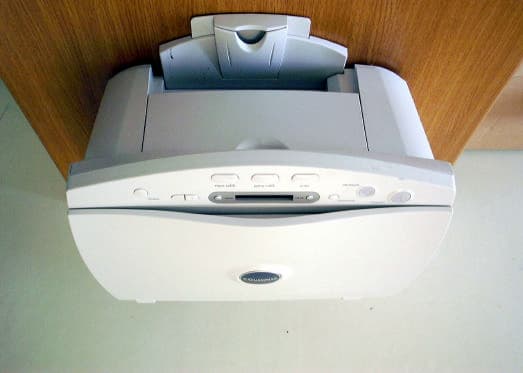
Click to zoom
Application Details
- Equipment Class
- JBP - Part 15 Class B Computing Device Peripheral
- Date of Grant
- Aug 07, 2001
- Application Purpose
- Original Equipment
- Date of Application
- Aug 06, 2001
- Equipment Note
- Inkjet Multi-Function Printer
- Company
- Samsung Electronics Co Ltd
- Country
- United States
Documents & Files
Document Text
Text extracted from the exhibit documents filed with the FCC. Open a document above to read the original.
Users Manual
Notice © 2000 Compaq Computer Corporation COMPAQ and the Compaq logo Registered in U.S. Patent and Trademark Office. Microsoft and Windows are trademarks of Microsoft Corporation. All other product names mentioned herein may be trademarks or registered trademarks of their respective companies. Compaq shall not be liable for technical or editorial errors or omissions contained herein. The information in this document is subject to change without notice. THE INFORMATION IN THIS PUBLICATION IS SUBJECT TO CHANGE WITHOUT NOTICE AND IS PROVIDED "AS IS" WITHOUT WARRANTY OF ANY KIND. THE ENTIRE RISK ARISING OUT OF THE USE OF THIS INFORMATION REMAINS WITH RECIPIENT. IN NO EVENT SHALL COMPAQ BE LIABLE FOR ANY DIRECT, CONSEQUENTIAL, INCIDENTAL, SPECIAL, PUNITIVE OR OTHER DAMAGES WHATSOEVER (INCLUDING WITHOUT LIMITATION, DAMAGES FOR LOSS OF BUSINESS PROFITS, BUSINESS INTERRUPTION OR LOSS OF BUSINESS INFORMATION), EVEN IF COMPAQ HAS BEEN ADVISED OF THE POSSIBILITY OF SUCH DAMAGES. THE FOREGOING SHALL APPLY REGARD- LESS OF THE NEGLIGENCE OR OTHER FAULT OF EITHER PARTY AND REGARDLESS OF WHETHER SUCH LIABILITY SOUNDS IN CONTRACT, NEGLI- GENCE, TORT, OR ANY OTHER THEORY OF LEGAL LIABILITY, AND NOT- WITHSTANDING ANY FAILURE OF ESSENTIAL PURPOSE OF ANY LIMITED REMEDY. The limited warranties for Compaq products are exclusively set forth in the documentation accompanying such products. Nothing herein should be construed as constituting a further or additional warranty. Compaq A3000 First Edition (August 2001) Contents Contents • • • • • iii Contents Getting Started Quick Setup . . . . . . . . . . . . . . . . . . . . . . . . . . . . 1 About the software . . . . . . . . . . . . . . . . . . . . . . . 2 Installing the software. . . . . . . . . . . . . . . . . . . . . 4 Cable and power connections . . . . . . . . . . . . . . . 5 Component locations . . . . . . . . . . . . . . . . . . . . . 6 Control Panel features. . . . . . . . . . . . . . . . . . . . . 7 Where to go from here . . . . . . . . . . . . . . . . . . . . 8 Using the Settings Utility Accessing the Settings Utility. . . . . . . . . . . . . . . 9 Main Settings Window . . . . . . . . . . . . . . . . . . . 10 Print Settings. . . . . . . . . . . . . . . . . . . . . . . . . . . 11 Copy Settings . . . . . . . . . . . . . . . . . . . . . . . . . . 11 Scan Settings. . . . . . . . . . . . . . . . . . . . . . . . . . . 13 Printing Loading paper . . . . . . . . . . . . . . . . . . . . . . . . . . 17 Printing a document . . . . . . . . . . . . . . . . . . . . . 18 Accessing the Control Program . . . . . . . . . . . . 19 Changing the Printer Properties . . . . . . . . . . . . 19 Loading specialty papers . . . . . . . . . . . . . . . . . 21 • • • • • Contents iv Copying Positioning the document . . . . . . . . . . . . . . . . . 25 Basic Copying . . . . . . . . . . . . . . . . . . . . . . . . . 27 Additional copy settings. . . . . . . . . . . . . . . . . . 28 Scanning Positioning the document . . . . . . . . . . . . . . . . . 31 Scanning with the computer. . . . . . . . . . . . . . . 33 Scanning with the scan button . . . . . . . . . . . . . 34 Scanning to a folder . . . . . . . . . . . . . . . . . . . . . 35 Scanning to Email . . . . . . . . . . . . . . . . . . . . . . 36 Scanning to applications . . . . . . . . . . . . . . . . . 37 Adjusting scanner settings . . . . . . . . . . . . . . . . 37 Maintaining your A3000 Using the Control Program . . . . . . . . . . . . . . . 39 Installing or replacing print cartridges . . . . . . . 40 Improving print quality . . . . . . . . . . . . . . . . . . 41 Troubleshooting Prints slowly or doesn’t print . . . . . . . . . . . . . 47 Paper misfeeds or jams. . . . . . . . . . . . . . . . . . . 49 Document prints with poor quality . . . . . . . . . 51 Transparencies, photos, and envelopes . . . . . . 53 Error messages . . . . . . . . . . . . . . . . . . . . . . . . . 54 Appendix Regulatory Notices. . . . . . . . . . . . . . . . . . . . . . 57 Index Getting Started Getting Started • • • • • 1 Getting Started This section will help you start using your new Compaq A3000 quickly. Quick Setup First, follow the Quick Setup poster. If you have misplaced the poster, simply follow these steps: 1Remove the A3000 from the box. Remove all tape and protective paper and plastic. 2Unlock the scanner. For instructions, see “Unlocking and locking the scanner” on page 45. 3Connect the power and USB cables. The connections are located in the rear. For a diagram, see “Cable and power connections” on page 5. 4Load paper into the paper input tray. See “Loading paper” on page 17. 5Press the Power button, open the front door, and install the ink cartridges. See “Installing or replacing print cartridges” on page 40. 6Align the cartridges. For help, see “Aligning print cartridges” on page 41 Once you have finished these steps, you are ready to install the software. 1 • • • • • Chapter 1 2 About the software Although your Compaq A3000 can be used as a stand- alone copier, you will derive the greatest benefit from your A3000 by connecting it to your computer and installing the included software. Installing the software will allow you to: •Print from your computer •Scan images to your computer •Scan documents to email or word processing programs •Adjust the Compaq A3000 settings •Upload picture albums to the internet •And more! What’s on the CD The A3000 driver CD includes the following software: Printer driver The printer driver tells the computer what kind of printer you are using and controls the various settings, such as print quality and paper type. You define these settings within the printer driver, which then communicates the settings to both the computer and the printer. Scanner driver The scanner driver allows you to scan pictures or other images. The driver is compatible with any graphics or OCR (Optical Character Recognition) application program that supports the TWAIN standard; for example, Kodak Imaging , Microsoft Paint, etc. Compaq A3000 utilities…
Text truncated - open the document above for the full version.
Block Diagram
10MHz 48MHz /REQ/ACK
External Photos
Front view of EUT Rear view of EUT
ID Label/Location Info
Page 13 of 14 JOB NO. : KE-01-0410 7. Label and Label Location 7.1 Label 7.2 Label location This test reports does not constitute an endorsement by NIST/NVLAP or U.S Government.
Internal Photos
Internal view of EUT Side view of EUT PCBs view of MAIN b'd Solder view of MAIN b'd PCBs view of SMPS Solder view of SMPS
Test Report
Page 2 of 14 JOB NO. : KE-01-0410 Table of Contents 1. General Information 1.1 Product Description 1.2 Tested System Details 1.3 Test Methodology 1.4 Test Facility 2. System Test Configuration 2.1 Operation Environment 2.2 Justification 2.3 EUT Exercise Software 2.4 Test Procedure 2.5 Test System configuration 3. Conducted and Radiated Measurement Photos 3.1 Conducted Measurement Photos 3.2 Radiated Measurement Photos 4. Measurement Uncertainty 4.1 Conducted Emission Test 4.2 Radiated Emission Test 5. Conducted Emission Test Data 6. Radiated Emission Test Data 7. Label and Label Location 8. Test Equipment Used This test reports does not constitute an endorsement by NIST/NVLAP or U.S Government. Page 3 of 14 JOB NO. : KE-01-0410 1. General Information APPLICANT :SAMSUNG ELECTRONICS CO., LTD. ADDRESS :416, Maetan-3Dong, Paldal-Gu Suwon-City, Kyungki-Do, Korea 442-742 CONTACT PERSON :Byeong Sun, Min TEL. +82-31-200-4167 CONTACT ADDRESS :416, Maetan-3Dong, Paldal-Gu Suwon-City, Kyungki-Do, Korea 442-742 REGULATION(S) :FCC Part 15 Subpart B, Class B MODEL NUMBER :A3000 SERIAL NUMBER :- KIND OF PRODUCT :Inkjet MFP TESTED DATE :July 27, 2001 TEST SITE :3meter semi-anechoic chamber TEST SITE ADDRESS :San 14, Nongseo-Ri, Kihung-Eup, Yongin-City, Kyungki-Do, Korea, 449-900 This test reports does not constitute an endorsement by NIST/NVLAP or U.S Government. Page 4 of 14 JOB NO. : KE-01-0410 1.1 Product Description The Samsung A3000 print up to 2400x1200(VerticalxHorizental)dots per inch class, monochrome 17 and color 7 pages-per-minute. Standard 100 sheet automatic input tray support various sizes, types. Main System Clock is 66MHz, Image Processor clock 75MHz and USB clock 48MHz. Power rating is AC110~240V and less than 20W Power consumption during operation and less than 15W in sleep mode. See the attached A3000 User's Guide for more information. 1.2 Tested System Details The FCC IDs for all equipment, plus descriptions of all products used in the tested system are: Device TypeManufacturerModel NumberSerial No.FCC ID / DoC (1)Inkjet PrinterSamsungA3000N/AA3LA3000 (EUT) (2)PCSamsungTD260-DTC92DK409981FCC DoC (3)MonitorSamsungSyncMaster 17GLsiH3MF400637FCC DoC (4)KeyboardSamsung5900K09141644FCC DoC (5)MouseLogitechM-SAS51LZB00478743JNZ211167 (6)External ModemUS RoboticsSPORTSTER33083962CJE-0149-217 (7) AC/DC AdaptorUS RoboticsAW-1220AN/A- 1.3 Test Methodology Both conducted and radiated testing were performed according to the procedures in FCC/ANSI C63.4(1992). Radiated testing was performed at a distance of 3 meters from the antenna to EUT. 1.4 Test Facility All test described in this report were performed by : Open area test site : 781-14, Chung-Ri, Dongtan-Myun, Hwasung-Kun, Kyungki-Do, Korea Conducted measurement facility and 3meter Semi-anechoic chamber : San 14, Nongseo-Ri, Kihung-Eup,Yongin-City, Kyungki-Do, Korea, 449-900 This test reports does not constitute an endorsement by NIST/NVLAP or U.S Government. Power rating is AC110~240V and less than 20W Power consumption during operation and less than 15W Page 5 of 14 JOB NO. : KE-01-0410 2. System Test Configuration 2.1 Operation Environment ConductionRadiation Temperature [] :24.524.5 Humidity [%] :4748 Power supply :AC115V/60HzAC115V/60Hz 2.2 Justification The system was configured in typical fashion(as a customer would normally use it) for testing. 2.3 EUT Exercise Soft ware The EUT exercise program used during radiated and conducted testing is word editor(Hun2000) and Twain scaner driver. And the emission was tested in the status of printing of 'H' pattern, scaning and copying. 2.4 Test Procedure 2.4.1 Conducted Emissions EUT was placed on a platform of nominal size, 1m by 1.5m, raised 80cm above the conducting ground plane. The rear of tabletop was located 40cm to the vertical conducting ground plane. The rear of EUT, including peripherals was aligned and flush with rear of tabletop. All other surfaces of tabletop was at least 80cm from any other grounded conducting surface. I/O cables and AC cables that were connected to the peripherals were bundled in center. They were folded back and forth forming a bundle 30cm to 40cm long and were hanged at a 40cm height to the ground plane. Each EUT current-carrying power lead, except the ground(safety) lead, were individually connected through a LISN to the input power source. This test reports does not constitute an endorsement by NIST/NVLAP or U.S Government. Page 6 of 14 JOB NO. : KE-01-0410 All unused 50 ohm connectors of the LISN were resistively terminated in 50 ohm when not connected to the measuring equipment. 2.4.2 Radiated Emissions EUT was placed on a platform of nominal size, 1m by 1.5m, raised 80cm above the conducting ground plane. The rear of EUT, including peripherals was aligned and flush with rear of tabletop. I/O cables that were connected to the peripherals were bundle in center. They were folded back and forth forming a bundle 30cm to 40cm long and were hanged 40cm height to the ground plane. Test was made with the antenna positioned in both the horizontal and vertical planes of polarization. The measurement antenna was varied in height above the conducting ground plane to obtain the maximum signal strength. 2.5 Test System configuration 2.5.1 System Block Diagram of Test Configuration This test reports does not constitute an endorsement by NIST/NVLAP or U.S Government. 6 5 2 1 3 9 F B A C E 8 G 7 10 D 4 Page 7 of 14 JOB NO. : KE-01-0410 2.5.2 Configuration of EUT and peripherals MarkItemModel No.Serial No.ManufacturerRemark ADesktop computerTD260-DTC92DK409981Samsung BExternal ModemSPORTSTER33083962US ROBOTICS CMonitor SyncMaster 17GLsi H3MF400637Samsung DInkjet MFPA3000-SamsungEUT EPS/2 MouseM-SAS51LZB00478743Logitech FKeyboard 5900K09141644 Samsung GAC/DC AdaptorAW-1220A-US ROBOTICS 2.5.3 Used Cable Description No.ItemLength[m]Shielded(Y/N) 1AC Power cable1.7N 2Video cable1.8Y 3USB cable1.8Y 4Serial cable3.0Y 5Mouse cable2.0Y 6Keyboard Cable1.7Y 7DC Power cable1.7N 8AC Pow…
Text truncated - open the document above for the full version.
Test Setup Photos
Page 8 of 14 JOB NO. : KE-01-0410 3. Conducted and Radiated Measurement Photos * Cabling was taken into consideration and test data was taken under worse case conditions. 3.1 Conducted Measurement Photos Conduction(Front View) Conduction(Rear View) This test reports does not constitute an endorsement by NIST/NVLAP or U.S Government. Page 9 of 14 JOB NO. : KE-01-0410 * Cabling was taken into consideration and test data was taken under worse case conditions. 3.2 Radiated Measurement Photos Radiation(Front View) Radiation(Rear View) This test reports does not constitute an endorsement by NIST/NVLAP or U.S Government.
Contact Information
Applicant
Jenni Chun(General Manager)
Technical Contact
PCTEST Engineering Lab., Inc.Randy Ortanez
[email protected]410-290-6652
6660-B Dobbin Road · Columbia, Maryland · United States
Test Firm
Samsung Electronics Co., Ltd.Se Hur
Technical Specifications
| # | Rule Parts | Frequency Range | Power Output |
|---|---|---|---|
| 1 | 15B | - | - |
Other Applications from Samsung Electronics Co Ltd
A3LSMS741B
Aug 05, 2026Portable Handset
Equipment Class
6VL - 15E 6 GHZ Very Low Power DeviceA3LSMX940
Jul 31, 2026BT,BLE Tablet DTS,UNII a,b,g,n,ac,ax,be and digitizer
Equipment Class
DTS - Digital Transmission SystemA3LSMS741U
Jul 30, 2026Portable Handset
Equipment Class
6CD - 15E 6 GHz Low Power Dual ClientA3LSMX840
Jul 27, 2026BT,BLE Tablet DTS,UNII a,b,g,n,ac,ax and Digitizer
Equipment Class
DSS - Part 15 Spread Spectrum TransmitterA3LSMX848U
Jul 27, 2026WCDMA, LTE, 5G NR Tablet BT,BLE, DTS,UNII a b g n ac ax and Digitizer
Equipment Class
JBP - Part 15 Class B Computing Device Peripheral