A3LEE-CP905Book Cover Keyboard
Samsung Electronics Co Ltd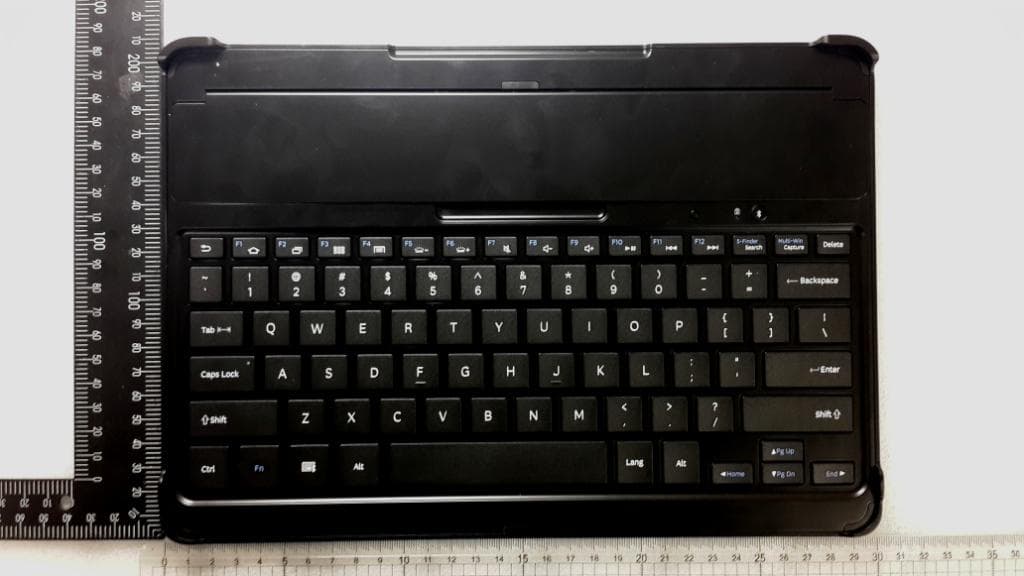
Click to zoom
Application Details
- Equipment Class
- DSS - Part 15 Spread Spectrum Transmitter
- Date of Grant
- Feb 27, 2014
- Application Purpose
- Original Equipment
- Date of Application
- Feb 27, 2014
- Equipment Note
- Book Cover Keyboard
- Frequency Range
- 2402.00000000 - 2480.00000000
- Company
- Samsung Electronics Co Ltd
- Country
- United States
Documents & Files
Document Text
Text extracted from the exhibit documents filed with the FCC. Open a document above to read the original.
Users Manual
Type E. A00272 02/2014. Rev.1.0 www.samsung.com Galaxy Note PRO Bluetooth Keyboard 2 English ...................................................... 3 Français .................................................. 14 Deutsch .................................................. 22 Italiano ................................................... 31 Español................................................... 40 Magyar ................................................... 49 Română .................................................. 58 Български ............................................. 67 Hrvatski .................................................. 76 Srpski ...................................................... 85 Português .............................................. 96 Latviešu ................................................105 Lietuvių kalba .....................................114 Eesti .......................................................123 Nederlands ..........................................132 Svenska ................................................141 Norsk ....................................................150 Suomi ...................................................159 Dansk ....................................................168 Čeština ..................................................177 Ελληνικά ..............................................186 Slovenščina .........................................195 Türkçe ...................................................204 Contents 3 English Copyright © 2014 Samsung Electronics • Please read this manual before using the device to ensure safe and proper use. • Images may differ in appearance from the actual product. Content is subject to change without prior notice. Device layout Notification light Power switch Multipurpose jack Lock button Bluetooth button Slot cover Charging the battery This device has a built-in battery. Before using the device for the first time or when the battery has been unused for extended periods, you must charge the battery. Use only Samsung-approved chargers and cables. Unapproved chargers or cables can cause the battery to explode or damage the device. English 4 After fully charging, disconnect the devic e from the charger. First unplug the charger from the device, and then unplug it from the electric socket. • To save energy, unplug the charger when not in use. The charger does not have a power switch, so you must unplug the charger from the electric socket when not in use to avoid wasting power. The charger should remain close to the electric socket and easily accessible while charging. • The socket-outlet shall be installed near the equipment and shall be easily accessible. Charging time and standard run time (160 mAh) Charging time Approx. 2 hrs Standard run time Approx. 120 hrs Charge the device by connecting it to the computer or the USB power adaptor via the USB cable. • The notification light turns red while the device is being charged. The notification light turns green when charging is complete. 5 English Using a tablet Mounting the tablet Open the Slot cover on the device and place the tablet into the slot. To remove the tablet from device, lift the tablet upwards. Follow the instructions when removing the tablet from the device. Otherwise, the tablet or the device may be damaged. • Charging time is measured after charging with a Samsung-approved charger. • Battery run time is results of tests performed in the manufacturer's laboratory. Standby time was measured at the time of first shipment. • The battery charging time and run time may vary depending on the environment the device is used in. Turning the device on or off Slide the Power switch to ON to turn on the device. ON OFF Slide the Power switch to OFF to turn off the device. 6 To separate the tablet from the device, place your fingers in the indentation at the back-edge of the device. Then, lift the tablet with your fingers while pushing the corner guides at the back of the device. Stowing the tablet Place the tablet with the touch screen facing the device as shown in the image below. 1 Place the lower-edge of the tablet against the corner guides at the back of the device. 2 Align the upper-edge of the tablet with the front of the device and lower it to stack the tablet on the device. 2 2 1 1 7 English Connecting to other devices After turning on the device, you can connect the device to other Bluetooth-enabled devices. The device is connected to a previously connected device automatically. 1 On the connected device, turn on the Bluetooth feature. The connected device searches for Bluetooth devices. 2 From the search results, select the device name. If the device is not on the list, turn on the device and press and hold the Bluetooth button for more than 3 seconds. 3 When requested, enter the passkey on the connected device's screen and press the Enter key. When pairing is complete, the device's name appears in the device list. Keys are not available if the Lock button is pressed. Disconnecting from other devices Use one of the following methods to disconnect a device: • Turn off the device. • Turn off the Bluetooth feature on the connected device. You can connect to another device only after disconnecting a previously connected device. Press and hold the Bluetooth button for more than 3 seconds to connect to another device. 8 Using the keyboard Before using the keyboard, select a display language on the connected device. For more information about language settings, refer to the user manual of the connected device. 12345789106 111213 • The device is compatible with Samsung mobile devices running the Android 4.4 operating system. • Some key functions may vary depending on the connected device's software version. For more information about how to upgrade the device's software, refer to the user manual of the connected device. 9 English No.KeyFunction 1 • Press to return to previous screen. 2 • Press to return to the Home screen. 3 • Press to open…
Text truncated - open the document above for the full version.
Users Manual
5 English Using a tablet Mounting the tablet Open the Slot cover on the device and place the tablet into the slot. To remove the tablet from device, lift the tablet upwards. Follow the instructions when removing the tablet from the device. The slot size is only for Galaxy Note Pro. FCC ID : A3LSMP905V Turning the device on or off Slide the Power switch to ON to turn on the device. ON OFF Slide the Power switch to OFF to turn off the device. 6 To separate the tablet from the device, place your fingers in the indentation at the back-edge of the device. Then, lift the tablet with your fingers while pushing the corner guides at the back of the device. Stowing the tablet Place the tablet with the touch screen facing the device as shown in the image below. 1 Place the lower-edge of the tablet against the corner guides at the back of the device. 2 Align the upper-edge of the tablet with the front of the device and lower it to stack the tablet on the device. 2 2 1 1
Cover Letter(s)
129, Samsung‐Ro, Yeongtong‐Gu, Suwon‐City Gyeonggi‐Do, 443‐742, Korea December 27, 2013 Federal Communications Commission Authorization and Evaluation Division 7435 Oakland Mills Road, Columbia, MD 21046 LETTER OF AUTHORIZATION To whom it may concern: I, the undersigned, hereby authorize Lab Manager Feel. Jeong (or Logan. Lee) and of SGS Korea Co., Ltd. and hereafter referred to as SGS Korea, to act on our behalf in all manners relating to application for equipment authorization, including signing of all documents relating to these matters. Any and all acts carried out by Lab Manager Feel. Jeong (or Logan. Lee) of SGS Korea Co., Ltd. on our behalf shall have the same effect as acts of our own. I, the undersigned, hereby certify that we are not subject to a denial of federal benefits, that includes FCC benefits, pursuant to Section 5301 of the Anti‐Drug Abuse Act of 1988, 21 U.S.C. 853(a). In authorizing SGS Korea as our agent, we still recognize that we are responsible to: a) comply with the relevant provisions of the certification program; b) make all necessary arrangements for the conduct of the evaluation, including provision for examining documentation and access to all areas, records (including internal audit reports) and personnel for the purposes of evaluation (e.g. testing, inspection, assessment, surveillance, reassessment) and resolution of complaints; c) make claims regarding certification only in respect of the scope for which certification has been granted; d) do not use our product certification in such a manner as to bring the Certification Division into disrepute and not make any statement regarding our product certification which the Certification Division may consider misleading or unauthorized; e) upon suspension or cancellation of certification, discontinue use of all advertising matter that contains any reference thereto and return any certification documents as required by the Certification Division; f) use certification only to indicate the products are certified as being in conformity with specified standards; g) endeavor to ensure that no certificate or report nor any part thereof is used in a misleading manner; h) ensure that any reference to our product certification in communication media such as documents, brochures or advertising, complies with the requirements of the Certification Division; 129, Samsung‐Ro, Yeongtong‐Gu, Suwon‐City Gyeonggi‐Do, 443‐742, Korea i) keep a record of all complaints made known to the us relating to the product’s compliance with requirements of the relevant standard and to make these records available to the Certification Division when requested; j) take appropriate action with respect to such complaints and any deficiencies found in products or services that affect compliance with the requirements for certification; k) document the actions taken. This authorization is valid until further written notice from the applicant. Sincerely Yours Sang Kyung (Peter) Ra / General Manager S AMSUNG ELECTRONICS Co., Ltd.
Cover Letter(s)
129, Samsun g‐Ro, Yeongtong‐Gu, Suwon‐City Gyeonggi‐Do, 443‐742, Korea December 27, 2013 Federal Communications Commission Authorization and Evaluation Division 7435 Oakland Mills Road, Columbia, MD 21046 REQUEST OF CONFIDENTIALITY for FCC ID: A3LEE‐CP905 To Whom It May Concern: Pursuant to Sections 0.457 and 0.459 of the Commission’s Rules (CFR 47), and Section 552 (b) (4) of the Freedom of Information Act, Samsung Electronics Co., Ltd. hereby requests confidentiality and treatment of certain information accompanying this application. The materials contain trade secrets and proprietary information not customarily released to the public. The public disclosure of these matters might be harmful to the Applicant and provide unjustified benefits to its competitors. We are also hereby request Short‐Term Confidentiality for 180 days after the grant as outlined in Public Notice DA 04‐1705. This provision will give Samsung Electronics Co., Ltd temporary confidentiality of commercially sensitive information prior to product release. The requested Permanent and Temporary Confidential exhibits are listed as follows: CONFIDENTIAL LIST Permanent 1 Block Diagram 2 Operational Descriptions 3 Schematics Short‐Term 4 External Photos 5 Internal Photos 6 Test‐Setup Photos 7 User Manual The Applicant understands that pursuant to Rule 0.457, disclosure of this application and all accompanying documentations, where applicable, will not be made public before the date of the Grant for this application. Sincerely Yours, Sang Kyung (Peter) Ra / General Manager SAMSUNG ELECTRONICS Co., Ltd.
External Photos
External photos of EUT Front view of EUT Rear view of EUT Top view of EUT Bottom view of EUT Side view of EUT
ID Label/Location Info
Label Drawing, Location EE-CP905 Bottom view of EUT Model: EE-CP905 MADE IN CHINA This device complies with part 15 of the FCC Rules. Operation is subject to the following two conditions: (1) This device may not cause harmful interference, and (2) this device must accept any interference received, including interference that may cause undesired operation. FCC ID: A3LEE-CP905 IC: 649E-EECP905
Internal Photos
Internal photos of EUT Internal view of EUT Top view of main PCB Bottom view of main PCB PCB Antenna Top view of Sub PCB Bottom view of Sub PCB
RF Exposure Info
FCC ID: A3LEE-CP905 1. Standalone SAR test exclusion threshold Per FCC KDB 447498 D01v05, the SAR exclusion threshold for distances < 50 ㎜ is defined by the following equation: Frequency = 2 402 ㎒ Test. Separation Distances = 5 ㎜ Maximum Tune-up Tolerances = 2 ㏈m Bluetooth Mode Calculation value: 2 (㎽) / 5(㎜) x √ 2.402 = 0.62 So, Calculation value ≤ 3.0 Bluetooth Mode Conclusion: Standalone SAR is not required 2. Simultaneous transmission SAR test exclusion threshold 2.1 Estimated SAR Evaluation Analysis When standalone SAR is not required to be measured per FCC KDB 447498 D01v05 4.3.2.2), the following equation must be used to estimate the standalone 1g SAR for simultaneous transmission involving that transmitter. Mode Frequency Maximum Allowed Power Separation Distance Estimated SAR [㎒] [㎽] [㎜] [W/㎏] Bluetooth 2 402 2 5 0.083 2.2 Information of Attached Tablet PC Model No SMP905V FCC ID A3LSMP905V Mode of Operation GPRS/EDGE 850/1900, UMTS 850 / 1900, LTE Band 13 / 4 (AWS), LTE Band 13, 802.11a,b,g,n, Bluetooth Tx Frequency Range 824.20 ㎒ ~ 848.80 ㎒ (GPRS/EDGE 850), 826.40 ㎒ ~ 846.60 ㎒ (UMTS 850), 1 850.20 ㎒ ~ 1 909 ㎒ (GPRS/EDGE 1900), 1 852.4 ㎒ ~ 1 907.6 ㎒ (UMTS 1900), 782 ㎒ (LTE Band 13), 1 712.5 ㎒ ~ 1 752.5 ㎒ (LTE Band 4), 2 412 ㎒ ~ 2 462 ㎒ (WLAN 2.4 GHz), 5 745 ㎒ ~ 5 825 ㎒ (WLAN 5.8 GHz), 5 180 ㎒ ~ 5 240 ㎒ (WLAN 5.2 GHz), 5 260 ㎒ ~ 5 320 ㎒ (WLAN 5.3 GHz), 5 500 ㎒ ~ 5 700 ㎒, (WLAN 5.5 GHz), 2 402.00 ㎒ ~ 2 480.00 ㎒ (Bluetooth) 2.3 Simultaneous Transmission Antenna Separation Distances Attached Tablet PC, FCC ID: A3LSMP905V Keyboard, FCC ID: A3LEE-CP905 2.4 SPLSR Evaluation Analysis Antenna Pair Worst case 1g SAR (W/㎏) Estimated 1g SAR (W/㎏) 1g SAR Sum (W/㎏) Separation Distance (㎜) SPLS Ratio SPLS Ratio Limit Ant "a" Ant "b" a b a + b D a-b (a+b) 1.5 / D a-b ≤ 0.04 1 GPRS/EDGE850 / 1900 B.T 1.6 0.084 1.684 83.3 0.026 UMTS 850 / 1900 1.6 1.684 83.3 0.026 LTE Band 13 / 4 1.6 1.684 83.3 0.026 3 Bluetooth 1.6 1.684 178.7 0.012 WIFI ANT#1(2.4, 5 GHz) 1.6 1.684 178.7 0.012 4 WIFI ANT#2(2.4, 5GHz) 1.6 1.684 179.5 0.012 2.5 Simultaneous Transmission conclusion The above numerical summed SAR results and SPLSR analysis is sufficient to determine that simultaneous transmission cases will not exceed the SAR limit and therefore no measured volumetric simultaneous SAR summation is required per FCC KDB publication 447498 D01 v05. BT ANT Rear of Device 83.3 mm 178.7 mm 179.5 mm Bluetooth ANT
Test Report
Report Number:F690501/RF-RTL007238-2Page :2of49 The results shown in this test report refer only to the sample(s) tested unless otherwise stated. This test report cannot be reproduced, except in full, without prior written permission of the Company. SGS Korea Co., Ltd. (Gunpo Laboratory)18-34, Sanbon-dong, Gunpo-si, Gyeonggi-do, Korea, 435-040 www.ee.sgs.com/korea RTT5041-20(2013.07.27)(1)Tel. +82 31 428 5700 / Fax. +82 31 427 2371 A4(210mmx297mm) INDEX Table of ContentsPage 1. General Information ---------------------------------------------------------------------------------3 2. Transmitter Radiated Spurious Emissions and Conducted Spurious Emission ------7 3. 20㏈Bandwidth and 99 % BW ------------------------------------------------------------------ 23 4. Maximum Peak Output Power -------------------------------------------------------------------29 5. Hopping Channel Separation ---------------------------------------------------------------------31 6. Number of Hopping Frequency ------------------------------------------------------------------33 7. Time of Occupancy(Dwell Time) -----------------------------------------------------------------36 8. Transmitter AC Power Line Conducted Emission -------------------------------------------44 9. Antenna Requirement ------------------------------------------------------------------------------49 Report Number:F690501/RF-RTL007238-2Page :3of49 The results shown in this test report refer only to the sample(s) tested unless otherwise stated. This test report cannot be reproduced, except in full, without prior written permission of the Company. SGS Korea Co., Ltd. (Gunpo Laboratory)18-34, Sanbon-dong, Gunpo-si, Gyeonggi-do, Korea, 435-040 www.ee.sgs.com/korea RTT5041-20(2013.07.27)(1)Tel. +82 31 428 5700 / Fax. +82 31 427 2371 A4(210mmx297mm) 1. General Information 1.1. Testing Laboratory SGS Korea Co., Ltd. (Gunpo Laboratory) - Wireless Div. 3FL, 18-34, Sanbon-dong, Gunpo-si, Gyeonggi-do, Korea 435-040 - 400-2, Gomae-dong, Giheoung-gu, Yongin-si, Gyeonggi-do, Korea, 446-901 All SGS services are rendered in accordance with the applicable SGS conditions of service available on request and accessible athttp://www.sgs.com/en/Terms-and-Conditions.aspx. Telephone:+82 31 428 5700 FAX:+82 31 427 2371 1.2. Details of Applicant Applicant:Samsung Electronics Co., Ltd. Address:129, Samsung-ro, Yeongtong-gu, Suwon-si, Gyeonggi-do, Republic of Korea Contact Person:Cho, Ha-Yeon Phone No.:+82 31 301 5071 1.3. Description of EUT Kind of Product Book Cover Keyboard Model Name EE-CP905 Power Supply DC 3.7 V Frequency Range 2 402㎒~ 2 480㎒(BT) Modulation Technique GFSK Number of Channels 79 channels (BT) Antenna Type Internal Type Antenna Gain -2.16㏈i 1.4. Declaration by the manufacturer - Adaptive Frequency Hopping is supported and use at least 20 channels - The modulation type of this Bluetooth device is only GFSK Report Number:F690501/RF-RTL007238-2Page :4of49 The results shown in this test report refer only to the sample(s) tested unless otherwise stated. This test report cannot be reproduced, except in full, without prior written permission of the Company. SGS Korea Co., Ltd. (Gunpo Laboratory)18-34, Sanbon-dong, Gunpo-si, Gyeonggi-do, Korea, 435-040 www.ee.sgs.com/korea RTT5041-20(2013.07.27)(1)Tel. +82 31 428 5700 / Fax. +82 31 427 2371 A4(210mmx297mm) 1.5. Information about the FHSS characteristics: 1.5.1. Pseudorandom Frequency Hopping Sequence The channel is represented by a pseudo-random hopping sequence hopping through the 79 RF channels. The hopping sequence is unique for the piconet and is determined by the Bluetooth device address of the master; the phase in the hopping sequence is determined by the Bluetooth clock of the master. The channel is divided into time slots where each slot corresponds to an RF hop frequency. Consecutive hops correspond to different RF hop frequencies. The nominal hop rate is 1 600 hops/s. 1.5.2. Equal Hopping Frequency Use All Bluetooth units participating in the piconet are time and hop-synchronized to the channel. 1.5.3. Example of a 79 hopping sequence in data mode: 40, 21, 44, 23, 42, 53, 46, 55, 48, 33, 52, 35, 50, 65, 54, 67, 56, 37, 60, 39, 58, 69, 62, 71, 64, 25, 68, 27, 66, 57, 70, 59, 72, 29, 76, 31, 74, 61, 78, 63, 01, 41, 05, 43, 03, 73, 07, 75, 09, 45, 13, 47, 11, 77, 15, 00, 64, 49, 66, 53, 68, 02, 70, 06, 01, 51, 03, 55, 05, 04 1.5.4. System Receiver Input Bandwidth Each channel bandwidth is 1㎒ 1.5.5. Equipment Description 15.247(a)(1) that the rx input bandwidths shift frequencies in synchronization with the transmitted 15.247(g): In accordance with the Bluetooth Industry Standard, the system is designed to comply with all of the regulations in Section 15.247 when the transmitter is presented with a continuous data (or information) system. 15.247(h): In accordance with the Bluetooth Industry Standard, the system does not coordinate it channels selection/ hopping sequence with other frequency hopping systems for the express purpose of avoiding the simultaneous occupancy of individual hopping frequencies by multiple transmitters. Report Number:F690501/RF-RTL007238-2Page :5of49 The results shown in this test report refer only to the sample(s) tested unless otherwise stated. This test report cannot be reproduced, except in full, without prior written permission of the Company. SGS Korea Co., Ltd. (Gunpo Laboratory)18-34, Sanbon-dong, Gunpo-si, Gyeonggi-do, Korea, 435-040 www.ee.sgs.com/korea RTT5041-20(2013.07.27)(1)Tel. +82 31 428 5700 / Fax. +82 31 427 2371 A4(210mmx297mm) 1.6. Test Equipment List EquipmentManufacturerModelS/NCal DateCal IntervalCal Due. Signal GeneratorR&S SMR40100540 Jan. 08, 2013AnnualJan. 08, 2014 Spectrum Analyzer AgilentN9030AMY53120526Jul. 30, 2013AnnualJul. 30, 2014 Bluetooth TesterTESCOMTC-3000C3000C000296Jul. 02, 2013AnnualJul. 02, 2014 Directional Coupler KRYTAR152613127445Jul. 02, 2013AnnualJul. 02, 2014 High Pass FilterWainwright WHK3.0/18G-6SS 4 Jul. 02, 2013AnnualJul. 02, 20…
Text truncated - open the document above for the full version.
Test Setup Photos
Test setup photos of EUT A. Photo of Radiated Spurious Emission Test (Below 1GHz) B. Photo of Radiated Spurious Emission Test (Above 1GHz) C. Photo of Transmitter AC Power Line Conducted Emission Test
Contact Information
Applicant
Jenni Chun(General Manager)
Test Firm
SGS Korea Co., LtdHwang Gihee
Technical Specifications
| # | Rule Parts | Frequency Range | Power Output |
|---|---|---|---|
| 1 | 15C | 2.40 GHz - 2.48 GHz | 1.00 mW |
Other Applications from Samsung Electronics Co Ltd
A3LSMS741B
Aug 05, 2026Portable Handset
Equipment Class
6VL - 15E 6 GHZ Very Low Power DeviceA3LSMX940
Jul 31, 2026BT,BLE Tablet DTS,UNII a,b,g,n,ac,ax,be and digitizer
Equipment Class
DTS - Digital Transmission SystemA3LSMS741U
Jul 30, 2026Portable Handset
Equipment Class
6CD - 15E 6 GHz Low Power Dual ClientA3LSMX840
Jul 27, 2026BT,BLE Tablet DTS,UNII a,b,g,n,ac,ax and Digitizer
Equipment Class
DSS - Part 15 Spread Spectrum TransmitterA3LSMX848U
Jul 27, 2026WCDMA, LTE, 5G NR Tablet BT,BLE, DTS,UNII a b g n ac ax and Digitizer
Equipment Class
JBP - Part 15 Class B Computing Device Peripheral