A3LKT35MPBLaser Beam Printer
Samsung Electronics Co Ltd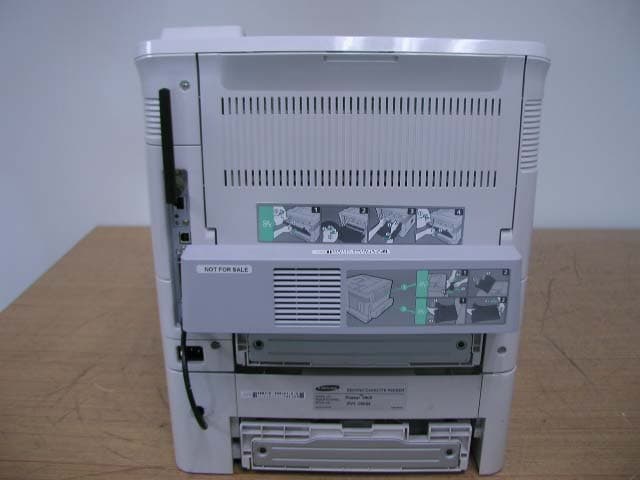
Click to zoom
Application Details
- Equipment Class
- JBP - Part 15 Class B Computing Device Peripheral
- Date of Grant
- May 24, 2005
- Application Purpose
- Original Equipment
- Date of Application
- May 24, 2005
- Equipment Note
- Laser Beam Printer
- Company
- Samsung Electronics Co Ltd
- Country
- United States
Documents & Files
Document Text
Text extracted from the exhibit documents filed with the FCC. Open a document above to read the original.
Users Manual
This manual is provided for information purposes only. All information included herein is subject to change without notice. Samsung Electronics is not responsible for any changes, direct or indirect, arising from or related to use of this manual. © 2005 Samsung Electronics Co., Ltd. All rights reserved. • ML-3560, ML-3561N, ML-3561ND, ML-3562W, and Samsung logo are trademarks of Samsung Electronics Co., Ltd. • Centronics is a trademark of Centronics Data Computer Corporation. • IBM and IBM PC are trademarks of International Business Machines Corporation. • PCL and PCL 6 are trademarks of Hewlett-Packard company. • Microsoft, Windows, Windows 9x, Windows Me, Windows 2000, Windows NT 4.0, and Windows XP are registered trademarks of Microsoft Corporation. • PostScript 3 is a trademark of Adobe System, Inc. • UFST® and MicroType™ are registered trademarks of Agfa division of Bayer Corp. • TrueType, LaserWriter, and Macintosh are trademarks of Apple Computer, Inc. • All other brand or product names are trademarks of their respective companies or organizations. ii 1. Introduction Special Features .................................................................................................................... 1.1 Printer Features ............................................................................................................... 1.2 Printer Components ................................................................................................................ 1.3 Front View ....................................................................................................................... 1.3 Rear View ........................................................................................................................ 1.3 2. Setting Up Your Printer Unpacking ............................................................................................................................. 2.1 Selecting a Location .......................................................................................................... 2.2 Installing the Toner Cartridge .................................................................................................. 2.2 Loading Paper ....................................................................................................................... 2.4 Changing the Size of the Paper in the Paper Tray .................................................................. 2.5 Connecting a Printer Cable ...................................................................................................... 2.6 For Local Printing .............................................................................................................. 2.6 For Network Printing ......................................................................................................... 2.6 Turning the Printer On ............................................................................................................ 2.7 Printing a Demo Page ............................................................................................................. 2.7 Changing the Display Language ............................................................................................... 2.8 Using the Toner Save Mode ..................................................................................................... 2.8 Using the Control Panel Button ........................................................................................... 2.8 Using the Control Panel Menu ............................................................................................. 2.8 From the Software Application ............................................................................................ 2.8 Installing Printer Software ....................................................................................................... 2.8 3. Using the Control Panel Understanding the Control Panel .............................................................................................. 3.1 Display ............................................................................................................................ 3.1 Buttons ........................................................................................................................... 3.2 Using Control Panel Menus ...................................................................................................... 3.3 Accessing Control Panel Menus ........................................................................................... 3.3 Overview of Control Panel Menus ........................................................................................ 3.3 Information Menu ............................................................................................................. 3.4 Paper Menu ..................................................................................................................... 3.4 Layout Menu .................................................................................................................... 3.5 Graphics Menu ................................................................................................................. 3.6 Printer Menu .................................................................................................................... 3.7 Setup Menu ..................................................................................................................... 3.7 PCL Menu ........................................................................................................................ 3.8 PostScript Menu ............................................................................................................... 3.9 EPSON/IBM Menu ............................................................................................................. 3.9 Network Menu .........................................................................…
Text truncated - open the document above for the full version.
Block Diagram
ٛ 료코드: 개정차수: 자료구코드: 대외비 ELECTRONICS 삼성전자 주식회사 기술자산으로서 기술자료 관리부서의 허가없이 복사 및 활용을 금합니다. 규격서(1) 관련도번(REF NR) 최초등록일자 PAGE 1 ■ Kestrel(ML-3560/3561N/3562W) H/W Block Diagram IEEE1284/USB 2.0 +24VS MAIN COVER S/W 4P SENSOR AC 110V / 220V HVPS SMPS P_DUPLEX SENSOR THV SUPPLY DEV MHV OPC GND +3.3V/ +5V/+24V INLET & POWER S/W TONER CARRIDGE 10K Contact to CRUM CART P.SIZE P_SIZE 1P_SIZE 2P_SIZE 3 JOINT MAIN SOL. REGI SOL. MP SOL. MP SEN. CASSETTE DET. 2P3P2P3P 8P LSU MAIN MOT. DEV MOT. REGI SEN. PTL DUPLEX SOL. 18P 9P4P2P2P LCD(16x2) BACK-LIGHT HT48C50 LCD/LED DRIVER KEY SCAN SENSOR DRIVER PANEL 16P 6P MAIN FAN SMPS FAN OUT_FULL SENSOR TEMP_2 3P 3P 2P 3P 4P FUSER Contorl FUSER /THERM. 3P +24VF FUSER COVER S/W 2P 16P SENSOR MOTOR CLUTCH SCF JUPITER 4e A3977SLP DUPLEX FAN MOTOR JUPITER 4e A3977SLP HDD I/F NPC & WNPC HDD HARD DISK 10Gbyte 28P 4P 3P SPGPv3 ARM1020E I-CACHE(32K)D-CACHE(32K) PLL MAIN MHz PCI MHzPVC MHz SDRAMC / ROMC DMAC NAND FlashController MAC I2C Controller Codec(HCT/JBIG) PCI Controller HPVC Engine Controller UART PPI(P1284) MAIN UNICON2 DEV MOTOR DRIVER (A3977SLP) CRYSTAL OSC 12MHz CRYSTAL OSC 12MHz RESET XC61FN3112FN NAND Flash K9F5616UOC (256M x 16bit) EEPROM M24C32W SDRAM K4S281632*2 (128M x 16bit) SDRAM DIMM (Option max 256MB) LSU LD CTL. (DUAL BEAM) MAIN MOTOR DRIVER (BLDC) 60P 80P
External Photos
1. External Pictures 1) Front View 2) Rear View 3) Side View 1 4) Side View 2
ID Label/Location Info
21 of 21 Samsung EMC Testing and Certification Laboratory Project No: LBE050996 This report shall not be reproduced except in full, without the written approval of SEC EMC Testing laboratory. Picture 7. EUT (Rear) & Label Location Picture 8. Label of Samsung Electronics Co., Ltd. (KT35MPB) Picture 9. Label of Xerox (Phaser 3500)
Internal Photos
2. Print Board Assembled(PBA) Pictures 1) Top View of Main Controller 2) Bottom View of Main Controller 3) Top View of SMPS 4) Bottom View of SMPS 5)TopViewofDuplexB'd 6) Bottom View of Duplex B'd 7) Top View of SCF B'd 8) Bottom View of SCF B'd 9) Top View of NPC B'd 10) Bottom View of NPC B'd 11) Top View of OPE B'd 12) Bottom View of OPE B'd 13) Top View of RAM B'd 14) Bottom View of RAM B'd 15) Top View of Hard disk connection B'd 16) Bottom View of Hard disk connection B'd 17) Top View of WLAN B'd 18) Bottom View of WLAN B'd 19)ViewofWLAN+AntennaB'd
Test Report
1 of 21 Samsung EMC Testing and Certification Laboratory Project No: LBE050996 This report shall not be reproduced except in full, without the written approval of SEC EMC Testing laboratory. EMC Test Report According to FCC Part 15 Subpart B Project No. LBE050996 Equipment under Test Applicant Samsung Electronics Co., Ltd. 416 Maetan 3-Dong, Yeongtong-Gu, Suwon-Si, Gyeonggi-Do, Korea, 443-742 FCC ID A3LKT35MPB Product Name Laser Beam Printer Model Name KT35MPB Manufacturer Samsung Electronics Co., Ltd. 259, Gongdan-Dong, Gumi-City, Gyongsandbuk-Do, 730-030 KOREA Date of Test May 6, 2005 ~ May 16, 2005 Issued Date May 16, 2005 Name/Position Signature Tested by Kyeong Dong, Kim Test Engineer Reviewed by No Cheon, Park Manager of EMC Lab. Authorized by Seung Kyu, Cha Chief of EMC Lab. 1. This test reports does not constitute an endorsement by NIST/NVLAP or U.S Government. 2. This test report is to certify that the tested device properly complies with the requirements of FCC Rules and Regulations Part 15 Subpart B Unintentional Radiators. All tests necessary to show compliance to the requirements were and these results met the specifications requirement. This laboratory is registered by the NIST/NVLAP, U.S.A. The test reported herein have been performed in accordance with its terms of registration. 3. FCC filing Registration Number : 873282 NVLAP LAB CODE 200623-0 2 of 21 Samsung EMC Testing and Certification Laboratory Project No: LBE050996 This report shall not be reproduced except in full, without the written approval of SEC EMC Testing laboratory. Table of Contents 1. General Information 1.1 Basic Information related Product 1.2 Detail Information related Product 1.3 Operating mode and condition 1.4 Test System Details 1.5 Equipment Modifications 1.6 Test Procedure 1.7 Test Configuration 1.8 Applied Standard 1.9 Test Facility 2. Summary of Test Results 3. Description of individual tests 3.1 Conducted Emission 3.2 Radiated Emission 4. Appendix 4.1 Test Photography 4.2 EUT Photography 3 of 21 Samsung EMC Testing and Certification Laboratory Project No: LBE050996 This report shall not be reproduced except in full, without the written approval of SEC EMC Testing laboratory. 1. General Information 1.1 Basic Information related Product Applicant Samsung Electronics Co., Ltd. Model name KT35MPB Applicant Address 416 Maetan 3-Dong, Yeongtong-Gu, Suwon-Si, Gyeonggi-Do, Korea, 443-742 Contact Person Kyeong Dong, Kim Kind of product Laser Beam Printer Variant list Phaser 3500 (Brand : Xerox) Manufacturer Samsung Electronics Co., Ltd. 259, Gongdan-Dong, Gumi-City, Gyongsandbuk-Do, 730-030 KOREA New / Alternative / Permissive change Information New 4 of 21 Samsung EMC Testing and Certification Laboratory Project No: LBE050996 This report shall not be reproduced except in full, without the written approval of SEC EMC Testing laboratory. 1.2 Detail Information related Product Specification Item Specification Remark Consumables 1-piece toner cartridge system - Power consumption Sleep mode : 11.7W Printing(Average) : 600W - Warm-up Time 30 seconds or less - Toner Cartridge Life 12,000 pages (for starter, 6,000 pages) @ ISO 19752(LSA 5% Coverage) - Power requirements 110~127 VAC, 50/60Hz, 6.5A - Set Dimension(W x D x H) 396 x 453 x 348 mm - Weight Net : 17.5 Kg With Toner cartridge Gross : 21 Kg Printing method Laser Beam Printing - Printing speed 33 PPM (A4), 35 PPM (Letter) Duplex : 18 IPM (A4), 19 IPM(Letter) Print resolution 1200 x 1200 dpi effective output Emulation PCL6 Compatible, PostScript 3, IBM ProPrinter, EPSON Interfaces USB 2.0 Compliant IEEE1284 Bidirectional Parallel Standard Ethernet 10/100 Base TX 802.11a/b/g Wireless LAN Memory 32MB Standard(Max. 288MB) 32, 64, 128, or 256 MB optional memory available (Only the Samsung-approved DIMM) First printing time 10 seconds or less Options Ethernet 10/100 Base TX Ethernet 10/100 Base TX + 802.11b Wireless LAN Duplex Unit Hard Disk 500 sheet Cassette Tray 5 of 21 Samsung EMC Testing and Certification Laboratory Project No: LBE050996 This report shall not be reproduced except in full, without the written approval of SEC EMC Testing laboratory. Operating Frequency A. Main clock : 12MHz B. Video input clock : 12MHz C. SDRAM Clock : 100MHz D. PCI Clock : 33 MHz E. SDRAM Clock(inside N/W card) : 133 MHz F. Pi chip main Clock(inside N/W card) : 25MHz G. USB clock : 12MHz H. Jupiter4e main clock(inside Duplex/SCF board) : 12MHz I. SDRAM clock(inside Duplex/SCF board) : 36MHz 1.3 Operating Mode and Condition The system was configured for testing in typical fashion use. Cable were attached to each of the available I/O port. Where applicable, peripherals were attached to the I/O cables. This EUT is supporting the USB, IEEE1284 and Network(LAN), WLAN printing. In each test mode, finally we found worst case emission that is above configuration with the Worst case components(in the above table). So, the data of the maximum EUT operation, USB printing(duplex mode) was reported. 1.4 Test System Details Refer to 1.2 1.5 Equipment Modifications No equipment modifications were required. 6 of 21 Samsung EMC Testing and Certification Laboratory Project No: LBE050996 This report shall not be reproduced except in full, without the written approval of SEC EMC Testing laboratory. 1.6 Test Procedure 1.6.1 Conducted Emission The EUT was placed on a platform nominal size, 1m by 1.5m, raised 80cm above the conducting ground plane. The rear of tabletop was located 40cm to the vertical conducting ground plane. The rear of EUT, including peripherals was aligned and flush with rear of tabletop. All other surfaces of tabletop was at least 80cm from any other grounded conducing surface. I/O cables and AC cables that were connected to the peripherals were bundled in center. They were folded back and forth forming a bindle 30cm to 40cm long and were handed at a 40cm height to the ground plane. Each EUT current-carrying power lead, except the ground(safety)lead, were individually con…
Text truncated - open the document above for the full version.
Test Setup Photos
18 of 21 Samsung EMC Testing and Certification Laboratory Project No: LBE050996 This report shall not be reproduced except in full, without the written approval of SEC EMC Testing laboratory. 4. Appendix 4.1 Test Photography Picture 1. Conducted Emission (Front) Picture 2. Conducted Emission (Rear) 19 of 21 Samsung EMC Testing and Certification Laboratory Project No: LBE050996 This report shall not be reproduced except in full, without the written approval of SEC EMC Testing laboratory. Picture 3. Radiated Emission (Front) Picture 4. Radiated Emission (Rear)
Contact Information
Applicant
Jenni Chun(General Manager)
Technical Contact
PCTEST Engineering Lab., Inc.Randy Ortanez
[email protected]410-290-6652
6660-B Dobbin Road · Columbia, Maryland · United States
Test Firm
Samsung Electronics Co., Ltd.John Lee
Technical Specifications
| # | Rule Parts | Frequency Range | Power Output |
|---|---|---|---|
| 1 | 15B | - | - |
Other Applications from Samsung Electronics Co Ltd
A3LSMS741B
Aug 05, 2026Portable Handset
Equipment Class
6VL - 15E 6 GHZ Very Low Power DeviceA3LSMX940
Jul 31, 2026BT,BLE Tablet DTS,UNII a,b,g,n,ac,ax,be and digitizer
Equipment Class
DTS - Digital Transmission SystemA3LSMS741U
Jul 30, 2026Portable Handset
Equipment Class
6CD - 15E 6 GHz Low Power Dual ClientA3LSMX840
Jul 27, 2026BT,BLE Tablet DTS,UNII a,b,g,n,ac,ax and Digitizer
Equipment Class
DSS - Part 15 Spread Spectrum TransmitterA3LSMX848U
Jul 27, 2026WCDMA, LTE, 5G NR Tablet BT,BLE, DTS,UNII a b g n ac ax and Digitizer
Equipment Class
JBP - Part 15 Class B Computing Device Peripheral