A3LML1640Laser Printer
Samsung Electronics Co Ltd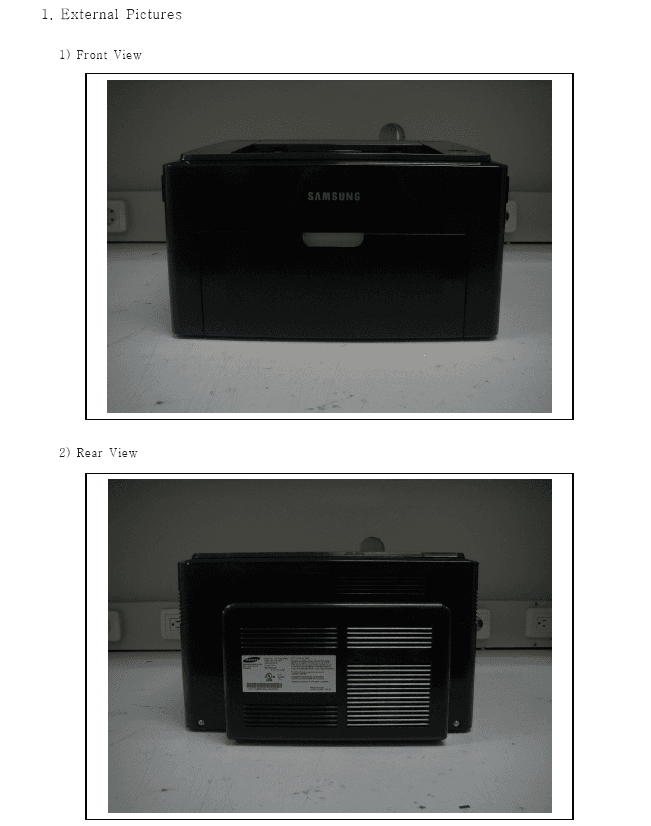
Click to zoom
Application Details
- Equipment Class
- JBP - Part 15 Class B Computing Device Peripheral
- Date of Grant
- Jan 17, 2008
- Application Purpose
- Original Equipment
- Date of Application
- Jan 17, 2008
- Equipment Note
- Laser Printer
- Company
- Samsung Electronics Co Ltd
- Country
- United States
Documents & Files
Document Text
Text extracted from the exhibit documents filed with the FCC. Open a document above to read the original.
Users Manual
ML-1640 Series ML-2240 Series Mono Laser Printer User’s Guide imagine the possibilities Thank you for purchasing a Samsung product. To receive a more complete service, please register your product at www.samsung.com/global/register 2_Features of your new laser product features of your new laser product Your new machine is equipped with a number of special features that improve the quality of the documents you print. With the machine, you can: Print with excellent quality and speed •You can print with a resolution of up to 1200*600 dpi. •Your machine prints A4-sized paper at up to 16 ppm,(ML- 1640 series), 22 ppm (ML-2240 series) and lettersized paper at up to 17ppm (ML-1640 series), 23ppm(ML-2240 series). Handle many different types of printable material •The 150-sheet tray supports plain paper in various sizes, letterhead, envelopes, labels, custom-sized media, postcards, and heavy paper. Create professional documents •Print watermarks. You can customize your documents with words, such as “Confidential”. See Software section. •Print posters. The text and pictures of each page of your document are magnified and printed across the sheet of paper and can then be taped together to form a poster. See Software section. •You can use preprinted forms and letterhead with plain paper. See Software section. Save time and money •To save paper, you can print multiple pages on one single sheet of paper. •This machine automatically conserves electricity by substantially reducing power consumption when not in use. . Print in various environments •You can print with Windows 2000 and Windows XP/2003/ Vista as well as Linux and Macintosh systems. •Your machine is equipped with a USB interface. SPECIAL FEATURES Features of your new laser product_3 FEATURES BY MODELS The machine is designed to support all of your document needs. Basic features of this machine include; ( : Included) ABOUT THIS USER’S GUIDE This user’s guide provides information about basic understanding of the machine as well as detailed explanation on each step during the actual usage. Both novice users and professional users can refer to this guide for installing and using the machine. Some terms in this guide are used interchangeably, as below: •Document is synonymous with original. •Paper is synonymous with media, or print media. •The explanation in this user guide is mainly based on ML-2240 Series. Some illustrations might be different for ML-1640 Series. Following table offers the conventions of this guide: FEATURESML-1640ML-2240 USB 2.0 Full speed Duplex (2-sided) printing (Manual) CONVENTIONDESCRIPTIONEXAMPLE BoldUsed for texts on the display or actual prints on the machine.Start Note Used to provide additional information or detailed specification of the machine function and feature. The date format may differ from country to country CautionUsed to give users information to protect the machine from possible mechanical damage or malfunction. Do not touch the green underside of the toner cartridge. FootnoteUsed to provide more detailed information on certain words or a phrase. a. pages per minute (See page 1 for more information) Used to guide users to the reference page for the additional detailed information. (See page 1 for more information) 4_Features of your new laser product FINDING MORE INFORMATION You can find information for setting up and using your machine from the following resources, either as a print-out or onscreen. Quick Install GuideProvides information on setting up your machine and this requires that you follow the instructions in the guide to prepare the machine. Online User’s GuideProvides you with step-by-step instructions for using your machine’s full features, and contains information for maintaining your machine, troubleshooting, and installing accessories. This user’s guide also contains a Software section to provide you with information on how to print documents with your machine in various operating systems, and how to use the included software utilities. You can access the user’s guide in other languages from the Manual folder on the printer software CD. Printer Driver HelpProvides you with help information on printer driver properties and instructions for setting up the properties for printing. To access a printer driver help screen, click Help from the printer properties dialog box. Samsung websiteIf you have Internet access, you can get help, support, printer drivers, manuals, and order information from the Samsung website, www.samsungprinter.com . Safety information_5 safety information IMPORTANT SAFETY SYMBOLS AND PRECAUTIONS What the icons and signs in this user’s guide mean: These warning signs are here to prevent injury to you and others. Follow them explicitly. After reading this section, keep it in a safe place for future reference. WARNING Hazards or unsafe practices that may result in severe personal injury or death. CAUTION Hazards or unsafe practices that may result in minor personal injury or property damage. CAUTION To reduce the risk of fire, explosion, electric shock, or personal injury when using your laser MFP, follow these basic safety precautions: Do NOT attempt. Do NOT disassemble. Do NOT touch. Follow directions explicitly. Unplug the power plug from the wall socket. Make sure the MFP is grounded to prevent electric shock. Call the service center for help. 1.Read and understand all instructions. 2.Use common sense whenever operating electrical appliances. 3.Follow all warnings and instructions marked on the machine and in the literature accompanying the machine. 4.If an operating instruction appears to conflict with safety information, heed the safety information. You may have misunderstood the operating instruction. If you cannot resolve the conflict, contact your sales or service representative for assistance. 5.Unplug the machine from the AC wall socket before cleaning. Do not use liquid or aerosol cleaners. Use only a damp cloth for cleaning. 6.Do not place the machine on an uns…
Text truncated - open the document above for the full version.
Block Diagram
Block / Connection Diagram_Peacock16 Main S/W INLET 24VS2 5V DGND DGND nP_FEED Fuser_On 24VS1 24VS1 24V Feed_Sensor 24VS1 24V SMPS 24VS2 5V DGND DGND nP_FEED Fuser_On 24VS1 24VS1 24V SOL 24VS2 PickUp_Sol MT OUT1AOUT1BOUT2AOUT2B a1 1 a2 2 3 a3 4 a4 b1 b2 b3 b4 5 6 7 8 DGND HYPER_RXD HYPER_TXD 3.3V 5V DCU_DATA DCU_CLK DGND PICK_UP_CLT MAIN_MOTOR HYPER DCU CRUM_DATA N.C CRUM_CLK DGND 3.3V Jupiter4e S-CRUM FAN THERMISTOR_IN N.C DGND THERMISTOR MICRO S/W 5V N.C LSU_5V HVPS nTHV_EN DGND 24VS224VS224VS1 nP_EXIT 3.3V 5V nKEY_IN BIAS_PWM nFUSER_FAN MHV_PWM THV_READ THV_PWM nP_EMPTY N.C nLED_TONER 24VS1 nLED_READY nLED_ERROR nTHV_EN DGND 24VS224VS224VS1 nP_EXIT 3.3V 5V nKEY_IN BIAS_PWM nFUSER_FAN MHV_PWM THV_READ THV_PWM nP_EMPTY N.C 24VS1 nLED_READY nLED_ERROR nLED_TONER FAN_Vcc GND Ready Error Toner THV OPC DEV MHV SUP LSU LSU_CLK 24VS2 nHSYNC LSU_5V DGND DAC_OUT nPMOTOR GND nLREADY VDO LSU_READ LSU_CLK 24VS2 nHSYNC LSU_5V DGND DAC_OUT nPMOTOR GND nLREADY VDO LSU_READ C M D- D+ GND GND VBUS GND USB SDRAM 8MB 12MHz a1 1 a2 2 3 a3 4 a4 b1 b2 b3 b4 5 6 7 8 Vcc1 0 GND 0 A3983 DC CY25811 3.3V Reg DC 1.8V Reg Peacock Hardware Team Digital Priting Div. Samsung Electronics Oct.24.2007
ID Label/Location Info
Project No. : LBE073636 Printer : ML-1640 - 23/23- This report must not be reproduced, except in full, without written permission from SEC EMC Laboratory. Label Location Label
Operational Description
Project No. : LBE073636 Printer : ML-1640 - 7/23- This report must not be reproduced, except in full, without written permission from SEC EMC Laboratory. 3.5 EUT Description The following features describe EUT represented by this report: Item Specification Remarks Processor Jupiter4e(ARM940T, 150MHz) - Standard System memory 8MB SDRAM - Resolution 1200x600dpi - Copy Quality mode NA - Paper Handling Paper Tray(standard) 150 Sheets 2nd Tray(optional) : NA Bypass Tray : NA - Power Rating 110~127 VAC, 4.0A, 50/60 Hz - Power Consumption Power save mode : 6Watts Printing simplex : 300Watts - Printer Language SPL - Interfaces USB1.1 (Compatible with USB2..0) - OS compatibility Windows 2000 / XP / 2003 / Vista Linux Mac OS 8.6~9.2, 10.1~10.4 - Modes of Operation USB Printing - Intended Class for Emissions Class B -
Test Report
-1/23- E E E M M M C C C T T T E E E S S S T T T R R R E E E P P P O O O R R R T T T Project No. LBE073636 Revision No. None Name of organization Samsung Electronics Co., Ltd. Address 416 Maetan 3-Dong, Yeongtong-Gu, Suwon-Si, Gyeonggi-Do 443-742 Korea Applicant Date of application 2007.11.23 Type of device Class B personal computers and peripherals Equipment authorization Declaration of Conformity Certification Verification FCC ID A3LML1640 Kind of product Printer ML-1640 Model No. Variant Model No. - EUT Equipment Under Test Manufacturer Samsung Electronics (Shandong) Digital Printing Co., Ltd. 264209, Samsung Road, Weihai Hi-Tech. IDZ, Shandong Province, P.R.China Applied Standards FCC Part 15, Subpart B / ANSI C63.4-2003 Issue date 2007.12.11 Test result : Complied The equipment under test has found to be compliant with the applied standards. (Refer to the attached test result for more detail.) Tested by : Young Ju, Ryu Reviewed by : No Cheon, Park This report is the test result about the sphere accredited by KOLAS which signed the Mutual Recognition Arrangement of International Laboratory Accreditation Cooperation. The test results in this report only apply to the tested sample. This report must not be reproduced, except in full, without written permission from SEC EMC Laboratory. SEC EMC Laboratory 416 Maetan 3-Dong, Yeongtong-Gu, Suwon-Si, Gyeonggi-Do, 443-742 Korea Tel: 82 31 277 7752, Fax: 82 31 277 7753 Project No. : LBE073636 Printer : ML-1640 - 2/23- This report must not be reproduced, except in full, without written permission from SEC EMC Laboratory. Table of contents 1. Summary of test results 1.1 Emission 2. General Information 2.1 Test facility 2.2 Accreditation and listing 3. Test configuration 3.1 Test Peripherals 3.2 EUT operating mode 3.3 Details of Sampling 3.4 Used cable description 3.5 EUT Description 3.6 Clock Frequencies 3.7 Operating mode condition 3.8 Measurement uncertainty 4. Result of individual tests 4.1 Conducted disturbance 4.2 Radiated disturbance Appendix – EUT photography Project No. : LBE073636 Printer : ML-1640 - 3/23- This report must not be reproduced, except in full, without written permission from SEC EMC Laboratory. 1. Summary of test results 1.1 Emission The EUT has been tested according to the following specifications: Applied Test type Applied standardResult Remarks Conducted Disturbance Complied Meets Class B Limit Minimum margin is 5.8 dB at 4.668 MHz Radiated Disturbance FCC Part 15 Subpart B Complied Meets Class B Limit Minimum margin is 5.7 dB at 31.393 MHz 2. General Information 2.1 Test facility The SEC EMC Laboratory is located on Samsung Electronics Co., Ltd. at 416 Maetan 3-Dong, Yeongtong-Gu, Suwon-Si, Gyeonggi-Do, South Korea. All testing are performed in Semi-anechoic chambers conforming to the site attenuation Characteristics defined by ANSI C63.4, CISPR 22, 16-1 and 16-2. and Shielded rooms. The SEC EMC Laboratory is operated as testing laboratory in accordance with the requirements of ISO/IEC 17025:2005. Project No. : LBE073636 Printer : ML-1640 - 4/23- This report must not be reproduced, except in full, without written permission from SEC EMC Laboratory. 2.2 Accreditation and listing Laboratory Qualifications Remarks KOLAS(Korea Laboratory Accreditation Scheme) Accredited : 124 Radio Research Laboratory Accredited : KR0004 FCC(Federal Communications Commission) Accredited : KR0004 National Voluntary Laboratory Accreditation Program Lab Code: 200623-0 Norges Elektriske Materiellkontroll Accredited : ELA 195 VCCI (Voluntary Control Council for Interference by Information Technology Equipment) C-2421,R-2224 China Quality Certification Center 5-053, 5-054 TUV Rhineland H9354285 GOST(GOSTSTANDART) ROSTEST Elektrotechnicky Zkusebni Ustav Reg. No.: 001 IC(Industry Canada) Assigned Code: 5871 Project No. : LBE073636 Printer : ML-1640 - 5/23- This report must not be reproduced, except in full, without written permission from SEC EMC Laboratory. 3. Test Setup configuration 3.1 Test Peripherals The following is a listing of the EUT and peripherals utilized during the performance of EMC test: Description Model No. Serial No. Manufacturer FCC ID Printer ML-1640 - Samsung A3LML1640 Note PC NP-Q20 KRBA5901278A00C F43M00MH Samsung A3LNPQ20 AC Adapter AD-4212A CNBA44XXXXXXSE 3831L0241 Dongguan Samsung Electro-Mechanics - USB Mouse M-UAE96 LZK61923406 Logitech DoC Earphone - - COSY - 3.2 EUT operating mode To achieve compliance applied standard specification, the following mode(s) were made during compliance testing: Operating Mode 1 USB Printing Operating Mode 2 Standby 3.3 Details of Sampling Customer selected, single unit. Project No. : LBE073636 Printer : ML-1640 - 6/23- This report must not be reproduced, except in full, without written permission from SEC EMC Laboratory. 3.4 Used cable description The EUT is configured, installed, arranged and operated in a manner consistent with typical applications. Interface cables/loads/devices are connected to at least one of each type of interface port of the EUT, and where practical, each cable shall be terminated in a device typical of actual usage. The type(s) of interconnecting cables to be used and the interface port (of the EUT) to which these were connected; Connected cable Length [m] Shielded [Y/N] Note Power 1.8 No - USB 1.8 Yes From PC to EUT From PC to Mouse Audio 1.0 No From earphone to PC Project No. : LBE073636 Printer : ML-1640 - 7/23- This report must not be reproduced, except in full, without written permission from SEC EMC Laboratory. 3.5 EUT Description The following features describe EUT represented by this report: Item Specification Remarks Processor Jupiter4e(ARM940T, 150MHz) - Standard System memory 8MB SDRAM - Resolution 1200x600dpi - Copy Quality mode NA - Paper Handling Paper Tray(standard) 150 Sheets 2nd Tray(optional) : NA Bypass Tray : NA - Power Rating 110~127 VAC, 4.0A, 50/60 Hz - Power Consumption Power save mode : 6Watts Printing simplex : 300Watts - Printer Langua…
Text truncated - open the document above for the full version.
Test Setup Photos
Project No. : LBE073636 Printer : ML-1640 - 12/23- This report must not be reproduced, except in full, without written permission from SEC EMC Laboratory. 4.1.2 Photograph of the test Configuration (Front) (Rear) Project No. : LBE073636 Printer : ML-1640 - 18/23- This report must not be reproduced, except in full, without written permission from SEC EMC Laboratory. 4.2.2 Photograph of the test Configuration (Front) (Rear)
Contact Information
Applicant
Jenni Chun(General Manager)
Technical Contact
PCTEST Engineering Lab., Inc.Randy Ortanez
[email protected]410-290-6652
6660-B Dobbin Road · Columbia, Maryland · United States
Test Firm
Samsung Electronics Co., Ltd. Global CS CenterPark No cheon
Technical Specifications
| # | Rule Parts | Frequency Range | Power Output |
|---|---|---|---|
| 1 | 15B | - | - |
Other Applications from Samsung Electronics Co Ltd
A3LSMS741B
Aug 05, 2026Portable Handset
Equipment Class
6VL - 15E 6 GHZ Very Low Power DeviceA3LSMX940
Jul 31, 2026BT,BLE Tablet DTS,UNII a,b,g,n,ac,ax,be and digitizer
Equipment Class
DTS - Digital Transmission SystemA3LSMS741U
Jul 30, 2026Portable Handset
Equipment Class
6CD - 15E 6 GHz Low Power Dual ClientA3LSMX840
Jul 27, 2026BT,BLE Tablet DTS,UNII a,b,g,n,ac,ax and Digitizer
Equipment Class
DSS - Part 15 Spread Spectrum TransmitterA3LSMX848U
Jul 27, 2026WCDMA, LTE, 5G NR Tablet BT,BLE, DTS,UNII a b g n ac ax and Digitizer
Equipment Class
JBP - Part 15 Class B Computing Device Peripheral