A3LML1865WLaser Printer
Samsung Electronics Co Ltd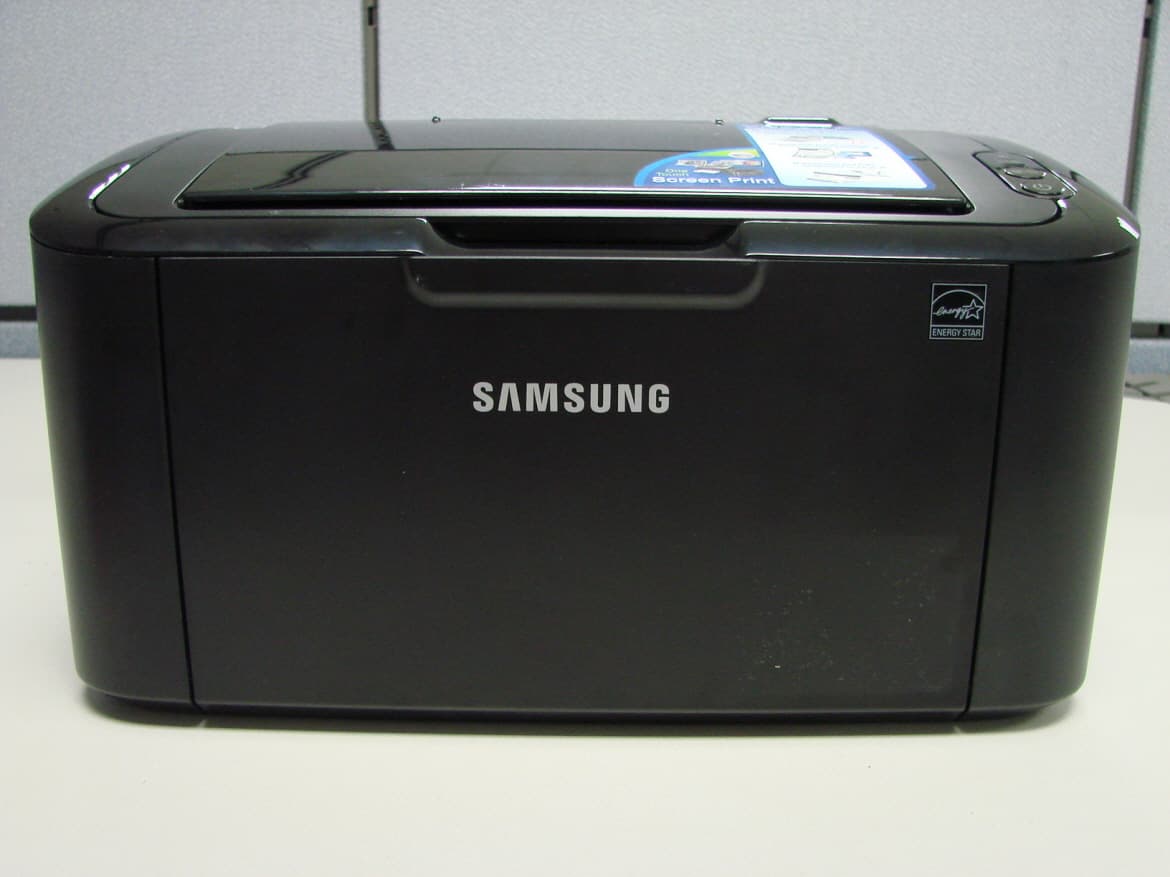
Click to zoom
Application Details
- Equipment Class
- JBP - Part 15 Class B Computing Device Peripheral
- Date of Grant
- Aug 03, 2010
- Application Purpose
- Original Equipment
- Date of Application
- Aug 03, 2010
- Equipment Note
- Laser Printer
- Company
- Samsung Electronics Co Ltd
- Country
- United States
Documents & Files
Document Text
Text extracted from the exhibit documents filed with the FCC. Open a document above to read the original.
Users Manual
ML-1865W Series Mono Laser Printer User’s Guide imagine the possibilities Thank you for purchasing a Samsung product. Copyright_ 2 copyright © 2010 Samsung Electronics Co., Ltd. All rights reserved. This user’s guide is provided for information purposes only. All information included herein is subject to change without notice. Samsung Electronics is not responsible for any direct or indirect damages, arising from or related to use of this user’s guide. •Samsung and Samsung logo are trademarks of Electronics Co., Ltd. •PCL and PCL 6 are trademarks of Hewlett-Packard Company. •Microsoft, Internet Explore, Windows, Windows Vista, Windows 7 and Windows 2008 Server R2 either registered trademarks or trademarks of Microsoft Corporation. •PostScript 3 is a trademark of Adobe System, Inc. •UFST® and MicroType™ are registered trademarks of Monotype Imaging Inc. •TrueType, Mac and Mac OS are trademarks of Apple Inc., registered in the U.S and other countries. •LaserWriter is a trademark of Apple Inc. •All other brand or product names are trademarks of their respective companies or organizations. Refer to the 'LICENSE.txt' file in the provided CD-ROM for the open source license information. REV. 1.04 Safety information_ 3 safety information These warnings and precautions are included to prevent injury to you and others, and to prevent any potential damage to your machine. Be sure to read and understand all of these instructions before using the machine. Use common sense for operating any electrical appliance and whenever using your machine. Also, follow all warnings and instructions marked on the machine and in the accompanying literature. After reading this section, keep it in a safe place for future reference. IMPORTANT SAFETY SYMBOLS This section explains the meanings of all icons and signs in the user's guide. These safety symbols are in order, according to the degree of danger. Explanation of all icons and signs used in the user’s guide: WarningHazards or unsafe practices that may result in severe personal injury or death. CautionHazards or unsafe practices that may result in minor personal injury or property damage. Do not attempt. Do not disassemble. Do not touch. Unplug the power cord from the wall socket. Make sure the machine is grounded to prevent electric shock. Call the service center for help. Follow directions explicitly. OPERATING ENVIRONMENT Warning Do not use if the power cord is damaged or if the electrical outlet is not grounded. ŹThis could result in electric shock or fire. Do not bend, or place heavy objects on the power cord. ŹStepping on or allowing the power cord to be crushed by a heavy object could result in electric shock or fire. Do not place anything on top of the machine (water, small metal or heavy objects, candles, lit cigarettes, etc.). ŹThis could result in electric shock or fire. Do not remove the plug by pulling on the cord; do not handle the plug with wet hands. ŹThis could result in electric shock or fire. Safety information_ 4 Caution During an electrical storm or for a period of non-operation, remove the power plug from the ele ctrical outlet. ŹThis could result in electric shock or fire. If the plug does not easily enter the electrical outlet, do not attempt to force it in. ŹCall an electrician to change the electrical outlet, or this could result in electric shock. Be careful, the paper output area is hot. ŹBurns could occur. Do not allow pets to chew on the AC power, telephone or PC interface cords. ŹThis could result in electric shock or fire and/or injury to your pet. If the machine has been dropped, or if the cabinet appears damaged, unplug the machine from all interface connections and request assistance from qualified service personnel. ŹOtherwise, this could result in electric shock or fire. If the machine does not operate properly after these instructions have been followed, unplug the machine from all interface conn ections and request assistance from qualified service personnel. ŹOtherwise, this could result in electric shock or fire. If the machine exhibits a sudden and distinct change in performance, unplug the machine from all interface conn ections and request assistance from qualified service personnel. ŹOtherwise, this could result in ele ctric shock or fire. OPERATING METHOD Caution Do not forcefully pull the paper out during printing. ŹIt can cause damage to the machine. When printing large quantities, the bottom part of the paper output area may get hot. Do not allow children to touch. ŹBurns can occur. Be careful not to put your hand between the machine and paper tray. ŹYou may get injured. When removing jammed paper, do not use tweezers or sharp metal objects. ŹIt can damage the machine. Do not block or push objects into the ventilation opening. ŹThis could result in elevated component temperatures which can cause damage or fire. Do not allow too many papers to stack up in the paper output tray. ŹIt can damage the machine. Be care when replacing paper or removing jammed paper. ŹNew paper has sharp edges and can cause painful cuts. This machine's power interception device is the power cord. ŹTo switch off the power supply, remove the power cord from the el ectrical outlet. If the machine gets overheated, it releases smoke, makes strange noises, or generates an odd odor, imme diately turn off the power switch and unplug the machine. ŹThis could result in electric shock or fire. Safety information_ 5 INSTALLATION / MOVING Warning Do not place the machine in an area with dust, humidity or water leaks. ŹThis could result in electric shock or fire. Caution Before moving the machine, turn the power off and disconnect all cords. Then lift the machine: • If the machine weighs under 20 kg (44.09lb), lift with 1 person. • I f the machine weighs 20 kg (44.09lb) - 40kg (88.18lb), lift with 2 people. • If the machine weighs more than 40 kg (88.18lb), lift with 4 or more people. ŹThe machine could fall, causing injury or machine damage. Do not put a …
Text truncated - open the document above for the full version.
Block Diagram
V0.2 Jupiter - 5 Core : 375MHz T O P Cover Micr o Switch 24VS DEVELOPER Unit OP C MHV DEV Suppl y TH V T D S DRUM M MT ST EP EEPRO M ( 512Kbit) MAIN Controller EMP T Y S e ns or US B De v i c e Pi ck U p Cl u t c h SOL CLK Clock Ge nerato r 12MHz S t eppe r Motor Co n t ro l l e r I C CA N C E L T a ct Swi t ch Ready Error F EED Sensor RES E T I C DDR2 SD RAM (64MB) Soft P O WER Ta ct Switch Wi r e le s s +3 .3V / +2 4V A C IN LET 24V 4P FUSER Unit The r m o s t at T hermistor FUSERCON T RO L THERM I STOR 2P 2P 16 P LSU CONTRO L Ma i n Motor 4P 2P 5P USB 2.0 ISP15 8 2 SPI Flash (8 MB) U S B H o s t ( W i r e l e s s ) BCM4319 Wi re le ss mo dul e 5P
External Photos
EXTERNAL PICTURES 1) FRONT VIEW 2) REAR VIEW EXTERNAL PICTURES 3) SIDE VIEW 1 4) SIDE VIEW 2
ID Label/Location Info
Project No. : LBE10060154 Printer : ML-1865W -28/29- This report must not be reproduced, except in full, without written permission from CS & Environment Centre. Rear View & Label location Internal View Project No. : LBE10060154 Printer : ML-1865W -29/29- This report must not be reproduced, except in full, without written permission from CS & Environment Centre. Label
Internal Photos
INTERNAL PICTURES 1) FRONT VIEW 2) TOP VIEW PRINTED BOARD ASSEMBLY PICTURES 1) TOP VIEW OF MAIN CONTROLLER 2) BOTTOM VIEW OF MAIN CONTROLLER PRINTED BOARD ASSEMBLY PICTURES 3) TOP VIEW OF PANEL 4) BOTTOM VIEW OF PANEL PRINTED BOARD ASSEMBLY PICTURES 5) TOP VIEW OF WIRELESS MODULE 6) BOTTOM VIEW OF WIRELESS MODULE
Operational Description
Project No. : LBE10060154 Printer : ML-1865W -6/29- This report must not be reproduced, except in full, without written permission from CS & Environment Centre. 3.5 EUT Description Item Specification Remarks Processor JUPITER5(375Mhz) - Standard System memory 64MB DDR2 SDRAM - Resolution True 1200x1200dpi - Copy Quality mode N.A - Paper Handling Paper Tray(BIN Type) 150 Sheets - Power Rating 110~127 VAC, 8A, 50/60 Hz - Power Consumption Power save mode : 0.45 Watts Printing mode: MAX. 280 Watts - Printer Language PCL5e - PC Interfaces USB2.0, WLAN - OS compatibility MS Windows 98/2000/XP/NT/Me,MAC/2007 (English only, no status monitor, web download only) Linux: Red Hat 8.0~9.0, Fedora Core 1~3, Mandrake 9.0~10.2, SuSE 8.2~9.2. Windows 2003. Netware 4.x - Modes of Operation USB Printing, Network Printing - Intended Class for Emissions Class B -
Test Report
-1/29- E E E M M M C C C T T T E E E S S S T T T R R R E E E P P P O O O R R R T T T Project No. LBE10060154 Issue No. 1 Applicant Name of organization Samsung Electronics Co., Ltd. Address 416 Maetan 3-Dong, Yeongtong-Gu, Suwon-City, Gyeonggi-Do, Korea 443-742 Date of application January 05, 2010 EUT Type of device Class B digital devices and peripherals Equipment authorization Verification FCC ID A3LML1865W Kind of product MONO LASER PRINTER Model No. ML-1865W Variant Model No. - Manufacturer Samsung Electronics Co., Ltd. 259, Gongdan-Dong, Gumi-City, Gyeong-Buk, 730-030, Korea Samsung Electronics (Shandong) Digital Printing Co., Ltd. 264209, Samsung Road, Weihai Hi-Tech IDZ, Shandong Province, P.R. China Shin Heung Digital Electronics Co., Ltd. 98, Samsung Road, Weihai Hi-Tech IDZ, Shandong Province, P.R. China Intops : Intops (Weihai) Electronics Co., Ltd., Keji Road-268-1 , Weihai Hi-Tech,Industries Development Zone , Shandong Province , CHINA Applied Standards FCC Part 15, Subpart B / ANSI C63.4-2003, ICES-003 issue 4 Test Period June 24, 2010 ~ July 02, 2010 Issue date July 13, 2010 Test result : Complied The equipment under test has found to be compliant with the applied standards. (Refer to the attached test result for more detail.) Tested by : Ho Jin Choi Reviewed by : No Cheon Park This report is the test result about the sphere accredited by KOLAS which signed the Mutual Recognition Arrangement of International Laboratory Accreditation Cooperation. The test results in this report only apply to the tested sample. This report must not be reproduced, except in full, without written permission from CS & Environment Centre. 416 Maetan 3-Dong, Yeongtong-Gu, Suwon-Si, Gyeonggi-Do, 443-742 Korea Tel: 82 31 277 7752, Fax: 82 31 277 7753 Project No. : LBE10060154 Printer : ML-1865W -2/29- This report must not be reproduced, except in full, without written permission from CS & Environment Centre. Table of contents 1. Summary of test results 1.1 Emission 2. General Information 2.1 Test facility 2.2 Accreditation and listing 3. Test configuration 3.1 Test Peripherals 3.2 EUT operating mode 3.3 Details of Sampling 3.4 Used cable description 3.5 EUT Description 3.6 Clock Frequencies 3.7 Test configuration and condition 3.8 Measurement uncertainty 4. Result of individual tests 4.1 Conducted disturbance 4.2 Radiated disturbance Appendix – EUT photography Project No. : LBE10060154 Printer : ML-1865W -3/29- This report must not be reproduced, except in full, without written permission from CS & Environment Centre. 1. Summary of test results 1.1 Emission The EUT has been tested according to the following specifications: Applied Test type Applied standard Result Remarks Conducted Disturbance FCC Part 15 Subpart B, ICES-003 issue 4 Complied Meets Class B Limit Radiated Disturbance Complied Meets Class B Limit 2. General Information 2.1 Test facility The CS & Environment Centre is located on Samsung Electronics Co., Ltd. at 416 Maetan 3-Dong, Yeongtong-Gu, Suwon-Si, Gyeonggi-Do, South Korea. All testing are performed in Semi-anechoic chambers conforming to the site attenuation Characteristics defined by ANSI C63.4, CISPR 22, 16-1 and 16-2. and Shielded rooms. The CS & Environment Centre is operated as testing laboratory in accordance with the requirements of ISO/IEC 17025:2005. Project No. : LBE10060154 Printer : ML-1865W -4/29- This report must not be reproduced, except in full, without written permission from CS & Environment Centre. 3. Test configuration 3.1 Test Peripherals The following is a listing of the EUT and supporting peripherals utilized during testing. Description Model No. Serial No. Manufacturer FCC ID and/or DoC Mono Laser Printer ML-1865W - Samsung A3LML1865W Notebook PC PP81L 2718225373 DELL DOC AC Adapter HP-OQ065B83 CN-ON2755-47890-44I-0249 DELL DOC USB Mouse MOARUO 074007856 Primax Electronics DOC Earphone - - Samaung - 3.2 EUT operating mode (selected) Operating Mode 1 Stand by Operating Mode 2 USB Printing Operating Mode 3 Wireless Network Printing 3.3 Details of Sampling - Customer selected, single unit. Project No. : LBE10060154 Printer : ML-1865W -5/29- This report must not be reproduced, except in full, without written permission from CS & Environment Centre. 3.4 Used cable description The EUT is configured, installed, arranged and operated in a manner consistent with typical applications. Interface cables/loads/devices are connected to at least one of each type of interface port of the EUT, and where practical, each cable shall be terminated in a device typical of actual usage. The type(s) of interconnecting cables to be used and the interface port (of the EUT) to which these were connected; Connected cable Length [m] Shielded [Y/N] Note Power 1.8 No For EUT Power 1.8 No For Note PC USB 1.8 Yes From Note PC to EUT USB 1.8 Yes From Note PC to Mouse Earphone 1.5 No For Note PC to Earphone Project No. : LBE10060154 Printer : ML-1865W -6/29- This report must not be reproduced, except in full, without written permission from CS & Environment Centre. 3.5 EUT Description Item Specification Remarks Processor JUPITER5(375Mhz) - Standard System memory 64MB DDR2 SDRAM - Resolution True 1200x1200dpi - Copy Quality mode N.A - Paper Handling Paper Tray(BIN Type) 150 Sheets - Power Rating 110~127 VAC, 8A, 50/60 Hz - Power Consumption Power save mode : 0.45 Watts Printing mode: MAX. 280 Watts - Printer Language PCL5e - PC Interfaces USB2.0, WLAN - OS compatibility MS Windows 98/2000/XP/NT/Me,MAC/2007 (English only, no status monitor, web download only) Linux: Red Hat 8.0~9.0, Fedora Core 1~3, Mandrake 9.0~10.2, SuSE 8.2~9.2. Windows 2003. Netware 4.x - Modes of Operation USB Printing, Network Printing - Intended Class for Emissions Class B - Project No. : LBE10060154 Printer : ML-1865W -7/29- This report must not be reproduced, except in full, without written permission from CS & Environment Centre. 3.6 Clock Frequencies 3.7 Test configuration and condition The system was configured fo…
Text truncated - open the document above for the full version.
Test Setup Photos
Project No. : LBE10060154 Printer : ML-1865W -11/29- This report must not be reproduced, except in full, without written permission from CS & Environment Centre. 4.1.3 Photograph of Test Setup Front Rear Project No. : LBE10060154 Printer : ML-1865W -20/29- This report must not be reproduced, except in full, without written permission from CS & Environment Centre. 4.2.3 Photograph of Test Setup Front Rear
Contact Information
Applicant
Jenni Chun(General Manager)
Technical Contact
PCTEST Engineering Lab., Inc.Randy Ortanez
[email protected]410-290-6652
6660-B Dobbin Road · Columbia, Maryland · United States
Test Firm
Samsung Electronics Co., Ltd. Global CS CenterPark No cheon
Technical Specifications
| # | Rule Parts | Frequency Range | Power Output |
|---|---|---|---|
| 1 | 15B | - | - |
Other Applications from Samsung Electronics Co Ltd
A3LSMS741B
Aug 05, 2026Portable Handset
Equipment Class
6VL - 15E 6 GHZ Very Low Power DeviceA3LSMX940
Jul 31, 2026BT,BLE Tablet DTS,UNII a,b,g,n,ac,ax,be and digitizer
Equipment Class
DTS - Digital Transmission SystemA3LSMS741U
Jul 30, 2026Portable Handset
Equipment Class
6CD - 15E 6 GHz Low Power Dual ClientA3LSMX840
Jul 27, 2026BT,BLE Tablet DTS,UNII a,b,g,n,ac,ax and Digitizer
Equipment Class
DSS - Part 15 Spread Spectrum TransmitterA3LSMX848U
Jul 27, 2026WCDMA, LTE, 5G NR Tablet BT,BLE, DTS,UNII a b g n ac ax and Digitizer
Equipment Class
JBP - Part 15 Class B Computing Device Peripheral