A3LML3471NDLaser Multi Function Printer
Samsung Electronics Co Ltd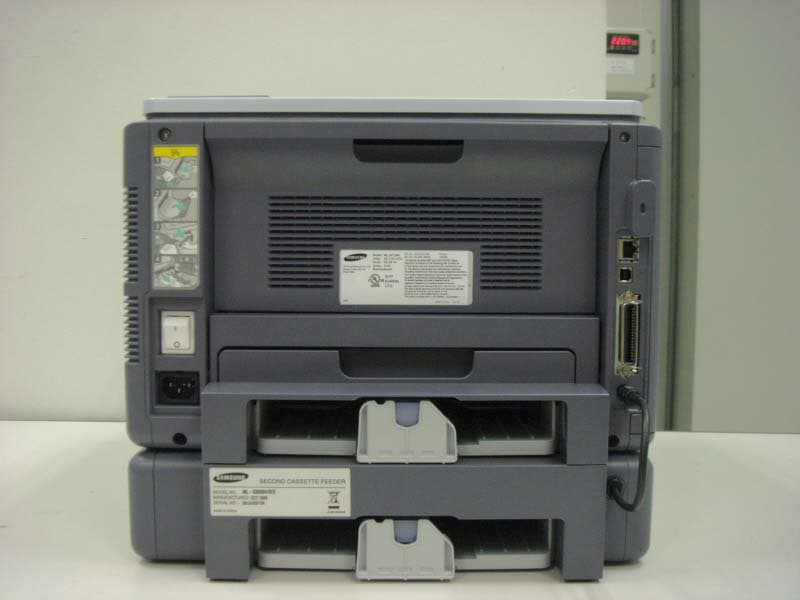
Click to zoom
Application Details
- Equipment Class
- JBP - Part 15 Class B Computing Device Peripheral
- Date of Grant
- May 20, 2007
- Application Purpose
- Original Equipment
- Date of Application
- May 20, 2007
- Equipment Note
- Laser Multi Function Printer
- Company
- Samsung Electronics Co Ltd
- Country
- United States
Documents & Files
Document Text
Text extracted from the exhibit documents filed with the FCC. Open a document above to read the original.
Users Manual
© 2007 Samsung Electronics Co., Ltd. All rights reserved. This user’s guide is provided for information purposes only. All information included herein is subject to change without notice. Samsung Electronics is not responsible for any changes, direct or indirect, arising from or related to use of this user’s guide. •ML-3470D, and ML-3471ND are model names of Samsung Electronics Co., Ltd. • Samsung and Samsung logo are trademarks of Samsung Electronics Co., Ltd. • IBM and IBM PC are trademarks of International Business Machines Corporation. • PCL and PCL 6 are trademarks of Hewlett-Packard company. • Microsoft, Windows, Windows NT and Windows Vista are either registered trademarks or trademarks of Microsoft Corporation. • PostScript 3 is a trademark of Adobe System, Inc. • UFST® and MicroType™ are registered trademarks of Agfa division of Bayer Corp. • TrueType, LaserWriter, and Macintosh are trademarks of Apple Computer, Inc. • All other brand or product names are trademarks of their respective companies or organizations. CONTACT SAMSUNG WORLD WIDE If you have any comments or questions regarding Samsung products, contact the Samsung customer care center. CountryCustomer Care Center Web Site ARGENTINE0800-333-3733www.samsung.com/ar AUSTRALIA1300 362 603www.samsung.com/au BELGIUM02 201 2418www.samsung.com/be BRAZIL0800-124-421 4004-0000 www.samsung.com/br CANADA1-800-SAMSUNG (7267864)www.samsung.com/ca CHILE800-726-7864 (SAMSUNG)www.samsung.com/cl CHINA800-810-5858 010- 6475 1880 www.samsung.com.cn COLOMBIA01-8000-112-112www.samsung.com/co COSTA RICA0-800-507-7267www.samsung.com/latin CZECH REPUBLIC 844 000 844www.samsung.com/cz Distributor pro ýeskou republiku : Samsung Zrt., þeska organizaþní složka Vyskoþilova 4, 14000 Praha 4 DENMARK70 70 19 70www.samsung.com/dk ECUADOR1-800-10-7267www.samsung.com/latin EL SALVADOR800-6225www.samsung.com/latin ESTONIA800-7267www.samsung.ee KAZAHSTAN8-800-080-1188www.samsung.kz FINLAND030-6227 515www.samsung.com/fi FRANCE3260 SAMSUNG or 08 25 08 65 65 (€ 0,15/min) www.samsung.com/fr GERMANY01805 - 121213 (€ 0,14/min) www.samsung.de GUATEMALA1-800-299-0013www.samsung.com/latin HONG KONG3698 4698www.samsung.com/hk HUNGARY06-80-SAMSUNG (7267864)www.samsung.com/hu INDIA3030 8282 1800 110 011 www.samsung.com/in/ INDONESIA0800-112-8888www.samsung.com/id ITALIA800-SAMSUNG(7267864)www.samsung.com/it JAMAICA1-800-234-7267www.samsung.com/latin JAPAN0120-327-527www.samsung.com/jp LATVIA800-7267www.samsung.com/lv/ index.htm LITHUANIA8-800-77777www.samsung.com/lt LUXEMBURG0032 (0)2 201 24 18www.samsung.lu MALAYSIA1800-88-9999www.samsung.com/my MEXICO01-800-SAMSUNG (7267864) www.samsung.com/mx NETHERLANDS0900 20 200 88 (€ 0,10/min)www.samsung.com/nl NORWAY815-56 480www.samsung.com/no PANAMA800-7267www.samsung.com/latin PHILIPPINES1800-10-SAMSUNG (7267864) www.samsung.com/ph POLAND0 801 801 881www.samsung.com/pl PORTUGAL80 8 200 128www.samsung.com/pt PUERTO RICO1-800-682-3180www.samsung.com/latin REP. DOMINICA 1-800-751-2676www.samsung.com/latin Republic of Ireland 0818 717 100www.samsung.com/uk RUSSIA8-800-200-0400www.samsung.ru SINGAPORE1800-SAMSUNG (7267864)www.samsung.com/sg SLOVAKIA0800-SAMSUNG (726786)www.samsung.com/sk SOUTH AFRICA 0860 726 7864 (SAMSUNG)www.samsung.com/za SPAIN902 10 11 30www.samsung.com/es SWEDEN0771-400 200www.samsung.com/se Switzerland0800-7267864www.samsung.com/ch/ TAIWAN0800-329-999www.samsung.com/tw THAILAND1800-29-3232 02-689-3232 www.samsung.com/th TRINIDAD & TOBAGO 1-800-7267-864www.samsung.com/latin U.A.E800-SAMSUNG (7267864)www.samsung.com/mea U.K0870 SAMSUNG (7267864)www.samsung.com/uk U.S.A1-800-SAMSUNG (7267864)www.samsung.com UKRAINE8-800-502-0000www.samsung.com/ur UZBEKISTAN8-800-120-0400www.samsung.com.uz VENEZUELA0-800-100-5303www.samsung.com/latin VIETNAM1 800 588 889www.samsung.com/vn CountryCustomer Care Center Web Site CONTENTS 1. Introduction Special features ...................................................................................................................................................... 1.1 Printer overview ...................................................................................................................................................... 1.2 Understanding the Status LED ................................................................................................................................ 1.4 Finding more information ........................................................................................................................................ 1.4 2. System setup Using control panel menus ...................................................................................................................................... 2.1 Menu overview ........................................................................................................................................................ 2.1 Printing a demo page .............................................................................................................................................. 2.5 Changing the display language ............................................................................................................................... 2.5 Using toner save mode ........................................................................................................................................... 2.5 3. Software overview Supplied software .................................................................................................................................................... 3.1 Printer driver features .............................................................................................................................................. 3.2 System requirements .............................................................................................................................................. 3.2 4. Network setup(ML-3471ND only) Introduction .......................…
Text truncated - open the document above for the full version.
Block Diagram
ML-3471ND/3470D H/W Block Diagram IEEE1284 USB 2.0 Ethernet 10/100 Tx ML-3471ND Only SPGPv3 ARM1020E I-CACHE(32K)D-CACHE(32K) PLL SDRAMC / ROMC DMAC NAND FlashController MAC I2C Controller Codec(HCT/JBIG) PCI Controller HPVC Engine Controller UART PPI(P1284) MAIN CONTROLLER USB 2.0 (ISP1582) CRYSTAL 12MHz RESET (XC61FN3112) NOR FLASH (8MB*2EA) SDRAM DIMM (Optional, 100pin) LSU Control DUPLEX MOTOR DRIVER (A3983) Thermistor REGI SENSOR FUSER FUSER AC Control INLET & POWER S/W 5V/24V Generation 2P 2P AC 110V/220V SMPS THV SUPPLY DEV HVPS DEVE. 24VS Front COVER M/S PAPER_EXIT SENSOR CONNECTION PBA 14P 24V MAIN FAN 2P SDRAM (32MB*2EA) ML-3471ND (16MB*2EA) ML-3470D EXIT MOTOR DRIVER (AN44060A) Ethernet Transceiver (BCM5241) ML-3471ND Only WirelessLAN Card (Optional) ML-3471ND Only FEED SENSOR DUPLEXSENSOR 24VSF Fuser COVER M/S P_Empty SENSOR 3P OPE PBA LSU CRUM Tray2 (Optional) MAIN MOTOR PICKUPCLUTCH REGI CLUTCH MPF CLUTCH MPF SENSOR 3P 2P 3P 18P 4P 11P 10P EXIT MOTOR DUPLEX MOTOR DUPLEX FAN 3P 2P 4P 4P 5P LSU S/W 5V LSU_5V IEEE1284 (SUPER1284) 1.3V / 3.3V DC to DC Converter Wireless LAN Interface ML-3471ND Only 60P IEEE802.11b/g ML-3471ND Only 28P 7P 16P MHVOPC 6P
External Photos
1. External Pictures 1) Front View 2) Rear View 3) Side View 1 4) Side View 2
ID Label/Location Info
-25/28- 4.3 Label and Label Location ( Samsung Electronics Co., Ltd ) -26/28- ( Samsung Electronics(Shandong)Digital Printing Co., Ltd ) -27/28- (Weihai Shin Heung Digital Electronics Co., Ltd.) Picture 7. Label -28/28- Picture 8. Label location
Internal Photos
2. Internal Pictures 1) Front View 2) Rear View 3. Print Board Assembled(PBA) Pictures 1) Top View of Main Controller 2) Bottom View of Main Controller 3) Top View of SMPS 4) Bottom View of SMPS 5) Top View of HVPS 6) Bottom View of HVPS 7) Top View of OPE 8) Bottom View of OPE 9) Top View of Connection 10) Bottom View of Connection 11) Top View of SCF 12) Bottom View of SCF 13) Top View of WNPC 14) Bottom View of WNPC
Operational Description
-5/28- 1.2 Detail Information related product 1.2.1 Specification ItemSpecification and Description Print SpeedBlack and White : Up to 33 PPM in A4(35 PPM in Letter) ResolutionPrinter: Up to 1200 x 1200 dpi(effective output) First print out time From Standby Mode : Less than 8.5 seconds From ColdBoot : Less than 25 seconds Warm-up timeLess than 15 seconds Power Rating110 ~ 127 VAC, 6.5A, 50/60 Hz Power Consumption Printing : 600 W Power Save mode : Less than 10 W Noise Level Printing mode: Less than 54 dBA Standby mode : Less than 39 dBA Warm-up: Less than 50dBA Consumable life Black Toner Cartridge : Approx. 4,000 A4/Letter pages at 5% Coverage Duty cycle (Max. Monthly Volume) Weight12.7 kg (including consumables) Package weight3.1 kg External dimensions (W x D x H) 400 x 435 x 284 mm(15.7 x 17.1 x 11.2 in) Operating Environment Temperature : 10 ~ 32 ( 50 ~ 90 ) Humidity : 20 ~ 80 % RH Printer LanguagePCL6, PostScrpript3, PCL5e Memory64MB (MAX320MB) InterfaceUSB 2.0, IEEE1284, Ethernet 10/100 Base TX, WLAN OS compatibility - Windows 98/Me/NT4.0/2000/XP(32/64bit)/2003 Server(32/64bit) - Mac OS 8.6~9.2/10.1~10.4 - Various Linux OS including Red Hat 8~9, Fedora Core 1~4, - Mandrake 9.2~10.1, and SuSE 8.2~9.2 - NetWare 4.x, 5.x, 6.x - Unix HP-UX, Solaris, SunOS, SCO UNIX Operating Frequency Main Source Clock : 12 MHz, Video Clock : 12 MHz, CPU Clock : 400 MHz SDRAM Clock : 100 MHz, USB Device Clock : 12 MHz, Network Device Clock : 25 MHz USB Clock = 6MHz, SD Memory Clock = 100MHz, MAC Clock = 25MHz
Test Report
-1/28- EMC TEST REPORT Samsung Electronics Co., Ltd. 416 Maetan 3-Dong, Yeongtong-Gu, Suwon-Si,Gyeonggi-Do, 443-742 Korea (Tel: 82 31 277 7752, Fax: 82 31 277 7753) Project No. : LBE071065 Page (1)/(28) 1. Applicant ◦ Name of organization : Samsung Electronics Co., Ltd. ◦ Address : 416 Maetan 3-Dong, Yeongtong-Gu, Suwon-Si, Gyeonggi-Do, 443-742 Korea ◦ Date of application : 2007. 03. 23 2. Purpose for the report : Approval for EMC 3. Kind of product : Printer (Model name :ML-3471ND) 4. Date of test : 2007. 03. 29 ~ 2007. 04. 02 5. Applied standard : FCC Part 15, Subpart B 6. Test result : Complied The equipment under test has found to be compliant with the applied standards. (Refer to the attached test result for more detail.) Tested by Name : Sang Kyu, seo Reviewed by Name : No Cheon Park This report is the test result about the sphere accredited by KOLAS which signed the Mutual Recognition Arrangement of International Laboratory Accreditation Cooperation. 2007. 04. 13 Samsung Electornics Co., Ltd. Chief of CS Management Center -2/28- TEST RESULT Test Report No. : LBE071065 Applicant / Address : Samsung Electronics Co., Ltd. 416 Maetan 3-Dong, Yeongtong-Gu,Suwon-Si,Gyeonggi-Do 443-742 Korea Manufacture / Address : 1) Samsung Electronics Co.,Ltd. 259, Gongdan-Dong, Gumi-City, Gyeongsangbuk-Do, 730-030 Korea 2) Samsung Electronics(Shandong) Digital Printing Co., Ltd. 264209, Samsung Road, Weihai Hi-Tech IDZ, Shandong Province, China 3) Weihai Shin Heung Digital Electronics Co., Ltd. 98, Samsung Road, Weihai H-Tech. IDZ, Shandong Province, P.R.China EUT : 1. Product name : Printer 2. Model name : ML-3471ND 3. Brand name : SAMSUNG 4. Variant model : ML-3470D 5. FCC ID : A3LML3471ND Test Method : ANSI C 63.4:2003 Test Result : PASS The equipment under test has found to be compliant with the applied standards Test Lab. : CS Management Center, Samsung Electronics Co., Ltd. Tested by : Sang Kyu, Seo Reviewed by : No Cheon Park Date of Issue : 2007. 04. 13 -3/28- Table of contents 1. General information 1.1 Basic information related product 1.2 Detail information related product 1.3 Operating mode and condition 1.4 Equipment modifications 1.5 Test procedure 1.6 Test configuration 1.7 Applied standard 1.8 Test facility 2. Summary of test results 3. Description of individual tests 3.1 Conducted emission 3.2 Radiated emission 4. Appendix 4.1 Test photography 4.2 EUT photography -4/28- 1. General information 1.1 Basic information related product Applicant Samsung Electronics Co., Ltd. Model name ML-3471ND Applicant address 416 Maetan 3-Dong, Yeongtong-Gu,Suwon-Si,Gyeonggi-Do 443-742 Korea Contact person Sangsu ROH Kind of product Printer Valiant model ML-3470D FCC ID A3LML3471ND Manufacturer 1) Samsung Electronics Co.,Ltd. 259, Gongdan-Dong, Gumi-City, Gyeongsangbuk-Do, 730-030 Korea 2) Samsung Electronics(Shandong) Digital Printing Co., Ltd. 264209, Samsung Road, Weihai Hi-Tech IDZ, Shandong Province, China 3) Weihai Shin Heung Digital Electronics Co., Ltd. 98, Samsung Road, Weihai H-Tech. IDZ, Shandong Province, P.R.China Rated power AC 120 V, 60 Hz New / Alternative / Permissive change information New -5/28- 1.2 Detail Information related product 1.2.1 Specification ItemSpecification and Description Print SpeedBlack and White : Up to 33 PPM in A4(35 PPM in Letter) ResolutionPrinter: Up to 1200 x 1200 dpi(effective output) First print out time From Standby Mode : Less than 8.5 seconds From ColdBoot : Less than 25 seconds Warm-up timeLess than 15 seconds Power Rating110 ~ 127 VAC, 6.5A, 50/60 Hz Power Consumption Printing : 600 W Power Save mode : Less than 10 W Noise Level Printing mode: Less than 54 dBA Standby mode : Less than 39 dBA Warm-up: Less than 50dBA Consumable life Black Toner Cartridge : Approx. 4,000 A4/Letter pages at 5% Coverage Duty cycle (Max. Monthly Volume) Weight12.7 kg (including consumables) Package weight3.1 kg External dimensions (W x D x H) 400 x 435 x 284 mm(15.7 x 17.1 x 11.2 in) Operating Environment Temperature : 10 ~ 32 ( 50 ~ 90 ) Humidity : 20 ~ 80 % RH Printer LanguagePCL6, PostScrpript3, PCL5e Memory64MB (MAX320MB) InterfaceUSB 2.0, IEEE1284, Ethernet 10/100 Base TX, WLAN OS compatibility - Windows 98/Me/NT4.0/2000/XP(32/64bit)/2003 Server(32/64bit) - Mac OS 8.6~9.2/10.1~10.4 - Various Linux OS including Red Hat 8~9, Fedora Core 1~4, - Mandrake 9.2~10.1, and SuSE 8.2~9.2 - NetWare 4.x, 5.x, 6.x - Unix HP-UX, Solaris, SunOS, SCO UNIX Operating Frequency Main Source Clock : 12 MHz, Video Clock : 12 MHz, CPU Clock : 400 MHz SDRAM Clock : 100 MHz, USB Device Clock : 12 MHz, Network Device Clock : 25 MHz USB Clock = 6MHz, SD Memory Clock = 100MHz, MAC Clock = 25MHz -6/28- 1.3 Operating mode and condition The system was configured for testing in typical fashion use. Cable were attached to each of the availabl e I/O port. Where applicable, peripherals were attached to the I/O cables. This EUT is supporting the USB, Parallel and Network(LAN) printing. In each test mode, finally we found worst case emission that is above configuration with the Worst case components(in the above table). So, the data of the maximum EUT operation, Parallel printing(duplex mode) was reported. - Operating Mode - Parallel Printing Mode (worst emission) - Network Printing Mode - USB Printing Mode - Standby Mode - Test Voltage : 120 V, 60 Hz 1.4 Equipment modifications No equipment modifications were required. -7/28- 1.5 Test procedure 1.5.1 Conducted emission EUT was placed on a platform nominal size, 1 m by 1.5 m, raised 80 cm above the conducting ground plane. The rear of tabletop was located 40 cm to the vertical conducting ground plane. The rear of EUT, including peripherals was aligned and flush with rear of tabletop. All other surfaces of tabletop was at least 80 cm from any other grounded conducting surface. I/O cables and AC cables that were connected to the peripherals were bundled in center. They were folded back and forth forming a bindle 30 cm to 40 cm long and were handed at a 40 cm …
Text truncated - open the document above for the full version.
Test Setup Photos
-22/28- 4. Appendix 4.1 Test photography Picture 1. Conducted Emission (Front) Picture 2. Conducted Emission (Rear) -23/28- Picture 3. Radiated emission (Front) Picture 4. Radiated emission (Rear)
Contact Information
Applicant
Jenni Chun(General Manager)
Technical Contact
PCTEST Engineering Lab., Inc.Randy Ortanez
[email protected]410-290-6652
6660-B Dobbin Road · Columbia, Maryland · United States
Test Firm
Samsung Electronics Co., Ltd. Global CS CenterPark No cheon
Technical Specifications
| # | Rule Parts | Frequency Range | Power Output |
|---|---|---|---|
| 1 | 15B | - | - |
Other Applications from Samsung Electronics Co Ltd
A3LSMS741B
Aug 05, 2026Portable Handset
Equipment Class
6VL - 15E 6 GHZ Very Low Power DeviceA3LSMX940
Jul 31, 2026BT,BLE Tablet DTS,UNII a,b,g,n,ac,ax,be and digitizer
Equipment Class
DTS - Digital Transmission SystemA3LSMS741U
Jul 30, 2026Portable Handset
Equipment Class
6CD - 15E 6 GHz Low Power Dual ClientA3LSMX840
Jul 27, 2026BT,BLE Tablet DTS,UNII a,b,g,n,ac,ax and Digitizer
Equipment Class
DSS - Part 15 Spread Spectrum TransmitterA3LSMX848U
Jul 27, 2026WCDMA, LTE, 5G NR Tablet BT,BLE, DTS,UNII a b g n ac ax and Digitizer
Equipment Class
JBP - Part 15 Class B Computing Device Peripheral