A3LML4600LASER PRINTER
Samsung Electronics Co Ltd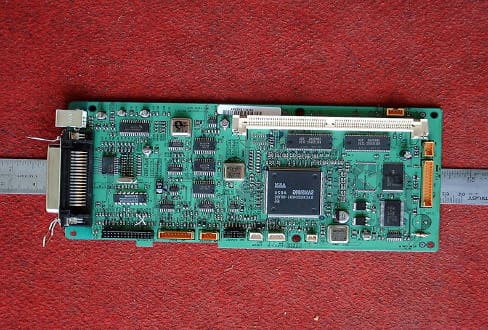
Click to zoom
Application Details
- Equipment Class
- JBP - Part 15 Class B Computing Device Peripheral
- Date of Grant
- Aug 17, 2000
- Application Purpose
- Original Equipment
- Date of Application
- Aug 17, 2000
- Equipment Note
- LASER PRINTER
- Company
- Samsung Electronics Co Ltd
- Country
- United States
Documents & Files
Document Text
Text extracted from the exhibit documents filed with the FCC. Open a document above to read the original.
Users Manual
This manual is provided for information purposes only. All information included herein is subject to change without notice. Samsung Electronics is not responsible for any damages, direct or indirect, arising from or related to use of this manual. © 2000 Samsung Electronics Co., Ltd. All rights reserved. • IZZI Laser plus and Samsung logo are trademarks of Samsung Electronics Co., Ltd. • IBM and IBM PC are trademarks of International Business Machines Corporation. • Microsoft, Windows, Windows 9x, Windows 2000 and Windows NT are trademarks of Microsoft Corporation. • GNU Ghostscript software, Copyright (C) 1999. Aladdin Enterprise, Menlo Park, California, and other authors as indicated in its documentation. • Adobe and Adobe Acrobat Reader are trademarks of Adobe Systems. • All other brand or product names are trademarks of their respective companies or organizations. I Special Features –––––––––––––––––––––––––––––––––1.1 Printer Components ––––––––––––––––––––––––––––––1.3 Control Panel Buttons –––––––––––––––––––––––––––––– 3.1 Control Panel Lights ––––––––––––––––––––––––––––––– 3.3 Contents Introduction STEP 1 :Unpack Your Printer –––––––––––––––––––––––––– 2.1 STEP 2 :Install the Toner Cartridge ––––––––––––––––––––– 2.2 STEP 3 :Load Paper ––––––––––––––––––––––––––––––––– 2.4 STEP 4 :Connect to the Computer with a Parallel Cable ––––– 2.6 STEP 5 :Turn on the Printer ––––––––––––––––––––––––––– 2.7 STEP 6 :Print a Demo Page! ––––––––––––––––––––––––––– 2.7 STEP 7 :Install the Printer Software ––––––––––––––––––––– 2.8 Installing Software from Diskette –––––––––––––––––––– 2.13 Choosing Paper and Other Media ––––––––––––––––––––– 4.1 Selecting the Output Location ––––––––––––––––––––––– 4.4 Loading Paper –––––––––––––––––––––––––––––––––––– 4.5 Printing on Envelopes –––––––––––––––––––––––––––––– 4.7 Printing on Heavy Paper –––––––––––––––––––––––––––– 4.9 Printing on Labels –––––––––––––––––––––––––––––––– 4.10 Printing on Transparencies ––––––––––––––––––––––––– 4.11 Printing on Preprinted Paper ––––––––––––––––––––––– 4.12 Printing on Card Stocks –––––––––––––––––––––––––––– 4.13 1 2 Setting Up Your Printer 3 Using Control Panel 4 Print Media II Maintaining Toner Cartridge ––––––––––––––––––––––––– 6.1 Cleaning the Printer ––––––––––––––––––––––––––––––– 6.4 Maintaining Your Printer 6 Printing a Document ––––––––––––––––––––––––––––––– 5.1 Using Toner Save Mode –––––––––––––––––––––––––––– 5.6 Printing Multiple Pages on One Sheet of Paper ––––––––––5.7 Fitting Your Document to a Selected Paper Size ––––––––– 5.8 Printing Posters ––––––––––––––––––––––––––––––––––– 5.9 Setting Graphic Properties ––––––––––––––––––––––––– 5.11 Printing Watermarks –––––––––––––––––––––––––––––– 5.14 Using Page Overlay ––––––––––––––––––––––––––––––– 5.17 Reprinting the Last Page –––––––––––––––––––––––––– 5.21 Printing on a Network Environment ––––––––––––––––––– 5.22 Printing Tasks 5 Troubleshooting Checklist ––––––––––––––––––––––––––– 7.1 Solving General Printing Problems –––––––––––––––––––– 7.2 Clearing Paper Jams ––––––––––––––––––––––––––––––– 7.6 Solving Print Quality Problems –––––––––––––––––––––– 7.11 Troubleshooting Error Messages ––––––––––––––––––––– 7.17 Common Windows Problems –––––––––––––––––––––––– 7.19 Problem Solving 7 Printer Specifications ––––––––––––––––––––––––––––––– A.1 Paper Specifications –––––––––––––––––––––––––––––––– A.2 Using Your Printer with a USB Cable ––––––––––––––––– A.10 Linux Driver Installation ––––––––––––––––––––––––––– A.16 Appendix INDEX III Environmental and Safety Consideration The printer is certified in the U.S. to conform to the requirements of DHHS 21 CFR, chapter 1 Subchapter J for Class I(1) laser products, and elsewhere is certified as a Class I laser product conforming to the requirements of IEC 825. Class I laser products are not considered to be hazardous. The laser system and printer are designed so there is never any human access to laser radiation above a Class I level during normal operation, user maintenance, or prescribed service condition. WARNING Never operate or service the printer with the protective cover removed from Laser/Scanner assembly. The reflected beam, although invisible, can damage your eyes. CAUTION- INVISIBLE LASER RADIATION WHEN THIS COVER OPEN. DO NOT OPEN THIS COVER. VORSICHT - UNSICHTBARE LASERSTRAHLUNG, WENN ABDECKUNG GEÖFFNET. NICHT DEM STRAHL AUSSETZEN. ATTENTION - RAYONNEMENT LASER INVISIBLE EN CAS D’OUVERTURE.EXPOSITION DAN GEREUSE AU FAISCEAU. ATTENZIONE -RADIAZIONE LASER INVISIBILE IN CASO DI APERTURA. EVITARE L’ESPOSIZIONE AL FASCIO. PRECAUCION -RADIACION LASER IVISIBLE CUANDO SE ABRE. EVITAR EXPONERSE AL RAYO. ADVARSEL. - USYNLIG LASERSTRÅLNING VED ÅBNING NÅR SIKKERHEDSBRYDERE ER UDE AF FUNKTION. UNDGÅ UDSAETTELSE FOR STRÅLNING. ADVARSEL. - USYNLIG LASERSTRÅLNING NÅR DEKSEL ÅPNES. STIRR IKKE INN I STRÅLEN. UNNGÅ EKSPONERING FOR STRÅLEN. VARNING - OSYNLIG LASERSTRÅLNING NÄR DENNA DEL ÄR ÖPPAND OCH SPÄRREN ÄR URKOPPLAD. BETRAKTA EJ STRÅLEN. STRÅLEN ÄR FARLIG. VARO! - AVATTAESSA JA SUOJALUKITUS OHITETTAESSA OLET ALTTIINA NÄKYMÄTTÖMÄLLE LASERSÄTEILYLLE ÄLÄ KATSO SÄTEESEEN. Laser Safety Statement IV Ozone Safety Power Saver During normal operation, the Samsung IZZI Laser plus printer produces ozone. the ozone produced does not present a hazard to the operator. However, it is advisable that the machine be operated in a well ventilated area. If you need additional information about ozone, please request your nearest Samsung dealer. This printer contains advanced energy conservation technology that reduces power consumption when it is not in active use. When the printer does not receive data for an extended period of time, power consumption is automatically lowered. The energy star emblem does not represent EPA endorsement of any product or service. OZONE This equipment has been tested and found to comply with the limits for a Class B digital device, pursuant to Part 15 of the FCC Rules. These limits are designed …
Text truncated - open the document above for the full version.
ID Label/Location Info
Page 12 of 13 JOB NO. : 00ISM152 7. Label and Label Location 7.1 Label 7.2 Label location
Test Report
Page 12 of 13 JOB NO. : 00I S 7. Label and Label Location 7.1 Label 7.2 Label location This test reports does not constitute an endorsement by NIST/NVLAP or U.S Government. 3 ISM152
Test Setup Photos
Page 7 of 13 JOB NO. : 00ISM152 3. Conducted and Radiated Measurement Photos * Cabling was taken into consideration and test data was taken under worse case conditions. 3.1 Conducted Measurement Photos Conduction(Front View) Conduction(Rear View) This test reports does not constitute an endorsement by NIST/NVLAP or U.S Government. Page 8 of 13 JOB NO. : 00ISM152 * Cabling was taken into consideration and test data was taken under worse case conditions. 3.2 Radiated Measurement Photos Radiation(Front View) Radiation(Rear View) This test reports does not constitute an endorsement by NIST/NVLAP or U.S Government.
Contact Information
Applicant
Jenni Chun(General Manager)
Test Firm
Samsung Electronics Co., Ltd.Jeong Kwan Choi
82-331-280-9951Fax: 82-331-280-9969
Technical Specifications
| # | Rule Parts | Frequency Range | Power Output |
|---|---|---|---|
| 1 | 15B | - | - |
Other Applications from Samsung Electronics Co Ltd
A3LSMS741B
Aug 05, 2026Portable Handset
Equipment Class
6VL - 15E 6 GHZ Very Low Power DeviceA3LSMX940
Jul 31, 2026BT,BLE Tablet DTS,UNII a,b,g,n,ac,ax,be and digitizer
Equipment Class
DTS - Digital Transmission SystemA3LSMS741U
Jul 30, 2026Portable Handset
Equipment Class
6CD - 15E 6 GHz Low Power Dual ClientA3LSMX840
Jul 27, 2026BT,BLE Tablet DTS,UNII a,b,g,n,ac,ax and Digitizer
Equipment Class
DSS - Part 15 Spread Spectrum TransmitterA3LSMX848U
Jul 27, 2026WCDMA, LTE, 5G NR Tablet BT,BLE, DTS,UNII a b g n ac ax and Digitizer
Equipment Class
JBP - Part 15 Class B Computing Device Peripheral