A3LNS2Notebook Computer
Samsung Electronics Co Ltd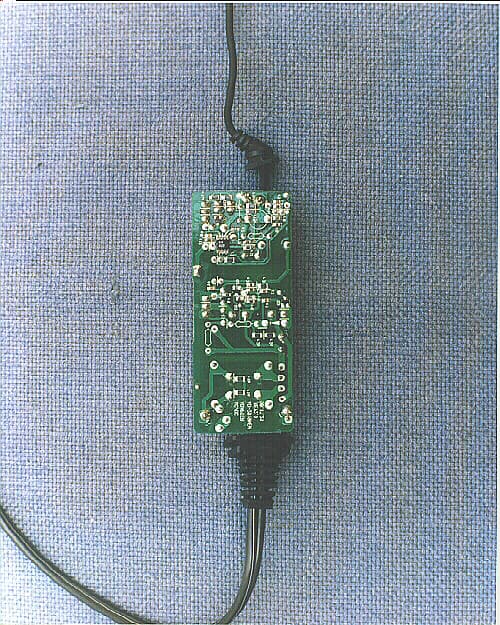
Click to zoom
Application Details
- Equipment Class
- JBC - Part 15 Class B Computing Device/Personal Computer
- Date of Grant
- Aug 12, 1999
- Application Purpose
- Original Equipment
- Date of Application
- Jun 15, 1999
- Equipment Note
- Notebook Computer
- Company
- Samsung Electronics Co Ltd
- Country
- United States
Documents & Files
Document Text
Text extracted from the exhibit documents filed with the FCC. Open a document above to read the original.
Users Manual
Home Guide to the StudyPro™: 2 nd Draft10/18/97 NetSchools Confidential– 1 –Front Cover Home Guide to the StudyPro™: Content Outline/2 nd Draft Outside Front Cover Home Guide to the StudyPro™: 2 nd Draft10/18/97 NETSchools Confidential– 2 –Content Draft NetSchools Glossary, Copyright, Trademarks (inside front cover) • Terms and definitions that relate to computers, networks, NetSchools system and equipment – to be selected from this list. List is in order of appearance in the text of the guide. StudyPro™ Computer Infrared E-mail Internet World Wide Web Assignments Server Telecommunications Network Modem Touchpad Port Desktop Function keys Icons Programs Word Processor Spreadsheet Database Browser HTML Attachments Double-clicking Click ♦ Copyright – This manual is copyrighted by NetSchools Corporation with all rights reserved. This manual cannot be reproduced in any form without the written permission of NetSchools Corporation. © 1997 by NetSchools Corporation. All rights reserved. ♦ Trademarks – StudyPro™ is a registered trademark of NetSchools Corporation. All other brand and product names are trademarks or registered trademarks of their respective companies. Home Guide to the StudyPro™: 2 nd Draft10/18/97 NETSchools Confidential– 3 –Content Draft Table of Contents (page 1) Home Guide to the StudyPro Table of Contents SectionPage 1. The NetSchools System2 2. Getting Started4 3. StudyPro Tools6 4. Working with Your Teachers8 5. Doing Homework with the StudyPro10 6. E-mail and Internet Activities12 7. How Families Use the StudyPro14 8. Taking Care of the StudyPro16 9. If You Have Problems...18 Index20 Technical and Legal Information21 Home Guide to the StudyPro™: 2 nd Draft10/18/97 NETSchools Confidential– 4 –Content Draft The NetSchools System (page 2-3) ♦ Text for the “NetSchools System” Section – You’ve got a new StudyPro computer! Congratulations! But what can it do? What can you do with it? Your StudyPro is a key part of your school’s NetSchools System – a totally new way for you, and your friends and family, to use computers and learn about the world. Your StudyPro is portable – you can take it with you, anywhere. You can take it to school. You can even carry it home. And the good news is that the StudyPro has no wires. The StudyPro “talks” to the school’s other computers using a wireless infrared beam. This wireless connection works like the remote control for a television but is much more powerful. In the classroom, your StudyPro works like a “smart” version of a class notebook. You can use it to take notes, do calculations and search for information – while sitting at any desk in any classroom. You can use your StudyPro to send messages to teachers and classmates using your school’s electronic mail (e-mail) system. You can also use the Internet and the World Wide Web to locate information that will help you complete assignments. But the exciting news is that your StudyPro goes home with you every day. At home you can do your homework and send it back to a teacher, electronically. Your family members can read email messages from your teachers and send them replies. The complete NetSchools System consists of a StudyPro computer for every student, the teachers’ computers, and a school server computer. The server acts as the central hub for all the messages that are sent to the computers. The system includes telecommunications equipment that lets everyone on the system access the Internet and the World Wide Web. Students and teachers can also use the school’s network from home. Each StudyPro has a built-in modem that makes access from home as easy as a local telephone call. The StudyPro has been designed to make your learning more successful and more exciting. Strap on your seat belt and get ready for the new worlds you can explore with your NetSchools StudyPro computer. Home Guide to the StudyPro™: 2 nd Draft10/18/97 NETSchools Confidential– 5 –Content Draft Getting Started (pages 4-5) ♦ Text for the “Getting Started” Section – Go ahead and open your StudyPro. There is a carry handle and a latch on the front of the computer’s cover. This latch unlocks the cover so you can swing it open. When you have opened the StudyPro, look for the following parts: v Keyboard v Touchpad and its two buttons v Color screen v Speaker v The high-speed infrared port When you open your StudyPro, the computer should “wake up.” You might hear a few sound effects coming from the computer as it starts to work. You will see the computer desktop appear on the color screen. The StudyPro keyboard has a key for every letter in the alphabet, for all the numbers 0 through 9, and many special characters. In addition, the keyboard also has a number of function keys labeled F1 through F12. Among other things, these function keys help you control the brightness of the StudyPro screen, sound levels, and other keyboard features. Do This: Use the function keys to change the screen’s brightness– 1.Locate the Fn key. 2.Press and hold this key down with a finger on your left hand. 3. Locate the F3 key. 4. Using a finger on your right hand, press the F3 key several times while still holding the Fn key down. The StudyPro screen will get brighter. 5. Still holding the Fn key down, press the F4 key several times. The StudyPro screen will get darker. 6. Still holding the Fn key down, press F3 or F4 until the StudyPro screen is as bright or as dark as you want it to be. On the desktop you will see a number of small pictures called icons. These icons identify several programs that come with your StudyPro. The StudyPro programs are the tools you will use to send and receive messages, get your assignments, do your assignments, and send your completed work back to your teachers. Home Guide to the StudyPro™: 2 nd Draft10/18/97 NETSchools Confidential– 6 –Content Draft Getting Started (pages 4-5) -- continued Do This: Use the touchpad to move the screen pointer – 1.Look at the screen and locate the screen pointer. The pointer looks lik…
Text truncated - open the document above for the full version.
Block Diagram
StudyPro II Clock Diagram SDRAM CX5530 CODEC GXm CX9210 MODEM CF CONTROLLER PCI1410 IR, IBM 1502 H8 MICOM RTC BQ3285 SUPERIO PC97338 CLOCK CHIP MK1491 X-TAL, 14.318M CLK_PCI5530 33MHZ PIC16C74A CLK_48M CLK_14M CLK_PCICPU, 33MHZSDRAMCLK, 70MHz CLK_PCLK 40MHz CLK_DCLK 80MHz X-TAL, 16MHZ OSC 48MHZ X-TAL 20MHZ X_TAL 32.768KHZ CLK_MODEM 33MHZ CLK_SUPIO 14.318MHZ CLK_AUD 24.576MHZ CLK_CB 33MHZ H8_PWRDWNCLK CLK_COGFP DSTN_CLK SDRAM
Cover Letter(s)
June 16, 1999 Federal Communications Commission 7435 Oakland Mills Road Columbia, MD 21046 RE: Notebook Computer (FCC P.15 Digital Device) Model: StudyPro II FCC ID No: A3LNS2 FCC Confirmation Number: Gentleman: The above application has been submitted to FCC OET web site on June 16, 1999. A check, $940.00 has been directly mailed to Mellon Bank to pay this application. The above Notebook Computer includes 4 kinds of oscillator, 16MHz, 48MHz, 20MHz 14.318MHz as shown on block diagram. The attached files are, for your reference, as follows: 1. FCC ID Label and location 2. Block Diagram including oscillator information 3. Test report including test set up photo’s 4. Photos(Internal and External) 5. User Manual If you have any question on this application, please let me know at [email protected] or Phone) 408-544-5124. Sincerely Yours, Ben Kim Engineering Manager Samsung Electronics America
Test Report
SAMSUNG Reference NO. : 990548 FCC ID : A3LNS2 PAGE 1 OF 11 EMI TEST REPORT Product :Notebook Computer Model No. :StudyPro II FCC ID : A3LNS2 DATE :May 24, 1999 SAMSUNG Reference NO. : 990548 This test report is to certify that the tested device properly complies with the requirements of FCC Rules and Regulations Part 15 Subpart B Unintentional Radiators. All tests necessary to show compliance to the requirements were and these results met the specifications requirement. 1. Applicant Name : SAMSUNG ELECTRONICS CO., LTD. (Company name & Address) 416 Maetan 3 Dong, Paldal-Ku, Suwon City, Kyungki Do, Korea, 442-742 2. Identification of tested device 2.1 FCC ID :A3LNS2 2.2 Device Name :Notebook Computer 2.3 Brand (Trade Name) :SAMSUNG 2.4 Model Number :StudyPro II 3. Test Procedure and Items 3.1 AC Powerline Conducted Emissions Measurement :ANSI C63.4-1992 3.2 Radiated Emissions Measurement :ANSI C63.4-1992 4. Issued Date :May 24, 1999 TESTED BY : No-Cheon, PARK / Test Engineer REVIEWED BY : Seung-Kyu, CHA / Manager of EMC Lab. APPROVED BY : Taek-Jeong, SHIN / Chief of EMC Lab. This reports shall not be reproduced except in full, without the written approval of SEC EMC Testing laboratory. SAMSUNG Reference NO. : 990548 FCC ID : A3LNS2 PAGE 2 OF 11 TABLE OF CONTENTS 1. GENERAL INFORMATION 1.1 Product Description 1.2 Grants 1.3 Tested System Details 1.4 Test Methdology 1.5 Test Facility 2. PRODUCT LABLEING 3. SYSTEM TEST CONFIGURATION 3.1 Justification 3.2 Video Mode Justification 3.3 EUT Exercise Software 3.4 Special Accessories 3.5 Equipment Modification 3.6 Figure(Test System configuration) 3.7 Photographs 4. CONDUCTED EMISSION DATA 5. RADIATED EMISSION DATA 6. LIST OF TEST INSTRUMENT This reports shall not be reproduced except in full, without the written approval of SEC EMC Testing laboratory. SAMSUNG Reference NO. : 990548 FCC ID : A3LNS2 PAGE 3 OF 11 1. General Information 1.1 Production Description The Samsung Electronics Co., Ltd. Notebook Computer Model StudyPro II(FCC ID :A3LNS2)is based on the powerful pentium processor(CPU200MHz) and has internal clock speeds of 14.318, 24, 33 and 48MHz and internal Modem(56Kbps). It can be operated from rechargeable battery pack or by 100-120V AC Adapter(with ferrite bead). See attached StudyPro II User's Guide for more information. 1.2 Grants N/A 1.3 Test System Details The FCC IDs for all equipment plus descriptions of all cables used with the tested system (including inserted cards which have grant) are: FCC ID DESCRIPTION (Model Name) CABLE DESCRIPTION A3LNS2 EUT (StudyPro II) - EW425-1040D Serial Mouse (25-1040D) Unshielded Cable N/A AC Adaper (AD-2019) Unshielded Power Cord (with Ferrite bead) N/A TelePhone (SSP-2501) Unshielded Cable DSI16XU222 Inkjet Printer (2225C+) Unshielded Cable N/A HeadPhone (HP-100CD) Unshielded Cable This reports shall not be reproduced except in full, without the written approval of SEC EMC Testing laboratory. SAMSUNG Reference NO. : 990548 FCC ID : A3LNS2 PAGE 4 OF 11 1.4 Test Methodology Both radiated and conducted tests were performed according to the procedure in ANSI C63.4. Radiated testing was performed at an antenna-to-EUT distance of three meters. 1.5 Test Facility All test described in this report were performed by : SAMSUNG ELECTRONICS CO., LTD. EMC TESTING LABORATORY 416 Maetan 3 Dong, Paldal-Ku, Suwon City, Kyungki Do, Korea, 441-742 Open field test site (3 meter) and Shielded Room. This test facility has been filed in FCC under the criteria in ANSI C63.4-1992. 2. PRODUCT LABELING This reports shall not be reproduced except in full, without the written approval of SEC EMC Testing laboratory. SAMSUNG Reference NO. : 990548 FCC ID : A3LNS2 PAGE 5 OF 11 3. SYSTEM TEST CONFIGURATION 3.1 Justification The system was configured for testing in typical fashion (as a customer would use it). The EUT has internal clock speeds of 14.318, 24, 33 and 48MHz. The EUT's video circuitry is capable of operating at a maximum non-interlaced resolution of 640*480 pixels. The EUT was observed while scrolling a continuous stream for capital "H's" in the 640*480 resolution mode. The EUT has no external Monitor Port. The EUT was tested with a Samsung AC Adapter Model number AD-2019. Further details of cabling and configuration are shown in the test system configuration. 3.2 Video Mode Justification The system was tested in 640*480 resolution mode and in the highest resolution mode of 640*480. This mode was used to collect the included data. The EUT has no external monitor port. 3.3 EUT Exercise Soft ware The EUT exercise program used during testing was designed to exercise the system in a manner similar to a typical use. This program was stored in Flash Memory. Once loaded, the program sequentially exercise each system component in turn. The sequence used was : 1) serial "H's" scrolled to the LCD(10.0"); 2) copy series of H characters to mass storage device. 3) print series of H characters to printer. Since the mouse and headphone are strictly input device, no data was transmitted to them during testing. They are, however, continuously scanned for data input activity. This reports shall not be reproduced except in full, without the written approval of SEC EMC Testing laboratory. SAMSUNG Reference NO. : 990548 FCC ID : A3LNS2 PAGE 6 OF 11 3.4 Special Accessories As shown in Figure 3.1, all interface cables used for compliance testing are unshielded as normally supplied by the manufacturer. The Samsung AC adapter cable has a ferrite bead on the line. The following is ferrite specification. AC-ADAPTER A : 5.02mm B : 9.84mm C : 24.5mm 3.5 Equipment Modifications No equipment modifications were performed during testing. 3.6 Test System configuration 1) Shielded Cable 2) Unshielded Cable 3) Unshield Power Cord 4) Ferrite Bead This reports shall not be reproduced except in full, without the written approval of SEC EMC Testing laboratory. A C B TELEPHONE Model : SSP-2501 FCC ID: N/A EUT Samsung Notebook Model:StudyPro II FCC ID:A3LNS2…
Text truncated - open the document above for the full version.
Contact Information
Applicant
Jenni Chun(General Manager)
Technical Contact
Samsung Electronics AmericaBen Kim
[email protected]408-544-5124
85 West Tasman Dr · San Jose, California · United States
Non-Technical Contact
Samsung Electronics AmericaBen Kim
[email protected]408-544-5124
Test Firm
Samsung Electronics Co., Ltd.K. Lyoum
Technical Specifications
| # | Rule Parts | Frequency Range | Power Output |
|---|---|---|---|
| 1 | 15B | - | - |
Other Applications from Samsung Electronics Co Ltd
A3LSMS741B
Aug 05, 2026Portable Handset
Equipment Class
6VL - 15E 6 GHZ Very Low Power DeviceA3LSMX940
Jul 31, 2026BT,BLE Tablet DTS,UNII a,b,g,n,ac,ax,be and digitizer
Equipment Class
DTS - Digital Transmission SystemA3LSMS741U
Jul 30, 2026Portable Handset
Equipment Class
6CD - 15E 6 GHz Low Power Dual ClientA3LSMX840
Jul 27, 2026BT,BLE Tablet DTS,UNII a,b,g,n,ac,ax and Digitizer
Equipment Class
DSS - Part 15 Spread Spectrum TransmitterA3LSMX848U
Jul 27, 2026WCDMA, LTE, 5G NR Tablet BT,BLE, DTS,UNII a b g n ac ax and Digitizer
Equipment Class
JBP - Part 15 Class B Computing Device Peripheral