A3LNX1Digital camera
Samsung Electronics Co Ltd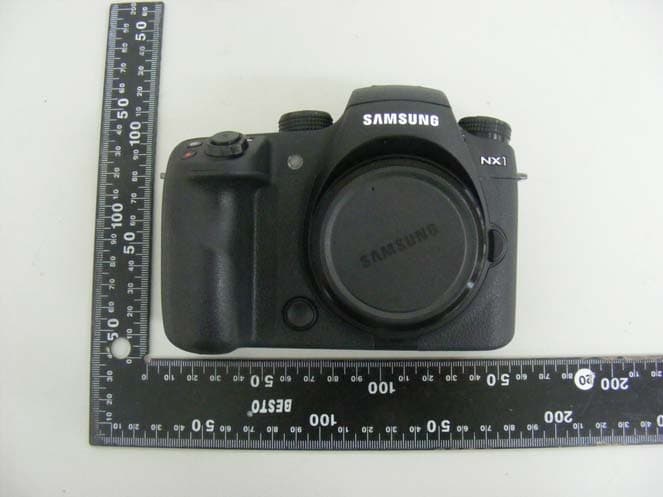
Click to zoom
Application Details
- Equipment Class
- NII - Unlicensed National Information Infrastructure TX
- Date of Grant
- Sep 17, 2014
- Application Purpose
- Original Equipment
- Date of Application
- Sep 17, 2014
- Equipment Note
- Digital camera
- Frequency Range
- 5745.00000000 - 5825.00000000
- Company
- Samsung Electronics Co Ltd
- Country
- United States
Documents & Files
Document Text
Text extracted from the exhibit documents filed with the FCC. Open a document above to read the original.
Users Manual
USER MANUAL ENG This user manual includes detailed usage instructions for your camera. Please read this manual thoroughly. 1 Copyright information • Camera specifications or contents of this manual may be changed without prior notice due to upgrade of camera functions. • You are not allowed to reuse or distribute any part of this manual without prior permission. • We recommend using your camera within the country where you purchase it. • Use this camera responsibly and adhere to all laws and regulations concerning its use. PlanetFirst represents Samsung Electronics’ commitment to sustainable development and social responsibility through eco-driven business and management activities. • Microsoft Windows and the Windows logo are registered trademarks of the Microsoft Corporation. • Mac and Apple App Store are registered trademarks of the Apple Corporation. • Google Play Store is a registered trademark of Google, Inc. • SD™, SDHC™, and SDXC™ are registered trademarks of the SD Association. • HDMI, the HDMI logo, and the term “High Definition Multimedia Interface“ are trademarks or registered trademarks of HDMI Licensing LLC. • Bluetooth® is a registered trademark of Bluetooth SIG, Inc. worldwide. • Wi-Fi®, the Wi-Fi CERTIFIED logo, and the Wi-Fi logo are registered trademarks of the Wi-Fi Alliance. • Trademarks and trade names used in this manual are the property of their respective owners. 2 Health and safety information Prevent damage to subjects’ eyesight. Do not use the flash in close proximity (closer than 1 m/3 ft) to people or animals. If you use the flash too close to your subject’s eyes, this can cause temporary or permanent eyesight damage. Keep your camera away from small children and pets. Keep your camera and all accessories out of the reach of small children and animals. Small parts may cause choking or serious injury if swallowed. Moving parts and accessories may present physical dangers as well. Do not expose the camera to direct sunlight or high temperatures for an extended period of time. Prolonged exposure to sunlight or extreme temperatures can cause permanent damage to your camera’s internal components. Avoid covering the camera or charger with blankets or clothes. The camera may overheat, which may distort the camera or cause a fire. Do not handle the power supply cord or the charger during a thunderstorm. This may result in an electric shock. Always comply with the following precautions and usage tips to avoid dangerous situations and ensure peak performance of your camera. Warning—situations that could cause injury to yourself or others Do not disassemble or attempt to repair your camera. You can damage the camera and expose yourself to the risk of an electric shock. Do not use your camera near flammable or explosive gases and liquids. This may cause a fire or explosion. Do not insert flammable materials into the camera or store these materials near the camera. This may cause a fire or electric shock. Do not handle your camera with wet hands. This may result in an electric shock. 3 Health and safety information If liquid or foreign objects enter your camera, immediately disconnect all power sources, such as the battery or charger, and then contact a Samsung service center. Comply with any regulations that restrict the use of a camera in a certain area. • Avoid interference with other electronic devices. • Turn off the camera when in an aircraft. Your camera can cause interference with aircraft equipment. Follow all airline regulations and turn off your camera when directed by airline personnel. • Turn off the camera near medical equipment. Your camera can interfere with medical equipment in hospitals or health care facilities. Follow all regulations, posted warnings, and directions from medical personnel. Avoid interference with pacemakers. Maintain a safe distance between this camera and all pacemakers to avoid potential interference, as recommended by the manufacturer and research groups. If you have any reason to suspect that your camera is interfering with a pacemaker or other medical device, turn off the camera immediately and contact the manufacturer of the pacemaker or medical device for guidance. Caution—situations that could cause damage to your camera or other equipment Remove the batteries from your camera when storing it for an extended period of time. Installed batteries may leak or corrode over time and cause serious damage to your camera. Use only authentic, manufacturer-recommended, Lithium-ion replacement batteries. Do not damage or heat the battery. Inauthentic, damaged, or heated batteries may cause a fire or personal injury. Use only Samsung-approved batteries, chargers, cables, and accessories. • Using unauthorized batteries, chargers, cables, or accessories can cause batteries to explode, damage your camera, or cause injury. • Samsung is not responsible for damage or injuries caused by unapproved batteries, chargers, cables, or accessories. Use the battery only for its intended purpose. Misusing the battery may cause a fire or electric shock. 4 Health and safety information Do not touch the flash while it fires. The flash is very hot when fired and may burn your skin. When you use the AC charger, turn off the camera before you disconnect the power to the AC charger. Failing to do so may result in fire or electric shock. Disconnect the charger from the wall socket when not in use. Failing to do so may result in fire or electric shock. Do not use a damaged power supply cord, plug, or loose outlet when you charge batteries. This may cause a fire or electric shock. Do not allow the AC charger to come in contact with the +/- terminals on the battery. This may cause a fire or electric shock. Do not drop or subject the camera to strong impacts. Doing so may damage the screen or external or internal components. Exercise caution when you connect cables and install batteries and memory cards. If you force the connectors, improperly connect cables, or impr…
Text truncated - open the document above for the full version.
Users Manual
My Camera > Display icons 51 IconDescription White Balance micro adjustment Optical Image Stabilization (OIS) (p. 101) intelli-zoom on intelli-zoom ratio Dynamic Range (p. 117) OLED Color (p. 86) Wi-Fi on Bluetooth on Firmware update noti cation* * This icon appears only when the camera is connected to a Wi-Fi network. 3. Shooting options (Touch) IconDescription Change Smart mode* Save a custom mode** Quick Transfer (p. 148) Touch AF options Shooting options Smart panel * This icon appears only when you select Smart mode. ** This icon appears when you select Custom1 or Custom2 mode. The icons displayed will change according to the mode you select or the options you set. 2. Shooting options IconDescription Photo size RAW le Drive mode Flash (p. 108) Flash intensity adjustment Metering (p. 114) AF mode (p. 91) Focus area Face detection White Balance (p. 87) My Camera > Display icons 52 IconDescription Shooting mode Touch AF option (Touch) Current recording time/ Available recording time Multi Motion (p. 123) Playback time after applying the Multi Motion feature 100% Battery percentage • : Fully charged • : Partially charged • (Red): Empty (recharge the battery) • : Charging • : Internal battery in use (when the vertical grip is connected) • : External battery in use (when the vertical grip is connected) IconDescription Zoom indicator* Exposure value ISO sensitivity (p. 85) Video sound level Recording videos 1. Shooting information My Camera > Display icons 53 IconDescription Fader (p. 124) Multi Motion (p. 123) Voice recording o (p. 125) Zoom button* OLED Color (p. 86) * This icon appears when you attach the Power Zoom lens. The icons displayed will change according to the mode you select or the options you set. About the level gauge The level gauge helps you align the camera with the horizontal and vertical lines on the display. If the level gauge is not level, calibrate the level gauge using the Horizontal Calibration function. (p. 177) Vertical Horizontal ▲ Level▲ Unlevel You cannot use the level gauge when you shoot in portrait orientation. 2. Shooting options IconDescription Video size AF mode (p. 91) Metering (p. 114) White Balance (p. 87) White Balance micro adjustment Optical Image Stabilization (OIS) (p. 101) Digital Image Stabilization (DIS) (p. 124) My Camera > Display icons 54 In Playback mode Viewing photos Information Mode F No Shutter ISO Metering Flash Focal Length White Balance EV Photo Size Folder No.-File No. Date & Time IconDescription View image thumbnails. (Touch) Current le/The total number of les Noti cation panel bar (Touch) Share les via Wi-Fi network. (Touch) Share les with other devices. (Touch) m Playback/Editing/Setting menu (Touch) RAW le 3D le Protected le 1 2 3 No.Description 1 Captured photo 2 RGB histogram (p. 173) 3 Shooting mode, Metering, Flash, White Balance, Aperture value, Shutter speed, ISO, Focal length, Exposure value, Photo size, Folder number-File number, Date Playing videos StopCapture IconDescription Playback speed Current playback time Video length Multi Motion View previous le/Scan backward. (Each time you touch the scan backward icon, you change the scan speed in this order: 2X, 4X, 8X.) Pause or resume playback. View next le/Scan forward. (Each time you touch the scan forward icon, you change the scan speed in this order: 2X, 4X, 8X.) Adjust the volume or mute the sound. My Camera > Display icons 55 Changing the information displayed Press [D] repeatedly to change the display type. ModeDisplay type Shooting • Basic shooting information (Shooting mode, Shutter speed, Aperture value, Exposure value, ISO sensitivity, etc.) • Basic shooting information + Shooting option buttons (MENU, Fn, Quick Transfer, Touch AF) + Current shooting options information (Photo size, Drive mode, Flash, Metering, AF mode, etc.) + Histogram • Basic shooting information + Shooting option buttons + Current shooting options information + Level gauge • Basic shooting information + Shooting option buttons + Current shooting options information • No information (when connected to an HDTV or an HDMI- enabled monitor) Playback • Basic information • Display all information about the current le. • Display all information about the current le including RGB histogram. My Camera > Display icons 56 Viewing the status display panel View basic shooting information, such as AF mode, metering option, and battery life on the status display panel without having to view the display. Press [O] to illuminate the status display panel. IconDescription AF mode (p. 91) Metering (p. 114) RAW le Battery life White Balance (p. 87) ISO sensitivity (p. 85) Available number of photos Shutter speed Aperture value Exposure adjustment value Connect the camera to your computer with the USB cable. Enter Power Save mode when the camera is connected to a power adapter. My Camera > Display icons 57 Viewing the noti cation panel Touch at the top of the display to open the noti cation panel. You can adjust the display brightness or view the current date and time, battery life, and data storage information. You can also view the status of a Bluetooth or Wi-Fi connection and enable or disable it. Touch the bottom of the noti cation panel or press [m] or [f] to close it. Auto Storage 10 shot(s) Battery Level Bluetooth Wi-Fi Networks 100 % Connection Status Storage & Battery Level Display Brightness My Camera 58 Lenses You can purchase optional lenses made exclusively for your NX series camera. Learn about the functions of each lens and select one that suits your needs and preferences. Lens layout SAMSUNG 18-55 mm F3.5-5.6 OIS III lens (example) 8 1 2 3 5 4 67 No.Description 1 Lens mount index 2 Zoom ring 3 Focus ring (p. 99) 4 Lens hood mount index 5 Lens 6 i-Function button (p. 47) 7 AF/MF switch (p. 91) 8 Lens contacts When not using the lens, attach the lens cap and lens mount cover to protect the lens from dust and scratches. My Camera > Lenses 59 SAMSUNG 20-50 mm F3.5-5.6 ED II lens (examp…
Text truncated - open the document above for the full version.
Users Manual
111 Shooting Functions > Flash Flash settings Set the ash mode, exposure value, ash brightness, or multi ash when you attach an external ash to the camera. You can also set wireless sync to control internal or external ash. The ash settings are supported only when you attach a compatible, optional external ash (SEF-580A). Setting external ash To set external ash, In Shooting mode, press [m] → b → External Flash Settings → an option. OptionDescription Flash Mode •A-T TL: In the A-TTL (Advanced Through The Lens) mode, the camera measures the light re ected by the subject through the lens. Then, it calculates the optimum exposure based on the exposure value and shutter speed. •Manual Flash: The ash emits the full amount of light or the ash intensity can be adjusted manually. •Multi Flash: When you press [Shutter], the ash res multiple times based on the number you have set. Flash EV Set the exposure of the ash when the ash mode is A-T TL. Flash Output Set the brightness of the ash when the ash mode is Manual Flash. Multi Flash Settings Set the count, brightness, or frequency of the ash when the ash mode is Multi Flash. If data can be exchanged between the camera and the ash, the settings for the external ash can be adjusted on the camera or the ash. Your previous options will be applied. 112 Shooting Functions > Flash Setting wireless sync for internal or external ash Set wireless sync to control internal and external ash units remotely via wireless signals. The remote system consists of a master ash that is mounted on the camera and one or more slave ash units. A slave ash is assigned to one of three groups: A, B, or C. To set wireless sync, In Shooting mode, press [m] → b → Internal Wireless Flash or External Wireless Flash → an option. * Default OptionDescription Use Wireless Flash Set to use wireless sync. (O *, On) Channel Select channels for wireless sync. There are four remote channels available to allow multiple remote systems to operate at the same time. Master and slave ash units, in the same remote system, must be set to the same channel. (Ch. 1, Ch. 2, Ch. 3, Ch. 4) Group Flash Mode Set the ash mode for group A, B, or C. Changes to the ash mode must be made on the master ash. The changes are then applied to slave group A, B, or C, and the slave groups operate as a remote system of the ash mode (TTL or manual) according to the settings for the master ash. • A-T TL: Set the exposure of the ash when the ash mode is A-T TL. • Manual Flash: Set the brightness of the ash when the ash mode is Manual Flash. • O : Do not re the ash. • You cannot select External Flash Settings when you use the External Wireless Flash function. • For information about using the wireless sync feature with an external ash, refer to the optional external ash’s (SEF-580A) user manual. 113 Shooting Functions > Flash Locking the ash intensity When the ash mode is set to A-TTL, the camera automatically calculates the optimum exposure through pre- ash. If the exposure is not calculated correctly, use the FEL function. The pre- ash res on the area that you set and the ash intensity is locked. To lock the ash intensity, Set the function of [a] to FEL → focus on the exposure area → press [a]. 114 Shooting Functions > Metering 114 Shooting Functions > Metering Shooting Functions The metering mode refers to the way in which a camera measures the quantity of light. The camera measures the amount of light in a scene, and in many of its modes, uses the measurement to adjust various settings. For example, if a subject looks darker than its actual color, the camera captures an overexposed photo of it. If a subject looks lighter than its actual color, the camera captures an underexposed photo of it. The brightness and overall mood of the photo can also be a ected by how the camera measures the amount of light. Select an appropriate setting for a shooting condition. To set a metering option, In Shooting mode, press [N] → an option. Multi The Multi mode calculates the amount of light in multiple areas. When light is su cient or insu cient, the camera adjusts the exposure by averaging the overall brightness of the scene. This mode is suitable for general photos. Metering 115 Shooting Functions > Metering Center-weighted The Center-weighted mode calculates a broader area than the Spot mode does. It sums up the amount of light in the center portion of the shot (60–80 %) and that of the rest of the shot (20–40 %). It is recommended for situations where there is a slight di erence in brightness between a subject and a background or an area of the subject is large compared to the overall composition of the photo. Spot The Spot mode calculates the amount of light in the center. When you capture a photo in conditions where there is a strong backlight behind a subject, the camera adjusts the exposure so as to shoot a subject correctly. For example, when you select the Multi mode in a strong backlight condition, the camera calculates that the overall amount of light is abundant, which results in a darker photo. The Spot mode can prevent this situation as it calculates the amount of light in a designated area. The subject is in bright color while the background is dark. The Spot mode is recommended for a situation like this where a huge di erence in the exposure exists between a subject and a background. 116 Shooting Functions > Metering Measuring the exposure value of the focus area When this function is turned on, the camera automatically sets an optimal exposure by calculating the brightness of the focus area. This function is only available when you select Spot metering or Multi metering, and Selection AF. To set this function, In Shooting mode, press [m] → b → Link AE to AF Point → an option. 117 Shooting Functions > Dynamic Range 117 Shooting Functions > Dynamic Range Shooting Functions This function automatically corrects the loss of bright detail that can occur due to shading di erenc…
Text truncated - open the document above for the full version.
Cover Letter(s)
129, Samsung‐Ro, Yeongtong‐Gu, Suwon‐ City Gyeonggi‐Do, 443‐742, Korea September 11th , 2014 Federal Communications Commission Authorization and Evaluation Division 7435 Oakland Mills Road, Columbia, MD 21046 LETTER OF AUTHORIZATION To whom it may concern: I, the undersigned, hereby authorize Lab Manager Feel. Jeong (or Logan. Lee) and of SGS Korea Co., Ltd. and hereafter referred to as SGS Korea, to act on our behalf in all manners relating to application for equipment authorization, including signing of all documents relating to these matters. Any and all acts carried out by Lab Manager Feel. Jeong (or Logan. Lee) of SGS Korea Co., Ltd. on our behalf shall have the same effect as acts of our own. I, the undersigned, hereby certify that we are not subject to a denial of federal benefits, that includes FCC benefits, pursuant to Section 5301 of the Anti‐Drug Abuse Act of 1988, 21 U.S.C. 853(a). In authorizing SGS Korea as our agent, we still recognize that we are responsible to: a) comply with the relevant provisions of the certification program; b) make all necessary arrangements for the conduct of the evaluation, including provision for examining documentation and access to all areas, records (including internal audit reports) and personnel for the purposes of evaluation (e.g. testing, inspection, assessment, surveillance, reassessment) and resolution of complaints; c) make claims regarding certification only in respect of the sco pe for which certification has been granted; d) do not use our product certification in such a manner as to bring the Certification Division into disrepute and not make any statement regarding our product certification which the Certification Division may consider misleading or unauthorized; e) upon suspension or cancellation of certification, discontinue use of all advertising matter that contains any reference thereto and return any certification documents as required by the Certification Division; f) use certification only to indicate the products are certified as being in conformity with specified standards; g) endeavor to ensure that no certificate or report nor any part thereof is used in a misleading manner; h) ensure that any reference to our product certification in communication media such as documents, brochures or advertising, complies with the requirements of the Certification Division; 129, Samsung‐Ro, Yeongtong‐Gu, Suw on‐City Gyeonggi‐Do, 443‐742, Korea i) keep a record of all complaints made known to the us relating to the product’s compliance with requirements of the relevant standard and to make these records available to the Certification Division when requested; j) take appropriate action with respect to such complaints and any deficiencies found in products or services that affect compliance with the requirements for certification; k) document the actions taken. This authorization is valid until further written notice from the applicant. Sincerely Yours Chan Ho, Youn / General Manager Samsung Electronics North America INC. TEL: +1-973-808-6362 E-mail: [email protected]
Cover Letter(s)
129, Samsun g‐Ro, Yeongtong‐Gu, Suwon‐City Gyeonggi‐Do, 443 ‐742, Korea September 11, 2014 Federal Communications Commission Authorization and Evaluation Division 7435 Oakland Mills Road, Columbia, MD 21046 REQUEST OF CONFIDENTIALITY for FCC ID: A3LNX1 To Whom It May Concern: Pursuant to Sections 0.457 and 0.459 of the Commission’s Rules (CFR 47), and Section 552 (b) (4) of the Freedom of Information Act, Samsung Electronics Co., Ltd. hereby requests confidentiality and treatment of certain information accompanying this application. The materials contain trade secrets and proprietary information not customarily released to the public. The public disclosure of these matters might be harmful to the Applicant and provide unjustified benefits to its competitors. We are also hereby request Short‐Term Confidentiality for 180 days after the grant as outlined in Public Notice DA 04‐1705. This provision will give Samsung Electronics Co., Ltd temporary confidentiality of commercially sensitive information prior to product release. The requested Permanent and Temporary Confidential exhibits are listed as follows: CONFIDENTIAL LIST Permanent 1 Block Diagram 2 Operational Descriptions 3 Schematics Short‐Term 4 External Photos 5 Internal Photos 6 Test‐Setup Photos 7 User Manual The Applicant understands that pursuant to Rule 0.457, disclosure of this application and all accompanying documentations, where applicable, will not be made public before the date of the Grant for this application. Sincerely Yours, Chan Ho, Youn / General Manager Samsung Ele ctronics North America INC. TEL: +1-973-808-6362 E-mail: [email protected]
External Photos
Model : NX1 External photos of EUT Model : NX1 Top view of EUT Bottom view of EUT Model : NX1 Front view of EUT Rear view of EUT Model : NX1 Side view of EUT
ID Label/Location Info
FCC/IC Label 1.(1) FCC Label Drawing (2) FCC Label Location 2.(1) IC Label Drawing (2) IC Label Location
Internal Photos
Model : NX1 Internal photos of EUT Model : NX1 Internal view of EUT Model : NX1 Top view of Main PCB Bottom view of Main PCB Model : NX1 Top view of Sub PCB#1 Bottom view of Sub PCB#1 Model : NX1 view of Sub Keypad PCB #1 view of Keypad PCB #2 Model : NX1 view of WLAN Antenna View of WLAN module
RF Exposure Info
SGS Korea Co., Ltd. 4, LS-ro 182beon-gil, Gunpo-si, Gyeonggi-do, 435-040 Tel. 031-428-5700 / Fax. 031-427-2371 http://www.sgsgroup.kr Page : 1 / 85 Report File No : F690501/RF-SAR002204-A2 Date of Issue : 2014-09-22 FCC SAR TEST REPORT Test File No : F690501/RF-SAR002204-A2 Equipment Under Test Digital Camera Model No. NX1 Applicant Samsung Electronics Co., Ltd. Address of Applicant 129, Samsung-ro, Yeongtong-gu Suwon-si, Gyeonggi-do, 443-742 Korea, Republic of FCC ID A3LNX1 IC Certification 649E-NX1 Device Category Portable Device Exposure Category General Population/Uncontrolled Exposure Standards FCC 47 CFR Part 2 (2.1093) IEEE 1528, 2003 ANSI/IEEE C95.1, C95.3 Date of Receipt 2014-08-13 Date of Test(s) 2014-08-25 ~ 2014-09-16 Date of Issue 2014-09-22 In the configuration tested, the EUT complied with the standards specified above. Remarks: Report prepared by / Jongwon Ma Test Engineer Approved by / Nicky You Technical Manager This report details the results of the testing carried out on one sample, the results contained in this test report do not relate to other samples of the same product. The manufacturer should ensure that all products in series production are in conformity with the product sample detailed in this report. This report may only be reproduced and distributed in full. If the product in this report is used in any configuration other than that detailed in the report, the manufacturer must ensure the new system complies with all relevant standards. Any mention of SGS Korea Co., Ltd. or testing done by SGS Korea Co., Ltd. in connection with distribution or use of the product described in this report must be approved by SGS Korea Co., Ltd. in writing. SGS Korea Co., Ltd. 4, LS-ro 182beon-gil, Gunpo-si, Gyeonggi-do, 435-040 Tel. 031-428-5700 / Fax. 031-427-2371 http://www.sgsgroup.kr Page : 2 / 85 Report File No : F690501/RF-SAR002204-A2 Date of Issue : 2014-09-22 Revision history Revision Date of issue Revisions Revised By - September 03, 2014 Initial issue - A1 September 16, 2014 Updated report 1. Page 23: Revised table for SAR Test Exclusions Applied. 2. Added SAR test the 802.11n HT40 Mode. Jongwon Ma A2 September 22, 2014 Updated report 1. Added rear side SAR test result. Jongwon Ma SGS Korea Co., Ltd. 4, LS-ro 182beon-gil, Gunpo-si, Gyeonggi-do, 435-040 Tel. 031-428-5700 / Fax. 031-427-2371 http://www.sgsgroup.kr Page : 3 / 85 Report File No : F690501/RF-SAR002204-A2 Date of Issue : 2014-09-22 Contents 1 Testing Laboratory 4 2 Details of Applicant 4 3 Description of EUT(s) 4 4 The Highest Reported SAR Values 4 5 Test Methodology 5 6 Test Environment 5 7 Specific Absorption Rate (SAR) 6 7.1 Introduction 6 7.2 SAR Definition 6 7.3 Test Standards and Limits 6 8 The SAR Measurement System 8 9 System Components 9 9.1 Probe 9 9.2 SAM Phantom 9 9.3 Device Holder 10 10 SAR Measurement Procedures 11 10.1 Normal SAR Measurement Procedure 11 11 SAR System Verification 13 12 Tissue Simulant Fluid for the Frequency Band 15 13 Test System Validation 18 14 Instruments List 19 15 FCC Power Measurement Procedures 20 16 Measured and Reported SAR 20 17 Maximum Output Power Specifications 20 18 RF Conducted Power Measurement 21 19 SAR Test configuration 24 20 Transmit Antenna Separation Distances 25 21 SAR Test Exclusions Applied 25 22 SAR Data Summary 26 23 SAR Measurement Variability 28 23.1 Measurement Variability 28 23.2 Measurement Uncertainty 28 Appendixes List 29 Appendixes A.1 30 Appendixes A.2 31 Appendixes A.3 32 Appendixes A.4 33 Appendixes A.5 34 Appendixes A.6 35 Appendixes A.7 36 Appendixes A.8 37 Appendixes A.9 38 Appendixes A.10 39 Appendixes B.1 40 Appendixes C.1 41 Appendixes C.2 52 Appendixes C.3 57 END 81 SGS Korea Co., Ltd. 4, LS-ro 182beon-gil, Gunpo-si, Gyeonggi-do, 435-040 Tel. 031-428-5700 / Fax. 031-427-2371 http://www.sgsgroup.kr Page : 4 / 85 Report File No : F690501/RF-SAR002204-A2 Date of Issue : 2014-09-22 1 Testing Laboratory Company Name SGS Korea Co., Ltd. (Gunpo Laboratory) Address Wireless Div. 4, LS-ro 182beon-gil, Gunpo-si, Gyeonggi-do, 435-040 Republic of Korea Telephone +82 +31 428 5700 FAX +82 +31 427 2371 Homepage All SGS services are rendered in accordance with the applicable SGS conditions of service available on request and accessible at http://www.sgs.com/en/Terms-and- Conditions.aspx 2 Details of Manufacturer Applicant Samsung Electronics Co., Ltd. Address 129, Samsung-ro, Yeongtong-gu, Suwon-city, Gyeonggi-do, 443-742 Korea, Republic of Contact Person Yonghee -Jeung Email [email protected] Phone No. +82 +10 2205 7555 3 Description of EUT(s) EUT Type Digital Camera Model NX1 Serial Number N/A Mode of Operation WLAN Duty Cycle 1 (WLAN) Body worn Accessory None Tx Frequency Range 2412 ~ 2462 (WLAN 802.11b/g/n) 5180 ~ 5240 , 5260 ~ 5320 (WLAN 802.11a/n/ac) 5500 ~ 5700 , 5745 ~ 5825 (WLAN 802.11a/n/ac) 2402 ~ 2480 (Bluetooth) Battery Type DC 7.2 V (Li-ion Battery) Antenna Information Manufacturer AMOTECH Type FPCB Peak Antenna Gain 2400 MHz ~ 2484 MHz -3.59 dBi 5250 MHz ~ 5825 MHz -3.60 dBi 4 The Highest Reported SAR Values Exposure Class Band & Mode Highest Reported SAR 1g Body (W/kg) DTS 2.4 GHz WLAN 0.33 UNII 5.8 GHz WLAN 0.14 NII 5.2 GHz WLAN 0.11 5.3 GHz WLAN 0.10 5.6 GHz WLAN 0.25 DSS Bluetooth N/A Simultaneous SAR per KDB 690783 D01v01r03 N/A SGS Korea Co., Ltd. 4, LS-ro 182beon-gil, Gunpo-si, Gyeonggi-do, 435-040 Tel. 031-428-5700 / Fax. 031-427-2371 http://www.sgsgroup.kr Page : 5 / 85 Report File No : F690501/RF-SAR002204-A2 Date of Issue : 2014-09-22 5 Test Methodology ANSI C95.1–1999: IEEE Standard for Safety Levels with Respect to Human Exposure to Radio Frequency Electromagnetic Fields, 3 kHz to 300 GHz. It specifies the maximum exposure limit of 1.6 W/kg as averaged over any 1 gram of tissue for portable devices being used within 20 cm of the user in the uncontrolled environment. Test tests documented in this report were performed in accordance with IEEE Standard 1528-2003 & IEEE 1528a- 2005 and the following published KDB pr…
Text truncated - open the document above for the full version.
Test Report
Report Number: F690501/RF-RTL008001-1 Page: 2 of 13 The results shown in this test report refer only to the sample(s) tested unless otherwise stated. This test report cannot be reproduced, except in full, without prior written permission of the Company. SGS Korea Co., Ltd. (Gunpo Laboratory) 4, LS-ro 182beon-gil, Gunpo-si, Gyeonggi-do, Korea, 435-040 http://www.sgsgroup.kr RTT5041-20(2014.01.20)(2) Tel. +82 31 428 5700 / Fax. +82 31 427 2370 A4(210 mmx297 mm) Table of contents 1. General information ‐‐‐‐‐‐‐‐‐‐‐‐‐‐‐‐‐‐‐‐‐‐‐‐‐‐‐‐‐‐‐‐‐‐‐‐‐‐‐‐‐‐‐‐‐‐‐‐‐‐‐‐‐‐‐‐‐‐‐‐‐‐‐‐‐‐‐‐‐‐‐‐‐‐‐‐------------ 3 2. DFS (Dynamic Frequency Selection)‐‐‐‐‐‐‐‐‐‐‐‐‐‐‐‐‐‐‐‐‐‐‐‐‐‐‐‐‐‐‐‐‐‐‐‐‐‐‐‐‐‐‐‐‐‐‐‐‐‐---------------- 5 Report Number: F690501/…
Text truncated - open the document above for the full version.
Contact Information
Applicant
Jenni Chun(General Manager)
Test Firm
SGS Korea Co., Ltd.Elan Lee
Technical Specifications
| # | Rule Parts | Frequency Range | Power Output |
|---|---|---|---|
| 4 | 15E | 5.75 GHz - 5.83 GHz | 15.00 mW |
Other Applications from Samsung Electronics Co Ltd
A3LSMS741B
Aug 05, 2026Portable Handset
Equipment Class
6VL - 15E 6 GHZ Very Low Power DeviceA3LSMX940
Jul 31, 2026BT,BLE Tablet DTS,UNII a,b,g,n,ac,ax,be and digitizer
Equipment Class
DTS - Digital Transmission SystemA3LSMS741U
Jul 30, 2026Portable Handset
Equipment Class
6CD - 15E 6 GHz Low Power Dual ClientA3LSMX840
Jul 27, 2026BT,BLE Tablet DTS,UNII a,b,g,n,ac,ax and Digitizer
Equipment Class
DSS - Part 15 Spread Spectrum TransmitterA3LSMX848U
Jul 27, 2026WCDMA, LTE, 5G NR Tablet BT,BLE, DTS,UNII a b g n ac ax and Digitizer
Equipment Class
JBP - Part 15 Class B Computing Device Peripheral