A3LRMC30C1TV Remote Control Transmitter
Samsung Electronics Co Ltd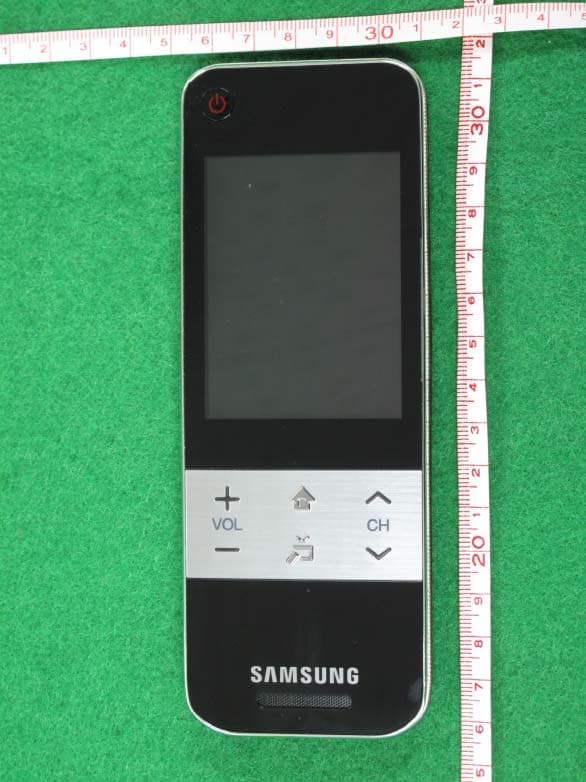
Click to zoom
Application Details
- Equipment Class
- DTS - Digital Transmission System
- Date of Grant
- Mar 28, 2010
- Application Purpose
- Original Equipment
- Date of Application
- Mar 28, 2010
- Equipment Note
- TV Remote Control Transmitter
- Frequency Range
- 2422.00000000 - 2452.00000000
- Company
- Samsung Electronics Co Ltd
- Country
- United States
Documents & Files
Document Text
Text extracted from the exhibit documents filed with the FCC. Open a document above to read the original.
Users Manual
imagine the possibilities Thank you for purchasing this Samsung product. To receive more complete service, please register your product at www.samsung.com/register Touch Remote user manual LED-C9000 Contact SAMSUNG WORLDWIDE If you have any questions or comments relating to Samsung products, please contact the SAMSUNG customer care center. Comment contacter Samsung dans le monde Si vous avez des suggestions ou des questions concernant les produits Samsung, veuillez contacter le Service Consommateurs Samsung. Comuníquese con SAMSUNG WORLDWIDE Si desea formular alguna pregunta o comentario en relación con los productos de Samsung, comuníquese con el centro de atención al cliente de SAMSUNG. Country Customer Care Center Web SiteAddress CANADA1-800-SAMSUNG (726-7864) www. samsung. com Samsung Electronics Canada Inc., Customer Service 55 Standish Court Mississauga, Ontario L5R 4B2 Canada MEXICO01-800-SAMSUNG (726-7864) www. samsung. com C.P 11570 AV. Presidente Masaryk No.111, Int. 701 Col. Chapultepec Morales, Delegacion Miguel Hidalgo Mexico D.F U.S.A1-800-SAMSUNG (726-7864) www. samsung. com Samsung Electronics America, Inc. 105 Challenger Road Ridgefield Park, NJ 07660-0511 A Warning that batteries (battery pack or batteries installed) shall not be exposed to excessive heat such as sunshine, fire or the like. CAUTION Danger of explosion if battery is incorrectly replaced. Replace only with the same or equivalent type. “excessive sound pressure from earphones and headphones can cause hearing loss.” BN68-02921A-00 [BN68-02921A]Touch Remote-00L03.indb 12010-03-16 오전 10:50:39 2 Touch Remote Contents *Product design and specifications may be changed without notice. * Avoid displaying still images (such as jpeg picture files) or still image elements (such as TV Program logos, panorama or 4:3 format images, stock or news bars at the screen bottom etc.) on the screen. The continuous display of a still picture can cause uneven wear of the screen phosphors, which can affect image quality. To reduce the risk of this occurring, please follow these recommendations: •Avoid displaying the same TV channel for long periods. •Always try to display any image on a full screen. Use the TV set picture format menu for best possible match. •Reduce brightness and contrast values to the minimum required to achieve the desired picture quality. Exceeding these values may speed up the burn-in process. •Frequently use all the TV features designed to reduce image retention and screen burn- in. Refer to the proper user manual section for details. Use basic functions ........03 Description 04 Inserting the battery 04 Charging the battery First Time User Setup ........05 First Time User Setup Setting up the Network ........06 Setting Up Your Remote TV control menu ........10 TV control menu Services ........13 HOT-KEY menu 13 Twin Display Multimedia ........14 Photo / Music / Movie (from your PC) CH Info ........15 View the Channel List 15 Touch Remote Channel List 16 Antenna Mode / Channel List Mode 16 Channel Edit (analog channels only) Devices control ........17 Add External device 19 Learning Remote Settings menu ........20 Add Macro 21 Channel macro 21 Remote Settings Troubleshooting ........24 Troubleshooting Specifi cation ........25 Specifi cation 20 Add Macro 21 Channel macro 21 Remote Settings [BN68-02921A]Touch Remote-00L03.indb 22010-03-16 오전 10:50:40 3 Touch Remote Use basic functions Description Power Turn the TV on and off. MUTE Mute or unmute. Volume Press to control the volume. Channel Press to change channels. SOURCE Display the source list (TV, PC, etc.) on the screen. Accessories User M anual USB CablePower AdapterBatteryUser ManualQuick Setup Guide / Warranty Card VOL CH MUTE SOURCE VOL CH MUTE SOURCE MUTE SOURCE CH VOL Charge port SOURCE button Speaker Channel button MUTE button TV Power button Touch screen Volume button Battery cover Phone Jack (Sold separately) IR receiver for learning external devices. [BN68-02921A]Touch Remote-00L03.indb 32010-03-16 오전 10:50:41 4 Touch Remote Charging the battery Charge the battery fully before using the remote control. 1Plug the small end of the USB cable into the charge port with the triangle facing up. 2Plug the power adapter into the outlet. The triangle lights up red. 3When the battery is fully charged, the triangle turns green. Unplug the adapter from the wall outlet. Inserting the battery 1Slide and open the battery cover in the direction of the arrow. 2Insert the battery with the Samsung logo facing up. 3Slide and close the battery cover in the direction of the arrow. VOL CH MUTE SOURCE VOL CH MUTE SOUR CE (A) (B) Charge Port [BN68-02921A]Touch Remote-00L03.indb 42010-03-16 오전 10:50:41 5 Touch Remote First Time User Setup The default setup screen appears when your touch remote is turned on for the first time. To connect the touch remote to the TV, you must complete the following steps. 1Select the desired language, and then tap <OK>. 2Select <OK> to connect the touch remote. If you want to connect to it later or if you have changed the touch remote to a new one, select <Skip>. If you selected <Skip>, refer to “Setting up the Network” (p. 7) when you want to connect the TV and touch remote. •The Samsung Wireless LAN Adapter must be connected to the TV before you establish a connection. •The Samsung Wireless LAN Adapter and touch remote must be parallel and no farther than 8 inches (20cm) apart. •If you are failed, reconnect the Samsung Wireless LAN Adapter, and then try again. •For initial TV settings, refer to the TV manual. Select a Language. Language English OK Welcome Select Language of the OSD. Menu Language : English Enter Plug & Play Succeed! Complete the confi guration of this remote control. Do the TV confi guration as the TV screen information. OK Connect TV Keyboard TV ControlServices [BN68-02921A]Touch Remote-00L03.indb 52010-03-16 오전 10:50:42 6 Touch Remote Setting up the Network Setting Up Your Remote You can set up your Touch Remote to contr…
Text truncated - open the document above for the full version.
Cover Letter(s)
SAMSUNG ELECTRONICS AMERICA, INC. American QA Lab 18600 Broadwick St. Rancho Dominguez, CA 90220 Date: February 12, 2010 Federal Communications Commission Authorization and Evaluation Division 7435 Oakland Mills Road, Columbia, MD 21046 RE: Request of Confidentiality for FCC ID: A3LRMC30C1 To Whom It May Concern: Pursuant to Sections 0.457 and 0.459 of the Commission’s Rules (CFR 47), and Section 552 (b) (4) of the Freedom of Information Act, SAMSUNG ELECTRONICS CO.,LTD. hereby requests confidentiality and treatment of certain information accompanying this application. The materials contain trade secrets and proprietary information not customarily released to the public. The public disclosure of these matters might be harmful to the Applicant and provide unjustified benefits to its competitors. We are also hereby request Short-Term Confidentiality for 180 days after the grant as outlined in Public Notice DA 04-1705. This provision will give SAMSUNG ELECTRONICS CO.,LTD. temporary confidentiality of commercially sensitive information prior to product release. The requested Permanent and Short-Term Confidential exhibits are listed as follows: PERMANENT AND SHORT-TERM CONFIDENTIAL LIST Exhibit Description 1 Block Diagram 2 Operational Description PERMANENT 3 Schematics 4 External Photos 5 Internal Photos 6 Test-Setup Photos SHORT-TERM 7 Users Manual The Applicant understands that pursuant to Rule 0.457, disclosure of this application and all accompanying documentations, where applicable, will not be made public before the date of the Grant for this application. Sincerely, Peter Ra General Manager American QA Lab SAMSUNG Electronics America INC.
Cover Letter(s)
From: 라상경 Sent: Friday, March 26, 2010 1:56 PM To: PCTEST TCB/CB; 이재우 Cc: PCTEST - Gregory Czumak; PCTEST - Randy Ortanez; PCTEST - Channy Park; PCTEST - Gregory Snyder; PCTEST - Mia Kang Subject: Re: Follow Up Questions Regarding FCC ID : A3LRMC30C1 3-26-10 Page 1 of 10Samsung Enterprise Portal mySingle 3/26/2010 Thanks Gregory for your quick review Concerning the following labelling issue I checked the requirements and the equipment is met the following optional thing As an option to placing the FCC label on the exterior of the device, the FCC label may be placed in a user accessible area if the following conditions are met: • The device is handheld (notebook computers are considered as handheld); -> This device is handheld • The FCC identifier is visible at the time of purchase. Marketing the device without the battery installed when the label is in the battery compartment is acceptable. The FCC ID on the box, or additional documentation directing the user where to find the FCC label, also satisfies this requirement; -> Without or with battery installed, the label is visible • The user accessible area must not require any special tools for access, and the FCC label must not be placed on a removable part; -> No need to specail tools for access • The FCC ID, Model Number, or FCC logo must be on the label and must meet all general labelling requirements or policies that apply for Certification, Verification or DoC. -> Above requirements is placed on the label Thanks and please review above things and let me know Thanks again for your quick review Just for your reference, it is scheduled to launch this unit Monday morning Sang Kyung, Ra ------- Original Message ------- Sender : PCTEST TCB/CB<[email protected]> [email protected] Date : 2010-03-26 10:31 (GMT-07:00) Title : Follow Up Questions Regarding FCC ID : A3LRMC30C1 3-26-10 라 상 경 (Ra, Sang Kyung)/General Manager Head of QA Lab America Samsung Electronics America, 18600 Broadwick St., Rancho Dominguez, CA 90220 TEL : +1-310-900-5250 FAX : +1-310-537-5500 C.P : +1-714-882-0231 e -mail:[email protected] [email protected] [email protected] Dear Mr. Lee, Thank you for your email. 1. Regarding your response to 3, please note the following: a. You ask: Is there any regulation for exception for cellular phones?, if you have please provide to us . Please see the September ’06 TCB Conference Call Minutes (attached), pp. 4-5. b. You also state: as you can see Permanently and readily visible is important 2 things. but there is other sentence about readily visible at 2.925-(2), this is not a prerequisite for grant of equipment authorization. In spite of this sentence of FCC 2.925-(2) , if we have to put FCC ID on out side, we will do that. You are misinterpreting the statement in the Rule: (2) As used here, readily visible means that the nameplate or nameplate data must be visible from the outside of the equipment enclosure. It is preferable that it be visible at all times during normal installation or use, but this is not a prerequisite for grant of equipment authorization. So, it is not a prerequisite that the nameplate info (including the FCC ID) be visible during installation or usage. It is required that it be readily visible at the time of purchase (per 2.925(d)). However, I have researched the issue on the FCC KDB, and found 784748 D01 Labelling Part 15 &18 Guidelines v07, also attached, which states on p.4: As an option to placing the FCC label on the exterior of the device, the FCC label may be placed in a user accessible area if the following conditions are met: • The device is handheld (notebook computers are considered as handheld); • The FCC identifier is visible at the time of purchase. Marketing the device without the battery installed when the label is in the battery compartment is acceptable. The FCC ID on the box, or additional documentation directing the user where to find the FCC label, also satisfies this requirement; • The user accessible area must not require any special tools for access, and the FCC label must not be placed on a removable part; • The FCC ID, Model Number, or FCC logo must be on the label and must meet all general labelling requirements or policies that apply for Certification, Verification or DoC. So, the FCC is now accepting the FCC ID inside the battery compartment for any Part 15/18 handheld device that meets the specified criteria. It is not necessary to place the FCC ID on the outside of the EUT. Please submit a statement verifying that the label will be readily visible at the time of purchase since it is located in the battery compartment, and the EUT is marketed without the battery installed (similar to the label letter Samsung always sends with its cell phone applications). Page 2 of 10Samsung Enterprise Portal mySingle 3/26/2010 2. We are awaiting the FCC’s response to our KDB inquiry regarding the necessity of SAR testing, and will inform you of their answer as soon as we receive it. Sincerely, Gregory Czumak Senior Certification Engineer PCTEST TCB From: JayWoo Lee [mailto:[email protected]] Sent: Friday, March 26, 2010 9:22 AM To: SangKyung Ra; [email protected]; [email protected]; [email protected]; [email protected]; [email protected]; 엄창섭; Seob Lee; Seon Taeg Jin; '김현우' Subject: Follow Up Questions Regarding FCC ID : A3LRMC30C1 to : PC Test Lab from : Jaywoo lee(samsung electronics) Dear Sir I send Follow Up Questions Regarding FCC ID : A3LRMC30C1 Especially #3 about FCC ID mark is very important. and also let me know ths complite schedule. 1. Regarding your response to question #2, you have submitted both a Part 15B report and also a label showing the FCC DoC logo. Is the peripheral portion (JBP) of the EUT to be authorized under Certification or DoC? If Certification, then the FCC DoC logo must be removed from the label- please revise and resubmit it. Alternatively, if the JBP is to be authorized under DoC, then you do not have to submit the Part 15B test…
Text truncated - open the document above for the full version.
External Photos
Test Report No.: NK-10-R-005 FCC and IC Certification Samsung Electronics Co., Ltd. FCC ID : A3LRMC30C1 / IC ID :649E-RMC30C1 Page 84 of 101 APPENDIX C – EUT PHOTOGRAPHS Front View of EUT Test Report No.: NK-10-R-005 FCC and IC Certification Samsung Electronics Co., Ltd. FCC ID : A3LRMC30C1 / IC ID :649E-RMC30C1 Page 85 of 101 Rear View of EUT Test Report No.: NK-10-R-005 FCC and IC Certification Samsung Electronics Co., Ltd. FCC ID : A3LRMC30C1 / IC ID :649E-RMC30C1 Page 86 of 101 Top View of EUT Test Report No.: NK-10-R-005 FCC and IC Certification Samsung Electronics Co., Ltd. FCC ID : A3LRMC30C1 / IC ID :649E-RMC30C1 Page 87 of 101 Bottom View of EUT Test Report No.: NK-10-R-005 FCC and IC Certification Samsung Electronics Co., Ltd. FCC ID : A3LRMC30C1 / IC ID :649E-RMC30C1 Page 88 of 101 Right View of EUT Test Report No.: NK-10-R-005 FCC and IC Certification Samsung Electronics Co., Ltd. FCC ID : A3LRMC30C1 / IC ID :649E-RMC30C1 Page 89 of 101 Left View of EUT Test Report No.: NK-10-R-005 FCC and IC Certification Samsung Electronics Co., Ltd. FCC ID : A3LRMC30C1 / IC ID :649E-RMC30C1 Page 90 of 101 Label View of EUT Test Report No.: NK-10-R-005 FCC and IC Certification Samsung Electronics Co., Ltd. FCC ID : A3LRMC30C1 / IC ID :649E-RMC30C1 Page 101 of 101 View of Adaptor Test Report No.: NK-10-R-005 FCC and IC Certification Samsung Electronics Co., Ltd. FCC ID : A3LRMC30C1 / IC ID :649E-RMC30C1 Page 81 of 101 APPENDIX A – LABELLING REQUIREMENTS The sample label shown shall be permanently affixed at a conspicuous location on the device and be readily visible to the user at the time of purchase. ※ See other information in the manual Labelling Requirements
ID Label/Location Info
Test Report No.: NK-10-R-005 FCC and IC Certification Samsung Electronics Co., Ltd. FCC ID : A3LRMC30C1 / IC ID :649E-RMC30C1 Page 81 of 101 APPENDIX A – LABELLING REQUIREMENTS The sample label shown shall be permanently affixed at a conspicuous location on the device and be readily visible to the user at the time of purchase. ※ See other information in the manual Labelling Requirements
Internal Photos
Test Report No.: NK-10-R-005 FCC and IC Certification Samsung Electronics Co., Ltd. FCC ID : A3LRMC30C1 / IC ID :649E-RMC30C1 Page 91 of 101 Inside View of EUT Test Report No.: NK-10-R-005 FCC and IC Certification Samsung Electronics Co., Ltd. FCC ID : A3LRMC30C1 / IC ID :649E-RMC30C1 Page 92 of 101 Fornt View of Main board Test Report No.: NK-10-R-005 FCC and IC Certification Samsung Electronics Co., Ltd. FCC ID : A3LRMC30C1 / IC ID :649E-RMC30C1 Page 93 of 101 Rear View of Main board Test Report No.: NK-10-R-005 FCC and IC Certification Samsung Electronics Co., Ltd. FCC ID : A3LRMC30C1 / IC ID :649E-RMC30C1 Page 94 of 101 Front View of Keypad board Test Report No.: NK-10-R-005 FCC and IC Certification Samsung Electronics Co., Ltd. FCC ID : A3LRMC30C1 / IC ID :649E-RMC30C1 Page 95 of 101 Rear View of Keypad board Test Report No.: NK-10-R-005 FCC and IC Certification Samsung Electronics Co., Ltd. FCC ID : A3LRMC30C1 / IC ID :649E-RMC30C1 Page 96 of 101 Inside View of EUT without main board Test Report No.: NK-10-R-005 FCC and IC Certification Samsung Electronics Co., Ltd. FCC ID : A3LRMC30C1 / IC ID :649E-RMC30C1 Page 97 of 101 Front View of WLAN module Test Report No.: NK-10-R-005 FCC and IC Certification Samsung Electronics Co., Ltd. FCC ID : A3LRMC30C1 / IC ID :649E-RMC30C1 Page 98 of 101 Front View of WLAN module without shield can Test Report No.: NK-10-R-005 FCC and IC Certification Samsung Electronics Co., Ltd. FCC ID : A3LRMC30C1 / IC ID :649E-RMC30C1 Page 99 of 101 Rear View of WLAN module Test Report No.: NK-10-R-005 FCC and IC Certification Samsung Electronics Co., Ltd. FCC ID : A3LRMC30C1 / IC ID :649E-RMC30C1 Page 100 of 101 Rear View of WLAN module without shield can
RF Exposure Info
SAMSUNG ELECTRONICS AMERICA, INC. American QA Lab 18600 Broadwick St. Rancho Dominguez, CA 90220 RF Exposure Evaluation Applicant: Samsung FCC ID: A3LRMC30C1 Device: 3” Touch Remote (Hand-held) Model: RMC30C1 Description: The device is a wireless hand-held TV remote with a touch screen. The unit operates from 2412 – 2462 MHz utilizing 802.11b/g/n technology. The maximum conducted output power is: • 802.11b: 16.23 dBm • 802.11g: 15.67 dBm • 802.11n(HT20): 14.64 dBm • 802.11n(HT40): 13.39 dBm RF Exposure evaluation is performed per FCC RF Exposure Procedures and Equipment Authorization Policies 447498 D01. Since the device is a hand-held device the RF Exposure evaluation is performed in accordance with the requirements of 447498 D01 Section 4)c)iii. 447498 D01 Section 4) c) iii): (1) Hand SAR is required for hand-held and hand-operated devices with output power > 1000 ·[f(GHz)] - 0.5 mW that are designed with the hand operating closer than 5 cm from the antenna during normal use. (2) Extremity SAR is required for wrist, feet or ankle worn devices. (3) Body SAR is required for hand-held and hand-operated or wrist, feet and ankle worn devices that operate closer than 5 cm to the body and the output power is > 300 ·[f(GHz)] -0.5 mW. The unit is a hand held only device with no body worn configuration. Also, the antenna is located more than 5cm from the hand when being held for use. The maximum conducted output power at 2.4GHz for the EUT is 16.23 dBm = 42mW Based on the calculation for the minimum output power that would require SAR evaluation for a hand-held device operating at 2.4GHz: For Hand SAR: 1000 × (2.4 GHz) -0.5 = 645mW For Body SAR: 300 × (2.4 GHz) -0.5 = 193mW The maximum output power for this device is below the powers listed above and therefore not applicable to SAR measurements and meets the RF Exposure requirements for a hand-held device.
Test Report
Test Report No.: NK-10-R-005 FCC and IC Certification Samsung Electronics Co., Ltd. FCC ID : A3LRMC30C1 / IC ID :649E-RMC30C1 Page 2 of 101 TABLE OF CONTENTS 1. Scope 4 2. Introduction (Site Description) 5 3. Test Conditions & EUT Information 6 3.1 Operation During Test 6 3.2 Support Equipment 7 3.3 Setup Drawing 7 3.4 EUT Information 8 4. Summary of Test Results 9 5. Recommendation / Conclusion 10 6. Antenna Requirements 10 7. Description of Test 11 7.1 Conducted Emissions 11 7.2 Radiated Emissions 12 7.3 6 dB Bandwidth 13 7.4 Maximum Peak Output Power 13 7.5 Peak Power Spectral Density 14 7.6 Conducted Spurious Emissions 14 8. Test Data 15 8.1 Conducted Emissions 15 8.2 Radiated Emissions 18 8.3 6 dB Modulated Bandwidth 19 8.4 Peak Power Output 27 8.5 Power Spectral Density 29 8.6 Conducted Spurious Emissions 37 8.7 Radiated Spurious Emissions 54 8.8 Receiver Spurious Emissions 77 Test Report No.: NK-10-R-005 FCC and IC Certification Samsung Electronics Co., Ltd. FCC ID : A3LRMC30C1 / IC ID :649E-RMC30C1 Page 3 of 101 9 Accuracy of Measurement 78 10. Test Equipment 80 Appendix A: Labelling Requirement 81 Appendix B: Photographs of Test Set-up 82 Appendix C: EUT Photographs 84 Test Report No.: NK-10-R-005 FCC and IC Certification Samsung Electronics Co., Ltd. FCC ID : A3LRMC30C1 / IC ID :649E-RMC30C1 Page 4 of 101 1. SCOPE Measurement and determination of electromagnetic emissions (EME) of radio frequency devices including intentional and/or unintentional radiators for compliance with the technical rules and regulations of the Federal Communications Commission under FCC part 15 and IC RSS-210. Responsible Party : Contact Person : Manufacturer : Samsung Electronics Co., Ltd. Mr. Jaywoo. Lee Samsung Electronics Co., Ltd. 416 Maetan-3Dong, Yeongtong-Gu, Suwon-Si, Gyeonggi-Do, 443-742 KOREA z FCC ID: A3LRMC30C1 z Model: RMC30C1 z Brand Name: SAMSUNG z EUT Type: 3” TOUCH REMOTE z Classification: z Applied Standard: z Test Procedure(s): z Dates of Test: z Place of Tests: FCC part 15 Spread Spectrum Transmitter FCC 47 CFR Part 15 subpart C and IC RSS-210 ANSI C63.4 (2003) Jan. 6, 2010 ~ Feb. 19, 2010 Nemko Korea Co., Ltd. Test Report No.: NK-10-R-005 FCC and IC Certification Samsung Electronics Co., Ltd. FCC ID : A3LRMC30C1 / IC ID :649E-RMC30C1 Page 5 of 101 2. INTRODUCTION The measurement procedure described in American National Standard for Methods of Measurement of Radio-Noise Emissions from Low-Voltage Electrical and Electronic Equipment in the Range of 9kHz to 40GHz (ANSI C63.4-2003) was used in determining radiated and conducted emissions emanating from Samsung Electronics Co., Ltd. FCC ID : A3LRMC30C1 and IC ID : 649E-RMC30C1 These measurement tests were conducted at Nemko Korea Co., Ltd. EMC Laboratory . The site address is 300-2, Osan-Ri, Mohyeon-Myeon, Cheoin-Gu, Yongin-Si, Gyeonggi- Do, KOREA. The area of Nemko Korea Corporation Ltd. EMC Test Site is located in a mountain area at 80 kilo-meters (48 miles) southeast and Incheon International Airport (Incheon Airport), 30 kilometers (18miles) south-southeast from central Seoul. It is located in the valley surrounded by mountains in all directions where ambient radio signal conditions are quiet and a favorable area to measure the radio frequency interference on open field test site for the computing and ISM devices manufactures. The detailed description of the measurement facility was found to be in compliance with the requirements of §2.948 according to ANSI C63.4 2003. Fig. 1. The map above shows the Seoul in Korea vicinity area. The map also shows Nemko Korea Corporation Ltd. EMC Lab. and Incheon Airport. Nemko Korea Co., Ltd. EMC Lab. 300-2, Osan-Ri, Mohyeon-Myeon, Cheoin- Gu, Yongin-Si, Gyeonggi-Do, KOREA 449-852 Tel)+82-31-322-2333 Test Report No.: NK-10-R-005 FCC and IC Certification Samsung Electronics Co., Ltd. FCC ID : A3LRMC30C1 / IC ID :649E-RMC30C1 Page 6 of 101 3. TEST CONDITIONS & EUT INFORMATION 3.1 Operation During Test The EUT was tested at the lowest channel, middle channel and the highest channel with the maximum RF power and all test data recorded in the report. During the test, the EUT was connected to notebook PC and then a test program supported by manufacturer was executed to operate EUT continuously. The EUT is programmed with the following data rate setting that used during testing: Test frequency 2412 MHz 2437 MHz 2462 MHz 802.11b Power Level 17 17 17 Data rate 11 11 11 802.11g Power Level 14 14 14 Data rate 54 54 54 802.11n(HT20) Power Level 14 14 14 Data rate MCS0 MCS0 MCS0 Test frequency 2422 MHz 2437 MHz 2452 MHz 802.11n(HT40) Power Level 12 14 12 Data rate MCS0 MCS0 MCS0 Test Report No.: NK-10-R-005 FCC and IC Certification Samsung Electronics Co., Ltd. FCC ID : A3LRMC30C1 / IC ID :649E-RMC30C1 Page 7 of 101 3.2 Support Equipment 3” TOUCH REMOTE (EUT) Samsung Electronics Co., Ltd. FCC ID: A3LRMC30C1 S/N: N/A TRAVEL ADAPTER Dongyang E&P Model : ATADU19JBE 2.0 m shielded power cable FCC Verification S/N: N/A Earphone N/A 0.8 m unshielded earphone cable S/N: N/A 3.3 Setup Drawing AC Public Networks 3” TOUCH REMOTE (EUT) TRAVEL ADAPTER WLAN Traffic AC Power Cable I/O Cable Test Report No.: NK-10-R-005 FCC and IC Certification Samsung Electronics Co., Ltd. FCC ID : A3LRMC30C1 / IC ID :649E-RMC30C1 Page 8 of 101 3.4 EUT Information The EUT is the Samsung 3” TOUCH REMOTE FCC ID: A3LRMC30C1, IC ID: 649E- RMC30C1. Specifications: EUT Type 3” TOUCH REMOTE Model Name RMC30C1 Brand Name SAMSUNG Frequency of Operation 2412 MHz to 2462 MHz Peak Power Output (Conducted) 802.11b : 16.23 dBm 802.11g : 15.67 dBm 802.11n(HT20) : 14.64 dBm 802.11n(HT40) : 13.39 dBm Channels 802.11b,g,n(HT20) : 11 CH 802.11n(HT40) : 9 CH Antenna Gain -0.473 dBi Spreading DSSS, OFDM Modulations BPSK, QPSK, 16QAM, 64QAM Temperature Range 0°C ~ +35 °C Voltage DC 3.7 V Dimension(W x D x H) 58 mm x 157 mm x 12 mm Weight 95 g Remarks - Test Report No.: NK-10-R-005 FCC and IC Certification Samsung Electronics Co., Ltd. FCC ID : A3LRMC30C1 / IC ID…
Text truncated - open the document above for the full version.
Test Setup Photos
Test Report No.: NK-10-R-005 FCC and IC Certification Samsung Electronics Co., Ltd. FCC ID : A3LRMC30C1 / IC ID :649E-RMC30C1 Page 82 of 101 APPENDIX B – PHOTOGRAPHS OF TEST SET-UP The Conducted Test Picture and Radiated Test Picture and show the worst-case configuration and cable placement. z Conducted Test Picture(Front) z Conducted Test Picture(Rear) Test Report No.: NK-10-R-005 FCC and IC Certification Samsung Electronics Co., Ltd. FCC ID : A3LRMC30C1 / IC ID :649E-RMC30C1 Page 83 of 101 z Radiated Test Picture(Front) z Radiated Test Picture(Rear)
Contact Information
Applicant
Jenni Chun(General Manager)
Technical Contact
PCTEST Engineering Lab., Inc.Randy Ortanez
[email protected]410-290-6652
6660-B Dobbin Road · Columbia, Maryland · United States
Test Firm
Nemko Korea Co.,Ltd.Hyun-ho Kim
Technical Specifications
| # | Rule Parts | Frequency Range | Power Output |
|---|---|---|---|
| 2 | 15C | 2.42 GHz - 2.45 GHz | 22.00 mW |
Other Applications from Samsung Electronics Co Ltd
A3LSMS741B
Aug 05, 2026Portable Handset
Equipment Class
6VL - 15E 6 GHZ Very Low Power DeviceA3LSMX940
Jul 31, 2026BT,BLE Tablet DTS,UNII a,b,g,n,ac,ax,be and digitizer
Equipment Class
DTS - Digital Transmission SystemA3LSMS741U
Jul 30, 2026Portable Handset
Equipment Class
6CD - 15E 6 GHz Low Power Dual ClientA3LSMX840
Jul 27, 2026BT,BLE Tablet DTS,UNII a,b,g,n,ac,ax and Digitizer
Equipment Class
DSS - Part 15 Spread Spectrum TransmitterA3LSMX848U
Jul 27, 2026WCDMA, LTE, 5G NR Tablet BT,BLE, DTS,UNII a b g n ac ax and Digitizer
Equipment Class
JBP - Part 15 Class B Computing Device Peripheral