A3LRMCTPHSMART TOUCH CONTROL
Samsung Electronics Co Ltd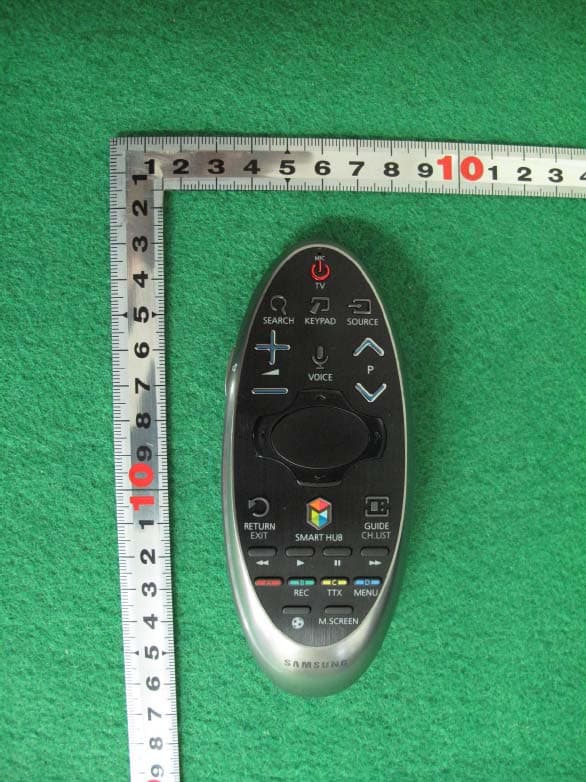
Click to zoom
Application Details
- Equipment Class
- DSS - Part 15 Spread Spectrum Transmitter
- Date of Grant
- Feb 17, 2014
- Application Purpose
- Original Equipment
- Date of Application
- Feb 17, 2014
- Equipment Note
- SMART TOUCH CONTROL
- Frequency Range
- 2402.00000000 - 2480.00000000
- Company
- Samsung Electronics Co Ltd
- Country
- United States
Documents & Files
Document Text
Text extracted from the exhibit documents filed with the FCC. Open a document above to read the original.
Users Manual
26 Inserting Batteries into the Smart Touch Control To use the Smart Touch Control, insert the batteries into the device referring to the figure below, depending on the model. 11 Gently pull on the battery cover's notch and then remove the cover completely once it comes loose. 21 Insert 2 AA alkaline batteries, making sure to align the positive and negative polarities correctly. 31 Place the battery cover on the remote control and insert the top part of the cover into the remote control. 41 Press the catches on both sides of the battery cover in the order as shown by the figure so that the cover is completely attached to the remote control. When you see this alarm icon on the screen... If the battery becomes low while using the Smart Touch Control, the following alarm icon appears. If the alarm icon pops up, replace the Smart Touch Control batteries. Samsung recommends using alkaline batteries for a longer operating life. <Low battery Alarm Icon> 2627 Pairing the Smart Touch Control To control the TV with the Smart Touch Control, you need to connect the Smart Touch Control and the TV via Bluetooth. Connect the Smart Touch Control to the TV. " The Smart Touch Control can only connect to a single TV. 11 Point the Smart Touch Control at the remote control sensor of the TV and press the TV button to turn the TV on. " The remote control receiver’s location may vary depending on the model. 21 A Bluetooth icon will appear on the screen as shown below. The TV will then attempt to connect to the Smart Touch Control unit automatically. <The attempting to connect and completion icons> Reconnecting the Smart Touch Control If the Smart Touch Control stops operating or works abnormally, replace the batteries. If the problem persists, press the PAIRING button on the Smart Touch Control to re-pair with the TV. The PAIRING button cannot be accessed without removing the Smart Touch Control’s battery cover. Point the Smart Touch Control at the TV’s remote control sensor from between 30 cm and 4 m and press the PAIRING button. The pairing image appears on the screen and the Smart Touch Control is connected to the TV. <The Smart Touch Control unit's PAIRING button> 28 Using the Smart Touch Control The Smart Touch Control makes it easier and more convenient to use the TV. If you press the KEYPAD button, an virtual remote control appears on the screen that allows you to easily enter digits, control content, and activate functions. " We recommend using the Smart Touch Control at a distance of less than 6m. Usable distance may differ depending on the wireless environmental conditions. Button Functions " The product colour and shape may vary depending on the model. 2829 ButtonDescription TV Turns the TV on/off. SEARCH Press this button to search for information through the search window available in various services. You can easily view channels and content that you have previously viewed using the recent viewing history. KEYPAD With the virtual remote control on the screen, you can easily enter digits, control content, and use functions. SOURCE Changes the source. w = v Changes the volume. VOICE Starts voice recognition. When the microphone icon appears on the screen, speak a voice command into the microphone. Say "Help" to learn about basic usage and voice commands. " Speak a voice command 10~15cm from the microphone at an appropriate volume. MUTE / AD Turns the sound off and on. < P > Changes the channel. < , > , ¡ , £ Moves the pointer or focus. TouchpadTap on the touchpad to run the focused item. † , ∂ , ∑ , ... Controls the item when you are playing a video, photo or music file or watching a recorded programme. You can also use the buttons to control the content on an external device. a , b , { , } Use these colour buttons to access additional options specific to the feature in use. RETURN / EXIT Returns to the previous menu. SMART HUB Launches Smart Hub. While an application is running, pressing the SMART HUB button terminates the application. GUIDE / CH.LIST Displays the digital channel broadcasting schedule. MENU Displays the menu on the screen. INFO Shows the information about the current digital broadcast programme or content. ¥ Enable Sports Mode for the optimal sports viewing experience. 30 Additional Functions Press and hold the following buttons for 1 second to use the additional functions. ButtonDescription Touchpad When you use the onscreen keyboard, press and hold the Enter button. To finish entering characters. RETURN Press and hold this button to exit all currently running applications. GUIDE / CH.LIST Press and hold to launch the CH.LIST. RETURN / EXIT Press and hold this button to exit all currently running applications MUTE / AD Press and hold this button while watching a programme to turn the subtitles on or off. { Press and hold to record the broadcast. " Availability depends on the model or area. } Press and hold to view information about the current digital channel or media file. Using the TV by Moving the Smart Touch Control The Smart Touch Control has a motion sensor (gyro sensor) that allows you to easily control the TV by holding and moving the Smart Touch Control. Place a finger on the touchpad and move the Smart Touch Control around as shown. The pointer or focus on the screen moves in the direction and as much as the Smart Touch Control is moved. It's also possible to scroll up and down on scrollable screens. 3031 Using the TV with the Touchpad " Navigate to the Support menu and select the Smart Touch Control Tutorial option to learn how to use the touchpad according to the instructions on the screen. Try Now " Navigate to the System > Smart Touch Control Settings menu and select the Touch Sensitivity option to change the touchpad sensitivity. If the touchpad sensitivity is too slow or fast, change the sensitivity using the Touch Sensitivity option. Try Now Moving the Focus or Pointer You can move the pointer or focus pressing the < , > , ¡ , £ button. Entering the Menu / Selecti…
Text truncated - open the document above for the full version.
Cover Letter(s)
129, Samsung-Ro, Yeongtong-Gu, Suwon-Si, Gyeonggi-Do, KOREA Date : October 22 nd , 2013 UL Verification Services Inc. Certification Division 47173 Benicia Street Fremont, CA 94538, USA To whom it may concern: I, the undersigned, hereby authorize UL Verification Services Inc. to act on our behalf in all manners relating to application for equipment authorization, including signing of all documents relating to these matters. Any and all acts carried out by UL Verification Services Inc. on our behalf shall have the same effect as acts of our own. I, the undersigned, hereby certify that we are not subject to a denial of federal benefits, that includes FCC benefits, pursuant to Section 5301 of the Anti-Drug Abuse Act of 1988, 21 U.S.C. 853(a). In authorizing UL Verification Services Inc. as our agent, we still recognize that we are responsible to: comply with the relevant provisions of the certification program; b) make all necessary arrangements for the conduct of the evaluation, including provision for examining documentation and access to all areas, records (including internal audit reports) and personnel for the purposes of evaluation (e.g. testing, inspection, assessment, surveillance, reassessment) and resolution of complaints; c) make claims regarding certification only in respect of the scope for which certification has been granted; d) do not use our product certification in such a manner as to bring the Certification Division into disrepute and not make any statement regarding our product certification which the Certification Division may consider misleading or unauthorized; e) upon suspension or cancellation of certification, discontinue use of all advertising matter that contains any reference thereto and return any certification documents as required by the Certification Division; 129, Samsung-Ro, Yeongtong-Gu, Suwon-Si, Gyeonggi-Do, KOREA f) use certification only to indicate the products are certified as being in conformity with specified standards; g) endeavor to ensure that no certificate or report nor any part thereof is used in a misleading manner; h) ensure that any reference to our product certification in communication media such as documents, brochures or advertising, complies with the requirements of the Certification Division; i) keep a record of all complaints made known to the us relating to the product’s compliance with requirements of the relevant standard and to make these records available to the Certification Division when requested; j) take appropriate action with respect to such complaints and any deficiencies found in products or services that affect compliance with the requirements for certification; k) document the actions taken. This authorization is valid until further written notice from the applicant. Sincerely Yours, Sang Kyung (Peter), RA Head of QA Lab (General Manager) Samsung Electronics America, Inc 19 Chapin Rd, Bldg D Pine Brook, NJ 07058
Cover Letter(s)
129, Samsung-Ro, Yeongtong-Gu, Suwon-Si, Gyeonggi-Do, KOREA Federal Communications Commission Authorization and Evaluation Division 7435 Oakland Mills Road, Columbia, MD 21046 Date: February 3, 2014 RE: Request of confidentiality for FCC ID: A3LRMCTPH To Whom It May Concern: Pursuant to Sections 0.457 and 0.459 of the Commission’s Rules (CFR 47), and Sectio 552 (b) (4) of the Freedom of Information Act, SAMSUNG ELECTRONICS CO.,LTD. Hereby requests confidentiality and treatment of certain information accompanying this application. The materials contain trade secrets and proprietary information not customarily released to the public. The public disclosure of these matters might be harmful to the Applicant and provide unjustified benefits to its competitors. We are also hereby request Short-Term Confidentiality for 180 day after the grant as outlined in Public Notice DA 04-1705. This provision will give SAMSUNG ELECTRONICS CO.,LTD. Temporary confidentiality of commercially sensitive information prior to product release. The requested Permanent and Short-Term Confidential exhibits are listed as follows: PERMANENT AND SHORT-TERM CONFIDENTIAL LIST Exhibit Description PERMANENT 1 Block Diagram 2 Operational Description 3 Schematics SHORT-TERM 4 External Photos 5 Internal Photos 6 Test-Setup Photos 7 Users Manual The Applicant understands that pursuant to Rule 0.457, disclosure of this application and all accompanying documentations, where applicable, will not be made public before the date of the Grant for this application. Sincerely, Name : Sang Kyung (Peter), Ra Title : General Manager Company : Samsung Electronics Co., Ltd.
External Photos
Test Report No.: NK-14-R-004 FCC and IC Certification Samsung Electronics Co., Ltd. FCC ID : A3LRMCTPH / IC : 649E-RMCTPH Page 60 of 73 APPENDIX C – EUT PHOTOGRAPHS Top View of EUT Test Report No.: NK-14-R-004 FCC and IC Certification Samsung Electronics Co., Ltd. FCC ID : A3LRMCTPH / IC : 649E-RMCTPH Page 61 of 73 Bottom View of EUT Test Report No.: NK-14-R-004 FCC and IC Certification Samsung Electronics Co., Ltd. FCC ID : A3LRMCTPH / IC : 649E-RMCTPH Page 62 of 73 Front View of EUT Test Report No.: NK-14-R-004 FCC and IC Certification Samsung Electronics Co., Ltd. FCC ID : A3LRMCTPH / IC : 649E-RMCTPH Page 63 of 73 Rear View of EUT Test Report No.: NK-14-R-004 FCC and IC Certification Samsung Electronics Co., Ltd. FCC ID : A3LRMCTPH / IC : 649E-RMCTPH Page 64 of 73 Right side View of EUT Test Report No.: NK-14-R-004 FCC and IC Certification Samsung Electronics Co., Ltd. FCC ID : A3LRMCTPH / IC : 649E-RMCTPH Page 65 of 73 Left View of EUT Test Report No.: NK-14-R-004 FCC and IC Certification Samsung Electronics Co., Ltd. FCC ID : A3LRMCTPH / IC : 649E-RMCTPH Page 66 of 73 Battery case View of EUT
ID Label/Location Info
Test Report No.: NK-14-R-004 FCC and IC Certification Samsung Electronics Co., Ltd. FCC ID : A3LRMCTPH / IC : 649E-RMCTPH Page 58 of 74 APPENDIX A – LABELLING REQUIREMENTS The sample label shown shall be permanently affixed at a conspicuous location on the device and be readily visible to the user at the time of purchase. (The rear side without battery cover) Labelling Requirements
Internal Photos
Test Report No.: NK-14-R-004 FCC and IC Certification Samsung Electronics Co., Ltd. FCC ID : A3LRMCTPH / IC : 649E-RMCTPH Page 67 of 73 Inside View of EUT Test Report No.: NK-14-R-004 FCC and IC Certification Samsung Electronics Co., Ltd. FCC ID : A3LRMCTPH / IC : 649E-RMCTPH Page 68 of 73 Front View of Mainboard Test Report No.: NK-14-R-004 FCC and IC Certification Samsung Electronics Co., Ltd. FCC ID : A3LRMCTPH / IC : 649E-RMCTPH Page 69 of 73 Rear View of Mainboard Test Report No.: NK-14-R-004 FCC and IC Certification Samsung Electronics Co., Ltd. FCC ID : A3LRMCTPH / IC : 649E-RMCTPH Page 70 of 73 Front View of keypad #1 Test Report No.: NK-14-R-004 FCC and IC Certification Samsung Electronics Co., Ltd. FCC ID : A3LRMCTPH / IC : 649E-RMCTPH Page 71 of 73 Rear View of Keypad #1 Test Report No.: NK-14-R-004 FCC and IC Certification Samsung Electronics Co., Ltd. FCC ID : A3LRMCTPH / IC : 649E-RMCTPH Page 72 of 73 Front View of Keypad #2 Test Report No.: NK-14-R-004 FCC and IC Certification Samsung Electronics Co., Ltd. FCC ID : A3LRMCTPH / IC : 649E-RMCTPH Page 73 of 73 Rear View of Keypad #2
RF Exposure Info
FCC RF Exposure description FCC ID : A3LRMCTPH 1. Applicable Standard According to §1.1307(b)(5), systems operating under the provisions of this section shall be operated in a manner that ensure that the public is not exposed to radio frequency energy level in excess of the Commission’s guideline. This Smart Touch Control can be used in a Portable device. 2. Maximum output power including tune‐up tolerancer Frequency band (GHz) 1) Target power (dBm) 1) Tune‐up tolerance (dB) Target + Tune‐up tolerance (dBm) Target + Tune‐up tolerance (mW) 2.4417.51.597.9 Notes: 1) Target power and Tune‐up tolerance were declared by manufacturer. 3. SAR test exclusion thresholds Frequency band (GHz) Target power including tune‐up tolerance (mW) Min. test separation distance (mm) √ f (GHz) 1) SAR test exclusion calcuation result 2) 1‐g SAR test exclusion threshold Result 2.4417.95.01.62.53.0Pass Notes: 1) SAR test exclusion calculation result =[(max. power of channel, including tune‐up tolerance, mW)/(min. test separation distance, mm)] · [√f(GHz)] 2) SAR Test Exclusion Thresholds at 5 mm Separation Distance were referred to Appendix A in 447498 D01 General RF Exposure Guidance v05r01. See a table for SAR Test Exclusion Thresholds for 100 MHz – 6 GHz and ≤ 50 mm in Appendix A on page 15 4. Conclusion As the output power of RMCTPH is below SAR test exclusion thresholds, the SAR evaluation is not required.
Test Report
Test Report No.: NK-14-R-004 FCC and IC Certification Samsung Electronics Co., Ltd. FCC ID : A3LRMCTPH / IC : 649E-RMCTPH Page 2 of 73 TABLE OF CONTENTS 1. Scope 4 2. Introduction (Site Description) 5 2.1 Test facility 5 2.2 Accreditation and listing 6 3. Test Conditions & EUT Information 7 3.1 Operation During Test 7 3.2 Support Equipment 7 3.3 Setup Drawing 8 3.4 EUT Information 9 4. Summary of Test Results 10 5. Recommendation / Conclusion 11 6. Antenna Requirements 11 7. Description of Test 12 7.1 Conducted Emissions 12 7.2 Radiated Emissions 13 7.3 20 dB Bandwidth and Carrier Frequency Separation 14 7.4 Transmitter Average Time of Occupancy 14 7.5 Number of Hopping Channels 15 7.6 Maximum Peak Output Power 15 7.7 Conducted Spurious Emissions 16 8. Test Data 17 8.1 Radiated Emissions 17 8.2 20 dB Modulated Bandwidth 18 8.3 Carrier Frequency Separation 24 8.4 Transmitter Average Time of Occupancy 27 Test Report No.: NK-14-R-004 FCC and IC Certification Samsung Electronics Co., Ltd. FCC ID : A3LRMCTPH / IC : 649E-RMCTPH Page 3 of 73 8.5 Number of Hopping Channels 29 8.6 Peak Power Output 30 8.7 Conducted Spurious Emissions 36 8.8 Radiated Spurious Emissions 52 8.9 Radiated Restricted Band Edge 54 9. Test Equipment 55 10 Accuracy of Measurement 56 Appendix A: Labeling Requirement 58 Appendix B: Photographs of Test Set-up 59 Appendix C: EUT Photographs 60 Test Report No.: NK-14-R-004 FCC and IC Certification Samsung Electronics Co., Ltd. FCC ID : A3LRMCTPH / IC : 649E-RMCTPH Page 4 of 73 1. SCOPE Measurement and determination of electromagnetic emissions (EME) of radio frequency devices including intentional and/or unintentional radiators for compliance with the technical rules and regulations of the Federal Communications Commission under FCC part 15 and IC RSS-210 Issue 8. Responsible Party : Contact Person : Manufacturer : Samsung Electronics Co., Ltd. Mr. Jaywoo, Lee Samsung Electronics Co., Ltd. 129, samsung-ro, Yeongtong-gu, Suwon-si, Gyeonggi-do, Korea 443-742 FCC ID: A3LRMCTPH IC: 649E-RMCTPH Model: RMCTPH Variant Model: RMCTPH1AP1 Brand Name: SAMSUNG EUT Type: Smart Touch Control Classification: 15C Intentional Radiator Applied Standard: FCC 47 CFR Part 15 subpart C and IC RSS-210 Issue 8 Test Procedure(s): ANSI C63.4-2003, ANSI C63.10 and FCC Public Notice DA 00- 705 dated March 30, 2000 entitled “Filling and Measurement Guidelines for Frequency Hopping Spread Spectrum Systems” Dates of Test: January 03, 2014 ~ January 21, 2014 Place of Tests: Nemko Korea Co., Ltd. Test Report No.: NK-14-R-004 FCC and IC Certification Samsung Electronics Co., Ltd. FCC ID : A3LRMCTPH / IC : 649E-RMCTPH Page 5 of 73 2. INTRODUCTION 2.1 Test facility The measurement procedure described in American National Standard for Methods of Measurement of Radio-Noise Emissions from Low-Voltage Electrical and Electronic Equipment in the Range of 9 kHz to 40 GHz (ANSI C63.4-2003), the American National Standard for Testing Unlicensed Wireless Device (ANSI C63.10-2009) were used in determining radiated and conducted emissions emanating from Samsung Electronics Co., Ltd. FCC ID : A3LRMCTPH and IC : 649E-RMCTPH These measurement tests were conducted at Nemko Korea Co., Ltd. EMC Laboratory. The site address is 155 & 159, Osan-Ro, Mohyeon-Myeon, Cheoin-Gu, Yongin-Si, Gyeonggi- Do, 449-852 KOREA, REPUBLIC OF. The area of Nemko Korea Corporation Ltd. EMC Test Site is located in a mountain area at 80 kilo-meters (48 miles) southeast and Incheon International Airport (Incheon Airport), 30 kilometers (18 miles) south-southeast from central Seoul. It is located in the valley surrounded by mountains in all directions where ambient radio signal conditions are quiet and a favorable area to measure the radio frequency interference on open field test site for the computing and ISM devices manufactures. The detailed description of the measurement facility was found to be in compliance with the requirements of §2.948 according to ANSI C63.4 2003. Fig. 1. The map above shows the Seoul in Korea vicinity area. The map also shows Nemko Korea Corporation Ltd. EMC Lab. and Incheon Airport. Nemko Korea Co., Ltd. EMC Lab. 155 & 159, Osan-Ro, Mohyeon- Myeon, Cheoin-Gu, Yongin-Si, Gyeonggi-Do, 449-852 KOREA, REPUBLIC OF Tel)+82-31-330-1700 Fax)+82-31-322-2332 Test Report No.: NK-14-R-004 FCC and IC Certification Samsung Electronics Co., Ltd. FCC ID : A3LRMCTPH / IC : 649E-RMCTPH Page 6 of 73 2.2 Accreditation and listing Accreditation type Accreditation number FCC part 15/18 Filing site Registration No. 97992 CAB Accreditation for DOC Designation No. KR0026 KOLAS Accredited Lab. (Korea Laboratory Accreditation Scheme) Registration No. 155 Canada IC Registered site Site No. 2040E-1/2 VCCI registration site(RE/CE/Telecom CE) Member No. 2118 EMC CBTL - KCC(RRL)Designated Lab. Registration No. KR0026 SASO registered Lab and Certification Body Registration No. 2008-15 Test Report No.: NK-14-R-004 FCC and IC Certification Samsung Electronics Co., Ltd. FCC ID : A3LRMCTPH / IC : 649E-RMCTPH Page 7 of 73 3. TEST CONDITIONS & EUT INFORMATION 3.1 Operation During Test The Laptop were used to control the EUT to transmit the wanted TX channel by the Bluetool testing program which manufacturer supported. The Laptop were removed after controlling the EUT to transmit the wanted signal. The EUT was tested at the lowest channel, middle channel and the highest channel with the maximum output power in accordance with the manufacturer’s specifications. The worst data were recorded in the report. The EUT is programmed with the following setting during the testing: Mode Frequency Band Power Setting Level GFSK/ π/4 DQPSK/ 8DPSK 2402 MHz ~ 2480 MHz Specify Power Table index 3.2 Support Equipment Smart Touch Control (EUT) Samsung Electronics Co., Ltd. Model: RMCTPH FCC ID : A3LRMCTPH S/N: N/A Laptop PC Samsung Electronics Co., Ltd. Model : NT-R520 0.29 m UART to USB shielded conversi on cable FCC DOC S/N: ZK6V93FS800012Y a.c.-d.c. Adaptor Ch…
Text truncated - open the document above for the full version.
Test Report
129, Samsung-Ro, Yeongtong-Gu, Suwon-Si, Gyeonggi-Do, KOREA ATTESTATION SATATEMENT FCC ID : A3LRMCTPH This Smart Touch Control contains an embedded Bluetooth device that Samsung confirms compliance with the following Part 15 regulations. 15.247(a)(1) The hopping sequence is pseudorandom All channels are used equally on average The receiver input bandwidth equals the transmit bandwidth The receiver hops in sequence with the transmit signal 15.247(g) The system is designed to comply with all of the regulations in Section 15.247 when the transmitter is presented with a continuous data (or information)stream. 15.247(h) The system does not coordinate it channels selection/hopping sequence with other frequency hopping systems for the express purpose of avoiding the simultaneous occupancy of individual hopping frequencies by multiple transmitters. Name : Sang Kyung (Peter), Ra Title : General Manager Company : Samsung Electronics Co., Ltd.
Test Setup Photos
Test Report No.: NK-14-R-004 FCC and IC Certification Samsung Electronics Co., Ltd. FCC ID : A3LRMCTPH / IC : 649E-RMCTPH Page 59 of 73 APPENDIX B – PHOTOGRAPHS OF TEST SET-UP The Radiated Test Picture and show the worst-case configuration and cable placement. Radiated Test Picture(Front) Radiated Test Picture(Rear)
Contact Information
Applicant
Jenni Chun(General Manager)
Test Firm
Nemko Korea Co., Ltd.Hyun Kim
[email protected]82313301781
Technical Specifications
| # | Rule Parts | Frequency Range | Power Output |
|---|---|---|---|
| 1 | 15C | 2.40 GHz - 2.48 GHz | 9.00 mW |
Other Applications from Samsung Electronics Co Ltd
A3LSMU600
Sep 15, 2026Bluetooth Headset
Equipment Class
DTS - Digital Transmission SystemA3LSMA185G
Sep 08, 2026Portable Handset
Equipment Class
CXX - Communications Rcvr for use w/ licensed Tx and CBsA3LSMS741B
Aug 05, 2026Portable Handset
Equipment Class
6VL - 15E 6 GHZ Very Low Power DeviceA3LSMX940
Jul 31, 2026BT,BLE Tablet DTS,UNII a,b,g,n,ac,ax,be and digitizer
Equipment Class
DTS - Digital Transmission SystemA3LSMS741U
Jul 30, 2026Portable Handset
Equipment Class
6CD - 15E 6 GHz Low Power Dual Client