A3LS620
Samsung Electronics Co Ltd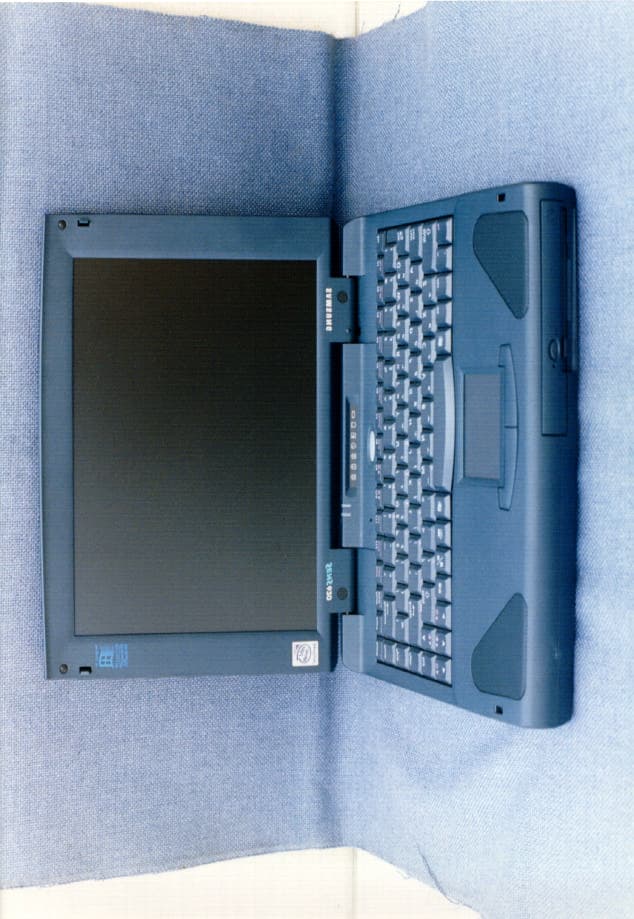
Click to zoom
Application Details
- Equipment Class
- JBC - Part 15 Class B Computing Device/Personal Computer
- Date of Grant
- Aug 11, 1998
- Application Purpose
- Original Equipment
- Date of Application
- Jul 12, 1998
- Company
- Samsung Electronics Co Ltd
- Country
- United States
Documents & Files
Document Text
Text extracted from the exhibit documents filed with the FCC. Open a document above to read the original.
Users Manual
i User’s Manual Notice The information within this manual is subject to change without notice. The manufacturer shall not be held liable for technical or editorial errors or omissions contained in herein; nor for incidental or consequential damages resulting from the furnishing, performance or use of this material. No part of this publication may be reproduced, stored in a retrieval system, or transmitted, in any form or by any means, mechanical photocopying, recording or otherwise, without the prior written permission of the manufacturer. Product names mentioned herein are for identification purposes only, and may be trademarks and/or registered trademarks of their respective companies. 1998. All rights reserved ii Important Safety Instruction Read all of these instructions, and save these instructions for later use. •Follow all warnings and instructions marked on the product. •Unplug this product from the wall outlet before cleaning. Do not use liquid cleaners or aerosol cleaners. Use a damp cloth for cleaning. •Do not use this product near water. Never spill liquid of any kind on the product. •Do not place this product on an unstable cart, stand, or table. •Slots and openings in the cabinet are provided for ventilation. To ensure reliable operation of the product on a bed, sofa, rug, or other similar surface. This product should never be placed near or over a radiator or heat register. This product should not be placed in a built-in installation unless proper ventilation is provided. •Before connecting this product to a power source, check the required voltage and frequency match the available power source. •This computer is powered by an internal battery pack or by an external AC power source, Which is supplied with the computer. Use of another battery pack or AC power source may present risk of fire or explosion. To disconnect the AC power cord and remove the battery packs. •This product is equipped with a 2-wire type plug. If you are unable to insert the plug into the outlet, contact your electrician to replace your obsolete outlet. •Do not allow anything to rest on the power cord. •Do not place this product in a location where someone may trip over the cord. •If an extension cord is used with this product, make sure that the total of the ampere ratings on the products plugged into the extension cord do not exceed the extension cord ampere rating. Also, make sure that the total of all products plugged into the wall outlet does not exceed 15 amperes. •Never push objects of any kind into this product through the cabinet slots, as they may touch dangerous voltage points or short out parts; that could result in a risk of fire or electric shock. •Except as explained elsewhere in this manual, do not attempt to service this product yourself. •Handle battery with care. If dropped, they may damaged. •Do not allow the battery to be exposed to direct sunlight for extended periods of time. iii User’s Manual •Do not attempt to disassemble the battery. If the battery is disassembled and the electrodes are exposed to outside, the battery may generate eat and smoke by chemical reaction. •Do not expose the battery to moisture or chemicals. •Charge the battery only as described in this document. •Do not short circuit the battery terminals as the resulting high currents can damage the battery. •The battery should not be used to power other products. •Do not dispose of a used battery in a fire or incinerator, as an explosion may result. •The battery should be recycled. •Do not subject the battery to temperature should not less than -20 degrees Centigrade or greater than 50 degrees Centigrade. •Unplug this product from the wall outlet and refer problems to the service representative under the following conditions: - When the power cord or plug is damaged or frayed. - If liquid has been spilled into product. - If the product has been exposed to rain or water. - If the product does not operate normally when the operating instructions are followed, adjust only those controls that are covered by the operating instructions. Improper adjustment of other controls may result in damage. - If the product exhibits a distinct change in performance. iv Battery Disposal Warning : Do not put rechargeable batteries or products powered by non- removable rechargeable batteries in the garbage. Contact your customer service representative for information on how to dispose of batteries that you cannot use or recharge any longer. Follow all local regulations when old batteries. v User’s Manual Federal Communications Commission (FCC) This device complies with Part 15 of the FCC Rules. Operation is subject to the following two conditions:(1) this device may not cause harmful interference, and (2) this device must accept any interference received, including interference that may cause undesired operation. NOTE: This equipment has been tested and found to comply with the limits for a Class B digital device pursuant to Part 15 of the FCC Rules. These limits are designed to provide reasonable protection against harmful interference in a residential installation. This equipment generate uses and can radiate radio frequency energy and if not installed and used in accordance with the instructions may cause harmful interference will not occur in a particular installation. If this equipment does cause harmful interference to radio or television reception, which can be determined by turning the equipment off and on, the user is encouraged to try to correct the interference by one or more of the following measures: •Reorient or relocate the receiving antenna. •Increase the separation between the equipment and receiver. •Connect the equipment into an outlet on a circuit different from that to which the receiver is connected. •Consult the dealer or an experienced radio/TV technician for help. If necessary, the user should consult the dealer or an experienced radio/television technician for additional suggestions. The user may find the fol…
Text truncated - open the document above for the full version.
Users Manual
i User’s Manual Notice The information within this manual is subject to change without notice. The manufacturer shall not be held liable for technical or editorial errors or omissions contained in herein; nor for incidental or consequential damages resulting from the furnishing, performance or use of this material. No part of this publication may be reproduced, stored in a retrieval system, or transmitted, in any form or by any means, mechanical photocopying, recording or otherwise, without the prior written permission of the manufacturer. Product names mentioned herein are for identification purposes only, and may be trademarks and/or registered trademarks of their respective companies. 1998. All rights reserved ii Important Safety Instruction Read all of these instructions, and save these instructions for later use. •Follow all warnings and instructions marked on the product. •Unplug this product from the wall outlet before cleaning. Do not use liquid cleaners or aerosol cleaners. Use a damp cloth for cleaning. •Do not use this product near water. Never spill liquid of any kind on the product. •Do not place this product on an unstable cart, stand, or table. •Slots and openings in the cabinet are provided for ventilation. To ensure reliable operation of the product on a bed, sofa, rug, or other similar surface. This product should never be placed near or over a radiator or heat register. This product should not be placed in a built-in installation unless proper ventilation is provided. •Before connecting this product to a power source, check the required voltage and frequency match the available power source. •This computer is powered by an internal battery pack or by an external AC power source, Which is supplied with the computer. Use of another battery pack or AC power source may present risk of fire or explosion. To disconnect the AC power cord and remove the battery packs. •This product is equipped with a 2-wire type plug. If you are unable to insert the plug into the outlet, contact your electrician to replace your obsolete outlet. •Do not allow anything to rest on the power cord. •Do not place this product in a location where someone may trip over the cord. •If an extension cord is used with this product, make sure that the total of the ampere ratings on the products plugged into the extension cord do not exceed the extension cord ampere rating. Also, make sure that the total of all products plugged into the wall outlet does not exceed 15 amperes. •Never push objects of any kind into this product through the cabinet slots, as they may touch dangerous voltage points or short out parts; that could result in a risk of fire or electric shock. •Except as explained elsewhere in this manual, do not attempt to service this product yourself. •Handle battery with care. If dropped, they may damaged. •Do not allow the battery to be exposed to direct sunlight for extended periods of time. iii User’s Manual •Do not attempt to disassemble the battery. If the battery is disassembled and the electrodes are exposed to outside, the battery may generate eat and smoke by chemical reaction. •Do not expose the battery to moisture or chemicals. •Charge the battery only as described in this document. •Do not short circuit the battery terminals as the resulting high currents can damage the battery. •The battery should not be used to power other products. •Do not dispose of a used battery in a fire or incinerator, as an explosion may result. •The battery should be recycled. •Do not subject the battery to temperature should not less than -20 degrees Centigrade or greater than 50 degrees Centigrade. •Unplug this product from the wall outlet and refer problems to the service representative under the following conditions: - When the power cord or plug is damaged or frayed. - If liquid has been spilled into product. - If the product has been exposed to rain or water. - If the product does not operate normally when the operating instructions are followed, adjust only those controls that are covered by the operating instructions. Improper adjustment of other controls may result in damage. - If the product exhibits a distinct change in performance. iv Battery Disposal Warning : Do not put rechargeable batteries or products powered by non- removable rechargeable batteries in the garbage. Contact your customer service representative for information on how to dispose of batteries that you cannot use or recharge any longer. Follow all local regulations when old batteries. v User’s Manual Federal Communications Commission (FCC) This device complies with Part 15 of the FCC Rules. Operation is subject to the following two conditions:(1) this device may not cause harmful interference, and (2) this device must accept any interference received, including interference that may cause undesired operation. NOTE: This equipment has been tested and found to comply with the limits for a Class B digital device pursuant to Part 15 of the FCC Rules. These limits are designed to provide reasonable protection against harmful interference in a residential installation. This equipment generate uses and can radiate radio frequency energy and if not installed and used in accordance with the instructions may cause harmful interference will not occur in a particular installation. If this equipment does cause harmful interference to radio or television reception, which can be determined by turning the equipment off and on, the user is encouraged to try to correct the interference by one or more of the following measures: •Reorient or relocate the receiving antenna. •Increase the separation between the equipment and receiver. •Connect the equipment into an outlet on a circuit different from that to which the receiver is connected. •Consult the dealer or an experienced radio/TV technician for help. If necessary, the user should consult the dealer or an experienced radio/television technician for additional suggestions. The user may find the fol…
Text truncated - open the document above for the full version.
Block Diagram
FCCID:A3LS620 °¤SAMSUNGReferenceNO.:980727 PAGE110F30 Figure4.1BlockDiagram
Block Diagram
FCCID:A3LS620 ***SAMSUNGReferenceNO.:980727 Figure4.1BlockDiagram
Cover Letter(s)
July 20, 1998 Federal Communications Commission 7435 Oakland Mills Road Columbia, MD 21046 RE: New Submission of Attachments FCC ID No: A3LS620 Form 731 Confirmation Number : EA90192 Gentleman: The above application was submitted to FCC electronically on July 8. However, the original attachments were made using non-USA compatible S/W. I ‘ve sent attachments in *. pdf file again. Please review this and contact me at Phone) 408-544-5124, Fax) 408-544-5191 if you have any question. Sincerely Yours, Ben Kim Engineering Manager Samsung Electronics America
External Photos
FCCID:A3LS620***SAMSUNGReferenceNO.:980727 FCCID:A3LS620***SAMSUNGReferenceNO.:980727
ID Label/Location Info
FCCID:A3LS620 °¤SAMSUNGReferenceNO.:980727 PAGE60F30 2.PRODUCTLABELING
ID Label/Location Info
FCCID:A3LS620***SAMSUNGReferenceNO.:980727 2.PRODUCTLABELING
ID Label/Location Info
FCCID:A3LS620***SAMSUNGReferenceNO.:980727 2.PRODUCTLABELING
Internal Photos
FCCID:A3LS620 °¤SAMSUNGReferenceNO.:980727 PAGE210F30 FCCID:A3LS620 °¤SAMSUNGReferenceNO.:980727 PAGE220F30 FCCID:A3LS620 °¤SAMSUNGReferenceNO.:980727 PAGE230F30 FCCID:A3LS620 °¤SAMSUNGReferenceNO.:980727 PAGE240F30 FCCID:A3LS620 °¤SAMSUNGReferenceNO.:980727 PAGE250F30 FCCID:A3LS620 °¤SAMSUNGReferenceNO.:980727 PAGE260F30 FCCID:A3LS620 °¤SAMSUNGReferenceNO.:980727 PAGE270F30 FCCID:A3LS620 °¤SAMSUNGReferenceNO.:980727 PAGE280F30 FCCID:A3LS620 °¤SAMSUNGReferenceNO.:980727 PAGE290F30 FCCID:A3LS620 °¤SAMSUNGReferenceNO.:980727 PAGE300F30
Internal Photos
FCCID:A3LS620***SAMSUNGReferenceNO.:980727 FCCID:A3LS620***SAMSUNGReferenceNO.:980727 FCCID:A3LS620***SAMSUNGReferenceNO.:980727 FCCID:A3LS620***SAMSUNGReferenceNO.:980727 FCCID:A3LS620***SAMSUNGReferenceNO.:980727 FCCID:A3LS620***SAMSUNGReferenceNO.:980727 FCCID:A3LS620***SAMSUNGReferenceNO.:980727 FCCID:A3LS620***SAMSUNGReferenceNO.:980727
Test Report
FCCID:A3LS620 °¤SAMSUNGReferenceNO.:980727 PAGE10F30 °¤SAMSUNGReferenceNO.:980626 Thistestreportistocertifythatthetesteddeviceproperlycomplieswiththerequirementsof FCCRulesandRegulationsPart15SubpartBUnintentionalRadiators.Alltestsnecessarytoshow compliancetotherequirementswereandtheseresultsmetthespecificationsrequirement. 1.ApplicantName:SAMSUNGELECTRONICSCO.,LTD. (Companyname&Address)416Maetan3Dong,Paldal-Ku, SuwonCity,KyungkiDo,Korea, 441-742 2.Identificationoftesteddevice 2.1FCCID:A3LS620 2.2DeviceName:NotebookComputer 2.3Brand(TradeName):SAMSUNG 2.4ModelNumber:SENSPro620 . 3.TestProcedureandItems 3.1ACPowerlineConductedEmissionsMeasurement:ANSIC63.4-1992 3.2RadiatedEmissionsMeasurement:ANSIC63.4-1992 4.DateofMeasurement:July06,1998 5.IssuedDate:July10,1998 Testedby: MIN-SOEK CHUNG TestEngineer Approvedby: SANG-KYU, LEE ManagerofEMCTestingLaboratory MEASUREMENT/TECHNICALREPORT SAMSUNGELECTRONICSCO.,LTD. NotebookComputer(SENSPro620) FCCID:A3LS620 DATE:JULY10,1998 FCCID:A3LS620 °¤SAMSUNGReferenceNO.:980727 PAGE20F30 TABLEOFCONTENTS 1.GENERALINFORMATION ......................................................................................................3 1.1ProductDescription.....................................................................................................3 1.2Grants...........................................................................................................................3 1.3TestedSystemDetails...............................................................................................4 1.4TestMethdology.........................................................................................................5 1.5TestFacility................................................................................................................5 2.PRODUCTLABLEING .............................................................................................................6 3.SYSTEMTESTCONFIGURATION ..........................................................................................7 3.1Justification..................................................................................................................7 3.2VideoModeJustification............................................................................................7 3.3EUTExerciseSoftware..............................................................................................7 3.4EquipmentModification..............................................................................................8 3.5TestSystemconfiguration.........................................................................................9 4.BLOCKDIAGRAM ...................................................................................................................10 Figure4.1-BlockDiagram...............................................................................................11 5.CONDUCTEDANDRADIATEDMEASUREMENTPHOTOS ..................................................12 6.CONDUCTEDEMISSIONDATA .............................................................................................14 7.RADIATEDEMISSIONDATA .................................................................................................17 8.LISTOFTESTINSTRUMENT .................................................................................................18 9.PHOTOSOFTESTEDEUT ......................................................................................................19 User'sManual...........................................................................................................AttachmentA Page FCCID:A3LS620 °¤SAMSUNGReferenceNO.:980727 PAGE30F30 1.GeneralInformation 1.1ProductionDescription TheSamsungElectronicsCo.,Ltd.NotebookComputerModelSENSPro620(FCCID :A3LS620)isbasedonthepowerfulpentiumprocessor(CPU266MHz)andhasinternal clockspeedsof14.318,33,48,56.448,and66.6MHz.Itcanbeoperatedfrom rechargeablebatterypackorby90-240VinternalACAdapter. SeeattachedSENSPro620User'sGuideformoreinformation. 1.2Grants N/A FCCID:A3LS620 °¤SAMSUNGReferenceNO.:980727 PAGE40F30 1.3TestSystemDetails TheFCCIDsforallequipmentplusdescriptionsofallcablesusedwiththetested system(includinginsertedcardswhichhavegrant)are: FCCID DESCRIPTION (ModelName) CABLEDESCRIPTION A3LS620 EUT (SENSPro620) - FCCDOC Monitor (6547-3BN) ShieldedInterface UnshieldedPowerCord DSI16XU222 InkjetPrinter (2225C) ShieldedInterface EW425-1040D SerialMouse (25-1040D) UnshieldedInterface GJJSKR-1032B Keyboard (SEM-K15Z) UnshieldedInterface N/AUSBTerminationCableUnshieldedInterface A3LSPR500E PortReplicator (SPR-500E) UnshieldedInterface N/A TelePhone (SSP-2501) UnshieldedInterface N/A Speaker (BS-211) UnshieldedInterface N/A Mike (YMC-2511) UnshieldedInterface N/A PCMCIA(SLOTS-2EA) FLASHMEMORY - FCCID:A3LS620 °¤SAMSUNGReferenceNO.:980727 PAGE50F30 1.4TestMethodology Bothradiatedandconductedtestswereperformedaccordingtotheprocedurein ANSIC63.4.RadiatedtestingwasperformedatOATS. Anantenna-to-EUTdistanceisthreemeters. 1.5TestFacility Alltestdescribedinthisreportwereperformedby: SAMSUNGELECTRONICSCO.,LTD. EMCTESTINGLABORATORY 416Maetan3Dong,Paldal-Ku, SuwonCity,KyungkiDo,Korea,441-742 Openfieldtestsite(3meter)andShieldedRoom. ThistestfacilityhasbeenfiledinFCCunderthecriteria inANSIC63.4-1992. FCCID:A3LS620 °¤SAMSUNGReferenceNO.:980727 PAGE60F30 2.PRODUCTLABELING FCCID:A3LS620 °¤SAMSUNGReferenceNO.:980727 PAGE70F30 3.SYSTEMTESTCONFIGURATION 3.1Justification Thesystemwasconfiguredfortestingintypicalfashion(asacustomerwould useit).TheEUThasinternalclockspeedsof14.318,33,48,56.448,and66.6MHz. TheEUTwasinvestigatedwhileoperatingatallspeeds.Thehighestspeedof 266MHzCPUwasusedforfinaltestingasitwasfoundtocauseworstcaseemissions. AndtheEUThasLCDdisplaysof12.1"TFT. TheEUT'svideocircuitryiscapableofoperatingatamaximumnon-interlaced resolutionof1024*768pixels.TheEUTwasobservedwhilescrollingacontinuous streamforcapital"H's"inthe1024*768mode(bothLCDdisplayandExt.Monitor). Comparingthetest…
Text truncated - open the document above for the full version.
Test Report
FCCID:A3LS620***SAMSUNGReferenceNO.:980727 *SAMSUNGReferenceNO.:980626 ThistestreportistocertifythatthetesteddeviceproperlycomplieswiththerequirementsofFCC RulesandRegulationsPart15SubpartBUnintentionalRadiators.Alltestsnecessarytoshow compliancetotherequirementswereandtheseresultsmetthespecificationsrequirement. 1.ApplicantName:SAMSUNGELECTRONICSCO.,LTD. (Companyname&Address)416Maetan3Dong,Paldal-Ku, SuwonCity,KyungkiDo,Korea, 441-742 2.Identificationoftesteddevice 2.1FCCID:A3LS620 2.2DeviceName:NotebookComputer 2.3Brand(TradeName):SAMSUNG 2.4ModelNumber:SENSPro620 . 3.TestProcedureandItems 3.1ACPowerlineConductedEmissionsMeasurement:ANSIC63.4-1992 3.2RadiatedEmissionsMeasurement:ANSIC63.4-1992 4.DateofMeasurement:July06,1998 5.IssuedDate:July10,1998 Testedby:MIN-SOEKCHUNG (TestEngineer) Approvedby:SANG-KYU,LEE (ManagerofEMCTestingLaboratory) MEASUREMENT/TECHNICALREPORT SAMSUNGELECTRONICSCO.,LTD. NotebookComputer(SENSPro620) FCCID:A3LS620 DATE:JULY10,1998 FCCID:A3LS620***SAMSUNGReferenceNO.:980727 TABLEOFCONTENTS 1.GENERALINFORMATION 1.1ProductDescription 1.2Grants 1.3TestedSystemDetails 1.4TestMethdology 1.5TestFacility 2.PRODUCTLABLEING 3.SYSTEMTESTCONFIGURATION 3.1Justification 3.2VideoModeJustification 3.3EUTExerciseSoftware 3.4EquipmentModification 3.5TestSystemconfiguration 4.BLOCKDIAGRAM Figure4.1-BlockDiagram 5.CONDUCTEDANDRADIATEDMEASUREMENTPHOTOS 6.CONDUCTEDEMISSIONDATA 7.RADIATEDEMISSIONDATA 8.LISTOFTESTINSTRUMENT 9.PHOTOSOFTESTEDEUT User'sManual..........................................................................................................AttachmentA FCCID:A3LS620***SAMSUNGReferenceNO.:980727 1.GeneralInformation 1.1ProductionDescription TheSamsungElectronicsCo.,Ltd.NotebookComputerModelSENSPro620(FCCID :A3LS620)isbasedonthepowerfulpentiumprocessor(CPU266MHz)andhasinternal clockspeedsof14.318,33,48,56.448,and66.6MHz.Itcanbeoperatedfrom rechargeablebatterypackorby90-240VinternalACAdapter. SeeattachedSENSPro620User'sGuideformoreinformation . 1.2Grants N/A FCCID:A3LS620***SAMSUNGReferenceNO.:980727 1.3TestSystemDetails TheFCCIDsforallequipmentplusdescriptionsofallcablesusedwiththetested system(includinginsertedcardswhichhavegrant)are: FCCID DESCRIPTION (ModelName) CABLEDESCRIPTION A3LS620 EUT (SENSPro620) - FCCDOC Monitor (6547-3BN) ShieldedInterface UnshieldedPowerCord DSI16XU222 InkjetPrinter (2225C) ShieldedInterface EW425-1040D SerialMouse (25-1040D) UnshieldedInterface GJJSKR-1032B Keyboard (SEM-K15Z) UnshieldedInterface N/AUSBTerminationCableUnshieldedInterface A3LSPR500E PortReplicator (SPR-500E) UnshieldedInterface N/A TelePhone (SSP-2501) UnshieldedInterface N/A Speaker (BS-211) UnshieldedInterface N/A Mike (YMC-2511) UnshieldedInterface N/A PCMCIA(SLOTS-2EA) FLASHMEMORY - FCCID:A3LS620***SAMSUNGReferenceNO.:980727 1.4TestMethodology Bothradiatedandconductedtestswereperformedaccordingtotheprocedurein ANSIC63.4.RadiatedtestingwasperformedatOATS. Anantenna-to-EUTdistanceisthreemeters. 1.5TestFacility Alltestdescribedinthisreportwereperformedby: SAMSUNGELECTRONICSCO.,LTD. EMCTESTINGLABORATORY 416Maetan3Dong,Paldal-Ku, SuwonCity,KyungkiDo,Korea,441-742 Openfieldtestsite(3meter)andShieldedRoom. ThistestfacilityhasbeenfiledinFCCunderthecriteria inANSIC63.4-1992. FCCID:A3LS620***SAMSUNGReferenceNO.:980727 3.SYSTEMTESTCONFIGURATION 3.1Justification Thesystemwasconfiguredfortestingintypicalfashion(asacustomerwould useit).TheEUThasinternalclockspeedsof14.318,33,48,56.448,and66.6MHz. TheEUTwasinvestigatedwhileoperatingatallspeeds.Thehighestspeedof 266MHzCPUwasusedforfinaltestingasitwasfoundtocauseworstcaseemissions. AndtheEUThasLCDdisplaysof12.1"TFT. TheEUT'svideocircuitryiscapableofoperatingatamaximumnon-interlaced resolutionof1024*768pixels.TheEUTwasobservedwhilescrollingacontinuous streamforcapital"H's"inthe1024*768mode(bothLCDdisplayandExt.Monitor). Comparingthetestresultswithoutportreplicatorandwithportreplicator,The testresultwithoutportreplicatorwasfoundtheworstcaseemissions.Andsothe finaltestingwasperformedwithoutportreplicator. 3.2VideoModeJustification Thesystemwastestedin1024*768resolutionmodeandinthehighestresolution modeof1024*768.sincethe1024*768resolutionmode(LCD&Ext.monitorbothin use)wasfoundtobeworstcase,thismodewasusedtocollecttheincludeddata. 3.3EUTExerciseSoftware TheEUTexerciseprogramusedduringtestingwasdesignedtoexercisethe systeminamannersimilartoatypicaluse.Thesoftwarewascontainedonthe EUT'sharddiskandfloppydisk.Onceloaded,theprogramsequentiallyexerciseeach systemcomponentinturn.Thesequenceusedwas:1)serial"H"sscrolledtothe LCDandmonitor;2)copyseriesof"H"scharacterstomassstoragedevice. 3)printseriesofHcharacterstoprinter.Sincethemouseandspeakerarestrictly inputdevice,nodatawastransmittedtothemduringtesting.Theyare,however, continuouslyscannedfordatainputactivity. FCCID:A3LS620***SAMSUNGReferenceNO.:980727 3.4EquipmentModifications Noequipmentmodificationswereperformedduringtesting. FCCID:A3LS620***SAMSUNGReferenceNO.:980727 3.5TestSystemconfiguration SamsungNotebook Model:SENSPro620 EUT SamsungNotebook Model:SENSPro620 FCCID:A3LS620 HPPRINTER Model:2225C+ FCCID:DSI16XU222 TANDYMOUSE Model:25-1040D FCCID:EW425-1040D AC90-240V,50/60Hz 1)ShieldedCable 2)UnshieldedCable 3)UnshieldPowerCord 4)FerriteBead 1) 2) TELEPHONE Model:SSP-2501 FCCID:N/A KEYBOARD Model:SEM-K15Z FCCID:GJJSKR-1032B 2) 3) MONITOR Model:6547-3BN FCCID:(DOC) SPEAKER Model:BS-211 FCCID:N/A MIKE Model:YMC-2511 FCCID:N/A 1) 2) 2) 2) FCCID:A3LS620***SAMSUNGReferenceNO.:980727 6.CONDUCTEDEMISSIONDATA Theinitialstepincollectingconducteddatawastoperformaquasi-peakscanover themeasurementrangeusingaspectrumanlyzer. -SampleCalculation Frequency:15.123[MHz] MeterReading:41.9[dBuV]<---MaximumMeterReading FactorofLISN:0.2[dB] Then,Resultiscalculatedasfollows. 41.9+0.2=42.1[dBuV] -SummaryofTestResult BelowdatashowsthatthetestdevicecomplieswithFCCrules. Minimummarginwas5.9dBat15.123MHz. -TestDataSheet N:NeutralL:Live Tested frequenc y [MHz] LISN Meter Reading [A] [dBuV] CABLE Loss [B] [dB] Results …
Text truncated - open the document above for the full version.
Test Setup Photos
FCCID:A3LS620***SAMSUNGReferenceNO.:980727 5.CONDUCTEDANDRADIATEDMEASUREMENTPHOTOS ConductedEmissionTestFront ConductedEmissionTestRear FCCID:A3LS620***SAMSUNGReferenceNO.:980727 RadiatedEmissionTestFront RadiatedEmissionTestRear
Contact Information
Applicant
Jenni Chun(General Manager)
Technical Contact
Samsung Electronics AmericaBen D Kim
[email protected]408-544-5124
85 West Tasman · San Jose, California · United States
Non-Technical Contact
Samsung Electronics AmericaBen Kim
[email protected]408-544-5124
Test Firm
Samsung Electronics Co., Ltd.Ben Kim
Technical Specifications
| # | Rule Parts | Frequency Range | Power Output | Tolerance |
|---|---|---|---|---|
| 1 | 15B | - | - | % |
Other Applications from Samsung Electronics Co Ltd
A3LSMS741B
Aug 05, 2026Portable Handset
Equipment Class
6VL - 15E 6 GHZ Very Low Power DeviceA3LSMX940
Jul 31, 2026BT,BLE Tablet DTS,UNII a,b,g,n,ac,ax,be and digitizer
Equipment Class
DTS - Digital Transmission SystemA3LSMS741U
Jul 30, 2026Portable Handset
Equipment Class
6CD - 15E 6 GHz Low Power Dual ClientA3LSMX840
Jul 27, 2026BT,BLE Tablet DTS,UNII a,b,g,n,ac,ax and Digitizer
Equipment Class
DSS - Part 15 Spread Spectrum TransmitterA3LSMX848U
Jul 27, 2026WCDMA, LTE, 5G NR Tablet BT,BLE, DTS,UNII a b g n ac ax and Digitizer
Equipment Class
JBP - Part 15 Class B Computing Device Peripheral