A3LSCM140Cable Modem
Samsung Electronics Co Ltd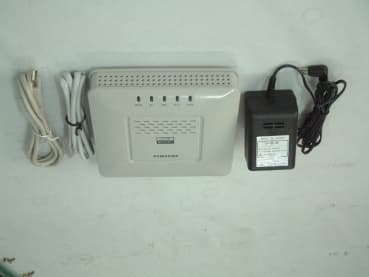
Click to zoom
Application Details
- Equipment Class
- JBP - Part 15 Class B Computing Device Peripheral
- Date of Grant
- Mar 21, 2002
- Application Purpose
- Original Equipment
- Date of Application
- Mar 21, 2002
- Equipment Note
- Cable Modem
- Company
- Samsung Electronics Co Ltd
- Country
- United States
Documents & Files
Document Text
Text extracted from the exhibit documents filed with the FCC. Open a document above to read the original.
Users Manual
SCM-140U User Guide CLASS B Digital device or Peripheral This equipment has been tested and found to comply with the limits for a Class B digital device, pursuant to Part 15 of the FCC Rules. These limits are designed to provide reasonable protection against harmful interference in a residential installation. This equipment generates, uses and can radiate radio frequency energy and, if not installed and used in accordance with the instructions, may cause harmful interference to radio communications. However, there is no guarantee that interference will not occur in a particular installation. If this equipment does cause harmful interference to radio or television reception, which can be determined by turning the equipment off and on, the user is encouraged to try to correct the interference by one or more of the following measures: - Reorient or relocate the receiving antenna. - Increase the separation between the equipment and receiver. - Connect the equipment into an outlet on a circuit different from that to which the receiver is connected. - Consult the dealer or experienced radio TV technician for help. iii Stop using PC and get rid of all the cables, such as power cable, coaxial cable, Ethernet cable and USB cable, connected to InfoRanger and PC during a thunderstorm. An electrical interaction can cause death, severe injury, or damage to the equipment. The warranty will be voided should any of the following occur : ➀The warranty seal covering the screw under the cable modem is broken or removed ➁The cable modem has been opened ➂There is substantial evidence that the cable modem's electronics have been tampered with. Samsung recommends to turn off and on the InfoRanger once in a while to triger to download the latest software automatically. Copyright © Samsung Electronics Co. Ltd. And Samsung Telecommunications America, Inc. 2001 All rights reserved. Samsung, the Samsung logo, Samsung InfoRanger are registered trademarks. All other product names are used for identification only and may be trademarks and/or registered trademarks of their respective companies. Product specifications subject to change without notice. No part of this publication may be reproduced in any form or by any means or used to make any derivatives such as translation, transformation, or adaptation without permission from Samsung Electronics as stipulated by the United States Copyright Act of 1976. iv Limited Warranty 1. What Is Covered And For How 1. What Is Covered And For How 1. What Is Covered And For How 1. What Is Covered And For How Long ? Long ?Long ? Long ? SAMSUNG TELECOMMUNICATIONS AMERICA, INC.(“SAMSUNG”)warrants to the original purchaser that SAMSUNG’s Cable Modems are free from defects in material and workmanship under normal use and service for the period commencing upon the date of purchase and continuing for the following specified period of time after that date : InfoRanger TM Cable Modem 2 years 2. What is not covered? 2. What is not covered?2. What is not covered? 2. What is not covered? This Limited Warranty is conditional upon proper use of the product by the purchaser. The Limited Warranty does not cover : (a) defects or damage resulting from accident, misuse, abuse, neglect, unusual physical, electrical or electromechanical stress, modification of any part of the product, or cosmetic damage; (b) equipment that has the serial number removed or made illegible;(c) all plastic surfaces and other externally exposed parts that are scratched or damaged due to normal use;(d) malfunctions resulting from the use of the product in conjunction with accessories, products or ancillary or peripheral equipment not authorized and approval of by SAMSUNG; (e) defects or damage from improper testing, operation, maintenance, installation, or adjustment. Please call SAMSUNG’s customer care center at 1-888-987-4357 for updated pricing on non-warranty repairs. 3. What Are What Are What Are What Are SAMSUNG SAMSUNGSAMSUNG SAMSUNG ’ s ss s Obligations? Obligations? Obligations? Obligations? During the applicable warranty period, SAMSUNG will repair or replace, at SAMSUNG’s sole option, without charge to purchaser, any defective component part of the Cable Modem or accessory. To obtain service under this Limited Warranty, purchaser must return the product to an authorized SAMSUNG service facility in an adequate container for shipping, accompanied by purchaser’s sales receipt or comparable substitute proof of purchase showing the date of purchase, the serial number of the product, and the sellers name and address. To obtain assistance on where to deliver the Cable Modem, call SAMSUNG customer care at 1-888-987-4357. Upon receipt, SAMSUNG will promptly repair or replace the defective product. SAMSUNG may, at SAMSUNG’s sole option, use rebuilt, reconditioned, or new parts or components when repairing any product or replace a product with a rebuilt, reconditioned or new product. Repaired products will be warranted for a period equal to the remainder of the original Limited Warranty on the original product or for 90 days, which ever is longer. All replaced parts, components, boards and equipment shall become the property of SAMSUNG. If SAMSUNG determines that the product is not covered by this Limited Warranty or that the product is not defective, the purchaser must pay all parts, shipping, and labor charge for the testing, repair and return of the product. 4. What Are The Limits On What Are The Limits On What Are The Limits On What Are The Limits On SAMSUNG SAMSUNGSAMSUNG SAMSUNG’ ’’ ’s Liability? s Liability?s Liability? s Liability? THE WARRANTIES GIVEN IN THIS WARRANTY ARE LIMITED TO THE DURATION OF THIS LIMITED WARRANTY SET OUT ABOVE. EXCECT TO THE EXTENT PROHIBITED BY APPLICABLE LAW, SAMSUNG SHALL NOT BE LIABLE FOR ANY SPECIAL, INCIDENTAL, CONSEQUENTIAL, INDIRECT OR SIMILAR DAMAGES, LOSS OF PROFITS, DAMAGES TO PURCHASER PROPERTY, OR INJURY TO PURCHASER OR OTHERS ARISING OUT OF THE USE, MISUSE OR INABILITY TO USE AN…
Text truncated - open the document above for the full version.
External Photos
Appendix-B : External Photographs of E.U.T <FRONT VIEW OF EUT> <REAR VIEW OF EUT
ID Label/Location Info
Test report Our reference : KEL02-F01020 Page : D1 of Appendix Issued date : 2002-02-23 Appendix-D : FCC ID label location information and Sample - FCC ID label location information The label included following statement will be attached on the bottom side of product. - FCC ID label sample
Internal Photos
Test report Our reference : KEL02-F01020 Page : C1 of Appendix Issued date : 2002-02-23 Appendix-C : Internal Photographs of E.U.T <INTERNAL VIEW OF E.U.T> Test report Our reference : KEL02-F01020 Page : C2 of Appendix Issued date : 2002-02-23 <FRONT VIEW OF MAIN BOARD> <REAR VIEW OF MAIN BOARD>
Test Setup Photos
Test report Our reference : KEL02-F01020 Page : A1 of Appendix Issued date : 2002-02-23 Appendix-A : Test Setup Photographs - Conducted Setup Photographs LINE CONDUCTED SETUP PHOTOGRAPH - FRONT VIEW LINE CONDUCTED SETUP PHOTOGRAPH - REAR VIEW - Radiated Setup Photograph RADIATED EMISSION SETUP PHOTOGRAPH - FRONT VIEW ( 30 - 300 MHz ) RADIATED EMISSION SETUP PHOTOGRAPH - REAR VIEW ( 30 - 300 MHz ) RADIATED EMISSION SETUP PHOTOGRAPH - FRONT VIEW ( 300- 1000 MHz ) RADIATED EMISSION SETUP PHOTOGRAPH - REAR VIEW ( 300 - 1000 MHz
Contact Information
Applicant
Jenni Chun(General Manager)
Test Firm
Bay Area Compliance LaboratoryJohn Chan
Technical Specifications
| # | Rule Parts | Frequency Range | Power Output |
|---|---|---|---|
| 1 | 15B | - | - |
Other Applications from Samsung Electronics Co Ltd
A3LSMS741B
Aug 05, 2026Portable Handset
Equipment Class
6VL - 15E 6 GHZ Very Low Power DeviceA3LSMX940
Jul 31, 2026BT,BLE Tablet DTS,UNII a,b,g,n,ac,ax,be and digitizer
Equipment Class
DTS - Digital Transmission SystemA3LSMS741U
Jul 30, 2026Portable Handset
Equipment Class
6CD - 15E 6 GHz Low Power Dual ClientA3LSMX840
Jul 27, 2026BT,BLE Tablet DTS,UNII a,b,g,n,ac,ax and Digitizer
Equipment Class
DSS - Part 15 Spread Spectrum TransmitterA3LSMX848U
Jul 27, 2026WCDMA, LTE, 5G NR Tablet BT,BLE, DTS,UNII a b g n ac ax and Digitizer
Equipment Class
JBP - Part 15 Class B Computing Device Peripheral