A3LSCX1150FMulti-Function Printer
Samsung Electronics Co Ltd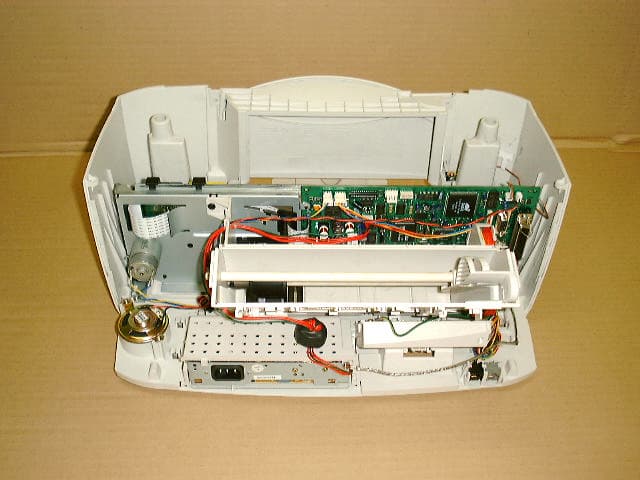
Click to zoom
Application Details
- Equipment Class
- JBP - Part 15 Class B Computing Device Peripheral
- Date of Grant
- Jan 09, 2002
- Application Purpose
- Original Equipment
- Date of Application
- Jan 08, 2002
- Equipment Note
- Multi-Function Printer
- Company
- Samsung Electronics Co Ltd
- Country
- United States
Documents & Files
Document Text
Text extracted from the exhibit documents filed with the FCC. Open a document above to read the original.
Users Manual
Important Precautions and Safety Information When using this product, these basic safety precautions should always be followed to reduce risk of fire, electric shock, and injury to persons: 1 Read and understand all instructions. 2 Use common sense whenever operating electrical appliances. 3 Follow all warnings and instructions marked on the product and in the literature accompanying the product. 4 If an operating instruction appears to conflict with safety information, heed the safety information. You may have misunderstood the operating instruction. If you cannot resolve the conflict, contact your sales or service representative for assistance. 5 Unplug the product from the AC wall socket and/or telephone jack before cleaning. Do not use liquid or aerosol cleaners. Use only a damp cloth for cleaning. 6 Do not place the product on an unstable cart, stand, or table. It may fall, causing serious damage. 7 Your product should never be placed on, near, or over a radiator, heater, air conditioner, or ventilation duct. 8 Do not allow anything to rest on the power. Do not locate your product where the cords will be abused by persons walking on them. 9 Do not overload wall outlets and extension cords. This can diminish performance, and may result in the risk of fire or electric shock. 10 Do not allow pets to chew on the AC power, telephone, or PC interface cords. 11 Never push objects of any kind into the product through case or cabinet openings. They may touch dangerous voltage points, creating a risk of fire or shock. Never spill liquid of any kind onto or into the product. 12 Your product may have a heavy cover for optimal pressure on the document for the best scanning and/or faxing (usually the flatbed-type product). In this case, replace the cover after placing document on the scan glass, hold the cover and move it down slowly until it seats on its location. 13 To reduce the risk of electric shock, do not disassemble the product. Take it to a qualified service technician when repair work is required. Opening or removing covers may expose you to dangerous voltages or other risks. Incorrect reassembly could cause electric shock when the unit is subsequently used. 14 Unplug the product from the telephone jack, PC and AC wall outlet, and refer servicing to qualified service personnel under the following conditions: • When any part of the power cord, plug, or connecting cable is damaged or frayed. • If liquid has been spilled into the product. • If the product has been exposed to rain or water. • If the product does not operate properly after instructions have been followed. • If the product has been dropped, or the cabinet appears damaged. • If the product exhibits a sudden and distinct change in performance. 15 Adjust only those controls covered by the operating instructions. Improper adjustment of other controls may result in damage, and may require extensive work by a qualified service technician to restore the product to normal operation. 16 Avoid using this product during a lightning storm. There may be a remote risk of electric shock from lightning. If possible, unplug the AC power and telephone cord for the duration of the lightning storm. 17 SAVE THESE INSTRUCTIONS. i Contents C ONTENTS Important Precautions and Safety Information .................. i Chapter 1: S ET U P Setting Up Your Product ......................................... 1.2 Contents ...................................................................... 1.2 Control Locations and Functions ..................................... 1.3 Front View ................................................................ 1.3 Rear View ................................................................. 1.4 Top View .................................................................. 1.4 Operation Panel Button Functions .................................... 1.5 Choosing a Location ....................................................... 1.7 Making Connections ....................................................... 1.7 Loading Paper .............................................................. 1.11 Installing Print Cartridges .............................................. 1.13 Installing Software .............................................. 1.18 About Samsung Software .............................................. 1.18 System Requirements ................................................... 1.19 Installing Samsung Software .......................................... 1.20 Configuring Fax and Internet Gates ................................. 1.24 Uninstalling Samsung Software ...................................... 1.28 Uninstalling the MFP Driver ........................................ 1.28 Using the SmarThru CD-ROM ..................................... 1.32 Basic System Setup .............................................. 1.33 Setting Date and Time .................................................. 1.33 Changing Date Format .............................................. 1.35 Changing Clock Mode ................................................ 1.35 Setting Fax Number and Name ....................................... 1.36 How To Enter Characters Using the Number Keypad ...... 1.37 Changing the Display Language ...................................... 1.39 Setting the Discard Size ................................................ 1.40 Setting Sounds ............................................................ 1.41 Ringer Volume, Alarm Sound, Key Sound .................... 1.41 Speaker Volume ....................................................... 1.41 ii Contents Setting Dialling Mode .................................................... 1.42 Using Save Mode .......................................................... 1.43 Ink Save ................................................................. 1.43 Paper Save .............................................................. 1.43 Power Save ............................................................. 1.44 …
Text truncated - open the document above for the full version.
External Photos
Front view of EUT Rear view of EUT Internal view of EUT Side view of EUT
ID Label/Location Info
Page 13 of 14 JOB NO. : KE-01-0590 7. Label and Label Location 7.1 Label 7.2 Label location This test reports does not constitute an endorsement by NIST/NVLAP or U.S Government. A3LSCX1150F
Internal Photos
PCBs view of SMPS Solder view of SMPS PCBs view of main b'd Solder view of main b'd External view of OPE Internal view of OPE PBA view of LIU PBA rear view of LIU
Test Report
Page 2 of 14 JOB NO. : KE-01-0590 Table of Contents 1. General Information 1.1 Product Description 1.2 Tested System Details 1.3 Test Methodology 1.4 Test Facility 2. System Test Configuration 2.1 Operation Environment 2.2 Justification 2.3 EUT Exercise Software 2.4 Test Procedure 2.5 Test System configuration 3. Conducted and Radiated Measurement Photos 3.1 Conducted Measurement Photos 3.2 Radiated Measurement Photos 4. Measurement Uncertainty 4.1 Conducted Emission Test 4.2 Radiated Emission Test 5. Conducted Emission Test Data 6. Radiated Emission Test Data 7. Label and Label Location 8. Test Equipment Used This test reports does not constitute an endorsement by NIST/NVLAP or U.S Government. Page 3 of 14 JOB NO. : KE-01-0590 1. General Information APPLICANT :SAMSUNG ELECTRONICS CO., LTD. ADDRESS :416, Maetan-3Dong, Paldal-Gu Suwon-City, Kyungki-Do, Korea 442-742 CONTACT PERSON :Ju Tak, Yang TEL. +82-31-200-4113 CONTACT ADDRESS :416, Maetan-3Dong, Paldal-Gu Suwon-City, Kyungki-Do, Korea 442-742 REGULATION(S) :FCC Part 15 Subpart B, Class B MODEL NUMBER :SCX-1150F SERIAL NUMBER :- VARIENT NAME(S) :- TESTED DATE :December 3, 2001 TEST SITE :3meter semi-anechoic chamber TEST SITE ADDRESS :San 14, Nongseo-Ri, Kihung-Eup, Yongin-City, Kyungki-Do, Korea, 449-900 This test reports does not constitute an endorsement by NIST/NVLAP or U.S Government. Page 4 of 14 JOB NO. : KE-01-0590 1.1 Product Description The Samsung MFP, SCX-1150F is supporting the ADF Copy, fax Tx,Rx and PC Printing, ADF Scan through IEEE1284,USB port, and it have phone call handset so talk to each other through PSTN. Main System clock 66MHz, Image Processor clock 75MHz, USB clock 48MHz and Modem clock 28MHz. See the attached SCX-1150F User's Guide for more information. 1.2 Tested System Details The FCC IDs for all equipment, plus descriptions of all cables used in the tested system are: ModelFCC ID/DoCDescriptionCable description (1)Samsung ElectronicsA3LSCX1150FMFPUnshielded RJ11 cable M/N : SCX-1150FUnshielded AC power cable S/N : -Centronics (EUT)USB (2)Samsung Electronics A3LCMH737Monitor Shielded Signal Cable M/N : SyncMaster 17GLSiUnshielded AC power cable S/N : P106H2JN401141 (3)Samsung Electronics DOCComputer Unshielded AC power cable M/N : TD260-DT S/N : C92DK409981 (4)Compaq AQ6-MTN4XZ15 KeyBoard PS/2 M/N : RT6656TW S/N : 23N39D015196 (5)SEJIN GJJB50PA0Mouse PS/2 M/N : SMB-600 S/N : 6GAF00761 (6)US Robotics DOCExt. Modem Serial Cable M/N : SPORTSTER S/N : 33083962 (7)Samsung VerificationExt. Telephone Telephone Cable M/N : SP-F124 S/N : KKCN614776 1.3 Test Methodology Both conducted and radiated testing were performed according to the procedures in FCC/ANSI C63.4(1992). Radiated testing was performed at a distance of 3 meters from the antenna to EUT. 1.4 Test Facility All test described in this report were performed by : Open area test site : 781-14, Chung-Ri, Dongtan-Myun, Hwasung-Kun, Kyungki-Do, Korea Conducted measurement facility and 3meter Semi-anechoic chamber : San 14, Nongseo-Ri, Kihung-Eup,Yongin-City, Kyungki-Do, Korea, 449-900 This test reports does not constitute an endorsement by NIST/NVLAP or U.S Government. Page 5 of 14 JOB NO. : KE-01-0590 2. System Test Configuration 2.1 Operation Environment ConductionRadiation Temperature [] :2222 Humidity [%] :3030 Power supply :AC110V-240V, 50/60HzAC110V-240V, 50/60Hz 2.2 Justification The system was configured in typical fashion(as a customer would normally use it) for testing. 2.3 EUT Exercise Soft ware It used Hun2000 word processor to PC printing. Word processor excuted 'H' character documant continuously. 2.4 Test Procedure 2.4.1 Conducted Emissions EUT was placed on a platform of nominal size, 1m by 1.5m, raised 80cm above the conducting ground plane. The rear of tabletop was located 40cm to the vertical conducting ground plane. The rear of EUT, including peripherals was aligned and flush with rear of tabletop. All other surfaces of tabletop was at least 80cm from any other grounded conducting surface. I/O cables and AC cables that were connected to the peripherals were bundled in center. They were folded back and forth forming a bundle 30cm to 40cm long and were hanged at a 40cm height to the ground plane. Each EUT current-carrying power lead, except the ground(safety) lead, were individually connected through a LISN to the input power source. This test reports does not constitute an endorsement by NIST/NVLAP or U.S Government. Page 6 of 14 JOB NO. : KE-01-0590 All unused 50 ohm connectors of the LISN were resistively terminated in 50 ohm when not connected to the measuring equipment. 2.4.2 Radiated Emissions EUT was placed on a platform of nominal size, 1m by 1.5m, raised 80cm above the conducting ground plane. The rear of EUT, including peripherals was aligned and flush with rear of tabletop. I/O cables that were connected to the peripherals were bundle in center. They were folded back and forth forming a bundle 30cm to 40cm long and were hanged 40cm height to the ground plane. Test was made with the antenna positioned in both the horizontal and vertical planes of polarization. The measurement antenna was varied in height above the conducting ground plane to obtain the maximum signal strength. 2.5 Test System configuration 2.5.1 System Block Diagram of Test Configuration This test reports does not constitute an endorsement by NIST/NVLAP or U.S Government. B 2 outside of chamber C 1 semi-anechoic chamber A 3 Internet H 6 E 1 semi-anechoic chamber A 2 A B C D F G 1 1 1 3 5 7 9 8 10 Page 7 of 14 JOB NO. : SEMC1007 2.5.2 Configuration of EUT and peripherals MarkItemModel No.Serial No.ManufacturerRemark AMonitorSyncMaster 17GLSi P106H2JN401141 Samsung BComputerTD260-DTC92DK409981Samsung CKeyBoardRT6656TW23N39D015196compaq DMouseSMB-6006GAF007601Sejin EExt. ModemSPORTSTER 33083962US Robotics FExt. TelephoneSP-F124KKCN614776Samsung GAdaptorAW-1220A-Anjun HMFPSCX-1150F-SamsungEUT 2.5.3 Used Cable Description No.ItemLength[m]Shielded(Y/N) 1AC Power cable1.7N …
Text truncated - open the document above for the full version.
Test Setup Photos
Page 8 of 14 JOB NO. : KE-01-0590 3. Conducted and Radiated Measurement Photos * Cabling was taken into consideration and test data was taken under worse case conditions. 3.1 Conducted Measurement Photos Conduction(Front View) Conduction(Rear View) This test reports does not constitute an endorsement by NIST/NVLAP or U.S Government. Page 9 of 14 JOB NO. : KE-01-0590 * Cabling was taken into consideration and test data was taken under worse case conditions. 3.2 Radiated Measurement Photos Radiation(Front View) Radiation(Rear View) This test reports does not constitute an endorsement by NIST/NVLAP or U.S Government.
Contact Information
Applicant
Jenni Chun(General Manager)
Technical Contact
PCTEST Engineering Lab., Inc.Randy Ortanez
[email protected]410-290-6652
6660-B Dobbin Road · Columbia, Maryland · United States
Test Firm
Samsung Electronics Co., Ltd.T. Shin
Technical Specifications
| # | Rule Parts | Frequency Range | Power Output |
|---|---|---|---|
| 1 | 15B | - | - |
Other Applications from Samsung Electronics Co Ltd
A3LSMS741B
Aug 05, 2026Portable Handset
Equipment Class
6VL - 15E 6 GHZ Very Low Power DeviceA3LSMX940
Jul 31, 2026BT,BLE Tablet DTS,UNII a,b,g,n,ac,ax,be and digitizer
Equipment Class
DTS - Digital Transmission SystemA3LSMS741U
Jul 30, 2026Portable Handset
Equipment Class
6CD - 15E 6 GHz Low Power Dual ClientA3LSMX840
Jul 27, 2026BT,BLE Tablet DTS,UNII a,b,g,n,ac,ax and Digitizer
Equipment Class
DSS - Part 15 Spread Spectrum TransmitterA3LSMX848U
Jul 27, 2026WCDMA, LTE, 5G NR Tablet BT,BLE, DTS,UNII a b g n ac ax and Digitizer
Equipment Class
JBP - Part 15 Class B Computing Device Peripheral