A3LSGHC516Cellular/PCS GSM Phone
Samsung Electronics Co Ltd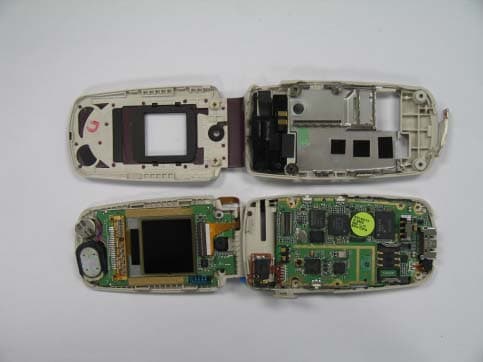
Click to zoom
Application Details
- Equipment Class
- PCE - PCS Licensed Transmitter held to ear
- Date of Grant
- Mar 07, 2007
- Application Purpose
- Original Equipment
- Date of Application
- Mar 07, 2007
- Equipment Note
- Cellular/PCS GSM Phone
- Frequency Range
- 1850.20000000 - 1909.80000000
- Company
- Samsung Electronics Co Ltd
- Country
- United States
Documents & Files
Document Text
Text extracted from the exhibit documents filed with the FCC. Open a document above to read the original.
Users Manual
Display Your phone is in Idle mode when yo u are not on a call or using a menu. You must be in Idle mode to dial a phone number. Silentmode Press and hold in Idle mode to disable all sounds on the phone. To exit, press and hold this key again. Voicemail server Press and hold 1 in Idle mode to access your voicemail server. SOSmode With the phone closed, press the Volume keys four times in Idle mode to send an SOS message to preset phone numbers. Once the SOS message is sent, the phone will change to SOS mode and will receive calls only from the SOS message recipients until the SOS mode is cancelled. Upon receiving a call from the SOS message recipients, the phone will automatically answer the call, after one vibration, relaying the emergency situation to the caller. Text and graphics Soft key function indicators Menu Phonebook Icons Printed in Korea Code No.: GH68-XXXXXA English (LTN). 01/2007. Rev.1.0 World Wide Web http://www.samsungmobile.com SGH-C516User’s Guide • Depending on the software installed or your service provider or country, some of the descriptions in this guide may not match your phone exactly. • Depending on your country, your phone and accessories may appear different from the illustrations in this guide. 1. SIM AT*2. Call records2.1 Missed calls2.2 Received calls2.3 Dialled calls2.4 Delete all2.5 Call time2.6 Call cost*3. Network services3.1 Call diverting3.2 Call barring3.3 Call waiting3.4 Network selection3.5 Caller ID3.6 Closed user group3.7 Band selection4. Sound settings4.1 Ring tone4.2 Ring volume4.3 Alert type4.4 Keypad tone4.5 Message tone 4.6 Alert on call4.7 Folder tone4.8 Power on/off4.9 Extra tones 5. Messages5.1 Text messages5.2 Multimedia messages5.3 Push messages5.4 SOS messages6. Funbox6.1 WAP browser6.2 Games6.3 Sounds6.4 Images6.5 Delete all6.6 Memory status7. Organiser7.1 Alarm7.2 Calendar7.3 Time & Date7.4 Calculator7.5 To do list7.6 Voice memo7.7 Currency exchange8. Camera8.1 Take photos8.2 My photos8.3 Memory status 9. Phone settings9.1 Infrared activate9.2 Display settings9.3 Greeting message9.4 Own number9.5 Language9.6 Security9.7 Extra settings9.8 Shortcuts9.9 Volume key9.0 Reset settingsPress the Phonebook soft key in Idle mode.1 Search2 New entry3 Group search4 Edit group5 Speed dial6 Delete all7 Memory status8 SDN* * Shows only if supported by your SIM card. Answering a call 1. When the phone rings, press the Accept soft key or to answer a call.To reject the call, press the Reject soft key or . 2. To end the call, press . Installing the SIM card and battery 1. Remove the battery cover and insert the SIM card. 2. Install the battery and reattach the cover. Charging the battery 1. Plug the supplied travel adapter. 2. When charging is finished, unplug the adapter. Note : Do not remove the battery from the phone without unplugging the adapter first. Otherwise, the phone may be damaged. Switching on or off the phone 1. Press and hold for more than one second to switch on the phone. 2. To switch off the phone, press and hold for more than two seconds. Changing the display language 1. In Idle mode, press the Menu soft key. 2. Select Phone settings → Language . 3. Select a language. Making a call 1. In Idle mode, enter an area code and phone number, and press . 2. When you want to end the call, press . Redialling recent numbers 1. In Idle mode, press . 2. Press Up or Down to scroll to the number you want. 3. Press to dial the number. Using the menus In Idle mode, press the Menu soft key to enter the main menu. Use the 4-way navigation keys ( ) as shortcuts to access your favourite menus.1. In Idle mode, press the Menu soft key. 2. Select Phone settings → Shortcuts . 3. Select a key.4. Select a menu to be assigned to the key. To select or modify a menu or feature:1. In Idle mode, press the Menu soft key. 2. Press the Navigation keys to reach a desired menu and then press the Select soft key or . 3. If the menu contains any submenus, locate the one you want by pressing the Navigation keys. Press the Select soft key or to enter the submenu. If the selected menu contains additi onal submenus, repeat this step. 4. Press the Navigation keys to find the setting of your choice.5. Press the Select soft key or to confirm your chosen setting. Shortcut numbersYou can quickly access the menu you want by using shortcut numbers. The shortcut number displays in front of the menu name in Menu mode. Adjusting the volume 1. In Idle mode, press the Menu soft key. 2. Select Sound settings → Ring volume . 3. Press Up or Down to adjust the volume level. 4. Press the OK soft key. While a call is in progress, press th e Volume keys to adjust the earpiece volume. Changing a ringtone for calls 1. In Idle mode, press the Menu soft key. 2. Select Sound settings → Ring tone . 3. Select a ringtone. Your phone displays the following status indicators on the top of the screen: Icon Description Received signal strengthCall in progressOut of your service area; you cannot make or receive calls except for emergency callsGPRS networkRoaming networkCall ringer set to vibrateSilent modeMute mode, during a callWhisper mode, during a callCall diverting feature activeIrDA feature activeSOS message feature activeNew text messageNew multimedia messageNew voicemail messageAlarm setBattery power level Menu map Entering text Changing the text input modeIn a text input field, press the right soft key until the input mode indicator you want appears: •: T9 mode•: ABC mode• : Number mode • None: Symbol mode T9 mode1. Press 2 to 9 to start entering a word. Pre ss each key once for one letter. Example: To enter “Hello” in T9 mode, press 4 , 3 , 5 , 5 , and 6 . T9 predicts the word that you are typing, and it may change with each key that you press. 2. Enter the whole word before editing or deleting characters. 3. When the word displays correctly, go to step 4. Otherwise, press 0 to display alternative word choices for the keys that you have pressed.For example, Of and Me use 6 and 3 . 4. Press to inse…
Text truncated - open the document above for the full version.
Attestation Statements
SAMSUNG ELECTRONICS CO.,LTD. 416 Maetan3-Dong Yeongtong-gu, Suwon city, Gyeonggi-Do, Korea 442-742 Date: February 28, 2007 Federal Communications Commission Authorization and Evaluation Division 7435 Oakland Mills Road, Columbia, MD 21046 RE: Request of Confidentiality for FCC ID: A3LSGHC516 To Whom It May Concern: Pursuant to Sections 0.457 and 0.459 of the Commission’s Rules (CFR 47), and Section 552 (b) (4) of the Freedom of Information Act, SAMSUNG ELECTRONICS CO.,LTD. hereby requests confidentiality and treatment of certain information accompanying this application. The materials contain trade secrets and proprietary information not customarily released to the public. The public disclosure of these matters might be harmful to the Applicant and provide unjustified benefits to its competitors. We are also hereby request Short-Term Confidentiality for 180 days after the grant as outlined in Public Notice DA 04-1705. This provision will give SAMSUNG ELECTRONICS CO.,LTD. temporary confidentiality of commercially sensitive information prior to product release. The requested Confidential and Temporary Confidential exhibits are listed as follows: CONFIDENTIAL AND SHORT-TERM CONFIDENTIAL LIST Exhibit Description 1 Block Diagram 2 Operational Description 3 Parts List & Tune-Up Procedure CONFIDENTIAL 4 Schematics 5 External Photos 6 Internal Photos 7 Test-Setup Photos SHORT-TERM CONFIDENTIAL 8 Users Manual The Applicant understands that pursuant to Rule 0.457, disclosure of this application and all accompanying documentations, where applicable, will not be made public before the date of the Grant for this application. Sincerely, SEOUNG HO PARK SAMSUNG ELECTRONICS CO.,LTD.
RF Exposure Info
of 32 SAMSUNG ELECTRONICS Co., Ltd., Regulatory Compliance Group IT R&D Center 416, Maetan-3dong, Yeongtong-gu, Suwon-si, Gyeonggi-do, Korea 443-742 TEST REPORT ON SAR Model Tested: SGH-C516 FCC ID (Requested): A3LSGHC516 Job No: FE-018 Report No: FE-018-S1 Date issued: Feb.28, 2007 - Abstract – This document reports on SAR Tests carried out in accordance with FCC/OET Bulletin 65, Supplement C(July 2001). Prepared By DK LEE - Test Engineer Authorized By JH NAM - Technical Manager Report Number: FE-018-S1 2 of 32 Contents 1. GENERAL INFORMATION............................................................................................................. 3 2. DESCRIPTION OF DEVICE ........................................................................................................... 3 3. DESCRIPTION OF TEST EQUIPMENT ......................................................................................... 4 3.1 SAR Measurement Setup ......................................................................................................4 3.2 E-field Probe .......................................................................................................................... 6 3.3 SAM Phantom ........................................................................................................................ 8 3.4 Brain & Muscle Simulating Mixture Characterization ............................................................. 8 3.5 Device Holder for Transmitters ..............................................................................................9 3.6 Validation Dipole .................................................................................................................... 9 3.7 Equipment Calibration.......................................................................................................... 10 4. SAR MEASUREMENT PROCEDURE ......................................................................................... 11 5. DESCRIPTION OF TEST POSITION ........................................................................................... 12 5.1 SAM Phantom Shape...........................................................................................................12 5.2 Cheek/Touch Position .......................................................................................................... 12 5.3 EAR/Tilt 15° Position ............................................................................................................ 14 5.4 Body Holster/Belt Clip Configurations.................................................................................. 15 6. MEASUREMENT UNCERTAINTY................................................................................................ 17 7. SYSTEM VERIFICATION ............................................................................................................. 19 7.1 Tissue Verification ................................................................................................................ 19 7.2 Test System Validation ......................................................................................................... 19 8. SAR MEASUREMENT RESULTS ................................................................................................ 20 8.1 Measurement Results(GSM850 Right Head SAR - Touch) ................................................. 21 8.2 Measurement Results(GSM850 Right Head SAR - Tilt) ...................................................... 22 8.3 Measurement Results(GSM850 Left Head SAR - Touch).................................................... 23 8.4 Measurement Results(GSM850 Left Head SAR - Tilt)......................................................... 24 8.5 Measurement Results(GPRS850 Body SAR without Holster) ............................................. 25 8.6 Measurement Results(GSM1900 Right Head SAR - Touch) ............................................... 26 8.7 Measurement Results(GSM1900 Right Head SAR - Tilt) .................................................... 27 8.8 Measurement Results(GSM1900 Left Head SAR - Touch).................................................. 28 8.9 Measurement Results(GSM1900 Left Head SAR - Tilt)....................................................... 29 8.10 Measurement Results(GPRS1900 Body SAR without Holster)......................................... 30 9. CONCLUSION .............................................................................................................................. 31 10. REFERENCES ............................................................................................................................ 32 Report Number: FE-018-S1 3 of 32 1. GENERAL INFORMATION Test Sample : Dual-Band GSM850/1900 Phone Model Number : SGH-C516 Serial Number : Identical prototype (S/N : # FE-018-D) Manufacturer : SAMSUNG ELECTRONICS Co., Ltd. Contact : DH YOO Phone : +82-31-301-0547 Fax : +82-31-301-9201 Test Standard : §2.1093; FCC/OET Bulletin 65, Supplement C(July 2001) FCC Classification : Licensed Portable Transmitter Held to Ear (PCE) Test Dates : Feb.22, 2007 ~ Feb.23, 2007 Tested for : FCC/TCB Certification 2. DESCRIPTION OF DEVICE Tx Freq. Range : 824.2 ~ 848.8 MHz (GSM850) 1850.20 ~ 1909.80 MHz (GSM1900) Rx Freq. Range : 869.2 ~ 893.8 MHz (GSM850) 1930.20 ~ 1989.80 MHz (GSM1900) Max. RF Output Power : 1.746 W ERP GSM850 (32.42 dBm) 1.104 W EIRP GSM1900 (30.43 dBm) Antenna Manufacturer : PATRON Model No.: SGH-C516 Antenna Dimensions : - Report Number: FE-018-S1 4 of 32 3. DESCRIPTION OF TEST EQUIPMENT 3.1 SAR Measurement Setup Robotic System Measurements are performed using the DASY4 automated dosimetric assessment system. Which is made by Schmid & Partner Engineering AG (SPEAG) in Zurich, Switzerland and consists of high precision robotics system (Stäubli), robot controller, measurement server, Samsung computer, near- field probe, probe alignment sensor, and the SAM twin phantom containing the brain equivale…
Text truncated - open the document above for the full version.
RF Exposure Info
G G GGG
Test Report
SAMSUNG ELECTRONICS Co., Ltd., Regulatory Compliance Group IT R&D Center 416 Maetan3-Dong, Yeongtong-gu, Suwon city, Gyeonggi-Do, Korea 443-742 FCC CFR47 PART 22 & 24 SUBPART CERTIFICATION REPORT Model Tested : SGH-C516 FCC ID(Requested) : A3LSGHC516 Report No : FE-018-R1 Job No : FE-018 Date issued : February 26, 2007 - Abstract - All measurement reported herein accordance with FCC Rules, 47CFR Part2, Part22, Part24. Prepared By SH ONG – Test Engineer Checked By WW JANG - Manager Authorized By SH PARK – Senior Manager Report Number : FE-018-R1 TABLE OF CONTENT MEASUREMENT REPORT Page 1. FCC CERTIFICATION INFORMATION .....................................................................3 1.1. §2.1033 General Information .........................................................................3 2. INTRODUCTION .......................................................................................................4 2.1. General..........................................................................................................4 3. MEASURING INSTRUMENT CALIBRATION ...........................................................5 4. TEST EQUIPMENT LIST...........................................................................................6 5. DESCRIPTION OF TESTS ........................................................................................7 5.1. Effective Radiated Power / Equivalent Isotropic Radiated Power ..................7 5.2. Radiated Spurious & Harmonic Emission ......................................................8 5.3. Occupied Bandwidth ....................................................................................10 5.4. Spurious and Harmonic Emission at Antenna Terminal................................10 5.4.1. Occupied Bandwidth Emission Limits ..............................................10 5.4.2. Conducted Spurious Emission .........................................................12 5.5. Frequency Stability / Temperature Variation .................................................13 6. TEST DATA .............................................................................................................14 6.1. Effective Radiated Power (E.R.P.)................................................................14 6.2. Equivalent Isotropic Radiated Power (E.I.R.P.) ............................................15 6.3. GSM850 Radiated Spurious & Harmonic measurement ..............................15 6.4. GSM1900 Radiated Spurious & Harmonic measurement ............................16 6.5. GSM850 Radiated Spurious & Harmonic Conversion Table ........................18 6.6. GSM1900 Radiated Spurious & Harmonic Conversion Table ......................19 6.7. Frequency Stability.......................................................................................20 6.7.1. GSM850 Frequency Stability Table ..................................................20 6.7.2. GSM850 Frequency Stability Graph.................................................21 6.7.3. GSM1900 Frequency Stability Table ................................................23 6.7.4. GSM1900 Frequency Stability Graph...............................................24 7. CONCLUSION.........................................................................................................26 8. TEST PLOTS...........................................................................................................27 Report Number : FE-018-R1 MEASUREMENT REPORT 1. FCC Certification Information The following information is in accordance with FCC Rules, 47CFR Part2, Subpart J, Sections 2.1033 – 2.1055. 1.1. §2.1033 General Information • Applicant Name : SAMSUNG ELECRONICS CO., LTD. • Address : 416 Maetan3-Dong, Yeongtong-gu, Suwon City Gyeonggi-Do, Korea 443-742 • Attention : SungJoo KIM, Engineering Manager (QA Lab) • FCC ID : A3LSGHC516 • Quantity : Quantity production is planned • Emission Designators : 249KGXW(GSM850) 251KGXW(GSM1900) • Tx Freq. Range : 824.2 - 848.8MHz (GSM850) 1850.2MHz - 1909.8MHz (GSM1900) • Rx Freq. Range : 869.2 - 893.8 MHz (GSM850) 1930.2MHz - 1989.8MHz (GSM1900) • Max. Power Rating : 1.746 W ERP GSM850 (32.42dBm) 1.104 W EIRP GSM1900 (30.43dBm) • FCC Classification(s) : Licensed Portable Tx Held to Ear (PCE) • Equipment (EUT) Type : Dual-Band GSM850/1900 Phone • Frequency Tolerance : ±0.00025% (2.5ppm) • FCC Rule Part(s) : §24(E), §22(H), §2. • Dates of Test : February 21 - 22, 2007 • Place of Test : SAMSUNG Lab, • Test Report S/N : FE-018-R1 Report Number : FE-018-R1 2. INTRODUCTION 2.1. General These measurement test were conducted at SAMSUNG ELECTRONICS CO., LTD(SUWON). The site address is 416 Maetan3-Dong, Yeongtong-gu, Suwon City, Gyeonggi-Do, Korea 443-742 The site have 1 Fully-anechoic chamber and measurement facility. Measurement Procedure The radiated and spurious measurements were made Fully-anechoic chamber at a 3-meter test range (see Figure2). The equipment under testing was placed on a Non-conducted turntable 3- meters from the receive antenna. The receive antenna height and turntable rotations were adjusted for the highest reading on the receive spectrum analyzer. The substitution antenna will replace the EUT antenna it the same position and in vertical polarization. The frequency of the signal generator shall be set to the frequencies that were measured on the EUT. The test antenna shall be raised and lowered, if necessary, to ensure that the maximum signal is still being received. The signal generator, output level, shall be adjusted until an equal or a known related level to what was measured from the EUT is obtained in the spectrum analyzer. This level was recorded. For readings above 1 GHz, the above procedure is repeated using horn antennas and the difference between the gain of the horn and an isotropic antenna are taken into consideration. Figure1. Map of the Suwon City area. Figure2. Photograph of 3m Fully-Anechoic Chamber Report Number : FE-018-R1 3. MEASURING INSTRUMENT CALIBR…
Text truncated - open the document above for the full version.
Test Setup Photos
© 2007 SAMSUNG ELECTRONICS Co., Ltd. SAMSUNG FCC ID: A3LSGHC516 Dual-Band GSM 850/1900 Phone © 2007 SAMSUNG ELECTRONICS Co., Ltd. SAMSUNG FCC ID: A3LSGHC516 Dual-Band GSM 850/1900 Phone © 2007 SAMSUNG ELECTRONICS Co., Ltd. SAMSUNG FCC ID: A3LSGHC516 Dual-Band GSM 850/1900 Phone © 2007 SAMSUNG ELECTRONICS Co., Ltd. SAMSUNG FCC ID: A3LSGHC516 Dual-Band GSM 850/1900 Phone © 2007 SAMSUNG ELECTRONICS Co., Ltd. SAMSUNG FCC ID: A3LSGHC516 Dual-Band GSM 850/1900 Phone © 2007 SAMSUNG ELECTRONICS Co., Ltd. SAMSUNG FCC ID: A3LSGHC516 Dual-Band GSM 850/1900 Phone
Test Setup Photos
© 2007 SAMSUNG ELECTRONICS Co., Ltd SAMSUNG FCC ID:A3LSGHC516 Dual-Band GSM850/1900 Phone © 2007 SAMSUNG ELECTRONICS Co., Ltd SAMSUNG FCC ID:A3LSGHC516 Dual-Band GSM850/1900 Phone © 2007 SAMSUNG ELECTRONICS Co., Ltd SAMSUNG FCC ID:A3LSGHC516 Dual-Band GSM850/1900 Phone © 2007 SAMSUNG ELECTRONICS Co., Ltd SAMSUNG FCC ID:A3LSGHC516 Dual-Band GSM850/1900 Phone © 2007 SAMSUNG ELECTRONICS Co., Ltd SAMSUNG FCC ID:A3LSGHC516 Dual-Band GSM850/1900 Phone © 2007 SAMSUNG ELECTRONICS Co., Ltd SAMSUNG FCC ID:A3LSGHC516 Dual-Band GSM850/1900 Phone © 2007 SAMSUNG ELECTRONICS Co., Ltd SAMSUNG FCC ID:A3LSGHC516 Dual-Band GSM850/1900 Phone © 2007 SAMSUNG ELECTRONICS Co., Ltd SAMSUNG FCC ID:A3LSGHC516 Dual-Band GSM850/1900 Phone © 2007 SAMSUNG ELECTRONICS Co., Ltd SAMSUNG FCC ID:A3LSGHC516 Dual-Band GSM850/1900 Phone © 2007 SAMSUNG ELECTRONICS Co., Ltd SAMSUNG FCC ID:A3LSGHC516 Dual-Band GSM850/1900 Phone © 2007 SAMSUNG ELECTRONICS Co., Ltd SAMSUNG FCC ID:A3LSGHC516 Dual-Band GSM850/1900 Phone © 2007 SAMSUNG ELECTRONICS Co., Ltd SAMSUNG FCC ID:A3LSGHC516 Dual-Band GSM850/1900 Phone
Contact Information
Applicant
Jenni Chun(General Manager)
Technical Contact
PCTEST Engineering Lab., Inc.Randy Ortanez
[email protected]410-290-6652
6660-B Dobbin Road · Columbia, Maryland · United States
Test Firm
Samsung Electronics Co., Ltd. Global CS CenterPark No cheon
Technical Specifications
| # | Rule Parts | Frequency Range | Power Output | Emission | Tolerance |
|---|---|---|---|---|---|
| 2 | 24E | 1.85 GHz - 1.91 GHz | 1.104 W | 251KGXW | 2.5 ppm |
Other Applications from Samsung Electronics Co Ltd
A3LSMS741B
Aug 05, 2026Portable Handset
Equipment Class
6VL - 15E 6 GHZ Very Low Power DeviceA3LSMX940
Jul 31, 2026BT,BLE Tablet DTS,UNII a,b,g,n,ac,ax,be and digitizer
Equipment Class
DTS - Digital Transmission SystemA3LSMS741U
Jul 30, 2026Portable Handset
Equipment Class
6CD - 15E 6 GHz Low Power Dual ClientA3LSMX840
Jul 27, 2026BT,BLE Tablet DTS,UNII a,b,g,n,ac,ax and Digitizer
Equipment Class
DSS - Part 15 Spread Spectrum TransmitterA3LSMX848U
Jul 27, 2026WCDMA, LTE, 5G NR Tablet BT,BLE, DTS,UNII a b g n ac ax and Digitizer
Equipment Class
JBP - Part 15 Class B Computing Device Peripheral