A3LSGHM320LCellular/PCS GSM Phone with Bluetooth
Samsung Electronics Co Ltd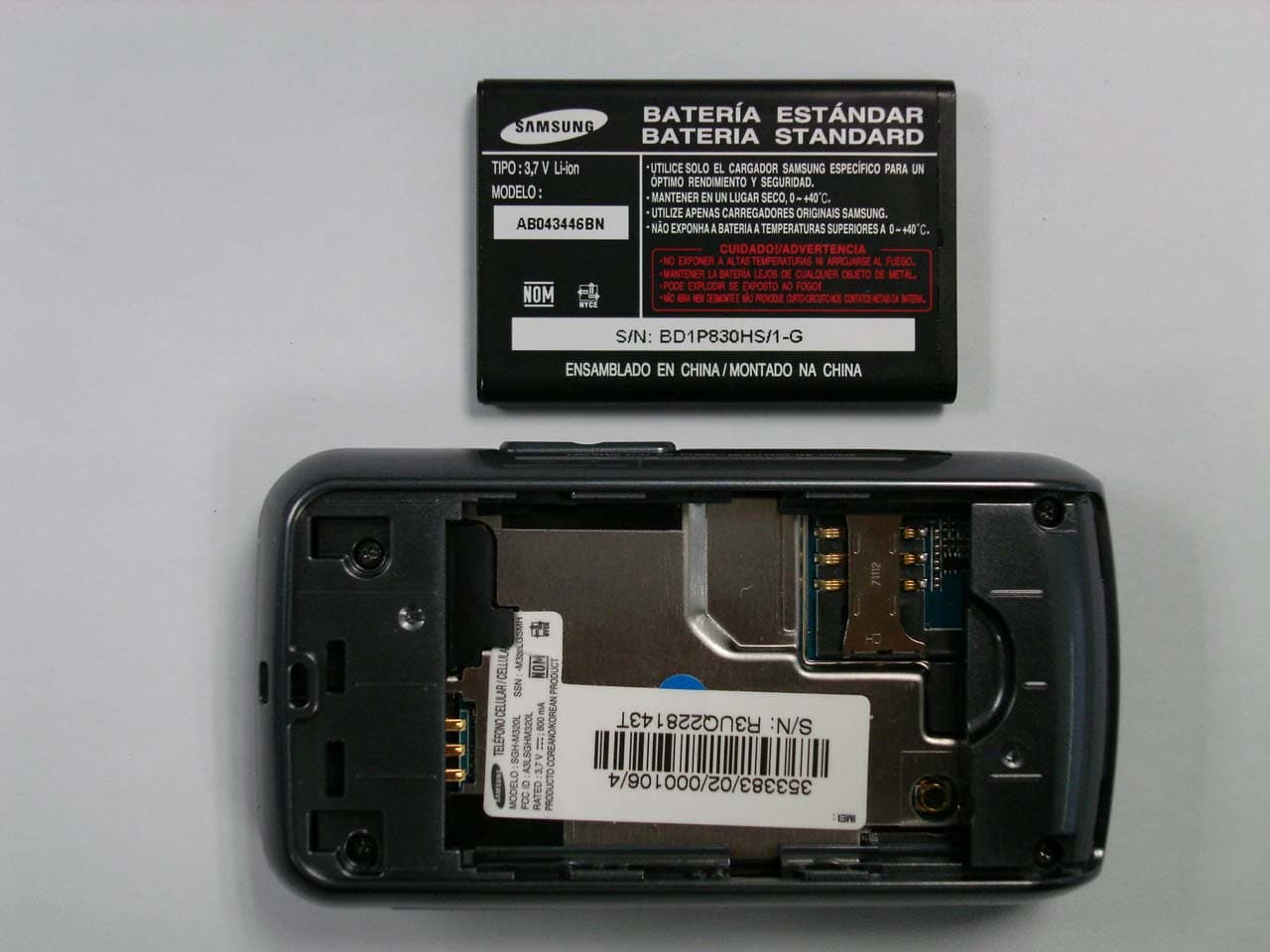
Click to zoom
Application Details
- Equipment Class
- JBP - Part 15 Class B Computing Device Peripheral
- Date of Grant
- Apr 17, 2008
- Application Purpose
- Original Equipment
- Date of Application
- Apr 17, 2008
- Equipment Note
- Cellular/PCS GSM Phone with Bluetooth
- Company
- Samsung Electronics Co Ltd
- Country
- United States
Documents & Files
Document Text
Text extracted from the exhibit documents filed with the FCC. Open a document above to read the original.
Users Manual
Printed in Korea Code No.: GH68- XXXXXA English (LTN). 03/2008. Rev.1.0 World Wide Webhttp://www.samsungmobile.com SGH-M320LUser’s Guide Some of the contents in this guide may differ from your phone depending on the software of the phone or your service provider.Bluetooth QD ID : B0XXXXX Draft 01 2008. 03. 13 SW: M320LVHHC1 Installing the SIM card and battery 1. Remove the battery cover and insert the SIM card. 2. Install the battery and reattach the battery cover. Battery cover Battery Charging the battery 1. Plug the supplied travel adapter into the phone and a power outlet. 2. When charging is finished, unplug the travel adapter. Note : Do not remove the battery from the phone without unplugging the travel adapter first. Otherwise, the phone may be damaged. With the triangle facing up Phone layout and key functions Power/End keyTurns the phone on or off when held down. Also, ends a call.Silent mode keyX Silent mode Delete keyDeletes characters from the display or items in an application. Dial key Makes and answers a call. In Idle mode, retrieves the most recent calls. Volume keys In Idle mode, adjust the keypad tone volume. Send an SOS message when pressed 4 times with the phone closed. X SOS mode Alphanumeric keys Web access/ Confirm key In Idle mode, accesses the web browser. In Menu mode, selects the highlighted option or confirms input. Voice mail server key In Idle mode, accesses your voice mail server when held down. 4-way navigation keysIn Idle mode, access the following menus or functions directly:• Up : Camera • Down / Left / Right : your favorite menus In Menu mode, scroll through menu options. Soft keysPerform functions indicated by the text above the key. Display Your phone is in Idle mode when you are not on a call or using a menu. You must be in Idle mode to dial a phone number. Silentmode Press and hold in Idle mode to disable all sounds on the phone. To exit, press and hold this key again. SOS mode With the phone closed, press the Volume keys 4 times to send an SOS message to preset phone numbers. Once the SOS message is sent, the phone will change to SOS mode and will receive calls only from the registered recipients. Upon receiving a call from the SOS message recipients, the phone will automatically answer the call. Press to exit SOS mode. Menu Contacts Text and graphicsSoft key function indicatorsIcons Your phone displays the following status indicators on the top of the screen: Switching on or off the phone 1. Press and hold for more than one second to switch on the phone. 2. Press and hold for more than two seconds to switch off the phone. Changing the display language 1. In Idle mode, press the Menu soft key. 2. Select Settings → Phone settings → Language . 3. Select a language. Making a call 1. In Idle mode, enter an area code and phone number, and press . 2. Press to end the call. Answering a call 1. When the phone rings, press the Accept soft key or to answer a call.Press the Reject soft key or to reject the call. 2. Press to end the call. Adjusting the volume 1. In Idle mode, press the Menu soft key. 2. Select Settings → Sound settings → Incoming call → Call alert volume . 3. Press Left or Right to adjust the volume level. 4. Press the Save soft key. While a call is in progress, press the Volume keys to adjust the earpiece volume. Changing a ringtone for calls 1. In Idle mode, press the Menu soft key. 2. Select Settings → Sound settings → Incoming call → Ringtone . 3. Select a ringtone category → a ringtone and press the Save soft key. Redialing recent numbers 1. In Idle mode, press . 2. Press Left or Right to select a call type. 3. Press Up or Down to scroll to the number you want. 4. Press to dial the number. Using the menus In Idle mode, press the Menu soft key to enter the main menu. To exit the menu without changing the menu settings, press this key. Labels at the bottom corners of the display show the current soft key functions. Press the left soft key ( ) or right soft key ( ) to perform the function indicated. Use the 4-way navigation keys as shortcuts to access your favorite menus. Up is fixed as a shortcut to Camera . 1. In Idle mode, press the Menu soft key. 2. Select Settings → Phone settings → Shortcuts . 3. Select a key.4. Select a menu to be assigned to the key. To select or modify a menu or feature:1. In Idle mode, press the Menu soft key. 2. Press the Navigation keys to reach a desired menu and then press the Select soft key or . 3. If the menu contains any submenus, locate the one you want by pressing the Navigation keys. Press the Select soft key or to enter the submenu.If the selected menu contains additional submenus, repeat this step. 4. Press the Navigation keys to find the setting of your choice.5. Press the Select soft key or to confirm your chosen setting. Shortcut numbersYou can quickly access the menu you want by using shortcut numbers. The shortcut number displays in front of the menu name in Menu mode. Menu map 1. Call log 1.1 Recent contacts1.2 Missed calls1.3 Dialled calls1.4 Received calls1.5 Delete all1.6 Call manager 2. Phonebook 2.1 Contact list2.2 Create contact2.3 Group2.4 Speed dial2.5 My namecard2.6 Own numbers2.7 Management2.8 Service number* 3. Applications 3.1 Alarm3.2 Voice recorder3.3 FM radio3.4 Java world3.5 Memo3.6 World clock 3.7 Calculator3.8 Converter3.9 Timer3.10 Stopwatch3.11 SIM application toolkit * 4. Browser 4.1 Home4.2 Enter URL4.3 Bookmarks4.4 Clear cache4.5 Browser settings 5. Messages 5.1 Create message5.2 My messages5.3 Templates5.4 Delete all5.5 Settings5.6 SOS messages5.7 Memory status 6. My files 6.1 Images6.2 Sounds6.3 Other files6.4 Memory status 7. Calendar8. Camera9. Settings 9.1 Time and date9.2 Phone settings9.3 Display settings9.4 Sound settings9.5 Light settings9.6 Network services9.7 Bluetooth9.8 Security9.9 Connection settings 9.10 Memory status9.11 Reset settings * Available only if supported by your SIM card. Entering text Changing the text input mode• Press and hold to switch betwee…
Text truncated - open the document above for the full version.
Cover Letter(s)
SAMSUNG ELECTRONICS AMERICA, INC. American QA Lab 18600 Broadwick St. Rancho Dominguez, CA 90220 Date: April 17, 2008 Federal Communications Commission Authorization and Evaluation Division 7435 Oakland Mills Road, Columbia, MD 21046 RE: Request of Confidentiality for FCC ID: A3LSGHM320L To Whom It May Concern: Pursuant to Sections 0.457 and 0.459 of the Commission’s Rules (CFR 47), and Section 552 (b) (4) of the Freedom of Information Act, SAMSUNG ELECTRONICS CO.,LTD. hereby requests confidentiality and treatment of certain information accompanying this application. The materials contain trade secrets and proprietary information not customarily released to the public. The public disclosure of these matters might be harmful to the Applicant and provide unjustified benefits to its competitors. We are also hereby request Short-Term Confidentiality for 180 days after the grant as outlined in Public Notice DA 04-1705. This provision will give SAMSUNG ELECTRONICS CO.,LTD. temporary confidentiality of commercially sensitive information prior to product release. The requested Permanent and Short-Term Confidential exhibits are listed as follows: PERMANENT AND SHORT-TERM CONFIDENTIAL LIST Exhibit Description 1 Block Diagram PERMANENT 2 Operational Description 3 External Photos 4 Internal Photos 5 Test-Setup Photos SHORT-TERM 6 Users Manual The Applicant understands that pursuant to Rule 0.457, disclosure of this application and all accompanying documentations, where applicable, will not be made public before the date of the Grant for this application. Sincerely, Steve Kim General Manager American QA Lab SAMSUNG Electronics America INC.
Internal Photos
Main antenna * Placement of each antenna in Folder Close Bluetooth antenna Main antenna * Placement of each antenna in Folder Open Bluetooth antenna Main antenna GSM900 DCS1800 PCS1900 * Antenna pattern 0.7 cm • No difference of distance betwee n bluetooth ante nna and Main ant enna for each case of Folder Open and Close
Test Report
Reviewed by: FCC ID: A3LSGHM320L FCC Pt. 15B MEASUREMENT REPORT (CERTIFICATION) Quality Manager Test Report S/N: Test Dates: EUT Type: 0804030398.A3L April 7, 2008 850/1900 GSM/GPRS Phone with Bluetooth Page 1 of 20 © 2008 PCTEST Engineering Laboratory, Inc. REV 5.2CT 12/31/07 Applicant Name: Date of Testing: Samsung Electronics, Co. Ltd. April 7, 2008 18600 Broadwick St. Test Site/Location: Rancho Dominguez, CA 90220 PCTEST Lab, Columbia, MD, USA United States Test Report Serial No.: 0804030398.A3L FCC ID: A3LSGHM320L APPLICANT: Samsung Electronics, Co. Ltd. EUT Type: 850/1900 GSM/GPRS Phone with Bluetooth Model(s): SGH-M320L FCC Rule Part(s): FCC Part 15 Subpart B FCC Classification: FCC Class B Digital Device (JBP) Test Procedure: ANSI C63.4-2003 The device bearing the FCC Identifier specified above has been shown to comply with the applicable technical standards as indicated in the measurement report and has been tested in accordance with the measurement procedures specified in ANSI C63.4-2003 (See Test Report). These measurements were performed with no deviation from the standards. I authorize and attest to the accuracy of data. All measurements reported herein were performed by me or were made under my supervision and are correct to the best of my knowledge and belief. I assume full responsibility for the completeness of these measurements and vouch for the qualifications of all persons taking them. NVLAP accreditation does not constitute any product endorsement by NVLAP or any agency of the United States Government. PCTEST certifies that no party to this application has been denied the FCC benefits pursuant to Section 5301 of the Anti-Drug Abuse Act of 1988, 21 U.S.C. 862. PCTEST ENGINEERING LABORATORY, INC. 6660-B Dobbin Road, Columbia, MD 21045 USA Tel. 410.290.6652 / Fax 410.290.6554 http://www.pctestlab.com CERTIFICATE OF COMPLIANCE FCC Part 15B Certification Reviewed by: FCC ID: A3LSGHM320L FCC Pt. 15B MEASUREMENT REPORT (CERTIFICATION) Quality Manager Test Report S/N: Test Dates: EUT Type: 0804030398.A3L April 7, 2008 850/1900 GSM/GPRS Phone with Bluetooth Page 2 of 20 © 2008 PCTEST Engineering Laboratory, Inc. REV 5.2CT 12/31/07 TABLE OF CONTENTS FCC Class B MEASUREMENT REPORT.....................................................................................3 1.0 INTRODUCTION....................................................................................................................4 1.1 SCOPE...................................................................................................................................................................4 1.2 PCTEST TEST LOCATION.................................................................................................................................4 2.0 PRODUCT INFORMATION.....................................................................................................5 2.1 EQUIPMENT DESCRIPTION.............................................................................................................................5 2.2 OPERATION MODE.............................................................................................................................................5 2.3 EMI SUPPRESSION DEVICE(S)/MODIFICATIONS......................................................................................5 2.4 LABELING REQUIREMENTS............................................................................................................................5 3.0 DESCRIPTION OF TEST........................................................................................................6 3.1 EVALUATION PROCEDURE.............................................................................................................................6 3.2 CONDUCTED EMISSIONS................................................................................................................................6 3.3 RADIATED EMISSIONS......................................................................................................................................7 4.0 SAMPLE CALCULATIONS......................................................................................................8 4.1 CONDUCTED EMISSION MEASUREMENT SAMPLE CALCULATION....................................................8 4.2 RADIATED EMISSION MEASUREMENT SAMPLE CALCULATION..........................................................8 5.0 TEST EQUIPMENT CALIBRATION DATA...............................................................................9 6.0 ENVIRONMENTAL CONDITIONS.........................................................................................10 7.0 TEST DATA.........................................................................................................................11 7.1 SUMMARY...........................................................................................................................................................11 7.2 TEST SUPPORT EQUIPMENT........................................................................................................................11 7.3 RADIATED MEASUREMENT DATA...............................................................................................................12 7.4 LINE CONDUCTED MEASUREMENT DATA................................................................................................13 8.0 CONCLUSION.....................................................................................................................15 9.0 TEST SETUP PHOTOGRAPHS............................................................................................16 10.0 EUT PHOTOGRAPHS..........................................................................................................19 Reviewed by: FCC ID: A3LSGHM320L FCC Pt. 15B MEASUREMENT REPORT (CERTIFICATION) Quality Manager Test Report S/N: Test Dates: EUT Type: 0804030398.A3L April 7, 2008 850/1900 GSM/GPRS Phone with Bluetooth Page 3 o…
Text truncated - open the document above for the full version.
Test Setup Photos
Reviewed by: FCC ID: A3LSGHM320L FCC Pt. 15B MEASUREMENT REPORT (CERTIFICATION) Quality Manager Test Report S/N: Test Dates: EUT Type: 0804030398.A3L April 7, 2008 850/1900 GSM/GPRS Phone with Bluetooth Page 16 of 20 © 2008 PCTEST Engineering Laboratory, Inc. REV 5.2CT 12/31/07 9.0 TEST SETUP PHOTOGRAPHS Reviewed by: FCC ID: A3LSGHM320L FCC Pt. 15B MEASUREMENT REPORT (CERTIFICATION) Quality Manager Test Report S/N: Test Dates: EUT Type: 0804030398.A3L April 7, 2008 850/1900 GSM/GPRS Phone with Bluetooth Page 17 of 20 © 2008 PCTEST Engineering Laboratory, Inc. REV 5.2CT 12/31/07 Reviewed by: FCC ID: A3LSGHM320L FCC Pt. 15B MEASUREMENT REPORT (CERTIFICATION) Quality Manager Test Report S/N: Test Dates: EUT Type: 0804030398.A3L April 7, 2008 850/1900 GSM/GPRS Phone with Bluetooth Page 18 of 20 © 2008 PCTEST Engineering Laboratory, Inc. REV 5.2CT 12/31/07
Contact Information
Applicant
Jenni Chun(General Manager)
Technical Contact
PCTEST Engineering Lab., Inc.Randy Ortanez
[email protected]410-290-6652
6660-B Dobbin Road · Columbia, Maryland · United States
Test Firm
PCTEST Engineering Laboratory, Inc.Randy Ortanez
Technical Specifications
| # | Rule Parts | Frequency Range | Power Output |
|---|---|---|---|
| 1 | 15B | - | - |
Other Applications from Samsung Electronics Co Ltd
A3LSMS741B
Aug 05, 2026Portable Handset
Equipment Class
6VL - 15E 6 GHZ Very Low Power DeviceA3LSMX940
Jul 31, 2026BT,BLE Tablet DTS,UNII a,b,g,n,ac,ax,be and digitizer
Equipment Class
DTS - Digital Transmission SystemA3LSMS741U
Jul 30, 2026Portable Handset
Equipment Class
6CD - 15E 6 GHz Low Power Dual ClientA3LSMX840
Jul 27, 2026BT,BLE Tablet DTS,UNII a,b,g,n,ac,ax and Digitizer
Equipment Class
DSS - Part 15 Spread Spectrum TransmitterA3LSMX848U
Jul 27, 2026WCDMA, LTE, 5G NR Tablet BT,BLE, DTS,UNII a b g n ac ax and Digitizer
Equipment Class
JBP - Part 15 Class B Computing Device Peripheral