A3LSGHP500Single-Band PCS GSM Phone
Samsung Electronics Co Ltd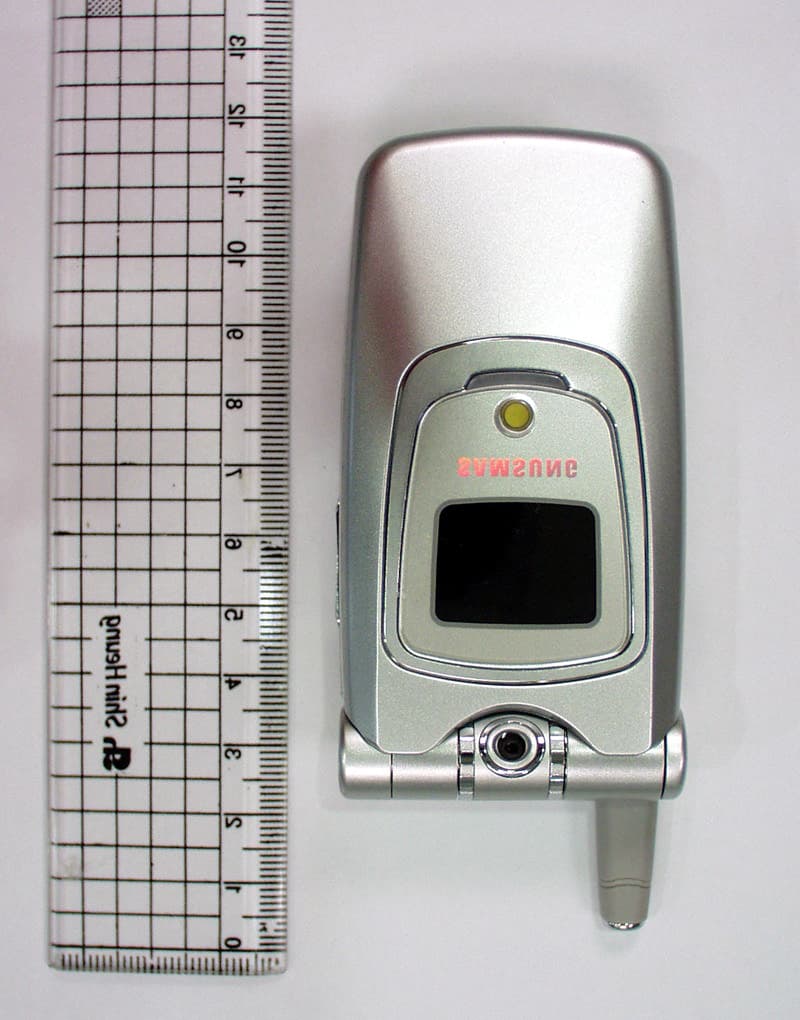
Click to zoom
Application Details
- Equipment Class
- PCE - PCS Licensed Transmitter held to ear
- Date of Grant
- Oct 09, 2003
- Application Purpose
- Original Equipment
- Date of Application
- Oct 09, 2003
- Equipment Note
- Single-Band PCS GSM Phone
- Frequency Range
- 1850.20000000 - 1909.80000000
- Company
- Samsung Electronics Co Ltd
- Country
- United States
Documents & Files
Document Text
Text extracted from the exhibit documents filed with the FCC. Open a document above to read the original.
Users Manual
TRI BAND GPRS TELEPHONE SGH-P500 * Some of the contents of this manual may differ from your phone, depending upon the software installed or your service provider. Printed in Korea Code No.: GH68-xxxxxA English. 06/2003. Rev. 1.0 World Wide Web http://www.samsungmobile.com 1st version (2003. 06. 2) 2 3 Contents Important Safety Precautions................................ 7 Unpacking.............................................................. 9 Your Phone.......................................................... 10 Phone Layout.......................................................... 10 Display................................................................... 13 Service Light........................................................... 16 Camera.................................................................. 16 Getting Started.................................................... 17 Installing the SIM Card............................................. 17 Charging the Battery................................................ 19 Switching the Phone On or Off................................... 21 Call Functions ...................................................... 22 Making a Call .......................................................... 22 Adjusting the Volume............................................... 24 Answering a Call...................................................... 25 Viewing Missed Calls ................................................ 26 Quickly Switching to Silent Mode................................ 28 Selecting Functions and Options.......................... 29 Phonebook........................................................... 31 Storing a Number with a Name.................................. 31 Using Phonebook Entry Options ................................. 34 Searching for a Number in Phonebook ........................ 35 Editing a Caller Group .............................................. 37 Speed-dialling......................................................... 38 Deleting All of the Phonebook Entries ......................... 40 Checking the Memory Status..................................... 41 Entering Text....................................................... 42 Changing the Text Input Mode................................... 43 Using the T9 Mode................................................... 44 Using the Alphabet Mode .......................................... 46 Using the Number Mode ........................................... 47 Using the Symbol Mode............................................ 48 Contents 4 Options During a Call........................................... 49 Putting a Call on Hold............................................... 49 Using the Menu Functions ......................................... 50 Switching the Microphone Off (Mute).......................... 51 Muting/Sending Key Tones........................................ 52 Sending DTMF Tones................................................ 52 Searching for a Number in Phonebook ........................ 53 Answering a Second Call........................................... 54 Making a Multi-party Call .......................................... 54 Using the Menus .................................................. 57 Accessing a Menu Function by Scrolling ...................... 57 Accessing a Menu Function by Using Its Shortcut ......... 58 List of Menu Functions.............................................. 58 Text Messages ..................................................... 64 Inbox (Menu 1.1) ..................................................... 64 Outbox (Menu 1.2) ................................................... 66 Write New (Menu 1.3) ............................................... 67 Templates (Menu 1.4) ............................................... 70 Settings (Menu 1.5) .................................................. 70 Delete All (Menu 1.6) ................................................ 72 Memory Status (Menu 1.7) ........................................ 72 Voice Mail (Menu 1.8) ............................................... 73 Broadcast (Menu 1.9) ................................................ 74 Picture Messages................................................. 76 Inbox (Menu 2.1) ..................................................... 76 Outbox (Menu 2.2) ................................................... 79 Draft (Menu 2.3) ...................................................... 80 Write New (Menu 2.4) ..................................................... 80 Templates (Menu 2.5) ..................................................... 84 Delete All (Menu 2.6) ................................................ 85 Memory Status (Menu 2.7) ........................................ 85 Setup (Menu 2.8) ..................................................... 86 MMS Profile (Menu 2.9) ................................................... 87 Call Records......................................................... 88 Missed Calls (Menu 3.1)................................................... 88 Received Calls (Menu 3.2) ......................................... 89 Dialled Calls (Menu 3.3) ............................................ 89 Delete All (Menu 3.4) ................................................ 90 Call Time (Menu 3.5) ................................................ 90 Call Cost (Menu 3.6) ................................................. 91 Contents 5 Camera................................................................ 92 Take Photos (Menu 4.1) ............................................ 92 My Photos (Menu 4.2) ............................................... 95 Video (Menu 4.3) ...................................................... 96 Sound Settings .................................................... 98 Ring Tone (Menu 5.1) ............................................... 98 Ring Volume (Menu 5.2) ............................................ 98 Alert Type (Menu 5.3) .....…
Text truncated - open the document above for the full version.
Users Manual
Camera 94 Protection: allows you to set the picture not to be deleted. Delete: deletes the picture. Using the Camera options In the capture mode, you can use various options by pressing the Options soft key. The following options are available: Effects: allows you to change the colour tone or apply special effects to the picture. When you select an option, the display shows your setting and prompts you to confirm it. Press the Yes soft key. Frame: allows you to use the frame. Select a frame from the list using the Navigation keys. Multi-Shot: allows you to take action stills. Select the capture speed, High Speed or Normal Speed, and the number of pictures the camera will take. When you press the Take soft key, the camera takes pictures successively. Rotation: rotates the picture. You can reverse the picture as a mirror image or flip the picture vertically. ToPress the scroll to an option or key. select the highlighted option Select soft key or the key. return to the capture mode Back soft key or C key. Camera 95 Timer: allows you to have a delay time before the camera takes a picture. Select the length of time you want. When you press the Take soft key, the camera takes the picture after a specified time. Picture Size: allows you to select a picture size. The higher the value, the higher the image quality and larger the file size. Once you change this setting, it is saved for the next shots. Image Quality: allows you to change the image quality. Once you change this setting, it is saved for the next shots. My Photos (Menu 4.2) This menu allows you to review your photos.When you access this menu, your phone displays them in the thumbnail mode, which shows photos as a small image. To view the photos on the full screen, press the View soft key. To go back to the thumbnail mode, press the Multi soft key. Press the Options soft key to use the following options: Send: allows you to send the photo as a multimedia message. For further details, see page 80. Set This Photo as: allows you to set the picture as your wallpaper for the idle screen or power on or off image. Protection: allows you to set the picture not to be deleted. Camera 96 Delete: deletes the picture. Delete All: deletes all of the pictures saved in your phone. This option Rename: allows you to change the name of the picture. Properties: shows the properties of the picture, such as date and time it was taken, file size, image size, protection status, file format and file name. Video (Menu 4.3) You can record a video that is currently displayed on the camera screen and save it as a video file. Record (Menu 4.3.1) 1. Press the Rec soft key to start recording. If you want to use the video options before recording, press the Options soft key. For details, see the next page. 2. When you are finished, press the Stop soft key. Or, the phone automatically stops when the recording time expires. 3. Press the Save soft key. The video is saved. Camera 97 Using the Video Options When you press the Options soft key before starting recording, the following options are available: (The options are not available on the current phone!!!) Video Clips (Menu 4.3.2) When you access this menu, the thumbnail images of the videos displays. To play back a video: 1. Press the Navigation keys to scroll to the video you want to view. 2. Press the Play soft key to start the playback. Press the Options soft key to use the following options: Rename: allows you to change the file name. Delete This: deletes the current video file. Delete All: deletes all of your video files. Protection: allows you to set the video file not to be deleted. 3.ToPress the pause the playbackPause soft key. resumeContinue soft key. stop the playbackStop soft key. return to the idle screen key. 98 Sound Settings You can use the Sound Settings feature to customise various settings, such as the: • ring melody, volume and type. • sounds made when you press a key, receive a message, open/close the folder or switch your phone on/off. • alert tone made every minute during a call, when you make an error or when your call is connected to the system. Note : When the phone is in Silent Mode (see page 28), you cannot change the sound settings. Ring Tone (Menu 5.1) This menu allows you to select a ring melody. You can choose between many different melodies. Each time you select a melody, it plays for a few seconds. If you have downloaded sounds from the Internet or EasyGPRS programme, you can use them in this menu. Ring Volume (Menu 5.2) This menu allows you to adjust the ring volume to one of five levels. Use the and keys or the volume keys on the left side of the phone to increase or decrease the volume. Sound Settings 99 Alert Type (Menu 5.3) This menu allows you to specify how you are to be informed of incoming calls. The following options are available: Light Only: the service light flashes; the phone neither rings nor vibrates. Melody: the phone rings using the ring melody selected in the Ring Tone menu (Menu 5.1); see page 98. Vibration: the phone vibrates but does not ring. Vibra+Melody: the phone first vibrates three times and then starts ringing. Keypad Tone (Menu 5.4) This menu allows you to select a tone that the phone sounds when you press a key. To turn the sound off, select Off. Sound Settings 100 Message Tone (Menu 5.5) This menu allows you to select how the phone informs you that a new message has been received. SMS Tone (Menu 5.5.1) This menu allows you to select how the phone informs you that a new SMS message has been received. The following options are available: Off: the phone does not use the SMS tone. Light Only: the service light flashes. Vibration: the phone vibrates. Single Beep: the phone beeps once. SMS Tonex: the phone uses one of several SMS tones. SMS-CB Tone (Menu 5.5.2) This menu allows you to select how the phone informs you that a new cell broadcast (CB) message has been received. The following options are available: Off: the phone does not use the CB tone. Light On…
Text truncated - open the document above for the full version.
Attestation Statements
September 8, 2003 Federal Communications Commission Authorization and Evaluation Div. Equipment Authorization Branch 7435 Oakland Mills Road Columbia, MD 21046 In re: Samsung Electronics Co., Ltd. FCC ID.: A3LSGHP500 Request for Confidentiality To Whom It May Concern: In accordance with 0.459 of CFR 47, Samsung Electronics Co., Ltd. requests confidentiality for the Block Diagram, Schematics, Parts list, Tune-up Procedure, Operational and Circuit Description of the attached test report. These documents contain detailed system and equipment descriptions and related information about the product, which Samsung Electronics Co., Ltd. considers to be proprietary, confidential, and a custom design and otherwise, would not release to the general public. Since this design is a basis from which future technological products will evolve, Samsung feels that this information would be of benefit to its competitors, and that the disclosure of the information in these documents would give our competitors an unfair advantage in the market. Sincerely, Wallace Oh Engineering Manager Samsun Samsung Electronics America
External Photos
© 2003 SAMSUNG ELECTRONICS Co., Ltd. SAMSUNG FCC ID: A3LSGHP500 Single-Band PCS Only Phone © 2003 SAMSUNG ELECTRONICS Co., Ltd. SAMSUNG FCC ID: A3LSGHP500 Single-Band PCS Only Phone © 2003 SAMSUNG ELECTRONICS Co., Ltd. SAMSUNG FCC ID: A3LSGHP500 Single-Band PCS Only Phone © 2003 SAMSUNG ELECTRONICS Co., Ltd. SAMSUNG FCC ID: A3LSGHP500 Single-Band PCS Only Phone © 2003 SAMSUNG ELECTRONICS Co., Ltd. SAMSUNG FCC ID: A3LSGHP500 Single-Band PCS Only Phone
Internal Photos
© 2003 SAMSUNG ELECTRONICS Co., Ltd. SAMSUNG FCC ID: A3LSGHP500 Single-Band PCS Only Phone © 2003 SAMSUNG ELECTRONICS Co., Ltd. SAMSUNG FCC ID: A3LSGHP500 Single-Band PCS Only Phone
RF Exposure Info
© 2003 SAMSUNG ELECTRONICS Co., Ltd. SAMSUNG FCC ID: A3LSGHP500 Single-Band PCS Only Phone © 2003 SAMSUNG ELECTRONICS Co., Ltd. SAMSUNG FCC ID: A3LSGHP500 Single-Band PCS Only Phone © 2003 SAMSUNG ELECTRONICS Co., Ltd. SAMSUNG FCC ID: A3LSGHP500 Single-Band PCS Only Phone © 2003 SAMSUNG ELECTRONICS Co., Ltd. SAMSUNG FCC ID: A3LSGHP500 Single-Band PCS Only Phone © 2003 SAMSUNG ELECTRONICS Co., Ltd. SAMSUNG FCC ID: A3LSGHP500 Single-Band PCS Only Phone © 2003 SAMSUNG ELECTRONICS Co., Ltd. SAMSUNG FCC ID: A3LSGHP500 Single-Band PCS Only Phone © 2003 SAMSUNG ELECTRONICS Co., Ltd. SAMSUNG FCC ID: A3LSGHP500 Single-Band PCS Only Phone © 2003 SAMSUNG ELECTRONICS Co., Ltd. SAMSUNG FCC ID: A3LSGHP500 Single-Band PCS Only Phone © 2003 SAMSUNG ELECTRONICS Co., Ltd. SAMSUNG FCC ID: A3LSGHP500 Single-Band PCS Only Phone © 2003 SAMSUNG ELECTRONICS Co., Ltd. SAMSUNG FCC ID: A3LSGHP500 Single-Band PCS Only Phone © 2003 SAMSUNG ELECTRONICS Co., Ltd. SAMSUNG FCC ID: A3LSGHP500 Single-Band PCS Only Phone © 2003 SAMSUNG ELECTRONICS Co., Ltd. SAMSUNG FCC ID: A3LSGHP500 Single-Band PCS Only Phone
RF Exposure Info
SAMSUNG FCC ID: A3LSGHP500 -- 1900MHz. PCS GSM Head SAR SAM Phantom; Right Cheek(CRP) Section; Probe:ET3DV6 - SN1735; ConvF(5.50,5.50,5.50) Head 1900 MHz: σ = 1.35 mho/m ε r = 39.5 ρ = 1.00 g/cm 3 ; Antenna Position -- Fixed; Crest Factor 8.0 SAR (1g): 1.01 mW/g SAMSUNG Single-Band PCS Only Phone Model: SGH-P500 GSM 1900 Mode, Ch.661 [1880MHz]; Slim Battery, Ambient Temp. (°C) - 22.5 Conducted Power=30dBm; Right Head Phantom, Cheek/Touch Position; Meas. Tissue Temp. (°C) - 22.2 Test Date--08/25/2003 [FCC/OET Bulletin 65-Supplement C, July 2001] SAR Tot [mW/g] 1.09E-1 3.26E-1 5.43E-1 7.61E-1 9.78E-1 . SAMSUNG FCC ID: A3LSGHP500 -- 1900MHz. PCS GSM Head SAR SAM Phantom; Right Hand Section; Probe:ET3DV6 - SN1735; ConvF(5.50,5.50,5.50) Head 1900 MHz: σ = 1.35 mho/m ε r = 39.5 ρ = 1.00 g/cm 3 ; Antenna Position -- Fixed; Crest Factor 8.0 SAR (1g): 0.190 mW/g SAMSUNG Single-Band PCS Only Phone Model: SGH-P500 GSM 1900 Mode, Ch.661 [1880MHz]; Slim Battery, Ambient Temp. (°C) - 22.5 Conducted Power=30dBm; Right Head Phantom, Ear/Tilt 15 deg Position; Meas. Tissue Temp. (°C) - 22.2 Test Date--08/25/2003 [FCC/OET Bulletin 65-Supplement C, July 2001] SAR Tot [mW/g] 1.97E-2 5.91E-2 9.85E-2 1.38E-1 1.77E-1 SAMSUNG FCC ID: A3LSGHP500 -- 1900MHz. PCS GSM Head SAR SAM Phantom; Left Cheek(CRP) Section; Probe:ET3DV6 - SN1735; ConvF(5.50,5.50,5.50) Head 1900 MHz: σ = 1.35 mho/m ε r = 39.5 ρ = 1.00 g/cm 3 ; Antenna Position -- Fixed; Crest Factor 8.0 SAR (1g): 0.792 mW/g SAMSUNG Single-Band PCS Only Phone Model: SGH-P500 GSM 1900 Mode, Ch.661 [1880MHz]; Slim Battery, Ambient Temp. (°C) - 22.5 Conducted Power=30dBm; Left Head Phantom, Cheek/Touch Position; Meas. Tissue Temp. (°C) - 22.2 Test Date--08/25/2003 [FCC/OET Bulletin 65-Supplement C, July 2001] SAR Tot [mW/g] 9.04E-2 2.71E-1 4.52E-1 6.33E-1 8.14E-1 SAMSUNG FCC ID: A3LSGHP500 -- 1900MHz. PCS GSM Head SAR SAM Phantom; Left Hand Section; Probe:ET3DV6 - SN1735; ConvF(5.50,5.50,5.50) Head 1900 MHz: σ = 1.35 mho/m ε r = 39.5 ρ = 1.00 g/cm 3 ; Antenna Position --Fixed; Crest Factor 8.0 SAR (1g): 0.158 mW/g SAMSUNG Single-Band PCS Only Phone Model: SGH-P500 GSM 1900 Mode, Ch.661 [1880MHz]; Slim Battery, Ambient Temp. (°C) - 22.5 Conducted Power=30dBm; Left Head Phantom, Ear/Tilt 15 deg Position; Meas. Tissue Temp. (°C) - 22.2 Test Date--08/25/2003 [FCC/OET Bulletin 65-Supplement C, July 2001] SAR Tot [mW/g] 1.50E-2 4.50E-2 7.50E-2 1.05E-1 1.35E-1 SAMSUNG FCC ID: A3LSGHP500 -- 1900MHz. PCS GSM Body SAR SAM Phantom; Flat Section; Probe:ET3DV6 - SN1735; ConvF(5.00,5.00,5.00) Body 1900 MHz: σ = 1.54 mho/m ε r = 51.5 ρ = 1.00 g/cm 3 ; Antenna Position -- Fixed; Crest Factor 8.0 SAR (1g): 0.312 mW/g SAMSUNG Single-Band PCS Only Phone Model: SGH-P500 GSM 1900 Mode, Ch.661 [1880MHz]; Slim Battery, Ambient Temp. (°C) - 22.9 Conducted Power=30dBm; Spacing=1.5cm from flat phantom to phone, with holster, Tissue Temp. (°C) - 22.1 Test Date--08/26/2003 [FCC/OET Bulletin 65-Supplement C, July 2001] SAR Tot [mW/g] 3.08E-2 9.24E-2 1.54E-1 2.16E-1 2.77E-1
RF Exposure Info
2 of 25 Contents 1. General Information.............................................................................................3 2. Description of Device...........................................................................................3 3. Description of Test Equipment..............................................................................4 3.1 SAR Measurement Setup.........................................................................................4 3.2 DASY3 E-Field Probe.............................................................................................5 3.3 SAM Phantom.....................................................................................................6 3.4 Brain & Muscle Simulating Mixture Characterization....................................................7 3.5 Device Holder for transmitters.................................................................................8 3.6 Validation Dipole...................................................................................................8 3.7 Equipment Calibration.............................................................................................9 4. SAR Measurement Procedure.............................................................................10 5. Description of test position..............................................................................11 5.1 SAM Phantom Shape............................................................................................11 5.2 Cheek/Touch Position............................................................................................11 5.3 Ear/Tilt 15 Position..............................................................................................13 5.4 Body/Holster/Belt Clip Configuration.......................................................................14 6. Measurement Uncertainty..................................................................................16 7. System Verification.........................................................................................17 7.1 Tissue Verification..............................................................................................17 7.2 Test System Validation...........................................................................................17 8. SAR Measurement Results.................................................................................18 8.1 Measurement Results(PCS GSM Right Head SAR-Touch)........................................19 8.2 Measurement Results(PCS GSM Right Head SAR-Tilt)............................................20 8.3 Measurement Results(PCS GSM Left Head SAR-Touch)..........................................21 8.4 Measurement Results(PCS GSM Left Head SAR-Tilt)...............................................22 8.5 Measurement Results(PCS GSM Body SAR w/o Holster)........................................23 9. Conclusion.......................................................................................................24 10. Reference......................................................................................................25 3 of 25 1. GENERAL INFORMATION Test Sample : Single-Band PCS Only Phone Model Number : SGH-P500 Serial Number : Identical prototype (S/N : # FA-0 12-H ) Manufacturer : SAMSUNG ELECTRONICS Co., Ltd. Contact : DY Kim, Manager Phone : +82- 54-479-5933 Fax : +82- 5 4-479-5921 Test Standard : §2.1093; FCC/OET Bulletin 65, Supplement C(July 2001) FCC Classification : Licensed Portable Transmitter Held to Ear (PCE) Test Dates : August 25,2003 ~ August 25,2003 Tested for : FCC/TCB Certification 2. DESCRIPTION OF DEVICE Tx Freq. Range : 1850.00 – 1910.00 MHz (PCS GSM) Rx Freq. Range : 1930.00 – 1990.00 MHz (PCS GSM) Max. RF Output Power : 1.409W EIRP PCS (31.49dBm) Antenna Manufacturer : SB-Telcom Model No. : NSB239-00S08001900-SS195 Antenna Dimensions : 35.05 mm [Fixed] 4 of 25 3. DESCRIPTION OF TEST EQUIPMENT 3.1 SAR Measurement Setup Robotic System Measurements are performed using the DASY3 automated dosimetric assessment system. Which is made by Schmid & Partner Engineering AG (SPEAG) in Zurich, Switzerland and consists of high precision robotics system (Stäubli), robot controller, Pentium computer, near-field probe, probe alignment sensor, and the SAM twin phantom containing the brain equivalent material. The robot is a six-axis industrial robot performing precise movements to position the probe to the location (points) of maximum electromagnetic field (EMF) (see Fig. 3.1). Figure 3.1 SAR Measurement System Setup System Hardware A cell controller system contains the power supply, robot controller, teach pendant (Joystick), and a remote control is used to drive the robot motors. The PC consists of the Samsung Pentium 550MHz computer with Windows 2000 system and SAR Measurement Software DASY3, A/D interface card, LCD monitor, mouse and keyboard. The Stäubli Robot is connected to the cell controller to allow software manipulation of the robot. A data acquisition electronic (DAE) circuit that performs the signal amplification, signal multiplexing, AD-conversion, offset measurements, mechanical surface detection, collision detection, etc. is connected to the Electro-optical coupler (EOC). The EOC performs the conversion from the optical into digital electric signal of the DAE and transfers data to the PC plug-in card. 5 of 25 System Electronics The DAE3 consists of a highly sensitive electrometer-grade preamplifier with auto-zeroing, a channel and gain-switching multiplexer, a fast 16-bit AD-converter and a command decoder and control logic unit. Transmission to the PC-card is accomplished through an optical downlink for data and status information and an optical uplink for commands and clock lines. The mechanical probe mounting device includes two different sensor systems for frontal and sidewise probe contacts. They are also used for mechanical surface detection and probe collision d…
Text truncated - open the document above for the full version.
Test Report
Radiated Spurious & Harmonic Conversion Table amp Radiated Spurious & Harmonic Configuration for Calibration
Test Setup Photos
© 2003 SAMSUNG ELECTRONICS Co., Ltd. SAMSUNG FCC ID: A3LSGHP500 Single-Band PCS Only Phone © 2003 SAMSUNG ELECTRONICS Co., Ltd. SAMSUNG FCC ID: A3LSGHP500 Single-Band PCS Only Phone © 2003 SAMSUNG ELECTRONICS Co., Ltd. SAMSUNG FCC ID: A3LSGHP500 Single-Band PCS Only Phone © 2003 SAMSUNG ELECTRONICS Co., Ltd. SAMSUNG FCC ID: A3LSGHP500 Single-Band PCS Only Phone © 2003 SAMSUNG ELECTRONICS Co., Ltd. SAMSUNG FCC ID: A3LSGHP500 Single-Band PCS Only Phone © 2003 SAMSUNG ELECTRONICS Co., Ltd. SAMSUNG FCC ID: A3LSGHP500 Single-Band PCS Only Phone
Contact Information
Applicant
Jenni Chun(General Manager)
Technical Contact
PCTEST Engineering Lab., Inc.Randy Ortanez
[email protected]410-290-6652
6660-B Dobbin Road · Columbia, Maryland · United States
Test Firm
SAMSUNG ELECTRONICS CO., LTD.No Cheon Park
Technical Specifications
| # | Rule Parts | Frequency Range | Power Output | Emission | Tolerance |
|---|---|---|---|---|---|
| 1 | 24E | 1.85 GHz - 1.91 GHz | 1.409 W | 250KGXW | 2.5000000000 ppm |
Other Applications from Samsung Electronics Co Ltd
A3LSMS741B
Aug 05, 2026Portable Handset
Equipment Class
6VL - 15E 6 GHZ Very Low Power DeviceA3LSMX940
Jul 31, 2026BT,BLE Tablet DTS,UNII a,b,g,n,ac,ax,be and digitizer
Equipment Class
DTS - Digital Transmission SystemA3LSMS741U
Jul 30, 2026Portable Handset
Equipment Class
6CD - 15E 6 GHz Low Power Dual ClientA3LSMX840
Jul 27, 2026BT,BLE Tablet DTS,UNII a,b,g,n,ac,ax and Digitizer
Equipment Class
DSS - Part 15 Spread Spectrum TransmitterA3LSMX848U
Jul 27, 2026WCDMA, LTE, 5G NR Tablet BT,BLE, DTS,UNII a b g n ac ax and Digitizer
Equipment Class
JBP - Part 15 Class B Computing Device Peripheral