A3LSGHS307GSM 850/1900 Dual Band Mobile Phone
Samsung Electronics Co Ltd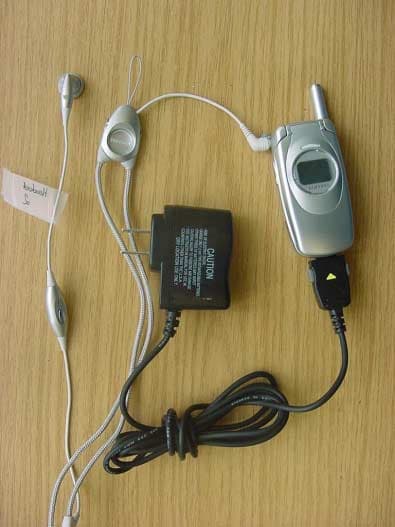
Click to zoom
Application Details
- Equipment Class
- PCE - PCS Licensed Transmitter held to ear
- Date of Grant
- Feb 26, 2003
- Application Purpose
- Original Equipment
- Date of Application
- Feb 26, 2003
- Equipment Note
- GSM 850/1900 Dual Band Mobile Phone
- Frequency Range
- 1850.20000000 - 1909.80000000
- Company
- Samsung Electronics Co Ltd
- Country
- United States
Documents & Files
Document Text
Text extracted from the exhibit documents filed with the FCC. Open a document above to read the original.
Users Manual
SGH-S307 WAP Browser User’s Manual ELECTRONICS * Some of the contents in this manual may differ from your phone, depending on the software installed or your service provider. Printed in Korea Code No.: GH68-xxxxxA English. 12/2002. Rev. 1.0 World Wide Web http://www.samsungmobile.com 2 What is WAP? WAP (Wireless Application Protocol) is the gateway to a new world of mobile data. It provides a universal standard, enabling you to access web-based interactive information services and applications directly from your mobile phone. 3 Contents About the WAP Browser............................ 4 Setting Up the WAP Browser..................... 5 Accessing the WAP Browser ...................... 5 Configuring the WAP Browser.................... 7 Starting the WAP Browser......................... 10 Exiting the WAP Browser .......................... 10 Using the WAP Browser............................ 11 Using the Soft Keys.................................. 11 Navigating the WAP Browser..................... 11 Entering Text, Numbers or Symbols ........... 12 Using the WAP Browser Menus................. 13 Using and Selecting Menu Options ............. 13 Reload ................................................... 13 Home..................................................... 13 Go to URL............................................... 14 Show URL............................................... 14 Edit Home .............................................. 15 Inbox..................................................... 15 4 About the WAP Browser Your phone comes equipped with a WAP (Wireless Application Protocol) browser, making it possible for you to access the Wireless Web. The WAP Browser allows you to: • access up-to-the-minute information via your phone • view specially designed text versions of popular Internet sites including Yahoo! ® , CNN Mobile SM and the Weather Channel ® Browsing the Wireless Web using your phone is unlike using your computer, in that site providers have: • selected only the critical aspects of their site for wireless phone users • removed most graphics Each time you start the WAP Browser, the phone connects to the Wireless Web and the service indicator icon ( ) appears on the display to inform you that you are: • are connected to the Wireless Web • will be billed accordingly (rates vary according to your service option) The WAP Browser ends the network connection after a certain period of inactivity and automatically reconnects as necessary. For this reason, you may find that you are billed for several network connections within a single session. This is normal and is designed to minimize your bill. 5 Setting Up the WAP Browser Accessing the WAP Browser To enter the WAP Browser menu to access the WAP browser: 1. When the idle screen is displayed, press the Menu soft key to enter menu mode. 2. Press the or key until the Funbox menu option is displayed, and then press the Select soft key. You can also press the key directly. Service Provider 05:17 Sat 02 Oct Menu Name 7 Funbox Funbox Network Services Messages Select Setting Up the WAP Browser 6 3. Press the or key one or more times to highlight WAP Browser , then press the Select soft key. You can also press the key directly. 4. Press the or key one or more times to highlight the required option and then press the Select soft key. Option Description Home Connects the phone to the network and loads the homepage of the Wireless Web service provider. Favorite Allows you to store the URL addresses of your favourite Web sites. You can access this menu directly by pressing and holding the key while using the WAP Browser. 7.2 7 .1 Funbox Games Downloads WAP Browser Select 7.2.1 7 .1.2 WAP Browser Home Favorite http:// Settings Clear Cache Select Setting Up the WAP Browser 7 Configuring the WAP Browser To configure the WAP Browser: 1. In the WAP Browser menu, highlight Settings using the and keys, and then press the Select soft key. You can also press the key directly. Favorite (continued) To store a URL address, select an empty location and enter the address. Three submenus are available: • Goto URL : quickly accesses you to the site. • Edit : edits the selected address. • Erase : deletes the selected address. http:// Allows you to manually enter the URL address of the website that you want to access. Clear Cache Clears the information stored in the cache (the phone’s temporary memory used to store the most recently accessed Web pages). Push Message Allows you to set whether or not you will receive Web messages from the server, and read or delete the messages received. Option Description Setting Up the WAP Browser 8 2. Select a proxy server and enter the parameters required. Contact your service provider for details. The remaining options depend on the Bearer setting, as indicated below. When the bearer is set to Data Parameter Description Profile Name Name that you wish to assign to the HTTP proxy server. Homepage URL Address of your startup homepage. When the default homepage displays, you can delete it using the key and enter your own choice. Security Data transmission mode. Choose Secure to protect your data against unauthorised access; otherwise, choose Non-Secure . IP Address WAP gateway address required to connect to the Internet. Bearer Bearer to be used for each type of network address accessed: GPRS or Data . Parameter Description Login Name PPP server login ID. Password PPP server password. Dial-up Number PPP server phone number. Data Call Type Data call type: Analogue or ISDN . Setting Up the WAP Browser 9 When the bearer is set to GPRS Note : The WAP Browser settings may vary, depending on the service provider. Contact your service provider for more information. 3. After selecting each of these settings, a dialogue box displays; you can either enter the information required or choose between given options. When you are satisfied with your input, press the OK soft key. 4. When you have finished configuring the WAP Browser, pres…
Text truncated - open the document above for the full version.
Users Manual
DUAL BAND GPRS TELEPHONE SGH-S307 ELECTRONICS * Some of the contents in this manual may differ from your phone, depending on the software installed or your service provider. Printed in Korea Code No.: GH68-xxxxxA English. 12/2002. Rev. 1.0 World Wide Web http://www.samsungmobile.com 2 3 Contents Important Safety Precautions ...................... 7 Unpacking.................................................... 9 Your Phone ................................................ 10 Phone Layout.................................................... 10 Display............................................................. 13 Service Light..................................................... 16 Getting Started .......................................... 17 Installing the SIM Card....................................... 17 Charging a Battery ............................................ 19 Switching the Phone On/Off ................................ 21 Call Functions ............................................ 22 Making a Call .................................................... 22 Adjusting the Volume......................................... 24 Answering a Call................................................ 25 Viewing Missed Calls .......................................... 26 Quickly Switching to the Silent Mode.................... 28 Selecting Functions and Options ................ 29 Phonebook................................................. 31 Storing a Number with a Name............................ 31 Using Phonebook Entry Options........................... 34 Searching for a Number in Phonebook.................. 36 Editing a Caller Group ........................................ 38 Speed-Dialing ................................................... 39 Checking the Memory Status............................... 40 Entering Text ............................................. 41 Changing the Text Input Mode ............................ 42 Using the T9 Mode............................................. 43 Using the Upper/Lower-Case Character Mode................................................. 44 Using the Symbol Mode...................................... 46 Using the Number Mode ..................................... 46 Contents 4 Options During a Call ................................. 47 Putting a Call on Hold......................................... 47 Switching the Microphone Off (Mute).................... 48 Muting/Sending Key Tones.................................. 49 Searching for a Number in Phonebook.................. 49 Using the SMS Service ....................................... 50 Answering a Second Call..................................... 50 Making a Multiparty Call ..................................... 51 Using the Menus......................................... 53 Accessing a Menu Function by Scrolling ................ 53 Accessing a Menu Function by Using its Shortcut ... 54 List of Menu Functions........................................ 54 Messages ................................................... 60 Inbox (Menu 1.1) ................................................. 60 Outbox (Menu 1.2)............................................... 62 Write New (Menu 1.3) ........................................... 63 Templates (Menu 1.4) .......................................... 65 Settings (Menu 1.5).............................................. 66 My Objects (Menu 1.6) ......................................... 67 Memory Status (Menu 1.7) ................................... 68 Voice Mail (Menu 1.8)........................................... 69 Broadcast (Menu 1.9)........................................... 70 Call Records ............................................... 72 Missed Calls (Menu 2.1)........................................ 72 Incoming Calls (Menu 2.2).................................... 72 Outgoing Calls (Menu 2.3) .................................... 73 Delete All (Menu 2.4)............................................ 73 Call Time (Menu 2.5)............................................ 73 Call Cost (Menu 2.6)............................................. 74 Sound Settings........................................... 75 Ring Tone (Menu 3.1)........................................... 75 Ring Volume (Menu 3.2) ....................................... 75 Alert Type (Menu 3.3)........................................... 76 Keypad Tone (Menu 3.4)....................................... 76 Message Tone (Menu 3.5)..................................... 77 Folder Tone (Menu 3.6) ........................................ 78 Power On/Off (Menu 3.7)...................................... 78 Extra Tones (Menu 3.8) ........................................ 78 Contents 5 Phone Settings........................................... 80 Infrared Activate (Menu 4.1)................................. 80 My Settings (Menu 4.2) ........................................ 81 Greeting Message (Menu 4.3) ............................... 82 Own Number (Menu 4.4) ...................................... 82 Language (Menu 4.5) ........................................... 83 Security (Menu 4.6).............................................. 83 Display Settings (Menu 4.7)................................. 86 Extra Settings (Menu 4.8)..................................... 88 Short Cut (Menu 4.9)............................................ 89 Reset Settings (Menu 4.10)................................... 89 Organizer................................................... 90 Calendar (Menu 5.1)............................................. 90 To Do List (Menu 5.2)........................................... 92 Time & Date (Menu 5.3) ....................................... 95 Alarm (Menu 5.4)................................................. 96 Calculator (Menu 5.5).......................................... 97 Currency Exchange (Menu 5.6) ............................. 98 Network Services....................................... 99 Call Forwarding (Menu 6.1)....…
Text truncated - open the document above for the full version.
External Photos
CETECOM ICT Services GmbH Test report no..: 4_0834-01-02/02Issue Date: 2003-01-13Page 104 (115) Photographs of the equipment SGH-S307 with Charger and Headset CETECOM ICT Services GmbH Test report no..: 4_0834-01-02/02Issue Date: 2003-01-13Page 105 (115) Photographs of the equipment CETECOM ICT Services GmbH Test report no..: 4_0834-01-02/02Issue Date: 2003-01-13Page 106 (115) Photographs of the equipment CETECOM ICT Services GmbH Test report no..: 4_0834-01-02/02Issue Date: 2003-01-13Page 111 (115) Photographs of the equipment Standart Battery CETECOM ICT Services GmbH Test report no..: 4_0834-01-02/02Issue Date: 2003-01-13Page 112 (115) Photographs of the equipment AC/DC Adapter/Charger TAD037BE CETECOM ICT Services GmbH Test report no..: 4_0834-01-02/02Issue Date: 2003-01-13Page 113 (115) Photographs of the equipment AC/DC Adapter/Charger TAD037BE CETECOM ICT Services GmbH Test report no..: 4_0834-01-02/02Issue Date: 2003-01-13Page 114 (115) Photographs of the equipment Headset CETECOM ICT Services GmbH Test report no..: 4_0834-01-02/02Issue Date: 2003-01-13Page 115 (115) Photographs of the equipment Headset
RF Exposure Info
CETECOM ICT Services GmbH Untertuerkheimer Str. 6-10, 66117 Saarbruecken, GermanyPhone: +49 (0) 681 598-0Fax: -8475 SAR-Laboratory Phone: +49 (0) 681 598-8454 . As of February 14, 2003Page 1 of 38 Accredited testing laboratory DAR registration number: TTI-P-G 166/98 Federal Motor Transport Authority (KBA) DAR registration number: KBA-P 00070-97 Appendix to the Report 4-0834-1-1/03 Calibration Data, Phantom Certificate and detail Information of the DASY 3 System CETECOM ICT Services GmbH Calibration Data and Phantom Information; Report No.: 4-0834-1-1/03 As of February 14, 2003Page 2 of 38 Table of Content 1.Calibration report “Probe ET3DV6”...............................................................................................................................3 2.Calibration report “1900 MHz System validation dipole”.............................................................................................12 3.Calibration report “900 MHz System validation dipole”...............................................................................................22 4.Certificate of Conformity “SAM Twin Phantom V4.0/V4.0C”......................................................................................31 5.Application Note Validation and system Check.............................................................................................................33 CETECOM ICT Services GmbH Calibration Data and Phantom Information; Report No.: 4-0834-1-1/03 As of February 14, 2003Page 3 of 38 1. Calibration report “Probe ET3DV6” CETECOM ICT Services GmbH Calibration Data and Phantom Information; Report No.: 4-0834-1-1/03 As of February 14, 2003Page 4 of 38 CETECOM ICT Services GmbH Calibration Data and Phantom Information; Report No.: 4-0834-1-1/03 As of February 14, 2003Page 5 of 38 CETECOM ICT Services GmbH Calibration Data and Phantom Information; Report No.: 4-0834-1-1/03 As of February 14, 2003Page 6 of 38 CETECOM ICT Services GmbH Calibration Data and Phantom Information; Report No.: 4-0834-1-1/03 As of February 14, 2003Page 7 of 38 CETECOM ICT Services GmbH Calibration Data and Phantom Information; Report No.: 4-0834-1-1/03 As of February 14, 2003Page 8 of 38 CETECOM ICT Services GmbH Calibration Data and Phantom Information; Report No.: 4-0834-1-1/03 As of February 14, 2003Page 9 of 38 CETECOM ICT Services GmbH Calibration Data and Phantom Information; Report No.: 4-0834-1-1/03 As of February 14, 2003Page 10 of 38 CETECOM ICT Services GmbH Calibration Data and Phantom Information; Report No.: 4-0834-1-1/03 As of February 14, 2003Page 11 of 38 CETECOM ICT Services GmbH Calibration Data and Phantom Information; Report No.: 4-0834-1-1/03 As of February 14, 2003Page 12 of 38 2. Calibration report “1900 MHz System validation dipole” CETECOM ICT Services GmbH Calibration Data and Phantom Information; Report No.: 4-0834-1-1/03 As of February 14, 2003Page 13 of 38 CETECOM ICT Services GmbH Calibration Data and Phantom Information; Report No.: 4-0834-1-1/03 As of February 14, 2003Page 14 of 38 CETECOM ICT Services GmbH Calibration Data and Phantom Information; Report No.: 4-0834-1-1/03 As of February 14, 2003Page 15 of 38 CETECOM ICT Services GmbH Calibration Data and Phantom Information; Report No.: 4-0834-1-1/03 As of February 14, 2003Page 16 of 38 CETECOM ICT Services GmbH Calibration Data and Phantom Information; Report No.: 4-0834-1-1/03 As of February 14, 2003Page 17 of 38 CETECOM ICT Services GmbH Calibration Data and Phantom Information; Report No.: 4-0834-1-1/03 As of February 14, 2003Page 18 of 38 CETECOM ICT Services GmbH Calibration Data and Phantom Information; Report No.: 4-0834-1-1/03 As of February 14, 2003Page 19 of 38 CETECOM ICT Services GmbH Calibration Data and Phantom Information; Report No.: 4-0834-1-1/03 As of February 14, 2003Page 20 of 38 CETECOM ICT Services GmbH Calibration Data and Phantom Information; Report No.: 4-0834-1-1/03 As of February 14, 2003Page 21 of 38 CETECOM ICT Services GmbH Calibration Data and Phantom Information; Report No.: 4-0834-1-1/03 As of February 14, 2003Page 22 of 38 3. Calibration report “900 MHz System validation dipole” CETECOM ICT Services GmbH Calibration Data and Phantom Information; Report No.: 4-0834-1-1/03 As of February 14, 2003Page 23 of 38 CETECOM ICT Services GmbH Calibration Data and Phantom Information; Report No.: 4-0834-1-1/03 As of February 14, 2003Page 24 of 38 CETECOM ICT Services GmbH Calibration Data and Phantom Information; Report No.: 4-0834-1-1/03 As of February 14, 2003Page 25 of 38 CETECOM ICT Services GmbH Calibration Data and Phantom Information; Report No.: 4-0834-1-1/03 As of February 14, 2003Page 26 of 38 CETECOM ICT Services GmbH Calibration Data and Phantom Information; Report No.: 4-0834-1-1/03 As of February 14, 2003Page 27 of 38 CETECOM ICT Services GmbH Calibration Data and Phantom Information; Report No.: 4-0834-1-1/03 As of February 14, 2003Page 28 of 38 CETECOM ICT Services GmbH Calibration Data and Phantom Information; Report No.: 4-0834-1-1/03 As of February 14, 2003Page 29 of 38 CETECOM ICT Services GmbH Calibration Data and Phantom Information; Report No.: 4-0834-1-1/03 As of February 14, 2003Page 30 of 38 CETECOM ICT Services GmbH Calibration Data and Phantom Information; Report No.: 4-0834-1-1/03 As of February 14, 2003Page 31 of 38 4. Certificate of Conformity “SAM Twin Phantom V4.0/V4.0C” CETECOM ICT Services GmbH Calibration Data and Phantom Information; Report No.: 4-0834-1-1/03 As of February 14, 2003Page 32 of 38 CETECOM ICT Services GmbH Calibration Data and Phantom Information; Report No.: 4-0834-1-1/03 As of February 14, 2003Page 33 of 38 5. Application Note Validation and system Check Purpose of validation The Validation and system check verify that the system operates within ist specifications. System and operator errors can be detected and corrected. It is recommended that the validation be performed prior to any usage of the system in order to guarantee reproducible results. Th…
Text truncated - open the document above for the full version.
RF Exposure Info
CETECOM ICT Services GmbH Test report no.: 4-0834-1-1/02 As of February 14, 2003Page 81 of 115 Annex 3 Photo documentation Picture no. 1 Measurement System DASY 3 CETECOM ICT Services GmbH Test report no.: 4-0834-1-1/02 As of February 14, 2003Page 82 of 115 Picture no. 2 DUT - front view CETECOM ICT Services GmbH Test report no.: 4-0834-1-1/02 As of February 14, 2003Page 83 of 115 Picture no. 3 DUT - front view (open) CETECOM ICT Services GmbH Test report no.: 4-0834-1-1/02 As of February 14, 2003Page 84 of 115 Picture no. 4 DUT - rear view (slim battery) CETECOM ICT Services GmbH Test report no.: 4-0834-1-1/02 As of February 14, 2003Page 85 of 115 Picture no. 5 DUT - side view (slim battery) CETECOM ICT Services GmbH Test report no.: 4-0834-1-1/02 As of February 14, 2003Page 86 of 115 Picture no. 6 DUT - rear view (standard battery) CETECOM ICT Services GmbH Test report no.: 4-0834-1-1/02 As of February 14, 2003Page 87 of 115 Picture no. 7 DUT - side view (standard battery) CETECOM ICT Services GmbH Test report no.: 4-0834-1-1/02 As of February 14, 2003Page 88 of 115 Picture no. 8 DUT - rear view (open) CETECOM ICT Services GmbH Test report no.: 4-0834-1-1/02 As of February 14, 2003Page 89 of 115 Picture no. 9 slim battery - front side CETECOM ICT Services GmbH Test report no.: 4-0834-1-1/02 As of February 14, 2003Page 90 of 115 Picture no. 10 slim battery - rear side CETECOM ICT Services GmbH Test report no.: 4-0834-1-1/02 As of February 14, 2003Page 91 of 115 Picture no. 11 standard battery - front side CETECOM ICT Services GmbH Test report no.: 4-0834-1-1/02 As of February 14, 2003Page 92 of 115 Picture no. 12 standard battery - rear side CETECOM ICT Services GmbH Test report no.: 4-0834-1-1/02 As of February 14, 2003Page 93 of 115 Picture no. 13 headset 1 (wire type) CETECOM ICT Services GmbH Test report no.: 4-0834-1-1/02 As of February 14, 2003Page 94 of 115 Picture no. 14 headset 2 (necklace type) CETECOM ICT Services GmbH Test report no.: 4-0834-1-1/02 As of February 14, 2003Page 95 of 115 Picture no. 15 test position left hand touched CETECOM ICT Services GmbH Test report no.: 4-0834-1-1/02 As of February 14, 2003Page 96 of 115 Picture no. 16 test position left hand touched CETECOM ICT Services GmbH Test report no.: 4-0834-1-1/02 As of February 14, 2003Page 97 of 115 Picture no. 17 test position left hand tilted 15° CETECOM ICT Services GmbH Test report no.: 4-0834-1-1/02 As of February 14, 2003Page 98 of 115 Picture no. 18 test position left hand tilted 15° CETECOM ICT Services GmbH Test report no.: 4-0834-1-1/02 As of February 14, 2003Page 99 of 115 Picture no. 19 test position right hand touched CETECOM ICT Services GmbH Test report no.: 4-0834-1-1/02 As of February 14, 2003Page 100 of 115 Picture no. 20 test position right hand touched CETECOM ICT Services GmbH Test report no.: 4-0834-1-1/02 As of February 14, 2003Page 101 of 115 Picture no. 21 test position right hand tilted 15° CETECOM ICT Services GmbH Test report no.: 4-0834-1-1/02 As of February 14, 2003Page 102 of 115 Picture no. 22 test position left hand tilted 15° CETECOM ICT Services GmbH Test report no.: 4-0834-1-1/02 As of February 14, 2003Page 103 of 115 Picture no. 23 test position body-worn front side with headset 1 (distance to SAM 15mm) CETECOM ICT Services GmbH Test report no.: 4-0834-1-1/02 As of February 14, 2003Page 104 of 115 Picture no. 24 test position body-worn front side with headset 1 (distance to SAM 15mm) CETECOM ICT Services GmbH Test report no.: 4-0834-1-1/02 As of February 14, 2003Page 105 of 115 Picture no. 25 test position body-worn front side with headset 2 (distance to SAM 15mm) CETECOM ICT Services GmbH Test report no.: 4-0834-1-1/02 As of February 14, 2003Page 106 of 115 Picture no. 26 test position body-worn front side with headset 2 (distance to SAM 15mm) CETECOM ICT Services GmbH Test report no.: 4-0834-1-1/02 As of February 14, 2003Page 107 of 115 Picture no. 27 test position body-worn rear side with headset 1 (distance to SAM 15mm) CETECOM ICT Services GmbH Test report no.: 4-0834-1-1/02 As of February 14, 2003Page 108 of 115 Picture no. 28 test position body-worn rear side with headset 1 (distance to SAM 15mm) CETECOM ICT Services GmbH Test report no.: 4-0834-1-1/02 As of February 14, 2003Page 109 of 115 Picture no. 29 test position body-worn rear side with headset 2 (distance to SAM 15mm) CETECOM ICT Services GmbH Test report no.: 4-0834-1-1/02 As of February 14, 2003Page 110 of 115 Picture no. 30 test position body-worn rear side with headset 2 (distance to SAM 15mm) CETECOM ICT Services GmbH Test report no.: 4-0834-1-1/02 As of February 14, 2003Page 111 of 115 Picture no. 31 depth of tissue simulating liquid - head 835 MHz CETECOM ICT Services GmbH Test report no.: 4-0834-1-1/02 As of February 14, 2003Page 112 of 115 Picture no. 32 depth of tissue simulating liquid - head 1900 MHz CETECOM ICT Services GmbH Test report no.: 4-0834-1-1/02 As of February 14, 2003Page 113 of 115 Picture no. 33 depth of tissue simulating liquid - body 835 MHz CETECOM ICT Services GmbH Test report no.: 4-0834-1-1/02 As of February 14, 2003Page 114 of 115 Picture no. 34 depth of tissue simulating liquid - body 1900 MHz CETECOM ICT Services GmbH Test report no.: 4-0834-1-1/02 As of February 14, 2003Page 115 of 115 Annex 4 Calibration parameters of E-field probe Calibration parameters are described in the additional document ‘ Calibration data and Phantom information for test report no. 4-0834-1-1/02‘, provided together with this document.
RF Exposure Info
CETECOM ICT Services GmbH Untertuerkheimer Str. 6-10, 66117 Saarbruecken, GermanyPhone: +49 (0) 681 598-0Fax: -8475 SAR-Laboratory Phone: +49 (0) 681 598-8454 . As of February 14, 2003Page 1 of 115 Accredited testing laboratory DAR registration number: TTI-P-G 166/98 Federal Motor Transport Authority (KBA) DAR registration number: KBA-P 00070-97 Test report no. : 4-0834-1-1/02 Type identification : SGH-S307 Test specification : Draft IEEE Std 1528-200X : OET Bulletin 65 FCC-ID: A3LSGHS307 Test specification : CETECOM ICT Services GmbH Test report no.: 4-0834-1-1/02 As of February 14, 2003Page 2 of 115 Table of Contents 1General Information ............................................................................................................................................................... 3 1.1Notes .............................................................................................................................................................................. 3 1.1.1Statement of Compliance ....................................................................................................................................... 3 1.2Testing laboratory .......................................................................................................................................................... 4 1.3Details of applicant......................................................................................................................................................... 4 1.4Application details.......................................................................................................................................................... 4 1.5Test item......................................................................................................................................................................... 5 1.6Test specification(s) ....................................................................................................................................................... 6 1.6.1RF exposure limits ................................................................................................................................................. 6 2Technical test ......................................................................................................................................................................... 7 2.1Summary of test results .................................................................................................................................................. 7 2.2Test environment............................................................................................................................................................ 7 2.3Measurement and test set-up .......................................................................................................................................... 7 2.4Measurement system ...................................................................................................................................................... 8 2.4.1System Description ................................................................................................................................................ 8 2.4.2Test environment.................................................................................................................................................... 9 2.4.3Probe description.................................................................................................................................................... 9 2.4.4Phantom description ............................................................................................................................................. 10 2.4.5Device holder description..................................................................................................................................... 10 2.4.6Scanning procedure .............................................................................................................................................. 11 2.4.7Spatial Peak SAR Evaluation ............................................................................................................................... 12 2.4.8Data Storage and Evaluation ................................................................................................................................ 13 2.4.9Test equipment utilized ........................................................................................................................................ 15 2.4.10Tissue simulating liquids : dielectric properties ................................................................................................... 16 2.4.11Tissue simulating liquids : parameters ................................................................................................................. 17 2.4.12Measurement uncertainties................................................................................................................................... 18 2.4.13System validation ................................................................................................................................................. 19 2.4.14Validation procedure .............…
Text truncated - open the document above for the full version.
Contact Information
Applicant
Jenni Chun(General Manager)
Test Firm
Cetecom ICT Services GmbHRalf Hoehn
Technical Specifications
| # | Rule Parts | Frequency Range | Power Output | Emission | Tolerance |
|---|---|---|---|---|---|
| 2 | 24E | 1.85 GHz - 1.91 GHz | 1.51 W | 300KGXW | 0.0245 ppm |
Other Applications from Samsung Electronics Co Ltd
A3LSMU600
Sep 15, 2026Bluetooth Headset
Equipment Class
DTS - Digital Transmission SystemA3LSMA185G
Sep 08, 2026Portable Handset
Equipment Class
CXX - Communications Rcvr for use w/ licensed Tx and CBsA3LSMS741B
Aug 05, 2026Portable Handset
Equipment Class
6VL - 15E 6 GHZ Very Low Power DeviceA3LSMX940
Jul 31, 2026BT,BLE Tablet DTS,UNII a,b,g,n,ac,ax,be and digitizer
Equipment Class
DTS - Digital Transmission SystemA3LSMS741U
Jul 30, 2026Portable Handset
Equipment Class
6CD - 15E 6 GHz Low Power Dual Client