A3LSGHT899MCellular/ PCS GSM/ EDGE/ WCDMA and AWS/ WCDMA/ LTE Phone with WLAN, Bluetooth and RFID
Samsung Electronics Co Ltd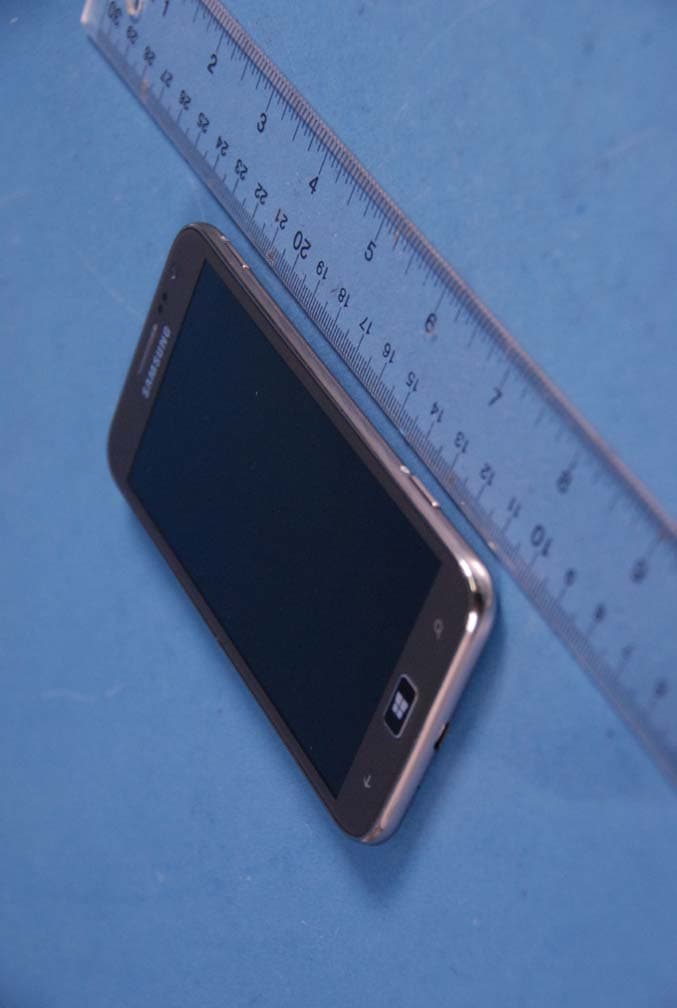
Click to zoom
Application Details
- Equipment Class
- NII - Unlicensed National Information Infrastructure TX
- Date of Grant
- Nov 01, 2012
- Application Purpose
- Original Equipment
- Date of Application
- Oct 18, 2012
- Equipment Note
- Cellular/ PCS GSM/ EDGE/ WCDMA and AWS/ WCDMA/ LTE Phone with WLAN, Bluetooth and RFID
- Frequency Range
- 5510.00000000 - 5670.00000000
- Company
- Samsung Electronics Co Ltd
- Country
- United States
Documents & Files
Document Text
Text extracted from the exhibit documents filed with the FCC. Open a document above to read the original.
Users Manual
www.samsung.com User Guide SGH-T899M 2 About this manual This device provides high quality mobile communication and entertainment using Samsung’s high standards and technological expertise. This user manual is specially designed to detail the device’s functions and features. • Please read this manual before using the device to ensure safe and proper use. • Descriptions are based on the device’s default settings. • Images and screenshots may differ in appearance from the actual product. • Content may differ from the final product, or from software provided by service providers or carriers, and is subject to change without prior notice. For the latest version of the manual, refer to the Samsung website, www.samsung.com. • Available features and additional services may vary by device, software, or service provider. • Applications and their functions may vary by country, region, or hardware specifications. Samsung is not liable for performance issues caused by applications from any provider other than Samsung. • Samsung is not liable for performance issues or incompatibilities caused by edited registry settings or modified operating system software. Attempting to customise the operating system may cause the device or applications to work improperly. • Software, sound sources, wallpapers, images, and other media provided with this device are licensed for limited use. Extracting and using these materials for commercial or other purposes is an infringement of copyright laws. Users are entirely responsible for illegal use of media. • You may incur additional charges for data services, such as messaging, uploading and downloading, auto-syncing, or using location services. To avoid additional charges, select an appropriate data tariff plan. For details, contact your service provider. • Default applications that come with the device are subject to updates and may no longer be supported without prior notice. If you have questions about an application provided with the device, contact a Samsung Service Centre. For user-installed applications, contact service providers. • Modifying the device’s operating system or installing softwares from unofficial sources may result in device malfunctions and data corruption or loss. These actions are violations of your Samsung licence agreement and will void your warranty. About this manual 3 Instructional icons Warning: situations that could cause injury to yourself or others Caution: situations that could cause damage to your device or other equipment Note: notes, usage tips, or additional information Copyright Copyright © 2012 Samsung Electronics This guide is protected under international copyright laws. No part of this guide may be reproduced, distributed, translated, or transmitted in any form or by any means, electronic or mechanical, including photocopying, recording, or storing in any information storage and retrieval system, without the prior written permission of Samsung Electronics. Trademarks • SAMSUNG and the SAMSUNG logo are registered trademarks of Samsung Electronics. • Bluetooth ® is a registered trademark of Bluetooth SIG, Inc. worldwide. • Wi-Fi ® , Wi-Fi CERTIFIED ™ , and the Wi-Fi logo are registered trademarks of the Wi-Fi Alliance. • All other trademarks and copyrights are the property of their respective owners. 4 Table of Contents Getting started 6 Device layout 7 Buttons 8 Package contents 9 Installing the SIM or USIM card and battery 12 Charging the battery 14 Inserting a memory card 16 Turning the device on and off 16 Holding the device 17 Locking and unlocking the device 17 Adjusting the volume 17 Switching to silent mode Basics 18 Indicator icons 19 Using the touch screen 21 Rotating the screen 22 Start screen 22 Using applications 23 Applications screen 24 Help+Tips 24 Entering text 25 Connecting to a Wi-Fi network 26 Setting up accounts 27 Transferring files 28 Securing the device 28 Updating the device Communication 29 Phone 32 People 34 Messaging 35 Email 36 ChatON Web & network 37 Internet Explorer 38 Bluetooth Media 40 Music+Videos 41 Camera 45 Photos 47 Live Wallpaper 47 Photo Editor 48 Now Application & media stores Table of Contents 5 49 Store 50 Games 50 Music Hub Utilities 51 OneNote 53 Calendar 54 Family Story 55 MiniDiary 56 Office 57 Alarms 58 Calculator 58 Wallet Travel & local 59 Maps Settings 60 About Settings 60 system 69 applications Troubleshooting 6 Getting started Device layout Camera button Search button Multipurpose jack Earpiece Microphone Proximity/Light sensor Back button Front camera Power button Start button Touch screen Flash Rear camera Main antenna Headset jack Volume button Microphone for speakerphone Speaker Back cover Getting started 7 The microphone at the top of the device is active when you use the speakerphone. • Do not cover the antenna area with your hands or other objects. This may cause connectivity problems or drain the battery. • Do not use a screen protector. This causes sensor malfunctions. • Do not allow water to contact the touch screen. The touch screen may malfunction in humid conditions or when exposed to water. Buttons ButtonFunction Power • Press and hold to turn the device on or off. • Press and hold for 9-10 seconds to reset the device if it has fatal errors or hang-ups, or freezes. • Press to lock or unlock the device. The device goes into lock mode when the touch screen turns off. Back • Tap to return to the previous screen. Start • Press to return to the Start screen. Search • Tap to launch Bing search. Volume • Press to adjust the device volume. Camera • Press to launch Camera. Getting started 8 Package contents Check the product box for the following items: • Device • Battery • Quick start guide Use only Samsung-approved software. Pirated or illegal software may cause damage or malfunctions, which are not covered by the warranty. • The items supplied with the device and any available accessories may vary depending on the region or service provider. • The supplied items are …
Text truncated - open the document above for the full version.
Users Manual
Media 43 Recording mode Open the video player to play videos. Swtich to still mode. Switch between front and rear camera. Use other lenses. Change the camera settings. Zooming in and out Spread two fingers apart on the screen to zoom in, and pinch to zoom out. The zoom in/out effect is not available when using the zoom feature while shooting video. Media 44 Configuring settings for Camera Tap to configure settings for Camera. Not all of the following options are available in both still camera and video camera modes. The available options vary depending on the mode used. • Focus Range: Select a focus mode. Normal (default) is camera-controlled. Macro is for very close objects. • White Balance: Select an appropriate white balance, so images have a true-to-life colour range. The settings are designed for specific lighting situations. These settings are similar to the heat range for white-balance exposure in professional cameras. • ISO Gain: Select an ISO value. This controls camera light sensitivity. It is measured in film- camera equivalents. Low values are for stationary or brightly-lit objects. Higher values are for fast-moving or poorly-lit objects. • EV: This determines how much light the camera’s sensor receives. For low-light situations, use a higher exposure. • Photo resolution / Video resolution: Select the resolution option. Using Bing Vision Tap → Bing Vision to scan codes to view more information, or to extract text from documents. Scanning a code Aim the rear camera at a code. After the code is scanned automatically, tap the code number to view information. Scanning a document Aim the rear camera at a document, and then tap scan text. Select a word, and then tap translate to view the definition of the word. To search the web with a keyword, tap search. Media 45 Photos Use this application to view images and videos. Tap Photos on the Applications screen. • Some file formats are not supported depending on the software installed on the device. • Some files may not play properly depending on how they are encoded. Viewing images Launching Photos displays available folders. When another application, such as Email, saves an image, the download folder is automatically created to contain the image. Select a folder to open it, and then tap an image to view it in full screen. Scroll left or right to view the next or previous image. Zooming in and out Use one of the following methods to zoom in an image: • Double-tap anywhere to zoom in. • Spread two fingers apart on any place to zoom in. Pinch to zoom out, or double-tap to return. Playing videos Video files show the icon on the preview. Select a video to watch it, and the Music+Videos launches. Media 46 Editing images When viewing images, tap and use the following functions: • edit: Edit the image. • add to favorites: Add the image to favourites. • save to SkyDrive: Upload the image to the SkyDrive storage. This feature may be labelled differently depending on the account settings. • apps...: See image editors downloaded from the Store. Deleting images Use one of the following methods: • In a folder, tap , select images by ticking, and then tap . • When viewing an image, tap → delete. Sharing images Use one of the following methods: • In a folder, tap , select images by ticking, and then tap to send them to others. • When viewing an image, tap → share... to send it to others. Setting as wallpaper for the lock screen When viewing an image, tap → set as lock screen to set the image as wallpaper for the lock screen. Media 47 Live Wallpaper Use this application to make a slideshow wallpaper for the lock screen. Tap Live Wallpaper on the Applications screen. Tap choose picture, select a folder, select images, and then tap . To take a photo to add it to the slideshow, tap . Tap yes to set the slideshow as wallpaper. Photo Editor Use this application to embellish photos by applying various effects, such as the oil paint effect. Tap Photo Editor on the Applications screen. To open an image, select one of the following: • : Select from among the images saved in the device. • : Take a photo to edit. Adjust the saturation or brightness of the image. Crop, rotate, or resize the image. Apply e ects to the image. Decorate the image with frames or stickers. Change the image editor settings. Undo and redo the last action. Save the image. Discard the current image and open a new image. To finish, tap → ok. Media 48 Now Use this application to get weather forecasts, recent news articles, or stock information. Tap Now on the Applications screen. Viewing weather information Scroll to weather to view the current weather and forecast. To add the current location, tap → Add a city → . To add other locations, tap → Add a city. To update weather forecast, tap . Reading news articles Scroll to news to view the news articles. Select an article to read. To add a news category, tap → Add a catogory. Viewing stock information Scroll to stocks to view stock information. Select a stock to monitor. To add a stock item, tap → Add a stock. Checking currencies Scroll to currency to view currency information. Select a currency to check. To add a currency, tap → Add currency. Viewing Tweeter posts Scroll to top tweets to view Twitter posts. Select a post to view. To add a region to view Twitter posts, tap → Add a country. 49 Application & media stores Store Use this application to purchase and download applications and games that are able to run on the device. Tap Store on the Applications screen. This application may not be available depending on the region or service provider. Installing applications Browse applications by category, or tap to search with a keyword. Select an application to view information. To download it, tap install. If there is a charge for the application, tap buy, and follow on-screen instructions to complete the purchase process. When a new version is available for any installed application, an update icon appears at the top of the screen to alert you…
Text truncated - open the document above for the full version.
Users Manual
English (CA). 10/2012. Rev. 1.0 Some content in this guide may differ from your device depending on the region or service provider. www.samsung.com SGH-T899M MOBILE PHONE Safety and Warranty Guide Please read this manual before operating your phone, and keep it for future reference. GH68-37638C T899M_SWG.book Page i Tuesday, October 16, 2012 2:03 PM Copyright © 2012 Samsung Electronics Canada, Inc. SAMSUNG is a registered trademark of Samsung Electronics Co., Ltd. and its related entities. Intellectual Property All Intellectual Property, as defined below, owned by or which is otherwise the property of Samsung or its respective suppliers relating to the SAMSUNG Phone, including but not limited to, accessories, parts, or software relating thereto (the “Phone System”), is proprietary to Samsung and protected under federal laws, provincial laws, and international treaty provisions. Intellectual Property includes, but is not limited to, inventions (patentable or unpatentable), patents, trade secrets, copyrights, software, computer programs, and related documentation and other works of authorship. You may not infringe or otherwise violate the rights secured by the Intellectual Property. Moreover, you agree that you will not (and will not attempt to) modify, prepare derivative works of, reverse engineer, decompile, disassemble, or otherwise attempt to create source code from the software. No title to or ownership in the Intellectual Property is transferred to you. All applicable rights of the Intellectual Property shall remain with SAMSUNG and its suppliers. T899M_SWG.book Page ii Tuesday, October 16, 2012 2:03 PM Disclaimer of Warranties; Exclusion of Liability Except as set forth in the express warranty contained on the warranty page enclosed with the product, the purchaser takes the product "as is", and Samsung makes no express or implied warranty of any kind whatsoever with respect to the product, including but not limited to the merchantability of the product or its fitness for any particular purpose or use; the design, condition or quality of the product; the performance of the product; the workmanship of the product or the components contained therein; or compliance of the product with the requirements of any law, rule, specification or contract pertaining thereto. Nothing contained in the instruction manual shall be construed to create an express or implied warranty of any kind whatsoever with respect to the product. In addition, Samsung shall not be liable for any damages of any kind resulting from the purchase or use of the product or arising from the breach of the express warranty, including incidental, special or consequential damages, or loss of anticipated profits or benefits. T899M_SWG.book Page iii Tuesday, October 16, 2012 2:03 PM Privacy The privacy and copyright laws of Canada govern the disclosure, reproduction and distribution of data, media and other content, including music and video content. Certain activities, including downloads or transfer by any means (including, via cable, Bluetooth® or otherwise) of such content may be an infringement of privacy or copyright law. Neither Samsung Electronics Canada Inc. nor any of its affiliates shall be liable or responsible for any data or content disclosed, reproduced, downloaded or distributed by the user of this equipment. IC Notice This Class B digital apparatus complies with Canadian ICES-003. This device complies with Industry Canada licence-exempt RSS standard(s). Operation is subject to the following two conditions: (1) this device may not cause interference, and (2) this device must accept any interference, including interference that may cause undesired operation of the device. T899M_SWG.book Page iv Tuesday, October 16, 2012 2:03 PM Table of Contents Safety................................................................... 2 Getting the Most Out of Your Reception ................... 2 Maintaining Safe Use of and Access to Your Phone 3 Caring for the Battery................................................. 7 Owner’s Record ....................................................... 12 Warranty Information ......................................... 13 Index .................................................................. 17 T899M_SWG.book Page 1 Tuesday, October 16, 2012 2:03 PM 2 Safety Safety Getting the Most Out of Your Reception Keeping Tabs on Signal Strength The quality of each call you make or receive depends on the signal strength in your area. Your phone informs you of the current signal strength by displaying a number of bars next to the signal strength icon. The more bars displayed, the stronger the signal. If you’re inside a building, being near a window may give you better reception. Understanding How Your Phone Operates Your phone is basically a radio transmitter and receiver. When it’s turned on, it receives and transmits radio frequency (RF) signals. When you use your phone, the system handling your call controls the power level. This power can range from 0.006 watts to 0.2 watts in digital mode. Knowing Radio Frequency Safety The design of your phone complies with updated NCRP standards described below. In 1991-92, the Institute of Electrical and Electronics Engineers (IEEE) and the American National Standards Institute (ANSI) joined in updating ANSI’s 1982 standard for safety levels with respect to human exposure to RF signals. More than 120 scientists, engineers and physicians from universities, government health agencies, and industries developed T899M_SWG.book Page 2 Tuesday, October 16, 2012 2:03 PM Safety 3 this updated standard after reviewing the available body of research. In 1993, the Federal Communications Commission (FCC) adopted this updated standard in a regulation. In August 1996, the FCC adopted a hybrid standard consisting of the existing ANSI/IEEE standard and the guidelines published by the National Council of Radiation Protection and Measurements (NCRP). Maintaining Your Phone’s Peak Perf…
Text truncated - open the document above for the full version.
Attestation Statements
SAMSUNG ELECTRONICS CO., LTD 416,Maetan-3dong,Yeongtong-gu Suwon-si,Gyeonggi-do, 443-742 Korea October 4, 2012 Federal Communications Commission 7435 Oakland Mills Road Columbia, MD 21046 SUBJECT : Label Statement FCC ID : A3LSGHT899M Gentlemen: We hereby provide the label statement letter for the above-mentioned device by a new label statement policy instituted at the September 12, 2006, TCB-FCC Teleconference. The label statement is as follows: The FCC ID shown in the FCC ID label page will be readily visible at the time of purchase because the device will be marketed without the battery installed. The label is permanently attached by acrylic glue and not easily removed from the device. This statement could not be included in the label. So we inform you of it through this letter. Should you have any questions or comments concerning the above, please contact the undersigned. Sincerely Yours, Seoung Ho Park Senior Manager SAMSUNG ELECTRONICS CO.,LTD Telecommunication Network Business Mobile Communication Division Regulatory Compliance Group.
Cover Letter(s)
SAMSUNG ELECTRONICS AMERICA, INC. American QA Lab 19 Chapin Rd, Building D. Pine Brook, NJ 07058 Date: October 4, 2012 Federal Communications Commission Authorization and Evaluation Division 7435 Oakland Mills Road, Columbia, MD 21046 RE: Request of Confidentiality for FCC ID: A3LSGHT889M To Whom It May Concern: Pursuant to Sections 0.457 and 0.459 of the Commission’s Rules (CFR 47), and Section 552 (b) (4) of the Freedom of Information Act, SAMSUNG ELECTRONICS CO.,LTD. hereby requests confidentiality and treatment of certain information accompanying this application. The materials contain trade secrets and proprietary information not customarily released to the public. The public disclosure of these matters might be harmful to the Applicant and provide unjustified benefits to its competitors. We are also hereby request Short-Term Confidentiality for 180 days after the grant as outlined in Public Notice DA 04-1705. This provision will give SAMSUNG ELECTRONICS CO.,LTD. temporary confidentiality of commercially sensitive information prior to product release. The requested Permanent and Short-Term Confidential exhibits are listed as follows: PERMANENT AND SHORT-TERM CONFIDENTIAL LIST Exhibit Description 1 Block Diagram 2 Operational Description PERMANENT 3 Schematics 4 External Photos 5 Internal Photos 6 Test-Setup Photos SHORT-TERM 7 Users Manual The Applicant understands that pursuant to Rule 0.457, disclosure of this application and all accompanying documentations, where applicable, will not be made public before the date of the Grant for this application. Sincerely, Peter Ra General Manager American QA Lab SAMSUNG Electronics America INC.
External Photos
Samsung FCC ID: A3LSGHT899M Model: SGH-T899M External Photos EUT Type: Portable Handset Page 1 of 4 © 2012 PCTEST Engineering Laboratory Inc. EXTERNAL PHOTOGRAPHS Samsung FCC ID: A3LSGHT899M Model: SGH-T899M External Photos EUT Type: Portable Handset Page 2 of 4 © 2012 PCTEST Engineering Laboratory Inc. Samsung FCC ID: A3LSGHT899M Model: SGH-T899M External Photos EUT Type: Portable Handset Page 3 of 4 © 2012 PCTEST Engineering Laboratory Inc. Samsung FCC ID: A3LSGHT899M Model: SGH-T899M External Photos EUT Type: Portable Handset Page 4 of 4 © 2012 PCTEST Engineering Laboratory Inc.
ID Label/Location Info
Label and Location Samsung Phone Model: SGH-T899M FCC ID: A3LSGHT899M Label: Location: Top Back plate of device Bottom Label is placed inside of the battery compartment. Label
Internal Photos
Samsung FCC ID: A3LSGHT899M Model: SGH-T899M Internal Photos EUT Type: Portable Handset Page 1 of 10 © 2012 PCTEST Engineering Laboratory Inc. INTERNAL PHOTOGRAPHS Samsung FCC ID: A3LSGHT899M Model: SGH-T899M Internal Photos EUT Type: Portable Handset Page 2 of 10 © 2012 PCTEST Engineering Laboratory Inc. Samsung FCC ID: A3LSGHT899M Model: SGH-T899M Internal Photos EUT Type: Portable Handset Page 3 of 10 © 2012 PCTEST Engineering Laboratory Inc. Samsung FCC ID: A3LSGHT899M Model: SGH-T899M Internal Photos EUT Type: Portable Handset Page 4 of 10 © 2012 PCTEST Engineering Laboratory Inc. Samsung FCC ID: A3LSGHT899M Model: SGH-T899M Internal Photos EUT Type: Portable Handset Page 5 of 10 © 2012 PCTEST Engineering Laboratory Inc. Samsung FCC ID: A3LSGHT899M Model: SGH-T899M Internal Photos EUT Type: Portable Handset Page 6 of 10 © 2012 PCTEST Engineering Laboratory Inc. Samsung FCC ID: A3LSGHT899M Model: SGH-T899M Internal Photos EUT Type: Portable Handset Page 7 of 10 © 2012 PCTEST Engineering Laboratory Inc. Samsung FCC ID: A3LSGHT899M Model: SGH-T899M Internal Photos EUT Type: Portable Handset Page 8 of 10 © 2012 PCTEST Engineering Laboratory Inc. Samsung FCC ID: A3LSGHT899M Model: SGH-T899M Internal Photos EUT Type: Portable Handset Page 9 of 10 © 2012 PCTEST Engineering Laboratory Inc. Samsung FCC ID: A3LSGHT899M Model: SGH-T899M Internal Photos EUT Type: Portable Handset Page 10 of 10 © 2012 PCTEST Engineering Laboratory Inc.
RF Exposure Info
FCC ID: A3LSGHT899M SAR EVALUATION REPORT Reviewed by: Quality Manager Document S/N: Test Dates: DUT Type: Page 1 of 49 0Y1208241227.A3L 08/25/12 - 09/19/12 Portable Handset © 2012 PCTEST Engineering Laboratory, Inc. REV 11.3 M 04/23/2012 Applicant Name: Date of Testing: Samsung Electronics Co., Ltd. 08/25/12 - 09/19/12 416, Maetan 3-dong, Yeongtong-gu, Suwon-si Test Site/Location: Gyeonggi-do, 443-742 PCTEST Lab, Columbia, MD, USA Republic of Korea Document Serial No.: 0Y1208241227.A3L FCC ID: A3LSGHT899M APPLICANT: SAMSUNG ELECTRONICS CO., LTD. DUT Type: Portable Handset Application Type: Certification FCC Rule Part(s): Model(s): CFR §2.1093 SGH-T899M 1 gm Head (W/kg) 1 gm Body- Worn (W/kg) 1 gm Hotspot (W/kg) GSM/GPRS/ EDGE Rx 850824.20 - 848.80 MHz32.47 0.120.520.52 WCDMA/HSPA 850826.40 - 846.60 MHz22.330.12 0.260.26 AWS WCDMA/HSPA1712.4 - 1752.5 MHz23.340.67 0.750.96 GSM/GPRS/ EDGE Rx 19001850.20 - 1909.80 MHz30.600.26 0.450.50 WCDMA/HSPA 19001852.4 - 1907.6 MHz23.310.47 0.520.78 LTE Band 4 (AWS)1712.5 - 1752.5 MHz23.980.89 1.051.07 2.4 GHz WLAN2412 - 2462 MHz17.340.10 0.210.21 5.8 GHz WLAN5745 - 5825 MHz12.460.090.42 5.2 GHz WLAN5180 - 5240 MHz11.820.060.19 5.3 GHz WLAN5260 - 5320 MHz12.250.070.24 5.5 GHz WLAN5500 - 5700 MHz12.770.080.63 Bluetooth2402 - 2480 MHz9.55 0.981.381.26 SAR Band & ModeTx Frequency Conducted Power [dBm] N/A Simultaneous SAR per KDB 690783 D01: Note: Powers in the above table represent output powers for the SAR test configurations and may not represent the highest output powers for all configurations for each mode. This wireless portable device has been shown to be capable of compliance for localized specific absorption rate (SAR) for uncontrolled environment/general population exposure limits specified in ANSI/IEEE C95.1-1992 and has been tested in accordance with the measurement procedures specified in FCC/OET Bulletin 65 Supplement C (2001), IEEE 1528-2003 and in applicable Industry Canada Radio Standards Specifications (RSS); for North American frequency bands only. I attest to the accuracy of data. All measurements reported herein were performed by me or were made under my supervision and are correct to the best of my knowledge and belief. I assume full responsibility for the completeness of these measurements and vouch for the qualifications of all persons taking them. Test results reported herein relate only to the item(s) tested. PCTEST certifies that no party to this application has been subject to a denial of Federal benefits that includes FCC benefits pursuant to Section 5301 of the Anti-Drug Abuse Act of 1988, 21 U.S.C. 862. PCTEST ENGINEERING LABORATORY, INC. 6660-B Dobbin Road, Columbia, MD 21045 USA Tel. +1.410.290.6652 / Fax +1.410.290.6654 http://www.pctestlab.com SAR EVALUATION REPORT FCC ID: A3LSGHT899M SAR EVALUATION REPORT Reviewed by: Quality Manager Document S/N: Test Dates: DUT Type: Page 2 of 49 0Y1208241227.A3L 08/25/12 - 09/19/12 Portable Handset © 2012 PCTEST Engineering Laboratory, Inc. REV 11.3 M 04/23/2012 TABLE OF CONTENTS 1 DEVICE UNDER TEST ................................................................................................................... 3 2 LTE CHECKLIST PER KDB 941225 D05 ....................................................................................... 7 3 INTRODUCTION ............................................................................................................................. 8 4 SAR MEASUREMENT SETUP ....................................................................................................... 9 5 DOSIMETRIC ASSESSMENT ...................................................................................................... 10 6 DEFINITION OF REFERENCE POINTS ...................................................................................... 11 7 TEST CONFIGURATION POSITIONS FOR HANDSETS ............................................................ 12 8 FCC AND HEALTH CANADA SAFETY CODE 6 RF EXPOSURE LIMITS .................................. 15 9 FCC MEASUREMENT PROCEDURES ........................................................................................ 16 10 RF CONDUCTED POWERS ......................................................................................................... 20 11 SYSTEM VERIFICATION .............................................................................................................. 27 12 SAR DATA SUMMARY ................................................................................................................. 30 13 FCC MULTI-TX AND ANTENNA SAR CONSIDERATIONS ......................................................... 40 14 EQUIPMENT LIST ......................................................................................................................... 44 15 MEASUREMENT UNCERTAINTIES ............................................................................................ 45 16 CONCLUSION ............................................................................................................................... 47 17 REFERENCES .............................................................................................................................. 48 FCC ID: A3LSGHT899M SAR EVALUATION REPORT Reviewed by: Quality Manager Document S/N: Test Dates: DUT Type: Page 3 of 49 0Y1208241227.A3L 08/25/12 - 09/19/12 Portable Handset © 2012 PCTEST Engineering Laboratory, Inc. REV 11.3 M 04/23/2012 1 DEVICE UNDER TEST 1.1 Device Overview GSM/GPRS/ EDGE Rx 850824.20 - 848.80 MHz WCDMA/HSPA 850826.40 - 846.60 MHz AWS WCDMA/HSPA1712.4 - 1752.5 MHz GSM/GPRS/ EDGE Rx 19001850.20 - 1909.80 MHz WCDMA/HSPA 19001852.4 - 1907.6 MHz LTE Band 4 (AWS)1712.5 - 1752.5 MHz 2.4 GHz WLAN2412 - 2462 MHz 5.8 GHz WLAN5745 - 5825 MHz 5.2 GHz WLAN5180 - 5240 MHz 5.3 GHz WLAN5260 - 5320 MHz 5.5 GHz WLAN5500 - 5700 MHz Bluetooth2402 - 2480 MHz NFC13.56 MHz Band & ModeTx Frequency 1.2 Near Field Communication (NFC) Antenna This DUT has NFC operations. …
Text truncated - open the document above for the full version.
RF Exposure Info
© 2012 PCTEST Engineering Laboratory, Inc. APPENDIX B: SYSTEM VERIFICATION DUT: SAR Dipole 835 MHz; Type: D835V2; Serial: 4d132 Communication System: CW; Frequency: 835 MHz;Duty Cycle: 1:1 Medium: 835 Head Medium parameters used: f = 835 MHz; σ = 0.91 mho/m; ε r = 42.2; ρ = 1000 kg/m 3 Phantom section: Flat Section; Space: 1.5 cm Test Date: 08-25-2012; Ambient Temp: 22.1°C; Tissue Temp: 23.2°C Probe: ES3DV3 - SN3213; ConvF(6.07, 6.07, 6.07); Calibrated: 4/24/2012; Sensor-Surface: 4mm (Mechanical Surface Detection) Electronics: DAE4 Sn1334; Calibrated: 5/7/2012 Phantom: SAM Front; Type: SAM; Serial: 1715 Measurement SW: DASY52, Version 52.8 (1);SEMCAD X Version 14.6.5 (6469) 835 MHz System Verification Area Scan (7x14x1): Measurement grid: dx=15mm, dy=15mm Zoom Scan (5x5x7)/Cube 0: Measurement grid: dx=8mm, dy=8mm, dz=5mm Input Power = 20.0 dBm (100 mW) Peak SAR (extrapolated) = 1.444 mW/g SAR(1 g) = 0.970 mW/g; SAR(10 g) = 0.630 mW/g Deviation = 2.65% 0 dB = 1.05 mW/g = 0.42 dB mW/g B1 DUT: SAR Dipole 835 MHz; Type: D835V2; Serial: 4d132 Communic…
Text truncated - open the document above for the full version.
Contact Information
Applicant
Jenni Chun(General Manager)
Technical Contact
PCTEST Engineering Lab., Inc.Randy Ortanez
[email protected]410-290-6652
6660-B Dobbin Road · Columbia, Maryland · United States
Test Firm
PCTEST Engineering Laboratory, Inc.Randy Ortanez
Technical Specifications
| # | Rule Parts | Frequency Range | Power Output | Tolerance |
|---|---|---|---|---|
| 6 | 15E | 5.51 GHz - 5.67 GHz | 12.00 mW | 2.5 ppm |
Other Applications from Samsung Electronics Co Ltd
A3LSMS741B
Aug 05, 2026Portable Handset
Equipment Class
6VL - 15E 6 GHZ Very Low Power DeviceA3LSMX940
Jul 31, 2026BT,BLE Tablet DTS,UNII a,b,g,n,ac,ax,be and digitizer
Equipment Class
DTS - Digital Transmission SystemA3LSMS741U
Jul 30, 2026Portable Handset
Equipment Class
6CD - 15E 6 GHz Low Power Dual ClientA3LSMX840
Jul 27, 2026BT,BLE Tablet DTS,UNII a,b,g,n,ac,ax and Digitizer
Equipment Class
DSS - Part 15 Spread Spectrum TransmitterA3LSMX848U
Jul 27, 2026WCDMA, LTE, 5G NR Tablet BT,BLE, DTS,UNII a b g n ac ax and Digitizer
Equipment Class
JBP - Part 15 Class B Computing Device Peripheral