A3LSM332Internal CD-RW
Samsung Electronics Co Ltd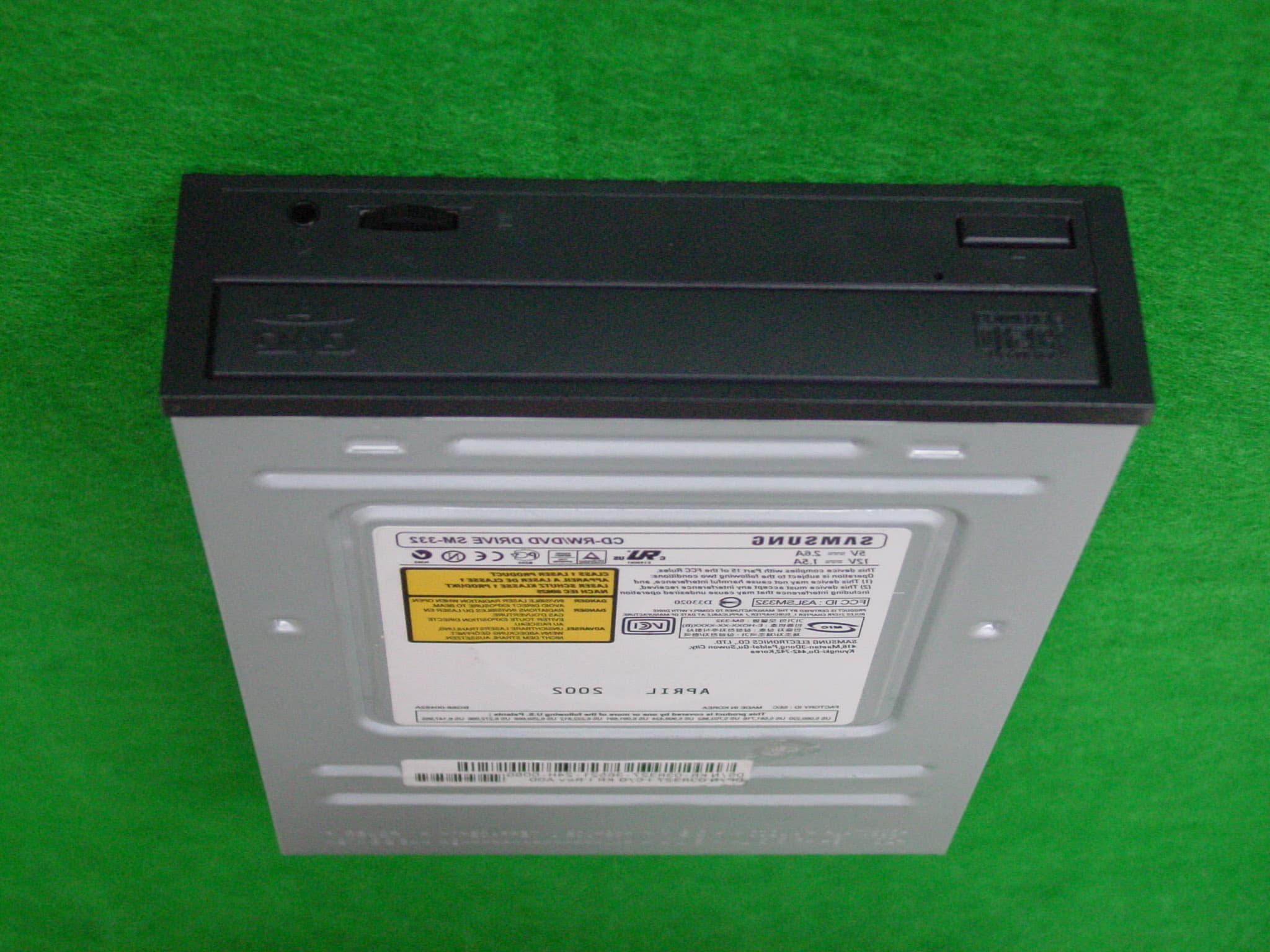
Click to zoom
Application Details
- Equipment Class
- JBP - Part 15 Class B Computing Device Peripheral
- Date of Grant
- May 08, 2002
- Application Purpose
- Original Equipment
- Date of Application
- May 07, 2002
- Equipment Note
- Internal CD-RW
- Company
- Samsung Electronics Co Ltd
- Country
- United States
Documents & Files
Document Text
Text extracted from the exhibit documents filed with the FCC. Open a document above to read the original.
Users Manual
COMBO DRIVESM-332 User's Guide FCC Compliance This equipment has been tested and found to comply with the limits for a Class Bdigital device, pursuant to Part 15 of the FCC rules.These limits are designed to provide reasonable protection against harmfulinterference in a residential installation.This equipment generates, uses, and can radiate radio frequency energy and,if not installed and used in accordance with the instructions, may cause harmfulinterference to radio communications. However, there is no guarantee thatinterference will not occur in a particular installation.If this equipment does cause harmful interference to radio or television reception,which can be deter-mined by turning the equipment off and on, the user isencouraged to try to correct the interference by one or more of the followingmeasures: Re-orient or relocate the receiving antenna.Increase the separation between the equipment and receiver.Connect the equipment into an outlet on a circuit different from that to whichthe receiver is connected.Consult the dealer or an experienced radio/TV technician for help. Contents 2 Safety Precautions 3 ENGLISH The following diagrams illustrate the precautions to be taken when usingyour COMBO drive. ✱ Changes or modifications not expressly approved by the party responsible forcompliance could void the user’s authority to operate the equipment. You must not use the drive in any manner other than that specified in this guide. Avoid exposing your eyes or skin to direct or scattered radiation. CAUTION Do not attempt to repair the COMBO drive yourself.Contact your dealer or local SAMSUNG representative for all repairs.If you make any adjustments or perform any operations other than thosespecified in this guide, you run the risk of exposure to hazardous radiation. WARRANTY Please refer to the Samsung limited warranty statements. PRECAUTIONS 1. To reduce the risk of fire or electric shock, do not expose this appliance to rain or moisture. 2. Always check each disc for cracks before using it. If there are cracks on the surfaces, especially around the border of the centerhole, we recommend that you make a copy of the disc immediatelyand then stop using it. If you continue using the disc, it will probablydevelop more cracks and eventually cause irreparable damage. 3. Do not use poor quality discs: From unknown sourcesWithout any copyrightScratched or damaged in any way Safety Precautions 3 Your COMBO Drive 4 Upgrading the Firmware Flash Memory 5 System Requirements 5 Installing the COMBO Drive 6 Connecting the Cables 6 Installing the CD Record Utility 9 Installing the Device Driver 9 Setting Up the Device Driver 10 Recommended Disc Types 10 Using the COMBO Drive 11 Storing and Cleaning Your Discs 11 Solving Recording Problems 12 Caution with errors 14 Term Description 15 Recommended Disc Type 15 General DMA Installation Guide 15 Solving Technical Problems 16 Technical Specifications 18 * All product names mentioned in this document are trademarks or registered trademarks of their respective owners. ENGLISH 5 Upgrading the Firmware Flash Memory Your COMBO Drive 4 1. Connector for stereo headphones with a 3.6 mm stereo mini-jack2. Headphone volume control3. Disc compartment (the compartment opens and closes automatically when you press the Eject button) 4. Emergency eject hole (if the compartment does not open when you press the Eject button, power off the computer, insert a pin orunfolded paper clip in the hole and push firmly) 5. Indicator light6. Eject button The product firmware can be upgraded by downloading the updated file from thefollowing Web site: http:// www.samsungodd.com www.samsungelectronics.com System Requirements Before you install the COMBO drive, we strongly recommend that you check thatyour setup meets the system requirements listed below.Item Description Computer Intel Pentium II 300MHz/Celeron 333A(or higher), 32 MB of RAM (or higher) with an IDE interface Free expansion unit 5.25 inch Disk space 700 MB minimum Windows version Windows 95/98/2000/ME/XP/NT4.0 OSR2 (or higher) (For Windows NT, we recommend Service Pack2,and Version is over 4.00.1381) MS-DOS 5.0 or higher (For MS-DOS, The CD-R/CD-RW drivercan only read a disc without premaster Software.) DVD Video playback PC with Windows 95/98/2000/ME/XP/NT4.0 OSR2 DVD-Video playback software and appropriatehardware (the Power DVD MPEG software isincluded in the COMBO drive package) 1. Two-pin digital audio output terminal for use with a sound or MPEG card supporting digital audio features 2. Four-pin sound output terminal for use with a sound card (refer to the sound card documentation for further details) 3. Master/slave select terminal4. 40pin host E-IDE interface connector5. 4pin power terminal 12 3 456 1 23 4 5 DVD Region Protection Coding (RPC): The RPC feature is supported on DVD players and is used with DVD-video discs(such as movies). Currently, the motion picture industry has divided the world intodifferent regions or zones that correspond to the regional markets into which themotion picture industry releases movies. Simply put, RPC codes are placed on moviesmarketed throughout the world, based on the region of the world in which they arebeing sold. These RPC codes help control and prevent pirating of new movies intoother motion picture regions prior to their true release dates within those markets.The SM-332 COMBO drive supports RPC phase II. In the RPC-2 mode, the localcode can be changed by users.RPC-2 is selected by default for the SM-332 COMBO drive.You can change the region code up to five times via an MPEG application.Please contact your dealer or local SAMSUNG representative if you wish to changethe local code more than five times. ENGLISH 7 6 Installing the COMBO DriveConnecting the Cables To install your COMBO drive in the PC, proceed as follows.1 Make sure that the PC is powered off and disconnected from any power source. 1 Connecting the power cableThe 4-pin power cable from the internal power unit o…
Text truncated - open the document above for the full version.
Test Report
Page 1 of 12 Project NO. : E2-02-0077 Project NO. : E2-02-0077 Product :CD-R/RW DVD Drive Model No. : SM-332 (VER:B) Date of test : April 24, 2002 - April 29, 2002 Issued Date : May 02, 2002 Tested by: Choon Kil, Kim / Test Engineer Reviewed by: Yang Soo, KIM / Technical Manager Authorised by: Yang Soo. KIM / Quality Manager SAMSUNG ELECTRONICS Co., Ltd. Suwon EMC Test Laboratory 416 Maetan-3 Dong, Paldal-Ku, Suwon City, Kyungki-Do, Korea,442-742 Tel. : 81-31-200-2185 Fax. : 81-31-200-2189 This report shall not be reproduced except in full, without the written approval of SEC EMC Testing laboratory. EMC TEST REPORT According to FCC Part 15B Class B Page 2 of 12 Project NO. : E2-02-0077 Table of Contents 1. General Information 1.1 Product Description 1.2 System Block Diagram of Test Configuration 2. System Test Configuration 2.1 Configuration of Radiated and Conducted Interference Measurement 2.2 Operation Enviroment 2.3 Justification 2.4 EUT Exercise Soft ware 2.5 Test Procedure 3. Conducted Emission Test Data 4. Radiated Emission Test Data 5. Test Equipment Used This report shall not be reproduced except in full, without the written approval of SEC EMC Testing laboratory. Page 3 of 12 Project NO. : E2-02-0077 1. General Information APPLICANT :SAMSUNG ELECTRONICS CO., LTD. ADDRESS :416 Maetan 3 Dong, Paldal-Ku, Suwon City, Kyungki Do, Korea, 442-742 CONTACT ADDRESS :416 Maetan 3 Dong, Paldal-Ku, Suwon City, Kyungki Do, Korea, 442-742 CONTACT PERSON :Ki Ho,Kim REGULATION(S) :FCC Part 15B Class B MODEL NUMBER: SM-332 (VER:B) SERIAL NUMBER :- KIND OF PRODUCT :CD-R/RW DVD Drive TESTED DATE :April 24, 2002 - April 29, 2002 TEST SITE :SAMSUNG EMC TEST LAB. FCC Registration Number : 98856 Anechoic Chamber NO 1 This report shall not be reproduced except in full, without the written approval of SEC EMC Testing laboratory. Page 4 of 12 Project NO. : E2-02-0077 1.1 Product Description Speed CDR: 10X, DVD : 32X Access Time CD-RW(110ms), DVD(110/130ms) Buffer 8MB Interface ATAPI BUS(E-IDE) Size 1.2 System Block Diagram of Test Configuration This report shall not be reproduced except in full, without the written approval of SEC EMC Testing laboratory. 148.2(W) * 42(H) * 184(D) mm G G B C E A D 110V 110V110V 110V 110V 110V110V 110V 220V 220V220V 220V 1 11 1 2 22 2 3 33 3 4 44 4 5 55 5 6 66 6 7 77 7 8 88 8 F Page 5 of 12 Project NO. : E2-02-0077 2.5.2 Configuration of EUT and peripherals MarkItemModel No.Serial No.ManufacturerRemark ACD-Rom DriveSM-332 (VER:B)-SamsungEUT BComputerNetvista 1S6841EA623A5618 IBM CMonitorCX151S-AZ N192H4NT319256 Samsung DPrinterDocuprintP8exJC68-30927FXerox EKeyBoardIBM 1S37L25141366363B IBM FEar phone- -SONY GMouseM-S35LZB05162649Logitech 2.5.3 Used Cable Description No.ItemLength[m]Shielded(Y/N) 1AC Power cable1.7N 2USB cable2.0Y 3 Video cable 1.8Y 4Mouse cable2.0N 5Keyboard Cable1.8N 6AC Power cable1.7N 7AC Power cable1.7N 8Centronics cable2.0Y This report shall not be reproduced except in full, without the written approval of SEC EMC Testing laboratory. Remark Page 6 of 12 Project NO. : E2-02-0077 2. System Test Configuration 2.1 Configuration of Radiated and Conducted Interference Measurement Cabling was taken into consideration and test data was taken under worse case conditions. 1)Conduction(Front View) 2)Conduction(Rear View) This report shall not be reproduced except in full, without the written approval of SEC EMC Testing laboratory. Page 7 of 12 Project NO. : E2-02-0077 3) Radiation(Front View) 4) Radiation(Rear View) This report shall not be reproduced except in full, without the written approval of SEC EMC Testing laboratory. Page 8 of 12 Project NO. : E2-02-0077 2.2 Operation Enviroment ConductionRadiation Temperature [centigrade] : 2222.5 Humidity [%] : 3941 Power supply : AC120V/60HzAC120V/60Hz 2.3 Justification The system was configured in typical fashion(as a customer would normally use it) for testing. 2.4 EUT Exercise Soft ware The EUT exercise program used during radiated and conducted testing was designed to exercise the various system components in a manner similar to typical use. 2.5 Test Procedure 2.5.1 Conducted Emissions Eut was placed on a platform of nominal size, 1m by 1.5m, raised 80cm above the conducting ground plane. The rear of tabletop was located 40cm to the vertical conducting ground plane. The rear of EUT,including peripherals was aligned and flush with rear of tabletop. All other surfaces of tabletop was at least 80cm from any other grounded conducting surface. I/O cables and AC cables that were connected to the peripherals were bundled in center. They were folded back and forth forming a bundle 30cm to 40cm long and were hanged at a 40cm height to the ground plane. Each EUT current-carrying power lead,except the ground(safety) lead, were individually connected through a LISN to the input power source. This report shall not be reproduced except in full, without the written approval of SEC EMC Testing laboratory. Page 9 of 12 Project NO. : E2-02-0077 All unused 50 ohm connectors of the LISN were resistively terminated in 50 ohm when not connected to the measuring equipment. 2.5.2 Radiated Emissions Eut was placed on a platform of nominal size, 1m by 1.5m, raised 80cm above the conducting ground plane. The rear of EUT,including peripherals was aligned and flush with rear of tabletop. I/O cables that were connected to the peripherals were bundle in center. They were folded back and forth forming a bundle 30cm to 40cm long and were hanged 40cm height to the ground plane. Test was made with the antenna positioned in both the horizontal and vertical planes of polarization. The measurement antenna was varied in height above the conducting ground plane to obtain the maximum signal strength. This report shall not be reproduced except in full, without the written approval of SEC EMC Testing laboratory. Page 10 of 12 Project NO. : E2-02-0077 3. Conducted Emission Test Data The initial step in collecting conducted data was to perform a quasi-peak…
Text truncated - open the document above for the full version.
Test Setup Photos
Page 6 of 12 Project NO. : E2-02-0077 2. System Test Configuration 2.1 Configuration of Radiated and Conducted Interference Measurement Cabling was taken into consideration and test data was taken under worse case conditions. 1)Conduction(Front View) 2)Conduction(Rear View) This report shall not be reproduced except in full, without the written approval of SEC EMC Testing laboratory. Page 7 of 12 Project NO. : E2-02-0077 3) Radiation(Front View) 4) Radiation(Rear View) This report shall not be reproduced except in full, without the written approval of SEC EMC Testing laboratory.
Contact Information
Applicant
Jenni Chun(General Manager)
Technical Contact
PCTEST Engineering Lab., Inc.Randy Ortanez
[email protected]410-290-6652
6660-B Dobbin Road · Columbia, Maryland · United States
Test Firm
Samsung Electronics Co., Ltd.T. Shin
Technical Specifications
| # | Rule Parts | Frequency Range | Power Output |
|---|---|---|---|
| 1 | 15B | - | - |
Other Applications from Samsung Electronics Co Ltd
A3LSMS741B
Aug 05, 2026Portable Handset
Equipment Class
6VL - 15E 6 GHZ Very Low Power DeviceA3LSMX940
Jul 31, 2026BT,BLE Tablet DTS,UNII a,b,g,n,ac,ax,be and digitizer
Equipment Class
DTS - Digital Transmission SystemA3LSMS741U
Jul 30, 2026Portable Handset
Equipment Class
6CD - 15E 6 GHz Low Power Dual ClientA3LSMX840
Jul 27, 2026BT,BLE Tablet DTS,UNII a,b,g,n,ac,ax and Digitizer
Equipment Class
DSS - Part 15 Spread Spectrum TransmitterA3LSMX848U
Jul 27, 2026WCDMA, LTE, 5G NR Tablet BT,BLE, DTS,UNII a b g n ac ax and Digitizer
Equipment Class
JBP - Part 15 Class B Computing Device Peripheral