A3LSMA346MMobile phone
Samsung Electronics Co Ltd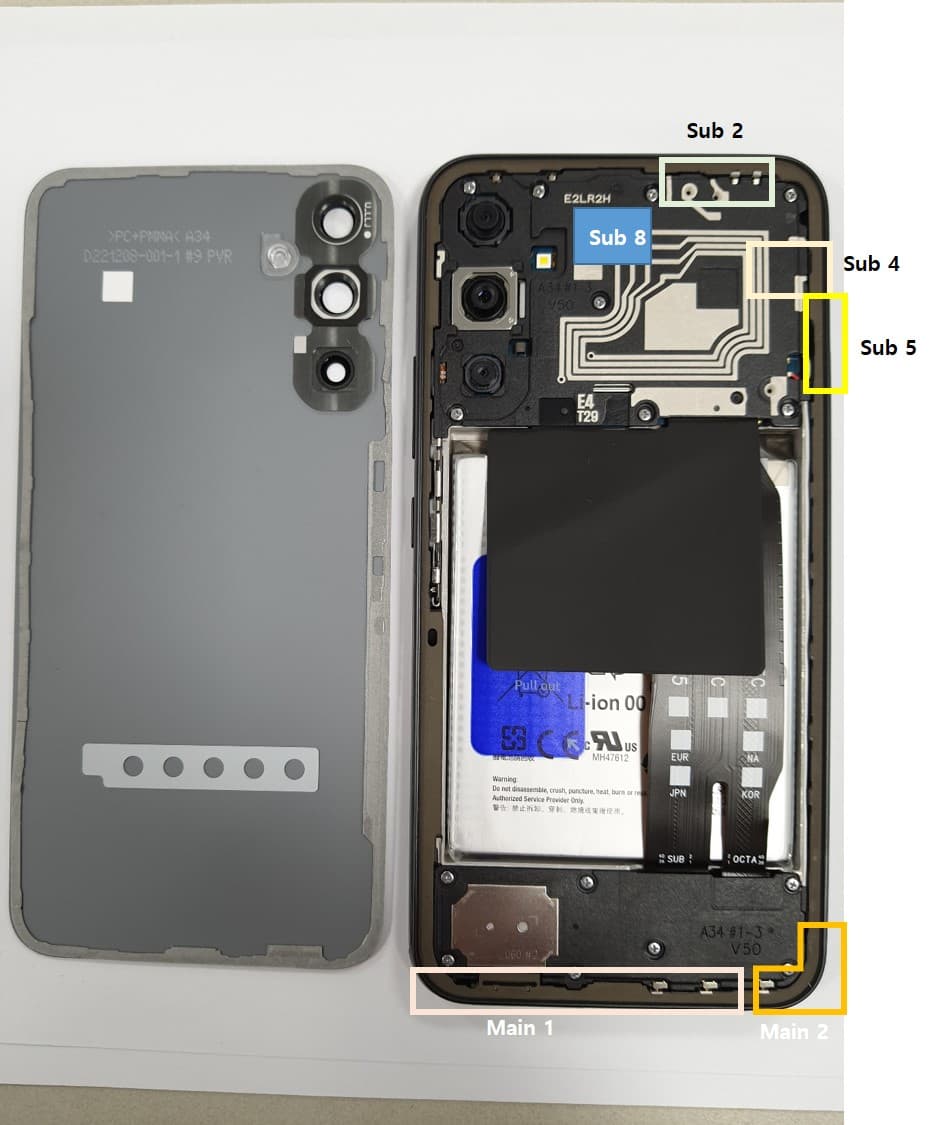
Click to zoom
Application Details
- Equipment Class
- PCE - PCS Licensed Transmitter held to ear
- Date of Grant
- Jan 18, 2023
- Application Purpose
- Original Equipment
- Date of Application
- Jan 17, 2023
- Equipment Note
- Mobile phone
- Frequency Range
- 1712.50000000 - 1777.50000000
- Company
- Samsung Electronics Co Ltd
- Country
- United States
Documents & Files
Document Text
Text extracted from the exhibit documents filed with the FCC. Open a document above to read the original.
Users Manual
www.samsung.com USER MANUAL SM-A346B/DSN SM-A346M/DSN SM-A346M/N English. 12/2022. Draft 2 Table of Contents Getting started 4 Device layout and functions 7 Charging the battery 10 SIM or USIM card (nano-SIM card) 12 Memory card (microSD card) 14 Turning the device on and off 15 Initial setup 15 Samsung account 16 Tr ansferring data from your previous device (Smart Switch) 19 Understanding the screen 27 Notification panel 29 Entering text Apps and features 31 Installing or uninstalling apps 32 Phone 35 Contacts 37 Messages 38 Internet 39 Camera 49 Gallery 53 Multi window 56 Samsung Health 57 Samsung Notes 57 Samsung Members 58 Samsung Kids 58 Samsung Global Goals 59 Samsung TV Plus 59 Galaxy Shop 59 Galaxy Wearable 60 Calendar 61 Reminder 62 Voice Recorder 62 My Files 62 Clock 62 Calculator 63 Game Launcher 64 Game Booster 65 SmartThings 65 Sharing content 66 Music Share 68 Google apps Settings 69 Introduction 69 Samsung account 69 Connections 71 Wi-Fi 72 Bluetooth 73 NFC and contactless payments (NFC-enabled models) 74 Data saver 75 Mobile data only apps 75 Mobile Hotspot 76 More connection settings Table of Contents 3 100 Apps 100 General management 101 Accessibility 102 Software update 102 Remote support 103 About phone Usage notices 104 Precautions for using the device 106 Notes on package contents and accessories 107 Device overheating situations and solutions Appendix 110 Troubleshooting 115 Removing the battery 77 Sounds and vibration 77 Sound quality and effects 78 Separate app sound 78 Notifications 79 Display 80 Wallpaper and style 80 Themes 80 Home screen 80 Lock screen 81 Smart Lock 82 Biometrics and security 83 Face recognition 85 Fingerprint recognition 87 Secure Folder 90 Secure Wi-Fi 91 Privacy 91 Location 92 Safety and emergency 92 Accounts and backup 93 Samsung Cloud 94 Google 94 Advanced features 95 Motions and gestures 96 Dual Messenger 97 Digital Wellbeing and parental controls 97 Battery and device care 97 Optimising your device 98 Battery 98 Storage 99 Memory 99 Device protection 99 Software update 99 Diagnostics 99 Ultra data saving 4 Getting started Device layout and functions Speaker Side key (Fingerprint recognition sensor) Volume key Touchscreen Front camera Proximity/Light sensor Multipurpose jack (USB Type-C) Earphone jack SIM card / Memory card tray Getting started 5 Rear camera Flash Microphone Main antenna Speaker Microphone NFC antenna (NFC-enabled models) GPS antenna • When using the speakers, such as when playing media files or using speakerphone, do not place the device close to your ears. • Be careful not to expose the camera lens to a strong light source, such as direct sunlight. If the camera lens is exposed to a strong light source, such as direct sunlight, the camera image sensor may be damaged. A damaged image sensor is irreparable and will cause dots or spots in pictures. • If you use the device with its glass or acrylic body broken, there may be a risk of injury. Use the device only after it has been repaired at a Samsung Service Centre. • If dust or foreign materials enter the microphone, speaker, or receiver, the device’s sound may become quiet or certain features may not work. If you attempt to remove the dust or foreign materials with a sharp object, the device may be damaged and its appearance may be affected. Getting started 6 • Connectivity problems and battery drain may occur in the following situations: – If you attach metallic stickers on the antenna area of the device – If you attach a device cover made with metallic material to the device – If you cover the device’s antenna area with your hands or other objects while using certain features, such as calls or the mobile data connection • Do not cover the proximity/light sensor area with accessories, such as stickers or a cover. Doing so may cause the sensor to malfunction. • Do not allow water to contact the touchscreen. The touchscreen may malfunction in humid conditions or when exposed to water. Hard keys KeyFunction Side key • Press and hold to turn the device on or off. • Press to turn on or lock the screen. • Press twice to launch the app or feature you set. Side key + Volume Down key • Press simultaneously to capture a screenshot. • Press and hold simultaneously to turn off the device. Setting the Side key Select an app or feature to launch by pressing the Side key twice. Launch the Settings app, tap Advanced features → Side key, and then select an option you want. Getting started 7 Soft buttons Back button Home button Recents button When you turn on the screen, the soft buttons will appear at the bottom of the screen. Refer to Navigation bar (soft buttons) for more information. Charging the battery Charge the battery before using it for the first time or when it has been unused for extended periods. Wired charging Connect the USB cable to the USB power adaptor and plug the cable into the device’s multipurpose jack to charge the battery. After fully charging, disconnect the charger from the device. Getting started 8 Quick charging Launch the Settings app, tap Battery and device care → Battery → More battery settings, and then activate the feature you want. • Fast charging: To use the fast charging feature, use a battery charger that supports Adaptive fast charging. You can charge the battery more quickly while the device or its screen is turned off. Charging other devices Use the USB cable to charge another mobile device with your device’s battery. Connect your device and the other device using your device’s USB cable. A USB connector may be needed depending on the other device. When charging starts, the battery charging icon will appear on the other device’s screen. The app selection pop-up window that appears on your device is for data transfer. Do not select an app from the pop-up window. Reducing the battery consumption Your device provides various options that help you conserve battery power. • Optimise the device using the device care feature. • When you are not using the…
Text truncated - open the document above for the full version.
Users Manual
User manual A3LSMA346M Important safety precautions Failure to comply with the following precautions may be dangerous or illegal. Copyright information ● Bluetooth? is a registered trademark of the Bluetooth SIG, Inc. worldwide. ● JavaTM is a trademark or registered trademark of Sun Microsystems, Inc. ● Picsel and Picsel ViewerTM are trademarks of Picsel Technologies, Inc. Drive safely at all times Do not use a hand-held phone while driving. Park your vehicle first. Switch off the phone when refuelling Do not use the phone at a refuelling point (service station) or near fuels or chemicals. Switch off in an aircraft Wireless phones can cause interference. Using them in an aircraft is both illegal and dangerous. Switch off the phone near all medical equipment Hospitals or health care facilities may be using equipment that could be sensitive to external radio frequency energy. Follow any regulations or rules in force. Interference All wireless phones may be subject to interference, which could affect their performance. Be aware of special regulations Meet any special regulations in force in any area and always switch off your phone whenever it is forbidden to use it, or when it may cause interference or danger. Water resistance Your phone is not water-resistant. Keep it dry. Sensible use Use only in the normal position (held to your ear). Avoid unnecessary contact with the antenna when the phone is switched on. Emergency calls Key in the emergency number for your present location, then press [ ]. Keep your phone away from small children Keep the phone and all its parts, including accessories, out of the reach of small children. Accessories and batteries Use only Samsung-approved batteries and accessories, such as headsets and PC data cables. Use of any unauthorised accessories could damage you or your phone and may be dangerous. Qualified service Only qualified service personnel may repair your phone. For more detailed safety information, see ¡°Health and safety information¡± on page 20. • The phone could explode if the battery is replaced with an incorrect type. • Dispose of used batteries according to the manufacturer’s instructions. Unpack Make sure you have each item • Phone • Adapter • Stereo headset • Battery • Battery travel holder • User’s manual Suitable Adapter or Charger, certified according to the relevant safety standard, will be provided for each country in use. You can obtain the following accessories for your phone from your local Samsung dealer. • Multi adapter • Travel charger • Car charger • PC data cable • Portable battery kit • Portable PC data cable • Music controller • Bluetooth mono/ stereo headset kit Get started First steps to operate your phone Install and charge the phone 1. Install the battery: To remove the battery, slide the battery catch toward the top of the phone and hold it. 2. Plug the adapter into the phone. 3. Plug the adapter into a standard AC wall outlet. 4. When the phone is completely charged (the battery icon stops blinking), unplug the adapter from the power outlet. 5. Remove the adapter from the phone. Low battery indicator When the battery is low: • a warning tone sounds, • the battery low message displays, and • the empty battery icon [ ] blinks. If the battery level becomes too low, the phone automatically turns off. Recharge your battery. Keys and display Buttons Function Power • Press and hold to turn the device on or off. • Press and hold for more than 7 seconds to reset the device if it has fatal errors or hang-ups, or freezes. • Press to lock or unlock the device. The device goes into lock mode when the touch screen turns off. Menu • Tap to open a list of options available for the current screen. • Tap and hold on the Home screen to launch Google application. Home • Press to return to the Home screen. • Press twice to launch S Voice application. • Press and hold to open the list of recent applications. Back • Tap to return to the previous screen. Volume • Press to adjust the device volume. Overview of menu functions To access Menu mode, press [환경설정] in ldle mode. T service ChatON Maps Call log Samsung Link Local Phone Group Play Navigation Contacts S Health Downloads Messaging S Voice Optical Reader Samsung Hub S Memo Messenger Samsung Apps S Translator Play Books WatchON Email Play Movies & TV Camera Shopping & wallet T nao Gallery T cloud App Guide Story Album hoppin T Membership DMB MelOn Remote Care T store Chrome T world T LTE Pack Gmail 11st Music Google SmartWallet Video Voice Search NATE Internet YouTube Calculator Clock Talk Voice Recorder S Planner Google+ Dictionary Settings Play Store My Files B tv mobile Pickat Basket Cyworld SmartTouch Cymera NateOnUC Dropbox Samsung service V3 Mobile 2.0 Help Google Settings Solve problems Help and personal needs To save the time and expense of an unnecessary service call, perform the simple checks in this section before contacting a service professional. When you switch on your phone, the following messages may appear: “Insert USIM card” • Be sure that the USIM card is correctly installed. “Phone locked Enter password” • The automatic locking function has been enabled. You must enter the phone¡ ̄s password before you can use the phone. “Enter PIN1” • You are using your phone for the first time. You must enter the PIN1 supplied with the USIM card. • The PIN1 Check feature is enabled. Every time the phone is switched on, the PIN1 has to be entered. To disable this feature, use the PIN check menu. “Enter PUK” • The PIN1 code has been entered incorrectly three times in succession, and the phone is now blocked. Enter the PUK1 supplied by your service provider. “No Service” “Network Failure,” or “Not Done” displays • The network connection has been lost. You may be in a weak signal area. Move and try again. • You are trying to access an option for which you have no subscription with your service provider. Contact the service provider for further details. You have entered a number but it was not…
Text truncated - open the document above for the full version.
Cover Letter(s)
Samsung Electronics Co., Ltd. 129, Samsung-ro, Yeontong-gu, Suwon-si, Gyeonggi-do, 16677, Korea MPR Attestation letter for LTE - FCC ID : A3LSMA346M - Model : SM-A346M/DSN, SM-A346M/N To Whom it May Concern We attest the following regarding FCC ID A3LSMA346M. 1. MPR is permanently implemented for all channel BWs, modulations, frequency bands and RB sizes. 2. A-MPR was disabled for all SAR test samples for SAR testing purposes only. 3. We confirm the specific MPR targets and tolerances shown in the SAR Report. All deviations in the power measurements from the specific MPR targets shown in the SAR Report are expected and within factory tolerances. 4. LTE Release 15 implementation is limited. The uplink does not support enhanced SC-FDMA. Features such as CoMP, HetNet, Relay, SON, cross carrier scheduling, eICIC, enhanced downlink MIMO, MBMS, M2M/D2 are also not supported. SVLTE is not supported as described in the operational description. 5. This device complies with FCC Part 27.75(a)(1) requirements: Mobile and portable stations that operate on any portion of frequencies in the paired 1755-1780 MHz and 2155-2180 MHz band must be capable of operating on all frequencies in the paired 1710-1780 MHz and 2110-2180 MHz band, using the same air interfaces that the equipment utilizes on any frequencies in the paired 1710-1780 MHz and 2110-2180 MHz band. Should you have any questions or comments concerning the above, please contact the undersigned. Sincerely, Ms. Jenni Chun General Manager Samsung Electronics America, Inc. TEL: +1-973-808-6375 E-mail: [email protected]
Cover Letter(s)
Samsung Electronics Co., Ltd. 129, Samsung-ro, Yeontong-gu, Suwon-si, Gyeonggi-do, 16677, Korea MPR Attestation letter for UMTS - FCC ID : A3LSMA346M - Model : SM-A346M/DSN, SM-A346M/N To Whom it May Concern We attest the following regarding FCC ID A3LSMA346M. 1. MPR is permanently implemented for HSDPA, HSUPA, and DC-HSDPA mode. 2. It is expected by the manufacturer that MPR for some HSPA subtests may be up to 2dB more than specified by 3GPP, but also as low as 0dB according to the chipset implementation in this model. 3. We confirm the specific MPR targets and tolerances shown in the SAR Report. Should you have any questions or comments concerning the above, please contact the undersigned. Sincerely, Ms. Jenni Chun General Manager Samsung Electronics America, Inc. TEL: +1-973-808-6375 E-mail: [email protected]
Cover Letter(s)
Federal Communications Commission 7435 Oakland Mills Road Columbia, MD 21046 E-label Attestation Letter - FCC ID : A3LSMA346M - Model : SM-A346M/DSN, SM-A346M/N To Whom It May Concern We hereby provide the following attestations according to CFR 2.935 and FCC KDB 784748 D02: At the time of purchase, the FCC ID is readily and physically visible to the purchaser on the exterior package per CFR 2.935(f). The FCC ID will be readily legible without the aid of magnification according to CFR 2.935(d). The literature in the package describes how to access the electronic display to find FCC ID per CFR 2.935(b) and FCC KDB 784748. Per CFR 2.935(c), the user will be able to access this information within a maximum of 3 steps. The user will be able to access this information without a SIM card, special accessories or supplemental plug-ins. Per CFR 2.935(e), We, Samsung Electronics Co., Ltd., have programmed the e-label and it is not able to be modified by any third party. Per CFR 2.935(f), the FCC ID will be able to survive normal shipping and handling so it is visible for inspection at the time of import. Should you have any questions or comments concerning the above, please contact the undersigned. Sincerely, Ms. Jenni Chun General Manager Regulatory & Environmental Affairs Samsung Electronics Co., Ltd. TEL : +1-973-808-6375 E-mail : [email protected]
Cover Letter(s)
Samsung Electronics Co., LTD. 129, Samsu ng -ro , Yeongtong-gu Suwon-City, Gyeonggi-do, 16677, Korea Date: December 23, 2022 Federal Communications Commission 7435 Oakland Mills Road Columbia MD 210 46 c.c. UL Verification Services Certification Division 4717 3 Beni cia Street Fremont, CA 94538, USA To whom it may concern: I, the undersigned, hereby authorize Ms. Chloe Lee/ Deputy General Manager of Eurofins KCTL Co.,Ltd.. and hereafter referred to as Eurofins KCTL to act o n our behalf in all manners relating to application for equipment authorization, including signing of a ll documents relating to these ma tters. Any and all acts carried out by Ms. Chloe Lee/ Manager of Eurofins KCTL Co.,Ltd. on our behalf shall have the same effect as acts of our own. I, the undersigned, hereby certify that we are not subject to a denial o f federal benefits, that includes FCC benefits, pursuant to Section 5301 of the Anti-Drug Abuse Act of 19 88, 21 U.S.C. 853(a). In authorizing Eurofins KCTL as our agent, we still recognize that we are responsible to: a) comply with the relevant provisions of the certification program; b) make all necessary arrangements for the conduct of the evaluation, including provision for examining documentation and access to all areas, records (including internal audit reports) and personnel for the purposes of evaluation (e.g. testing, inspection, assessment, surveillance, reassessment) and resolution of complaints; c) make claims regarding certification only in respect of the scope for which certification has been granted; d) do not use our product certification in such a manner as to bring the Certification Division into disrepute and not make any statement regarding our product certification which the Certification Division may consider misleading or unauthorized; e)upon suspension or cancellation of certification, discontinue use of all advertising m atter that contains any reference thereto and return any certification docume nts as required by the Certific ation Division; f) use certification only to indicate the products are certified as being in conformity with specified sta ndards; g) endeavor to ensure that no certificate or report nor any part thereof is used in a m isleading m anner; h)ensure that any reference to our product certification in communication medi a such as docum ents, brochures or advertising, complies with the requirements of the Certification Division ; i)k eep a record of all complaints made known to the us relating to the pro duct’s c ompliance with requirements of the relevant standard and to make these records available to the Certification Division when requ ested; j)tak e appropriate action with respect to such complaints and any deficiencie s fou nd in products or services that affect compliance with the requirements for certific ation; k)docum e nt the actions taken. Thi s authorization is valid until further written notice from the applicant. Sincerely Yours, Jenni Chun, General Manager Regulatory & Environmental Affairs Samsung Electronics America, Inc
Cover Letter(s)
Samsung Electronics Co., LTD. 129, Samsung -ro , Yeongtong-gu Suwon-City, Gyeonggi-do, 16677, Korea CONFIDENTIALITY REQUEST Federal Communication Commission Equipment Authorization Division, Application Processing Branch 7435 Oakland Mills Road Columbia, MD 21048 December 23, 2022 TO WHOM IT MAY CONCERN Pursuant to Paragraphs §0.457 and 0.459 of the Commission’s Rules (47 C.F.R.) and Section §552(b)(4) of the Freedom of Information Act, Samsung Electronics Co., Ltd. requests confidentiality for the following products: FCC ID Number A3LSMA346M Product Title/Model Mobile phone / SM-A346M/DSN, SM-A346M/N The following exhibits contain trade secrets and proprietary information that could be of benefit to our competitors regarding the design of our product. This material is not customarily available to the general public and we request that it be withheld from public inspection. We request that the following information submitted be held permanent confidential treatment. Permanent Confidential Request -. Schematics -. Block Diagram -. Operational Description -. Parts list -. Tune-up procedure -. U-NII Device SW Security Statement We also hereby request Short-Term Confidentiality for 180 days after the grant as outlined in Public Notice DA 04-1705. This provision will give temporary confidentiality of commercially sensitive information prior to product release. Short-Term Confidential Request -. External Photos -. Internal Photos -. Test set-up photo -. User Manual If you have any questions, please feel free to contact me at the address shown below. Sincerely, Jenni Chun / General manager
External Photos
This document shall not be reproduced, except in full, without the written approval External photos of EUT This document shall not be reproduced, except in full, without the written approval This document shall not be reproduced, except in full, without the written approval This document shall not be reproduced, except in full, without the written approval
ID Label/Location Info
Description of E-Label and Location FCC ID : A3LSMA346M Model : SM-A346M/DSN, SM-A346M/N This model is applied E-label, please find description of E-label below. 1. FCC ID (E-label): Settings > About Phone > Status information FCC certification FCC ID: A3LSMA346M <Device Display Screen> 2.Insturction of E-label on the User manual (online manual)
Internal Photos
This document shall not be reproduced, except in full, without the written approval Internal photos of EUT This document shall not be reproduced, except in full, without the written approval This document shall not be reproduced, except in full, without the written approval This document shall not be reproduced, except in full, without the written approval This document shall not be reproduced, except in full, without the written approval This document shall not be reproduced, except in full, without the written approval This document shall not be reproduced, except in full, without the written approval
RF Exposure Info
verify No.559849775746 Eurofins KCTL Co.,Ltd. 65, Sinwon-ro, Yeongtong-gu, Suwon-si, Gyeonggi-do, 16677, Korea TEL: 82-31-285-0894 FAX: 82-505-299-8311 www.kctl.co.kr Report No.: KR23-SPF0001-A Page (2) of (488) This test report shall not be reproduced, except in full, without the written approval KCTL-TIA002-004/6(220705) KP22-05964 REPORT REVISION HISTORY Date Revision Page No 2023-01-06 Originally issued - 2023-01-12 Revised the title 88 Conducted output power updated -LTE Band 2, LTE Band 66, 5G NR n66 information overall Note: The Report No. KR23-SPF0001 is superseded by the report No. KR23-SPF0001-A. This report shall not be reproduced except in full, without the written approval of Eurofins KCTL Co.,Ltd. This document may be altered or revised by Eurofins KCTL Co.,Ltd. personnel only, and shall be noted in the revision section of the document. Any alteration of this document not carried out by Eurofins KCTL Co.,Ltd. will constitute fraud and shall nullify the document. This test report is a general report that does not use the KOLAS accreditation mark and is not related to KS Q ISO/IEC 17025 and KOLAS accreditation. General remarks for test reports Statement concerning the uncertainty of the measurement systems used for the tests (may be required by the product standard or client) Internal procedure used for type testing through which traceability of the measuring uncertainty has been established: Procedure number, issue date and title: Calculations leading to the reported values are on file with the testing laboratory that conducted the testing. Statement not required by the standard or client used for type testing 1. Identification when information is provided by the customer: Information marked " # " is provided by the customer. - Disclaimer: This information is provided by the customer and can affect the validity of results. Eurofins KCTL Co.,Ltd. 65, Sinwon-ro, Yeongtong-gu, Suwon-si, Gyeonggi-do, 16677, Korea TEL: 82-31-285-0894 FAX: 82-505-299-8311 www.kctl.co.kr Report No.: KR23-SPF0001-A Page (3) of (488) This test report shall not be reproduced, except in full, without the written approval KCTL-TIA002-004/6(220705) KP22-05964 CONTENTS 1. General information .................................................................................................................................. 4 2. Device information .................................................................................................................................... 5 3. #LTE Information .................................................................................................................................... 19 4. #5G NR Information ............................................................................................................................ 21 5. Specific Absorption Rate ..................................................................................................................... 22 6. SAR Measurement Procedures ........................................................................................................ 23 7. SAR Measurement Configurations .................................................................................................. 24 8. RF Exposure Limits ............................................................................................................................... 28 9. SAR General Measurement Procedures ...................................................................................... 29 10. RF Average Conducted Output Power........................................................................................... 36 11. System Verification .............................................................................................................................. 119 12. SAR Test Results ................................................................................................................................. 124 13. Simultaneous Transmission ............................................................................................................. 159 14. SAR Measurement Variability .......................................................................................................... 180 15. Measurement Uncertainty ................................................................................................................. 181 16. Test Equipment Information ............................................................................................................. 182 17. Test System Verification Results .................................................................................................... 184 18. Test Results ............................................................................................................................................ 212 Appendixes List ................................................................................................................................................ 312 Appendix A. Calibration certificate ......................................................................................................... 313 Appendix B. SAR Tissue Specification ............................................................................................... 455 Appendix C. LTE CA RF Conducted Power .................................................................................... 456 Appendix D. #Antenna Location & Distance .................................................................................... 466 Appendix E. EUT Photo ............................................................................................................................. 470 Appendix F. Test Setup Photo ................................................................................................................ 473 Appendix G. Power Reduction Verification ........................................................................................ 481 End of test report .......…
Text truncated - open the document above for the full version.
RF Exposure Info
Eurofins KCTL Co.,Ltd. 65, Sinwon-ro, Yeongtong-gu, Suwon-si, Gyeonggi-do, 16677, Korea TEL: 82-31-285-0894 FAX: 82-505-299-8311 www.kctl.co.kr Report No.: KR23-SPF0001-A Page (191) of (488) This test report shall not be reproduced, except in full, without the written approval KCTL-TIA002-004/6(220705) KP22-05964 Date: 12/16/2022 Test Laboratory: Eurofins KCTL Co.,Ltd. File Name: 850 MHz Verification Input Power 250 mW 2022-12-16.da52:0 DUT: Dipole 850 MHz D850V2, Type: D850V2, Serial: D850V2 - SN:1006 Communication System: UID 0, CW (0); Frequency: 850 MHz; Duty Cycle: 1:1 Medium parameters used: f = 850 MHz; σ = 0.893 S/m; ε r = 41.316; ρ = 1000 kg/m 3 Phantom section: Flat Section DASY5 Configuration: Probe: EX3DV4 - SN7540;ConvF(9.73, 9.73, 9.73) @ 850 MHz; Calibrated: 4/29/2022 Sensor-Surface: 1.4mm (Mechanical Surface Detection) Electronics: DAE4 Sn666; Calibrated: 1/26/2022 Phantom: Twin-SAM V8.0; Type: QD 000 P41 AA; Serial: 1975 Measurement SW: DASY52, Version 52.10 (4); Configuration/850 MHz Verification Input Power 250 mW 2022-12-16/Area Scan (8x13x1): Measurement grid: dx=15mm, dy=15mm Maximum value of SAR (measured) = 3.00 W/kg Configuration/850 MHz Verification Input Power 250 mW 2022-12-16/Zoom Scan (5x5x7)/Cube 0: Measurement grid: dx=8mm, dy=8mm, dz=5mm Reference Value = 64.52 V/m; Power Drift = -0.01 dB Peak SAR (extrapolated) = 3.92 W/kg SAR(1 g) = 2.59 W/kg; SAR(10 g) = 1.69 W/kg Maximum value of SAR (measured) = 3.48 W/kg 0 dB = 3.48 W/kg = 5.42 dBW/kg Eurofins KCTL Co.,Ltd. 65, Sinwon-ro, Yeongtong-gu, Suwon-si, Gyeonggi-do, 16677, Korea TEL: 82-31-285-0894 FAX: 82-505-299-8311 www.kctl.co.kr Report No.: KR23-SPF0001-A Page (192) of (488) This test report shall not be reproduced, except in full, without the written approval KCTL-TIA002-004/6(220705) KP22-05964 Date: 2022-12-09 Test Laboratory: Eurofins KCTL Co.,Ltd. File Name: 1750 MHz Verification Input Power 250 mW 2022-12-09.da52:0 DUT: Dipole 1750 MHz D1750V2, Type: D1750V2, Serial: D1750V2 - SN:1072 Communication System: UID 0, CW (0); Frequency: 1750 MHz; Duty Cycle: 1:1 Medium parameters used: f = 1750 MHz; σ = 1.385 S/m; ε r = 39.057; ρ = 1000 kg/m 3 Phantom section: Flat Section DASY5 Configuration: Probe: EX3…
Text truncated - open the document above for the full version.
Contact Information
Applicant
Jenni Chun(General Manager)
Technical Contact
Eurofins KCTL Co., Ltd.Chloe Lee
[email protected]82-70-5008-1016
65, Sinwon-ro, Yeongtong-gu · Suwon-si · South Korea
Test Firm
Eurofins KCTL Co., Ltd.Sung-su Lim
Technical Specifications
| # | Rule Parts | Frequency Range | Power Output | Emission | Tolerance |
|---|---|---|---|---|---|
| 45 | 27 | 1.71 GHz - 1.78 GHz | 83.00 mW | 4M51W7D | 2.5 ppm |
Other Applications from Samsung Electronics Co Ltd
A3LSMU600
Sep 15, 2026Bluetooth Headset
Equipment Class
DTS - Digital Transmission SystemA3LSMA185G
Sep 08, 2026Portable Handset
Equipment Class
CXX - Communications Rcvr for use w/ licensed Tx and CBsA3LSMS741B
Aug 05, 2026Portable Handset
Equipment Class
6VL - 15E 6 GHZ Very Low Power DeviceA3LSMX940
Jul 31, 2026BT,BLE Tablet DTS,UNII a,b,g,n,ac,ax,be and digitizer
Equipment Class
DTS - Digital Transmission SystemA3LSMS741U
Jul 30, 2026Portable Handset
Equipment Class
6CD - 15E 6 GHz Low Power Dual Client