A3LSMA725MMobile phone
Samsung Electronics Co Ltd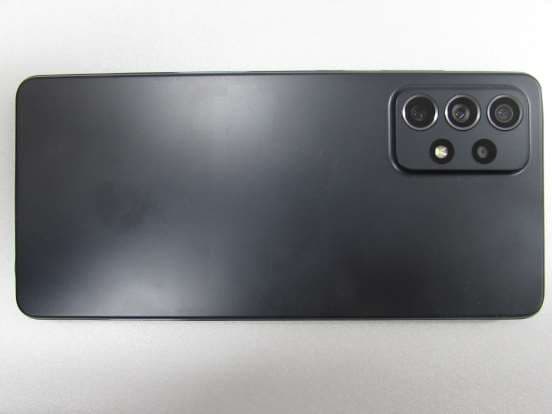
Click to zoom
Application Details
- Equipment Class
- JBP - Part 15 Class B Computing Device Peripheral
- Date of Grant
- Jan 25, 2021
- Application Purpose
- Original Equipment
- Date of Application
- Jan 18, 2021
- Equipment Note
- Mobile phone
- Company
- Samsung Electronics Co Ltd
- Country
- United States
Documents & Files
Document Text
Text extracted from the exhibit documents filed with the FCC. Open a document above to read the original.
Users Manual
www.samsung.com USER MANUAL English (LTN). 02/2021. Rev.1.0 SM-A525M SM-A525M/DS SM-A526B SM-A526B/DS SM-A725M SM-A725M/DS 2 Table of Contents Basics 4 Read me first 7 Device o verheating situations and solutions 10 Device layout and functions 14 Charging the battery 16 SIM or USIM card (nano-SIM card) 18 Memory car d (microSD card) 20 Turning the device on and off 21 Initial setup 21 Samsung acc ount 22 Transf erring data from your previous device (Smart Switch) 24 Understanding the screen 32 Notification panel 33 Screen capture and screen record 35 Entering text Apps and features 37 Installing or uninstalling apps 38 Phone 41 Con tacts 43 Messages 44 Internet 45 Camera 59 Gallery 63 AR Zone 67 Bixby (Galaxy A52) 69 Bixby Vision 70 Bixby Routines 72 Multi window 74 Samsung Pay 76 Samsung Health 77 Samsung Notes 77 Samsung Members 77 Galaxy Shop 78 Galaxy W earable 78 Calendar 79 Reminder 80 Radio 81 Voice R ecorder 82 My Files 82 Clock 82 Calcula tor 83 Game Launcher 84 Game Booster 85 Samsung Kids 85 SmartThings 86 Sharing content 87 Music Share 89 Smart View 89 Link to Windows 90 Samsung Global Goals 91 Google apps Table of Contents 3 119 Privacy 119 Location 119 Google 120 Accounts and backup 120 Samsung Cloud 121 Advanc ed features 122 Motions and gestures 123 Dual Messenger 124 Digital W ellbeing and parental controls 124 Batter y and device care 124 Optimising your device 125 Battery 125 St orage 125 Memor y 126 Device pr otection 126 Apps 126 General managemen t 127 Accessibility 128 Soft ware update 128 About phone Appendix 130 Troubleshooting 136 About Hearing Aid Compatibility (HAC) Settings 92 Introduction 92 Samsung account 92 Connec tions 93 Wi-Fi 95 Bluetooth 96 NFC and contac tless payments 97 Data saver 98 Mobile data only apps 98 Mobile Hotspot 99 More connection settings 100 Sounds and vibration 100 Sound quality and eff ects 101 Separa te app sound 101 Notifications 102 Display 103 Motion smoothness 103 Changing the screen mode or adjusting the display color 104 Wallpaper 104 Themes 104 Home screen 105 Lock screen 105 Smart Lock 106 Alwa ys On Display 107 Biometrics and securit y 108 Face r ecognition 110 Fingerpr int recognition 113 Samsung Pass 115 Secure F older 118 Secure W i-Fi (Galaxy A52) 4 Basics Read me first Please read this manual before using the device to ensure safe and proper use. • Descriptions are based on the device’s default settings. • Some content may differ from your device depending on the region, service provider, model specifications, or device’s software. • The device may require a connection to a Wi-Fi or mobile network when using some apps or features. • Content (high quality content) that requires high CPU and RAM usage will affect the overall performance of the device. Apps related to the content may not work properly depending on the device’s specifications and the environment that it is used in. • Samsung is not liable for performance issues caused by apps supplied by providers other than Samsung. • Samsung is not liable for performance issues or incompatibilities caused by edited registry settings or modified operating system software. Attempting to customize the operating system may cause the device or apps to work improperly. • Software, sound sources, wallpapers, images, and other media provided with this device are licensed for limited use. Extracting and using these materials for commercial or other purposes is an infringement of copyright laws. Users are entirely responsible for illegal use of media. • You may incur additional charges for data services, such as messaging, uploading and downloading, auto-syncing, or using location services depending on your data plan. For large data transfers, it is recommended to use the Wi-Fi feature. • Default apps that come with the device are subject to updates and may no longer be supported without prior notice. If you have questions about an app provided with the device, contact a Samsung Service Center. For user-installed apps, contact service providers. • Modifying the device’s operating system or installing softwares from unofficial sources may result in device malfunctions and data corruption or loss. These actions are violations of your Samsung license agreement and will void your warranty. Basics 5 • Depending on the region or service provider, a screen protector is attached for protection during production and distribution. Damage to the attached screen protector is not covered by the warranty. • You can see the touchscreen clearly even in strong outdoor sunlight by automatically adjusting the contrast range based on the surrounding environment. Due to the nature of the product, displaying fixed graphics for extended periods may result in afterimages (screen burn-in) or ghosting. – It is recommended not to use fixed graphics on part or all of the touchscreen for extended periods and turn off the touchscreen when not using the device. – You can set the touchscreen to turn off automatically when you are not using it. Launch the Settings app, tap Display → Screen timeout, and then select the length of time you want the device to wait before turning off the touchscreen. – To set the touchscreen to automatically adjust its brightness based on the surrounding environment, launch the Settings app, tap Display, and then tap the Adaptive brightness switch to activate it. • Depending on the region or model, some devices are required to receive approval from the Federal Communications Commission (FCC). If your device is approved by the FCC, you can view the FCC ID of the device. To view the FCC ID, launch the Settings app and tap About phone → Status information. If your device does not have an FCC ID, it means that the device has not been authorized for sale in the U.S. or its territories and may only be brought to the U.S. for the owner’s personal use. • The use of mobile devices on airplanes or ships may be subject to federal and local guidelines and restrictions. Check with the appropriate …
Text truncated - open the document above for the full version.
Cover Letter(s)
Samsung Electronics America, Inc 19 Chapin Rd, Building D. Pine Brook, NJ 07058 Date: Jan. 11, 2021 FCC ID: A3LSMA725M To whom it may concern: We, the undersigned, hereby authorize HCT Co., LTD to act on our behalf in all ma tters relating to applications for equipment authorization, including the signing of all documents relating to these matters. Any and all acts carried out by HCT Co., LTD on our behalf shall have the same effect as acts of our own. We also hereby certify that no party to any application is subject to a denial of benefits, including FCC benefits, pursuant to Section 5301 of the Anti-Drug Abuse Act of 1988, 21 U.S. C. 862. Sincerely, Ms. Jenni Chun General Manager Samsung Electronics CO. LTD TEL: 1-973-808-6375 E-mail: [email protected]
Cover Letter(s)
Federal Communications Commission 7435 Oakland Mills Road Columbia, MD 21046 E-label Attestation Letter - FCC ID : A3LSMA725M - Model : SM-A725M/DS, SM-A725M To Whom It May Concern We hereby provide the following attestations according to CFR 2.935 and FCC KDB 784748 D02: At the time of purchase, the FCC ID is readily and physically visible to the purchaser on the exterior package per CFR 2.935(f). The FCC ID will be readily legible without the aid of magnification according to CFR 2.935(d). The literature in the package describes how to access the electronic display to find FCC ID per CFR 2.935(b) and FCC KDB 784748. Per CFR 2.935(c), the user will be able to access this information within a maximum of 3 steps. The user will be able to access this information without a SIM card, special accessories or supplemental plug-ins. Per CFR 2.935(e), We, Samsung Electronics Co., Ltd., have programmed the e-label and it is not able to be modified by any third party. Per CFR 2.935(f), the FCC ID will be able to survive normal shipping and handling so it is visible for inspection at the time of import. Should you have any questions or comments concerning the above, please contact the undersigned. Sincerely, Ms. Jenni Chun General Manager Regulatory & Environmental Affairs Samsung Electronics Co., Ltd. TEL : +1-973-808-6375 E-mail : [email protected]
External Photos
FCC ID: A3LSMA725M F-TP22-03 (Rev.00) 1 / 7 HCT CO.,LTD. - EXTERNAL PHOTOGRAPHS FCC ID: A3LSMA725M F-TP22-03 (Rev.00) 2 / 7 HCT CO.,LTD. 1. External Photo (Front view) FCC ID: A3LSMA725M F-TP22-03 (Rev.00) 3 / 7 HCT CO.,LTD. 2. External Photo (Rear view) FCC ID: A3LSMA725M F-TP22-03 (Rev.00) 4 / 7 HCT CO.,LTD. 3. External Photo (Left side view) FCC ID: A3LSMA725M F-TP22-03 (Rev.00) 5 / 7 HCT CO.,LTD. 4. External Photo (Right side view) FCC ID: A3LSMA725M F-TP22-03 (Rev.00) 6 / 7 HCT CO.,LTD. 5. External Photo (Top view) FCC ID: A3LSMA725M F-TP22-03 (Rev.00) 7 / 7 HCT CO.,LTD. 6. External Photo (Bottom view)
ID Label/Location Info
Description of E-label on the A3LSMA725M Jan. 09, 2021 FCC ID : A3LSMA725M This model is applied E-label, please find description of E-label below. Depending on the region or model, some devices are required to receive approval from the Federal Communications Commis sion(FCC). If your device is approved by the FCC, you can view the FCC ID or the device. To view the FCC ID, tap Settings > About phone > Status information <Device Display Screen> FCC Certification FCC ID : A3LSMA725M
Internal Photos
FCC ID: A3LSMA725M F-TP22-03 (Rev.00) 1 / 23 HCT CO.,LTD. - INTERNAL PHOTOGRAPHS FCC ID: A3LSMA725M F-TP22-03 (Rev.00) 2 / 23 HCT CO.,LTD. ■ Main / Bluetooth & WLAN Antenna Internal Photo Sub ANT 1(Metal) 2G : 850 3G : 5 4G : 5, 12, 13, 17, 26 Sub ANT 2(Metal) 2G : 1900 3G : 2, 4 4G : 2, 4, 41, 66 WiFi2.4G, BT, GPS Sub ANT 3(Metal) WiFi5G Main ANT 1(Metal) 2G : 850 3G : 5 4G : 5, 12, 13, 17, 26 Main ANT 2(Metal) 2G : 1900 3G : 2, 4 4G : 2, 4, 41, 66 NFC ANT FCC ID: A3LSMA725M F-TP22-03 (Rev.00) 3 / 23 HCT CO.,LTD. 1. Internal Photo FCC ID: A3LSMA725M F-TP22-03 (Rev.00) 4 / 23 HCT CO.,LTD. 2. Internal Photo FCC ID: A3LSMA725M F-TP22-03 (Rev.00) 5 / 23 HCT CO.,LTD. 3. Internal Photo FCC ID: A3LSMA725M F-TP22-03 (Rev.00) 6 / 23 HCT CO.,LTD. 4. Internal Photo FCC ID: A3LSMA725M F-TP22-03 (Rev.00) 7 / 23 HCT CO.,LTD. 5. Internal Photo FCC ID: A3LSMA725M F-TP22-03 (Rev.00) 8 / 23 HCT CO.,LTD. 6. Internal Photo FCC ID: A3LSMA725M F-TP22-03 (Rev.00) 9 / 23 HCT CO.,LTD. 7. Internal Photo FCC ID: A3LSMA725M F-TP22-03 (Rev.00) 10 / 23 HCT CO.,LTD. 8. Internal Photo FCC ID: A3LSMA725M F-TP22-03 (Rev.00) 11 / 23 HCT CO.,LTD. 9. Internal Photo FCC ID: A3LSMA725M F-TP22-03 (Rev.00) 12 / 23 HCT CO.,LTD. 10. Internal Photo FCC ID: A3LSMA725M F-TP22-03 (Rev.00) 13 / 23 HCT CO.,LTD. 11. Internal Photo FCC ID: A3LSMA725M F-TP22-03 (Rev.00) 14 / 23 HCT CO.,LTD. 12. Internal Photo FCC ID: A3LSMA725M F-TP22-03 (Rev.00) 15 / 23 HCT CO.,LTD. 13. Internal Photo FCC ID: A3LSMA725M F-TP22-03 (Rev.00) 16 / 23 HCT CO.,LTD. 14. Internal Photo FCC ID: A3LSMA725M F-TP22-03 (Rev.00) 17 / 23 HCT CO.,LTD. 15. Internal Photo FCC ID: A3LSMA725M F-TP22-03 (Rev.00) 18 / 23 HCT CO.,LTD. 16. Internal Photo FCC ID: A3LSMA725M F-TP22-03 (Rev.00) 19 / 23 HCT CO.,LTD. 17. Internal Photo FCC ID: A3LSMA725M F-TP22-03 (Rev.00) 20 / 23 HCT CO.,LTD. 18. Internal Photo FCC ID: A3LSMA725M F-TP22-03 (Rev.00) 21 / 23 HCT CO.,LTD. 19. Internal Photo FCC ID: A3LSMA725M F-TP22-03 (Rev.00) 22 / 23 HCT CO.,LTD. 20. Internal Photo FCC ID: A3LSMA725M F-TP22-03 (Rev.00) 23 / 23 HCT CO.,LTD. 21. Internal Photo
Test Report
FCC ID: A3LSMA725M Report No.: HCT-EM-2101-FC010 F-TP22-03 (Rev.00) 2 / 19 HCT CO.,LTD. REVISION HISTORY The revision history for this document is shown in table. Report No. Issue Date Information About Changes 0 January 11, 2021 Initial Release The above Test Report is not related to the accredited test result by (KS Q) ISO/IEC 17025 and KOLAS (Korea Laboratory Accreditation Scheme) / A2LA (American Association for Laboratory Accreditation), which signed the ILAC-MRA. * The report shall not be reproduced except in full(only partly) without approval of the laboratory. FCC ID: A3LSMA725M Report No.: HCT-EM-2101-FC010 F-TP22-03 (Rev.00) 3 / 19 HCT CO.,LTD. TABLE OF CONTENTS PAGE 1. GENERAL INFORMATION .............................................................................................................. 4 1.1 Description of EUT .................................................................................................................... 4 1.2 Tested System Details ................................................................................................................ 4 1.3 Cable Description ....................................................................................................................... 5 1.4 Noise Suppression Parts on Cable. (I/O Cable) ......................................................................... 5 1.5 Test Facility ................................................................................................................................ 6 1.6 Calibration of Measuring Instrument ......................................................................................... 6 1.7 Measurement Uncertainty .......................................................................................................... 6 2. LIST OF TEST EQUIPMENT ............................................................................................................ 7 3. DESCRIPTION OF TEST ................................................................................................................... 8 3.1 Measurement of Conducted Emission........................................................................................ 8 3.2 Measurement of Radiated Emission ........................................................................................... 9 4. PRELIMINARY TEST ....................................................................................................................... 11 4.1 Conducted Emission.................................................................................................................. 11 4.2 Rediated Emission ..................................................................................................................... 11 5. CONDUCTED AND RADIATED EMISSION TEST SUMMARY ................................................. 12 5.1 Conducted Emission................................................................................................................. 12 5.2 Radiated Emission .................................................................................................................... 13 6. CONCLUSION ................................................................................................................................. 18 7. APPENDIX A. TEST SETUP PHOTO ............................................................................................. 19 FCC ID: A3LSMA725M Report No.: HCT-EM-2101-FC010 F-TP22-03 (Rev.00) 4 / 19 HCT CO.,LTD. 1.GENERAL INFORMATION 1.1 Description of EUT FCC ID A3LSMA725M Model Name SM-A725M/DS Series Model Name SM-A725M Product Name Mobile Phone Frequency Band GSM 850/1900, WCDMA B2/4/5, LTE B2/4/5/7/12/13/17/26/38/40/41/66, BT, WLAN a/b/g/n/ac(SISO), NFC Power Voltage Travel adaptor Input: AC (100 to 240) V, (50 to 60) Hz, 0.7 A Output: (PDO) DC 5.0 V, 3.0 A or DC 9.0 V, 2.77 A, (PPS) DC 3.3-5.9 V, 3.0 A or DC 3.3-11.0 V, 2.25 A Battery Li-ion Battery, Low: 3.65 V, Normal: 3.86 V, High: 4.4 V 1.2 Tested System Details All equipment descriptions used in the tested system (including inserted cards) are: Device Type Model Name Serial Number Manufacturer EUT SM-A725M/DS - SAMSUNG TA EP-TA800 - SOLUM Data Cable EP-DA705B - CRESYN Earphone EHS64AVF - CRESYN Micro SD Card - - SAMSUNG FCC ID: A3LSMA725M Report No.: HCT-EM-2101-FC010 F-TP22-03 (Rev.00) 5 / 19 HCT CO.,LTD. 1.3 Cable Description Product Name Port Power Cord Shielded (Y/N) I/O Cable Shielded (Y/N) Length (m) EUT USB Type C Y N/A (P) 1.0 Earphone N/A N (D) 1.2 *The marked “(D)” means the data cable and “(P)” means the power cable. 1.4 Noise Suppression Parts on Cable. (I/O Cable) Product Name Port Ferrite Bead (Y/N) Location Metal Hood (Y/N) Location EUT USB Type C N N/A Y Both End Earphone N N/A Y EUT End FCC ID: A3LSMA725M Report No.: HCT-EM-2101-FC010 F-TP22-03 (Rev.00) 6 / 19 HCT CO.,LTD. 1.5 Test Facility Test site is located at 74, Seoicheon-ro 578beon-gil, Majang-myeon, Icheon-si, Gyeonggi-do, Korea. Those measurement facilities are constructed in conformance with the requirements of ANSI C63.4-2014. The Normalized site attenuations (30 MHz to 1 GHz) and Site validation (1 GHz to 18 GHz) were performed in accordance with the standard in ANSI C63.4-2014. Our laboratories are accredited and designated in accordance with the provisions of Radio Waves ACT and International Standard ISO/IEC 17025:2017. (National Radio Research Agency, Designation No. KR0032) 1.6 Calibration of Measuring Instrument The measuring equipment, which was utilized in performing the tests documented herein, has been calibrated in accordance with the manufacturers recommendations for utilizing calibration equipment, which is traceable to recognized national standards. Espectially, all antenna for measurement is calibrated in accordance with the requirements of C63.5:2017 1.7 Measurement Uncertainty The measurement uncertainties shown below were calculated in accordance with the requirements of ANSI C63.4-2014. All measurement u…
Text truncated - open the document above for the full version.
Test Setup Photos
Test Report Number FCR-017-U1 Device Name: SM-A725M/DS Page 1 of 14 - APPENDIX A. Test Setup Photographs - <<Conducted Disturbance –Front>> - Mode 1 - Mode 2 Test Report Number FCR-017-U1 Device Name: SM-A725M/DS Page 2 of 14 - Mode 3 - Mode 4 Test Report Number FCR-017-U1 Device Name: SM-A725M/DS Page 3 of 14 - Mode 5 Test Report Number FCR-017-U1 Device Name: SM-A725M/DS Page 4 of 14 <<Conducted Disturbance – Rear >> - Mode 1 - Mode 2 Test Report Number FCR-017-U1 Device Name: SM-A725M/DS Page 5 of 14 - Mode 3 - Mode 4 Test Report Number FCR-017-U1 Device Name: SM-A725M/DS Page 6 of 14 - Mode 5 Test Report Number FCR-017-U1 Device Name: SM-A725M/DS Page 7 of 14 <<Radiated Disturbance for Below 1 GHz –Front>> - Mode 1,2 - Mode 3,4 Test Report Number FCR-017-U1 Device Name: SM-A725M/DS Page 8 of 14 -Mode 5 Test Report Number FCR-017-U1 Device Name: SM-A725M/DS Page 9 of 14 <<Radiated Disturbance for Below 1 GHz –Rear>> - Mode 1,2 - Mode 3,4 Test Report Number FCR-017-U1 Device Name: SM-A725M/DS Page 10 of 14 - Mode 5 Test Report Number FCR-017-U1 Device Name: SM-A725M/DS Page 11 of 14 <<Radiated Disturbance for Above 1 GHz –Front>> - Mode 1,2 - Mode 3,4 Test Report Number FCR-017-U1 Device Name: SM-A725M/DS Page 12 of 14 -Mode 5 Test Report Number FCR-017-U1 Device Name: SM-A725M/DS Page 13 of 14 <<Radiated Disturbance for Above 1 GHz –Rear>> - Mode 1,2 - Mode 3,4 Test Report Number FCR-017-U1 Device Name: SM-A725M/DS Page 14 of 14 -Mode 5 - - - End of page - - -
Contact Information
Applicant
Jenni Chun(General Manager)
Technical Contact
HCT Co., LTDEunMi Kim
[email protected]82-31-645-6436
74, Seoicheon-ro, 578beon-gil, Majang-myeon, · Icheon-si · South Korea
Test Firm
Samsung Electronics Co., Ltd. Global CS CenterPark No cheon
Technical Specifications
| # | Rule Parts | Frequency Range | Power Output |
|---|---|---|---|
| 1 | 15B | - | - |
Other Applications from Samsung Electronics Co Ltd
A3LSMU600
Sep 15, 2026Bluetooth Headset
Equipment Class
DTS - Digital Transmission SystemA3LSMA185G
Sep 08, 2026Portable Handset
Equipment Class
CXX - Communications Rcvr for use w/ licensed Tx and CBsA3LSMS741B
Aug 05, 2026Portable Handset
Equipment Class
6VL - 15E 6 GHZ Very Low Power DeviceA3LSMX940
Jul 31, 2026BT,BLE Tablet DTS,UNII a,b,g,n,ac,ax,be and digitizer
Equipment Class
DTS - Digital Transmission SystemA3LSMS741U
Jul 30, 2026Portable Handset
Equipment Class
6CD - 15E 6 GHz Low Power Dual Client