A3LSMT3777Cellular/PCS WCDMA Tablet with Bluetooth and WLAN
Samsung Electronics Co Ltd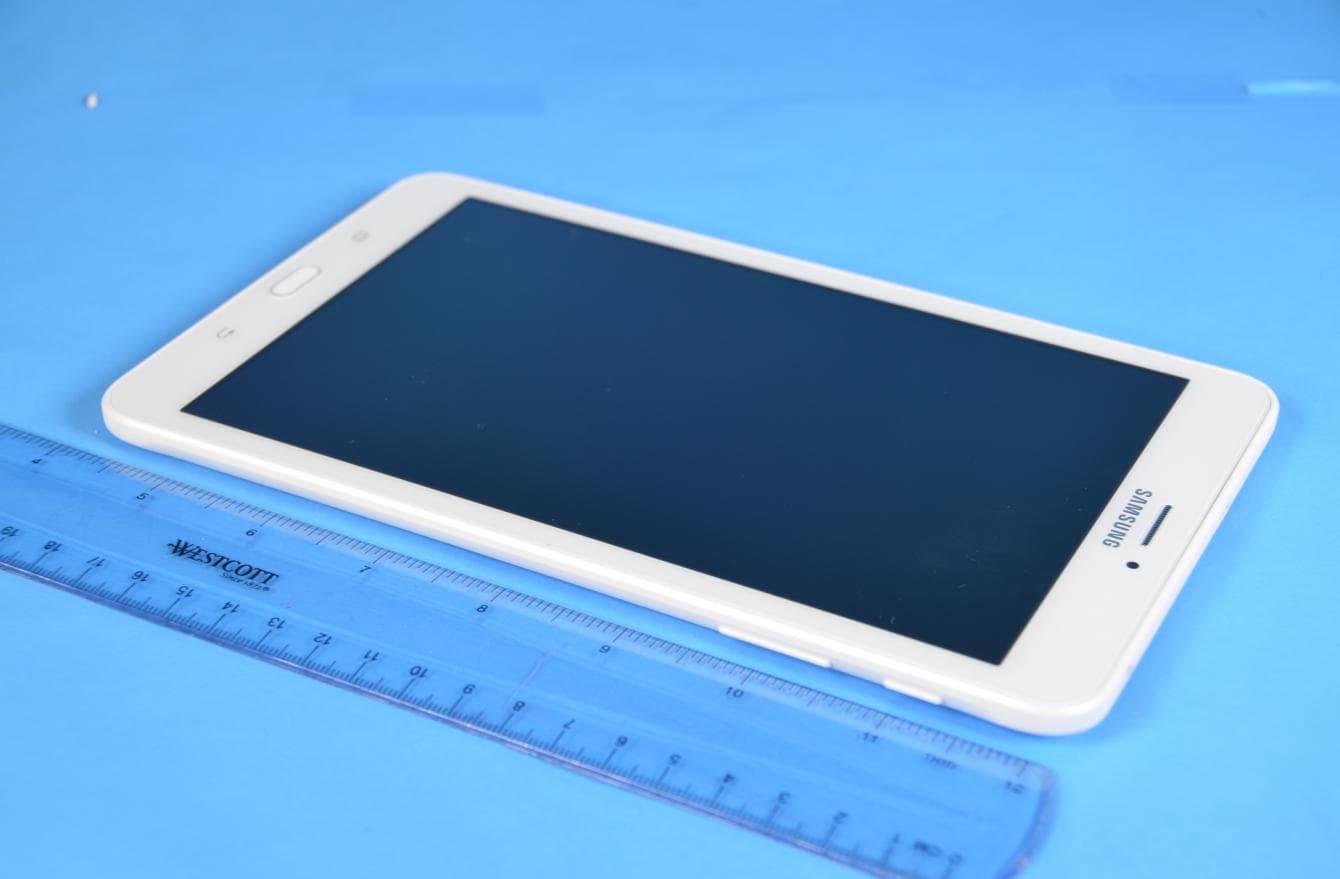
Click to zoom
Application Details
- Equipment Class
- JBC - Part 15 Class B Computing Device/Personal Computer
- Date of Grant
- Dec 21, 2015
- Application Purpose
- Original Equipment
- Date of Application
- Dec 21, 2015
- Equipment Note
- Cellular/PCS WCDMA Tablet with Bluetooth and WLAN
- Company
- Samsung Electronics Co Ltd
- Country
- United States
Documents & Files
Document Text
Text extracted from the exhibit documents filed with the FCC. Open a document above to read the original.
Users Manual
User manual SM-T3777 Draft Important safety precautions Failure to comply with the following precautions may be dangerous or illegal. Copyright information ● Bluetooth? is a registered trademark of the Bluetooth SIG, Inc. worldwide. ● JavaTM is a trademark or registered trademark of Sun Microsystems, Inc. ● Picsel and Picsel ViewerTM are trademarks of Picsel Technologies, Inc. Drive safely at all times Do not use a hand-held TABLET while driving. Park your vehicle first. Switch off the TABLET when refuelling Do not use the TABLET at a refuelling point (service station) or near fuels or chemicals. Switch off in an aircraft Wireless TABLETs can cause interference. Using them in an aircraft is both illegal and dangerous. Switch off the TABLET near all medical equipment Hospitals or health care facilities may be using equipment that could be sensitive to external radio frequency energy. Follow any regulations or rules in force. Interference All wireless TABLETs may be subject to interference, which could affect their performance. Be aware of special regulations Meet any special regulations in force in any area and always switch off your TABLET whenever it is forbidden to use it, or when it may cause interference or danger. Water resistance Your TABLET is not water-resistant. Keep it dry. Sensible use Use only in the normal position (held to your ear). Avoid unnecessary contact with the antenna when the TABLET is switched on. Emergency calls Key in the emergency number for your present location, then press [ ]. Keep your TABLET away from small children Keep the TABLET and all its parts, including accessories, out of the reach of small children. Accessories and batteries Use only Samsung-approved batteries and accessories, such as headsets and PC data cables. Use of any unauthorised accessories could damage you or your TABLET and may be dangerous. Qualified service Only qualified service personnel may repair your TABLET. For more detailed safety information, see ¡°Health and safety information¡± on page 20. • The TABLET could explode if the battery is replaced with an incorrect type. • Dispose of used batteries according to the manufactureri’s instructions. Excessive exposure to sound at high volumes can cause hearing damage. Always turn the volume down before plugging the earTABLETs into an audiosource and use only the minimum volume setting necessary to hear your conversation or music. Unpack Make sure you have each item • TABLET • Adapter • Stereo headset • Battery • Battery travel holder • User’s manual Suitable Adapter or Charger, certified according to the relevant safety standard, will be provided for each country in use. You can obtain the following accessories for your TABLET from your local Samsung dealer. • Multi adapter • Travel charger • Car charger • PC data cable • Portable battery kit • Portable PC data cable • Music controller • Bluetooth mono/ stereop headset kit Get started First steps to operate your TABLET Install and charge the TABLET 1. Install the battery: To remove the battery, slide the battery catch toward the top of the TABLET and hold it. 2. Plug the adapter into the TABLET. 3. Plug the adapter into a standard AC wall outlet. 4. When the TABLET is completely charged (the battery icon stops blinking), unplug the adapter from the power outlet. 5. Remove the adapter from the TABLET. Low battery indicator When the battery is low: • a warning tone sounds, • the battery low message displays, and • the empty battery icon [ ] blinks. If the battery level becomes too low, the TABLET automatically turns off. Recharge your battery. Keys and display Buttons Function Power • Press and hold to turn the device on or off. • Press and hold for more than 7 seconds to reset the device if it has fatal errors or hang-ups, or freezes. • Press to lock or unlock the device. The device goes into lock mode when the touch screen turns off. Menu • Tap to open a list of options available for the current screen. • Tap and hold on the Home screen to launch Google application. Home • Press to return to the Home screen. • Press twice to launch S Voice application. • Press and hold to open the list of recent applications. Back • Tap to return to the previous screen. Volume • Press to adjust the device volume. Overview of menu functions To access Menu mode, press [환경설정] in ldle mode. T service ChatON Maps Call log Samsung Link Local TABLET Group Play Navigation Contacts S Health Downloads Messaging S Voice Optical Reader Samsung Hub S Memo Messenger Samsung Apps S Translator Play Books WatchON Email Play Movies & TV Camera Shopping & wallet T nao Gallery T cloud App Guide Story Album hoppin T Membership DMB MelOn Remote Care T store Chrome T world T LTE Pack Gmail 11st Music Google SmartWallet Video Voice Search NATE Internet YouTube Calculator Clock Talk Voice Recorder S Planner Google+ Dictionary Settings Play Store My Files B tv mobile Pickat Basket Cyworld SmartTouch Cymera NateOnUC Dropbox Samsung service V3 Mobile 2.0 Help Google Settings Solve problems Help and personal needs To save the time and expense of an unnecessary service call, perform the simple checks in this section before contacting a service professional. When you switch on your TABLET, the following messages may appear: “Insert USIM card” • Be sure that the USIM card is correctly installed. “TABLET locked Enter password” • The automatic locking function has been enabled. You must enter the TABLET¡ ̄s password before you can use the TABLET. “Enter PIN1” • You are using your TABLET for the first time. You must enter the PIN1 supplied with the USIM card. • The PIN1 Check feature is enabled. Every time the TABLET is switched on, the PIN1 has to be entered. To disable this feature, use the PIN check menu. “Enter PUK” • The PIN1 code has been entered incorrectly three times in succession, and the TABLET is now blocked. Enter the PUK1 supplied by your service provider. “No Service” “Network Failure,” or “Not Done” displays • The networ…
Text truncated - open the document above for the full version.
Attestation Statements
Samsung Electronics America, Inc 19 Chapin Rd, Building D. Pine Brook, NJ 07058 Date: December 13, 2015 FCC ID: A3LSMT3777 To whom it may concern: We, the undersigned, hereby authorize PCTEST Engineering Laboratory Inc., to act on our behalf in all matters relating to applications for equipment authorization, including the signing of all documents relating to these matters. Any and all acts carried out by PCTEST Engineering Laboratory, Inc. on our behalf shall have the same effect as acts of our own. We also hereby certify that no party to any application is subject to a denial of benefits, including FCC benefits, pursuant to Section 5301 of the Anti-Drug Abuse Act of 1988, 21 U.S. C. 862. Sincerely, CHANHO, YOUN General Manager Samsung Electronics CO. LTD TEL: +1-973-808-6362 E-mail: [email protected]
Cover Letter(s)
SAMSUNG ELECTRONICS AMERICA, INC. American QA Lab 19 Chapin Rd, Building D. Pine Brook, NJ 07058 Date: December 13, 2015 Federal Communications Commission Authorization and Evaluation Division 7435 Oakland Mills Road, Columbia, MD 21046 RE: Request of Confidentiality for FCC ID: A3LSMT3777 To Whom It May Concern: Pursuant to Sections 0.457 and 0.459 of the Commission’s Rules (CFR 47), and Section 552 (b) (4) of the Freedom of Information Act, SAMSUNG ELECTRONICS CO.,LTD. hereby requests confidentiality and treatment of certain information accompanying this application. The materials contain trade secrets and proprietary information not customarily released to the public. The public disclosure of these matters might be harmful to the Applicant and provide unjustified benefits to its competitors. We are also hereby request Short-Term Confidentiality for 180 days after the grant as outlined in Public Notice DA 04-1705. This provision will give SAMSUNG ELECTRONICS CO.,LTD. temporary confidentiality of commercially sensitive information prior to product release. The requested Permanent and Short-Term Confidential exhibits are listed as follows: PERMANENT AND SHORT-TERM CONFIDENTIAL LIST Exhibit Description PERMANENT 1 Block Diagram 2 Operational Description SHORT-TERM 3 External Photos 4 Internal Photos 5 Test-Setup Photos 6 Users Manual The Applicant understands that pursuant to Rule 0.457, disclosure of this application and all accompanying documentations, where applicable, will not be made public before the date of the Grant for this application. Sincerely, CHANHO, YOUN General Manager American QA Lab SAMSUNG Electronics America INC.
External Photos
Samsung Electronics Co., Ltd. FCC ID: A3LSMT3777 Model: SM-T3777 External Photos EUT Type: Portable Tablet Page 1 of 4 © 2015 PCTEST Engineering Laboratory, Inc. V 3.2 10/30/2015 E X T E R N A L P H O T O G R A P H S Samsung Electronics Co., Ltd. FCC ID: A3LSMT3777 Model: SM-T3777 External Photos EUT Type: Portable Tablet Page 2 of 4 © 2015 PCTEST Engineering Laboratory, Inc. V 3.2 10/30/2015 Samsung Electronics Co., Ltd. FCC ID: A3LSMT3777 Model: SM-T3777 External Photos EUT Type: Portable Tablet Page 3 of 4 © 2015 PCTEST Engineering Laboratory, Inc. V 3.2 10/30/2015 Samsung Electronics Co., Ltd. FCC ID: A3LSMT3777 Model: SM-T3777 External Photos EUT Type: Portable Tablet Page 4 of 4 © 2015 PCTEST Engineering Laboratory, Inc. V 3.2 10/30/2015
Test Report
c ORT Project No. LBE20156058 I Issue No. 1--------o ~ arne of organization Samsung Electronics Co., Ltd. . ~29, Samsung-ro, Yeongtong-gu, Suwon-si, Applicant Address . Gyeongg1-do, 16677 Rep. of Korea • EUT ,_ Date of application December 1 0, 2015 Type of device Equipment authorization FCCID r8] Class B personal computers and peripherals D All other devices D Declaration of Conformity r8] Certification D Verification I A3LSMT3777 Kind of product l Mobile Phone Model No. SM-T3777 r Variant Model No. Refer to clause 4.6 SAMSUNG ELECTRONICS CO., LTD. 94-1, lmsu-dong, Gumi-si, Gyengsangbuk-do, 730-722,Republic of Korea Manufacturer SAMSUNG ELECTRONICS HUIZHOU CO.,LTD. 516229, Chenjiang Town, HuiZhou City, Guangdong Province, China Applied Standards Test Period J 47 CFR Part 15, Subpart B, Class B I ANSI C63.4-2009 December 11, 2015-December 16, 2015 --------1 Issue date December 18, 2015 ------------~ Test result : Complied The equipment under test has found to be compliant with the applied standards. (Refer to the attached test result for more detail.) Tested by~ Reviewed by : Tae-Young Jang The test results in this report only apply to the tested sample. This report must not be reproduced, except in full, without written permission from CS & Environment center. CS & Environment Center of Samsung Electronics Co., Ltd. 129, Samsung-ro, Yeongtong-gu, Suwon-si, G eonggi-do, 16677 Re . of Korea -1/13- Project No. : LBE20156058 Portable Device : SM-T3777 - 2/13- This report must not be reproduced, except in full, without written permission from CS & Environment center. Form No.: SRA-TRF-46/3 Table of contents 1. Report Information 1.1 Revision history ------------------------------------------------------------------------------------------------------------------ 3 2. Summary of test results 2.1 Emission ------------------------------------------------------------------------------------------------------------------------------- 3 3. General Information 3.1 Test facility ---------------------------------------------------------------------------------------------------------------------------- 3 4. Test Configuration 4.1 Test Peripherals ----------------------------------------------------------------------------------------------------------------- 4 4.2 EUT operating mode -------------------------------------------------------------------------------------------------------- 4 4.3 Details of Sampling ----------------------------------------------------------------------------------------------------------- 4 4.4 Used cable description ---------------------------------------------------------------------------------------------------- 5 4.5 Test arrangement -------------------------------------------------------------------------------------------------------------- 5 4.6 EUT Description ----------------------------------------------------------------------------------------------------------------- 6 4.7 Clock Frequencies ------------------------------------------------------------------------------------------------------------ 6 4.8 Test configuration and condition ---------------------------------------------------------------------------------- 7 4.9 Measurement uncertainty ---------------------------------------------------------------------------------------------- 7 5. Result of individual tests 5.1 Conducted disturbance --------------------------------------------------------------------------------------------------- 8 5.2 Radiated disturbance ------------------------------------------------------------------------------------------------------- 10 Project No. : LBE20156058 Portable Device : SM-T3777 - 3/13- This report must not be reproduced, except in full, without written permission from CS & Environment center. Form No.: SRA-TRF-46/3 1. Report Information 1.1 Revision history No. Revised detailed information Issue 0 There are no revisions and this version is basic test report. 2. Summary of test results 1.1 Emission The EUT has been tested according to the following specifications: Applied Test type Applied standard Result Conducted Disturbance (Mains port) 47 CFR Part 15, Subpart B / ANSI C63.4-2009 ( Class B) Complied Radiated Disturbance Complied 3. General Information 3.1 Test facility The CS & Environment center is located on Samsung Electronics Co., Ltd. at (Maetan dong) 129, Samsung-ro, Yeongtong-gu, Suwon-si, Gyeonggi-do, Republic of Korea. All testing are performed in Semi-anechoic chambers conforming to the site attenuation characteristics defined by ANSI C63.4, CISPR 22, 16-1 and 16-2. and Shielded rooms. The CS & Environment center is operated as testing laboratory in accordance with the requirements of ISO/IEC 17025:2005. Project No. : LBE20156058 Portable Device : SM-T3777 - 4/13- This report must not be reproduced, except in full, without written permission from CS & Environment center. Form No.: SRA-TRF-46/3 4. Test Setup configuration 4.1 Test Peripherals The cables used for these peripherals are either permanently attached by the peripheral manufacturer or coupled with an assigned cable as defined below. The following is a listing of the EUT and peripherals utilized during the performance of EMC test: Mark Description Model No. Serial No. Manufacturer / Trademark FCC ID / DoC A Portable Device SM-T3777 - SAMSUNG A3LSMT3777 B Battery EB-BT367ABE - SAMSUNG - C Headset EHS61ASFWE - SAMSUNG - D Data Cable ECB-DU68WE - SAMSUNG - E Micro SD Card32GB - SANDISK - F Desk-Top Computer HP Compaq dx2200 Microtower CNG7060LW0 HP DoC G LCD Monitor U2713HMt CN-0GK0KD-74445-332-106L Dell DoC H Mouse M-SBF96 LZ949BG0D9Y Logitech DoC I Keyboard SKG-2000PB CNBA5902830AGP53Z5A3485 SAMSUNG DoC J Router H3008 10070100009 EFM Networks DoC K Power Supply HB12B-050200SPAHBK520201025 Shen Zhen DoC This tablet device does not contain the minimum number of ports required for personal computer testing per ANSI C63.4, but the EUT is attached to a computer through its only available port, …
Text truncated - open the document above for the full version.
Test Setup Photos
Project No. : LBE20156058 Portable Device : SM-T3777 - 1/4- This report must not be reproduced, except in full, without written permission from CS & Environment center. Form No.: SRA-TRF-46/3 APPENDIX – Test Setup and EUT photography – Project No. : LBE20156058 Portable Device : SM-T3777 - 2/4- This report must not be reproduced, except in full, without written permission from CS & Environment center. Form No.: SRA-TRF-46/3 1. Photograph of Test Setup [ Conducted Disturbance – Front ] [ Conducted Disturbance – Rear ] Project No. : LBE20156058 Portable Device : SM-T3777 - 3/4- This report must not be reproduced, except in full, without written permission from CS & Environment center. Form No.: SRA-TRF-46/3 [ Radiated Disturbance for Below 1 GHz – Front ] [ Radiated Disturbance for Below 1 GHz – Rear ] Project No. : LBE20156058 Portable Device : SM-T3777 - 4/4- This report must not be reproduced, except in full, without written permission from CS & Environment center. Form No.: SRA-TRF-46/3 [ Radiated Disturbance for Above 1 GHz – Front ] [ Radiated Disturbance for Above 1 GHz – Rear ]
Contact Information
Applicant
Jenni Chun(General Manager)
Technical Contact
PCTEST Engineering Laboratory, Inc.Randy Ortanez
[email protected]410-290-6652
6660-B Dobbin Road · Columbia, Maryland · United States
Test Firm
Samsung Electronics Co., Ltd. Global CS CenterPark No cheon
Technical Specifications
| # | Rule Parts | Frequency Range | Power Output |
|---|---|---|---|
| 1 | 15B | - | - |
Other Applications from Samsung Electronics Co Ltd
A3LSMA185G
Sep 08, 2026Portable Handset
Equipment Class
CXX - Communications Rcvr for use w/ licensed Tx and CBsA3LSMS741B
Aug 05, 2026Portable Handset
Equipment Class
6VL - 15E 6 GHZ Very Low Power DeviceA3LSMX940
Jul 31, 2026BT,BLE Tablet DTS,UNII a,b,g,n,ac,ax,be and digitizer
Equipment Class
DTS - Digital Transmission SystemA3LSMS741U
Jul 30, 2026Portable Handset
Equipment Class
6CD - 15E 6 GHz Low Power Dual ClientA3LSMX840
Jul 27, 2026BT,BLE Tablet DTS,UNII a,b,g,n,ac,ax and Digitizer
Equipment Class
DSS - Part 15 Spread Spectrum Transmitter