A3LSMT630DTS/UNII a/b/g/n/ac/ax Tablet + BT/BLE, and NFC
Samsung Electronics Co Ltd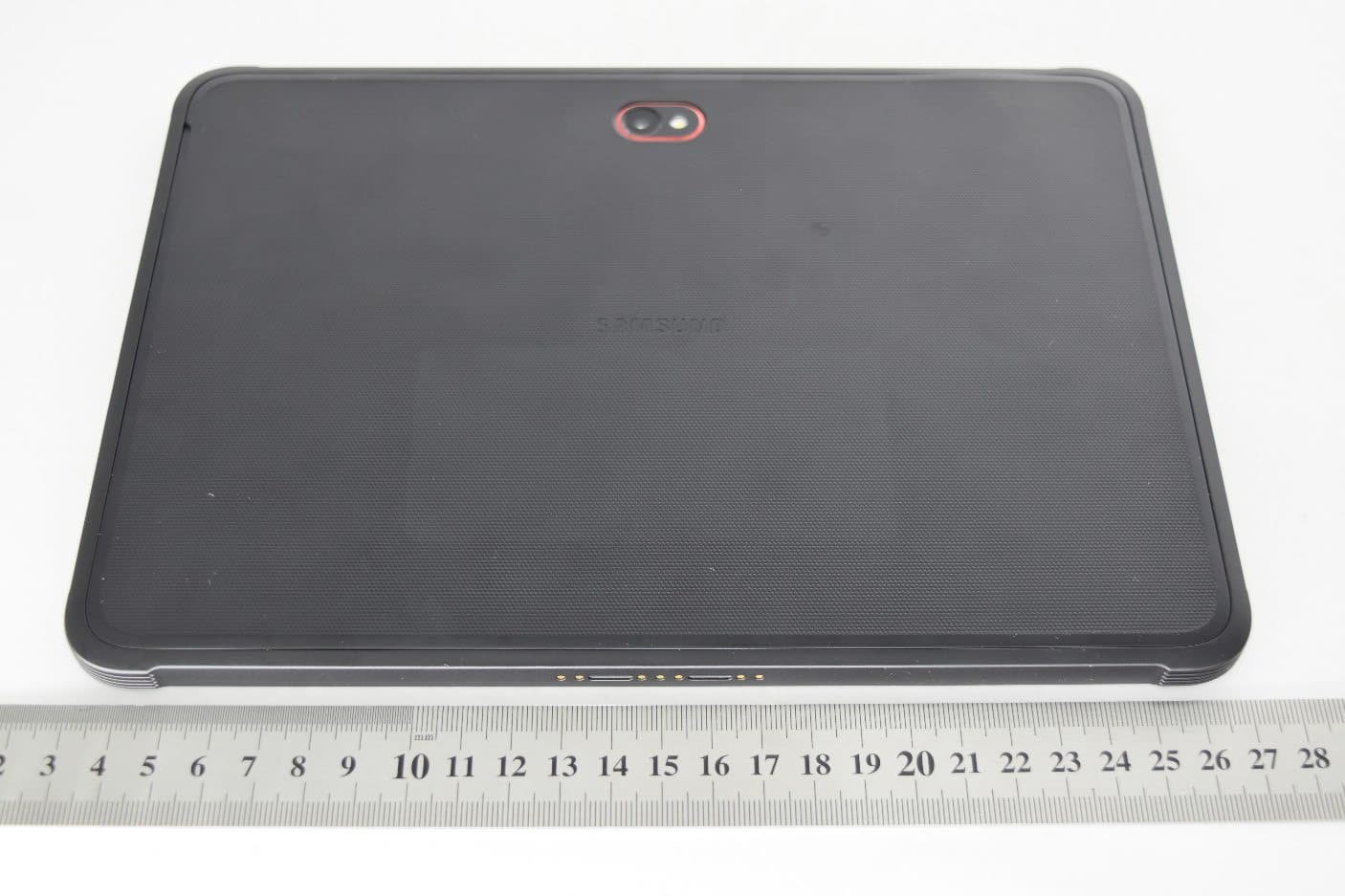
Click to zoom
Application Details
- Equipment Class
- NII - Unlicensed National Information Infrastructure TX
- Date of Grant
- Aug 28, 2022
- Application Purpose
- Original Equipment
- Date of Application
- Aug 09, 2022
- Equipment Note
- DTS/UNII a/b/g/n/ac/ax Tablet + BT/BLE, and NFC
- Frequency Range
- 5745.00000000 - 5825.00000000
- Company
- Samsung Electronics Co Ltd
- Country
- United States
Documents & Files
Document Text
Text extracted from the exhibit documents filed with the FCC. Open a document above to read the original.
Users Manual
Quick Reference Guide (Terms and Conditions) SM-T630 Read this document before operating the mobile device, accessories, or software (defined collectively and individually as the “Product”) and keep it for future reference. This document contains important Terms and Conditions. Electronic acceptance, opening the packaging, use, or retention of the Product constitutes acceptance of these Terms and Conditions. Visit www.samsung.com/us to view device information, the user manual, and more. You may incur additional charges for accessing the Internet. DRAFT Device Layout To turn on the device, pr ess and hold the Side key for a few seconds. The charger should remain close to the electric socket and easily acc essible while charging. Installing a nano-SIM card Nano-SI M cards are sold separately. Contact us Questions? Visit us.community.samsung.com Get Support Call 1.800.SAMSUNG Service locations Find a service location near you at Samsung.com/us/support/service/locations Switching made simple Whether you are coming from an iOS or Android platform, you can easily transfer your data with Smart Switch. Back up your old phone Back up your old phone using your favorite back-up app. Samsung Smart Switch 1.From your new Galaxy device, tap Settings > Accounts and backup > Smart Switch. 2.Tap Receive data. 3.Select your old device type. 4.Tap Cable (Android) or Wireless (Android and iOS) and follow the prompts to connect your phones. Customize Tap Settings to personalize your phone. Flight mode This disables all wireless functions on your device. You can use only non- network services On the setting screen, tap Flight mode. NOTE: The use of mobile devices on an aircraft or a ship may be subject to federal and local guidelines and restrictions. Check with appropriate author and always follow crew instructions regarding when and how you may use your device. Important legal information Arbitration Agreement - This Product is subject to a binding arbitration agreement between you and SAMSUNG ELECTRONICS AMERICA, INC. (“Samsung”). You can opt out of the agreement within 30 calendar days of the first consumer purchase by emailing [email protected] or calling 1-800-SAMSUNG (726-7864) and providing the applicable information. The full Arbitration Agreement, Standard One-year Limited Warranty, End User License Agreement (EULA), and Health & Safety Information for your device are available online: •English: www.samsung.com/us/Legal/Tablet-HSGuide • Spanish: www.samsung.com/us/Legal/Tablet-HSGuide-SP This information can also be found on the device in the “About device” or “About phone” or “About tablet” section, for example: •Settings > About phone or About device or About tablet > Legal information > Samsung legal •Or,Search “Legal” Health and Safety WARNING! To avoid electri c shock and damage to your device, do not charge device whil e i t is wet or in an area where it co uld get wet. Do not handle device, c harger or cords with wet hands whil e charging. Maint aining dust and water resistance The device is not impervious to dust and water damage in any situation. It is important that all c ompartments are closed tightly. Follow these tip s carefully to prevent damage to the device and maintain dust and water resistance performance: •Water resistant based on IP68 rating, which tests submers ion in fresh water deeper than 1.5 meters or keep it submerged for more than 30 minut es. If device is expo sed to fresh water, dry it thoroughly with a clean, soft cloth; if exposed to liquid other than fresh water, rinse with fresh water and dry as directed. •Any device which uses acces sible compartments or ports that can be opened should have th ese se aled or closed tightly to prevent li quid from entering th e system. •If th e device has been immersed i n water or th e microphone or speaker is wet, sound may not be heard clearly during a call. After wipi ng th e device with a dry cloth, dry it thoroughly before using it. •Do not expose t he device to water at high pressure. •If th e device is dropped or receives an impact, th e water and dust resistant features of th e device may be damaged. Note: Liquid other than fresh water may enter th e device fa ster. Failure to rinse th e device in fresh water and dry it as instructed may cause th e device to suffer from operability or cosmetic issues. Samsung Knox Samsung Knox is Samsung’s security platform. Additional licensing fees may be required for enterprise use. For more information about Knox, pl ease refer to: www.samsung.com/us/knox Specific Absorption Rate (SAR) certification information For information about SAR, visit : •https://www.fcc.gov/general/radio-frequency-safety-0 •w ww.fcc.gov/encyclopedia/ s pecific-absorption-rate-sar-cellular-telephones •www.samsung.com/sar S amsung mobile products and recycling WARNING! Never dispose of batterie s in a fire because th ey may explode. Do not disassemble, crush, puncture, heat, burn or reuse. F or battery and cell phone recycling, go to call2re cy cle. org or call 1- 800-822-8837. For more recycling information, go to our website: www.samsung.com/re cy cl ing or call 1-800-S AMSUNG. Your location Location-based information on that can be used to determine the appro ximate location of a mobile device. If you use applic ations that require location-based information (e.g., driving dir ections), such information may be shared with thi rd-parties, including your wireless service provider, applications providers, Samsung, and other thi rd- parties providing services. Navigation Maps, directions, and other navigation data, including data relating to your current location, may contain inaccurate or incomplete data. Therefore, you should always pay attention to road conditions, closures, traffic, and all other factors that may impact safe driving or walking. FCC Part 15 Information and Notices . Note: Any device that uses Bluetooth or Wi-Fi is subject to FCC Part 15. Any device with a power supply is subject to Part 15 …
Text truncated - open the document above for the full version.
Users Manual
02/2022. Rev.1.9.3www.samsung.com Safety information 1 English ..................................................2 Shqip ....................................................15 العربية .....................................................27 Azərbaycan (latin) ...............................39 বাংলা ....................................................51 Български ..........................................63 繁體中文 (香港) .....................................76 简体中文 ..............................................87 繁體中文 (台灣) ....................................98 Hrvatski .............................................110 Čeština ...............................................122 Dansk ................................................134 Nederlands ........................................147 Eesti ...................................................159 فارسی ...................................................171 Suomi ................................................183 Français .............................................195 ქართული .........................................207 Deutsch .............................................219 Ελληνικά ...........................................231 עברית ..................................................243 हिन्दी ...................................................255 Magyar ..............................................267 Bahasa Indonesia ..............................279 Italiano ...............................................291 日本語 ................................................304 Қазақ тілі ..........................................316 ខ្មែ�ែរ ......................................................328 한국어 .................................................340 ລາວ ....................................................353 Latviešu .............................................365 Lietuvių kalba ...................................377 Македонски .....................................389 Монгол ..............................................401 ျမန္္မာ ..................................................413 Norsk .................................................425 Polski .................................................437 Português ..........................................450 Português (Brasil) .............................463 Română .............................................476 Русский .............................................488 Srpski ................................................501 Slovenčina .........................................513 Slovenščina .......................................525 Español .............................................. 537 Español (Estados Unidos) .................549 Svenska .............................................561 ไทย .....................................................573 Türkçe ................................................585 Українська ........................................597 اردو ......................................................609 O'zbek ...............................................621 Tiếng Việt ..........................................633 English 2 Safety information Please read this important safety information before you use the device. It contains general safety information for devices and may include content that does not apply to your device. Follow the warning and caution information to prevent injury to yourself or others and to prevent damage to your device. The term ‘device’ refers to the product and its battery, the items supplied with the product, and any Samsung-approved accessories used with the product. Warning Failure to comply with safety warnings and regulations can cause serious injury or death Your device contains magnets. Keep a safe distance between your device and objects that may be affected by magnets such as credit cards and implantable medical devices. If you have an implantable medical device, consult your physician before use Do not use damaged power cords or plugs, or loose electrical sockets Unsecured connections can cause electric shock or fire. Do not touch the device, power cords, plugs, or the electric socket with wet hands or other wet body parts Doing so may cause electric shock. Do not pull the power cord excessively when disconnecting it Doing so may cause electric shock or fire. Do not bend or damage the power cord Doing so may cause electric shock or fire. Do not use the device with wet hands while the device is charging Doing so may cause electric shock. Do not directly connect together the charger’s positive and negative terminals Doing so may cause fire or serious injury. English 3 Do not use your device outdoor during a thunderstorm Doing so may result in electric shock or device malfunction. Use manufacturer-approved batteries, chargers, accessories, and supplies • Using generic batteries or chargers may shorten the life of your device or cause the device to malfunction. They may also cause a fire or cause the battery to explode. • Use only Samsung-approved battery, charger, and cable specifically designed for your device. Incompatible battery, charger, and cable can cause serious injuries or damage to your device. • Samsung cannot be responsible for the user’s safety when using accessories or supplies that are not approved by Samsung. Do not carry your device in your back pockets or on your waist • The device may be damaged, explode, or result in a fire if too much pressure is applied to it. • You may be injured if you are bumped or fall. Do not drop or cause excessive impact to the device • This may damage your device or battery, cause the device to malfunction, or shorten its lifespan. • This may also cause overheating, combustion, fire, or other hazards. Handle and dispose of the device and charger with care • Never dispose of the battery or device in a fire. Never place the battery or device on or in heating devices, such as microwave ovens, stoves, or radiators. The device may explode when overheated. Follow all local regulations when disposi…
Text truncated - open the document above for the full version.
Users Manual
www.samsung.com USER MANUAL English. 08/2022. Rev.1.0 SM-T630 SM-T636B SM-T638B 2 Table of Contents Getting started 4 Device layout and functions 7 Charg ing the battery 12 SIM or USIM card (nano-SIM card) (Mobile network enabled models) 13 Memory card (microSD card) 15 Protective case 17 Tur ning the device on and off 17 Initial setup 18 Samsung account 19 Tr ansferring data from your previous device (Smart Switch) 21 Understanding the screen 28 Notification panel 30 Screen capture and screen record 31 Entering text Apps and features 34 Installing or uninstalling apps 35 S Pen 45 P hone 48 Contacts 50 Messages 51 I nternet 52 Camera 62 Gallery 66 Bixby 68 Bixby Vision 69 Bixby Routines 71 Multi windo w 73 Samsung Notes 77 Samsung Members 77 Samsung K ids 78 Samsung Global Goals 78 Galaxy Shop 79 PENUP 79 Calendar 80 Reminder 81 Voice Recorder 82 My Files 82 Clock 82 Calculator 83 SmartThings 83 Sharing content 85 Music Share 86 Smart V iew 87 Samsung Flow 88 Daily Board 90 Samsung D eX 96 Google apps Table of Contents 3 126 Google 126 Advanced features 128 Motions and gestur es 129 Dual Messenger 130 Digital Wellbeing and parental controls 130 Battery and device care 130 Optimising your devic e 131 Ba ttery 131 Storage 132 M emory 132 Devic e protection 132 Software update 132 Diag nostics 132 A pps 133 Gener al management 134 A ccessibility 134 Sof tware update 135 Remote support 135 About tablet Usage notices 136 Precautions for using the device 138 Notes on package contents and accessories 139 Main taining water and dust resistance 140 Devic e overheating situations and solutions Appendix 143 Troubleshooting Settings 97 Introduction 97 Samsung account 97 C onnections 99 Wi-Fi 100 Bluetooth 102 NFC and con tactless payments 103 Data saver (Mobile network enabled models) 104 Mobile data only apps (Mobile network enabled models) 104 Mobile Hotspot (Mobile network enabled models) 105 More connection settings 106 Sounds and vibration 107 Sound qualit y and effects 107 Separ ate app sound 108 Notifica tions 108 Displa y 109 Wallpaper and st yle 109 Home screen 109 Lock scr een 110 Smart Lock 110 Biometrics and security 111 Fac e recognition 113 Fingerprint recognition 116 Samsung P ass 118 Secur e Folder 121 Secur e Wi-Fi 122 P rivacy 122 L ocation 123 Saf ety and emergency 123 Ac counts and backup 124 U sers 125 Samsung Cloud 4 Getting started Device layout and functions Multipurpose jack (USB Type-C) Side key Speaker Keyboard dock port Touchscreen Volume key Active key Microphone Microphone Earphone jack Light sensor Front camera Home key (Fingerprint recognition sensor) Back key Recents key Speaker Back cover NFC antenna Rear camera Main antenna (SM-T636B, SM-T638B) Flash GPS antenna Getting started 5 The device and some accessories (sold separately) contain magnets. The American Heart Association (US) and the Medicines and Healthcare Products Regulatory Agency (UK) both warn that magnets can affect the operation of implanted pacemakers, cardioverters, defibrillators, insulin pumps or other electro medical devices (collectively, “Medical Device”) within the range of 15 cm (6 inches). If you are a user of any of these Medical Devices, DO NOT USE THIS DEVICE AND SOME ACCESSORIES (SOLD SEPARATELY) UNLESS YOU HAVE CONSULTED WITH YOUR PHYSICIAN. • Do not store your device and some accessories (sold separately) near magnetic fields. Magnetic stripe cards, including credit cards, phone cards, passbooks, and boarding passes, may be damaged by magnetic fields. • When using the speakers, such as when playing media files or using speakerphone, do not place the device close to your ears. • Be careful not to expose the camera lens to a strong light source, such as direct sunlight. If the camera lens is exposed to a strong light source, such as direct sunlight, the camera image sensor may be damaged. A damaged image sensor is irreparable and will cause dots or spots in pictures. • If you use the device with its glass or acrylic body broken, there may be a risk of injury. Use the device only after it has been repaired at a Samsung Service Centre. • If dust or foreign materials enter the microphone, speaker, or receiver, the device’s sound may become quiet or certain features may not work. If you attempt to remove the dust or foreign materials with a sharp object, the device may be damaged and its appearance may be affected. • Connectivity problems and battery drain may occur in the following situations: – If you attach metallic stickers on the antenna area of the device – If you attach a device cover made with metallic material to the device – If you cover the device’s antenna area with your hands or other objects while using certain features, such as calls or the mobile data connection • If the area around the rear camera is covered with accessories, such as a screen protector or stickers, unwanted noises may occur during calls or media playback. • Do not cover the light sensor area with accessories, such as stickers or a cover. Doing so may cause the sensor to malfunction. Getting started 6 Hard keys KeyFunction Side key • When the device is off, press and hold to turn it on. • Press to turn on or lock the screen. • Press and hold to start a conversation with Bixby. Refer to Using Bixby for more information. • Press twice or press and hold to launch the app or feature you set. Side key + Volume Down key • Press simultaneously to capture a screenshot. • Press and hold simultaneously to turn off the device. Active key • Press or press and hold to launch preset apps. Recents key • Press to open the list of recent apps. Home key • Press to turn on the screen while the screen is locked. • Press to return to the Home screen. • Press and hold to launch Google Assistant app. Back key • Press to return to the previous screen. Setting the Side key Select an app or feature to launch by pressing the Side key twice or pressing and holding the Side key. Launch the Settings app, tap Advanced features → Side key, a…
Text truncated - open the document above for the full version.
Cover Letter(s)
Date: November 19, 2021 UL Korea, Ltd. Suwon Laboratory 218 Maeyeong-ro, Yeongtong-gu, Suwon-si, Gyeonggi-do, 16675, Korea To whom it may concern: I, the undersigned, hereby authorize UL Korea, Ltd. Suwon Laboratory, to act on our behalf in all manners relating to application for equipment authorization, including signing of all documents relating to these matters. Any and all acts carried out by UL Korea, Ltd. Suwon Laboratory on our behalf s hall have the same effect as acts of our own. In authorizing UL Korea as our agent, we still recognize that we are responsible to: a) comply with the relevant provisions of the certification program; b) make all necessary arrangements for the conduct of the evaluation, including provision for examining documentation and access to all areas, records (including internal audit reports) and personnel for the purposes of evaluation (e.g. testing, inspection, assessment, surveillance, reassessment) and resolution of complaints; c) make claims regarding certification only in respect of the scope for which certification has been granted; d) do not use our product certification in such a manner as to bring the Certification Division into disrepute and not make any statement regarding our product certification which the Certification Division may consider misleading or unauthorized; e) upon suspension or cancellation of certification, discontinue use of all advertising matter that contains any reference thereto and return any certification documents as required by the Certification Division; f) use certification only to indicate the products are certified as being in conformity with specified standards; g) endeavor to ensure that no certificate or report nor any part thereof is used in a misleading manner; h) ensure that any reference to our product certification in communication media such as documents, brochures or advertising, complies with the requirements of the Certification Division; i) keep a record of all complaints made known to the us relating to the product’s compliance with requirements of the relevant standard and to make these records available to the when requested; j) take appropriate action with respect to such complaints and any deficiencies found in products or services that affect compliance with the requirements for certification; k) document the actions taken. l) the undersigned, hereby certify that we are not subject to a denial of federal benefits, that includes FCC benefits, pursuant to Section 5301 of the Anti-Drug Abuse Act of 1988, 21 U.S.C. 853(a). This authorization is valid until further written notice from the applicant. Sincerely Yours, Ms. Jenni Chun General Manager Samsung Electronics America, Inc. TEL: +1-973-808-6375 E-mail: [email protected]
Cover Letter(s)
July 26, 2022 Federal Comm unications Commission 7435 Oakland Mills Road Columbia MD 21046 Subject: FCC ID: Request for Confidentiality A3LSMT630 To Whom It May Concern: Pursuant to the provisions of Sections 0. 457 and 0.459 of the Commission’s rules (47 CFR §§ 0. 457, 0.459), we are requesting the Commission to withhold the following attachments as confidential document from public disclosure indefinitely. Schematics Block Diagram Operational Description Parts List Tune-Up Procedure PED Above mentioned document contains detailed system and equipment description are cons idered as proprietary information in operation of the equipment. The public disclosure of above documents might be harmful to our company and would give competitor an unfair advantage in the market. In additional to above mentioned documents, pursuant to Public Notice DA 04-1705 of the Commission’s policy, in order to comply with the marketing regulations in 47 CFR §2.803 and the importation rules in 47 CFR §2.1204, while ensuring that business sensitive information remains confidential until the actual marketing of newly authorized devices. We are requesting the commission to grant short-term confidentiality request on the following attachm ents until 180 days External Photos Internal Photos Test Setup Photos User Manual It is our understanding that all measurement test reports, FCC ID label format and correspondence during certification review process cannot be granted as confidential documents and such information will be available for public review once the grant of equipment authorization is issued. Best Regards Ms. Jenni Chun General Manager Samsung Electronics America, Inc. TEL: +1-973-808-6375 E-mail: [email protected]
External Photos
External Photo Applicant : SAMSUNG ELECTRONICS CO., LTD. 129 SAMSUNG-RO, YEONGTONG-GU, SUWON-SI, GYEONGGI-DO, 16677, KOREA Model : SM-T630 FCC ID : A3LSMT630 Date Of Issue: 2022-07-25 Prepared by: UL Korea, Ltd. 26th floor, 152, Teheran-ro, Gangnam-gu Seoul, 06236, Korea Suwon Test Site: UL Korea, Ltd. Suwon Laboratory 218 Maeyeong-ro, Yeongtong-gu, Suwon-si, Gyeonggi-do, 16675, Korea TEL: (031) 337-9902 FAX: (031) 213-5433 Testing Laboratory TL-637 FCC ID: A3LSMT630 DATE: 2022-07-25 UL Korea, Ltd. Suwon Laboratory FORM ID: FCC_15B(04) 218 Maeyeong-ro, Yeongtong-gu, Suwon-si, Gyeonggi-do, 16675, Korea TEL: (031) 337-9902 FAX: (031) 213-5433 UL Korea, Ltd. Confidential This report shall not be reproduced except in full, without the written approval of UL Korea, Ltd. External Photo FCC ID: A3LSMT630 DATE: 2022-07-25 UL Korea, Ltd. Suwon Laboratory FORM ID: FCC_15B(04) 218 Maeyeong-ro, Yeongtong-gu, Suwon-si, Gyeonggi-do, 16675, Korea TEL: (031) 337-9902 FAX: (031) 213-5433 UL Korea, Ltd. Confidential This report shall not be reproduced except in full, without the written approval of UL Korea, Ltd. FCC ID: A3LSMT630 DATE: 2022-07-25 UL Korea, Ltd. Suwon Laboratory FORM ID: FCC_15B(04) 218 Maeyeong-ro, Yeongtong-gu, Suwon-si, Gyeonggi-do, 16675, Korea TEL: (031) 337-9902 FAX: (031) 213-5433 UL Korea, Ltd. Confidential This report shall not be reproduced except in full, without the written approval of UL Korea, Ltd.
ID Label/Location Info
Label and Location Model: FCC ID: SM-T630 A3LSMT630 Label: Location: Tablet: Label is placed inside of the battery compartment. TABLET PC MODEL : SM-T630 FCC ID : A3LSMT630 RATED : 3.8 V ;1800 mA DESIGNED & ENGINEERED BY SAMSUNG MANUFACTURED IN VIETNAM PO Box 12987, Dublin. IE
Internal Photos
Internal Photo Applicant : SAMSUNG ELECTRONICS CO., LTD. 129 SAMSUNG-RO, YEONGTONG-GU, SUWON-SI, GYEONGGI-DO, 16677, KOREA Model : SM-T 630 FCC ID : A3LSMT630 Date Of Issue: 2022-07-27 Prepared by: UL Korea, Ltd. 26th floor, 152, Teheran-ro, Gangnam-gu Seoul, 06236, Korea Suwon Test Site: UL Korea, Ltd. Suwon Laboratory 218 Maeyeong-ro, Yeongtong-gu, Suwon-si, Gyeonggi-do, 16675, Korea TEL: (031) 337-9902 FAX: (031) 213-5433 Testing Laboratory TL-637 FCC ID: A3LSMT630 DATE: 2022-07-27 UL Korea, Ltd. Suwon Laboratory FORM ID: FCC_15B(04) 218 Maeyeong-ro, Yeongtong-gu, Suwon-si, Gyeonggi-do, 16675, Korea TEL: (031) 337-9902 FAX: (031) 213-5433 UL Korea, Ltd. Confidential This report shall not be reproduced except in full, without the written approval of UL Korea, Ltd. Internal Photo FCC ID: A3LSMT630 DATE: 2022-07-27 UL Korea, Ltd. Suwon Laboratory FORM ID: FCC_15B(04) 218 Maeyeong-ro, Yeongtong-gu, Suwon-si, Gyeonggi-do, 16675, Korea TEL: (031) 337-9902 FAX: (031) 213-5433 UL Korea, Ltd. Confidential This report shall not be reproduced except in full, without the written approval of UL Korea, Ltd. FCC ID: A3LSMT630 DATE: 2022-07-27 UL Korea, Ltd. Suwon Laboratory FORM ID: FCC_15B(04) 218 Maeyeong-ro, Yeongtong-gu, Suwon-si, Gyeonggi-do, 16675, Korea TEL: (031) 337-9902 FAX: (031) 213-5433 UL Korea, Ltd. Confidential This report shall not be reproduced except in full, without the written approval of UL Korea, Ltd. FCC ID: A3LSMT630 DATE: 2022-07-27 UL Korea, Ltd. Suwon Laboratory FORM ID: FCC_15B(04) 218 Maeyeong-ro, Yeongtong-gu, Suwon-si, Gyeonggi-do, 16675, Korea TEL: (031) 337-9902 FAX: (031) 213-5433 UL Korea, Ltd. Confidential This report shall not be reproduced except in full, without the written approval of UL Korea, Ltd. FCC ID: A3LSMT630 DATE: 2022-07-27 UL Korea, Ltd. Suwon Laboratory FORM ID: FCC_15B(04) 218 Maeyeong-ro, Yeongtong-gu, Suwon-si, Gyeonggi-do, 16675, Korea TEL: (031) 337-9902 FAX: (031) 213-5433 UL Korea, Ltd. Confidential This report shall not be reproduced except in full, without the written approval of UL Korea, Ltd. FCC ID: A3LSMT630 DATE: 2022-07-27 UL Korea, Ltd. Suwon Laboratory FORM ID: FCC_15B(04) 218 Maeyeong-ro, Yeongtong-gu, Suwon-si, Gyeonggi-do, 16675, Korea TEL: (031) 337-9902 FAX: (031) 213-5433 UL Korea, Ltd. Confidential This report shall not be reproduced except in full, without the written approval of UL Korea, Ltd. FCC ID: A3LSMT630 DATE: 2022-07-27 UL Korea, Ltd. Suwon Laboratory FORM ID: FCC_15B(04) 218 Maeyeong-ro, Yeongtong-gu, Suwon-si, Gyeonggi-do, 16675, Korea TEL: (031) 337-9902 FAX: (031) 213-5433 UL Korea, Ltd. Confidential This report shall not be reproduced except in full, without the written approval of UL Korea, Ltd. FCC ID: A3LSMT630 DATE: 2022-07-27 UL Korea, Ltd. Suwon Laboratory FORM ID: FCC_15B(04) 218 Maeyeong-ro, Yeongtong-gu, Suwon-si, Gyeonggi-do, 16675, Korea TEL: (031) 337-9902 FAX: (031) 213-5433 UL Korea, Ltd. Confidential This report shall not be reproduced except in full, without the written approval of UL Korea, Ltd. FCC ID: A3LSMT630 DATE: 2022-07-27 UL Korea, Ltd. Suwon Laboratory FORM ID: FCC_15B(04) 218 Maeyeong-ro, Yeongtong-gu, Suwon-si, Gyeonggi-do, 16675, Korea TEL: (031) 337-9902 FAX: (031) 213-5433 UL Korea, Ltd. Confidential This report shall not be reproduced except in full, without the written approval of UL Korea, Ltd. FCC ID: A3LSMT630 DATE: 2022-07-27 UL Korea, Ltd. Suwon Laboratory FORM ID: FCC_15B(04) 218 Maeyeong-ro, Yeongtong-gu, Suwon-si, Gyeonggi-do, 16675, Korea TEL: (031) 337-9902 FAX: (031) 213-5433 UL Korea, Ltd. Confidential This report shall not be reproduced except in full, without the written approval of UL Korea, Ltd.
RF Exposure Info
Plot No. 1 Test Laboratory: UL Korea, Ltd. Suwon Laboratory Date: 2022-07-05 Wi-Fi 2.4 GHz Frequency: 2462 MHz; Duty Cycle: 1:1; Room Ambient Temperature: 23.0C; Liquid Temperature: 22.0C Medium parameters used (interpolated): f = 2462 MHz; σ = 1.802 S/m; ε r = 40.073; ρ = 1000 kg/m 3 DASY5 Configuration: - Area Scan Setting: Find Secondary Maximum Within: 2.0 dB and with a peak SAR value greater than 0.012W/kg - Electronics: DAE4 Sn1670; Calibrated: 2022-06-07 - Probe: EX3DV4 - SN7330; ConvF(8.16, 8.16, 8.16) @ 2462 MHz; Calibrated: 2022-01-28 - Sensor-Surface: 1.4mm (Mechanical Surface Detection) - Phantom: ELI V6.0 (20deg probe tilt) (Left); Type: QD OVA 003 AA; Serial: 2111 Rear/802.11 b mode ch.11 SISO Ant.1/Area Scan (18x13x1): Measurement grid: dx=12mm, dy=12mm Maximum value of SAR (measured) = 0.882 W/kg Rear/802.11 b mode ch.11 SISO Ant.1Zoom Scan (8x8x8)/Cube 0: Measurement grid: dx=5mm, dy=5mm, dz=1.4mm Reference Value = 18.32 V/m; Power Drift = -0.04 dB Peak SAR (extrapolated) = 2.56 W/kg SAR(1 g) = 0.585 W/kg; SAR(10 g) = 0.229 W/kg Maximum value of SAR (measured) = 1.35 W/kg 0 dB = 0.882 W/kg = -0.55 dBW/kg Plot No. 2 Test Laboratory: UL Korea, Ltd. Suwon Laboratory Date: 2022-07-05 Wi-Fi 2.4 GHz Frequency: 2437 MHz; Duty Cycle: 1:1; Room Ambient Temperature: 23.0C; Liquid Temperature: 22.0C Medium parameters used (interpolated): f = 2437 MHz; σ = 1.784 S/m; ε r = 40.167; ρ = 1000 kg/m 3 DASY5 Configuration: - Area Scan Setting: Find Secondary Maximum Within: 2.0 dB and with a peak SAR value greater than 0.012W/kg - Electronics: DAE4 Sn1670; Calibrated: 2022-06-07 - Probe: EX3DV4 - SN7330; ConvF(8.16, 8.16, 8.16) @ 2437 MHz; Calibrated: 2022-01-28 - Sensor-Surface: 1.4mm (Mechanical Surface Detection) - Phantom: ELI V6.0 (20deg probe tilt) (Left); Type: QD OVA 003 AA; Serial: 2111 Edge 3/802.11 b mode ch.6 SISO Ant.2/Area Scan (7x23x1): Measurement grid: dx=12mm, dy=12mm Maximum value of SAR (measured) = 1.25 W/kg Edge 3/802.11 b mode ch.6 SISO Ant.2Zoom Scan (7x7x7)/Cube 0: Measurement grid: dx=5mm, dy=5mm, dz=5mm Reference Value = 24.56 V/m; Power Drift = 0.0…
Text truncated - open the document above for the full version.
Contact Information
Applicant
Jenni Chun(General Manager)
Test Firm
UL Korea, Ltd.Junwhan Lee
Technical Specifications
| # | Rule Parts | Frequency Range | Power Output |
|---|---|---|---|
| 4 | 15E | 5.75 GHz - 5.83 GHz | 111.00 mW |
Other Applications from Samsung Electronics Co Ltd
A3LSMU600
Sep 15, 2026Bluetooth Headset
Equipment Class
DTS - Digital Transmission SystemA3LSMA185G
Sep 08, 2026Portable Handset
Equipment Class
CXX - Communications Rcvr for use w/ licensed Tx and CBsA3LSMS741B
Aug 05, 2026Portable Handset
Equipment Class
6VL - 15E 6 GHZ Very Low Power DeviceA3LSMX940
Jul 31, 2026BT,BLE Tablet DTS,UNII a,b,g,n,ac,ax,be and digitizer
Equipment Class
DTS - Digital Transmission SystemA3LSMS741U
Jul 30, 2026Portable Handset
Equipment Class
6CD - 15E 6 GHz Low Power Dual Client