A3LSN308Internal CD-RW/DVD ROM Drive
Samsung Electronics Co Ltd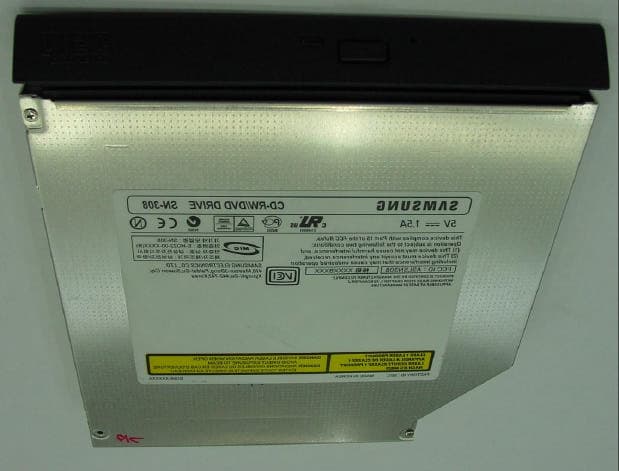
Click to zoom
Application Details
- Equipment Class
- JBP - Part 15 Class B Computing Device Peripheral
- Date of Grant
- Jun 26, 2001
- Application Purpose
- Original Equipment
- Date of Application
- Jun 25, 2001
- Equipment Note
- Internal CD-RW/DVD ROM Drive
- Company
- Samsung Electronics Co Ltd
- Country
- United States
Documents & Files
Document Text
Text extracted from the exhibit documents filed with the FCC. Open a document above to read the original.
Users Manual
SAMSUNG SN-308 CD-RW/DVD ROM Drive User's Guide The information below is provided by the supplier of the referenced device without independent verification by Dell and is subject to the restrictions and disclaimers noted below. Information in this document is subject to change without notice. © 2001 SAMSUNG Electronics Co.,LTD. All rights reserved. Trademarks used in this text: SAMSUNG is trademarks of SAMSUNG Electronics Co.,LTD.; Dell and the DELL logo are trademarks of Dell Computer Corporation. Microsoft and Windows are registered trademarks of Microsoft Corporation. Restrictions and Disclaimers The information contained in this document, including all instructions, cautions, and regulatory approvals and certifications, is provided by the supplier and has not been independently verified or tested by Dell. Dell cannot be responsible for damage caused as a result of either following or failing to follow these instructions. All statements or claims regarding the properties, capabilities, speeds or qualifications of the part referenced in this document are made by the supplier and not by Dell. Dell specifically disclaims knowledge of the accuracy, completeness or substantiation for any such statements. All questions or comments relating to such statements or claims should be directed to the supplier. Initial release: May, 2001 Introduction Setup Using the CD-RW/DVD ROM Drive Troubleshooting Specifications Drive Connectors Regulatory FCC Compliance This equipment has been tested and found to comply with the limits for a Class B digital device, pursuant to Part 15 of the FCC rules. These limits are designed to provide reasonable protection against harmful interference in a residential installation. This equipment generates, uses, and can radiate radio frequency energy and, if not installed and used in accordance with the instructions, may cause harmful interference to radio communications. However, there is no guarantee that interference will not occur in a particular installation. If this equipment does cause harmful interference to radio or television reception, which can be deter-mined by turning the equipment off and on, the user is encouraged to try to correct the interference by one or more of the following measures: Re-orient or relocate the receiving antenna. Increase the separation between the equipment and receiver. Connect the equipment into an outlet on a circuit different from that to which the receiver is connected. Consult the dealer or an experienced radio/TV technician for help. Back to Contents Page Introduction: SAMSUNG SN-308 CD-RW/DVD ROM Drive User's Guide Manufacturer model name and number • Drive speed • Bus interface • Types of disc formats supported • Software support • Features • Configuration • Front View Drive has capability of reading CD, DVD and writing CD-R and CD-RW media through the use of Standard sofware required to operate traditional CD, CD-RW and DVD Drives. Manufacturer model name and number SAMSUNG SN-308 Drive speed Read : DVD : 8X CD-ROM : 24X CD-RW : 8X Write : CD-R : 2X. 4X. 8X CD-RW : 2X. 4X, 8X Bus interface ATAPI BUS(IDE) Types of disc formats supported DVD : DVD-5 : single-sided, single-layer format (4.3 GB) DVD-9 : single-sided, dual-layer format (~ 7.9 GB) DVD-10 : double-sided, single-layer format (~ 8.7 GB) DVD-18 : double-sided, dual-layer format (~ 15.9 GB) DVD-R : V1.9 CD : CD-DA CD-ROM(Mode-1,2) CD-ROM XA(Mode-2, Form-1,2) Photo-CD(Single, Multi-Session) VIDEO-CD ready CD-I(FMV) CD-Plus CD Extra CD-R(Read/Write) CD-RW(Read/Write) CD-TEXT Software support ? Easy CD Creator Ver 4.04d10 or higher ? CLONE Ver 2.67 or higher ? Winon CD Ver 3.7 or higher ? Juggler Ver 3.0 or higher Features ? Disc loading mechanism This drive uses motor solenoid mechanism. ? 3-way disc ejection Eject button, Software and Emergency Eject Hole ? Average access time ? Audio capability Audio capability follows the industry standard CD-Audio format. ? MPC3 compatibility Compatible Configuration This CD-RW/DVD ROM drive should be used only in its current hardware and software configuration. Front View DVD120msec (1/3 stroke) CD-R/RW120msec (1/3 stroke) 1.LED This indicator lights green while data is being read. 2.Eject button 3.Emergency Eject Hole If the disc tray does not open when you press the Eject button, insert a small, metal rod(an unwound paper clip for example) into this hole to eject the disc. * This function should only be performed when the computer is powered OFF. 4.Disc Tray The Disc Tray will be open a little when you press the Eject button. Then you should pull the Tray open completely. * When you place a disc in the tray, make sure that the label on the disc is facing upwards. Please read all restrictions and disclaimers. Back to Contents Page Back to Contents Page Setup: SAMSUNG SN-308 CD-RW/DVD ROM Drive User's Guide Dell Installed Drives • Drives Purchased Separately as Customer Kits Dell Installed Drives Dell performs the installation and setup on CD-RW/DVD ROM drives that are shipped as part of a system, including loading the appropriate device drivers when the operating system is installed. The drive is ready for use when you receive your system. No further installation or configuration is necessary. Drives Purchased Separately as Customer Kits Installing the Drive ? Install and configure the drive according to the instructions provided in the Dell documentation for your system. Verify Drive Operation by playing an Audio CD 1.Insert an Audio CD into the CD Tray. 2.Press the CD Tray until the tray is closed completely. 3.Audio CD will start playing (If Audio CD does not start-up, see Troubleshooting section). Please read all restrictions and disclaimers. Back to Contents Page Note: To help avoid possible damage to the system board, unplug the computer system and wait 15 to 20 seconds for the standby power to dissipate before adding or removing any components from the system. Note: If customer has an older version of the NT file called cdau…
Text truncated - open the document above for the full version.
Block Diagram
This report shall not be reproduced except in full, without the written approval of SEC EMC Testing laboratory.
External Photos
This report shall not be reproduced except in full, without the written approval of SEC EMC Testing laboratory.
ID Label/Location Info
This report shall not be reproduced except in full, without the written approval of SEC EMC Testing laboratory. This report shall not be reproduced except in full, without the written approval of SEC EMC Testing laboratory.
Internal Photos
This report shall not be reproduced except in full, without the written approval of SEC EMC Testing laboratory. This report shall not be reproduced except in full, without the written approval of SEC EMC Testing laboratory. This report shall not be reproduced except in full, without the written approval of SEC EMC Testing laboratory.
Test Report
Page 1 of 13 Project NO. : SE-01-0096 Project NO. : SE-01-0096 Product :Slim CD-ReWritable/ DVD ROM DRIVE Model No. :SN-308 FCC ID. :A3LSN308 Date of test : June 4, 2001 Issued Date : June 8, 2001 Tested by: No Cheon, PARK / Test Engineer Reviewed by: Seung Kyu, CHA / Manager of EMC Lab. Authorised by: Taek Jeong, SHIN / Chief of EMC Lab. SAMSUNG ELECTRONICS Co., Ltd. Suwon EMC Test Laborator y 416 Maetan-3 Dong, Paldal-Ku, Suwon City, Kyungki-Do, Korea,442-742 Tel. : 81-31-200-2185 Fax. : 81-31-200-2189 This report shall not be reproduced except in full, without the written approval of SEC EMC Testing laboratory. EMC TEST REPORT According to FCC Part 15B Class B Page 2 of 13 Project NO. : SE-01-0096 Table of Contents 1. General Information 1.1 Product Description 1.2 Tested System Details 1.3 Configuration of EUT and peripherals 1.4 Used Cable Description 1.5 System Block Diagram of Test Configuration 2. System Test Configuration 2.1 Configuration of Radiated and Conducted Interference Measurement 2.2 Operation Enviroment 2.3 Justification 2.4 EUT Exercise Soft ware 2.5 Test Procedure 3. Conducted Emission Test Data 4. Radiated Emission Test Data 5. Test Equipment Used This report shall not be reproduced except in full, without the written approval of SEC EMC Testing laboratory. Page 3 of 13 Project NO. : SE-01-0096 1. General Information APPLICANT :SAMSUNG ELECTRONICS CO., LTD. ADDRESS :416 Maetan 3 Dong, Paldal-Ku, Suwon City, Kyungki Do, Korea, 442-742 CONTACT PERSON :Son Mun Eul CONTACT ADDRESS :416 Maetan 3 Dong, Paldal-Ku, Suwon City, Kyungki Do, Korea, 442-742 REGULATION(S) :FCC Part 15B Class B MODEL NUMBER :SN-308(Trade Name "SAMSUNG") VARIANT MODEL NUMBER :- SERIAL NUMBER :- KIND OF PRODUCT :Slim CD-ReWritable/ DVD ROM DRIVE TESTED DATE :June 4, 2001 TEST SITE :SAMSUNG EMC TEST LAB. FCC Registration Number: 98856 Anechoic Chamber #1 This report shall not be reproduced except in full, without the written approval of SEC EMC Testing laboratory. Page 4 of 13 Project NO. : SE-01-0096 1.1 Product Description Speed CD : 24X, DVD : 8X, CD/RW : 8X Access Time CD 120ms, DVD 120ms, CD/RW 120ms Buffer 2048KB Interface ATAPI BUS(IDE) Size 1.2 Tested System Details MakersProduct ModelFCC IDSerial NumberRemarks (1) SAMSUNG Slim CD-ReWritable/ DVD ROM DRIVE EUT M/N : SN-308A3LSN308S/N : - (2) PHILIPS External Monitor Unshielded AC Power Cable M/N : 109PA3KM092S/N : 4882A217 (3) COMPAQ PS/2 Mouse Shielded Mouse Cable M/N : M-S48aJNZ201213S/N : 4882A001 (4) COMPAQ USB Keyboard Shielded Keyboard Cable M/N :SDM4540UL DOCS/N : 3892A630 (5) Dell Notebook Computer - M/N :LATITUDE(C600) DOCS/N : TW-0791UH (6) HPDSI6XU2225 Printer Shielded Printer Cable M/N :2225C+S/N : 2814S11345 (7) KOXOMEar PhoneShielded Ear Phone Cable M/N : -S/N : - (8) DellDOC AC Adapter Unshielded AC Power Cable M/N : ADP-70EB S/N : TH-09364U Unshielded DC Power Cable (9) SejinGJJS965M3Serial MouseShielded Mouse Cable M/N: SMB-400S/N : 7DEF021843 This report shall not be reproduced except in full, without the written approval of SEC EMC Testing laboratory. 128 * 12.7 * 129 mm Page 5 of 13 Project NO. : SE-01-0096 1.3 Configuration of EUT and peripherals MarkItemModel No.Serial No.ManufacturerRemark A Slim CD-ReWritable/ DVD ROM DRIVE SN-308-SamsungEUT BExternal Monitor109P 4882A217PHILIPS CNotebook Computer LATITUDE(C600) TW-0791UHDELL DPS/2 MouseM-S48a4882A001COMPAQ EUSB KeyboardSDM4540UL3892A630COMPAQ FEar phone- -KOXOM GPrinter2225C+2814S11345HP HAC AdapterADP-70EBTH-09364UDELL ISerial MouseSMB-4007DEF021843SEJIN 1.4 Used Cable Description No.ItemLength[m]Shielded(Y/N) 1AC Power Cable1.5N 2AC Power Cable1.5N 3Earphone Cable1.5Y 4Mouse Cable1.5Y 5Keyboard Cable1.5Y 6AC Power Cable1.5N 7DC Power Cable1.5N 8Monitor Cable1.2Y 9Printer Cable1.5Y 10 Mouse Cable1.5Y This report shall not be reproduced except in full, without the written approval of SEC EMC Testing laboratory. Remark Page 6 of 13 Project NO. : SE-01-0096 1.5 System Block Diagram of Test Configuration This report shall not be reproduced except in full, without the written approval of SEC EMC Testing laboratory. I II I 10 1010 10 G GG G C B F D E 5 4 1 3 2 A G H 8 9 6 7 Page 7 of 13 Project NO. : SE-01-0096 2. System Test Configuration 2.1 Configuration of Radiated and Conducted Interference Measurement * Cabling was taken into consideration and test data was taken under worse case conditions. 1)Conduction(Front View) 2)Conduction(Rear View) This report shall not be reproduced except in full, without the written approval of SEC EMC Testing laboratory. Page 8 of 13 Project NO. : SE-01-0096 3) Radiation(Front View) 4) Radiation(Rear View) This report shall not be reproduced except in full, without the written approval of SEC EMC Testing laboratory. Page 9 of 13 Project NO. : SE-01-0096 2.2 Operation Enviroment ConductionRadiation Temperature [centigrade] : 2524.5 Humidity [%] : 4545 Power supply : AC120V/60HzAC120V/60Hz 2.3 Justification The system was configured in typical fashion(as a customer would normally use it) for testing. 2.4 EUT Exercise Soft ware The EUT exercise program used during radiated and conducted testing was designed to exercise the various system components in a manner similar to typical use. 2.5 Test Procedure 2.5.1 Conducted Emissions Eut was placed on a platform of nominal size, 1m by 1.5m, raised 80cm above the conducting ground plane. The rear of tabletop was located 40cm to the vertical conducting ground plane. The rear of EUT,including peripherals was aligned and flush with rear of tabletop. All other surfaces of tabletop was at least 80cm from any other grounded conducting surface. I/O cables and AC cables that were connected to the peripherals were bundled in center. They were folded back and forth forming a bundle 30cm to 40cm long and were hanged at a 40cm height to the ground plane. Each EUT current-carrying power lead,except the ground(safety) lead, were individually connected through a LISN to the input power source. This report shall…
Text truncated - open the document above for the full version.
Test Setup Photos
Page 7 of 13 Project NO. : SE-01-0096 2. System Test Configuration 2.1 Configuration of Radiated and Conducted Interference Measurement * Cabling was taken into consideration and test data was taken under worse case conditions. 1)Conduction(Front View) 2)Conduction(Rear View) This report shall not be reproduced except in full, without the written approval of SEC EMC Testing laboratory. Page 8 of 13 Project NO. : SE-01-0096 3) Radiation(Front View) 4) Radiation(Rear View) This report shall not be reproduced except in full, without the written approval of SEC EMC Testing laboratory.
Contact Information
Applicant
Jenni Chun(General Manager)
Technical Contact
PCTEST Engineering Lab., Inc.Randy Ortanez
[email protected]410-290-6652
6660-B Dobbin Road · Columbia, Maryland · United States
Test Firm
Samsung Electronics Co., Ltd.T. Shin
Technical Specifications
| # | Rule Parts | Frequency Range | Power Output |
|---|---|---|---|
| 1 | 15B | - | - |
Other Applications from Samsung Electronics Co Ltd
A3LSMS741B
Aug 05, 2026Portable Handset
Equipment Class
6VL - 15E 6 GHZ Very Low Power DeviceA3LSMX940
Jul 31, 2026BT,BLE Tablet DTS,UNII a,b,g,n,ac,ax,be and digitizer
Equipment Class
DTS - Digital Transmission SystemA3LSMS741U
Jul 30, 2026Portable Handset
Equipment Class
6CD - 15E 6 GHz Low Power Dual ClientA3LSMX840
Jul 27, 2026BT,BLE Tablet DTS,UNII a,b,g,n,ac,ax and Digitizer
Equipment Class
DSS - Part 15 Spread Spectrum TransmitterA3LSMX848U
Jul 27, 2026WCDMA, LTE, 5G NR Tablet BT,BLE, DTS,UNII a b g n ac ax and Digitizer
Equipment Class
JBP - Part 15 Class B Computing Device Peripheral