A3LSPHN195Single-Mode PCS Phone
Samsung Electronics Co Ltd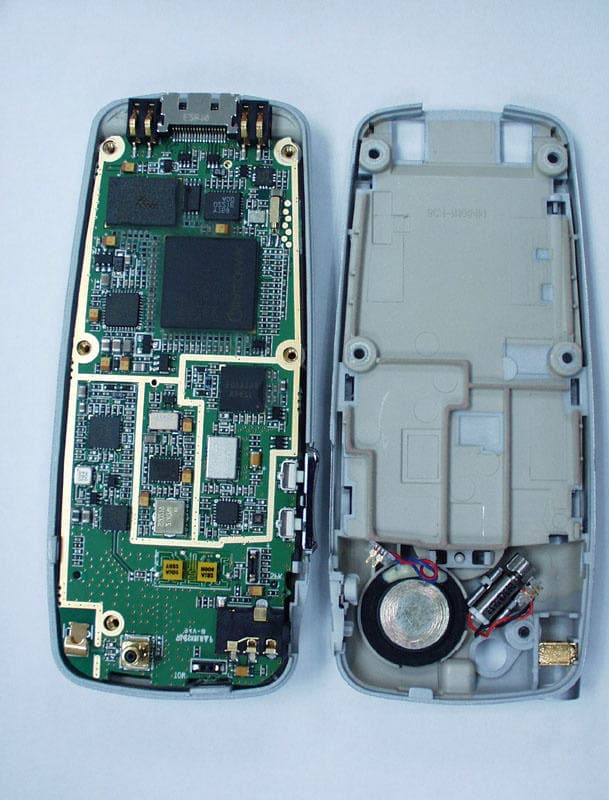
Click to zoom
Application Details
- Equipment Class
- PCE - PCS Licensed Transmitter held to ear
- Date of Grant
- Nov 07, 2002
- Application Purpose
- Original Equipment
- Date of Application
- Nov 07, 2002
- Equipment Note
- Single-Mode PCS Phone
- Frequency Range
- 1851.25000000 - 1908.75000000
- Company
- Samsung Electronics Co Ltd
- Country
- United States
Documents & Files
Document Text
Text extracted from the exhibit documents filed with the FCC. Open a document above to read the original.
Users Manual
ELECTRONICS World Wide Web http://www.samsungmobile.com SPH-N195 User’s Manual Printed in Korea Código No.: GH68-xxxxxA English. 09/2002.Rev.1.0 Please read this manual before operating your phone, and keep it for future reference. 3rd version (2002.09.18) The reference page numbers in text and the index will be updated when the manual is fixed. 3 IMPORTANT SAFETY PRECAUTIONS............................................... 7 UNPACKING...................................................................................... 9 YOUR PHONE Phone Layout .................................................................................... 10 Display .............................................................................................. 13 Service Light ...................................................................................... 15 GETTING STARTED Installing the Battery .......................................................................... 16 Charging the Battery ........................................................................... 17 Switching the Phone On/Off ................................................................ 20 Your Phone’s Mode ............................................................................ 21 CALL FUNCTIONS Making a Call ..................................................................................... 23 Adjusting the Volume ........................................................................... 31 Answering a Call ................................................................................. 32 Options During a Call .......................................................................... 33 Using the Caller ID .............................................................................. 34 Viewing Missed Calls ........................................................................... 35 Quickly Switching to Silent Mode ......................................................... 35 Call Forwarding .................................................................................. 35 Call Waiting ........................................................................................ 36 Three-Way Calling ............................................................................... 37 ENTERING TEXT Changing the Text Input Mode ............................................................. 39 T9 Mode .............................................................................................. 40 ABC Mode ........................................................................................... 42 Symbol Mode ...................................................................................... 44 123 Mode ........................................................................................... 44 Table of Contents 45 USING THE MENUS Accessing a Menu Function by Scrolling .................................................45 Accessing a Menu Function by Using Its Shortcut.................................... 46 List of Menu Functions ......................................................................... 47 CALLS Outgoing(MENU 1-1) ................................................................... 51 Incoming (MENU 1-2) ................................................................... 52 Missed (MENU 1-3)........................................................................ 52 Erase Logs (MENU 1-4).................................................................. 53 Air Time (MENU 1-5)...................................................................... 53 PHONE BOOK Find Name(MENU 2-1)................................................................ 54 Add Entry (MENU 2-2).................................................................. 55 Find Entry (MENU 2-3)................................................................. 58 Relation Search (MENU 2-4)........................................................... 58 Add E-mail (MENU 2-5)................................................................. 59 Memory Info (MENU 2-6)............................................................. 59 Group Color (MENU 2-7)............................................................... 59 WEB About the Web Browser ...................................................................... 60 Get In Web (MENU 3-1)................................................................. 61 Prompt (MENU 3-2)........................................................................ 64 SCHEDULER Today(MENU 4-1)........................................................................ 65 View Month (MENU 4-2)............................................................... 67 Jump To Date (MENU 4-3)............................................................ 68 To Do List (MENU 4-4).................................................................. 69 Count Down (MENU 4-5)............................................................... 70 World Time (MENU 4-6) ................................................................ 71 Calculator (MENU 4-7).................................................................. 72 Alarm (MENU 4-8) ........................................................................ 73 SOUNDS Ringer Volume (MENU 5-1)........................................................... 74 Ringer Type (MENU 5-2)............................................................... 75 Key Beep (MENU 5-3).................................................................. 75 Alerts (MENU 5-4)........................................................................ 76 Voice Volume (MENU 5-5).............................................................. 77 Roam Ringer (MENU 5-6)............................................................. 77 Power On/Off (MENU 5-7)........................................................... 77 DISPLAY Backlight(MENU 6-1)................................................................... 78 Banner (MENU 6-2)............................…
Text truncated - open the document above for the full version.
Users Manual
69 SScchheedduulleerr 68 SScchheedduulleerr Viewing an Event Days with scheduled events are indicated by a underline on the calendar when you access the View Month menu option (MENU 4-2). Select one of them, and press . The first event of the day is displayed. If necessary, when an event is displayed, press to access the options. For further details on the options, refer to “Today” on page 66. Jump To DateMENU 4-3 This feature allows you to specify the calendar date you want to view. You can enter, edit and delete events on the day in your calendar. Enter a date using the numeric keys, and press . To create, edit or erase events, refer to “Today” on page 66. To Do ListMENU 4-4 This feature allows you to enter up a list of tasks to be done and assign both a priority and a deadline to each task. Creating a To Do Item 1. Enter the first task. You can enter up to 32 characters. For further details on how to enter characters, see page 39. 2. Press to confirm your input. 3. Enter your deadline using the numeric keys, and press . You can move to each input field using and .You must enter the hour in 12-hour format. Press for A (AM) or press for P (PM). 4. Select high or low priority using or and then press to store the task. Viewing a To Do Item The first task is displayed with the deadline and the associated priority (!for High or-for Low) when you select the To Do Listmenu option (MENU 4-4). Scroll to the task you want to view by pressing or . 71 SScchheedduulleerr 70 SScchheedduulleerr While viewing a task, the following options available when you press . Add new:allows you to add a new task. Edit: allows you to edit the current task. Erase: allows you to erase the current task. Erase all: allows you to erase all of the tasks. Count DownMENU 4-5 This menu help you know how much time it takes you to do something, or how many months, days, hours and minutes until a specific day arrives. You can create up to 20 Count down timers using this menu. Creating a Count Down Timer 1. Enter a name for your new Count down timer and press . For further details about entering text, see page 39. 2. Enter the date and time that you want to count down from using the numeric keys. You can move to each input field using and . You must enter the hour in 12-hour format. Press for A (AM) or press for P (PM). Note: You can enter a year between 1980 and 2099. 3. Press to save the timer. Viewing a Count Down Timer The first Count Down timer is displayed when you select the Count Down menu option (MENU 4-5). Scroll to the timer you want to view by pressing or . While viewing a count down timer, the following options are available when you press . Add new:allows you to create a new timer. Edit :allows you to edit the current timer. Erase :allows you to delete the current timer. Erase all :allows you to delete all of the timers. World TimeMENU 4-6 You can use this menu option to find out what time it is in another part of the world. Select the city corresponding to your time zone by pressing or one or more times. The local date and time are displayed. 73 SScchheedduulleerr 72 SScchheedduulleerr CalculatorMENU 4-7 Using this feature, you can use the phone as a calculator. The calculator provides the basic arithmetic functions; addition, subtraction, multiplication and division. 1. Enter the first number using the numeric keys. 2. Set the operation for your calculation by pressing or until the required arithmetic symbol appears: +(add), -(subtract), x(multiply), /(divide). 3. Enter the second number. 4. To get the result, press . 5. Repeat Steps 1 to 4 as many times as required. Each time you change the operator, the previous calculation is performed and the result is displayed as the top number on the display. Notes: • To erase any mistakes or clear the display, press . • Use to enter a decimal point and to change the sign of a number to a negative (-). Alarm MENU 4-8 This option allows you to set an alarm to ring at a specific time or release it. To set an alarm: 1. When Setis highlighted, press . 2. Select the alarm frequency option by pressing or and press . • Once: the alarm rings only once and is then deactivated. • Daily: the alarm rings every day at the same time. 3. Enter the required time for the alarm to ring using the numeric keys. You can move to each input field using and . You must enter the hour in 12-hour format. Press for A (AM) or for P (PM). 4. Press to save the setting. To stop the alarm when it rings, press any key. To release the alarm, access the Alarmmenu option (MENU 4-8) and select Release. 7574 Sounds You can use the Sounds menu to customize various sound settings, such as the: •Ringer volume, type and tone. •Key beep and voice volume. • Alert sounds and a ringer for the roaming calls. •Ringer which sounds when the phone is switched on or off. Ringer VolumeMENU 5-1 This menu option allows you to adjust the ringer volume for the following items: Calls: allows you to adjust the ringer volume for incoming voice calls. Note: In standby mode, you can adjust the volume using the volume keys on the left side of the phone. Alarm: allows you to adjust the ringer volume for an alarm. For each items, you can select one of the following settings: 1 ~ 5lvl: you can adjust the volume level. The more bars you see, the louder the ringer. Vib:the phone switches to vibration mode. An incoming call vibrates the phone. Beep: the phone sounds a beep. Off: the phone does not sound the ringer. SSoouunnddss Ringer TypeMENU 5-2 This option allows you to set unique ringers for the following items: Voice Calls: allows you to set a unique ringer for incoming voice calls. Alarm: allows you to have a distinctive ringer for an alarm. Data/Fax In: allows you to be alerted with a distinctive ringer tone when you receive faxes or data through the phone. This feature may be unavailable depending upon your network. Schedule: allows you to have a distinctive ringer for schedule alarm. For each items, you can select a unique ringer…
Text truncated - open the document above for the full version.
Attestation Statements
October 28, 2002 Federal Communications Commission Authorization and Evaluation Div. Equipment Authorization Branch 7435 Oakland Mills Road Columbia, MD 21046 In re: Samsung Electronics Co., Ltd. FCC ID.: A3LSPHN195 Request for Confidentiality To Whom It May Concern: In accordance with 0.459 of CFR 47, Samsung Electronics Co., Ltd. requests confidentiality for the Block Diagram, Schematics, Parts list, Tune-up Procedure, Operational and Circuit Description of the attached test report. These documents contain detailed system and equipment descriptions and related information about the product, which Samsung Electronics Co., Ltd. considers to be proprietary, confidential, and a custom design and otherwise, would not release to the general public. Since this design is a basis from which future technological products will evolve, Samsung feels that this information would be of benefit to its competitors, and that the disclosure of the information in these documents would give our competitors an unfair advantage in the market.
Attestation Statements
October 28, 2002 Federal Communications Commission Authorization and Evaluation Div. Equipment Authorization Branch 7435 Oakland Mills Road Columbia, MD 21046 To whom it may concern: We, the undersigned, hereby authorize PCTEST Engineering Laboratory Inc., to act as agent on behalf of all matters relating to applications for equipment authorization, including the signing of all documents relating to these matters. Any and all acts carried out by PCTEST Engineering Laboratory, Inc. on our behalf shall have the same effect as acts of our own. We also hereby certify that no party to this application is subject to a denial of benefits, including FCC benefits, pursuant to Section 5301 of the Anti-Drug Abuse Act of 1988,21 U.S.C.862. Sincerely, Wallace Oh Engineering Manager Samsun Electronics America October 28, 2002 Federal Communications Commission Equipment Approval Services 7435 Oakland Mills Road Columbia, MD 21046 SUBJECT:Samsung Electronics Co., Ltd. FCC ID: A3LSPHN195 Users Manual RF Exposure Warning Statement Gentlemen: Samsung Electronics Co., Ltd., hereby confirms that the attached RF exposure warning page will be readily visible to the user, and will be placed at a prominent location in the front section of the users manual. If you have any further questions regarding this matter, please do not hesitate to contact me or PCTEST Lab at (410) 290-6652.
Cover Letter(s)
October 28, 2002 Federal Communications Commission Equipment Approval Services 7435 Oakland Mills Road Columbia, MD 21046 SUBJECT: SAMSUNG Electronics Co., Ltd. FCC ID: A3LSPHN195 Part 24 Certification Gentlemen: Submitted herewith, on behalf of SAMSUNG Electronics Co., Ltd., is an application for Part 24 Certification of the Single-Band PCS Phone. Attached is the applicant’s Letter of Authorization, Confidentiality Request, measurement report test data and plots, RF Exposure measurement report and data, FCC ID label and location, test setup photographs, internal and external photographs, block diagram (confidential), circuit diagrams & description (confidential), operational description (confidential), parts list & tune-up procedure (confidential), and the user's manual. Should you have any questions or comments concerning the above, please contact the undersigned. cc: SAMSUNG Electronics Co., Ltd.
ID Label/Location Info
© 2002PCTEST Lab FCC ID SAMPLE LABEL & LOCATION LABELLING REQUIREMENTS PER §§ 2.925 The Label shown shall be permanently affixed at a conspicuous location on the device and be readily visible to the user at the time of purchase. (SEE NEXT PAGE) SAMSUNG ELECTRONICS CO., LTD. MODEL NO: SPH-N195 FCC ID: A3LSPHN195 MADE IN KOREA SAMSUNG ELECTRONICS CO., LTD
Internal Photos
© 2002 SAMSUNG ELECTRONICS Co., Ltd. SAMSUNG FCC ID: A3LSPHN195 Single-Band PCS Phone © 2002 SAMSUNG ELECTRONICS Co., Ltd. SAMSUNG FCC ID: A3LSPHN195 Single-Band PCS Phone © 2002 SAMSUNG ELECTRONICS Co., Ltd. SAMSUNG FCC ID: A3LSPHN195 Single-Band PCS Phone
RF Exposure Info
2 of 25 Contents 1. General Information.............................................................................................3 2. Description of Device...........................................................................................3 3. Description of Test Equipment..............................................................................4 3.1 SAR Measurement Setup.........................................................................................4 3.2 DASY3 E-Field Probe.............................................................................................5 3.3 SAM Phantom.....................................................................................................6 3.4 Brain & Muscle Simulating Mixture Characterization....................................................7 3.5 Device Holder for transmitters.................................................................................8 3.6 Validation Dipole...................................................................................................8 3.7 Equipment Calibration.............................................................................................9 4. SAR Measurement Procedure.............................................................................10 5. Description of test position..............................................................................11 5.1 SAM Phantom Shape............................................................................................11 5.2 Cheek/Touch Position............................................................................................11 5.3 Ear/Tilt 15 Position..............................................................................................13 5.4 Body/Holster/Belt Clip Configuration.......................................................................14 6. Measurement Uncertainty..................................................................................16 7. System Verification.........................................................................................17 7.1 Tissue Verification..............................................................................................17 7.2 Test System Validation...........................................................................................17 8. SAR Measurement Results.................................................................................18 8.1 Measurement Results(PCS CDMA Right Head SAR-Touch)........................................19 8.2 Measurement Results(PCS CDMA Right Head SAR-Tilt)............................................20 8.3 Measurement Results(PCS CDMA Left Head SAR-Touch)..........................................21 8.4 Measurement Results(PCS CDMA Left Head SAR-Tilt)...............................................22 8.5 Measurement Results(PCS CDMA Body SAR w/o Holster)........................................23 9. Conclusion.......................................................................................................24 10. Reference......................................................................................................25 3 of 25 1. GENERAL INFORMATION Test Sample : Single-Band PCS Only Phone Model Number : SPH-N195 Serial Number : Identical prototype (S/N : # 1) Manufacturer : SAMSUNG ELECTRONICS Co., Ltd. Contact : JH Lee, Technical Manager Phone : +82-31-279-6267 Fax : +82-31-279-6323 Test Standard : §2.1093; FCC/OET Bulletin 65, Supplement C(July 2001) FCC Classification : Licensed Portable Transmitter Held to Ear (PCE) Test Dates : October 4, 2002 Tested for : FCC/TCB Certification 2. DESCRIPTION OF DEVICE Tx Freq. Range : 1851.25 – 1908.75 MHz (PCS CDMA) Rx Freq. Range : 1931.25 – 1988.75 MHz (PCS CDMA) Max. RF Output Power : 0.365W EIRP PCS ( 25.621dBm) Antenna Manufacturer : RETRACTABLE ANT. Model No : NSB115A-01S1800 – SS166 (silver) Antenna Dimensions : Length = 74.0mm ± 1.0mm 4 of 25 3. DESCRIPTION OF TEST EQUIPMENT 3.1 SAR Measurement Setup Robotic System Measurements are performed using the DASY3 automated dosimetric assessment system. Which is made by Schmid & Partner Engineering AG (SPEAG) in Zurich, Switzerland and consists of high precision robotics system (Stäubli), robot controller, Pentium computer, near-field probe, probe alignment sensor, and the SAM twin phantom containing the brain equivalent material. The robot is a six-axis industrial robot performing precise movements to position the probe to the location (points) of maximum electromagnetic field (EMF) (see Fig. 3.1). Figure 3.1 SAR Measurement System Setup System Hardware A cell controller system contains the power supply, robot controller, teach pendant (Joystick), and a remote control is used to drive the robot motors. The PC consists of the Samsung Pentium 550MHz computer with Windows 2000 system and SAR Measurement Software DASY3, A/D interface card, LCD monitor, mouse and keyboard. The Stäubli Robot is connected to the cell controller to allow software manipulation of the robot. A data acquisition electronic (DAE) circuit that performs the signal amplification, signal multiplexing, AD-conversion, offset measurements, mechanical surface detection, collision detection, etc. is connected to the Electro-optical coupler (EOC). The EOC performs the conversion from the optical into digital electric signal of the DAE and transfers data to the PC plug-in card. 5 of 25 System Electronics The DAE3 consists of a highly sensitive electrometer-grade preamplifier with auto-zeroing, a channel and gain-switching multiplexer, a fast 16-bit AD-converter and a command decoder and control logic unit. Transmission to the PC-card is accomplished through an optical downlink for data and status information and an optical uplink for commands and clock lines. The mechanical probe mounting device includes two different sensor systems for frontal and sidewise probe contacts. They are also used for mechanical surface detection and probe…
Text truncated - open the document above for the full version.
RF Exposure Info
SAMSUNG FCC ID: A3LSPHN195 -- 1900MHz. PCS CDMA Head SAR SAM Phantom; Right Hand Section; Probe:ET3DV6 - SN1660 -- ConvF(5.20,5.20,5.20) Head 1900 MHz Brain: σ = 1.43 mho/m ε r = 38.3 ρ = 1.00 g/cm 3 ; Antenna Position -- In; Crest Factor 1.0 SAR (1g): 0.613 mW/g SAMSUNG Single - Band Model: SPH-N195 1900 PCS CDMA Mode, Ch.600 [1880.0MHz]; Standard Battery: Meas. Ambient Temp. (°C) - 21.3 Conducted Power = 24.5dBm; Right Head Phantom, Cheek/Touch Position: Meas. Tissue Temp. (°C) - 20.2 Test Date -- 10/04/2002 [FCC/OET Bulletin 65 - Supplement C, July 2001] SAR Tot [mW/g] 5.63E-2 1.69E-1 2.82E-1 3.94E-1 5.07E-1 SAMSUNG ELECTRONICS CO., Ltd. SAMSUNG FCC ID: A3LSPHN195 -- 1900MHz. PCS CDMA Head SAR SAM Phantom; Right Hand Section; Probe:ET3DV6 - SN1660 -- ConvF(5.20,5.20,5.20) Head 1900 MHz Brain: σ = 1.43 mho/m ε r = 38.3 ρ = 1.00 g/cm 3 ; Antenna Position -- In; Crest Factor 1.0 SAR (1g): 0.862 mW/g, SAMSUNG Single - Band Model: SPH-N195 1900 PCS CDMA Mode, Ch.600 [1880.0MHz]; Standard Battery: Meas. Ambient Temp. (°C) - 21.3 Conducted Power = 24.5dBm; Right Head Phantom, Ear/Tilt 15 deg Position: Meas. Tissue Temp. (°C) - 20.2 Test Date -- 10/04/2002 [FCC/OET Bulletin 65 - Supplement C, July 2001] SAR Tot [mW/g] 8.35E-2 2.51E-1 4.17E-1 5.85E-1 7.51E-1 SAMSUNG ELECTRONICS CO., Ltd. SAMSUNG FCC ID: A3LSPHN195 -- 1900MHz. PCS CDMA Head SAR SAM Phantom; Left Hand Section; Probe:ET3DV6 - SN1660 -- ConvF(5.20,5.20,5.20) Head 1900 MHz Brain: σ = 1.43 mho/m ε r = 38.3 ρ = 1.00 g/cm 3 ; Antenna Position -- In; Crest Factor 1.0 SAR (1g): 0.838 mW/g SAMSUNG Single - Band Model: SPH-N195 1900 PCS CDMA Mode, Ch.1175 [1908.75MHz]; Standard Battery: Meas. Ambient Temp. (°C) - 21.3 Conducted Power = 24.5dBm; Left Head Phantom, Cheek/Touch Position: Meas. Tissue Temp. (°C) - 20.2 Test Date -- 10/04/2002 [FCC/OET Bulletin 65 - Supplement C, July 2001] SAR Tot [mW/g] 5.95E-2 1.78E-1 2.97E-1 4.16E-1 5.35E-1 SAMSUNG ELECTRONICS CO., Ltd. SAMSUNG FCC ID: A3LSPHN195 -- 1900MHz. PCS CDMA Head SAR SAM Phantom; Left Hand Section; Probe:ET3DV6 - SN1660 -- ConvF(5.20,5.20,5.20) Head 1900 MHz Brain: σ = 1.43 mho/m ε r = 38.3 ρ = 1.00 g/cm 3 ; Antenna Position -- In; Crest Factor 1.0 SAR (1g): 1.15 mW/g SAMSUNG Single - Band Model: SPH-N195 1900 PCS CDMA Mode, Ch.600 [1880.0MHz]; Standard Battery: Meas. Ambient Temp. (°C) - 21.3 Conducted Power = 24.5dBm; Left Head Phantom, Ear/Tilt 15 deg Position: Meas. Tissue Temp. (°C) - 20.2 Test Date -- 10/04/2002 [FCC/OET Bulletin 65 - Supplement C, July 2001] SAR Tot [mW/g] 8.58E-2 2.57E-1 4.29E-1 6.01E-1 7.72E-1 SAMSUNG ELECTRONICS CO., Ltd. SAMSUNG FCC ID: A3LSPHN195 -- 1900MHz. PCS CDMA BodySAR SAM Phantom; Flat Section; Probe:ET3DV6 - SN1660 -- ConvF(4.80,4.80,4.80) Body 1900 MHz Brain: σ = 1.53 mho/m ε r = 54.1 ρ = 1.00 g/cm 3 ; Antenna Position -- In; Crest Factor 1.0 SAR (1g): 0.457 mW/g SAMSUNG Single - Band Model: SPH-N195 1900 PCS CDMA Mode, Ch.1175 [1908.75MHz]; Standard Battery: Meas. Ambient Temp. (°C) - 21.5 Conducted Power = 24.5dBm; Spacing = 1.5cm. from flat phantom to phone, w/o beltclip or holster, Meas. Tissue Temp. (°C) - 20.4 Test Date -- 10/02/2002 [FCC/OET Bulletin 65 - Supplement C, July 2001] SAR Tot [mW/g] 4.94E-2 1.48E-1 2.47E-1 3.46E-1 4.45E-1 SAMSUNG ELECTRONICS CO., Ltd.
RF Exposure Info
© 2002 SAMSUNG ELECTRONICS Co., Ltd. SAMSUNG FCC ID: A3LSPHN195 Single-Band PCS Phone © 2002 SAMSUNG ELECTRONICS Co., Ltd. SAMSUNG VFCC ID: A3LSPHN195 Single-Band PCS Phone © 2002 SAMSUNG ELECTRONICS Co., Ltd. SAMSUNG FCC ID: A3LSPHN195 Single-Band PCS Phone © 2002 SAMSUNG ELECTRONICS Co., Ltd. SAMSUNG FCC ID: A3LSPHN195 Single-Band PCS Phone © 2002 SAMSUNG ELECTRONICS Co., Ltd. SAMSUNG FCC ID: A3LSPHN195 Single-Band PCS Phone © 2002 SAMSUNG ELECTRONICS Co., Ltd. SAMSUNG FCC ID: A3LSPHN195 Single-Band PCS Phone © 2002 SAMSUNG ELECTRONICS Co., Ltd. SAMSUNG FCC ID: A3LSPHN195 Single-Band PCS Phone © 2002 SAMSUNG ELECTRONICS Co., Ltd. SAMSUNG FCC ID: A3LSPHN195 Single-Band PCS Phone © 2002 SAMSUNG ELECTRONICS Co., Ltd. SAMSUNG FCC ID: A3LSPHN195 Single-Band PCS Phone © 2002 SAMSUNG ELECTRONICS Co., Ltd. SAMSUNG FCC ID: A3LSPHN195 Single-Band PCS Phone © 2002 SAMSUNG ELECTRONICS Co., Ltd. SAMSUNG FCC ID: A3LSPHN195 Single-Band PCS Phone © 2002 SAMSUNG ELECTRONICS Co., Ltd. SAMSUNG FCC ID: A3LSPHN195 Single-Band PCS Phone © 2002 SAMSUNG ELECTRONICS Co., Ltd. SAMSUNG FCC ID: A3LSPHN195 Single-Band PCS Phone © 2002 SAMSUNG ELECTRONICS Co., Ltd. SAMSUNG FCC ID: A3LSPHN195 Single-Band PCS Phone © 2002 SAMSUNG ELECTRONICS Co., Ltd. SAMSUNG FCC ID: A3LSPHN195 Single-Band PCS Phone © 2002 SAMSUNG ELECTRONICS Co., Ltd. SAMSUNG FCC ID: A3LSPHN195 Single-Band PCS Phone
Test Report
PCTEST PT. 24 REPORT FCC CERTIFICATION Reviewed By: Quality Manager Test Report S/N: 24.221014524.A3L Test Dates: Oct. 25, 2002 EUT Type: Single-Mode PCS Phone FCC ID: A3LSPHN195 Page 1 of 17 © 2002 PCTEST ENGINEERING LABORATORY, INC. PCTEST Engineering Laboratory, Inc. 6660-B Dobbin Road • Columbia, MD 21045 • U.S.A. TEL (410) 290-6652 • FAX (410) 290-6654 http://www.pctestlab.com CERTIFICATE OF COMPLIANCE FCC Part 24 Certification SAMSUNG ELECTRONICS CO., LTD. Dates of Tests: October 25, 2002 416 Maetan-3 Dong, Paldal-Ku Test Report S/N: 24.221014524.A3L Suwon City Kyungki-Do 441-742, KOREA Test Site: PCTEST Lab, Columbia MD Attn: Wallace Oh, Engineering Manager Samsung Electronics America (QA Lab) FCC ID A3LSPHN195 APPLICANT SAMSUNG ELECTRONICS CO., LTD. Classification: Licensed Portable Transmitter Held to Ear (PCE) FCC Rule Part(s): §24(E), §2 EUT Type: Single-Mode PCS Phone Model: SPH-N195 Tx Frequency Range: 1851.25MHz — 1908.75MHz (PCS CDMA) Rx Frequency Range: 1931.25MHz — 1988.75MHz (PCS CDMA) Max. RF Output Power: 0.365W EIRP PCS CDMA (25.621 dBm) Max. SAR Measurement: 1.150 W/kg PCS CDMA Head SAR; 0.457W/kg PCS CDMA Body SAR Emission Designator(s): 1M25F9W This equipment has been shown to be capable of compliance with the applicable technical standards as indicated in the measurement report and was tested in accordance with the measurement procedures specified in §2.947. I attest to the accuracy of data. All measurements reported herein were performed by me or were made under my supervision and are correct to the best of my knowledge and belief. I assume full responsibility for the completeness of these measurements and vouch for the qualifications of all persons taking them. PCTEST certifies that no party to this application has been denied the FCC benefits pursuant to Section 5301 of the Anti-Drug Abuse Act of 1988, 21 U.S.C. 862. 221014524.A3L PCTEST PT. 24 REPORT FCC CERTIFICATION Reviewed By: Quality Manager Test Report S/N: 24.221014524.A3L Test Dates: Oct. 25, 2002 EUT Type: Single-Mode PCS Phone FCC ID: A3LSPHN195 Page 2 of 17 © 2002 PCTEST ENGINEERING LABORATORY, INC. TABLE OF CONTENTS ATTACHMENT A: COVER LETTER(S) ATTACHMENT B: ATTESTATION STATEMENT(S) ATTACHMENT C: TEST REPORT 1.1 SCOPE 3 2.1 INTRODUCTION 4 3.1 INSERTS 5 4.1 DESCRIPTION OF TESTS 6-7 6.1 EQUIVALENT ISOTROPIC RADIATED POWER 8 7.1 RADIATED MEASUREMENTS 9-11 8.1 FREQUENCY STABILITY 12-13 9.1 PLOTS OF EMISSIONS 14 10.1 LIST OF TEST EQUIPMENT 15 11.1 SAMPLE CALCULATIONS 16 12.1 CONCLUSION 17 ATTACHMENT D: TEST PLOTS ATTACHMENT E: FCC ID LABEL / LOCATION ATTACHMENT F: TEST SETUP PHOTOGRAPHS ATTACHMENT G: EXTERNAL PHOTOGRAPHS ATTACHMENT H: INTERNAL PHOTOGRAPHS ATTACHMENT I: BLOCK DIAGRAM(S) ATTACHMENT J: SCHEMATIC DIAGRAM(S) ATTACHMENT K: OPERATIONAL / CIRCUIT DESCRIPTION ATTACHMENT L: PARTS LIST/TUNE UP PROCEDURE ATTACHMENT M: USER’S MANUAL ATTACHMENT N: SAR MEASUREMENT REPORT ATTACHMENT O: SAR TEST DATA ATTACHMENT P: SAR TEST SETUP PHOTOGRAPHS ATTACHMENT Q: DIPOLE VALIDATION ATTACHMENT R: PROBE CALIBRATION PCTEST PT. 24 REPORT FCC CERTIFICATION Reviewed By: Quality Manager Test Report S/N: 24.221014524.A3L Test Dates: Oct. 25, 2002 EUT Type: Single-Mode PCS Phone FCC ID: A3LSPHN195 Page 3 of 17 © 2002 PCTEST ENGINEERING LABORATORY, INC. MEASUREMENT REPORT 1.1 Scope Measurement and determination of electromagnetic emissions (EME) of radio frequency devices includin…
Text truncated - open the document above for the full version.
Contact Information
Applicant
Jenni Chun(General Manager)
Technical Contact
PCTEST Engineering Lab., Inc.Randy Ortanez
[email protected]410-290-6652
6660-B Dobbin Road · Columbia, Maryland · United States
Non-Technical Contact
PCTEST Engineering Lab., Inc.Randy Ortanez
[email protected]410-290-6652
Test Firm
PCTEST Engineering Laboratory, Inc.Randy Ortanez
Technical Specifications
| # | Rule Parts | Frequency Range | Power Output | Emission | Tolerance |
|---|---|---|---|---|---|
| 1 | 24E | 1.85 GHz - 1.91 GHz | 365.00 mW | 1M25F9W | 2.5000000000 ppm |
Other Applications from Samsung Electronics Co Ltd
A3LSMU600
Sep 15, 2026Bluetooth Headset
Equipment Class
DTS - Digital Transmission SystemA3LSMA185G
Sep 08, 2026Portable Handset
Equipment Class
CXX - Communications Rcvr for use w/ licensed Tx and CBsA3LSMS741B
Aug 05, 2026Portable Handset
Equipment Class
6VL - 15E 6 GHZ Very Low Power DeviceA3LSMX940
Jul 31, 2026BT,BLE Tablet DTS,UNII a,b,g,n,ac,ax,be and digitizer
Equipment Class
DTS - Digital Transmission SystemA3LSMS741U
Jul 30, 2026Portable Handset
Equipment Class
6CD - 15E 6 GHz Low Power Dual Client