A3LSRT03DVD Multi Drive
Samsung Electronics Co Ltd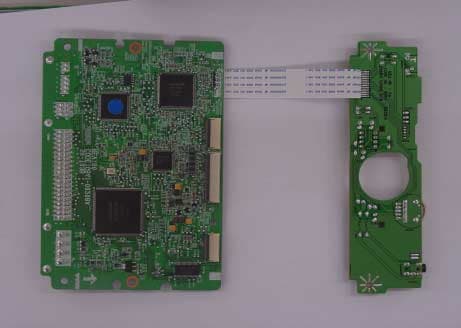
Click to zoom
Application Details
- Equipment Class
- JBP - Part 15 Class B Computing Device Peripheral
- Date of Grant
- Dec 05, 2002
- Application Purpose
- Original Equipment
- Date of Application
- Dec 03, 2002
- Equipment Note
- DVD Multi Drive
- Company
- Samsung Electronics Co Ltd
- Country
- United States
Documents & Files
Document Text
Text extracted from the exhibit documents filed with the FCC. Open a document above to read the original.
Users Manual
DVD-MULTI User s Manual B-Class DeviceThis device is made for home use and electromagneticallycompatible. It can be used in all places, including residential areas.Note: A-Class devices are devices made for business use, and B-Class devices are those that produce a lowerlevel of electromagnetic wave than the A-Class devices. BG68-00418A Rev.00 Installing DVD-MULTI Drive And Connecting Cables Installing Drive 5 Connecting Cables 6 Features Exterior 3 System Requirements 3 Features 4 User s Manual Safety Precautions Safety Labels 1 Electromagnetic Wave Standards 1 During Installation/Operating/Others 2 Installing Device Driver And Confirming The Installation Windows98/Me/XP 10 Windows2000 10 Confirming the Installation of Supporting Utilities 11 Confirming the Installation of Device Driver 11 How To Use The DVD-MULTI Drive How to Use the Drive 13 DVD-RAM Disk Format 15 Format Type 16 Properties of DVD-RAM by Disc Type 17 Utilities 18 Adding/Deleting Utilities Adding/Deleting Utilities 22 Troubleshooting Troubleshooting 24 Product Specifications Product Specifications 26 Storing/Cleaning Drive And Disc Cleaning the Drive 22 Storing the Disc 23 Cleaning the RAM Disc and Other Discs 23 User s Manual SR-T03 Table of Contents 1 Safety Pr ecautions 1. Electro m a gnetic Wave Standards 2. Safety Pr ecautions Class ı Laser ProductThis Samsung DVD-MULTI drive is guaranteed to be in compliance with Subchapter J, Chapter I,DHHS Regulation 21 CFR in terms of the effect of production date. This product is classified as Class | Laser, safe touse and generates no harmful electromagnetic wave.Laser RequirementsClass | Laser ProductWave length: 655-666nm, 775-815nmLaser Power Level: No harmful laser radiation due to the safety protection feature.Always make sure that the disc does not have a crack before use. If the disc has a crack (especially around thecenter hole), it is recommended to make a copy immediately and use the copy instead. When a cracked disc is usedcontinuously, the size of the crack is likely to grow and this will eventually result in irreparable damage to the disc. Important to read and understand at all times. This symbol indicates explanations about extremely dangerous matters.If users ignore this symbol and handle the device the wrong way, serious injury or death could result. Do not open the top cover of the DVD-MULTI drive.Do not touch the interior components. You may be exposed to invisible electromagnetic wave.Do not look inside the inside of the DVD-MULTI drive. Do not attempt to execute procedures that are not specified in the manual.It may cause harmful laser radiation. Important to read and understand at all timesDo not disassemble Warning This symbol indicates explanations about dangerous matters.If users ignore this symbol and handle the device the wrong way, damage to home or property could result. Caution Do not drop the drive, andprotect it fromsevere shocks. It can damage the drive orcause it to malfunction. Do not place the drive indirect sunlight. Avoid low-or high-temperatureenvironments. Avoid high-humidityenvironments. Handle with caution to preventdamage from external shock. It can damage the drive orcause it to malfunction. Do not drop the drive, and protect it fromsevere shocks. It can damage the drive orcause it to malfunction. Installation While Operating Other Do not move the drive while inoperation and do not attempt to openthe disc tray by force. Make sure toclose all working programs beforeattempting to open the tray andalways use the open/close button. Do not use cracked, distortedor damaged discs. In particular, a disc with a crack on theinner tracks may break while in use. Never allow food particles orforeign substances to enter thedrive casing. To protect against the risk offire, do ot spill such liquidsas alcohol and benzene onthe drive. Do not disassemble, attempt to repair ormodify the device without expressapproval as directed in the manual. To reduce the risk of damage,electric shock, and fire,. 2 Do not insert a pin into the emergencyopening while in operation. 4 DVD-RAM: Read/Write DVD-R: Read/Write (no overwrite allowed) DVD-RW: Read/Write Supports Read (playback) for various types of discs DVD-RAM 2.6BG Format CD-ROM(support XA)CD-R/RW(support MultiRead)CD-DACD-EXTRAPhoto CD(supports Multisession)VIDEO CDCD-I/FMVDVD-RAM : 9.4GB(both sides),4.7GB(one side) DVD-RAM : 5.2GB(both sides),2.6GB(one side) DVD-RAM : 2.8GB(both sides),1.4GB(one side) DVD-VIDEODVD-ROMDVD-R : 4.7GB (FOR GENERAL Ver 2.0) DVD-R : 4.7GB (FOR AUTHORING : Disc-at Once mode) DVD-R : 3.95GB (FOR AUTHORING : Disc-at Once mode) DVD-RW 4.7GB For General Ver 1.0DVD-RW 4.7GB For General Ver 1.1DVD-RW 3.95GB, 4.7GB For Authoring Disc Type Write Read (Playback) DVDForm : Formatting software program. Formats the DVD-RAM discs in the UDF or FAT format. 3 Eject pin, screw, device driver, I/F cable, and audio cableBlank discs : DVD-RAM, DVD-RW, and DVD-RSoftware Programs: DVD-RAM device driver, B s recorder, B s clip, B s DVD, WIN DVD, and DVD MovieAlbum Software program for recording for Samsung DVD-MULTIOS: Microsoft Windows 95/98/2000/Me/XP/NT 4.0 (SP 3.0 or higher)CPU: 500MHz or greater IBM-compatible PCRAM: 128Mbytes or greaterHDD: Access time 19 msec, transfer speed 6 Gbps or faster You need to have an IBM-compatible PC with the following specifications. 6 5 DVD-R/RW/ RAM drive 8 7 Connect the IDE cable (with 40 pins) connected to the hard disc to the interface port. (Place the cable so that where the red wire is goes to pin No. 1) Master Drive Slave Drive (Select the SL jumper) PRI 1 SEC 1 Master drive :(Select the MA jumper) Master drive Slave drive :(Select the SL jumper) (Select the MA jumper) (Select the SL jumper) Master drive Master drive :(Select the MA jumper) PRI 1 SEC 1 10 9 Connect the jumper to the slot in the back of the DVD-MULTI drive.When you connect the jumper to MA (Master), the drive runs as the master, and when you connect it to SL (Slave), the drive runs as the s…
Text truncated - open the document above for the full version.
Block Diagram
Main PCB (4 층 층층층양 양양양면 면면면 ) FEP AN22110A SODC MN103S42 Motor Drive (AN41101) Spindle Motor Drive (D16857) Act (Tilt) Step Loading Front PCB BLOCK DIAGRAM CD-FEP R-FEP RAM-FEP FEP AN8727 LPC System Control 16bit MN102H73K AD PRML FMT WS DVD-R ADSC DRAM ECC ATAPI 32b CPU CIRC DAC CD ENC ATIP CD WS HOST INTERFACE (IDE) AUDIO OUT +12V +5V Regulator 1.8V/3.3V/5V CN801 56P CN301(50)CN302(28) Spindle Motor BML4H01KA PICK-UP RAF3090A Step Motor HA LDD IC201 TQFP128 IC403 TQFP216 IC101TQFP64 IC600TQFP128 SOP48 IC601 Flash Rom 1MB MBM29LV800AB Load Motor HEADPHONE&VR APA3541 Position S/W LED &EJT KEY CN702 15P CN701 25P R1 Deck (Catridge) 16.95MHz
ID Label/Location Info
© 2002PCTEST Lab FCC ID SAMPLE LABEL & LOCATION LABELLING REQUIREMENTS PER §§ 2.925 The Label shown shall be permanently affixed at a conspicuous location on the device and be readily visible to the user at the time of purchase. (SEE NEXT PAGE)
Internal Photos
PCB 전면 PCB 후면
Test Report
Page 1 of 14 Project NO. : LBE020680 FCC ID: A3LSRT03 Product :DVD Multi Drive Model No. :SR-T03 Date of test :October 10, 2002 - October 15, 2002 Issued Date :October 16, 2002 Tested by: Jong Ho, Lee / Test Engineer Reviewed by: Choon Kil, Kim, KIM / Technical Manager Authorized by: Kyu Baek, CHUNG / Chief of EMC Lab. SAMSUNG ELECTRONICS Co., Ltd. Suwon EMC Test Laboratory 416 Maetan-3 Dong, Paldal-Ku, Suwon City, Kyungki-Do, Korea,442-742 Tel. : 81-31-279-1750 Fax. : 81-31-279-1745 This laboratory is registered by the NIST/NVLAP, U.S.A The test report herein have been performed in accordance with its terms of registration. This report shall not be reproduced except in full, without the written approval of SEC EMC Testing laboratory. EMI TEST REPORT According to FCC Part 15B Class B NVLAP Code: 200447 Page 2 of 14 Project NO. : LBE020680 Table of Contents 1. General Information 1.1 Product Description 1.2 System Block Diagram of Test Configuration 2. System Test Configuration 2.1 Configuration of Radiated and Conducted Interference Measurement 2.2 Operation Enviroment 2.3 Justification 2.4 EUT Exercise Soft ware 2.5 Test Procedure 3. Conducted Emission Test Data 4. Radiated Emission Test Data 5. Test Equipment Used This report shall not be reproduced except in full, without the written approval of SEC EMC Testing laboratory. Page 3 of 14 Project NO. : LBE020680 1. General Information APPLICANT :SAMSUNG ELECTRONICS CO., LTD. ADDRESS :416 Maetan 3 Dong, Paldal-Ku, Suwon City, Kyungki Do, Korea, 442-742 CONTACT ADDRESS :416 Maetan 3 Dong, Paldal-Ku, Suwon City, Kyungki Do, Korea, 442-742 CONTACT PERSON :Ki Ho, Kim Tel.: +82 - 31 - 200 - 7909 Fax.: +82 - 31 - 200 - 7890 REGULATION(S) :FCC Part 15B Class B MODEL NUMBER:SR-T03 FCC ID.: :A3LSRT03 KIND OF PRODUCT :DVD Multi Drive TESTED DATE :October 10, 2002 - October 15, 2002 TEST SITE :SAMSUNG EMC TEST LAB. FCC Registration Number : 98856 Anechoic Chamber #1 This report shall not be reproduced except in full, without the written approval of SEC EMC Testing laboratory. Page 4 of 14 Project NO. : LBE020680 1.1 Product Description MAX TRANSFER RATE FROM MEDIA AVERAGE SEEK TIME *DVD-RAM/RW :AVR 130msec (TYP 170msec) *DVD-ROM/R :AVR 115msec (TYP 150msec) *CD-ROM/R/RW :AVR 120msec (TYP 160msec) Buffer2MB Interface ATA/ATAPI-5 Size 1.2 System Block Diagram of Test Configuration This report shall not be reproduced except in full, without the written approval of SEC EMC Testing laboratory. CD-ROM/RREAD 32X 149(W) * 41.5(H) * 200(D) mm CD-RWWRITE/READ 8X / 24X DVD-ROMREAD 12X DVD-RW (4.7G)WRITE/READ 1X / 6X CD-RWRITE/READ 12X / 32X DIVIDECONTENT DVD-RAM(4.7G)WRITE/READ 2X DVD-RAM(2.6G)WRITE/READ 1X DVD-R (4.7G)WRITE/READ 2X / 6X E B C D AC POWER AC POWER 1 2 3 4 5 F 6 A Page 5 of 14 Project NO. : LBE020680 2.5.2 Configuration of EUT and peripherals MarkItemModel No.Serial No.ManufacturerRemark ACD-Rom DriveSR-T03-SamsungEUT BComputerDHSBQ08411DELL CLCD MonitorCX-151S N192H4LT105171 Samsung DKeyBoardRT7D00 025PGG DELL EMouseM-S34 LNA10104642 Logitech FEar Phone- -- 2.5.3 Used Cable Description No.ItemLength[m]Shielded(Y/N) 1AC Power Cable1.7N 2Video Cable1.8Y 3Mouse Cable2.0N 4Keyboard Cable1.8N 5AC Power Cable1.7N 6Ear Phone Cable1.5N This report shall not be reproduced except in full, without the written approval of SEC EMC Testing laboratory. Remark Page 6 of 14 Project NO. : LBE020680 2. System Test Configuration 2.1 Configuration of Radiated and Conducted Interference Measurement * Cabling was taken into consideration and test data was taken under worse case conditions. 1)Conduction(Front View) 2)Conduction(Rear View) This report shall not be reproduced except in full, without the written approval of SEC EMC Testing laboratory. Page 7 of 14 Project NO. : LBE020680 3) Radiation(Front View) 4) Radiation(Rear View) This report shall not be reproduced except in full, without the written approval of SEC EMC Testing laboratory. Page 8 of 14 Project NO. : LBE020680 2.2 Operation Enviroment ConductionRadiation Temperature [centigrade] :2220 Humidity [%] :5237 Power supply :AC120V/60HzAC120V/60Hz 2.3 Justification The system was configured in typical fashion(as a customer would normally use it) for testing. 2.4 EUT Exercise Soft ware The EUT exercise program used during radiated and conducted testing was designed to exercise the various system components in a manner similar to typical use. 2.5 Test Procedure 2.5.1 Conducted Emissions Eut was placed on a platform of nominal size, 1m by 1.5m, raised 80cm above the conducting ground plane. The rear of tabletop was located 40cm to the vertical conducting ground plane. The rear of EUT,including peripherals was aligned and flush with rear of tabletop. All other surfaces of tabletop was at least 80cm from any other grounded conducting surface. I/O cables and AC cables that were connected to the peripherals were bundled in center. They were folded back and forth forming a bundle 30cm to 40cm long and were hanged at a 40cm height to the ground plane. Each EUT current-carrying power lead,except the ground(safety) lead, were individually connected through a LISN to the input power source. This report shall not be reproduced except in full, without the written approval of SEC EMC Testing laboratory. Page 9 of 14 Project NO. : LBE020680 All unused 50 ohm connectors of the LISN were resistively terminated in 50 ohm when not connected to the measuring equipment. 2.5.2 Radiated Emissions Eut was placed on a platform of nominal size, 1m by 1.5m, raised 80cm above the conducting ground plane. The rear of EUT,including peripherals was aligned and flush with rear of tabletop. I/O cables that were connected to the peripherals were bundle in center. They were folded back and forth forming a bundle 30cm to 40cm long and were hanged 40cm height to the ground plane. Test was made with the antenna positioned in both the horizontal and vertical planes of polarization. The measurement antenna was varied in height above the conducting…
Text truncated - open the document above for the full version.
Test Setup Photos
Page 6 of 14 Project NO. : LBE020680 2. System Test Configuration 2.1 Configuration of Radiated and Conducted Interference Measurement * Cabling was taken into consideration and test data was taken under worse case conditions. 1)Conduction(Front View) 2)Conduction(Rear View) This report shall not be reproduced except in full, without the written approval of SEC EMC Testing laboratory. Page 7 of 14 Project NO. : LBE020680 3) Radiation(Front View) 4) Radiation(Rear View) This report shall not be reproduced except in full, without the written approval of SEC EMC Testing laboratory.
Contact Information
Applicant
Jenni Chun(General Manager)
Technical Contact
PCTEST Engineering Lab., Inc.Randy Ortanez
[email protected]410-290-6652
6660-B Dobbin Road · Columbia, Maryland · United States
Test Firm
SAMSUNG ELECTRONICS CO., LTD.No Cheon Park
Technical Specifications
| # | Rule Parts | Frequency Range | Power Output |
|---|---|---|---|
| 1 | 15B | - | - |
Other Applications from Samsung Electronics Co Ltd
A3LSMS741B
Aug 05, 2026Portable Handset
Equipment Class
6VL - 15E 6 GHZ Very Low Power DeviceA3LSMX940
Jul 31, 2026BT,BLE Tablet DTS,UNII a,b,g,n,ac,ax,be and digitizer
Equipment Class
DTS - Digital Transmission SystemA3LSMS741U
Jul 30, 2026Portable Handset
Equipment Class
6CD - 15E 6 GHz Low Power Dual ClientA3LSMX840
Jul 27, 2026BT,BLE Tablet DTS,UNII a,b,g,n,ac,ax and Digitizer
Equipment Class
DSS - Part 15 Spread Spectrum TransmitterA3LSMX848U
Jul 27, 2026WCDMA, LTE, 5G NR Tablet BT,BLE, DTS,UNII a b g n ac ax and Digitizer
Equipment Class
JBP - Part 15 Class B Computing Device Peripheral