A8IESPRESSOBluetooth Speaker
Shenzhen Divoom Technology Co., LTD.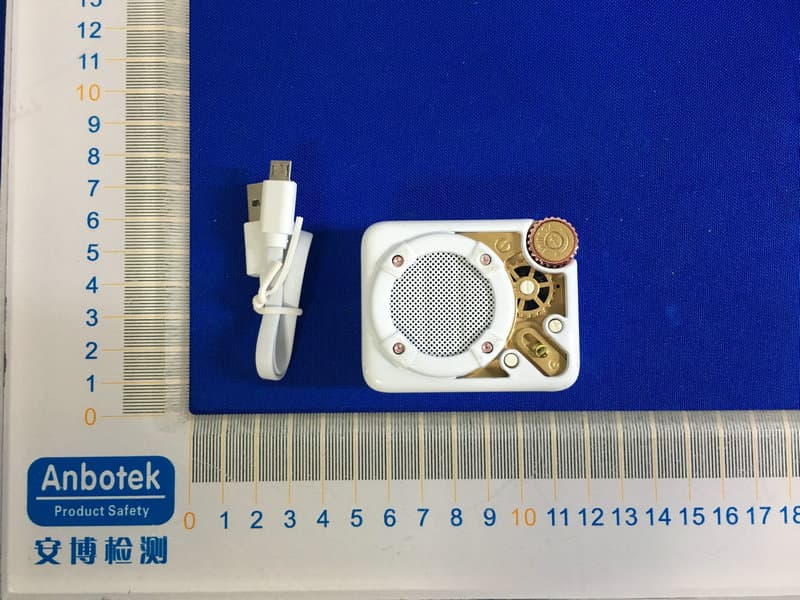
Click to zoom
Application Details
- Equipment Class
- DSS - Part 15 Spread Spectrum Transmitter
- Date of Grant
- May 12, 2020
- Application Purpose
- Original Equipment
- Date of Application
- May 12, 2020
- Equipment Note
- Bluetooth Speaker
- Frequency Range
- 2402.00000000 - 2480.00000000
- Country
- China
Documents & Files
Document Text
Text extracted from the exhibit documents filed with the FCC. Open a document above to read the original.
Users Manual
Espresso - The ultra portable radio speaker Espresso is new ultra portable radio speaker by Divoom. Equipped with a 4W DSP-Tuned speaker and FM radio tuner, it sounds just as good as it look. Powered by a 500mAh battery, it offers 5 hours non-stop music play. It’s time to enjoy the great audio. What’s included? Espresso Strap User manual Micro USB charging cable Thank you for purchasing a Divoom product! Please read this manual carefully. You can also visit divoom.com to learn more about our other products! Due to the nature of the technology product, the instructions on this manual are subject to change without prior notice. If you have any questions, please feel free to contact the Divoom customer support. NICE TO MEET YOU! 1.Power ON/OFF 2.Previous track 3.Next track 4.Change mode (Bluetooth/TF card/FM radio) 5.Mode indicator light (Blue=Bluetooth, White=TF card, Orange=FM radio) 6.Knob Rotate clockwise: increase volume Rotate counter-clockwise: decrease volume Press: Play, Pause, Answer, Reject call Hold: search FM stations (under FM radio mode) SIDE FRONT 7.Micro USB charging port 8.TF card slot (support .mp3 up to 128GB) 9.Strap port PRODUCT DETAILS 1 2 6 4 5 3 8 9 7 How to connect in Bluetooth? 1.Power on the speaker, and make sure the backlight is flashing blue. 2.In the phone’s Settings, please turn on the Bluetooth. 3.Search and connect with the ‘Divoom Espresso’. 4.Once paired, you can start to play music on your music APP. *If the backlight is showing solid Blue, it means it’s already connected with another mobile. You need to disconnect the speaker first, before connecting it to the new one. *If the backlight is showing a different color, please press the ‘ Mode’ button to switch to Bluetooth. How to setup TF card audio? 1.Power on, and insert the TF card to the side. 2.The audio should start to play automatically. 3.You can rotate the knob to adjust volume, or press the skip/previous track buttons to change track. *If the backlight is not showing the white color, please press the ‘ Mode’ button to switch to TF card(white backlight). BLUETOOTH TF CARD Solid Blue = Connected Flash Blue = Pairing TF card slot How to setup FM radio? 1.Power on the speaker, then press the ‘Mode’ button to switch to FM radio mode 2.Hold the turn knob to start searching for FM radio stations (only require for the first use) 3.Y ou can rotate the knob to adjust volume, or press the skip/previous track buttons to change stations. 1.Insert one of thin end strap head into the slot. 2.Pull the thin end strap from the other slot. 3.Insert the thick end strap into the thin end strap, then pull out and tighten the strap. How to insert the handle strap? *To detach, please reverse the above steps. FM RADIO *If the backlight is not showing the orange color, please press the ‘ Mode’ button to switch to FM radio mode(orange backlight). Orange = FM Radio MORE SET UP INFORMATION Press the turn knob to pick up an incoming call, and press the knob again to end call. Hold the turn knob to reject the incoming call. How to make call with hands-free mode? Insert the USB cable into the side of the speaker. You can continue to listen to music while charging. How to charge the Espresso? The charging time may vary by the type of USB charger. We recommend using the 1.0A charger for optimal charging time. MORE SET UP INFORMATION Press = Answer / End call Hold = Reject call Dimension (mm):47.6L x 31.3W x 59.5 H Weight:85.1g Speaker size:32mm Output power:4W Frequency response:100-20KHz Signal-to-noise ratio:>=78dB Playback time:up to 5hrs Battery capacity:500mAh Battery voltage:3.7V Battery charge time:2-2.5 hrs Charge:via USB cable, 5V-1A Wireless range:up to 10 meters/33 feet Bluetooth compliant:v5.0 Specification details PRODUCT SPECIFICATION Please dispose of used batteries properly following local regulations. Do NOT incinerate. Removal of the rechargeable lithium-ion battery in this product should be conducted only by a qualified professional. WARRANTY INFORMATION This product is covered by a limited warranty from Divoom. For complete warranty details, visit the website www.Divoom.com Product Name: Bluetooth Speaker Trade Mark:Divoom Product name: Serial number: purchasing store: Purchasing date: Owner name: Contact Email: owner address: PRODUCT WARRANTY CARD Divoom official website: http://www.divoom.com/ Divoom warranty information: http://www.divoom.com/article/detail/id/60.html Divoom support Email: [email protected] Divoom support contact number: 0755-29494509 Divoom repair & return address: Shenzhen Divoom Technology Limited Corporation 1st Floor, 5th Building, XinLianHe Industrial Complex Shajing Town, Baoan District Shenzhen City, Guangdong Province 518000 The people’s republic of China Divoom product FAQ: http://www.divoom.com/article/detail/id/59.html 1.If you believe your product is defective within the warranty period, please bring the product back to where the product was initially purchased. Alternatively, or within any other questions or concerns, please call customer support at +0755 86290767, or contact us via email at [email protected]. 2.If within 12 (24 if required by local law) months of purchase this device or any part thereof is proven to be defective by reason of faulty workmanship or defects in materials, we will at our option repair or replace the same free of charge of labor or materials on condition that similar to the product current condition. 3.The sales invoice or receipt with the date and source of purchase must be presented together with the defective unit. We cannot validate the product warranty information without an invoice. 4.The warrant does not cover product failures which have been caused by use of accessories other peripheral devices which are not Divoom branded original accessories intended for use with the product. 5.The warranty does not cover product failures caused by: modification, repaired, and disassembled by any person who is not authorized by the manufacture. 6.The warran…
Text truncated - open the document above for the full version.
Cover Letter(s)
Shenzhen Divoom Technology Co.,LTD. FCC Confidentiality Request (Permanent or also called long term confidentiality is the normal method to keep certain docuements confidential, and may apply to schematics, block diagrams, operational description and bill of materials.) To: Federal Communications Commission Equipment Authorization Branch 7435 Oakland Mills Road Columbia, MD 21046 Pursuant to 47 CFR Section 0.457(d)(2)&0.459, we, (the applicant / grantee) Company nameShenzhen Divoom Technology Co.,LTD. Address1st floor, 5th Building, Xinlianhe Industrial Park, Jincheng Road, Shajing Town, Bao'an Cityshenzhen Countrychina request for this certification filing under: Grantee CodeProduct Number FCC ID:A8IESPRESSO to maintainpermanent confidentialityfor the following documents submitted within this application: (please cross what is applicable, or add other documents, provide the file name and description) ExhibitFile NameDescription √ Operational DescriptionOperational Descriptionexplaining the functioning of the block diagram √ Block DiagramsBlock Diagramsshowing the systematic building blocks of the EUT √ Schematics DiagramsSchematicsshowing components, their values and interconnection Bill of MaterialsList of components used on the PCB’s of the EUT Above materials crossed contain secrets, proprietary and technical information, which would customarily be guarded from competitors under 47 CFR, section 0.457(d)(2). Disclosure or publication or any portion of this company confidential material to other parties could cause substantial competitive harm and provide unjustified benefits for competitors. We understand that pursuant to 47 CFR section 0.457(d)(1)(ii) disclosure of the applicant and all accompanying documentation will not be made before the date of the grant. The documents indicated as confidential above, are not publicly available elsewhere. Attestation: City and Country:Date:Name: (this must be a person) Function:Signature: (or official company stamp) shenzhen, china2020-05-07 Jeffery YaoSales Manager
External Photos
FCC ID: A8IESPRESSO
ID Label/Location Info
Label Location On EUT
ID Label/Location Info
Product Name: Bluetooth Speaker Model Number: Espresso Trademark: Divoom FCC ID: A8IESPRESSO This device complies with Part 15 of the FCC Rules. Operation is subject to the following two conditions: (1) This device may not cause harmful interference, and (2) This device must accept any interference received, including interference that may cause undesired operation. Size:40mm*30mm
Internal Photos
FCC ID: A8IESPRESSO FMANT ANT
Test Report
Report No.: SZAWW191012011-01FCC ID: A8IESPRESSOPage 1 of 67 Code:AB-RF-05-a FCC TEST REPORT Client Name: Shenzhen Divoom Technology Co.,LTD. Address: 1st floor, 5th Building, Xinlianhe Industrial Park Jincheng Road, Shajing Town, Bao'an, Shenzhen, China 518000 Product Name: Bluetooth Speaker Date: Apr. 30, 2020 Shenzhen Anbotek Compliance Laboratory Limited Report No.: SZAWW191012011-01FCC ID: A8IESPRESSOPage 2 of 67 Code:AB-RF-05-a Contents 1. General Information ............................................................................................................................................... 5 1.1. Client Information ....................................................................................................................................... 5 1.2. Description of Device (EUT) ..................................................................................................................... 5 1.3. Auxiliary Equipment Used During Test ................................................................................................... 6 1.4. Description of Test Modes ........................................................................................................................ 6 1.5. List of channels ........................................................................................................................................... 7 1.6. Description Of Test Setup ......................................................................................................................... 8 1.7. Test Equipment List .................................................................................................................................... 9 1.8. Measurement Uncertainty ....................................................................................................................... 10 1.9. Description of Test Facility ...................................................................................................................... 10 2. Summary of Test Results ................................................................................................................................... 11 2.1. Pseudorandom Frequency Hopping Sequence .................................................................................. 11 3. Conducted Emission Test ................................................................................................................................... 13 3.1. Test Standard and Limit .......................................................................................................................... 13 3.2. Test Setup .................................................................................................................................................. 13 3.3. Test Procedure .......................................................................................................................................... 13 3.4. Test Data .................................................................................................................................................... 13 4. Radiation Spurious Emission and Band Edge ................................................................................................ 16 4.1. Test Standard and Limit .......................................................................................................................... 16 4.2. Test Setup .................................................................................................................................................. 16 4.3. Test Procedure .......................................................................................................................................... 17 4.4. Test Data .................................................................................................................................................... 18 5. Maximum Peak Output Power Test .................................................................................................................. 28 5.1. Test Standard and Limit .......................................................................................................................... 28 5.2. Test Setup .................................................................................................................................................. 28 5.3. Test Procedure .......................................................................................................................................... 28 5.4. Test Data .................................................................................................................................................... 28 6. 20DB Occupy Bandwidth Test ........................................................................................................................... 34 6.1. Test Standard ............................................................................................................................... ............. 34 6.2. Test Setup .................................................................................................................................................. 34 6.3. Test Procedure .......................................................................................................................................... 34 6.4. Test Data .................................................................................................................................................... 34 7. Carrier Frequency Separation Test ................................................................................................................... 40 7.1. Test Standard and Limit .......................................................................................................................... 40 7.2. Test Setup ...........................................................................................................................................…
Text truncated - open the document above for the full version.
Test Setup Photos
FCC ID: A8IESPRESSO Photo of Conducted Emission Measurement Photo of Radiation Emission Test
Contact Information
Applicant
Jeffery Yao(Sales Manager)
Test Firm
Shenzhen Anbotek Compliance Laboratory LimitedJeff Zhu
Technical Specifications
| # | Rule Parts | Frequency Range | Power Output |
|---|---|---|---|
| 1 | 15C | 2.40 GHz - 2.48 GHz | 4.00 mW |
Other Applications from Shenzhen Divoom Technology Co., LTD.
A8I-GATE-2
Mar 04, 2026Pixel Photo Frame
Equipment Class
NII - Unlicensed National Information Infrastructure TXA8I-PIXOO64-2
Feb 05, 2026Pixel Photo Frame
Equipment Class
NII - Unlicensed National Information Infrastructure TXA8I-EMODO
Dec 25, 2025Smart Badge
Equipment Class
DSS - Part 15 Spread Spectrum Transmitter
A8I-DIPOW-65
Sep 25, 2024GaN Fast Charger
Equipment Class
DSS - Part 15 Spread Spectrum TransmitterA8I-HQ2-MIC
Sep 12, 2024Microphone
Equipment Class
DWM - Part 15 Wireless Microphone