A8IPIXOO64Pixoo 64 with WiFi
Shenzhen Divoom Technology Co., LTD.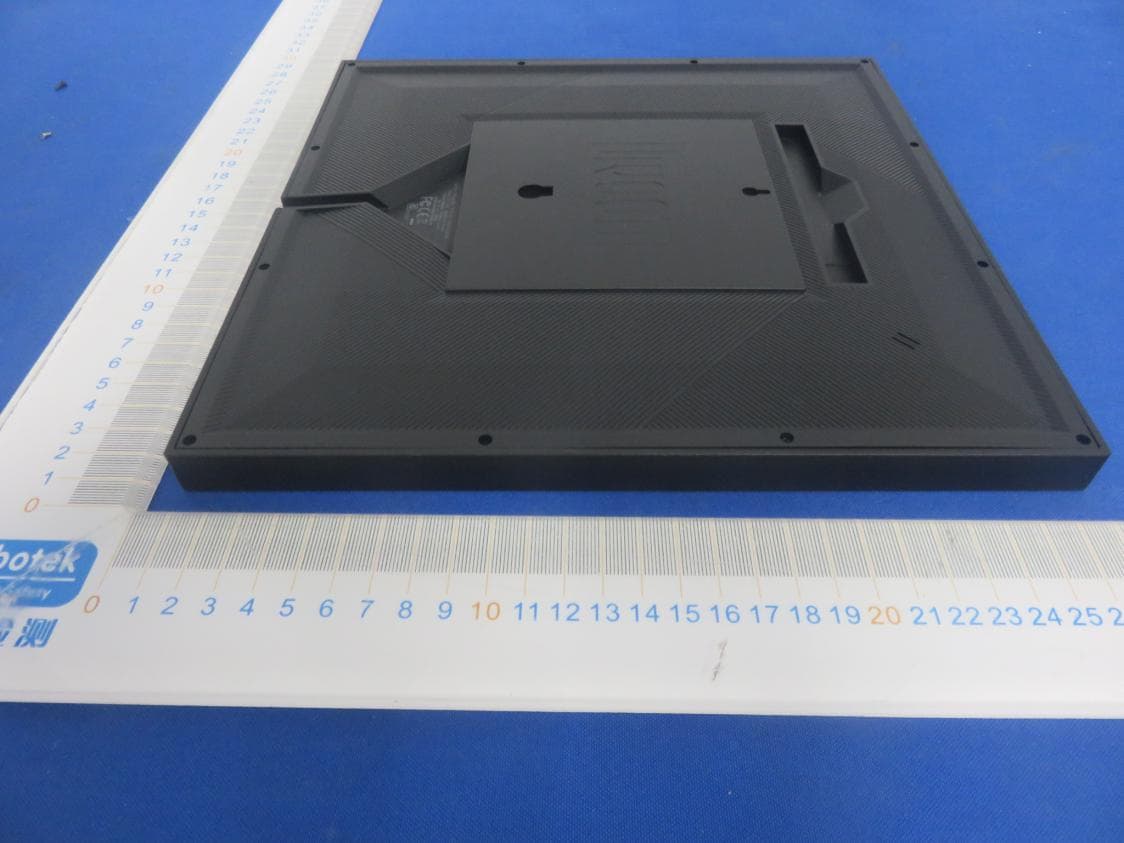
Click to zoom
Application Details
- Equipment Class
- DTS - Digital Transmission System
- Date of Grant
- Aug 01, 2021
- Application Purpose
- Original Equipment
- Date of Application
- Aug 01, 2021
- Equipment Note
- Pixoo 64 with WiFi
- Frequency Range
- 2412.00000000 - 2462.00000000
- Country
- China
Documents & Files
Document Text
Text extracted from the exhibit documents filed with the FCC. Open a document above to read the original.
Users Manual
What’s included? Pixoo 64 Pixoo 64 Mounting screws Mounting screws User manual User manual USB-C Charging cable USB-C Charging cable Nice to meet you! 1.PRESS: Power ON/OFF The Divoom application is available in both iOS an Android APP stores. You can search ‘Divoom’ or scan this QR code. 1.Please download and install the Divoom APP from the App Store or Google Play 2.Please turn on phone’s Bluetooth, and connect to a 2.4G wireless Internet network. 3.Open the App, press Me>My device, and select Internet to pair device. 4.Connect device with power, and it should show a ‘waiting for config’ logo. 5.In App, press ‘Start to pair’, and enter the password for the connected network. 6.In App, it would show ‘pairing’ for 10 to 20 seconds. 7.Once the device is connected to the network, the App will shows successfully connected. 5.WALL MOUNT HOLES 6.MOUNTING SCREW HOLES 7.MOUNTING STAND/TRAY 8.MOUNTING STAND HOLE 9.BUZZER HOLE 10.MICROPHONE HOLE HOLD (8 seconds): Reset network settings For new card, format the TF card before use 2.PRESS: Change channels HOLD (3 seconds): Switch recent clock interfaces / Music visualizer effects / Custom channels 3.TF CARD: For Divoom use only. 4.USB-C POWER PORT (use FAT file format, exFAT not supported). *If there’s a update message, please proceed with the update. Do not unplug the device during its update. (keep your phone/device close to the network router) Product details How to setup the network connection? Account Password This is Pixoo 64, a new multi-functional informative smart display for your home. With a 64x64 pixel art LED display and wireless Internet connectivity, Pixoo 64 unlocks the world of pixel art, and you can decorate your house with this unique gadget. Thank you for purchasing a Divoom product! Please read this manual carefully. Visit www.divoom.com to learn more about our other products. Due to the nature of the technology products, the information on this manual is subject to change without prior notice. If you have any questions, please feel free to contact the Divoom customer representative. Reset network? *Please use the stock USB-C cable. The maximum supported length is 2M. **Please use a USB charger with a 5V2A output. ***If the device is flickering or random power OFF, please try a different USB cable and/or charger. 1.Connect the device to the power cable. Once the device is ON, please hold the ON/OFF button for 8 seconds. 2.The device should be ready for the Internet configuration. How to power it? 1.Insert the USB-C cable into the USB port on the rear panel. 2.The device will power ON instantly. 3.If the device is currently OFF, you can press its power button to turn it ON. General Troubleshoot: 1. Device is connected with power, but the screen and ON/OFF button is unresponsive. a) Please make sure it’s connected with a 5V/2A charger, b) Try a different USB-C cable. 2. Network pairing timeout a)Restart Bluetooth function, delete Bluetooth paired device history, and enable GPS function b)Make sure the phone’s connected with a 2.4G Internet network (5G network not supported). c)Make sure the Internet network is working properly, and both devices are near the router. d)Try the pairing process on a different phone. Or reset and re-do the network pairing process. e)Download the latest Divoom App 3.Device shows a non supported TF card logo a)Make sure the TF card is properly inserted. b) Try a different TF card (Device will download the firmware to the card via Internet, please pull & insert the USB cable when the new card’s ready). 4.Device shows number and full panel coloring a)Make sure the lighting key is unstuck, b) Reconnect the power cable Product specification Warranty information: Dimension (mm): 262x17.8x261.4 Weight: 740g Color: Full RGB Color Temp: 1600-6500K Color: Full RGB Brightness: 80@4000K Output: 10W Microphone: 6050 Full Direction -42+/-3dB Charge: via USB cable, 5V(+/-0.25V)/2A ▪ Please follow our product installation and operation instructions. ▪ Always place the product on a smooth and stable surface. ▪ Do not push any objects into product vents or slots. Do not apply any great force on the product. ▪ Please keep the product ay a room temperature environment. Do not please the product nearany heat sources (such as radiators, heat registers, stoves, fire place, or direct sunlight). Do not place the product near any open flame source. ▪ Do not attempt to service the product by yourself. Always refer to the instructions by qualified service personnel. ▪ To avoid the risk of electrical hazard, do not expose this product to wet surface. Please read the following instructions carefull: 1.If you believe your product is defective within the warranty period, please bring the product back to where the product was initially purchased. Alternatively, or within any other questions or concerns, please call customer support at +0755 86290767, or contact us via email at [email protected]. 2.If within 12 (24 if required by local law) months of purchase this device or any part thereof is proven to be defective by reason of faulty workmanship or defects in materials, we will at our option repair or replace the same free of charge of labor or materials on condition that similar to the product current condition. 3.The sales invoice or receipt with the date and source of purchase must be presented together with the defective unit. We cannot validate the product warranty information without an invoice. 4.The warrant does not cover product failures which have been caused by use of accessories other peripheral devices which are not Divoom branded original accessories intended for use withthe product. 5.The warranty does not cover product failures caused by: modification, repaired, and disassembled by any person who is not authorized by the manufacture. 6.The warranty is non transferable. Any defective unit or part shall become property of the manufacture. 7.Warranty does not cover any damage caused by misuse, drop, hit or negligent. 8.…
Text truncated - open the document above for the full version.
Cover Letter(s)
ShenzhenDivoom TechnologyCo.,LTD. FCCConfidentialityRequest (Permanentoralsocalledlongtermconfidentialityisthenormalmethodtokeepcertaindocuementsconfidential,andmayapplyto schematics,blockdiagrams,operationaldescriptionandbillofmaterials.) To:FederalCommunicationsCommission EquipmentAuthorizationBranch 7435OaklandMillsRoad Columbia,MD21046 Pursuantto47CFRSection0.457(d)(2)&0.459,we, (theapplicant/grantee) CompanynameShenzhenDivoomTechnologyCo.,LTD. Address1stfloor,5thBuilding,XinlianheIndustrialPark,JinchengRoad,ShajingTown,Bao'an Cityshenzhen Countrychina requestforthiscertificationfilingunder: GranteeCodeProductNumber FCCID:A8IPIXOO64 tomaintainpermanentconfidentialityforthefollowingdocumentssubmittedwithinthisapplication: (pleasecrosswhatisapplicable,oraddotherdocuments,providethefilenameanddescription) ExhibitFileNameDescription √ OperationalDescriptionOperationalDescriptionexplainingthefunctioningoftheblockdiagram √ BlockDiagramsBlockDiagramsshowingthesystematicbuildingblocksoftheEUT √ SchematicsDiagramsSchematicsshowingcomponents,theirvaluesandinterconnection BillofMaterialsListofcomponentsusedonthePCB’softheEUT Abovematerialscrossedcontainsecrets,proprietaryandtechnicalinformation,whichwouldcustomarilybeguardedfrom competitorsunder47CFR,section0.457(d)(2).Disclosureorpublicationoranyportionofthiscompanyconfidentialmaterial tootherpartiescouldcausesubstantialcompetitiveharmandprovideunjustifiedbenefitsforcompetitors.Weunderstandthat pursuantto47CFRsection0.457(d)(1)(ii)disclosureoftheapplicantandallaccompanyingdocumentationwillnotbemade beforethedateofthegrant.Thedocumentsindicatedasconfidentialabove,arenotpubliclyavailableelsewhere. Attestation: CityandCountry:Date:Name: (thismustbeaperson) Function:Signature: (orofficialcompanystamp) shenzhen,china2021-07-12JefferyYaoSalesManager
Cover Letter(s)
ShenzhenDivoomTechnologyCo.,LTD. PowerofAttorney To:PhoenixTestlabGmbH Nameormodeltypeof theSpecifiedRadioEquipment:Pixoo64 Model:Pixoo64 Applicant’scompanyname:ShenzhenDivoomTechnologyCo.,LTD. Applicant’scompanyaddress:1stfloor,5thBuilding,XinlianheIndustrialParkJinchengRoad, ShajingTown,Bao'an,Shenzhen,China518000 Applicant’sname:JefferyYao DateandApplicant’sSignature: 2021-07-12 JobTitleandDepartment:SalesManager Itisnecessary,thatthepresidentorCEOoftheapplicant’scompanysignsthisform. Iherebyauthorizethefollowingpersonasarepresentativeandallrightsregardingtheapplicationto obtainTypeCertificationfortheSpecifiedRadioEquipment(mentionedabove)aredelegated. Attorney’sCompanyname:ShenzhenAnbotekComplianceLaboratoryLimited. Attorney’sCompanyaddress:1/F,BuildingD,SogoodScienceandTechnologyPark,Sanwei community,HangchengStreet,Bao'anDistrict,Shenzhen,Guangdong,China.518102 Attorney’sName:TomChen DateandAttorney’sSignature:...............2021-07-12 JobTitleandDepartment:Manager(EngineeringDepartment)
External Photos
FCCID:A8IPIXOO64
ID Label/Location Info
LabelLocationOnEUT ProductName:Pixoo64 ModelNumber:Pixoo64 Trademark:Divoom FCCID:A8IPIXOO64 ThisdevicecomplieswithPart15oftheFCCRules.Operationis subjecttothefollowingtwoconditions: (1)Thisdevicemaynotcauseharmfulinterference,and (2)Thisdevicemustacceptanyinterferencereceived,including interferencethatmaycauseundesiredoperation. Size:60mm*40mm
Internal Photos
FCCID:A8IPIXOO64 ANT
RF Exposure Info
RFEXPOSUREEVALUATION AccordingtoFCC1.1310:Thecriterialistedinthefollowingtableshallbeusedto evaluatetheenvironmentimpactofhumanexposuretoradiofrequency(RF)Radiation asspecifiedin§1.1307(b) FCCID:A8IPIXOO64 EUTSpecification EUTPixoo64 Frequencyband(Operating)WLAN:2.412GHz~2.462GHz WLAN:5.18GHz~5.24GHz WLAN:5.745GHz~5.825GHz Others:2.402GHz~2.480GHz DevicecategoryPortable(<20cmseparation) Mobile(>20cmseparation) Others___ ExposureclassificationOccupational/Controlledexposure(S=5mW/cm2) GeneralPopulation/Uncontrolledexposure(S=1mW/cm2) AntennadiversitySingleantenna Multipleantennas Txdiversity Rxdiversity Tx/Rxdiversity Antennagain(Max)1.86dBi EvaluationappliedMPEEvaluation SAREvaluation LimitsforMaximumPermissibleExposure(MPE) Frequency Range(MHz) ElectricField Strength(V/m) MagneticField Strength(A/m) Power Density(mW/cm 2 ) Average Time (A)LimitsforOccupational/ControlExposures 300-1500----F/3006 1500-100000----56 (B)LimitsforGeneralPopulation/UncontrolExposures 300-1500----F/15006 1500-100000----130 Friistransmissionformula:Pd=(Pout*G)\(4*pi*R2) Where Pd=PowerdensityinmW/cm 2 Pout=outputpowertoantennainMw G=gainofantennainlinearscale Pi=3.1416 R=distancebetweenobservationpointandcenteroftheradiatorincm PdthelimitofMPE,1mW/cm2.Ifweknowthemaximumgainoftheantennaand totalpowerinputtotheantenna,throughthecalculation,wewillknowthedistance wheretheMPElimitisreached. MaxMeasurementResult Operating Mode Measured Power Tuneup tolerance Max.Tune upPower Antenn aGain Power densityat 20cm Powerdensity Limits (mW/cm2) (dBm)(dBm)(dBm)(dBi)(mW/cm2) WiFi2.4G20.8120.81±121.811.860.04631
Test Report
Page 1 of 46 Appendix Test Data Report No.:18220WC10124601Test Date:2021.6.16 Test Engineer:Auditor: Temperature:24.3°CRelative Humidity:56 % Pressure:1012 hPa 1. Duty Cycle 1.1 Ant1 1.1.1 Test Result Ant1 Mode TX Type Frequency (MHz) RU RU Pos T_on (ms) Period (ms) Duty Cycle (%) Duty Cycle Correction Factor (dB) Max. DC Variation (%) 802.11bSISO 2412//100.00100.00100.000.000.00 2437//100.00100.00100.000.000.00 2462//100.00100.00100.000.000.00 802.11gSISO 2412//100.00100.00100.000.000.00 2437//100.00100.00100.000.000.00 2462//100.00100.00100.000.000.00 802.11n (HT20) SISO 2412//100.00100.00100.000.000.00 2437//100.00100.00100.000.000.00 2462//100.00100.00100.000.000.00 802.11n (HT40) SISO 2422//100.00100.00100.000.000.00 2437//100.00100.00100.000.000.00 2452//100.00100.00100.000.000.00 Note1: Only for Report Use Page 2 of 46 1.1.2 Test Graph 802.11b_LCH_2412MHz_Ant1 (SISO)_NTNV 802.11b_MCH_2437MHz_Ant1 (SISO)_NTNV Page 3 of 46 802.11b_HCH_2462MHz_Ant1 (SISO)_NTNV 802.11g_LCH_2412MHz_Ant1 (SISO)_NTNV Page 4 of 46 802.11g_MCH_2437MHz_Ant1 (SISO)_NTNV 802.11g_HCH_2462MHz_Ant1 (SISO)_NTNV Page 5 of 46 802.11n(HT20)_LCH_2412MHz_Ant1 (SISO)_NTNV 802.11n(HT20)_MCH_2437MHz_Ant1 (SISO)_NTNV Page 6 of 46 802.11n(HT20)_HCH_2462MHz_Ant1 (SISO)_NTNV 802.11n(HT40)_LCH_2422MHz_Ant1 (SISO)_NTNV Page 7 of 46 802.11n(HT40)_MCH_2437MHz_Ant1 (SISO)_NTNV 802.11n(HT40)_HCH_2452MHz_Ant1 (SISO)_NTNV Page 8 of 46 2. Bandwidth 2.1 OBW 2.1.1 Test Result ModeTX Type Frequency (MHz) RURU PosAnt 99% Occupied Bandwidth (MHz) LimitVerdict 802.11bSISO 2412//113.22/Note1 2437//113.21/Note1 2462//113.23/Note1 802.11gSISO 2412//116.89/Note1 2437//116.89/Note1 2462//116.90/Note1 802.11n (HT20) SISO 2412//117.55/Note1 2437//117.55/Note1 2462//117.56/Note1 802.11n (HT40) SISO 2422//135.03/Note1 2437//135.02/Note1 2452//135.05/Note1 Note1: Only for Report Use Page 9 of 46 2.1.2 Test Graph 802.11b_LCH_2412MHz_Ant1 (SISO)_NTNV 802.11b_MCH_2437MHz_Ant1 (SISO)_NTNV Page 10 of 46 802.11b_HCH_2462MHz_Ant1 (SISO)_NTNV 802.11g_LCH_2412MHz_Ant1 (SISO)_NTNV Page 11 of 46 802.11g_MCH_2437MHz_Ant1 (SISO)_NTNV 802.11g_HCH_2462MHz_Ant1 (SISO)_NTNV Page 12 of 46 802.11n(HT20)_LCH_2412MHz_Ant1 (SISO)_NTNV 802.11n(HT20)_MCH_2437MHz_Ant1 (SISO)_NTNV Page 13 of 46 802.11n(HT20)_HCH_2462MHz_Ant1 (SISO)_NTNV 802.11n(HT40)_LCH_2422MHz_Ant1 (SISO)_NTNV Page 14 of 46 802.11n(HT40)_MCH_2437MHz_Ant1 (SISO)_NTNV 802.11n(HT40)_HCH_2452MHz_Ant1 (SISO)_NTNV Page 15 of 46 2.2 6dB BW 2.2.1 Test Result ModeTX Type Frequency (MHz) RURU PosAnt6dB Bandwidth (MHz)LimitVerdict 802.11bSISO 2412//19.15>=0.5Pass 2437//19.15>=0.5Pass 2462//19.16>=0.5Pass 802.11gSISO 2412//116.46>=0.5Pass 2437//116.46>=0.5Pass 2462//116.47>=0.5Pass 802.11n (HT20) SISO 2412//117.38>=0.5Pass 2437//117.38>=0.5Pass 2462//117.37>=0.5Pass 802.11n (HT40) SISO 2422//133.49>=0.5Pass 2437//133.95>=0.5Pass 2452//133.35>=0.5Pass Page 16 of 46 2.2.2 Test Graph 802.11b_LCH_2412MHz_Ant1 (SISO)_NTNV 802.11b_MCH_2437MHz_Ant1 (SISO)_NTNV Page 17 of 46 802.11b_HCH_2462MHz_Ant1 (SISO)_NTNV 802.11g_LCH_2412MHz_Ant1 (SISO)_NTNV Page 18 of 46 802.11g_MCH_2437MHz_Ant1 (SISO)_NTNV 802.11g_HCH_2462MHz_Ant1 (SISO)_NTNV Page 19 of 46 802.11n(HT20)_LCH_2412MHz_Ant1 (SISO)_NTNV 802.11n(HT20)_MCH_2437MHz_Ant1 (SISO)_NTNV Page 20 of 46 802.11n(HT20)_HCH_2462MHz_Ant1 (SISO)_NTNV 802.11n(HT40)_LCH_2422MHz_Ant1 (SISO)_NTNV Page 21 of 46 802.11n(HT40)_MCH_2437MHz_Ant1 (SISO)_NTNV 802.11n(HT40)_HCH_2452MHz_Ant1 (SISO)_NTNV Page 22 of 46 3. Maximum Conducted Output Power 3.1 Power 3.1.1 Test Result Mode TX Type Frequency (MHz) RU RU Pos Measured Peak Output Power (dBm) Limit (dBm)Verdict Ant1 802.11bSISO 2412//16.77<=30Pass 2437//15.26<=30Pass 2462//14.28<=30Pass 802.11gSISO 2412//20.77<=30Pass 2437//19.39<=30Pass 2462//17.91<=30Pass 802.11n (HT20) SISO 2412//20.81<=30Pass 2437//19.42<=30Pass 2462//17.99<=30Pass 802.11n (HT40) SISO 2422//20.19<=30Pass 2437//19.21<=30Pass 2452//18.29<=30Pass Note1: Antenna Gain: 1: 1.86dBi; 4. Maximum Power Spectral Density 4.1 PSD 4.1.1 Test Result Mode TX Type Frequency (MHz) RU RU Pos Maximum PSD (dBm/3kHz) Limit (dBm/3kHz)Verdict Ant1 802.11bSISO 2412//-10.05<=8Pass 2437//-11.38<=8Pass 2462//-12.58<=8Pass 802.11gSISO 2412//-14.89<=8Pass 2437//-16.17<=8Pass 2462//-18.10<=8Pass 802.11n (HT20) SISO 2412//-14.69<=8Pass 2437//-16.18<=8Pass 2462//-17.60<=8Pass 802.11n (HT40) SISO 2422//-17.03<=8Pass 2437//-17.41<=8Pass 2452//-18.20<=8Pass Note1: Antenna Gain: 1: 1.86dBi; Page 23 of 46 4.1.2 Test Graph 802.11b_LCH_2412MHz_Ant1 (SISO)_NTNV 802.11b_MCH_2437MHz_Ant1 (SISO)_NTNV Page 24 of 46 802.11b_HCH_2462MHz_Ant1 (SISO)_NTNV 802.11g_LCH_2412MHz_Ant1 (SISO)_NTNV Page 25 of 46 802.11g_MCH_2437MHz_Ant1 (SISO)_NTNV 802.11g_HCH_2462MHz_Ant1 (SISO)_NTNV Page 26 of 46 802.11n(HT20)_LCH_2412MHz_Ant1 (SISO)_NTNV 802.11n(HT20)_MCH_2437MHz_Ant1 (SISO)_NTNV Page 27 of 46 802.11n(HT20)_HCH_2462MHz_Ant1 (SISO)_NTNV 802.11n(HT40)_LCH_2422MHz_Ant1 (SISO)_NTNV Page 28 of 46 802.11n(HT40)_MCH_2437MHz_Ant1 (SISO)_NTNV 802.11n(HT40)_HCH_2452MHz_Ant1 (SISO)_NTNV Page 29 of 46 5. Unwanted Emissions In Non-restricted Frequency Bands 5.1 Ref 5.1.1 Test Result ModeTX Type Frequency (MHz) RURU PosAntLevel of Reference (dBm)Limit (dBm)Verdict 802.11bSISO 2412//15.85// 2437//14.34// 2462//13.33// 802.11gSISO 2412//10.19// 2437//1-1.28// 2462//1-2.84// 802.11n (HT20) SISO 2412//1-0.15// 2437//1-1.30// 2462//1-2.64// 802.11n (HT40) SISO 2422//1-4.15// 2437//1-4.98// 2452//1-5.99// Note1: Refer to FCC Part 15.247 (d) and ANSI C63.10-2020, the channel contains the maximum PSD level was used to establish the reference level. Note2: Only for Report Use Page 30 of 46 5.1.2 Test Graph 802.11b_LCH_2412MHz_Ant1 (SISO)_NTNV 802.11b_MCH_2437MHz_Ant1 (SISO)_NTNV Page 31 of 46 802.11b_HCH_2462MHz_Ant1 (SISO)_NTNV 802.11g_LCH_2412MHz_Ant1 (SISO)_NTNV Page 32 of 46 802.11g_MCH_2437MHz_Ant1 (SISO)_NTNV 802.11g_HCH_2462MHz_Ant1 (SISO)_NTNV Page 33 of 46 802.11n(HT20)_LCH_2412MHz_Ant1 (SISO)_NTNV 802.11n(HT20)_MCH_2437MHz_Ant1 (SISO)_NTNV…
Text truncated - open the document above for the full version.
Test Report
ReportNo.:18220WC10124601FCCID:A8IPIXOO64Page1of46 Code:AB-RF-05-a FCCTESTREPORT ClientName:ShenzhenDivoomTechnologyCo.,LTD. Address: 1stfloor,5thBuilding,XinlianheIndustrialPark,Jincheng Road,ShajingTown,Bao'an,Shenzhen,518000,China ProductName:Pixoo64 Date:Jul.09,2021 ShenzhenAnbotekComplianceLaboratoryLimited ReportNo.:18220WC10124601FCCID:A8IPIXOO64Page2of46 Code:AB-RF-05-a Contents 1.GeneralInformation ............................................................................................................................................... 5 1.1.ClientInformation ....................................................................................................................................... 5 1.2.DescriptionofDevice(EUT) ..................................................................................................................... 5 1.3.AuxiliaryEquipmentUsedDuringTest ................................................................................................... 6 1.4.DescriptionofTestModes ........................................................................................................................ 6 1.5.Listofchannels ........................................................................................................................................... 7 1.6.DescriptionOfTestSetup ......................................................................................................................... 8 1.7.TestEquipmentList .................................................................................................................................... 9 1.8.MeasurementUncertainty ....................................................................................................................... 10 1.9.DescriptionofTestFacility ...................................................................................................................... 10 2.SummaryofTestResults ................................................................................................................................... 11 3.ConductedEmissionTest ................................................................................................................................... 12 3.1.TestStandardandLimit .......................................................................................................................... 12 3.2.TestSetup .................................................................................................................................................. 12 3.3.TestProcedure .......................................................................................................................................... 12 4.RadiationSpuriousEmissionandBandEdge ................................................................................................ 17 4.1.TestStandardandLimit .......................................................................................................................... 17 4.2.TestSetup .................................................................................................................................................. 17 4.3.TestProcedure .......................................................................................................................................... 18 4.4.TestData .................................................................................................................................................... 19 5.MaximumOutputPowerTest ............................................................................................................................ 29 5.1.TestStandardandLimit .......................................................................................................................... 29 5.2.TestSetup .................................................................................................................................................. 29 5.3.TestProcedure .......................................................................................................................................... 29 5.4.TestData .................................................................................................................................................... 29 6.6DBOccupyBandwidthTest ............................................................................................................................. 30 6.1.TestStandardandLimit .......................................................................................................................... 30 6.2.TestSetup .................................................................................................................................................. 30 6.3.TestProcedure .......................................................................................................................................... 30 6.4.TestData .................................................................................................................................................... 30 7.PowerSpectralDensityTest .............................................................................................................................. 31 7.1.TestStandardandLimit .......................................................................................................................... 31 7.2.TestSetup .................................................................................................................................................. 31 7.3.TestProcedure .......................................................................................................................................... 31 7.4.TestData .................................................................................................................................................... 31 8.100kHzBandwidthofFrequencyBandEdgeRequirement .......................................................................…
Text truncated - open the document above for the full version.
Test Setup Photos
FCCID:A8IPIXOO64 PhotoofPowerLineConductedEmissionTest PhotoofRadiationEmissionTest
Contact Information
Applicant
Jeffery Yao(Sales Manager)
Test Firm
Shenzhen Anbotek Compliance Laboratory LimitedJeff Zhu
Technical Specifications
| # | Rule Parts | Frequency Range | Power Output |
|---|---|---|---|
| 1 | 15C | 2.41 GHz - 2.46 GHz | 120.00 mW |
Other Applications from Shenzhen Divoom Technology Co., LTD.
A8I-GATE-2
Mar 04, 2026Pixel Photo Frame
Equipment Class
NII - Unlicensed National Information Infrastructure TXA8I-PIXOO64-2
Feb 05, 2026Pixel Photo Frame
Equipment Class
NII - Unlicensed National Information Infrastructure TXA8I-EMODO
Dec 25, 2025Smart Badge
Equipment Class
DSS - Part 15 Spread Spectrum Transmitter
A8I-DIPOW-65
Sep 25, 2024GaN Fast Charger
Equipment Class
DSS - Part 15 Spread Spectrum TransmitterA8I-HQ2-MIC
Sep 12, 2024Microphone
Equipment Class
DWM - Part 15 Wireless Microphone