AHRTAB-PLAYTABPROMID WITH 11BGN
POINT OF VIEW US LLC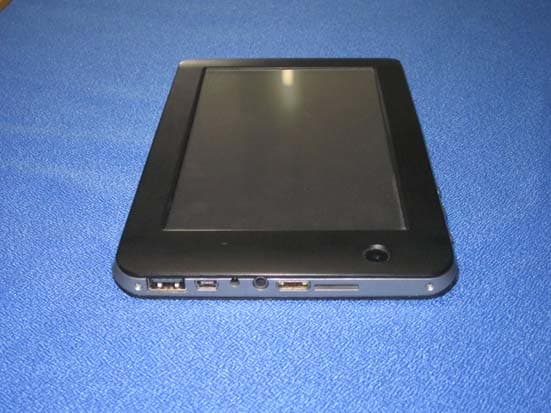
Click to zoom
Application Details
- Equipment Class
- JBC - Part 15 Class B Computing Device/Personal Computer
- Date of Grant
- Apr 10, 2012
- Application Purpose
- Original Equipment
- Date of Application
- Apr 10, 2012
- Equipment Note
- MID WITH 11BGN
- Company
- POINT OF VIEW US LLC
- Country
- United States
Documents & Files
Document Text
Text extracted from the exhibit documents filed with the FCC. Open a document above to read the original.
Users Manual
Point of View Android 2.3 Tablet - User’s Manual English PlayTab Pro Contents 1. General notes...........................................................................................................2 2. Box contents............................................................................................................2 3. Product outlook........................................................................................................3 4. Startup and shut down.............................................................................................4 5. Desktop....................................................................................................................4 6. Buttons .....................................................................................................................5 7. System Settings .......................................................................................................5 8. Install, uninstall & run applications...........................................................................7 9. Touch Calibration.....................................................................................................8 10. External devices.....................................................................................................8 11. Frequently Asked Questions Treatment:................................................................9 1 English Point of View Android 2.3 Tablet - User’s Manual PlayTab Pro 1. General notes ·This product is a highly advanced product, do not disassemble yourself. ·Protect the product from strong shocks such as dropping. · Avoid using this product the following conditions: high and low temperatures, moist, dusty, magnetic fields strong environments or long-term exposure to sunlight. · Please use only a slightly moist cotton cloth to clean the product shell, do not use any chemical cleaning solution. This product should not be exposed to liquids. · Using headphones at high volumes to long periods of time can cause hearing damage. · Avoid active use of this device while in traffic, especially when using headphones. · Please only use the permitted batteries, chargers and accessories. Any other products can violate the warranty regulations and may be dangerous. · Please follow the relevant local environmental regulations to deal with obsolete machines and accessories. · The manufacturer takes no responsibility for loss of data caused by either hardware or software. The user is responsible for performing backups and saving of important data. 2. Box contents Tablet PC 5V 2A Dc charge Instruction manual USB cable 1pc 1pc 1pc 1pc 2 Point of View Android 2.3 Tablet - User’s Manual English PlayTab Pro 3. Product outlook 2 1 6 5 4 3 7 8 9 101112 13 1 Camera 2 Microphone 3 Reset 4 Power 5 Menu 6 ESC 7 USB 8 Mini USB 9 Power jack 10Headphone 11 HDMI 12Micro SD card reader 13 Speaker 3 English Point of View Android 2.3 Tablet - User’s Manual PlayTab Pro 4. Startup and shut down ·Boot: Press and hold the power button to turn on the device: The system is now been turned on and the Android system is being loaded: After the startup sequence, the basic Android default home interface is shown. · Shutdown: Press the power button, a pop-up appears, select “Shut Down” to shut down the tablet PC: · Sleep: Short press the power button to allow the tablet to go in hibernation (power saving) mod. Short press the power button again and the tablet will be re-activated. 5. Desktop The default desktop contains the following interactive objects: Status Bar (top), Quick navigation buttons (right side). Also, there may be some pre-installed shortcut icons and/or widgets on the desktop itself. The status bar shows relevant system information such as network, battery status and the system time. Press the App drawer button (dotted button in the middle of the Quick Navigation menu) to open you App drawer. This displays all the installed applications on the device. 4 Point of View Android 2.3 Tablet - User’s Manual English PlayTab Pro 6. Buttons The tablets’ buttons have the following functions: Power key: Turn on, shut down or hibernate on/off. Menu button: Open the menu options (if available) Home button: Return to the home screen Return: Go back to the previous screen The volume can be changed by using the volume + and - buttons in the right top corner of the screen The back button and menu button are also available in the right top corner. These have the same function as the physical buttons on the device. 7. System Settings The "Settings" icon opens the system settings interface, as shown below: WIFI Wireless Connection: 5 English Point of View Android 2.3 Tablet - User’s Manual PlayTab Pro In the "Settings" menu, click on "Wireless & networks" to open the WiFi settings interface. Check the option "WIFI" to quickly enable or disable the WIFI feature. In the “Wi-Fi settings” you can view and edit the wireless network of your choice. The "Network Notification" option enables the tablet to pop up a notification when a new wireless network is available. Under the “Wi-Fi networks” a list of the available networks will appear. Select the network of choice and enter the appropriate password if needed. 6 Point of View Android 2.3 Tablet - User’s Manual English PlayTab Pro 8. Install, uninstall & run applications You can install applications using different methods such as ‘App market‘ applications or special .APK apps. This manual instructs how to manually install Android installation files (.APK) through the “File Explorer”. First make sure that in the menu “Settings” / “Applications” the option “Unknown sources” is checked. For this action, the .apk files needs to be first copied to either the micro SD card ot the tablet’s internal NAND memory. Through the “File Explorer” you can select the correct .APK file to start the installation. ·Uninstall applications: Select "Settings" / "Application" / "Manage Applications" and select the ri…
Text truncated - open the document above for the full version.
External Photos
V1.0 Page 65 of 68 Report No.: CTL120113030-WW 6. External and Internal Photos of the EUT External Photos V1.0 Page 66 of 68 Report No.: CTL120113030-WW
Internal Photos
V1.0 Page 66 of 67 Report No.: CTL120113030-WW Internal Photos V1.0 Page 67 of 67 Report No.: CTL120113030-WW ......................End of Report........................
Operational Description
Operation Description Power: Rated supply voltage: 5V. RF Module: RTL8188CUS Work Freqency: 2412~2462MHz for wi-fi 802.11bgn The RTL8188CUS module is designed based on Broadcom 4329 chipset solution. It supports generic SPI (G-SPI), SDIO interface to connect the WLAN to the host processor. If Antenna be diversity, Antenna should add one SPDT switch outside module and control by module. 1. The RTL8188CUS is 802.11b/g/n draft compliant 1T1R 2.4G ISM band Transceiver. 2. Tine frequency is a multiplied frequency to produce a extract HF signal. 3. RF module is used for producing digital modulation OFDM and DSSS.
Schematics
104104104104104 104104 104104 104 224224224 224 224224224224 224 224224224 104104104104 104104 F30 BGA441-APP F30 BGA441-APP 104104104 104104104104 104104 104104104104 224 240R 1% 224 104 104 1K +/-1% 1K +/-1% C5C4C3C2C1 C9 C10 C11 C12 C13 C14C71C62 C63 C65C72C77C78 C80 C81C82C83 C84C85C86C87 C100 C101 U1-A U1-B C110C111C112 C90C93 C94C95 C96 C97C99 C113C114 C117 C119 R96 TP6TP7 C39 C56 C57 R103 R104 2011-08-05 SC3007_V03_110805.PCB SC3007 1.00 D VER: DATE: DRAWN BY: CHECK BY: APPRO BY: PCB P/N: SCALE: DATE: DATE: TITLE: XIE CPU每个电源对放置一个 CPU每个电源对放置一个 CPU每个电源对放置一个 CPU每个电源对放置一个 CPU及周边器件 贴片对位点 DRAM参考电压 DRAM NAND TS0/CSI0 TS1/CSI1 AB4 SDQ0 AC7 SDQ1 AC4 SDQ2 AB8 SDQ3 AC8 SDQ4 AB5 SDQ5 AB7 SDQ6 AC3 SDQ7 AB2 SDQ8 Y1 SDQ9 AC2 SDQ10 Y2 SDQ11 AA1 SDQ12 AB3 SDQ13 W2 SDQ14 AC1 SDQ15 N1 SDQ16 T2 SDQ17 N2 SDQ18 U1 SDQ19 U2 SDQ20 P1 SDQ21 T1 SDQ22 M2 SDQ23 L1 SDQ24 H1 SDQ25 L2 SDQ26 H2 SDQ27 J1 SDQ28 M1 SDQ29 G2 SDQ30 K2 SDQ31 H3 SVREF0 H4 SVREF1 Y5 SVREF2 AA8 SVREF3 AB6 SDQS0 AC5 SDQS0# AB1 SDQS1 AA2 SDQS1# R1 SDQS2 P2 SDQS2# K1 SDQS3 J2 SDQS3# AC6 SDQM0 W1 SDQM1 R2 SDQM2 G1 SDQM3 V2 SCK# V1 SCK N3 SCKE0 J4 SCKE1 W4 SA0 R4 SA1 U4 SA2 M4 SA3 Y4 SA4 N4 SA5 V4 SA6 M3 SA7 AA3 SA8 P4 SA9 L3 SA10 W3 SA11 P3 SA12 Y3 SA13 R3 SA14 K3 SBA0 L4 SBA1 K4 SBA2 T3 SWE U3 SCAS T4 SRAS V3 SCS0 AA4 SCS1 AA7 SZQ AA6 SRST P8 SDBG0 R8 SDBG1 N8 ADBG M23 NWE#/SPI0_MOSI/PC0 M22 NALE/SPI0_MISO/PC1 L23 NCLE/SPI0_CLK/PC2 L22 NCE1/PC3 K23 NCE0/PC4 K22 NRE#/PC5 J23 NRB0/SDC2_CMD/PC6 J22 NRB1/SDC2_CLK/PC7 H23 NDQ0/SDC2_D0/PC8 H22 NDQ1/SDC2_D1/PC9 G23 NDQ2/SDC2_D2/PC10 G22 NDQ3/SDC2_D3/PC11 H21 NDQ4/PC12 H20 NDQ5/PC13 G21 NDQ6/PC14 G20 NDQ7/PC15 M21 NWP/PC16 F23 NCE2/PC17 F22 NCE3/PC18 L21 NCE4/SPI2_CS0/PC19 K21 NCE5/SPI2_CLK/PC20 J21 NCE6/SPI2_MOSI/PC21 J20 NCE7/SPI2_MISO/PC22 G19 SPI0_CS0/PC23 F21 NDQS/PC24 H19 NAND_VCC0 J19 NAND_VCC1 E23 TS0_CLK/CSI0_PCLK/PE0 E22 TS0_ERR/CSI0_MCLK/PE1 D23 TS0_SYNC/CSI0_HSYNC/PE2 D22 TS0_DVLD/CSI0_VSYNC/PE3 C23 TS0_D0/CSI0_D0/PE4 C22 TS0_D1/CSI0_D1/PE5 B23 TS0_D2/CSI0_D2/PE6 B22 TS0_D3/CSI0_D3/PE7 A23 TS0_D4/CSI0_D4/PE8 A22 TS0_D5/CSI0_D5/PE9 B21 TS0_D6/CSI0_D6/PE10 A21 TS0_D7/CSI0_D7/PE11 F20 TS1_CLK/CSI1_PCLK/SDC1_CMD/PG0 E21 TS1_ERR/CSI1_MLCK/SDC1_CLK/PG1 E20 TS1_SYNC/CSI1_HSYNC/SDC1_D0/PG2 D21 TS1_DVLD/CSI1_VSYNC/SDC1_D1/PG3 D20 TS1_D0/CSI1_D0/SDC1_D2/CSI0_D8/PG4 C21 TS1_D1/CSI1_D1/SDC1_D3/CSI0_D9/PG5 E19 TS1_D2/CSI1_D2/UART3_TX/CSI0_D10/PG6 C20 TS1_D3/CSI1_D3/UART3_RX/CSI0_D11/PG7 D19 TS1_D4/CSI1_D4/UART3_RTS/CSI0_D12/PG8 C19 TS1_D5/CSI1_D5/UART3_CTS/CSI0_D13/PG9 D18 TS1_D6/CSI1_D6/UART4_TX/CSI0_D14/PG10 C18 TS1_D7/CSI1_D7/UART4_RX/CSI0_D15/PG11 AA5 ODT0 J3 ODT1 G5 VCC0_DRAM H5 VCC1_DRAM L5 VCC2_DRAM M5 VCC3_DRAM R5 VCC4_DRAM T5 VCC5_DRAM W5 VCC6_DRAM W6 VCC7_DRAM W7 VCC8_DRAM Y6 VCC9_DRAM M8 VDD0_DLL N9 VDD1_DLL P9 VDD2_DLL H11 VDD0_CPU H12 VDD1_CPU H13 VDD2_CPU H14 VDD3_CPU J12 VDD4_CPU J13 VDD5_CPU J15 VDD0_INT J16 VDD1_INT K9 VDD2_INT K10 VDD3_INT K15 VDD4_INT L8 VDD5_INT L9 VDD6_INT R9 VDD7_INT R10 VDD8_INT T8 VDD9_INT N19 VCC_CARD W12 VCC0_LVDS W13 VCC1_LVDS W14 VCC2_LVDS F19 VCC_CSI0 E18 VCC_CSI1 H8 VCC0 H9 VCC1 H10 VCC2 H15 VCC3 J8 VCC4 J9 VCC5 J10 VCC6 J14 VCC7 G3 GND0_DRAM G4 GND1_DRAM J5 GND2_DRAM K5 GND3_DRAM N5 GND4_DRAM P5 GND5_DRAM U5 GND6_DRAM V5 GND7_DRAM Y7 GND8_DRAM Y8 GND9_DRAM M9 GND0_DLL N10 GND1_DLL P10 GND2_DLL J11 GND0 K11 GND1 K12 GND2 K13 GND3 L10 GND4 L11 GND5 L12 GND6 M10 GND7 M11 GND8 M12 GND9 M13 GND10 N11 GND11 N12 GND12 P11 GND13 P12 GND14 R11 GND15 R12 GND16 T11 GND17 T12 GND18 W9 GND0_LVDS W10 GND1_LVDS W11 GND2_LVDS VDD_1V2 DRAM_VCC DQ10 DQ9 DQ8 DQ7 DQ6 DQ19 SA8 DQ18 SA7 SDQS0 DQ17 SA6 DQ16 SA5 DQ15 SA4 SA3 DQ14 DQ13 SDQS1 SDQM0 DQ25 SBA2 SCKE SCK SBA1 DQ23 SBA0 SA13 SDQM3 DQ22 SA12 SDQS3 SA11 DQ21 SDQM2 DQ20 SA10 SDQS2 SDQM1 SA9 DQ24 CPU-VREF DQ3 DQ31 DQ2 DQ30 DQ1 DQ29 SODT DQ28 SCS# SA2 DQ0 SRAS# DQ27 SA1 DQ26 SCAS# DQ5 DQ12 SA0 SWE# DQ4 DQ11 SCK# CSI0_HSYNC CSI0_CK CSI0_PCK CSI0_D3 CSI0_D2 CSI0_D1 CSI0_D0 CSI0_D7 CSI0_D6 CSI0_D5 CSI0_D4 CSI0_VSYNC NCLE NALE NWE# ND6 ND5 NCE1# ND4 ND3 ND2 NRB1# ND1 NRB0# ND0 NRD# NCE0# ND7 NCE3# NCE2# NWP DRAM_VCC VCC_3V3 INTVDDINTVDD INTVDD VDD_1V2 INTVDD INTVDD VCC_3V3 VCC_3V3 CSI0_IO_2V8 CSI0_IO_2V8 SDQS0# SDQS1# SDQS2# SDQS3# SRST SA14 VCC_3V3 NDQS CSI1_HSYNC CSI1_CK CSI1_PCK CSI1_D3 CSI1_D2 CSI1_D1 CSI1_D0 CSI1_D7 CSI1_D6 CSI1_D5 CSI1_D4 CSI1_VSYNC SZQ CSI1_2V8 CSI1_2V8 CPU-VREF DRAM_VCC 104 105 104 24MHz 18P 18P 104 104 200K +/-1% 104 224 104 224 10M 18P 18P 104 NC 2K 2K 10UF 1M F30 BGA441-APP F30BGA441-APP 104 102 104 4.7uF10uF 10UF 000R 000R 000R NSR0320MW2T1 C18 C19 C20 X1 C21 C25 C17 C6 TP1 TP5 R5 C22 C24 C91 C16 R9 C26 C32 C41 R39 R48 R49 TP16 TP17 CT6 R38 U1-CU1-D TP2 TP3 TP11 TP13 TP14 TP15 C60 C23 C55 CT7CT8 CT4 3V3 GD R123 R124 R126 D7 X2 2011-08-05 SC3007_V03_110805.PCB SC3007 1.00 SHEN ZHEN D VER: DATE: DRAWN BY: CHECK BY: APPRO BY: PCB P/N: SCALE: DATE: DATE: TITLE: XIE CT7和CT8一定要用钽电容,否则开机会有爆破音 预留DEBUG测试点,以备调试使用 预留DEBUG测试点,以备调试使用 SYS TEST IR UART PS2 SPI TWI EMACCARD0 EINT AUDIO INT AUDIO CODEC USB CARD3 TV SATA HDMI GPS PWM TP LCD1 LCD0 D5 ERXD3/SPI1_CS0/PA0 E5 ERXD2/SPI1_CLK/PA1 D6 ERXD1/SPI1_MOSI/PA2 E6 ERXD0/SPI1_MISO/PA3 D7 ETXD3/SPI1_CS1/PA4 E7 ETXD2/SPI3_CS0/PA5 D8 ETXD1/SPI3_CLK/PA6 E8 ETXD0/SPI3_MOSI/PA7 D9 ERXCK/SPI3_MISO/PA8 E9 ERXERR/SPI3_CS1/PA9 D10 ERXDV/UART1_TX/PA10 E10 EMDC/UART1_RX/PA11 D11 EMDIO/UART6_TX/UART1_RTS/PA12 E11 ETXEN/UART6_RX/UART1_CTS/PA13 D12 ETXCK/UART7_TX/UART1_DTR/PA14 E12 ECRS/UART7_RX/UART1_DSR/PA15 D13 ECOL/CAN_TX/UART1_DCD/PA16 C13 ETXERR/CAN_RX/UART1_RING/PA17 A15 TWI0_SCK/PB0 B15 TWI0_SDA/PB1 A8 TWI1_SCK/PB18 B8 TWI1_SDA/PB19 C8 TWI2_SCK/PB20 C7 TWI2_SDA/PB21 C17 SPI0_CS0/UART5_TX/EINT22/PI10 D17 SPI0_CLK/UART5_RX/EINT23/PI11 C16 SPI0_MOSI/UART6_TX/EINT24/PI12 D16 SPI0_MISO/UART6_RX/EINT25/PI13 C15 PS2_SCK1/TCLKIN0/EINT26/SPI0_CS1/PI14 D15 PS2_SDA1/TCLKIN1/EINT27/SPI1_CS1/PI15 A7 UART0_TX/IR1_TX/PB22 B7 UART0_RX/IR1_RX/PB23 B14 IR0_TX/SPDIF_MCLK/STANBYWFI/PB3 A13 IR0_RX/PB4 A10 JTAG_MS0/SPI2_CS0/PB14 B10 JTAG_CK0/SPI2_CLK/PB15 A9 JTAG_DO0/SPI2_MOSI/PB16 B9 JTAG_D…
Text truncated - open the document above for the full version.
Test Report
Shenzhen CTL Electromagnetic Technology Co., Ltd. Tel: +86-755-89486194 Fax: +86-755-89486187 FCC PART 15 SUBPART B TEST REPORT FCC Part 15B Report Reference No......................: CTL120113030-WF Compiled by ( position+printed name+signature)..: File administrators Andy Zhang Name of the organization performing the tests ( position+printed name+signature)..: Test Engineer Kendy Wang Approved by ( position+printed name+signature)..: Manager Tracy Qi Date of issue.....................................: March 31, 2012 Representative Laboratory Name.: Shenzhen CTL Electromagnetic Technology Co., Ltd. Address.............................................: Zone B, 4/F, Block 20, Guangqian Industrial Park, Longzhu Road, Nanshan, Shenzhen 518055 China. Test Firm..........................................: Bontek Compliance Testing Laboratory Ltd Address.............................................: 1/F, Block East H-3, OCT Eastern Ind. Zone, Qiaocheng East Road, Nanshan, Shenzhen, China Applicant’s name............................: POINT OF VIEW US LLC Address.............................................: 8300 NW 53rd Road, DORAL, FL 33166 MIAMI Test specification: Standard ...........................................: FCC Part 15B: Unintentional Radiators TRF Originator ..................................: Shenzhen CTL Electromagnetic Technology Co., Ltd. Master TRF.......................................: Dated 2011-01 Shenzhen CTL Electromagnetic Technology Co., Ltd. All rights reserved. This publication may be reproduced in whole or in part for non-commercial purposes as long as the Shenzhen CTL Electromagnetic Technology Co., Ltd. is acknowledged as copyright owner and source of the material. Shenzhen CTL Electromagnetic Technology Co., Ltd. takes no responsibility for and will not assume liability for damages resulting from the reader's interpretation of the reproduced material due to its placement and context. Test item description .................... : MID Trade Mark .......................................: Point of View Model/Type reference.......................: TAB-PLAYTABPRO I/O Type of EUT................................: USB Port/ Earphone Port/ DC Input Port I/O Q’TY............................................: 1/ 1/ 1 Antenna Type..............................: / FCC ID.......................................: AHRTAB-PLAYTABPRO Result................................................: Positive V1.0 Page 2 of 19 Report No.: CTL120113030-WF T E S T R E P O R T Test Report No. : CTL120113030-WF March 31, 2012 ______________________________________________________________________________________________ Date of issue Equipment under Test : MID Model /Type : TAB-PLAYTABPRO Listed Models : / Applicant : POINT OF VIEW US LLC Address : 8300 NW 53rd Road, DORAL, FL 33166 MIAMI Manufacturer : Shenzhen A&G Technology CO., Ltd. Address : NO.7 Guangyang Industrial, Jian’an Road West, Emerson Avenue, High–tech Development, Fuyong Peace Village, Bao’an District, Shenzhen, China. Test Result according to the standards on page 4: Positive The test report merely corresponds to the test sample. It is not permitted to copy extracts of these test result without the written permission of the test laboratory. V1.0 Page 3 of 19 Report No.: CTL120113030-WF Contents 1. TEST STANDARDS .................................................................. 4 2. SUMMARY............................................................................. 5 2.1. General Remarks 5 2.2. Equipment Under Test 5 2.3. Short description of the Equipment under Test (EUT) 5 2.4. EUT operation mode 5 2.5. EUT configuration 5 2.6. Related Submittal(s) / Grant (s) 6 2.7. Modifications 6 3. TEST ENVIRONMENT............................................................... 7 3.1. Address of the test laboratory 7 3.2. Test Facility 7 3.3. Environmental conditions 7 3.4. Configuration of Tested System 7 3.5. Statement of the measurement uncertainty 8 3.6. Equipments Used during the Test 8 3.7. Summary of Test Result 9 4. TEST CONDITIONS AND RESULTS ............................................ 10 4.1. Conducted Emissions Test 10 4.2. Radiated Emissions Test 13 5. TEST SETUP PHOTOS OF THE EUT .......................................... 17 6. EXTERNAL AND INTERNAL PHOTOS OF THE EUT ....................... 18 V1.0 Page 4 of 19 Report No.: CTL120113030-WF 1. TEST STANDARDS The tests were performed according to following standards: FCC PartB : Unintentional Radiators ANCI C63.4: 2003 V1.0 Page 5 of 19 Report No.: CTL120113030-WF 2. SUMMARY 2.1. General Remarks Date of receipt of test sample : Jan. 10, 2012 Testing commenced on : Jan. 11, 2012 Testing concluded on : Jan. 18, 2012 2.2. Equipment Under Test Power supply system utilised Power supply voltage : z 120V / 60 Hz o 115V / 60Hz o 12 V DC o 24 V DC o Other (specified in blank below) 2.3. Short description of the Equipment under Test (EUT) The device is a MID, work frequency at 2.4~2.4835GHz, support 802.11bgn. For more details, refer to the user’s manual of the EUT. Serial number: Prototype 2.4. EUT operation mode Test Mode: 1. The EUT has been tested under normal operating condition. 2. No test program used to control the EUT within testing. 3. EUT Function and Test Mode The field strength of radiation emission was measured in the following position: EUT stand-up position (Y axis), lie-down position (X, Z axis). The following data show only with the worst case setup. The worst case of Y axis was reported. Based on client request, all normal using modes of the normal function were tested but only the worst test data of the worst mode is reported by this report. 2.5. EUT configuration The following peripheral devices and interface cables were connected during the measurement: o - supplied by the manufacturer ● - supplied by the lab ● U-disk Manufacturer : KINGSTON Model No. : 4047412 ● Ear-phone Manufacturer : Philip Model No. : KY21-05 V1.0 Page 6 of 19 Report No.: CTL120113030-WF 2.6. Related Su…
Text truncated - open the document above for the full version.
Test Setup Photos
5. Test Setup Photos of the EUT
Contact Information
Applicant
Julian Ponce(General Manager)
Test Firm
Bontek Compliance Testing Laboratory LtdTony Wu
Technical Specifications
| # | Rule Parts | Frequency Range | Power Output |
|---|---|---|---|
| 1 | 15B | - | - |