AK8NWA20Digital Media Player
Sony Group Corporation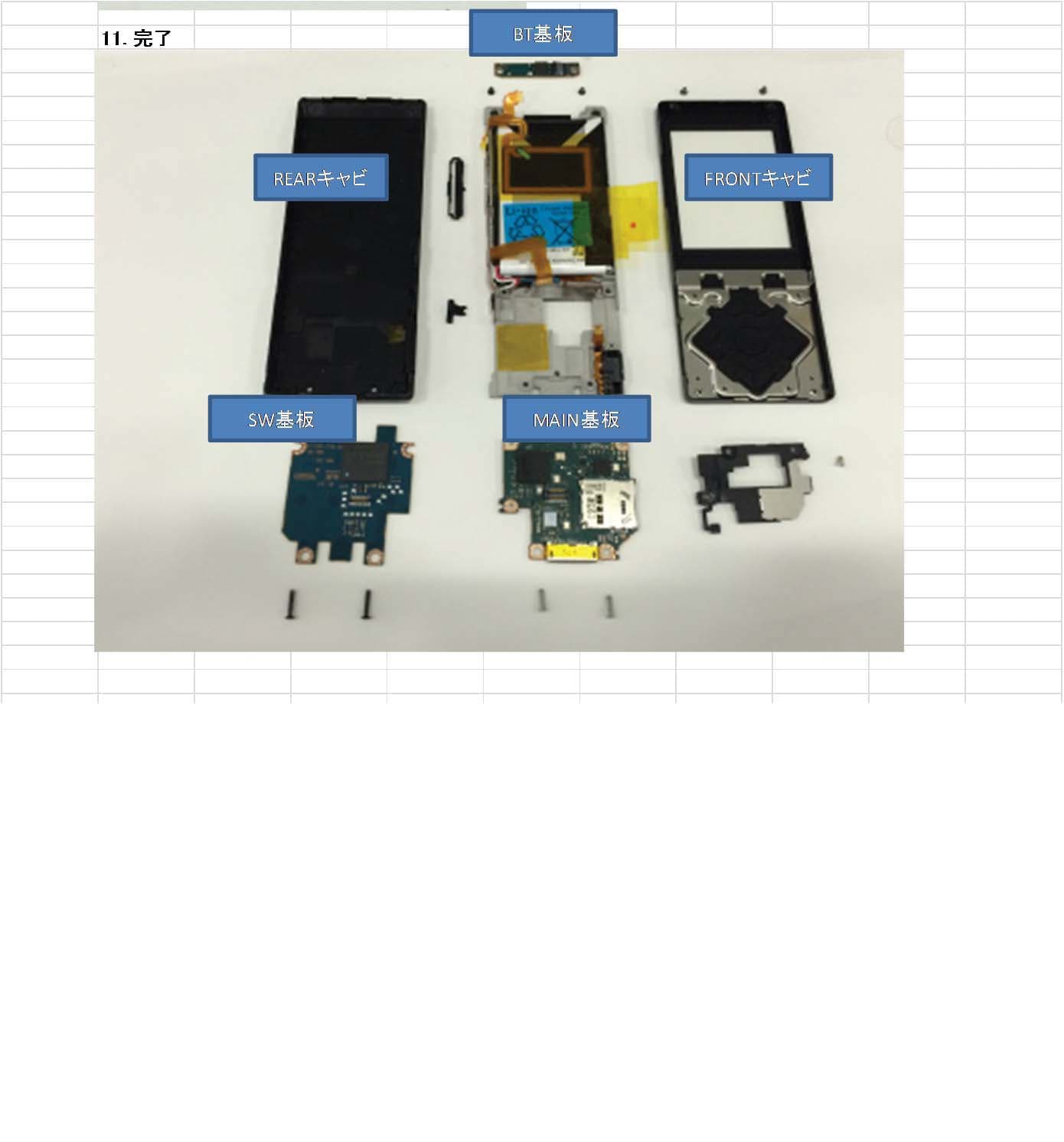
Click to zoom
Application Details
- Equipment Class
- DXX - Part 15 Low Power Communication Device Transmitter
- Date of Grant
- May 10, 2015
- Application Purpose
- Original Equipment
- Date of Application
- May 10, 2015
- Equipment Note
- Digital Media Player
- Frequency Range
- 13.56000000 - 13.56000000
- Company
- Sony Group Corporation
- Country
- Japan
Documents & Files
Document Text
Text extracted from the exhibit documents filed with the FCC. Open a document above to read the original.
Users Manual
NW-A25/A25HN/A26HN/A27HN 4-573-948-11(1) NW-A25/A25HN/A26HN/A27HN ©2015 Sony Corporation Printed in Malaysia English Instruction Manual About the manuals 1. Instruction Manual (this manual) 2. (Startup Guide) The Startup Guide describes the following: • Basic operating instructions of your WALKMAN® • How to access the “Help Guide”, which contains all of the operating instructions and explanations of customer support websites ,etc. • How to access useful PC applications websites on the internet While browsing is free, you may be charged a communication fee according to your carrier contract. Depending on the country/region in which you have purchased your Walkman, some models may not be available. Notes for using Walkman Note for battery • To prevent battery deterioration, charge the battery at least once every six months or every year. About volume operation (Only for countries/areas complying with European and Korean Directives) An alarm (beep) and a warning [Check the volume level] are meant to protect your ears when you turn the volume up to a level that is harmful for your ears for the first time. You can cancel the alarm and warning by pressing any button. Note • You can turn up the volume after canceling the alarm and warning. • After the initial warning, the alarm and warning repeat every 20 cumulative hours that the volume is set to a level that is harmful for your ears. When this happens, the volume is turned down automatically. • If the volume is set to a level that is harmful for your ears and you turn off the Walkman, the volume is turned down to a level that is safe for your ears automatically. Bluetooth capabilities You can listen to music stored on your Walkman from Bluetooth audio devices such as headphones or speakers. Pairing (first time the device is used) 1. Set the Bluetooth audio device to pairing mode. (Refer to the device’s instruction manual.) 2. From the Home menu of your Walkman, select [Bluetooth] - [Add Device (Pairing)] - the Bluetooth audio device to pair with. After pairing is completed, the Bluetooth connection is made automatically. Connecting (subsequent uses) 1. Turn on the paired Bluetooth audio device and set it to standby. 2. From the Home menu of your Walkman, select [Bluetooth] - [Connect to Audio Device] - the paired Bluetooth audio device to connect with. Disconnecting From the Home menu of your Walkman, select [Bluetooth] - [Disconnect Audio Device]. Symptom & Remedy Your Walkman cannot charge the battery or is not recognized on your computer. • The USB cable (supplied) is not connected to a USB connector on your computer properly. Disconnect the USB cable, and then reconnect it. • When you use your Walkman for the first time, or if you have not used the Walkman for a long time, it may take a few minutes to be recognized by the computer. Check that the computer recognizes the Walkman after you have connected it to the computer for about 10 minutes. Your Walkman does not operate or the power does not turn on. • You cannot operate your Walkman while it is connected to a computer. Disconnect the Walkman from a computer. Compliance & Information Information on laws and trademarks For information on laws, regulations and trademark rights, refer to “Important Information” contained in the supplied software. To install it, open [WALKMAN] folder in your WALKMAN’s memory after connecting to your computer. Windows user: [FOR_WINDOWS] - [Help_Guide_Installer(.exe)] Mac user: [FOR_MAC] - [Help_Guide_Installer_for_mac] After installing the software, double-click the shortcut or the alias icon generated on your desktop. About the in-ear headphones The earbuds seal your ears. Therefore, be aware that there is a risk of damage to your ears or eardrums if strong pressure is applied to the earbuds or the earbuds are suddenly removed from your ears. After use, be sure to take the earbuds off your ears gently. About the headphones • Avoid playing the unit at so loud a volume that extended play might affect your hearing. • At a high volume outside sounds may become inaudible. Avoid listening to the unit in situations where hearing must not be impaired, for example, while driving or cycling. • As the headphones are of open-air design, sounds go out through the headphones. Remember not to disturb those close to you. Notice for customers: the following information is only applicable to equipment sold in countries applying EU directives Manufacturer: Sony Corporation, 1-7-1 Konan Minato-ku Tokyo, 108-0075 Japan For EU product compliance: Sony Deutschland GmbH, Hedelfinger Strasse 61, 70327 Stuttgart, Germany To prevent possible hearing damage, do not listen at high volume levels for long periods. Hereby, Sony Corp., declares that this equipment is in compliance with the essential requirements and other relevant provisions of Directive 1999/5/EC. For details, please access the following URL: http://www.compliance.sony.de/ Design and specifications are subject to change without notice. 4-573-948-11(1) Instruction Manual Instruction ManualFRInstruction ManualGR Instruction ManualDEInstruction ManualTR Instruction ManualESInstruction ManualPL Instruction ManualITInstruction ManualKR
Users Manual
Digital Media Player NW-A25/A25HN/A26HN/A27HN The following FCC statement applies only to the version of this model manufactured for sale in the USA. NOTE: This equipment has been tested and found to comply with the limits for a Class B digital device, pursuant to Part 15 of the FCC Rules. These limits are designed to provide reasonable protection against harmful interference in a residential installation. This equipment generates, uses and can radiate radio frequency energy and, if not installed and used in accordance with the instructions, may cause harmful interference to radio communications. However, there is no guarantee that interference will not occur in a particular installation. If this equipment does cause harmful interference to radio or television reception, which can be determined by turning the equipment off and on, the user is encouraged to try to correct the interference by one or more of the following measures: ・Reorient or relocate the receiving antenna. ・Increase the separation between the equipment and receiver. ・Connect the equipment into an outlet on a circuit different from that to which the receiver is connected. ・Consult the dealer or an experienced radio/TV technician for help. The following FCC statement applies only to the version of this model manufactured for sale in the USA. You are cautioned that any changes or modifications not expressly approved in this manual could void your authority to operate this equipment The following FCC statement applies only to the version of this model manufactured for sale in the USA. If you have any questions about this product: Visit: www.sony.com/walkmansupport Contact: Sony Customer Information Service Center at 1-(866)-456-7669 Write: Sony Customer Information Service Center 12451 Gateway Blvd., Fort Myers, FL 33913 Declaration of Conformity Trade Name: SONY Model No.: NW-A25/A26/A27 Responsible Party: Sony Electronics Inc. Address: 16535 Via Esprillo, San Diego, CA 92127 U.S.A Telephone Number: 858-942-2230 This device complies with Part 15 of the FCC Rules. Operation is subject to the following two conditions: (1) this device may not cause harmful interference, and (2) this device must accept any interference received, including interference that may cause undesired operation. The following FCC statement applies only to the version of this model manufactured for sale in the USA. This equipment must not be co-located or operated in conjunction with any other antenna or transmitter. The following FCC statement applies only to the version of this model manufactured for sale in the USA. This equipment complies with FCC radiation exposure limits set forth for an uncontrolled environment and meets the FCC radio frequency (RF) Exposure Guidelines. This equipment has very low levels of RF energy that are deemed to comply without testing of specific absorption rate(SAR). Notice for customers: the following information is only applicable to equipment sold in countries applying EU directives Manufacturer: Sony Corporation, 1-7-1 Konan Minato-ku Tokyo, 108-0075 Japan For EU product compliance: Sony Deutschland GmbH, Hedelfinger Strasse 61, 70327 Stuttgart, Germany Disposal of waste batteries and electrical and electronic equipment (applicable in the European Union and other European countries with separate collection systems) This symbol on the product, the battery or on the packaging indicates that the product and the battery shall not be treated as household waste. On certain batteries this symbol might be used in combination with a chemical symbol. The chemical symbols for mercury (Hg) or lead (Pb) are added if the battery contains more than 0.0005% mercury or 0.004% lead. By ensuring these products and batteries are disposed of correctly, you will help prevent potentially negative consequences for the environment and human health which could otherwise be caused by inappropriate waste handling. The recycling of the materials will help to conserve natural resources. In case of products that for safety, performance or data integrity reasons require a permanent connection with an incorporated battery, this battery should be replaced by qualified service staff only. To ensure that the battery and the electrical and electronic equipment will be treated properly, hand over these products at end-of-life to the applicable collection point for the recycling of electrical and electronic equipment. For all other batteries, please view the section on how to remove the battery from the product safely. Hand the battery over to the applicable collection point for the recycling of waste batteries. For more detailed information about recycling of this product or battery, please contact your local Civic Office, your household waste disposal service or the shop where you purchased the product or battery. Applicable accessories: Headphones For users in Canada Listening for a Lifetime Selecting fine audio equipment such as the unit you’ve just purchased is only the start of your musical enjoyment. Now it’s time to consider how you can maximize the fun and excitement your equipment offers. This manufacturer, the Consumer Electronics Association (CEA)® and the American Speech-Language-Hearing Association (ASHA) want you to get the most out of your equipment by playing it at a safe level; a level that lets the sound come through clearly without annoying blaring or distortion and, most importantly, without damaging your sensitive hearing. Sound can be deceiving. Over time your hearing “comfort level” adapts to higher volumes of sound. So what sounds “normal” can actually be loud and harmful to your hearing. Guard against this by setting your equipment at a safe level BEFORE your hearing adapts. TO ESTABLISH A SAFE LEVEL: ・Set your volume control to the lowest level where you can hear the music comfortably and clearly. Prolonged exposure to anything over 85 decibels can cause gradual hearing loss. ・Once you have established a sound level where you can …
Text truncated - open the document above for the full version.
Cover Letter(s)
Sony EMCS Corporation, Kisarazu SITE 8-4 Shiomi Kisarazu City, Chiba Pref., 292-0834 Japan Letter of Authorization Date: April 17, 2015 UL Japan, Inc. 4383-326 Asama-cho, Ise-shi, Mie 516-0021 Japan FCC ID : AK8NWA20 Applicant : Sony Corporation To whom it may concern: Please be advised we authorize Yoshihisa Maeda of Consumer Technology Division, UL Japan, Inc. to act on our behalf, until otherwise notified, for applications submitted for Federal Communication Commission Radio equipment applications submitted to UL Japan, Inc. We certify that we are not subject to denial of federal benefits, t hat includes FCC benefits, pursuant to Section 5301 of the Anti-Drug Abuse ACT of 1988, U.S.C. 862. Further, no party, as defined in 47 CFR 1.2002(b), to the application is subject to denial of federal benefits, that includes FCC benefits. The application for the subject equipment has not been submitted to another TCB for certification. Thank you for your attention to this matter. Sincerely, Hideo Nomura Sony EMCS Corporation
Cover Letter(s)
Sony EMCS Corporation, Kisarazu SITE 8-4 Shiomi Kisarazu City, Chiba Pref., 292-0834 Japan Request for Confidentiality Date: April 17, 2015 UL Japan, Inc. 4383-326 Asama-cho, Ise-shi, Mie 516-0021 Japan FCC ID : AK8NWA20 Applicant : Sony Corporation To whom it may concern: Please be advised that the following information is to be held confidential on behalf of us, referring to the FCC rules 0.457 and 0.459: Block Diagram Theory of Operation Schematics Parts List The application contains technical information which we deem to be trade secrets and proprietary. If made public, the information might be used to the disadvantage of the applicant in the market place. Thank you for your attention to this matter. Sincerely, Hideo Nomura Sony EMCS Corporation
Cover Letter(s)
Sony EMCS Corporation, Kisarazu SITE 8-4 Shiomi Kisarazu City, Chiba Pref., 292-0834 Japan Request for Short-Term Confidentiality Date: April 17, 2015 UL Japan, Inc. 4383-326 Asama-cho, Ise-shi, Mie 516-0021 Japan FCC ID : AK8NWA20 Applicant : Sony Corporation To whom it may concern: Please be advised that the following information is to be held in confidence for 114 days from the date of the Grant of Equipment Authorization and behalf of us, referring to the FCC rules 0.457 and 0.459: External Photos Internal Photos Test Setup Photos User Manual The application contains technical information, which we deem to be trade secrets and proprietary. If made public, the information might be used to the disadvantage of the applicant in the market place. Thank you for your attention to this matter. Sincerely, ____________________________________ Hideo Nomura Sony EMCS Corporation
ID Label/Location Info
Serial Word height UC
Internal Photos
㻮㼀 㻼㼃㻮 㻹㻭㻵㻺 㻼㼃㻮 㻿㼃 㻼㼃㻮 㻲㼞㼛㼚㼠㻌㼏㼍㼎㼕㼚㼑㼠 㻾㼑㼍㼞㻌㼏㼍㼎㼕㼚㼑㼠 NW-A25, NW-A26, NW-A27 Front Side(Main PWB) Rear Side(Main PWB) Front Side(BT PWB) Rear Side(BT PWB) BT Antenna BTModule FPCConnecter (To MainPWB) NW-A25, NW-A26, NW-A27 Rear Side(Walkman) NW‐A25, NW-A26, NW-A27 NFCAntenna (To MainPWB) MAINPWB Rear Side(Main PWB) NFC IC NW-A25, NW-A26, NW-A27 Front Side(SW PWB) Rear Side(SW PWB)
Test Report
FCC ID: AK8NWA20 Project No: JB-Z0048-C Model No.: NW-A27 IC: 409B-NWA20 Issued: May 11, 2015 Page 1 of 17 Sony EMCS EMC/RF Test Laboratory Main Lab. A2LA Cert. #3203.01 Kisarazu Site 8-4 Shiomi Kisarazu-shi, Chiba, 292-0834 Japan PHONE +81-(438) 37-2750 FAX +81-(438) 37-2048 RADIO TEST REPORT Project No. : JB-Z0048-C Client : Sony Corporation Address : 1-7-1 Konan, Minato-ku Tokyo 108-0075, Japan Type of Equipment : Digital Media Player (for NFC part) Model No. : NW-A27 Serial No. : 001, 002 FCC ID : AK8NWA20 IC : 409B-NWA20 Regulation Applied : 47 CFR Part 15 Subpart C / RSS-Gen Issue 4 / RSS-210 Issue 8 + Amendment 1 Final Judgment : Passed Sample Receipt : March 16, 2015 Testing : April 13, 2015 - April 16, 2015 Reported : May 11, 2015 Reported by : Approved Signatory : Takanori Oho Teruki Kurihara Test Engineer Technical Manager EMC/ RF Test Laboratory Main Lab. EMC/ RF Test Laboratory Main Lab. Design Technology Division Design Technology Division Sony EMCS Corporation Sony EMCS Corporation Notice * These test results relate only to the items (combination equipment, test configuration, operation condition etc.) tested. * This report shall not be reproduced except in full, without written approval of the laboratory. * This report must not be used by the client to claim product endorsement by A2LA or any agency of the U.S. Government. * All test results are traceable to the national and / or international standards. The testing in which “Non-accreditation” is displayed is outside the accreditation scopes in Sony EMCS EMC/ RF Test Laboratory. TESTING CERT #3203.01 FCC ID: AK8NWA20 Project No: JB-Z0048-C Model No.: NW-A27 IC: 409B-NWA20 Issued: May 11, 2015 Page 2 of 17 Sony EMCS EMC/RF Test Laboratory Main Lab. A2LA Cert. #3203.01 Kisarazu Site 8-4 Shiomi Kisarazu-shi, Chiba, 292-0834 Japan PHONE +81-(438) 37-2750 FAX +81-(438) 37-2048 TABLE OF CONTENTS 1. General Information .................................................................................................................................................... 3 1.1. Description of Equipment Under Test (EUT) ...................................................................................................... 3 1.2. Summary of Test Result ......................................................................................................................................... 3 1.3. Tested Methodology ................................................................................................................................................ 4 1.4. Measurement Procedures ...................................................................................................................................... 4 1.5. Test Facility .............................................................................................................................................................. 6 1.6. Uncertainty .............................................................................................................................................................. 6 2. System Test Configuration .......................................................................................................................................... 7 2.1. Validation ................................................................................................................................................................. 7 2.2. Test Operating Conditions ..................................................................................................................................... 7 2.3. Special Accessories .................................................................................................................................................. 7 2.4. EUT Modifications .................................................................................................................................................. 7 2.5. Configuration of Tested System ............................................................................................................................ 8 3. Test Data ....................................................................................................................................................................... 9 3.1. 20dB Bandwidth ...................................................................................................................................................... 9 3.2. 99% Occupied Bandwidth .................................................................................................................................... 10 3.3. Frequency Tolerance ............................................................................................................................................. 11 3.4. Electric field strength (Fundamental and Spurious emissions) ...................................................................... 12 4. Method of Calculation ................................................................................................................................................ 14 4.1. Frequency Tolerance Measurement ................................................................................................................... 14 4.2. Electric field strength Measurement .................................................................................................................. 14 5. List of Test Equipment .............................................................................................................................................. 15 5.1. 20dB Bandwidth / 99% Occupied Bandwidth / Frequency Tolerance ............................................................ 15 5.2. Electric field strength (Fundamental and Spurious emissions) ...................................................................... 15 6. Photographs of test setup ...........................................................................................................…
Text truncated - open the document above for the full version.
Test Setup Photos
FCC ID: AK8NWA20 Project No: JB-Z0048-C Model No.: NW-A27 IC: 409B-NWA20 Issued: May 11, 2015 Page 16 of 17 Sony EMCS EMC/RF Test Laboratory Main Lab. A2LA Cert. #3203.01 Kisarazu Site 8-4 Shiomi Kisarazu-shi, Chiba, 292-0834 Japan PHONE +81-(438) 37-2750 FAX +81-(438) 37-2048 6. Photographs of test setup The following photographs show the arrangement of the worst case. 6.1. 20dB Bandwidth / 99% Occupied Bandwidth / Frequency Tolerance Measurements Photo(s) FCC ID: AK8NWA20 Project No: JB-Z0048-C Model No.: NW-A27 IC: 409B-NWA20 Issued: May 11, 2015 Page 17 of 17 Sony EMCS EMC/RF Test Laboratory Main Lab. A2LA Cert. #3203.01 Kisarazu Site 8-4 Shiomi Kisarazu-shi, Chiba, 292-0834 Japan PHONE +81-(438) 37-2750 FAX +81-(438) 37-2048 6.2. Electric field strength Measurement Photo(s) Below 30MHz 30 - 1000 MHz < EUT Axis> X (without Tag) Y (without Tag) Z (without Tag) X (with Tag) Y (with Tag) Z (with Tag)
Contact Information
Applicant
Kazuyuki Hori(Chief EMC/RF Compliance Specialist)
Technical Contact
Sony EMCS EMC/RF Test Laboratory Main Lab.Teruki Kurihara
[email protected]81-438-37-2750
Kisarazu Site 8-4 Shiomi Kisarazu-shi · Chiba · Japan
Non-Technical Contact
UL Japan, Inc.Yoshihisa Maeda
[email protected]81-596-24-8999
Test Firm
Sony GMOC EMC/RF Test Laboratory, Main LabTeruki Kurihara
Technical Specifications
| # | Rule Parts | Frequency Range | Power Output |
|---|---|---|---|
| 1 | 15C | 13.56 MHz - 13.56 MHz | - |
Other Applications from Sony Group Corporation
AK8WW81782
Aug 21, 2026Radio Equipment
Equipment Class
DSS - Part 15 Spread Spectrum TransmitterAK8CFIZCP2
Aug 03, 2026Wireless Controller
Equipment Class
DSS - Part 15 Spread Spectrum TransmitterAK8OEV321MUH
Apr 14, 2026LCD Monitor
Equipment Class
JAD - Part 15 Class A Digital DeviceAK8OEV431MUH
Apr 14, 2026LCD Monitor
Equipment Class
JAD - Part 15 Class A Digital DeviceAK8OEV271MUH
Apr 14, 2026LCD Monitor
Equipment Class
JAD - Part 15 Class A Digital Device