AK8PCG4F2LPersonal Computer with WLAN and Bluetooth
Sony Group Corporation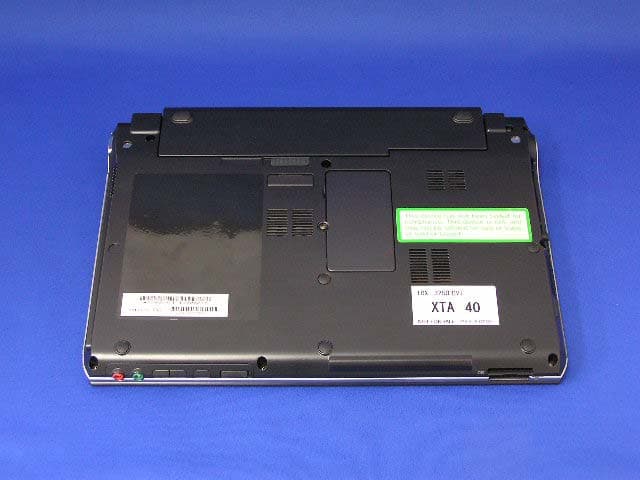
Click to zoom
Application Details
- Equipment Class
- DTS - Digital Transmission System
- Date of Grant
- Aug 31, 2005
- Application Purpose
- Original Equipment
- Date of Application
- Aug 31, 2005
- Equipment Note
- Personal Computer with WLAN and Bluetooth
- Frequency Range
- 2412.00000000 - 2462.00000000
- Company
- Sony Group Corporation
- Country
- Japan
Documents & Files
Document Text
Text extracted from the exhibit documents filed with the FCC. Open a document above to read the original.
Users Manual
N User Guide Personal Computer VGN-TX600 Series 2 nN Contents Before Use .........................................................................................................................................................................6 Documentation .............................................................................................................................................................6 Ergonomic Considerations ...........................................................................................................................................8 Getting Started .................................................................................................................................................................10 Locating Controls and Ports.......................................................................................................................................11 About the Indicator Lights ..........................................................................................................................................18 Connecting a Power Source ......................................................................................................................................20 Using the Battery Pack ..............................................................................................................................................21 Shutting Down Your Computer Safely .......................................................................................................................25 Using Your VAIO Computer .............................................................................................................................................26 Using the Keyboard ...................................................................................................................................................27 Using the Touch Pad .................................................................................................................................................29 Using Special-function Buttons ..................................................................................................................................30 Using the Optical Disc Drive ......................................................................................................................................32 Using PC Cards .........................................................................................................................................................41 Using the Memory Stick Media ..................................................................................................................................45 Using Other Memory Cards .......................................................................................................................................48 Using the Internet.......................................................................................................................................................50 Using Wireless LAN (WLAN) .....................................................................................................................................51 Using the Bluetooth Functionality ..............................................................................................................................61 3 nN Using Peripheral Devices .................................................................................................................................................66 Connecting a Port Replicator .....................................................................................................................................67 Connecting External Speakers ..................................................................................................................................71 Connecting an External Display .................................................................................................................................72 Selecting Display Modes............................................................................................................................................76 Using the Multiple Monitors Function .........................................................................................................................77 Connecting an External Microphone ..........................................................................................................................79 Connecting a Universal Serial Bus (USB) Device......................................................................................................80 Connecting a Printer ..................................................................................................................................................83 Connecting an i.LINK Device .....................................................................................................................................84 Connecting to a Network (LAN) .................................................................................................................................86 Customizing Your VAIO Computer ..................................................................................................................................88 Setting the Password .................................................................................................................................................89 Setting Up Your Computer with VAIO Central ...........................................................................................................92 Using the Power Saving Modes .................................................................................................................................93 Managing Power with VAIO Power Management .................................................................................................…
Text truncated - open the document above for the full version.
Users Manual
Por favor lea detalladamente este manual de instrucciones antes de conectar y operar este equipo. Recuerde que un mal uso de su aparato podría anular la garantía. IMPORTANTE! ! Personal Computer / Computadora Personal VGN-TX600 Series Safety Information / Información de Seguridad 2 For customers in USA and Canada Pour les utilisateurs aux Etats-Unis et au Canada Notice © 2005 Sony Electronics Inc. Reproduction in whole or in part without written permission is prohibited. All rights reserved. This manual and the software described herein, in whole or in part, may not be reproduced, translated, or reduced to any machine-readable form without prior written approval. SONY ELECTRONICS INC. PROVIDES NO WARRANTY WITH REGARD TO THIS MANUAL, THE SOFTWARE, OR OTHER INFORMATION CONTAINED HEREIN AND HEREBY EXPRESSLY DISCLAIMS ANY IMPLIED WARRANTIES OF MERCHANTABILITY OR FITNESS FOR ANY PARTICULAR PURPOSE WITH REGARD TO THIS MANUAL, THE SOFTWARE, OR SUCH OTHER INFORMATION. IN NO EVENT SHALL SONY ELECTRONICS INC. BE LIABLE FOR ANY INCIDENTAL, CONSEQUENTIAL, OR SPECIAL DAMAGES, WHETHER BASED ON TORT, CONTRACT, OR OTHERWISE, ARISING OUT OF OR IN CONNECTION WITH THIS MANUAL, THE SOFTWARE, OR OTHER INFORMATION CONTAINED HEREIN OR THE USE THEREOF. SONY CANNOT WARRANT THAT THE FUNCTIONS DESCRIBED IN THIS GUIDE WILL BE UNINTERRUPTED OR ERROR-FREE. SONY ALSO ASSUMES NO RESPONSIBILITY, AND SHALL NOT BE LIABLE FOR ANY DAMAGES TO, OR VIRUSES THAT MAY INFECT, YOUR COMPUTER EQUIPMENT, OR OTHER PROPERTY ON ACCOUNT OF YOUR ACCESS TO, USE OF, OR BROWSING IN ANY DESCRIBED WEB SITE, OR YOUR DOWNLOADING OF ANY MATERIALS, DATA, TEXT, IMAGES, VIDEO, OR AUDIO FROM ANY DESCRIBED WEB SITE. WEB SITE INFORMATION IS OBTAINED FROM VARIOUS SOURCES AND MAY BE INACCURATE. COPIES OF COPYRIGHTED INFORMATION MAY ONLY BE MADE FOR LEGALLY PERMISSIBLE PURPOSES. Sony Electronics Inc. reserves the right to make any modification to this manual or the information contained herein at any time without notice. The software described herein is governed by the terms of a separate user license agreement. This product contains software owned by Sony and licensed by third parties. Use of such software is subject to the terms and conditions of license agreements enclosed with this product. Some of the software may not be transported or used outside the United States. Software specifications are subject to change without notice and may not necessarily be identical to current retail versions. Certain product(s) included with this computer may include features such as copy protection and content management technology. USE OF THE SOFTWARE PRODUCT(S) REQUIRES AGREEMENT TO APPLICABLE END USER AGREEMENTS AND FULL COMPLIANCE WITH APPLICABLE PRODUCT ACTIVATION PROCEDURES. Product activation procedures and privacy policies will be detailed during initial launch of the software product(s), or upon certain reinstallations of the software product(s), or reconfigurations of the computer, and may be completed by Internet or telephone (toll charges may apply). Updates and additions to software may require an additional charge. Subscriptions to online service providers may require a fee and credit card information. Financial services may require prior arrangements with participating financial institutions. 3 Important information for Canadian customers: Your new VAIO computer includes certain software versions or upgrades, and Internet services or offers that are available to U.S. customers only. Sony, VAIO, the VAIO logo, VAIO Digital Studio, VAIO Media, VAIO Media Music Server, VAIO Media Photo Server, VAIO Media Video Server, Click to DVD, CLIÉ, DVgate Plus, Handycam, MagicGate, Memory Stick, the Memory Stick logo, OpenMG, MICROMV, SonicStage, ImageStation, ATRAC3, and i.LINK are trademarks or registered trademarks of Sony. Intel and Pentium are trademarks or registered trademarks of the Intel Corporation. Microsoft, Windows, and the Windows logo are trademarks or registered trademarks of the Microsoft Corporation. PS/2 is a registered trademark of the IBM Corporation. All other trademarks are trademarks or registered trademarks of their respective owners. The International ENERGY STAR® Office Equipment Program is an international program that promotes energy saving through the use of computers and other office equipment. The program backs the development and dissemination of products with functions that effectively reduce energy consumption. It is an open system in which business proprietors can participate voluntarily. The targeted products are office equipment such as computers, displays, printers, facsimiles and copiers. Their standards and logos are uniform among participating nations. ENERGY STAR is a U.S. registered trademark of the Environmental Protection Agency. Reverse engineering or disassembly is prohibited. i.LINK is a trademark of Sony used only to designate that a product contains an IEEE 1394 connection. The i.LINK connection may vary, depending on the software applications, operating system, and compatible i.LINK devices. All products with an i.LINK connection may not communicate with each other. Please refer to the documentation that came with your compatible i.LINK device for information on operating conditions and proper connection. Before connecting compatible i.LINK PC peripherals to your system, such as a CD-RW or hard disk drive, confirm their operating system compatibility and required operating conditions. All other trademarks are trademarks of their respective owners. End User / Product Activation Requirements Certain software product(s) included with this computer may include features such as copy protection and content management technology. Use of the software product(s) requires agreement to applicable end user agreements and full compliance with applicable product activation procedures. Product activation procedures and privacy policies will be detailed during initial launch of the software product(s), or upon certain reinstallatio…
Text truncated - open the document above for the full version.
Cover Letter(s)
American Telecommunications Certification Body Inc. 6731 Whittier Ave, McLean, VA 22101 August 11, 2005 RE: FCC ID: AK8PCG4F2L_ATCB002667 Attention: Yukari Ito I have a few comments on this Application. Please note that further comments may arise in response to answers provided to the questions below. 1. Please provide the sample label, including the 2-condition statement required in 15.19. 2. Please note that the SAR report shows a number of measurements that have a power drift exceeding 7%. Please note that power drift is not to exceed 5%. If power drift does exceed 5% then some explanation and justification needs to be provided. Other than the increased power drift uncertainty, was any SAR over time data taken to justify this excessive power drift and to insure that SAR was not adversely affected by this drift? For example, IEEE 1528 states that if the power varies by more than 5% the measurement should be repeated. Correcting the uncertainty of measurement does not appear to meet this statement. Dennis Ward mailto:[email protected] The items indicated above must be submitted before processing can continue on the above referenced application. Failure to provide the requested information may result in application termination. Correspondence should be considered part of the permanent submission and may be viewed from the Internet after a Grant of Equipment Authorization is issued. Please do not respond to this correspondence using the email reply button. In order for your response to be processed expeditiously, you must submit your documents through the AmericanTCB.com website. Also, please note that partial responses increase processing time and should not be submitted. Any questions about the content of this correspondence should be directed to the sender.
External Photos
FCC ID: AK8PCG4F2L IC Number: 409B-PCG4F2L Applicant: Sony Corporation External Photo Top Bottom FCC ID: AK8PCG4F2L IC Number: 409B-PCG4F2L Applicant: Sony Corporation Front Rear FCC ID: AK8PCG4F2L IC Number: 409B-PCG4F2L Applicant: Sony Corporation Side A Side B FCC ID: AK8PCG4F2L IC Number: 409B-PCG4F2L Applicant: Sony Corporation Side A (with the lid open) Side B (with the lid open)
Internal Photos
FCC ID: AK8PCG4F2L IC Number: 409B-PCG4F2L Applicant: Sony Corporation Internal Photo Location of WLAN module 1 Location of WLAN module [Enlarged] WLAN Module FCC ID: AK8PCG4F2L IC Number: 409B-PCG4F2L Applicant: Sony Corporation WLAN module: Side A with shield WLAN module: Side A without shield FCC ID: AK8PCG4F2L IC Number: 409B-PCG4F2L Applicant: Sony Corporation Ref.: Location of granted Bluetooth module Ref.: Location of granted Bluetooth module Bluetooth Module: FCC ID CWTUGPZ6 Bluetooth Module: FCC ID CWTUGPZ6 FCC ID: AK8PCG4F2L IC Number: 409B-PCG4F2L Applicant: Sony Corporation WLAN module: Side A with shield WLAN module: Side A without shield FCC ID: AK8PCG4F2L IC Number: 409B-PCG4F2L Applicant: Sony Corporation WLAN module: Side B
RF Exposure Info
Test report No. : 25KE0051-HO-3a Page : 2 of 104 Issued date : August 9, 2005 Revised data : August 26, 2005 FCC ID : AK8PCG4F2L UL Apex Co., Ltd. Head Office EMC Lab. 4383-326 Asama-cho, Ise-shi, Mie-ken 516-0021 JAPAN Telephone: +81 596 24 8116 Facsimile: +81 596 24 8124 CONTENTS PAGE SECTION 1 : Client information............................................................................................................................................3 SECTION 2 : Equipment under test (E.U.T.)........................................................................................................................3 2.1 Identification of E.U.T. ..........................................................................................................................3 2.2 Product Description ................................................................................................................................3 2.3 Antenna Location ...................................................................................................................................5 SECTION 3 : Test standard information...............................................................................................................................8 3.1 Requirements for compliance testing defined by the FCC .....................................................................8 3.2 Exposure limit........................................................................................................................................9 SECTION 4 : Test result .......................................................................................................................................................10 4.1 Colocation of SAR value......................................................................................................................10 4.2 Result of Max SAR value.....................................................................................................................10 SECTION 5 : Operation of E.U.T. during testing...............................................................................................................11 5.1 Operating modes...................................................................................................................................11 5.2 Measurement procedure .......................................................................................................................12 5.3 Test setup of EUT.................................................................................................................................14 SECTION 6 : Test surrounding............................................................................................................................................15 6.1 Measurement uncertainty ......................................................................................................................15 SECTION 7 : Confirmation before testing ..........................................................................................................................16 7.1 Conducted power of Main Antenna Port...............................................................................................16 7.2 Conducted power of Aux Antenna Port ................................................................................................17 7.3 Conducted power of Bluetooth Antenna Port .......................................................................................18 SECTION 8 : Measurement results......................................................................................................................................19 8.1 SAR Measurement results .....................................................................................................................19 APPENDIX 1 : Photographs of test setup.......................................................................................................................... 22 APPENDIX 2 : Test instruments........................................................................................................................................ 36 Equipment & calibration information.......................................................................................................37 1. Equipment used ....................................................................................................................................37 2. Dosimetry assessment setup .................................................................................................................38 3. Configuration and peripherals ..............................................................................................................39 4. System components ..............................................................................................................................40 5. Test system specifications ....................................................................................................................42 6. Simulated Tissues Composition of 2450MHz......................................................................................43 7. Validation Measurement ......................................................................................................................43 8. System validation data..........................................................................................................................44 9. Validation Measurement data...............................................................................................................45 10. System Validation Dipole (D2450V2,S/N: 765) ................................................................................47 11. Dosimetric E-Field Probe Calibration (ET3DV6,S/N: 1684) ............................................................56 12. References .......................................................................................................…
Text truncated - open the document above for the full version.
Test Report
Test report No. : 25KE0051-HO-1 Page : 2 of 84 Issued date : August 9, 2005 FCC ID : AK8PCG4F2L UL Apex Co., Ltd. Head Office EMC Lab. 4383-326 Asama-cho, Ise-shi, Mie-ken 516-0021 JAPAN Telephone : +81 596 24 8116 Facsimile : +81 596 24 8124 MF060b(01.06.05) CONTENTS PAGE SECTION 1: Client information ......................................................................................................... 3 SECTION 2: Equipment under test (E.U.T.)..................................................................................... 3 SECTION 3: Test specification, procedures & results...................................................................... 5 SECTION 4: Operation of E.U.T. during testing .............................................................................. 8 SECTION 5: Conducted Emission.................................................................................................... 10 SECTION 6: Spurious Emission....................................................................................................... 11 SECTION 7: Bandwidth .................................................................................................................... 12 SECTION 8: Maximum Peak Output Power .................................................................................. 12 SECTION 12: Peak Power Density................................................................................................... 12 APPENDIX 1: Photographs of test setup .........................................................................................13 Conducted Emission............................................................................................................................ 13 Spurious Emission (Radiated) ............................................................................................................ 14 Worst Case Position (Z-axis:Horizontal / X-axis:Vertical) .............................................................. 15 APPENDIX 2:Test instruments ......................................................................................................... 16 APPENDIX 3: Data of EMI test......................................................................................................... 17 Conducted Emission............................................................................................................................ 17 6dB Bandwidth(DSSS and other forms of modulation) ................................................................... 25 Maximum Peak OutPut Power (DSSS and other forms of modulation) ........................................ 30 Radiated Spurious Emission(DSSS and other forms of modulation )(below1GHz)...................... 35 Radiated Spurious Emission(DSSS and other forms of modulation )(above1GHz)...................... 42 Conducted Spurious Emission(DSSS and other forms of modulation) .......................................... 73 Conducted emission Band Edge compliance (DSSS and other forms of modulation) .................. 79 Power Density (DSSS and other forms of modulation) .................................................................... 80 Test report No. : 25KE0051-HO-1 Page : 3 of 84 Issued date : August 9, 2005 FCC ID : AK8PCG4F2L UL Apex Co., Ltd. Head Office EMC Lab. 4383-326 Asama-cho, Ise-shi, Mie-ken 516-0021 JAPAN Telephone : +81 596 24 8116 Facsimile : +81 596 24 8124 MF060b(01.06.05) SECTION 1: Client information SECTION 2: Equipment under test (E.U.T.) 2.1 Identification of E.U.T. Type of Equipment Personal Computer Model No. PCG-4F2L Serial No. XTA37 ( for Radiated emission and Conducted emission) XTA40 ( for other tests) Country of Manufacture Japan Rating DC16.0 V, 4.0A (AC Adapter output) Receipt Date of Sample July 6, 2005 Condition of EUT Engineering prototype (Note for sale: This sample is equivalent to mass-produced item) Category Identified Portable device 2.2 Product Description Digital Specification Feature of EUT Model No: PCG-4F2L (referred to as the EUT in this report) is the Personal Computer with Wireless LAN IEEE802.11b/g. and Bluetooth module. The Bluetooth module is granted by FCC/IC (FCC ID: CWTUGPZ6/IC No.: 1788F-UGPZ6). Size 272*190*30 (W*L*H) Operating temperature range +5 to +35 deg. C. Battery Type : Li-ion Battery Model Name : VGP-BPxx Rating =7.4V : 7800mAh Operation Clock 2462MHz, 1200MHz, 400MHz, 270MHz, 100MHz, 77.5MHz, 48MHz, 33MHz, 25MHz, 24.576MHz, 24MHz, 14.381MHz, 10MHz Company Name Sony Corporation Brand name Sony Address 6-7-35 Kitashinagawa Shinagawa-ku, Tokyo,141-0001, Japan Telephone Number +81-3-5795-8702 Facsimile Number +81-3-5795-8981 Contact Person Takumi Ozawa Test report No. : 25KE0051-HO-1 Page : 4 of 84 Issued date : August 9, 2005 FCC ID : AK8PCG4F2L UL Apex Co., Ltd. Head Office EMC Lab. 4383-326 Asama-cho, Ise-shi, Mie-ken 516-0021 JAPAN Telephone : +81 596 24 8116 Facsimile : +81 596 24 8124 MF060b(01.06.05) Radio Specification Wireless LAN (IEEE802.11b/g) Equipment Type Transceiver Frequency band 2412-2462MHz Channel spacing 5MHz Type of Modulation 11b: DSSS 11g: OFDM Antenna Type lambda/4-Monopole Antenna Antenna Connector Type U.FL Compatible connecter Antenna Gain Right: 2.63dBi Left: -0.81dBi Max. Output Power 16.88dBm (Peak), 48.75mW ITU code G1D/D1D Power Supply DC 3.3V ±10% Bluetooth Equipment Type Transceiver Frequency band 2402-2480MHz Channel spacing 1MHz Type of Modulation FHSS Antenna Type lambda/4Monopole Antenna Antenna Connector Type U.FL Compatible connecter Antenna Gain 1.5dBi Max. Output Power 0.84dBm (Peak), 1.21mW ITU code F1D Power Supply DC3.3V±10% FCC 15.31 (e) This EUT provides stable voltage (DC3.3V) constantly to RF Module regardless of input voltage. Therefore, this EUT complies with the requirement. FCC Part 15.203 Antenna requirement It is impossible for end users to replace the antenna, because the antenna is mounted inside of the EUT. Therefore, the equipment complies with the antenna requirement of Section 15.20…
Text truncated - open the document above for the full version.
Test Setup Photos
Test report No. : 25KE0051-HO-1 Page : 13 of 84 Issued date : August 9, 2005 FCC ID : AK8PCG4F2L UL Apex Co., Ltd. Head Office EMC Lab. 4383-326 Asama-cho, Ise-shi, Mie-ken 516-0021 JAPAN Telephone : +81 596 24 8116 Facsimile : +81 596 24 8124 MF060b(01.06.05) APPENDIX 1: Photographs of test setup Conducted Emission Front Rear Test report No. : 25KE0051-HO-1 Page : 14 of 84 Issued date : August 9, 2005 FCC ID : AK8PCG4F2L UL Apex Co., Ltd. Head Office EMC Lab. 4383-326 Asama-cho, Ise-shi, Mie-ken 516-0021 JAPAN Telephone : +81 596 24 8116 Facsimile : +81 596 24 8124 MF060b(01.06.05) Spurious Emission (Radiated) Front Rear Test report No. : 25KE0051-HO-1 Page : 15 of 84 Issued date : August 9, 2005 FCC ID : AK8PCG4F2L UL Apex Co., Ltd. Head Office EMC Lab. 4383-326 Asama-cho, Ise-shi, Mie-ken 516-0021 JAPAN Telephone : +81 596 24 8116 Facsimile : +81 596 24 8124 MF060b(01.06.05) Worst Case Position (Z-axis:Horizontal / X-axis:Vertical) X-axis Y-axis Z-axis
Contact Information
Applicant
Kazuyuki Hori(Chief EMC/RF Compliance Specialist)
Technical Contact
Test Firm
UL Japan, IncMitsuru Fujimura
Technical Specifications
| # | Rule Parts | Frequency Range | Power Output |
|---|---|---|---|
| 1 | 15C | 2.41 GHz - 2.46 GHz | 49.00 mW |
Other Applications from Sony Group Corporation
AK8WW81782
Aug 21, 2026Radio Equipment
Equipment Class
DSS - Part 15 Spread Spectrum TransmitterAK8CFIZCP2
Aug 03, 2026Wireless Controller
Equipment Class
DSS - Part 15 Spread Spectrum TransmitterAK8OEV321MUH
Apr 14, 2026LCD Monitor
Equipment Class
JAD - Part 15 Class A Digital DeviceAK8OEV431MUH
Apr 14, 2026LCD Monitor
Equipment Class
JAD - Part 15 Class A Digital DeviceAK8OEV271MUH
Apr 14, 2026LCD Monitor
Equipment Class
JAD - Part 15 Class A Digital Device