AK8PCG4J1LLaptop Computer with CDMA, WLAN and BT Radios
Sony Group Corporation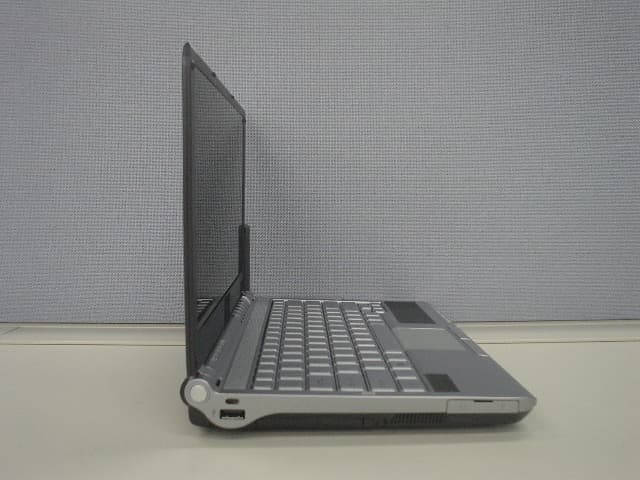
Click to zoom
Application Details
- Equipment Class
- PCB - PCS Licensed Transmitter
- Date of Grant
- Sep 24, 2006
- Application Purpose
- Original Equipment
- Date of Application
- Sep 24, 2006
- Equipment Note
- Laptop Computer with CDMA, WLAN and BT Radios
- Frequency Range
- 824.70000000 - 848.31000000
- Company
- Sony Group Corporation
- Country
- Japan
Documents & Files
Document Text
Text extracted from the exhibit documents filed with the FCC. Open a document above to read the original.
Users Manual
N User Guide Personal Computer VGN-TX Series 2 nN Contents Before Use .........................................................................................................................................................................6 Documentation .............................................................................................................................................................6 Ergonomic Considerations ...........................................................................................................................................7 Getting Started .................................................................................................................................................................10 Locating Controls and Ports.......................................................................................................................................10 About the Indicator Lights ..........................................................................................................................................16 Connecting a Power Source ......................................................................................................................................17 Using the Battery Pack ..............................................................................................................................................18 Shutting Down Your Computer Safely .......................................................................................................................21 Using Your VAIO Computer .............................................................................................................................................23 Using the Keyboard ...................................................................................................................................................23 Using the Touch Pad .................................................................................................................................................24 Using Special-function Buttons ..................................................................................................................................25 Using the Optical Disc Drive ......................................................................................................................................27 Using PC Cards .........................................................................................................................................................34 Using the Memory Stick Media ..................................................................................................................................37 Using Other Memory Cards .......................................................................................................................................41 Using the Internet.......................................................................................................................................................43 Using Wireless LAN (WLAN) .....................................................................................................................................44 Using the Bluetooth Functionality ..............................................................................................................................51 Using Peripheral Devices .................................................................................................................................................57 3 nN Connecting a Port Replicator .....................................................................................................................................57 Connecting External Speakers ..................................................................................................................................61 Connecting an External Display .................................................................................................................................62 Selecting Display Modes............................................................................................................................................65 Using the Multiple Monitors Function .........................................................................................................................66 Connecting an External Microphone ..........................................................................................................................67 Connecting a Universal Serial Bus (USB) Device......................................................................................................68 Connecting a Printer ..................................................................................................................................................70 Connecting an i.LINK Device .....................................................................................................................................71 Connecting to a Network (LAN) .................................................................................................................................73 Customizing Your VAIO Computer ..................................................................................................................................75 Setting the Password .................................................................................................................................................75 Using Fingerprint Authentication ................................................................................................................................83 Using Trusted Platform Module (TPM).......................................................................................................................97 Setting Up Your Computer with VAIO Central ............................................................................................…
Text truncated - open the document above for the full version.
Users Manual
About your Computer 1 About your Computer Thank you for purchasing a VAIO® computer! Your new computer combines state-of-the-art hardware and software to bring you unparalleled wireless connectivity. Contents Your computer may not be equipped with all of these hardware features or accessories. The location of the controls, ports, and jacks may vary from the illustrations shown in this section. See your computer’s specification sheet for details on your computer’s supplied accessories. Carton Contents Antenna Computer Battery AC adapter Power cord VAIO® Computer Wireless Information 2 About Wireless Connectivity and Technlogy Your computer is equipped with the new Evolution Data Optimized (EV-DO) technology, by Sprint ®. With built-in EV-DO Wireless WAN capabilities, your computer can connect wirelessly to your e-mail, the Internet, and any intranet networks with which you may be associated with, in a secured mobile environment. You can now enjoy increased mobile broadband high-speeds and enhanced graphics like never before! To Activate Your Sprint Account You can activate your Sprint account account using one of the following methods: ❑With an over the air activation with Sprint network (preferred method) ❑By phone without an internet connection With Over the Air Activation With Sprint Network To activate your Sprint account with over the air activation with Sprint network follow these steps: 1Click Start in the Windows ® taskbar, click All Programs, then click SmartWi Connection Utility. 2From the SmartWi Connection Utility menu, click Activate with Sprint. 3Follow the Sprint Activation on-screen instructions. To Activate Your Sprint Account 3 By Phone (without an internet connection) To activate your Sprint account without using an existing internet connection, follow these steps: 1Call Sony Customer support at 1-888-604-VAIO (8246). You will receive Activation Code, MSID, and MDN by email within 48 hours. After you receive the email, start the “enter activation code" procedure beginning with step 2 below. 2Click Start in the Windows ® taksbar, click All Programs, then click SmartWi Connection Utility. 3From the SmartWi Connection Utility menu, click Enter Activation Code. 4Follow the Sprint Activation on-screen instructions. Sprint Activation Screen VAIO® Computer Wireless Information 4 Activation Status Screen About SmartWi Connection Utility 5 About SmartWi Connection Utility The SmartWi Connection Utility functions largely as a switch manager between the various forms of wireless connectivity: Bluetooth®, WLAN, and WWAN using Sprint ® Wireless software. You can click one of the three wireless options at a time. The SmartWi Connection Utility allows you to switch between the three options. Starting SmartWi Connection Utility At initial startup, a pop-up prompt appears from the Task Tray. Clicking the pop- up prompt or double-clicking the tool icon starts the SmartWi Connection Utility, then you are prompted to activate your Sprint account. If you close the program, however, and later wish to restart it, do the following: SmartWi Connection Utility main screen VAIO® Computer Wireless Information 6 1Make sure your computer is turned on. 2Make sure the wireless switch is turned on. If it is not, locate the switch on the front left portion of your computer and slide the switch up to the ON position. 3You may also click the SmartWi Connection Utility icon in the taskbar notification area. Depending on the wireless selection, one of six icons may appear in the taskbar notification area. Wireless switch and indicators ✍Once you slide the wireless switch to the on position, the SmartWi Connection Utility window appears automatically. WWAN Bluetooth WIRELESS LAN OFF ON WIRELESS Starting SmartWi Connection Utility 7 4Alternately, press Start, select All Programs, select the VA I O S m a r t W i Connection Utility folder, and click SmartWi Connection Utility. The SmartWi Connection Utility dialog box displays. SmartWi Connection Utility icons ✍Note that WWAN and WLAN cannot coexist simultaneously. When one is selected, the other is automatically deselected. Bluetooth Wireless device is turned off (no WWAN or WLAN) WLAN WWAN WWAN and Bluetooth WLAN and Bluetooth VAIO® Computer Wireless Information 8 About the Wireless Switching Window The Wireless Switching Window is a utility that allows you to switch between wireless modes. You can easitly switch between Bluetooth®, WLAN, and WWAN by pressing keyboard buttons instead of using the touch pad (or a separately available USB mouse). Using the Wireless Switching Window To start the Wireless Switching Window utility, press Fn + F to bring up the window. Then to toggle between wireless modes hold the Fn key down while pressing the F key. Wireless Switching Window Using the Wireless Connection Utility 9 Using the Wireless Connection Utility To use the wireless connectivity features and begin using e-mail or connecting to the Internet, simply click the desired button: Sprint ® Wireless (for WAN connectivity), WLAN, or Bluetooth®. Wireless Connection Utility main screen VAIO® Computer Wireless Information 10 Using the Sprint Wireless WAN connection To use Sprint Wireless WAN (WWAN) connectivity, do the following: 1Click the Sprint button on the SmartWi Connection Utility main screen. A Sprint WWAN launch area display appears below the button. 2Click anywhere in the Sprint WWAN launch area. The Sprint WAN Setup screen displays. Sprint WWAN launch area Using the Sprint Wireless WAN connection 11 3By default, your connection to theSprint service initiates. Sprint WAN Setup screen For FCC Radio Frequency Exposure (RF) safety reasons, please keep the device at least 20cm distance from your body when the WWAN is operating. VAIO® Computer Wireless Information 12 Using the Wireless LAN connection To use Wireless LAN (WLAN) connectivity, do the following: 1Click the WLAN button on the SmartWi Connection Utility main screen. A status display appears below the but…
Text truncated - open the document above for the full version.
Users Manual
Por favor lea detalladamente este manual de instrucciones antes de conectar y operar este equipo. Recuerde que un mal uso de su aparato podría anular la garantía. IMPORTANTE! ! Personal Computer / Computadora Personal VGN-TXN10 Series Safety Information / Información de Seguridad 3750_LegalSafety.fm Page 1 Monday, August 21, 2006 11:17 AM 2 For customers in USA and Canada Pour les utilisateurs aux Etats-Unis et au Canada Owner’s Record The model number and serial number are located on the back panel of your Sony VAIO® computer. Record the model and serial number in the space provided here, and keep in a secure location. Refer to the model and serial numbers when you call your Sony Service Center. Notice © 2006 Sony Electronics Inc. Reproduction in whole or in part without written permission is prohibited. All rights reserved. This manual and the software described herein, in whole or in part, may not be reproduced, translated, or reduced to any machine-readable form without prior written approval. SONY ELECTRONICS INC. PROVIDES NO WARRANTY WITH REGARD TO THIS MANUAL, THE SOFTWARE, OR OTHER INFORMATION CONTAINED HEREIN AND HEREBY EXPRESSLY DISCLAIMS ANY IMPLIED WARRANTIES OF MERCHANTABILITY OR FITNESS FOR ANY PARTICULAR PURPOSE WITH REGARD TO THIS MANUAL, THE SOFTWARE, OR SUCH OTHER INFORMATION. IN NO EVENT SHALL SONY ELECTRONICS INC. BE LIABLE FOR ANY INCIDENTAL, CONSEQUENTIAL, OR SPECIAL DAMAGES, WHETHER BASED ON TORT, CONTRACT, OR OTHERWISE, ARISING OUT OF OR IN CONNECTION WITH THIS MANUAL, THE SOFTWARE, OR OTHER INFORMATION CONTAINED HEREIN OR THE USE THEREOF. SONY CANNOT WARRANT THAT THE FUNCTIONS DESCRIBED IN THIS GUIDE WILL BE UNINTERRUPTED OR ERROR-FREE. SONY ALSO ASSUMES NO RESPONSIBILITY, AND SHALL NOT BE LIABLE FOR ANY DAMAGES TO, OR VIRUSES THAT MAY INFECT, YOUR COMPUTER EQUIPMENT, OR OTHER PROPERTY ON ACCOUNT OF YOUR ACCESS TO, USE OF, OR BROWSING IN ANY DESCRIBED WEB SITE, OR YOUR DOWNLOADING OF ANY MATERIALS, DATA, TEXT, IMAGES, VIDEO, OR AUDIO FROM ANY DESCRIBED WEB SITE. WEB SITE INFORMATION IS OBTAINED FROM VARIOUS SOURCES AND MAY BE INACCURATE. COPIES OF COPYRIGHTED INFORMATION MAY ONLY BE MADE FOR LEGALLY PERMISSIBLE PURPOSES. Sony Electronics Inc. reserves the right to make any modification to this manual or the information contained herein at any time without notice. The software described herein is governed by the terms of a separate user license agreement. This product contains software owned by Sony and licensed by third parties. Use of such software is subject to the terms and conditions of license agreements enclosed with this product. Some of the software may not be transported or used outside the United States. Software specifications are subject to change without notice and may not necessarily be identical to current retail versions. Certain product(s) included with this computer may include features such as copy protection and content management technology. USE OF THE SOFTWARE PRODUCT(S) REQUIRES AGREEMENT TO APPLICABLE END USER AGREEMENTS AND FULL COMPLIANCE WITH APPLICABLE PRODUCT Model Number: Serial Number: 3750_LegalSafety.fm Page 2 Monday, August 21, 2006 11:17 AM 3 ACTIVATION PROCEDURES. Product activation procedures and privacy policies will be detailed during initial launch of the software product(s), or upon certain reinstallations of the software product(s), or reconfigurations of the computer, and may be completed by Internet or telephone (toll charges may apply). Updates and additions to software may require an additional charge. Subscriptions to online service providers may require a fee and credit card information. Financial services may require prior arrangements with participating financial institutions. Important information for Canadian customers: Your new VAIO computer includes certain software versions or upgrades, and Internet services or offers that are available to U.S. customers only. Sony, VAIO, the VAIO logo, VAIO Digital Studio, VAIO Media, VAIO Media Music Server, VAIO Media Photo Server, VAIO Media Video Server, Click to DVD, CLIÉ, DVgate Plus, Handycam, MagicGate, Memory Stick, the Memory Stick logo, OpenMG, MICROMV, SonicStage, SonicStage Mastering Studio, SmartWi, ImageStation, ATRAC3, and i.LINK are trademarks or registered trademarks of Sony. Intel and Pentium are trademarks or registered trademarks of Intel Corporation. Microsoft, Windows, and the Windows logo are trademarks or registered trademarks of Microsoft Corporation. PS/2 is a registered trademark of IBM Corporation. All other trademarks are trademarks or registered trademarks of their respective owners. The International ENERGY STAR® Office Equipment Program is an international program that promotes energy saving through the use of computers and other office equipment. The program backs the development and dissemination of products with functions that effectively reduce energy consumption. It is an open system in which business proprietors can participate voluntarily. The targeted products are office equipment such as computers, displays, printers, facsimiles and copiers. Their standards and logos are uniform among participating nations. ENERGY STAR is a U.S. registered trademark of the Environmental Protection Agency. As an ENERGY STAR® Partner, Sony Corporation has determined that this product meets the ENERGY STAR® guidelines for energy efficiency. 3750_LegalSafety.fm Page 3 Monday, August 21, 2006 11:17 AM 4 Reverse engineering or disassembly is prohibited. i.LINK is a trademark of Sony used only to designate that a product contains an IEEE 1394 connection. The i.LINK connection may vary, depending on the software applications, operating system, and compatible i.LINK devices. All products with an i.LINK connection may not communicate with each other. Please refer to the documentation that came with your compatible i.LINK device for information on operating conditions and proper connection. Before connecting compatible i.LINK PC peripherals to your system, such…
Text truncated - open the document above for the full version.
Attestation Statements
411 Dixon Landing Rd. Milpitas, CA 95035 P. (408)586-6200 F. (408)586-6299 Federal Communication Commission Equipment Authorization Division, Application Processing Branch 7435 Oakland Mills Road Columbia, MD 21048 September 20th, 2006 TO WHOM IT MAY CONCERN Non co-transmission of WLAN and CDMA Declaration FCC-ID : AK8PCG4J1L Hereby declare under our sole responsibilities that the PCG-4JlL (FCCID: Ak8PCG4J1L) equipped with the WLAN, CDMA and Bluetooth radios. Only one transmitter either WLAN or 1xRTT can operate at any give time. These radios are set up to not transmit simultaneously. Only following set of radios are set up to co-transmit: WLAN and BT or 1xRTT and BT Sincerely, Michael Grings Deputy Test Lab Manager CETECOM INC.
External Photos
PHOTOS : External Page 1 of 5 FCC-ID : AK8PCG4J1L IC-ID : 409B-PG4J1L PHOTOS : External Page 2 of 5 FCC-ID : AK8PCG4J1L IC-ID : 409B-PG4J1L PHOTOS : External Page 3 of 5 FCC-ID : AK8PCG4J1L IC-ID : 409B-PG4J1L PHOTOS : External Page 4 of 5 FCC-ID : AK8PCG4J1L IC-ID : 409B-PG4J1L PHOTOS : External Page 5 of 5 FCC-ID : AK8PCG4J1L IC-ID : 409B-PG4J1L
ID Label/Location Info
PHOTOS : External FCC-ID : AK8PCG4J1L IC-ID : 409B-PG4J1L
Internal Photos
CDMA ES720 Mini PCI EVDO Module CDMA ES720 Mini PCI EVDO Module CDMA ES720 Mini PCI EVDO Module
Internal Photos
PHOTOS : Internal Page 1 of 5 FCC-ID : AK8PCG4J1LIC-ID : 409B-PCG4J1L PHOTOS : Internal Page 1 of 5 FCC-ID : AK8PCG4J1LIC-ID : 409B-PCG4J1L PHOTOS : Internal Page 1 of 5 FCC-ID : AK8PCG4J1LIC-ID : 409B-PCG4J1L PHOTOS : Internal Page 1 of 5 FCC-ID : AK8PCG4J1LIC-ID : 409B-PCG4J1L PHOTOS : Internal Page 1 of 5 FCC-ID : AK8PCG4J1LIC-ID : 409B-PCG4J1L PHOTOS : Internal Page 1 of 5 FCC-ID : AK8PCG4J1LIC-ID : 409B-PCG4J1L
Parts List/Tune Up Info
BOM: .01017757. PCB ASSY EVDO MINI CARD - EV720 REVISION: D # Novatel Part # Manufactuer Part # Manufactuer Description Qty Reference Designators 1 .01017792. FLASH ASSEMBLY ES720 SONY SPRINT 117 1 U701 2 .15923191. GRM155R71A333KA01D MURATA CAP 0.033UF 0402 -25TO+85C 10V +/-10%X7R 1 C902 3 .15940187. TMK105CH201KW-T TAIYO YUDEN CAP MLC 25V 200PF +/-10% C0G 0402 1 C419 4 .15C010C0. C0402C109C5GAC KEMET CAP CHIP 1PF 0.25PF 50V COG 0402 1 C242 5 .15C040C0. GRM36C0G040C050AQ MURATA CAP CHP 4PF 0.25PF 50V COG 0402 4 C217 C223 C239 C243 6 .15C060D0. GRM1555C1H6R0DZ01D MURATA ELECTRONICS CAP CHIP 6PF 0.5 PF 50V COG 0402 3 C234 C237 C311 7 .15C080D0. GRM36COG080D050AQ MURATA CAP CHIP 8PF 0.5PF 50V COG 0402 1 C310 8 .15C100C0. GPR1555C1H100RZ01E MURATA CAP CHIP 10PF +/-0.25PF 50V COG O402 1 C222 9 .15C101J0.00 GRM1555C1H101JZ01D MURATA CAPACITOR 100 PF 5% 50V C0G 0402 14 C201 C210 C213 C215 C221 C225 C226 C229 C233 C303 C429 C 600 C712 C713 10 .15C102J0. GRM1555C1H102JA01D MURATA CAP CHIP 1000PF 5% 50V COG 0402 15 C228 C312 C623 C625 C806 C807 C808 C809 C810 C811 C818 C81 9 C820 C823 C824 11 .15C120J0.00 GRM1555C1H120JZ01D MURATA CAPACITOR 12 PF 5% 50V C0G 0402 3 C240 C601 C602 12 .15C150J0. C0402C150J5GAC7867 KEMET CAP CHIP 15PF 5% 50V COG 0402 3 C261 C417 C420 13 .15C152K1. 0402B152K500NT WALSIN CAP CHP 1500PF 10% 50V X7R 0402 1 C316 14 .15C221K1. GRM155R71H221KA01D MURATA CAP CHIP 220PF 10% 50V X7R 0402 3 C254 C307 C309 15 .15C222K1. GRM36X7R222K050AQ MURATA CAP CHIP 2200PF 10% 50V X7R 0402 1 C901 16 .15C270J0. C0402C270J5GACTU KEMET CAP CHIP 27PF 5% 50V COG 0402 3 C220 C244 C248 17 .15C272K1. GRM36X7R272K050AL MURATA CAP CHIP 2700PF +-10% 50V X7R 402 1 C255 18 .15C330J0.00 GRM1555C1H330JZ01D MURATA CAPACITOR 33 PF 5% 50V C0G 0402 18 C204 C208 C219 C235 C245 C246 C257 C259 C318 C408 C412 C 413 C416 C432 C433 C711 C843 C844 19 .15C331K1. GRM155R71H331KA01D MURATA CAP CHIP 330PF 10% 50V X7R 0402 3 C411 C415 C422 20 .15C332K1. UMK105BJ332KV-F TAIYO YUDEN CAP CHIP 3300PF 10% 50V X7R 0402 5 C216 C218 C224 C227 C427 21 .15C470J0.00 GRM1555C1H470JZ01D MURATA CAPACITOR 47 PF 5% 50V C0G 0402 2 C426 C710 22 .15C681K1. GRM36X7R681K050AQ MURATA CAP CHIP 680PF 10% 50V X7R 0402 1 C250 23 .15H103K1.00 GRM155R71E103KA01D MURATA CAPACITOR 10 NF 10% 25V X7R 0402 26 C1004 C252 C253 C313 C314 C319 C428 C702 C703 C704 C705 C706 C707 C815 C816 C817 C821 C822 C825 C830 C831 C832 C833 C841 C900 C903 24 .15H472K1. GRM36X7R472K025AQ MURATA CAP CHIP 4700PF 10% 25V X7R 0402 1 C306 25 .15H682K1. C0402C682K3RACTU KEMET CAP CHIP 6800PF 10% 25V X7R 0402 1 C249 26 .15R225K4.00 GRM188R60J225KE01 MURATA CAPACITOR 2U2 UF 10% 6.3V X5R 0603 6 C302 C423 C628 C629 C630 C631 27 .15R475K4.00 GRM188R60J475KE19D MURATA CAPACITOR 4U7 UF 10% 6.3V X5R 0603 8 C260 C609 C611 C622 C624 C626 C627 C838 28 .15S104K4.00 GRM155R61A104KA01D MURATA CAPACITOR 100 NF 10% 10V X5R 0402 54 C200 C203 C207 C209 C212 C230 C232 C236 C241 C300 C301 C304 C305 C308 C317 C320 C410 C414 C418 C421 C434 C603 C606 C610 C612 C613 C614 C615 C616 C617 C619 C700 C701 C800 C801 C802 C803 C804 C805 C812 C813 C814 C826 C827 C828 C829 C834 C835 C836 C837 C839 C840 C842 C904 29 .15T106K4.00 GRM219R60J106KE19D MURATA CAPACITOR 10 UF 10% 6.3V X5R 0805 3 C202 C206 C409 30 .15T226K4. GRM21BR60J226M***L MURATA CAP CHIP 22UF 10% 6.3V X5R 0805 1 C608 31 .15X105K4.00 GRM155R60J105KE19D MURATA CAPACITOR 1U0 UF 10% 6.3V X5R 0402 4 C205 C621 C632 C633 32 .17017757. PC BOARD EVDO MINI CARD - EV720 1 33 .17417757. PANEL PCB EVDO MINI CARD - EV720 1 34 .18523275. HK10052N7S-T TAIYO YUDEN INDUCTOR CHIP,2.7NH,+/-.3NH,HK10052N7S-T 1 L209 35 .18523283.00 HK100547NJ-T TAIYO YUDEN INDUCTOR 47 NH 5% MULTILAYER 0402 TY 4 L200 L300 L301 L303 36 .18523303. HK 1005 1N8S-T TAIYO YUDEN INDUCTOR CHP 1.8NH +/-0.3NH 0402 1 L220 37 .18523351. LQG15HN6N8J02D MURATA INDUCTOR CHIP 6.8NH 5% 0402 MLC Q=8 1 L409 38 .18523352. LQG15HN8N2J02D MURATA INDUCTOR CHIP 8.2NH 5% 0402 MLC Q=8 1 L222 39 .18523354. LQG15HN12NJ02D MURATA INDUCTOR CHIP 12NH 5% 0402 MLC Q=8 1 L226 40 .18523398. 0402CS_15NXJBW COILCRAFT INDUCTOR CHIP CERAMIC 15 NH 5% WIRE 0402 2 L214 L216 41 .18523404. LQG15HN2N7S02 MURATA INDUCTOR CHIP 2.7 NH MULTILAYER 0402 1 L219 42 .18523426. LQG15HN4N7S02 MURATA INDUCTOR CHIP 4.7 NH MULTILAYER 0402 3 L207 L211 L217 43 .18523425. LQG15HN3N9S02 MURATA INDUCTOR CHIP 3.9 NH MULTILAYER 0402 1 L406 44 .18523505. LQH2MCN100K02L MURATA INDUCTOR CHIP 10UH 10% 225MA DC-DC 2 L600 L601 45 .18523521.00 LQW15AN6N2B00D MURATA INDUCTOR 6N2 NH +/-0.1 WIREWOUND 0402 MU 1 L225 46 .18523541.00 LQW15AN27NG00D MURATA INDUCTOR 27 NH 2% WIREWOUND 0402 MURATA 2 L210 L213 47 .18523555.00 LQW15AN82NG00D MURATA INDUCTOR 82 NH 2% WIREWOUND 0402 MURATA 1 L208 48 .18523567.00 LQW15AN5N6C10D MURATA INDUCTOR 5.6 NH +/-0.2 WIREWOUND 0402 MU 2 L212 L227 49 .18523580.00 LQG15HN3N3S02D MURATA INDUCTOR 3N3 NH +/-0.3 MULTILAYER 0402 M 1 L224 50 .18523592.00 LQG15HN10NJ02D MURATA INDUCTOR 10 NH 5% MULTILAYER 0402 MURATA 2 L203 L204 51 .18523597.00 LQG15HN27NJ02D MURATA INDUCTOR 27 NH 5% MULTILAYER 0402 MURATA 1 L202 52 .18523598.00 LQG15HN33NJ02D MURATA INDUCTOR 33 NH 5% MULTILAYER 0402 MURATA 4 L201 L206 L215 L218 53 .18523601.00 LQG15HN56NJ02D MURATA INDUCTOR 56 NH 5% MULTILAYER 0402 MURATA 2 L221 L223 54 .20223099. 120-12661 TEW VCTCXO 19.2MHZ 3.2X2.5MM TTS18VS-A5 1 X300 55 .20223102.00 V0921QZ1763/3920 FUJITSU VCO DUAL CDMA MODULE 5X4 1 U201 56 .21323155.00 20314-001E-01 I-PEX CONNECTOR RF SMD U.FL 2 J400 J401 57 .23023075. CM415 CITIZEN CRYSTAL 32.768 RTC CL=12.5PF 1 Y600 58 .27023198. ACPF-7003 AGILENT FILTER SAW HIGH REJ. FULL BAND TX PCS 1 FL407 59 .27023200.00 B9034 EPCOS FILTER SAW RX HIGH REJECTION PCS DIV 1 FL400 BOM: .01017757. PCB ASSY EVDO MINI CARD - EV720 REVISION: D # Novatel Part # Manufactuer Part # Manufactuer Description Qty Reference Designators 60 .27023203.00 B39841-B9003-E910 EPCOS FILTER SAW AMPS TX B9003 LEAD FREE 1 FL406 61 .27023205. B7838 EPCOS FILTER SAW WCDMA AMPS RX B7838 1 FL200 62 .27023208. B39202-B7847-K41…
Text truncated - open the document above for the full version.
RF Exposure Info
TTI-P-G 081/94-A0 Accredited according to ISO/IEC 17025 Bluetooth Qualification Test Facility (BQTF) FCC listed# 101450 IC recognized # 3925 CETECOM Inc. 411 Dixon Landing Road Milpitas, CA 95035 U.S.A. Phone: + 1 (408) 586 6200 Fax: + 1 (408) 586 6299 E-mail: [email protected] http://www.cetecom.com CETECOM Inc. is a Delaware Corporation with Corporation number: 2113686 Board of Directors: Dr. Harald Ansorge, Dr. Klaus Matkey, Hans Peter May V.2.16M-2002-03-12 \\stupendousman\rootappsdata\emc\projects_emc\sony_electronics\sonye_009_06002_f_series_cdma_w__bg \2_test_reports\sar\wlan_bg\sar_sony_008_06002_fcc_850_1900_2400_5000.doc © Copyright by CETECOM SAR Test Report No.: SAR_SONY_008_06002_FCC_850_1900_2400 for the SONY Corporation notebook PC Model Number: Vaio VGN TX FCC ID: AK8PCG4J1L IC-ID: 409B-PCG4J1L Date of Report: 7/26/2006 Date of issue: 7/26/2006 Report Copy No.: 01 SAR Test Report No. SAR_SONY_008_06002_FCC_850_1900_2400 Date of Report: 7/26/2006 Page 2 of 28 This report shall not be reproduced except in full without the written approval of: CETECOM Inc. SAR 411 Dixon Landing Road Milpitas, CA 95035 U.S.A. Contents 1 ASSESSMENT ...................................................................................................................4 2 ADMINISTRATIVE DATA...................................................................................................5 2.1 Identification of the Testing Laboratory Issuing the SAR Assessment Report ...............5 2.2 Identification of the Client...........................................................................................5 2.3 Identification of the Manufacturer...............................................................................5 3 EQUIPMENT UNDER INVESTIGATION (EUI)...................................................................6 3.1 Identification of the Equipment under Investigation ...................................................6 4 SUBJECT OF INVESTIGATION ........................................................................................7 4.1 The IEEE Standard C95.1 and the FCC Exposure Criteria .......................................7 4.2 Distinction Between Exposed Population, Duration of Exposure and Frequencies...7 4.3 Distinction between Maximum Permissible Exposure and SAR Limits......................8 4.4 SAR Limit ...................................................................................................................8 5 THE FCC MEASUREMENT PROCEDURE .......................................................................9 5.1 General Requirements...............................................................................................9 5.2 Test Positions ..........................................................................................................10 5.3 Body-worn and Other Configurations.......................................................................10 5.4 Procedure for assessing the peak spatial-average SAR .........................................10 5.5 Determination of the largest peak spatial-average SAR ..........................................12 6 THE MEASUREMENT SYSTEM ......................................................................................14 6.1 Robot system specification ......................................................................................14 6.2 Probe and amplifier specification .............................................................................15 6.3 Phantoms.................................................................................................................16 6.4 SAR measurement procedure .................................................................................17 6.5 SARA2 Interpolation and Extrapolation schemes ....................................................17 6.6 Interpolation of 2D area scan...................................................................................18 6.7 Extrapolation of 3D scan..........................................................................................18 6.8 Interpolation of 3D scan and volume averaging.......................................................18 SAR Test Report No. SAR_SONY_008_06002_FCC_850_1900_2400 Date of Report: 7/26/2006 Page 3 of 28 This report shall not be reprodu…
Text truncated - open the document above for the full version.
Contact Information
Applicant
Kazuyuki Hori(Chief EMC/RF Compliance Specialist)
Technical Specifications
| # | Rule Parts | Frequency Range | Power Output | Emission | Tolerance |
|---|---|---|---|---|---|
| 2 | 22H | 824.7 MHz - 848.31 MHz | 29.00 mW | 1M28F9W | 2.5 ppm |
Other Applications from Sony Group Corporation
AK8WW81782
Aug 21, 2026Radio Equipment
Equipment Class
DSS - Part 15 Spread Spectrum TransmitterAK8CFIZCP2
Aug 03, 2026Wireless Controller
Equipment Class
DSS - Part 15 Spread Spectrum TransmitterAK8OEV321MUH
Apr 14, 2026LCD Monitor
Equipment Class
JAD - Part 15 Class A Digital DeviceAK8OEV431MUH
Apr 14, 2026LCD Monitor
Equipment Class
JAD - Part 15 Class A Digital DeviceAK8OEV271MUH
Apr 14, 2026LCD Monitor
Equipment Class
JAD - Part 15 Class A Digital Device