AK8PCG551LNotebook PC with Integral Wireless LAN Card
Sony Group Corporation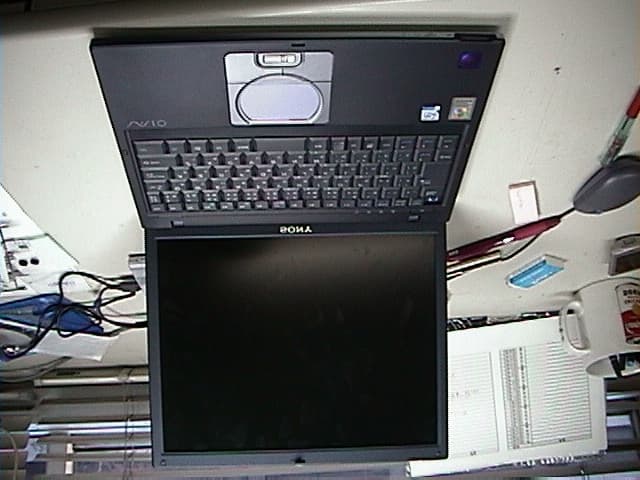
Click to zoom
Application Details
- Equipment Class
- DSS - Part 15 Spread Spectrum Transmitter
- Date of Grant
- Mar 25, 2002
- Application Purpose
- Original Equipment
- Date of Application
- Mar 25, 2002
- Equipment Note
- Notebook PC with Integral Wireless LAN Card
- Frequency Range
- 2412.00000000 - 2462.00000000
- Company
- Sony Group Corporation
- Country
- Japan
Documents & Files
Document Text
Text extracted from the exhibit documents filed with the FCC. Open a document above to read the original.
Users Manual
VAIO® Computer Safety Information PCG-VX88, PCG-VX88P Notes on Use 2 Notice to Users © 2002 Sony Electronics Inc. All rights reserved. This manual and the software described herein, in whole or in part, may not be reproduced, translated, or reduced to any machine-readable form without prior written approval. SONY ELECTRONICS INC. PROVIDES NO WARRANTY WITH REGARD TO THIS MANUAL, THE SOFTWARE, OR OTHER INFORMATION CONTAINED HEREIN AND HEREBY EXPRESSLY DISCLAIMS ANY IMPLIED WARRANTIES OF MERCHANTABILITY OR FITNESS FOR ANY PARTICULAR PURPOSE WITH REGARD TO THIS MANUAL, THE SOFTWARE, OR SUCH OTHER INFORMATION. IN NO EVENT SHALL SONY ELECTRONICS INC. BE LIABLE FOR ANY INCIDENTAL, CONSEQUENTIAL, OR SPECIAL DAMAGES, WHETHER BASED ON TORT, CONTRACT, OR OTHERWISE, ARISING OUT OF OR IN CONNECTION WITH THIS MANUAL, THE SOFTWARE, OR OTHER INFORMATION CONTAINED HEREIN OR THE USE THEREOF. Sony Electronics Inc. reserves the right to make any modification to this manual or the information contained herein at any time without notice. The software described herein is governed by the terms of a separate user license agreement. This product contains software owned by Sony and licensed by third parties. Use of such software is subject to the terms and conditions of license agreements enclosed with this product. Some of the software may not be transported or used outside the United States. Software specifications are subject to change without notice and may not necessarily be identical to current retail versions. Updates and additions to software may require an additional charge. Subscriptions to online service providers may require a fee and credit card information. Financial services may require prior arrangements with participating financial institutions. The International ENERGY STAR® Office Equipment Program is an international program that promotes energy saving through the use of computers and other office equipment. The program backs the development and dissemination of products with functions that effectively reduce energy consumption. It is an open system in which business proprietors can participate voluntarily. The targeted products are office equipment such as computers, displays, printers, facsimiles and copiers. Their standards and logos are uniform among participating nations. ENERGY STA R i s a U . S . registered mark. As an ENERGY STAR® Partner, Sony Corporation has determined that this product meets the ENERGY STAR® guidelines for energy efficiency. Notice to Users 3 Sony, DVgate, Handycam, i.LINK, Mavica, MagicGate™ Memory Stick and , Memory Stick and , MovieShaker, PictureGear, PictureToy, VAIO, and the VAIO logo are trademarks of Sony Corporation. Microsoft, Windows Media, Windows, Windows NT, and the Windows logo are registered trademarks of Microsoft Corporation. Intel, SpeedStep, and Pentium are trademarks or registered trademarks of Intel Corporation. PS/2 is a registered trademark of IBM. Acrobat Reader, Photoshop, Photoshop Elements, and Premiere are trademarks of Adobe Systems Incorporated. PowerPanel is a trademark of Phoenix Technologies Ltd. This product incorporates copyright protection technology that is protected by method claims of certain U.S. patents and other intellectual property rights owned by Macrovision Corporation and other rights owners. Use of this copyright protection technology must be authorized by Macrovision Corporation, and is intended for home and other limited viewing uses only unless otherwise authorized by Macrovision Corporation. Reverse engineering or disassembly is prohibited. i.LINK is a trademark of Sony used only to designate that a product contains an IEEE 1394 connection. The i.LINK connection may vary, depending on the software applications, operating system, and compatible i.LINK devices. All products with an i.LINK connection may not communicate with each other. Please refer to the documentation that came with your compatible i.LINK device for information on operating conditions and proper connection. Before connecting compatible i.LINK PC peripherals to your system, such as a CD-RW or hard disk drive, confirm their operating system compatibility and required operating conditions. All other trademarks are trademarks of their respective owners. Microsoft note Certain software product(s) included with this computer may include features such as copy protection and content management technology. Use of the software product(s) requires agreement to applicable end user agreements and full compliance with applicable product activation procedures. Product activation procedures and privacy policies will be detailed during initial launch of the software product(s), or upon certain reinstallations of the software product(s) or reconfiguration of the computer, and may be completed by Internet or telephone (toll charges may apply). Owner’s Record The model number and serial number are located on the bottom of your Sony VAIO Notebook. Refer to the model and serial number when you call your Sony Service Center. Model Numbers: PCG-551L Serial Number:________________________ This unit has passed Wi-Fi certification, and complies with the interoperability specifications established by WECA (Wireless Ethernet Compatibility Alliance). MEMORY STICK TM Notes on Use 4 Safety Information WARNING ❑ To prevent fire or shock hazard, do not expose your notebook computer to rain or moisture. ❑To avoid electrical shock, do not open the cabinet. Refer servicing to qualified personnel only. ❑Never install modem or telephone wiring during a lightning storm. ❑Never install telephone jacks in wet locations unless the jack is specifically designed for wet locations. ❑Never touch uninsulated telephone wire or terminals unless the telephone line has been disconnected at the network interface. ❑Use caution when installing or modifying telephone lines. ❑Avoid using the modem during an electrical storm. ❑Do not use the modem or a telephone to report a gas leak in the vicinity of the …
Text truncated - open the document above for the full version.
Users Manual
1 Welcome.......................................................9 Using Your VAIO Computer .....................11 Using the Keyboard...................................................12 Functions of the keyboard keys .........................................13 Combinations and functions with the Windows key .........14 Indicators ...........................................................................15 Combinations and functions with the Fn key ....................16 Using VAIO Action Setup ........................................19 Using the Jog Dial Control ........................................20 Launcher mode ..................................................................20 Guide mode ........................................................................21 Using the Jog Dial control with Sony software .................21 Using the Jog Dial control with other software .................22 Internal timer......................................................................23 Using Memory Stick Media ......................................24 Types of Memory Stick media...........................................24 Notes on using Memory Stick media.................................26 Using PC Cards .........................................................28 To insert PC card ...............................................................28 To remove a PC Card while your computer is on..............29 Notes on PC Cards .............................................................29 Using Power Saving Modes ......................................31 Normal mode .....................................................................31 Standby mode ....................................................................31 Hibernate mode ..................................................................31 Notes on power saving modes ...........................................32 Connecting a Telephone Cable ................................33 To connect a telephone cable .............................................33 Connecting to a LAN ................................................34 To set up a network............................................................35 Change text in this variable definition to document title. 2 Connecting to a Wireless LAN ................................. 36 Turning On Wireless LAN................................................ 36 The Wireless LAN Access Point ...................................... 36 Communicating with an Access Point (infrastructure) ..... 37 Communicating without an access point (ad-hoc) ............ 38 Turning Off Wireless LAN ............................................... 40 Notes on using Wireless LAN .......................................... 40 Connecting Peripheral Devices ...............41 Connecting a Floppy Disk Drive .............................. 42 To connect a floppy disk drive.......................................... 42 To insert a floppy disk into the floppy disk drive ............. 43 To remove a floppy disk from the floppy disk drive ........ 44 To disconnect a floppy disk drive when the computer is on. 44 To carry an floppy disk drive ............................................ 45 Notes on handling floppy disks......................................... 45 Connecting a PC Card Bus Drive ............................. 46 To connect an optical drive ............................................... 46 To insert a disc .................................................................. 47 To remove the drive .......................................................... 48 Notes on CD and DVD discs ............................................ 49 Connecting an i.LINK Optical Disc Drive ............... 50 To connect an i.LINK optical disc drive........................... 50 To disconnect an i.LINK optical disc drive ...................... 52 Notes on using i.LINK optical disc drives ........................ 52 Connecting a USB Mouse or Keyboard ................... 53 To connect a USB mouse or keyboard.............................. 53 Connecting a USB Device ........................................ 55 To connect a USB device .................................................. 55 3 Connecting a USB Printer .........................................56 To connect to a USB printer ..............................................56 Connecting an i.LINK Audio-Video Device.............58 To connect a digital video camera recorder .......................58 Notes on connecting an i.LINK device..............................59 Connecting an External Display................................60 To connect a computer display ..........................................60 To connect a projector .......................................................61 Changing the display when connecting an external computer display or projector ............................................................62 Connecting with another VAIO computer ................63 Connecting External Speakers ..................................64 To connect external speakers .............................................64 Connecting a Microphone .........................................65 To connect a microphone...................................................65 To record from a microphone or audio equipment ............65 Adjusting the volume.........................................................66 Expanding Your Computer Capabilities ...................68 Personal Digital Assistant ..................................................68 Wireless LAN Access Point ..............................................68 Wireless LAN PC Card......................................................69 Customizing Your VAIO Computer..........71 Displaying the Sony Notebook Setup Screen ...........72 Sony Notebook Setup tabs .................................................73 Controlling Power Management ...............................74 Viewing the Power Management status icons ...................74 To acc…
Text truncated - open the document above for the full version.
External Photos
FCC ID:AK8PCG551L External Photo FCC ID:AK8PCG551L External Photo FCC ID:AK8PCG551L External Photo
Internal Photos
FCC ID:AK8PCG551L Internal Photo FCC ID:AK8PCG551L Internal Photo FCC ID:AK8PCG551L Internal Photo FCC ID:AK8PCG551L Internal Photo FCC ID:AK8PCG551L Internal Photo FCC ID:AK8PCG551L Internal Photo FCC ID:AK8PCG551L Internal Photo FCC ID:AK8PCG551L Internal Photo FCC ID:AK8PCG551L Internal Photo
Operational Description
The ORiNOCO Mini PCI radio card is a full-featured, Wi-Fi-compliant wireless device that uses the Mini PCI form factor. The module functions at 2.4 GHz, with a bandwidth of 11 Mbps, and range of up to 1200 feet. It is fully compatible with the entire ORiNOCO line of infrastructure produces for home, office, outdoor and public hot-spot environments. The Mini PCI radio also works with other Wi-Fi-compliant wireless networking systems. Integration into OEM Devices Ideally suited for notebooks, Web pads, Internet appliances and other mobile data applications, the Mini PCI card is only 51 x 60mm in size and weighs 15 grams. The Mini PCI gives manufacturers a great deal of freedom in system design and antenna placement. It can be embedded or designed to be an optional dealer-added feature. ORiNOCO Mini PCI is supported by a complete set of drivers and networking tools to support operating systems including Windows ME, 98, 2000 and Linux. The card is available in two versions, one with 64 WEP encryption and one with 128 bit RC4 encryption. In the automatic mode, the ARS mechanism will select the best possible speed for every data path. This means that the actual speed the mobile clients will use when talking to an Access Point can be different for different stations within one cell. Integration support Lucent provides extensive technical documentation on integration issues like optimal antenna design, customized drivers and management software as well as multi language support for manuals and help files. Echo robustness The delay spread robustness in the IEEE 11 and 5.5 Mbit/s mode is lower than in the IEEE 2 and 1 Mbit/s modes, because delay spread robustness is traded against more sophisticated modulation techniques. Privacy The ORiNOCO Mini PCI Card supports 64 bit WEP as a standard. This means that 64 WEP is used to encrypt the payload data in a message when the end user chooses to run this level of privacy. WEP, which is defined in the IEEE 802.11b standard, uses a 40 bit secret key and a 24 bit Initialization Vector (IV): a 24 bit value unique to a message, which is included in plain text in that message. The IV is included to make sure that two identical plain text messages result in two different encrypted messages. The ORiNOCO/ Mini PCI Card is also released with 128 RC4. This product uses the RC4 encryption algorithm with a 104 bit secret key and a 24 bit IV. Mini PCI Form Factor Radios for Wireless Networking OEMs ORiNOCO TM Mini PCI THE NEW WAVELAN YOUR MOBILE BROADBAND CONNECTION ORiNOCO Mini PCI Card Specifications Frequency Range2400 2462 mHz Number of Selectable Channels11 Modulation TechniqueDirect Sequence Spread Spectrum (CCK, DQPSK, DBPSK) StandardIEEE 802.11b, Mini PCI V1.0 Security64 WEP or 128 RC4 Spreading11 chip Barker sequence Bit Error rateBetter than 10 -5 Media Access ProtocolCSMA/CA (Collision Avoidance) with ACK InterfaceMiniPCI V1.0 PCB Dimension Length:59.75 mm Width: 50.95mm Range (meter/feet)Standard Low SpeedStandard SpeedMedium SpeedHigh Speed (1 Mbit/s)(2 Mbit/s)(5.5 Mbit/s)(11 Mbit/s) Open environment550 m (1750 ft)400 m (1300 ft)270 m (855 ft)160 m (525 ft) Semi-Open environment115 m (375 ft)90 m (300 ft)70 m (230 ft)50 m (165 ft) Closed environment50 m (165 ft)40 m (130 ft)35 m (115 ft)25 m (80 ft) Transmitter output power15 dBm15 dBm15 dBm15 dBm Min. receive level @BER 10^ -5 -94 dBm-91 dBm-87 dBm-82 dBm Delay spread robustness in nanoseconds500 ns400 ns225 ns65 ns Max. Power ConsumptionDoze Mode 16 mA Receive Mode 250mA Transmit Mode 350 mA EnvironmentalThe ORiNOCO Mini PCI Card passes the environmental tests as specified in “Mini PCI Specification, October 1999, Section 5.6 Thermal Guidelines”. Operating temperature0 to 60°C ambient temperature Storage temperature-20 to 75°C ambient temperature Operating humidity95% maximum (non condensing) Storage humidity95% maximum (non condensing) W ired b ackb o n e Basic ORiNOCO Mini PCI Configuration ORiNOCO Mini PCI Card Specifications(continued) Barometric pressure740 to 1050 HPa (storage and operating) Operating System CompatibilityWindows 98, ME and 2000.(NDIS5 Miniport Driver), Linux WHQLDevice WHQL sytem to be certified in co-operation with the OEM manufacturer RegulationsEurope: R&TTE Dir. 1999/5/EC USA: FCC 47 CFR, Part15.247 Canada:ISC RSS139 EnvironmentDelay Spread Office (one room)30 nsec Office40 – 150 nsec Airport120 nsec Warehouse130 nsec Shopping mall90 – 200 nsec Factory300 – 500 nsec Net Throughput11Mb 11Mb11Mb (payload, excluding headers etc)High SpeedMedium SpeedStandard Speed (11 Mbit/s)(5.5 Mbit/s) (2 Mbit/s) Station-to-station (TCP/IP) Peer to Peer5.04 Mbit/s3.44 Mbit/s1.59 Mbit/s Peer to Peer (+WEP128)4.51 Mbit/s3.44 Mbit/s1.59 Mbit/s via AP (both wireless)2.85 Mbit/s via AP (both wireless) (+WEP128)2.62 Mbit/s via AP (one on Ethernet)4.66 Mbit/s via AP (one on Ethernet) (+WEP128)4.11 Mbit/s Frequency Channels Channel Number12 3 4 5 6 78 91011 Channel Frequencies (MHz) 2412 241724222427243224372442 24472452 24572462 For additional information, please contact your Lucent Technologies Sales Representative. You can also visit our web site at http://www.lucent.com or call 1-800-928-3526. ORiNOCO is a trademark or registered trademark of Lucent Technologies Inc. in the United States and/or other countries. Wi-Fi is a trademark of the Wireless Ethernet Compatibility Alliance, Inc. Windows, Windows CE and Windows ME are registered trademarks of Microsoft Corporation. This document is for planning purposes only and is not intended to modify or supplement any specifications or warranties relating to Lucent Technologies products and services. Copyright © 2000 Lucent Technologies Inc. All rights reserved Printed in U.S.A. Lucent Technologies Inc. Marketing Communications 7026 PJE 11/00 Mechanical Specifications 59.75 mm 30.45 mm 2.60 mm 50.95 mm 42.15 mm 41.4 mm RF_MAINRF_AUX Key Advantages of the Mini PCI Card • Card allows full integration into OEM device • Antennae can be positioned on optimal sp…
Text truncated - open the document above for the full version.
Operational Description
DESCRIPTION OF THE Orinoco 2.4 GHz BLOCKDIAGRAM The various parts of the Blockdiagram are numbered and an explanation is given of these blocks. First the transmitter will be described: A) Digital Signal Processor. (22) Function : Generate spreaded signal with an Barker sequence of 11, the original raw data rate of two Megabits is transformed to a symbol rate of one MegaBaud and multiplied with eleven and modulated with a DQPSK ( Differential Quadrature Phase Shift Keying ) Modulation. The unfiltered data comes out of I and Q and goes to the up/down mixer (6) B) The above signals are mixed in (6) in a so called quadrature modulator with the Intermediate Frequency ( IF) of 352 MHz. C) The upmixer is fed by the VCO of 704 MHz, which is divided by 2 to 352 MHz. D) The SAW ( 8 ) filters all unwanted mixing products, such that only the 352 MHz band remains. E) This signal goes into the RF upmixer ( 9) SA2420 were it is mixed with the RF VCO with a range of 2050 to 2150 MHz. F) The Rx/Tx switch (17) brings the signal to the variable attenuator (10 ), where the output level is controlled. G) The signal is fed through a 2.4- 2.5 GHz bandpass filter (11) to remove all unwanted mixer products, and thus to get a clean signal for further processing. H) The signal is amplified in (12), with approx 23 dB to an output level of approx. 15 dBm I) This signal goes to the special connector. J) The output power is controlled with a so called power feed back loop (15) in which the output power is compared with a DAC value from (10) Receiver functions. K) The receive signal enters the antenna passes the RX/TX switch (14) and (13) this is set to RX mode. L) The signal goes through the 2.4 GHz filter (16) to remove all unwanted spectral components in order to deliver a clean signal for the receiver. M) A Low Noise Amplifiers (LNA) (in 9) is used to amplify the weak signal to a level fitted for down mixing. N) The AGC (27) can amplify or attenuate the signal according to the Digital signal processor required input with a step size of 26 dB. O) Again the Rx/Tx switch in the Rx mode is passed and also the same filter as in transmit mode ( 18). P) The down mixer (9) mixes the 2.4 GHz with the 2.1 GHz to the 352 MHz IF. Q) The signal of 352 MHz is amplified again (9) and filtered by a SAW filter (19) to give a clean signal for the second mixer. R) The Downmixer (6) mixes the 352 MHz signal down to the I and Q signals, also the auto gain control can increase the level to the required level via line 20. S)The very low amplitude baseband I and Q signal is amplified in the AMPs (6) to a level fitted for the Analog to Digital converters (22), which make it a proper signal for the digital signal processor. T) The digital signal processor (22) removes the spreading as present on the signal with a so called autocorrelation function. The resulting output of the processor is a received data rate of 2 Megabits. VCO , PLL and OSC. U)These three form one entity to generate a single tone signal for down mixing. There are two of these blocks available, one for the IF LO (7 and 6 ) (352MHz ) and one for the RF LO (25 and 26) of 2050 to 2150 MHz. V)All the PLL’s and the processor (2) have one reference Crystal of 22 MHz (4) with an accuracy of 25 ppm. General circuits: W)Antenna Diversity. Depending on the signal strength and signal quality the Digital processor (22) can select between two antenna’s which gives the best signal. This is done initial during the training sequence in the received signal. X)Automatic Gain control. Depending on the signal strength and signal quality the Digital processor (22) can choose to increase or decrease the signal level at the digital input, this is done by reducing or increasing the gain in the receiver via the LNA-AGC (in 9). Y) The Signal processor (22) can read via the MAC (2) the registers for programming all Z) The MAC is used to do the handshaking with the miniPCI bridge chip bus (1 ) and handling the IEEE protocol. Also used to load the PLL frequencies and dividers, also used to interface to the Eeprom which contains all parameters for the PLL’s and the Callcode Blockdiagram description of the Lucent 2.4 GHz Orinoco, miniPCI card Guus Jansen Aug 16, 2000
RF Exposure Info
RF Exposure Statement No. : 22GE0015-YW-1 Applicant: Sony Corporation Type of Equipment : Wireless LAN builtin Personal Computer Model No.: PCG-551L FCC ID: AK8PCG551L A-PEX International Co., Ltd. YOKOWA LAB. 108 Yokowa-cho, Ise-shi, Mie-ken 516-1106 JAPAN Telephone:int +81 596 39 1485 Facsimile: int +81 596 39 0232 Page 1 FCC Radiation Exposure Statement: Sony Corporation Model : PCG-551L complies with FCC radiation exposure requirement specified in the FCC Rules 15.247(b)(4). Notice in Installation Manual FCC Radiation Exposure Statement: This equipment complies with FCC radiation exposure limits set forth for an uncontrolled environment. This equipment should installed and operated with minimum distance 20cm between the radiator and your body(excluding extremities : hands, wrists, and feet). and must not be co-located or operated with any antenna or transmitter. RF Exposure Calculations: The following information provides the minimum separation distance for the highest gain antenna provided with the “PCG-551L” as calculated from FCC OET 65 Appendix B, Table (B) Limits for General Population / Uncontrolled Exposure. This calculation is based on the highest EIRP possible from the system, considering maximum power and antenna gain, and considering a 1.0m W/cm^2 uncontrolled exposure limit. The Fires formula used was: S = (P * G) / (4* π * r^2) or r = (P * G) / (4 *π* S) Where S = 1.0 mW/cm^2 for 2400 MHz P = 28.8 mW (Maximum Conducted Power) G = 1(λ/4 mono-pole antenna gain : Converted absolute value) r = Minimum safe distance from antenna (cm) For: PCG-551L r = 1.5 cm
Test Report
Measurement file output name is:11mbit.cnd Input command file name is:INPUT.CMDNote: 11 Mbit, 9 dB SIR tested for (18 dB SNR - 10.4 + 1 impl. losses). Input CW correction level:6dBTakes into account 1 dB of implementation loss (allowed 2 dB). Lowcount is:1000messagesOnly RxD errors are taken into account since these need better SIR then preamble at 1 MBit Highcount is:50000messagesAttention: Input the red cells for correct spreadsheet calculations!total errors52out of 280 measurement points. Rx level DUT is:-53dBmpercentage18.57% Number of received data errors as a function of frequency and interference levelOK?=<20%, OK Not measured combinations listed as "-1"HIJKLMNOPQRS Uncorrected Interference level dialed at CW generator -60-59-58-57-56-55-54-53-52RxD ErrorsPDARxD ErrorsPDABoth error True CW interference level at receiver input (dBm)detectedmissingdetectedmissingRxD and -66-65-64-63-62-61-60-59-58full testfull testup to CWup to CWPDA J/S ratio (dB)-13#PDA-12#PDA-11#PDA-10#PDA-9#PDA-8#PDA-7#PDA-6#PDA-5#PDArangerange=< -62 dBm=< -62 dBm=< -62 dBm Frequency (Hz)(J/S = -9dB)(J/S = -9 dB)timedate 24090000000100001000010000100001000010000100001000049987OK, 0 RxD errorsOK, No PDA errors00012:40:041999/4/14 24090500000100001000010000100001000010000100001000049993OK, 0 RxD errorsOK, No PDA errors00012:38:481999/4/14 24091000000100001000010000100001000010000100001000049984OK, 0 RxD errorsOK, No PDA errors00012:37:321999/4/14 2409150000010000100001000010000100001000099901000049989 OK, 0 RxD errorsOK, No PDA errors00012:36:171999/4/14 24092000000100001000010000100001000010000100001000049988OK, 0 RxD errorsOK, No PDA errors00012:35:001999/4/14 2409250000010000100001000010000100001000099901000049990 OK, 0 RxD errorsOK, No PDA errors00012:33:441999/4/14 240930000001000010000100001000099901000099901000049991OK, 0 RxD errorsOK, No PDA errors01112:32:291999/4/14 2409350000010000100001000010000100001000010000999049983OK, 0 RxD errorsOK, No PDA errors00012:31:131999/4/14 2409400000010000100001000010000100009990100001000049985 OK, 0 RxD errorsOK, No PDA errors00012:29:571999/4/14 240945000001000010000100001000099901000099901000049987OK, 0 RxD errorsOK, No PDA errors01112:28:411999/4/14 24095000000100001000010000100001000010000100001000049996OK, 0 RxD errorsOK, No PDA errors00012:27:251999/4/14 24095500000100001000010000100001000010000100001000049989 OK, 0 RxD errorsOK, No PDA errors00012:26:091999/4/14 2409600000010000100001000010000999010000100001000049988 OK, 0 RxD errorsOK, No PDA errors01112:24:531999/4/14 2409650000010000100001000010000100001000010000999049991OK, 0 RxD errorsOK, No PDA errors00012:23:371999/4/14 2409700000010000100001000010000100001000010000999049993OK, 0 RxD errorsOK, No PDA errors00012:22:211999/4/14 240975000001000010000100001000099901000099901000049986 OK, 0 RxD errorsOK, No PDA errors01112:21:051999/4/14 2409800000010000100001000010000999010000100001000049981OK, 0 RxD errorsOK, No PDA errors01112:19:491999/4/14 2409850000010000100001000010000998010000100001000049984OK, 0 RxD errorsOK, No PDA errors01112:18:331999/4/14 24099000000100001000010000100001000010000100001000049989 OK, 0 RxD errorsOK, No PDA errors00012:17:161999/4/14 24099500000100001000010000100001000010000100001000049990OK, 0 RxD errorsOK, No PDA errors00012:16:001999/4/14 24100000000100001000010000100001000010000100001000049983OK, 0 RxD errorsOK, No PDA errors00012:14:4404/14/99 2410050000010000100001000010000100001000010000999049984OK, 0 RxD errorsOK, No PDA errors00012:13:2804/14/99 2410100000010000100001000010000100001000010000999049989 OK, 0 RxD errorsOK, No PDA errors00012:12:1104/14/99 2410150000010000100001000010000999010000100001000049992OK, 0 RxD errorsOK, No PDA errors01112:10:5504/14/99 24102000000100001000010000100001000010000100001000049984OK, 0 RxD errorsOK, No PDA errors00012:09:4004/14/99 24102500000100001000010000100001000010000100001000049989 OK, 0 RxD errorsOK, No PDA errors00012:08:2404/14/99 2410300000010000100001000010000100001000099901000049990OK, 0 RxD errorsOK, No PDA errors00012:07:0804/14/99 24103500000100001000010000100001000010000100001000049992OK, 0 RxD errorsOK, No PDA errors00012:05:5204/14/99 2410400000010000100001000010000100009990100001000049986OK, 0 RxD errorsOK, No PDA errors00012:04:3604/14/99 24104500000100001000010000100001000010000100001000049989 OK, 0 RxD errorsOK, No PDA errors00012:03:2104/14/99 24105000000100001000010000100001000010000100001000049992OK, 0 RxD errorsOK, No PDA errors00012:02:0504/14/99 24105500000100001000010000100001000010000100001000049990OK, 0 RxD errorsOK, No PDA errors00012:00:4804/14/99 2410600000010000100001000010000100001000099901000049985 OK, 0 RxD errorsOK, No PDA errors00011:59:3204/14/99 24106500000100001000010000100001000010000100001000049987OK, 0 RxD errorsOK, No PDA errors00011:58:1704/14/99 24107000000100001000010000100001000010000100001000049984OK, 0 RxD errorsOK, No PDA errors00011:57:0104/14/99 24107500000100001000010000100001000010000100001000049992OK, 0 RxD errorsOK, No PDA errors00011:55:4504/14/99 24108000000100001000010000100001000010000100001000049990 OK, 0 RxD errorsOK, No PDA errors00011:54:2904/14/99 2410850000010000100001000010000100001000010000999049985OK, 0 RxD errorsOK, No PDA errors00011:53:1404/14/99 2410900000010000100001000010000100009980100001000049990 OK, 0 RxD errorsOK, No PDA errors00011:51:5804/14/99 2410950000010000100001000010000100001000099801000049989OK, 0 RxD errorsOK, No PDA errors00011:50:4204/14/99 24110000000100001000010000100001000010000100001000049992OK, 0 RxD errorsOK, No PDA errors00011:49:2604/14/99 2411050000010000100001000010000998010000100001000049990 OK, 0 RxD errorsOK, No PDA errors01111:48:1004/14/99 24111000000100001000010000100001000010000100001000049988OK, 0 RxD errorsOK, No PD…
Text truncated - open the document above for the full version.
Contact Information
Applicant
Kazuyuki Hori(Chief EMC/RF Compliance Specialist)
Technical Contact
A-Pex International Co., LtdNaoki Sakamoto
[email protected]+81 596 39 1485
108 Yokowa-cho · Ise-Shi, Mie-ken · Japan
Test Firm
UL Japan, Inc.Kazunori Nishimura
Technical Specifications
| # | Rule Parts | Frequency Range | Power Output |
|---|---|---|---|
| 1 | 15C | 2.41 GHz - 2.46 GHz | 28.80 mW |
Other Applications from Sony Group Corporation
AK8WW81782
Aug 21, 2026Radio Equipment
Equipment Class
DSS - Part 15 Spread Spectrum TransmitterAK8CFIZCP2
Aug 03, 2026Wireless Controller
Equipment Class
DSS - Part 15 Spread Spectrum TransmitterAK8OEV321MUH
Apr 14, 2026LCD Monitor
Equipment Class
JAD - Part 15 Class A Digital DeviceAK8OEV431MUH
Apr 14, 2026LCD Monitor
Equipment Class
JAD - Part 15 Class A Digital DeviceAK8OEV271MUH
Apr 14, 2026LCD Monitor
Equipment Class
JAD - Part 15 Class A Digital Device