AK8PCG5A1LLaptop PC with WLAN and Bluetooth
Sony Group Corporation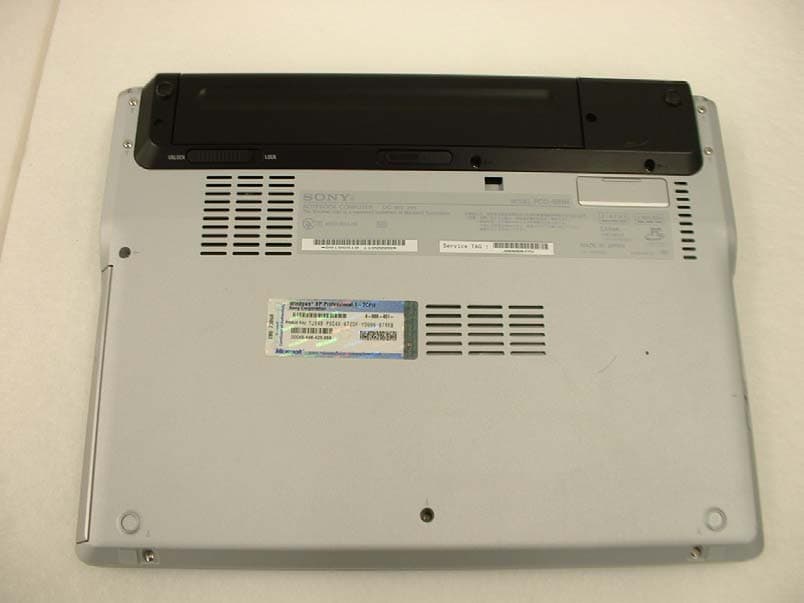
Click to zoom
Application Details
- Equipment Class
- DTS - Digital Transmission System
- Date of Grant
- Jan 05, 2004
- Application Purpose
- Original Equipment
- Date of Application
- Jan 05, 2004
- Equipment Note
- Laptop PC with WLAN and Bluetooth
- Frequency Range
- 2412.00000000 - 2462.00000000
- Company
- Sony Group Corporation
- Country
- Japan
Documents & Files
Document Text
Text extracted from the exhibit documents filed with the FCC. Open a document above to read the original.
Users Manual
Intel(R) PRO/Wireless 2200BG User's Guide Your Intel(R) PRO/Wireless 2200BG Network Connection adapter works with either 802.11b or 802.11g wireless standard. Operating at 2.4 GHz frequency at speeds of up to 54 Mbps you can now connect your computer to high-capacity existing 802.11b networks using multiple access points within large or small environments, and also to high-speed 802.11g networks. Your wireless adapter maintains automatic data rate control according to access point location to achieve the fastest possible connection. All your wireless client connections can be easily managed by the Intel(R) PROSet for Wireless utility. Using the Intel(R) PROSet for Wireless Profile Wizard, you can create profiles automatically to suite your specific connection requirements. Enhanced security measures using 802.1x, WPA encryption and authentication, and 128-bit WEP encryption is standard for both 802.11b and 802.11g. Introduction to Wireless Networking Software Installation Using Intel(R) PROSet for Wireless Connecting to a Network Security Overview Setting up Connection Security Troubleshooting Specifications Glossary Customer Support Safety and Regulatory Notices Warranty Adapter Registration Information in this document is subject to change without notice. (c) 2000–2003 Intel Corporation. All rights reserved. Intel Corporation, 5200 N.E. Elam Young Parkway, Hillsboro, OR 97124-6497 USA The copying or reproducing of any material in this document in any manner whatsoever without the written permission of Intel Corporation is strictly forbidden. Intel(R) is a trademark or registered trademark of Intel Corporation or its subsidiaries in the United States and other countries. Other trademarks and trade names may be used in this document to refer to either the entities claiming the marks and names or their products. Intel disclaims any proprietary interest in trademarks and trade names other than its own. Microsoft and Windows are registered trademarks of Microsoft Corporation. *Other names and brands may be claimed as the property of others. Intel Corporation assumes no responsibility for errors or omissions in this document. Nor does Intel make any commitment to update the information contained herein. September 2003 Back to Contents Page Wireless LAN Overview: Intel(R) PRO/Wireless 2200BG User's Guide About Wireless LAN Technology l Choosing a WLAN l Configuring a WLAN l Identifying a WLAN l Surveying the Site of Your WLAN l Factors Affecting Range A wireless network connects computers without using network cables. Computers use radio communications to send data between each other. You can communicate directly with other wireless computers, or connect to an existing network through a wireless access point. When you set up your wireless adapter, you select the operating mode for the kind of wireless network you want. You can use your wireless adapter to connect to other similar wireless devices that comply with the 802.11 standard for wireless networking. Choosing a Wireless LAN Wireless LANs can operate with or without access points, depending on the number of users in the network. Infrastructure mode uses access points to allow wireless computers to send and receive information. Wireless computers transmit to the access point, the access point receives the information and rebroadcasts it to other computers. The access point can also connect to a wired network or to the Internet. Multiple access points can work together to provide coverage over a wide area. Peer-to-Peer mode, also called Ad Hoc mode, works without access points and allows wireless computers to send information directly to other wireless computers. Ad Hoc Mode is only supported in 802.11b and 802.11g networks. You can use Peer-to-Peer mode to network computers in a home or small office or to set up a temporary wireless network for a meeting. Configuring a Wireless LAN There are three basic components that must be configured for an 802.11 wireless LAN to operate properly: l Network Name: Each wireless network uses a unique Network Name to identify the network. This name is called the Service Set Identifier (SSID). When you set up your wireless adapter, you specify the SSID. If you want to connect to an existing network, you must use the name for that network. If you are setting up your own network you can make up your own name and use it on each computer. The name can be up to 32 characters long and contain letters and numbers. l Profiles: When you set up your computer to access a wireless network, the wireless client manager creates a profile for the wireless settings that you specify. If you want to connect to another network, you can scan for existing networks and make a temporary connection, or create a new profile for that network. After you create profiles, your computer will automatically connect when you change locations. l Security: The 802.11 wireless networks use encryption to help protect your data. Wired equivalent privacy (WEP) uses a 64-bit or 128-bit shared encryption key to scramble data. Before a computer transmits data, it scrambles the data using the secret encryption key. The receiving computer uses this same key to unscramble the data. If you are connecting to an existing network, use the encryption key provided by the administrator of the wireless network. If you are setting up your own network you can make up your own key and use it on each computer. m Wi-Fi Protected Access (WPA) is a security enhancement that strongly increases the level of data protection and access control to a WLAN. WPA mode enforces 802.1x authentication and key-exchange to strengthen data encryption. WPA utilizes its Temporal Key Integrity Protocol (TKIP). TKIP provides important data encryption enhancements that include a per-packet key mixing function, a message integrity check (MIC) named "Michael", an extended initialization vector (IV) with sequencing rules, and a also re-keying mechanism. Using these improvement enhanceme…
Text truncated - open the document above for the full version.
Users Manual
VAIO® Computer Quick Start PCG-Z1WA Series Altima4_QuickStart.book Page 1 Thursday, December 18, 2003 3:18 PM Short Cut Menu +F1Displays the VAIO Help and Support Center window. +TabSwitches the selected button on the taskbar. +DDisplays the desktop. +EDisplays the My Computer window. +FDisplays the Search Results window, where you can find a file or folder. This is the equivalent of selecting Search from the Start menu. +Ctrl+FDisplays the Search Results - Computers window, where you can locate other computers. This is the equivalent of selecting Search, and then Computer from the Start menu. +MMinimizes all displayed windows. Shift++MReturns all minimized windows to their previous size. +RDisplays the Run window. This is the equivalent of selecting Run from the Start menu. Fn++InsertDisplays the System Properties window. This is the equivalent of selecting Control Panel, and then System from the Start menu. Fn+F3Toggles the built-in speakers off and on. Fn+F4Together with the or keys, it increases volume. Together with the or keys, it decreases volume. Fn+F5Together with the or keys, it increases brightness. Together with the or keys, it decreases brightness. Fn+F7Toggles the display between the computer screen (LCD), a connected external display, and both the LCD and an external display. Fn+F12Puts the system into Hibernate mode, a power management state. To return the system to normal operating mode, press the power button. Fn+EscPuts the system into Standby mode, a power management state. To return the system to the active state, press any key or the power button. Altima4_QuickStart.book Page 2 Thursday, December 18, 2003 3:18 PM 3 Contents Notice to Users ............................................5 Setting Up ..................................................13 Unpacking Your Computer .......................................13 Locating Controls and Ports ......................................15 Getting Started ..........................................21 Turning On Your Computer ......................................21 Using the Touch Pad .................................................25 Registering Your Computer ......................................26 Locating Your VAIO Computer User Guide ............27 Setting Up A Dial-Up Connection ............................29 Turning Off Your Computer .....................................30 VAIO Recovery Wizard Utility...................31 Troubleshooting ........................................33 Troubleshooting Your Computer ..............................33 Support Options.........................................................37 Altima4_QuickStart.book Page 3 Thursday, December 18, 2003 3:18 PM VAIO® Computer Quick Start 4 Altima4_QuickStart.book Page 4 Thursday, December 18, 2003 3:18 PM 5 Notice to Users © 2004 Sony Electronics Inc. All rights reserved. This manual and the software described herein, in whole or in part, may not be reproduced, translated, or reduced to any machine-readable form without prior written approval. SONY ELECTRONICS INC. PROVIDES NO WARRANTY WITH REGARD TO THIS MANUAL, THE SOFTWARE, OR OTHER INFORMATION CONTAINED HEREIN AND HEREBY EXPRESSLY DISCLAIMS ANY IMPLIED WARRANTIES OF MERCHANTABILITY OR FITNESS FOR ANY PARTICULAR PURPOSE WITH REGARD TO THIS MANUAL, THE SOFTWARE, OR SUCH OTHER INFORMATION. IN NO EVENT SHALL SONY ELECTRONICS INC. BE LIABLE FOR ANY INCIDENTAL, CONSEQUENTIAL, OR SPECIAL DAMAGES, WHETHER BASED ON TORT, CONTRACT, OR OTHERWISE, ARISING OUT OF OR IN CONNECTION WITH THIS MANUAL, THE SOFTWARE, OR OTHER INFORMATION CONTAINED HEREIN OR THE USE THEREOF. Sony Electronics Inc. reserves the right to make any modification to this manual or the information contained herein at any time without notice. The software described herein is governed by the terms of a separate user license agreement. This product contains software owned by Sony and licensed by third parties. Use of such software is subject to the terms and conditions of license agreements enclosed with this product. Some of the software may not be transported or used outside the United States. Software specifications are subject to change without notice and may not necessarily be identical to current retail versions. Updates and additions to software may require an additional charge. Subscriptions to online service providers may require a fee and credit card information. Financial services may require prior arrangements with participating financial institutions. The International ENERGY STAR® Office Equipment Program is an international program that promotes energy saving through the use of computers and other office equipment. The program backs the development and dissemination of products with functions that effectively reduce energy consumption. It is an open system in which business proprietors can participate voluntarily. The targeted products are office equipment such as computers, displays, printers, facsimiles and copiers. Their standards and logos are uniform among participating nations. ENERGY STAR is a U.S. registered mark. As an ENERGY STAR® Partner, Sony Corporation has determined that this product meets the ENERGY STAR® guidelines for energy efficiency. The Wireless LAN functionality, which is incorporated into selected models only, has passed Wi-Fi certification and complies with the interoperability specifications established by WFA (Wi-Fi Alliance). Altima4_QuickStart.book Page 5 Thursday, December 18, 2003 3:18 PM VAIO® Computer Quick Start 6 Sony, Click to DVD, DVgate Plus, Handycam, i.LINK, Mavica, MagicGate™ Memory Stick, Memory Stick, Memory Stick PRO, PictureGear Studio, SonicStage, VAIO, and the VAIO logo are trademarks of Sony Corporation. Microsoft, Windows Media, Windows, Windows NT, and the Windows logo are registered trademarks of Microsoft Corporation. Microsoft, Windows Media, Windows, Windows NT, and the Windows logo are registered trademarks of Microsoft Corporation. Intel, SpeedStep, and Pentium are tradema…
Text truncated - open the document above for the full version.
Cover Letter(s)
American Telecommunications Certification Body Inc. 6731 Whittier Ave, McLean, VA 22101 January 1, 2004 RE: FCC ID: AK8PCG5A1L_ATCB001028 Attention: Yoshiko Mizuta I have a few comments on this Application. 1. Please clearly identify the system. The system appears to contain a WLAN and a Bluetooth. However, neither the external photos nor the operational description clearly state this fact nor do they show where the Bluetooth device is located in the laptop. Please clearly show where the Bluetooth device is located in the laptop and please clearly show where the antenna(s) for the Bluetooth device is located in the laptop. Please also adequately explain the application configuration to reduce confusion about what it is that is being certified. 2. Please note that this appears to be a certification for both the WLAN and the Bluetooth. However, the Bluetooth appears to have been tested as a module (stand alone) and the WLAN appears to have been tested as an LMA (inside the host). The same ID cannot be for both devices in this situation. In the configuration you present, the Bluetooth Module would have to have its own ID and the LMA WLAN configuration would have to have its own ID. Both devices must be tested inside the host if the same ID is to be applied. What is the application for? Please explain. 3. Please provide a 731 that addresses the fact that there are two devices. Is this application for a WLAN LMA with a Bluetooth transmitter in side under its own ID. Or is this an LMA for both the WLAN and Bluetooth???? Please clearly identify what the application for certification is for. 4. Dennis Ward mailto:[email protected] The items indicated above must be submitted before processing can continue on the above referenced application. Failure to provide the requested information may result in application termination. Correspondence should be considered part of the permanent submission and may be viewed from the Internet after a Grant of Equipment Authorization is issued. Please do not respond to this correspondence using the email reply button. In order for your response to be processed expeditiously, you must submit your documents through the AmericanTCB.com website. Also, please note that partial responses increase processing time and should not be submitted. Any questions about the content of this correspondence should be directed to the sender.
External Photos
FCC ID : AK8PCG5A1L External Photo Sony Corporation Front Back FCC ID : AK8PCG5A1L External Photo Sony Corporation Right Left FCC ID : AK8PCG5A1L External Photo Sony Corporation Open back Cover closed
Internal Photos
FCC ID : AK8PCG5A1L Internal Photo Sony Corporation Body front Module location FCC ID : AK8PCG5A1L Internal Photo Sony Corporation Module front (without cover) Module front (with cover) FCC ID : AK8PCG5A1L Internal Photo Sony Corporation Module back (without cover) Module back (with cover)
Internal Photos
Wireless LANAntenna Bluetooth Antenna Wireless LAN Antenna Bluetooth Antenna
RF Exposure Info
Test report No. : 24DE0025-HO-5 Page : 1 of 97 Issued date : December 19, 2003 FCC ID : AK8PCG5A1L UL Apex Co., Ltd. Head Office EMC Lab. 4383-326 Asama-cho, Ise-shi, Mie-ken 516-0021 JAPAN Telephone: +81 596 24 8116 Facsimile: +81 596 24 8124 MF058b(10.04.03) SAR EVALUATION REPORT Report No. : 24DE0025-HO-5 Applicant : Sony Corp. Type of Equipment : Notebook Personal Computer Model No. : PCG-5A1L FCC ID : AK8PCG5A1L Test standard : FCC47CFR 2.1093 FCC OET Bulletin 65, Supplement C Test Result : Complied Max SAR Measured : 0.0873W/kg( Body, 2412MHz ) 1. This test report shall not be reproduced except full or partial, without the written approval of UL Apex Co., Ltd. 2. The results in this report apply only to the sample tested. 3. This equipment is in compliance with above regulation. We hereby certify that the data contain a true representation of the SAR profile. 4. The test results in this test report are traceable to the national or international standards. Date of test : December 10 and 11, 2003 Tested by : Miyo Ikuta Head Office EMC Lab. Approved by : Tetsuo Maeno Site Manager of Head Office EMC Lab. Test report No. : 24DE0025-HO-5 Page : 2 of 97 Issued date : December 19, 2003 FCC ID : AK8PCG5A1L UL Apex Co., Ltd. Head Office EMC Lab. 4383-326 Asama-cho, Ise-shi, Mie-ken 516-0021 JAPAN Telephone: +81 596 24 8116 Facsimile: +81 596 24 8124 CONTENTS PAGE SECTION 1 : Client information ................................................................................................................. 3 SECTION 2 : Equipment under test (E.U.T.) ............................................................................................. 4 SECTION 3 : Requirements for compliance testing defined by the FCC ................................................ 6 SECTION 4 : Dosimetry assessment setup .................................................................................................. 6 SECTION 5 : Test system specifications.................................................................................................... 10 SECTION 6 : Test setup of EUT ................................................................................................................ 11 SECTION 7 : Measurement uncertainty ................................................................................................... 14 SECTION 8 : Simulated tissue liquid parameter...................................................................................... 15 SECTION 9 : System validation data ........................................................................................................ 17 SECTION 10 : Evaluation procedure ........................................................................................................ 18 SECTION 11 : Exposure limit .................................................................................................................... 19 SECTION 12 : SAR Measurement results................................................................................................. 20 SECTION 13 : Equipment & calibration information ............................................................................. 26 SECTION 14 : References........................................................................................................................... 27 APPENDIX 1 : Photographs of test setup................................................................................................ 28 APPENDIX 2 : SAR Measurement data .................................................................................................. 35 APPENDIX 3 : Validation Measurement data ........................................................................................73 APPENDIX 4 : System Validation Dipole (D2450V2,S/N: 713)............................................................. 76 APPENDIX 5 : Dosimetric E-Field Probe Calibration (ET3DV6,S/N: 1685) ...................................... 85 Test report No. : 24DE0025-HO-5 Page : 3 of 97 Issued date : December 19, 2003 FCC ID : AK8PCG5A1L UL Apex Co., Ltd. Head Office EMC Lab. 4383-326 Asama-cho, Ise-shi, Mie-ken 516-0021 JAPAN Telephone: +81 596 24 8116 Facsimile: +81 596 24 8124 SECTION 1 : Client information Company Name : Sony Corp. Brand Name : SONY Address : 6-7-35, Kita-Shinagawa, Shinagawa-ku, Tokyo 141-0001, Japan Telephone Number : +81-3-5795-8033 Facsimile Number : +81-3-5795-8346 Contact Person : Kaoru Ichimura Test report No. : 24DE0025-HO-5 Page : 4 of 97 Issued date : December 19, 2003 FCC ID : AK8PCG5A1L UL Apex Co., Ltd. Head Office EMC Lab. 4383-326 Asama-cho, Ise-shi, Mie-ken 516-0021 JAPAN Telephone: +81 596 24 8116 Facsimile: +81 596 24 8124 SECTION 2 : Equipment under test (E.U.T.) 2.1 Identification of E.U.T. Sony Corp., Model No: PCG-5A1L is the Notebook computer, which is co-located with Wireless LAN module (IEEE 802.11b, IEEE 802.11g) and Bluetooth module(FCC ID:CWTUGPZ3). We recognized that this EUT can be co-operated Wireless LAN and Bluetooth. Therefore, we measured SAR when both Wireless LAN and Bluetooth were transmitted at the same time. *Please refer to Report No.23DE0002-YK-1 for the detail on Bluetooth module. Applicant : Sony Corp. Type of Equipment : Notebook Personal Computer Model No. : PCG-5A1L Serial No. : 1100008 Country of Manufacture : JAPAN Receipt Date of Sample : November 26 ,2003 Condition of EUT : Engineering prototype Battery option : Only one model with EUT Category Identified : Portable device Test report No. : 24DE0025-HO-5 Page : 5 of 97 Issued date : December 19, 2003 FCC ID : AK8PCG5A1L UL Apex Co., Ltd. Head Office EMC Lab. 4383-326 Asama-cho, Ise-shi, Mie-ken 516-0021 JAPAN Telephone: +81 596 24 8116 Facsimile: +81 596 24 8124 2.2 Product Description (Wireless LAN) Tx Frequency : 2412MHz~2462MHz Modulation : DSSS , OFDM Rating : DC 3.1V ~ 3.46 V Max.Output Power Tested : 17.0dBm Peak Conducted Antenna Type : λ/4-Monopole Antenna Position of Antenna : See photograph of fo…
Text truncated - open the document above for the full version.
RF Exposure Info
Test report No. : 24DE0025-HO-5 Page : 35 of 97 Issued date : December 19, 2003 FCC ID : AK8PCG5A1L UL Apex Co., Ltd. Head Office EMC Lab. 4383-326 Asama-cho, Ise-shi, Mie-ken 516-0021 JAPAN Telephone: +81 596 24 8116 Facsimile: +81 596 24 8124 APPENDIX 2 : SAR Measurement data Test report No. : 24DE0025-HO-5 Page : 36 of 97 Issued date : December 19, 2003 FCC ID : AK8PCG5A1L UL Apex Co., Ltd. Head Office EMC Lab. 4383-326 Asama-cho, Ise-shi, Mie-ken 516-0021 JAPAN Telephone: +81 596 24 8116 Facsimile: +81 596 24 8124 PCG-5A1L/ Body / Right Bottom (Main antenna) / DSSS / 2437MHz Crest factor: 1 Medium: M2450 (σ = 1.96 mho/m, ε r = 50.2, ρ = 1000 kg/m 3 ) Phantom section: Flat Section DASY4 Configuration: - Probe: ET3DV6 - SN1685; ConvF(4.3, 4.3, 4.3); Calibrated: 2003/10/10 - Sensor-Surface: 4mm (Mechanical And Optical Surface Detection) - Phantom: SAM 1196 - Measurement SW: DASY4, V4.1 Build 47; Postprocessing SW: SEMCAD, V1.6 Build 115 Area Scan (91x131x1): Measurement grid: dx=20mm, dy=20mm Maximum value of SAR = 0.00715 mW/g Zoom Scan (5x5x7)/Cube 0: Measurement grid: dx=8mm, dy=8mm, dz=5mm Peak SAR (extrapolated) = 0.00709 W/kg SAR(1 g) = 0.00324 mW/g; SAR(10 g) = 0.00145 mW/g Maximum value of SAR = 0.00709 mW/g Zoom Scan (5x5x7)/Cube 1: Measurement grid: dx=8mm, dy=8mm, dz=5mm Peak SAR (extrapolated) = 0.00503 W/kg SAR(1 g) = 0.00298 mW/g; SAR(10 g) = 0.0013 mW/g Maximum value of SAR = 0.00498 mW/g Test date = 12 / 10 / 03 Reference Value = 1.17 V/m Power Drift = -0.2 dB Ambient Temperature : 24.8 degree.c Liquid Temperature : Before 22.8 degree.C , After 22.8 degree.C Test report No. : 24DE0025-HO-5 Page : 37 of 97 Issued date : December 19, 2003 FCC ID : AK8PCG5A1L UL Apex Co., Ltd. Head Office EMC Lab. 4383-326 Asama-cho, Ise-shi, Mie-ken 516-0021 JAPAN Telephone: +81 596 24 8116 Facsimile: +81 596 24 8124 PCG-5A1L/ Body / Right Back of display (Main antenna) / DSSS / 2437MHz Crest factor: 1 Medium: M2450 (σ = 1.96 mho/m, ε r = 50.2, ρ = 1000 kg/m 3 ) Phantom section: Flat Section DASY4 Configuration: - Probe: ET3DV6 - SN1685; ConvF(4.3, 4.3, 4.3); Calibrated: 2003/10/10 - Sensor-Surface: 4mm (Mechanical And Optical Surface Detection) - Phantom: SAM 1196 - Measurement SW: DASY4, V4.1 Build 47; Postprocessing SW: SEMCAD, V1.6 Build 115 Area Scan (91x131x1): Measurement grid: dx=20mm, dy=20mm Maximum value of SAR = 0.0308 mW/g Zoom Scan (5x5x7)/Cube 0: Measurement grid: dx=8mm, dy=8mm, dz=5mm Peak SAR (extrapolated) = 0.0565 W/kg SAR(1 g) = 0.0276 mW/g; SAR(10 g) = 0.0156 mW/g Maximum value of SAR = 0.0287 mW/g Zoom Scan (5x5x7)/Cube 1: Measurement grid: dx=8mm, dy=8mm, dz=5mm Peak SAR (extrapolated) = 0.0769 W/kg SAR(1 g) = 0.0341 mW/g; SAR(10 g) = 0.0161 mW/g Maximum value of SAR = 0.0364 mW/g Test date = 12 / 10 / 03 Reference Value = 3.97 V/m Power Drift = -0.2 dB Ambient Temperature : 24.8 degree.c Liquid Temperature : Before 23.5 degree.C , After 23.5 degree.C Test report No. : 24DE0025-HO-5 Page : 38 of 97 Issued date : December 19, 2003 FCC ID : AK8PCG5A1L UL Apex Co., Ltd. Head Office EMC Lab. 4383-326 Asama-cho, Ise-shi, Mie-ken 516-0021 JAPAN Telephone: +81 596 24 8116 Facsimile: +81 596 24 8124 PCG-5A1L/ Body / Right Side of display (Main antenna) / DSSS / 2437MHz Crest factor: 1 Medium: M2450 (σ = 1.96 mho/m, ε r = 50.2, ρ = 1000 kg/m 3 ) Phantom section: Flat Section DASY4 Configuration: - Probe: ET3DV6 - SN1685; ConvF(4.3, 4.3, 4.3); Calibrated: 2003/10/10 - Sensor-Surface: 4mm (Mechanical And Optical Surface Detection) - Phantom: SAM 1196 - Measurement SW: DASY4, V4.1 Build 47; Postprocessing SW: SEMCAD, V1.6 Build 115 Area Scan (91x131x1): Measurement grid: dx=20mm, dy=20mm Reference Value = 5.45 V/m Power Drift = -0.0004 dB Maximum value of SAR = 0.0772 mW/g Zoom Scan (5x5x7)/Cube 0: Measurement grid: dx=8mm, dy=8mm, dz=5mm Peak SAR (extrapolated) = 0.156 W/kg SAR(1 g) = 0.0767 mW/g; SAR(10 g) = 0.0391 mW/g Maximum value of SAR = 0.0822 mW/g Zoom Scan (5x5x7)/Cube 1: Measurement grid: dx=8mm, dy=8mm, dz=5mm Peak SAR (extrapolated) = 0.14 W/kg SAR(1 g) = 0.0637 mW/g; SAR(10 g) = 0.0303 mW/g Maximum value of SAR = 0.0635 mW/g Test date = 12 / 10 / 03 Reference Value = 5.45 V/m Power Drift = -0.0004 dB Ambient Temperature : 24.8 degree.c Liquid Temperature : Before 23.5 degree.C , After 23.4 degree.C Test report No. : 24DE0025-HO-5 Page : 39 of 97 Issued date : December 19, 2003 FCC ID : AK8PCG5A1L UL Apex Co., Ltd. Head Office EMC Lab. 4383-326 Asama-cho, Ise-shi, Mie-ken 516-0021 JAPAN Telephone: +81 596 24 8116 Facsimile: +81 596 24 8124 PCG-5A1L/ Body / Right Side of display (Main antenna) / DSSS / 2412MHz Crest factor: 1 Medium: M2450 (σ = 1.96 mho/m, ε r = 50.2, ρ = 1000 kg/m 3 ) Phantom section: Flat Section DASY4 Configuration: - Probe: ET3DV6 - SN1685; ConvF(4.3, 4.3, 4.3); Calibrated: 2003/10/10 - Sensor-Surface: 4mm (Mechanical And Optical Surface Detection) - Phantom: SAM 1196 - Measurement SW: DASY4, V4.1 Build 47; Postprocessing SW: SEMCAD, V1.6 Build 115 Area Scan (91x131x1): Measurement grid: dx=20mm, dy=20mm Maximum value of SAR = 0.088 mW/g Zoom Scan (5x5x7)/Cube 0: Measurement grid: dx=8mm, dy=8mm, dz=5mm Peak SAR (extrapolated) = 0.178 W/kg SAR(1 g) = 0.0873 mW/g; SAR(10 g) = 0.0448 mW/g Maximum value of SAR = 0.0922 mW/g Zoom Scan (5x5x7)/Cube 1: Measurement grid: dx=8mm, dy=8mm, dz=5mm Peak SAR (extrapolated) = 0.171 W/kg SAR(1 g) = 0.081 mW/g; SAR(10 g) = 0.0387 mW/g Maximum value of SAR = 0.0815 mW/g Test date = 12 / 10 / 03 Reference Value = 6.56 V/m Power Drift = -0.2 dB Ambient Temperature : 24.8degree.c Liquid Temperature : Before 23.4 degree.C , After 23.4 degree.C Test report No. : 24DE0025-HO-5 Page : 40 of 97 Issued date : December 19, 2003 FCC ID : AK8PCG5A1L UL Apex Co., Ltd. Head Office EMC Lab. 4383-326 Asama-cho, Ise-shi, Mie-ken 516-0021 JAPAN Telephone: +81 596 24 8116 Facsimile: +81 596 24 8124 Z-axis scan at max SAR location PCG-5A1L/ Body / Right Side of display (Main antenna) / DSSS / 2412MHz Crest factor: 1 Medium: M2450 (…
Text truncated - open the document above for the full version.
Test Report
Test report No. : 24DE0025-HO-1 Page : 11 of 72 Issued date : December 16, 2003 FCC ID : AK8PCG5A1L UL Apex Co., Ltd. Head Office EMC Lab. 4383-326 Asama-cho, Ise-shi, Mie-ken 516-0021 JAPAN Telephone : +81 596 24 8116 Facsimile : +81 596 24 8124 MF060b(10.04.03) APPENDIX 1: Photographs of test setup Conducted Emission Front Rear Test report No. : 24DE0025-HO-1 Page : 12 of 72 Issued date : December 16, 2003 FCC ID : AK8PCG5A1L UL Apex Co., Ltd. Head Office EMC Lab. 4383-326 Asama-cho, Ise-shi, Mie-ken 516-0021 JAPAN Telephone : +81 596 24 8116 Facsimile : +81 596 24 8124 MF060b(10.04.03) Spurious Emission (Radiated) Front Rear
Test Setup Photos
Test report No. : 24DE0025-HO-1 Page : 11 of 72 Issued date : December 16, 2003 FCC ID : AK8PCG5A1L UL Apex Co., Ltd. Head Office EMC Lab. 4383-326 Asama-cho, Ise-shi, Mie-ken 516-0021 JAPAN Telephone : +81 596 24 8116 Facsimile : +81 596 24 8124 MF060b(10.04.03) APPENDIX 1: Photographs of test setup Conducted Emission Front Rear Test report No. : 24DE0025-HO-1 Page : 12 of 72 Issued date : December 16, 2003 FCC ID : AK8PCG5A1L UL Apex Co., Ltd. Head Office EMC Lab. 4383-326 Asama-cho, Ise-shi, Mie-ken 516-0021 JAPAN Telephone : +81 596 24 8116 Facsimile : +81 596 24 8124 MF060b(10.04.03) Spurious Emission (Radiated) Front Rear
Contact Information
Applicant
Kazuyuki Hori(Chief EMC/RF Compliance Specialist)
Technical Contact
UL Apex Co., LtdHironobu Shimoji
[email protected]81-596-24-8116
4383-326 Asama-cho · Ise-shi, Mie-ken · Japan
Test Firm
UL Apex Co., Ltd.Tetsuya Hashimoto
Technical Specifications
| # | Rule Parts | Frequency Range | Power Output |
|---|---|---|---|
| 1 | 15C | 2.41 GHz - 2.46 GHz | 49.00 mW |
Other Applications from Sony Group Corporation
AK8WW81782
Aug 21, 2026Radio Equipment
Equipment Class
DSS - Part 15 Spread Spectrum TransmitterAK8CFIZCP2
Aug 03, 2026Wireless Controller
Equipment Class
DSS - Part 15 Spread Spectrum TransmitterAK8OEV321MUH
Apr 14, 2026LCD Monitor
Equipment Class
JAD - Part 15 Class A Digital DeviceAK8OEV431MUH
Apr 14, 2026LCD Monitor
Equipment Class
JAD - Part 15 Class A Digital DeviceAK8OEV271MUH
Apr 14, 2026LCD Monitor
Equipment Class
JAD - Part 15 Class A Digital Device