AK8PCGABA1USB Bluetooth Dongle
Sony Group Corporation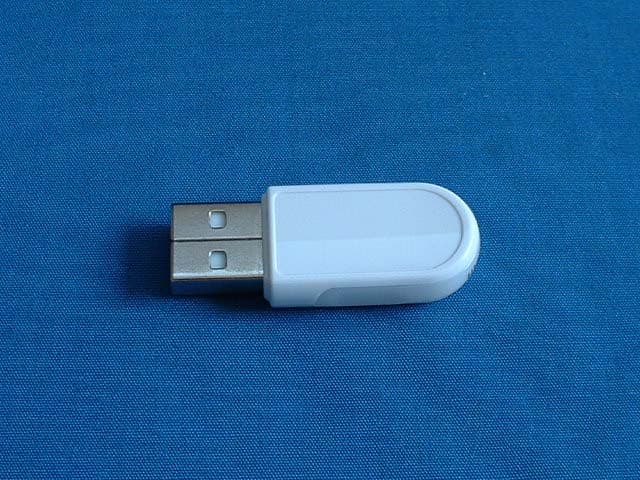
Click to zoom
Application Details
- Equipment Class
- DSS - Part 15 Spread Spectrum Transmitter
- Date of Grant
- Jun 10, 2003
- Application Purpose
- Original Equipment
- Date of Application
- Jun 10, 2003
- Equipment Note
- USB Bluetooth Dongle
- Frequency Range
- 2402.00000000 - 2480.00000000
- Company
- Sony Group Corporation
- Country
- Japan
Documents & Files
Document Text
Text extracted from the exhibit documents filed with the FCC. Open a document above to read the original.
Users Manual
4-675-349-11(1) 2003 Sony Corporation Bluetooth ™ USB Adapter PCGA-BA1 Series DE FR GB Operating Instructions Bedienungsanleitung Mode d’emploi IT 2 GB Warnings ❑To avoid electrical shock, do not open the cabinet. Refer servicing to qualified personnel only. ❑To prevent fire or shock hazard, do not expose the unit to rain or moisture. ❑In some situations or environments, the use of the Bluetooth™ technology might be restricted by the proprietor of the building or responsible representatives of the organization, for example on board airplanes, in hospitals or in any other environment where the risk of interference with other devices or services is perceived or identified as harmful. ❑If you are uncertain about the policy applying to the use of Bluetooth™ technology in a specific organization or environment, you are encouraged to first ask for authorization prior to switching it on. ❑Consult your physician or the manufacturer of personal medical devices (pacemakers, hearing aids, etc.) regarding any restrictions on the use of Bluetooth™ technology. Before using the PCGA-BA1, be sure to read the accompanying End User Software License Agreement. ❑Copyright laws prohibit reproducing the software or the manual accompanying it in whole or in part, or renting the software without the permission of the copyright holder. ❑In no event will Sony be liable for any financial damages, or loss of profits, including claims made by third parties, arising out of the use of the software supplied with this device. ❑If a problem occurs with this product as a result of defective manufacturing, Sony will replace it. However, Sony bears no other responsibility. ❑The software provided with this unit cannot be used with other units. ❑Please note that, due to continued efforts to improve quality, the software specifications may be changed without notice. ❑Operation of this unit with software other than that provided is not covered by the warranty. 3 GB Continued on next page GB Regulatory information For customers in Europe Sony hereby declares that the PCGA-BA1 Bluetooth™ USB Adapter is in compliance with the essential requirements and other relevant provisions of European Directive 1999/5/EC. To obtain a copy of the declaration of Conformity (DoC) with the R & TTE Directive, please access the following URL address: http://www.compliance.Sony.de/ The PCGA-BA1 is a Bluetooth™ intended radio device using the 2.4 GHz frequency band (2.400GHz – 2.4835GHz). It is intended for wireless communication with other Bluetooth™ enabled devices using the Bluetooth™ Serial Port, Dial-up Networking via mobile phone or modem, Object Push and Basic Imaging profiles. The PCGA-BA1 Bluetooth TM technology complies with regulations in the following countries, and can therefore only be used in these countries: Austria, Belgium, Denmark, Finland, France, Germany, Greece, Iceland, Ireland, Italy, Luxembourg, Norway, Portugal, Spain, Sweden, Switzerland, the Netherlands and the United Kingdom. In France, this product can only be used indoors. • VAIO and are registered trademarks of Sony Corporation. • Microsoft and Windows are registered trademarks of Microsoft Corporation in the United States and/or other countries. • BLUETOOTH and its logo are trademark owned by Bluetooth SIG, Inc., U.S.A and licenced to Sony Corporation. • All other names of systems, products and services are trademarks of their respective owners. In the manual, the ™ or ® marks are not specified. • In this manual, Microsoft ® Windows ® XP Home Edition and Microsoft ® Windows ® XP Professional are referred to as Windows XP. 4 GB Voordat u de Bluetooth USB-adapter gaat gebruiken, moet u de bijgaande gebruiksrechtovereenkomst voor eindgebruikers lezen. ❑De wet op de auteursrechten verbiedt het geheel of gedeeltelijk reproduceren van de software of de handleiding, alsook de verhuur van de software zonder toestemming van de eigenaar van de auteursrechten. ❑Sony kan in geen geval aansprakelijk worden gesteld voor financiële verliezen noch winstderving, met inbegrip van claims ingediend door derden, ten gevolge van het gebruik van de software die bij deze adapter wordt geleverd. ❑Indien dit produkt problemen geeft door constructiefouten, zal Sony het vervangen. Sony draagt echter geen enkele andere verantwoordelijkheid. ❑De software die bij dit toestel wordt geleverd, kan niet met andere toestellen worden gebruikt. ❑Merk op dat in het kader van ons permanent streven naar kwaliteitsverbetering de softwarespecificaties steeds kunnen worden gewijzigd zonder voorafgaande kennisgeving. ❑Gebruik van dit toestel met andere software dan de bijgeleverde is niet gedekt door de waarborg. Waarschuwing ❑Ter voorkoming van elektrische schokken mag u de behuizing niet openen. Laat service uitsluitend uitvoeren door deskundig personeel. ❑Ter voorkoming van het gevaar van brand of elektrische schokken, mag u het produkt niet blootstellen aan regen of vocht. ❑In bepaalde gevallen of omgevingen kan het gebruik van de Bluetooth™ technologie beperkt worden door de eigenaar van het gebouw of de verantwoordelijke vertegenwoordiger van de organisatie. Bijvoorbeeld: aan boord van een vliegtuig, in ziekenhuizen of in andere omgevingen waar het interferentierisico met andere apparaten of diensten als schadelijk wordt geëvalueerd of als zodanig bepaald wordt. ❑Als u niet zeker bent over het toegepaste beleid betreffende het gebruik van de Bluetooth™ technologie in een specifieke organisatie of omgeving, raden wij u aan om eerst toelating te vragen voor tot gebruik over te gaan. ❑Raadpleeg uw dokter of de fabrikant van persoonlijke medische apparaten (pacemakers, hoorapparaten, enz.) betreffende mogelijke beperkingen in het gebruik van de Bluetooth™ technologie. 5 GB Continued on next page Wettelijke informatie Sony verklaart hierbij dat de PCGA- BA1 Bluetooth™ USB Adapter voldoet aan de essentiële vereisten en andere relevante bepalingen van richtlijn 1999/5/EC. De PCGA-BA1 is een Bluetooth™ vermogensk…
Text truncated - open the document above for the full version.
Users Manual
4-675-348-11(1) 2003 Sony Corporation Bluetooth™ USB Adapter PCGA-BA1 Series DE FR GB Read This First Bitte zuerst lesen! Lisez-moi en premier 2 GB • VAIO and are registered trademarks of Sony Corporation. • Microsoft and Windows are registered trademarks of Microsoft Corporation in the United States and/or other countries. • BLUETOOTH and its logo are trademarks owned by Bluetooth SIG, Inc., U.S.A and licenced to Sony Corporation. • All other names of systems, products and services are trademarks of their respective owners. In the manual, the ™ or ® marks are not specified. In this manual, Microsoft ® Windows ® XP Home Edition and Microsoft ® Windows ® XP Professional are referred to as Windows XP. Contents Supplied Accessories .............................................................................. 3 Precautions .............................................................................................. 3 Setup process .......................................................................................... 4 Installing the driver and software ........................................................... 5 For customers in Europe ............................................................. 5 For customers in the U.S.A., Canada and other regions ............. 6 Ways to Connect with a Bluetooth Device ............................................. 8 3 GB Supplied Accessories Unpack the unit and make sure the following parts are included. If anything is missing, contact the Sony dealer where you purchased this product or a Sony service representative serving your area. • Bluetooth USB Adapter (1)• Software CD-ROM (1) • Carrying case (1) • Read This First (this document) (1)• Operating Instructions (1) • Warranty Card (1)• Safety Regulations (Europe only) (1) zHint The software CD-ROM includes a copy of this document and the separate Operating Instructions as PDF files in the “manual” folder. Precautions Before using the Bluetooth USB Adapter, observe the following precautions. • This product can be used with Sony VAIO notebooks running Windows XP operating system. It cannot be used with models that have integrated Bluetooth functions. • Within an aircraft and in other locations where radio emissions may be a problem, remove the Bluetooth USB Adapter from the computer. Simply shutting down the software is not enough to stop the emission of radiowaves from the unit. • You can use only one Bluetooth USB Adapter per computer. • Do not install the Bluetooth USB Adapter in an external USB connection. Otherwise, software and radio functions may not perform correctly. 4 GB Setup process Before the Bluetooth USB Adapter can be used for communication with a Bluetooth enabled device, you need to take the following steps. Install Windows XP Service Pack 1 (if your computer already has Windows XP Service Pack 1 or later installed, this operation is not necessary). Windows XP Service Pack 1 is not included in the software on the supplied CD-ROM. If it is not already installed, please download it from Microsoft's website (http://www.microsoft.com/WindowsXP/pro/downloads/servicepacks/sp1/ default.asp). To determine whether Windows XP Service Pack 1 is installed on your computer, click the Windows “Start” button and select “Control Panel”. Click “Performance and Maintenance” and then “System” in the Control Panel, if “Service Pack 1” appears on the “General” tab in the “System Properties” dialog box. Windows XP Service Pack 1 is installed. Install the Bluetooth driver and software Install the Bluetooth device driver and the BlueSpace NE software by carrying out the steps listed below. Install software on target device as required Depending on the target device, you may need to install software to enable communication with the Bluetooth USB Adapter. For details, refer to the documentation of the target device. Note Depending on your computer model, after installing Windows XP Service Pack 1, the following message may appear: “A device or application is disabled. ‘YAMAHA AC-XG WDM Audio Device’ may cause Windows system to become unstable. This driver was not loaded. Please click here for details.” In this case, see the “Troubleshooting” section of the Operating Instructions. 5 GB Continued on next page Installing the driver and software Install the driver and software required to use this device. Note Before starting the procedure below, the computer must be set up to read CD-ROM discs. Do not remove the CD-ROM until all steps have been completed. For details on CD-ROM use, refer to the manuals provided with your computer and CD-ROM drive. For customers in Europe Installing the Bluetooth Driver and Software 1Turn on the computer and insert the supplied CD-ROM into the CD-ROM drive. The installer program starts automatically. zHint If the installer program does not start automatically, click “Start”, and select “My Computer”. Double-click the drive letter (for example, drive E) corresponding to the CD-ROM drive, the double-click “Setup.exe”. * The drive name may be vary, depending on the computer. 2Select your language. 3Click “Install BlueSpace NE version 3.1” button. 4Follow the instructions on the screen, clicking “Next” and “Finish”. Installing Network Smart Capture 1Turn on the computer and insert the supplied CD-ROM into the CD-ROM drive. The installer program starts automatically. 6 GB zHint If the installer program does not start automatically, click the “Start” button, and select “My Computer”. Double-click the drive letter (for example, drive E) corresponding to the CD-ROM drive, then double-click “Disk1”, and “Setup.exe” in sequence. * The drive name may vary, depending on the computer. 2Select your language. 3Click the “Installer Network Smart Capture version 1.2” button. 4Follow the instructions on the screen by clicking “Next”. Note If Network Smart Capture has been previously installed, uninstall it first. To access Network Smart Capture Help Click “Start” in the Windows taskbar, point…
Text truncated - open the document above for the full version.
Users Manual
Sony Corporation © 2003 Printed in Japan4-677-222-01 (1) PCGA-BA1 Series Regulatory information English For customers in the U.S.A. Owner’s Record The model number is located on the bottom of the adapter. Refer to this number whenever you call your Sony dealer regarding this product. Model No. PCGA-BA1/A This equipment has been tested and found to comply with the limits for a Class B digital device, pursuant to Part 15 of the FCC Rules. These limits are designed to provide reasonable protection against harmful interference in a residential installation. This equipment generates, uses, and can radiate radio frequency energy and, if not installed and used in accordance with the instructions, may cause harmful interference to radio communications. However, there is no guarantee that interference will not occur in a particular installation. If this equipment does cause harmful interference to radio or television reception, which can be determined by turning the equipment off and on, the user is encouraged to try to correct the interference by one or more of the following measures: –Reorient or relocate the receiving antenna. –Increase the separation between the equipment and receiver. –Connect the equipment into an outlet on a circuit different from that to which the receiver is connected. –Consult the dealer or an experienced radio/TV technician for help. The shielded interface cable recommended in this manual must be used with this equipment in order to comply with the limits for a digital device pursuant to subpart B of Part 15 of the FCC Rules. You are cautioned that any changes or modifications not expressly approved in this manual could void your authority to operate this equipment. For questions regarding your product or for the Sony Service Center nearest you, call 1- 888-476-6972 in the United States or 1-800- 961-7669 in Canada. The number below is for FCC related matters only. Declaration of Conformity Trade Name:Sony Model No.:PCGA-BA1 Responsible Party:Sony Electronics Inc. Address:680 Kinderkamack Road Oradell, NJ 07649 USA Telephone No.:201-930-6972 The device complies with Part 15 of the FCC Rules. Operation is subject to the following two conditions: (1) This device may not cause harmful interference, and (2) this device must accept any interference received, including interference that may cause undesired operation. Radio-Frequency Exposure Statement This equipment generates and radiates radio- frequency energy. In order to comply with FCC radio-frequency radiation exposure guidelines for an uncontrolled environment, this equipment has to be installed and operated while maintaining a minimum body to antenna distance of 2.5 cm. Based on continuous exposure of 30 minutes. Users are not permitted to make changes or modify the system in any way.
Cover Letter(s)
American Telecommunications Certification Body Inc. 6731 Whittier Ave, McLean, VA 22101 June 9, 2003 RE: FCC ID: AK8PCGABA1 Attention: Toyokazu Imamura / Kanako Sanda I have a few comments on this Application. 1. Please note that this is NOT A MODULE ( i.e. not used inside a Host device). This is a stand alone Bluetooth USB Adapter/peripheral. Consequently, it cannot be granted as a module – and must be granted as a stand alone transmitter. The module request letter will be deleted from the application. 2. FYI – Please note that conducted emissions has two limits – QP and Average. You must show compliance to both. While a peak or QP measurement may be used to show compliance to the average limits, the margin to the average limits must still be shown. Consequently, when you only provide peak or QP readings, your reports are inaccurate and incomplete in that they do not show compliance to the average limits (which are 10dB lower than the QP). This means the actual margin of your device when only a peak or QP reading is recorded, is a full 10 dB lower than you report. Here is a general guideline: A peak reading, if under the QP and Average Limits, can be used to show compliance to both the QP and Average limits. IF the peak is over the QP and the QP reading is under both the QP and average limits, then the QP reading can be used to show compliance to both the QP and Average limits. If the QP is under the QP limit but over the Average limits, then both the QP and Average measurements must be taken and compared to the proper limits. In any case BOTH QP AND AVERAGE LIMITS MUST BE COMPARED to derive a proper margin for the device. 3. Your theory of operation states that the antenna is explained in the “Declaration concerning Antenna Specification”. Please provide this document. Dennis Ward mailto:[email protected] The items indicated above must be submitted before processing can continue on the above referenced application. Failure to provide the requested information may result in application termination. Correspondence should be considered part of the permanent submission and may be viewed from the Internet after a Grant of Equipment Authorization is issued. Please do not respond to this correspondence using the email reply button. In order for your response to be processed expeditiously, you must submit your documents through the AmericanTCB.com website. Also, please note that partial responses increase processing time and should not be submitted. Any questions about the content of this correspondence should be directed to the sender.
Cover Letter(s)
19 May, 2003 Subject : FCC ID: AK8PCGABA1 Dear Mr. Dennis Ward, Regarding to your comments for FCC ID: AK8PCGABA1 on June 9, 2003, please find the following replies; 1. We understood what you indicated. Please delete the Module Approval Letter. 2. We know that there is each limit for QP and Average in CISPR 22. In this time, we judged the measurement of Average does not need because the value of QP is far below the ones of QP and Average. This is based on your advice which you gave us as “a general guideline” in the comments. However, just to be safe, we have performed the worst point. Since we uploaded the revised test report adding the chart (graphed the submitted data) 3. Please find the “declaration concerning Antenna Specification” in the filing. Sincerely yours, Kanako Sanda (Ms.) UL Apex Co., Ltd.
External Photos
Internal Photo SONY CORPORATION Model: PCGA-BA1 FCC ID: AK8PCGABA1 Front Internal Photo SONY CORPORATION Model: PCGA-BA1 FCC ID: AK8PCGABA1 Jack part (Top-cross shot) Jack part (Top) Internal Photo SONY CORPORATION Model: PCGA-BA1 FCC ID: AK8PCGABA1 Backside with sticker Backside without sticker
Internal Photos
Internal Photo SONY CORPORATION Model: PCGA-BA1 FCC ID: AK8PCGABA1 Top View Bottom View Internal Photo SONY CORPORATION Model: PCGA-BA1 FCC ID: AK8PCGABA1 Top View without Cover
RF Exposure Info
Applicant: Sony Corporation T ype of Equipment : Bluetooth USB adapter Model No. : PCGA-BA1 FCC ID: AK8PCGABA1 RF Exposure Statement: Sony Corporation declares that Model : PCGA-BA1 complies with FCC radiation exposure requirement specified in the FCC Rules 2.1093(2). PCGA-BA1 has 1.19 mW of conducted Peak output power and 0.99 mW of EIRP. (Antenna gain : -0.8 dBi) According to RF output power of this module transmitter, values for both Conducted peak output power and EIRP are below 5mW.This kind of equipment hardly ever go over SAR value limited of 1.6W/Kg for public resident which is regulated by "OET Bulletin65, Supplement C". RF Exposure Calculations: The following information provides the minimum separation distance for the highest gain antenna provided with the “PCGA-BA1“ as calculated from FCC OET 65 Appendix B, Table (B) Limits for General Population / Uncontrolled Exposure. This calculation is based on the highest EIRP possible from the system, considering maximum power and antenna gain, and considerin g a 1.0m W/cm 2 uncontrolled exposure limit. The Friis formula used was: S = (P * G) / (4* π * r 2 ) or r = √((P * G) / (4 * π* S)) WhereS =1.00 mW/cm 2 for 2400 MHz P =1.19 mW (Maximum Conducted Power) G =0.83 Numerical Antenna gain; equal to -0.83dBi r = Minimum safe distance from antenna (cm) For: PCGA-BA1 r = 0.28 cm Notes in Installation Manual: FCC Radiated Exposure Statement: This module may be installed into any end product both mobile and portable applications. Because the module only radiates very low power levels, it complies with RF exposure requirements. According to Supplement C, Edition 01-01 to OET Bulletin 65, Edition 97-01 spread spectrum transmitters are categorically excluded from routine environmental evaluation because of the low power level, where there is a high likelihood of compliance with RF exposure standards. UL Apex Co., Ltd. Head Office EMC Lab. 4383-326 Asama-cho, Ise-shi, Mie-ken 516-0021 JAPAN Telephone: +81 596 24 8116 Facsimile: +81 596 24 8124 RF Exposure Statement No. : 23GE0035-YK-1
Test Report
FCC ID : AK8PCGABA1 Test report No. : 23GE0035-YK-1 Page : 2 of 48 Issued date : March 28, 2003 Revised date : May 29, 2003 UL Apex Co., Ltd. YAMAKITA EMC LAB. 907 Kawanishi, Yamakita-machi, Ashigarakami-gun, Kanagawa-ken, 258-0124 JAPAN Telephone: +81 465 77 1011 Facsimile: +81 465 77 2112 MF060b(10.04.03) Table of Contents Page 1 GENERAL INFORMATION 3 1.1 Tested Methodology 3 1.2 Test Facility 3 2 PRODUCT DESCRIPTION 4 3 SYSTEM TEST CONFIGURATION 5 3.1 Justification 5 3.2 Configuration of Tested System 6 4 MEASUREMENT UNCERTAINTY 8 5 SUMMARY OF TEST 9 5.1 §15.207 Conducted Emissions 9 5.2 §15.247(a)(1) Frequency Hopping System (Antenna Port Conducted) 9 5.3 §15.247(a)(1)(ii) Channel Utilization (Antenna Port Conducted) 10 5.4 §15.247(b)(3) Maximum Peak Out Put Power (Antenna port Conducted) 10 5.5 §15.247(c) Out of Band Emissions (Radiated) 11 5.6 §15.247(c) Out of Band Emissions (Antenna Port Conducted) 11 Contents of Appendixes 12 APPENDIX 1: Photographs of test setup 13 APPENDIX 2: Test Data 16 APPENDIX 3: Test instruments 48 FCC ID : AK8PCGABA1 Test report No. : 23GE0035-YK-1 Page : 3 of 48 Issued date : March 28, 2003 Revised date : May 29, 2003 UL Apex Co., Ltd. YAMAKITA EMC LAB. 907 Kawanishi, Yamakita-machi, Ashigarakami-gun, Kanagawa-ken, 258-0124 JAPAN Telephone: +81 465 77 1011 Facsimile: +81 465 77 2112 MF060b(10.04.03) 1 GENERAL INFORMATION Company Name : Sony Corporation Brand Name : Sony Address : 6-7-35 Kitashinagawa, Shinagawa-ku, Tokyo, 141-0001 JAPAN Telephone Number : +81 3 5795 8033 Facsimile Number : +81 3 5795 8346 Contact Person : Kaoru Ichimura Type of Equipment : Bluetooth USB adapter Model No. : PCGA-BA1 Rating : DC3.3V Country of Manufacture : Japan Receipt Date of Sample : February 25, 2003 Condition of EUT : Production model Regulation(s) : FCC Part15 Subpart C, Section 15.247 Test Site : UL Apex Yamakita EMC Lab. No.2 Open Test Site 1.1 Tested Methodology The measurements were performed according to the procedures in ANSI C63.4 (2001). These tests were also referred to FCC Public Notice DA 00-705 “Guidance on Measurement for Frequency Hopping Spread Spectrum Systems”. 1.2 Test Facility This site has been fully described in a report submitted to FCC office, and accepted on September 20, 2002 (Registration No.: 99354). NVLAP Lab. code : 200441-0 *Our company name and laboratory name were changed as following since A-Pex International Co., Ltd. merged with UL Japan Co., Ltd. In April 10, 2003. Company name A-Pex International Co., Ltd → UL Apex Co., Ltd. Laboratory name Yamakita Lab. → Yamakita EMC Lab. FCC ID : AK8PCGABA1 Test report No. : 23GE0035-YK-1 Page : 4 of 48 Issued date : March 28, 2003 Revised date : May 29, 2003 UL Apex Co., Ltd. YAMAKITA EMC LAB. 907 Kawanishi, Yamakita-machi, Ashigarakami-gun, Kanagawa-ken, 258-0124 JAPAN Telephone: +81 465 77 1011 Facsimile: +81 465 77 2112 MF060b(10.04.03) 2 PRODUCT DESCRIPTION Sony Corporation, Model: PCGA-BA1 (referred to as the EUT in this report) is a Bluetooth USB adapter. The clock frequency used in EUT is 16MHz (X’tal). Frequency characteristics : 2402MHz through 2480MHz Number of channels/ channel spacing : 79 channels/ 1MHz channel spacing Modulation : GFSK (Low power Frequency Hopping Spread Spectrum (FHSS)) Antenna type : 1/4λ Monopole Antenna model : YCE-5207 Antenna Gain : -0.82dBi (Max) Operating Voltage : DC3.3V Operating Temperature Range : 5 deg. C. – 35 deg. C. *FCC Part15.31 (e) The host device PC-PJ120H provides the Bluetooth USB adapter with stable power supply (DC3.3V), and the power is not changed when voltage of the personal computer is varied. Therefore, the Bluetooth USB adapter complies power supply regulation. *FCC Part 15.203 Antenna requirement The standard type of antenna connector is applied: however, the Bluetooth USB adapter complies this requirement since this radio equipment is for professional installation. FCC ID : AK8PCGABA1 Test report No. : 23GE0035-YK-1 Page : 5 of 48 Issued date : March 28, 2003 Revised date : May 29, 2003 UL Apex Co., Ltd. YAMAKITA EMC LAB. 907 Kawanishi, Yamakita-machi, Ashigarakami-gun, Kanagawa-ken, 258-0124 JAPAN Telephone: +81 465 77 1011 Facsimile: +81 465 77 2112 MF060b(10.04.03) 3 SYSTEM TEST CONFIGURATION 3.1 Justification The system was configured in typical fashion (as a customer would normally use it) for testing. Test mode: 1. Transmitting mode (DH5) : Radiated and Antenna Port Conducted tests Performed the test about channels 2402MHz (Low) and 2480MHz (High) channels of all Carrier frequencies. 2. Hopping mode : Antenna Port Conducted tests 3. Inquiry mode : Antenna Port Conducted tests 4. Page mode : Antenna Port Conducted tests FCC ID : AK8PCGABA1 Test report No. : 23GE0035-YK-1 Page : 6 of 48 Issued date : March 28, 2003 Revised date : May 29, 2003 UL Apex Co., Ltd. YAMAKITA EMC LAB. 907 Kawanishi, Yamakita-machi, Ashigarakami-gun, Kanagawa-ken, 258-0124 JAPAN Telephone: +81 465 77 1011 Facsimile: +81 465 77 2112 MF060b(10.04.03) 3.2 Configuration of Tested System Front View *Cabling was taken into consideration and test data was taken under worse case conditions. Top View *Cabling was taken into consideration and test data was taken under worse case conditions. AC120V/60Hz : Ferrite core B 3 A 2 1 2 1 C : Ferrite core 1 3 AC120V/60Hz 2 A C B FCC ID : AK8PCGABA1 Test report No. : 23GE0035-YK-1 Page : 7 of 48 Issued date : March 28, 2003 Revised date : May 29, 2003 UL Apex Co., Ltd. YAMAKITA EMC LAB. 907 Kawanishi, Yamakita-machi, Ashigarakami-gun, Kanagawa-ken, 258-0124 JAPAN Telephone: +81 465 77 1011 Facsimile: +81 465 77 2112 MF060b(10.04.03) Description of EUT and support equipment No. Item Model number Serial number Manufacturer FCC ID A Bluetooth USB adapter PCGA-BA1 030210-46 Sony Corporation AK8PCGABA1 B Personal Computer PC-PJ120H 69029817 SHARP - C AC Adaptor EA-J03V LTD0022031941 SHARP - List of cables used No. Name Length (m) Shield Backshell material 1 AC Main Cable 1.8 Unshielded Polyvinyl chloride 2 DC Cable 1.2 Unsh…
Text truncated - open the document above for the full version.
Test Setup Photos
FCC ID : AK8PCGABA1 Test report No. : 23GE0035-YK-1 Page : 13 of 48 Issued date : March 28, 2003 Revised date : May 29, 2003 UL Apex Co., Ltd. YAMAKITA EMC LAB. 907 Kawanishi, Yamakita-machi, Ashigarakami-gun, Kanagawa-ken, 258-0124 JAPAN Telephone: +81 465 77 1011 Facsimile: +81 465 77 2112 MF060b(10.04.03) Conducted emission FCC ID : AK8PCGABA1 Test report No. : 23GE0035-YK-1 Page : 14 of 48 Issued date : March 28, 2003 Revised date : May 29, 2003 UL Apex Co., Ltd. YAMAKITA EMC LAB. 907 Kawanishi, Yamakita-machi, Ashigarakami-gun, Kanagawa-ken, 258-0124 JAPAN Telephone: +81 465 77 1011 Facsimile: +81 465 77 2112 MF060b(10.04.03) Radiated emission FCC ID : AK8PCGABA1 Test report No. : 23GE0035-YK-1 Page : 15 of 48 Issued date : March 28, 2003 Revised date : May 29, 2003 UL Apex Co., Ltd. YAMAKITA EMC LAB. 907 Kawanishi, Yamakita-machi, Ashigarakami-gun, Kanagawa-ken, 258-0124 JAPAN Telephone: +81 465 77 1011 Facsimile: +81 465 77 2112 MF060b(10.04.03) Pre check of worse-case position X axis Y axis Z axis
Contact Information
Applicant
Kazuyuki Hori(Chief EMC/RF Compliance Specialist)
Technical Contact
UL Apex Co., Ltd.Toyokazu Imamura
[email protected]81-465-77-1011
907 Kawanishi, Kyamakita-cho, · Ashigarakami-gun, Kanagawa-ken · Japan
Test Firm
UL Apex Co., Ltd.Tetsuya Hashimoto
Technical Specifications
| # | Rule Parts | Frequency Range | Power Output |
|---|---|---|---|
| 1 | 15C | 2.40 GHz - 2.48 GHz | 1.20 mW |
Other Applications from Sony Group Corporation
AK8WW81782
Aug 21, 2026Radio Equipment
Equipment Class
DSS - Part 15 Spread Spectrum TransmitterAK8CFIZCP2
Aug 03, 2026Wireless Controller
Equipment Class
DSS - Part 15 Spread Spectrum TransmitterAK8OEV321MUH
Apr 14, 2026LCD Monitor
Equipment Class
JAD - Part 15 Class A Digital DeviceAK8OEV431MUH
Apr 14, 2026LCD Monitor
Equipment Class
JAD - Part 15 Class A Digital DeviceAK8OEV271MUH
Apr 14, 2026LCD Monitor
Equipment Class
JAD - Part 15 Class A Digital Device