AK8PEGACC5Car Cradle
Sony Group Corporation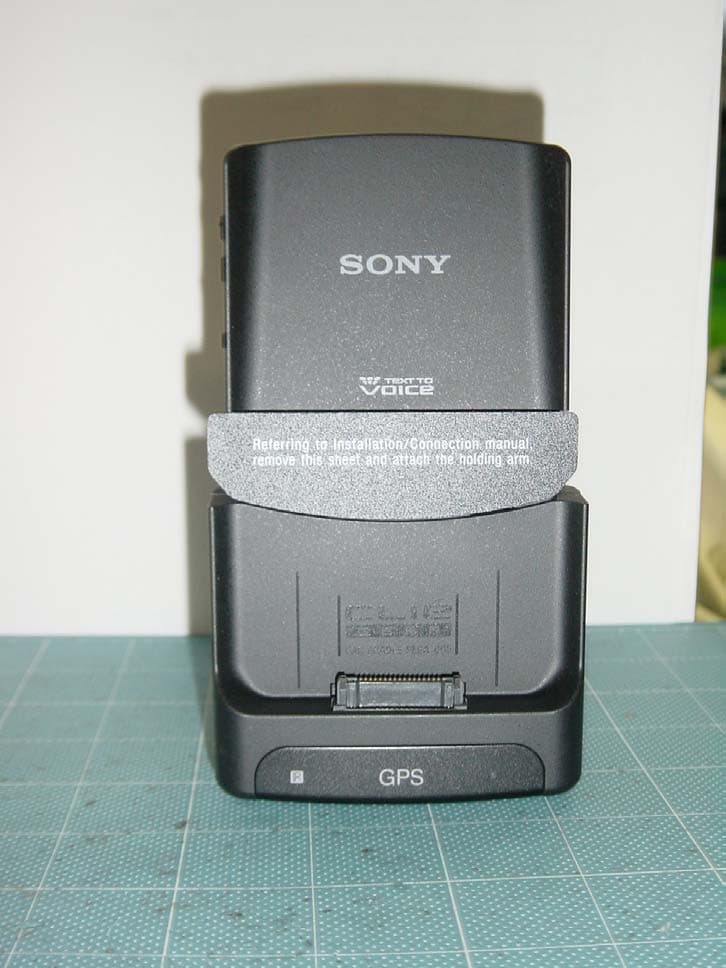
Click to zoom
Application Details
- Equipment Class
- DXX - Part 15 Low Power Communication Device Transmitter
- Date of Grant
- Jul 17, 2003
- Application Purpose
- Original Equipment
- Date of Application
- Jul 17, 2003
- Equipment Note
- Car Cradle
- Frequency Range
- 95.90000000 - 101.90000000
- Company
- Sony Group Corporation
- Country
- Japan
Documents & Files
Document Text
Text extracted from the exhibit documents filed with the FCC. Open a document above to read the original.
Users Manual
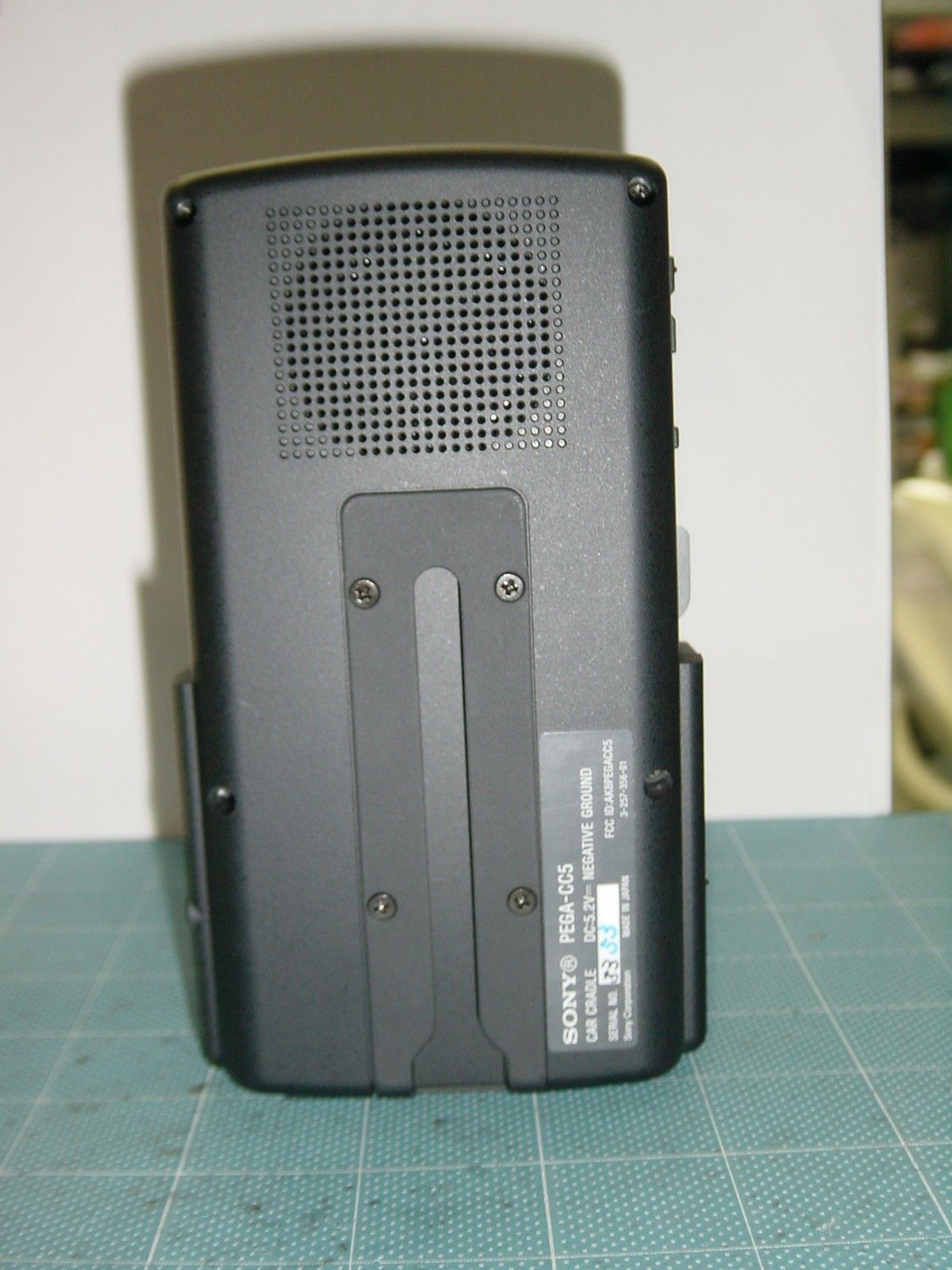
Operating Instructions 3-256-433-11 (2) Owner’s Record The model number and serial number are located on the back of the product. Record the model number and the serial number in the space provided below. Refer to them whenever you call upon your Sony dealer regarding this product. Model No. PEGA-CC5 Serial No. PEGA-CC5 For installation and connections, see the supplied installation/connections manual. For details about the StreetFinder ® C 3 Travel Navigation Software, see the supplied StreetFinder ® C 3 Travel Navigation Software User’s Guide. © 2003 Sony Corporation Car Cradle 2 CAUTION You are cautioned that any changes or modifications not expressly approved in this manual could void your authority to operate this equipment. Note: This equipment has been tested and found to comply with the limits for a Class B digital device, pursuant to Part 15 of the FCC Rules. These limits are designed to provide reasonable protection against harmful interference in a residential installation. This equipment generates, uses, and can radiate radio frequency energy and, if not installed and used in accordance with the instructions, may cause harmful interference to radio communications. However, there is no guarantee that interference will not occur in a particular installation. If this equipment does cause harmful interference to radio or television reception, which can be determined by turning the equipment off and on, the user is encouraged to try to correct the interference by one or more of the following measures: – Reorient or relocate the receiving antenna. – Increase the separation between the equipment and receiver. – Connect the equipment into an outlet on a circuit different from that to which the receiver is connected. – Consult the dealer or an experienced radio/TV technician for help. The car cradle is only for use in the U.S.A. Table of Contents Before use . . . . . . . . . . . . . . . . . . . 7 What you can do with CLIÉ™ handheld during in-vehicle mode . . . . . . . . . . . . . . . . . .8 Introducing applications . . . . . . . . . . 8 Location of controls . . . . . . 11 Front panel . . . . . . . . . . . . . . . . . . 11 Side panel . . . . . . . . . . . . . . . . . . 12 Wireless card remote commander . . . . . . . . . . . . . . . . . . . 13 Getting started . . . . . . . . . . 15 Initial setup of your CLIÉ™ handheld . . . . . . . . . . . . . . . . . . 15 Installing software for the car cradle . . . . . . . . . . . . . . 15 Setting up your CLIÉ™ handheld for the car cradle . . . . . . . . . . . . . . . . . 19 Mounting your CLIÉ™ handheld in the car cradle . . . . . . . . . . . . . . . . . 20 Charging your CLIÉ handheld . . . . . 22 Various in-vehicle mode systems/ functions . . . . . . . . . . . . . . . . . . 23 About in-vehicle mode. . . . . . . . . . . 23 About Sleep mode . . . . . . . . . . . . . . 26 About HOLD mode . . . . . . . . . . . . . 26 About the caution alarm . . . . . . . . . 27 Basic operations . . . . . . . . . 28 Operating the touch panel . . . . . . . . 28 Using Car Launcher . . . . . . . . . . . . 28 Display items. . . . . . . . . . . . . . . . . . 29 About Screensaver . . . . . . . . . . . . . 30 WARNING This device complies with part 15 of the FCC Rules. Operation is subject to the following two conditions: (1) This device may not cause harmful interference, and (2) This device must accept any interference received, including interference that may cause undesired operation. 3 Using applications . . . . . . . 31 Starting an application . . . . . . . . . . .31 Mail (Text-to-voice application). . . . .33 Reading out mail . . . . . . . . . . . . . . . 33 Display items . . . . . . . . . . . . . . . . . . 34 About filtering. . . . . . . . . . . . . . . . . . 36 Schedule (Text-to-voice application). . . . . . .38 Reading out a schedule/event. . . . . . 38 Various reading out modes . . . . . . . 38 Display items . . . . . . . . . . . . . . . . . . 40 Today (Text-to-voice application) . . . .43 Music . . . . . . . . . . . . . . . . . . . . . .45 Using the built-in FM transmitter . . . 46 Using the SONY-BUS connection adapter (optional) . . . . . . . . . . . . . . . 47 Using a cassette adapter (optional) . . . . . . . . . . . . . . . . . . . . . 48 Display items . . . . . . . . . . . . . . . . . . 49 StreetFinder ® C 3 Travel Navigation Software . . . . . . . . . . . . . . . . . . .51 Photo. . . . . . . . . . . . . . . . . . . . . . .52 GPS Meter . . . . . . . . . . . . . . . . . . .53 Display items . . . . . . . . . . . . . . . . . . 53 Monitor . . . . . . . . . . . . . . . . . . . . .54 Display items . . . . . . . . . . . . . . . . . . 55 Other functions . . . . . . . . . 59 Car Setting . . . . . . . . . . . . . . . . . . .59 Uninstalling the Car Cradle basic software on your CLIÉ handheld. . . . 61 Setting Sounds. . . . . . . . . . . . . . . . . 62 Setting the Display Order . . . . . . . . . 63 Assigning Applications to Application Buttons. . . . . . . . . . . . . . . . . . . . . . . 64 Setting Screensaver . . . . . . . . . . . . . 65 Setting Miscellaneous . . . . . . . . . . . 67 Setting the voice pitch, speed and animation for reading out (Text-to-voice function) . . . . . . . . . . .69 Configuring the Mail settings . . . . . .70 Configuring the Music settings . . . . .72 Configuring the Photo settings . . . . .73 Configuring the Schedule settings. . .74 Additional information . . . . 75 Maintenance . . . . . . . . . . . . . . . . . 75 Troubleshooting . . . . . . . . . . . . . . . 77 Specifications . . . . . . . . . . . . . . . . 81 Computer system requirements . . . .82 INDEX . . . . . . . . . . . . . . . . 83 Continued on next page • • • • • • • • • • • • • • • • • • • • • • • • • • • 4 Notes on this manual • The illustrations in this manual depict the short screen type of CLIÉ™ handheld. • Depending on your CLIÉ handheld, the screen may differ. • Screen images in this manual may be different from the actual displays in the supplied software. • Contents of this manual…
Text truncated - open the document above for the full version.
Cover Letter(s)
American Telecommunications Certification Body Inc. 6731 Whittier Ave, McLean, VA 22101 July 7, 2003 RE: FCC ID: AK8PEGACC5_ATCB000557 Attention: Yuykari Ito I have a few comments on this Application. 1. Please provide a 731 form. - 2. Please remove the shield form the small circuit portion shown on the first internal photo and show what is underneath. - 3. Please note that the device appears more than sufficiently large to contain the 2-condition statement on the device as required by 15.19. Please provide a sample label with this statement on the device. Alternately, please explain why this device meets the exception of 15.19(a)(5). Please note that size would not appe ar to be a valid exclusion. - 4. Please note that the OBW plots on page 15 are not correct. The OBW is the 26dB points, not the - 10dB points. It appears that the OBW was incorrectly taken at the -10 to -15dB points and not at the correct -26dB points as specified in C64.4 13.1.7 (Occupied bandwidth measurements). Please note that the proper dB down for the OBW is calculated at the 1% (99% power point) where .05% exists on each of the two side bands. This relates to 20 log(0.05) or -26dB. Please show compliance of the OBW requirements using your -26dB plots. This requires correcting your OBW table and removing your incorrect OBW plots and using your 26dB plot data. Please use the required section 13.1.7 and Annex I of ANSI C63.4 as yo ur measurement guideline for OBW. - 5. Please specify the modulation used in the OBW test. Please follow the modulation guidelines of 13.1.1.1. - 6. Please note that on page 20 of your report the QP is higher than the peak reading. This is not possible. Please explain. - 7. Please note that on page 20 of your report you show several bandedge data that is higher than the fundamental. This is not allowed. Under no circumstance can any emission be higher than the fundamental. Please retest your device showing compliance to this requirement. - 8. Please note that your modification statement in the manual is not appropriate nor correct. Your statement infers that the warranty would be void if unauthorized modifications are made. Please note that this is not what the FCC regulations say the statement is to state. The statement must inform the user that unauthorized modifications may void the users authority to operate the equipment, not that any warranty will be voided. Please correct the statement to be in line with the requirements of 15.21 of the FCC rules. - 9. Dennis Ward mailto:[email protected] The items indicated above must be submitted before processing can continue on the above referenced application. Failure to provide the requested information may result in application termination. Correspondence should be considered part of the permanent submission and may be viewed from the Internet after a Grant of Equipment Authorization is issued. Please do not respond to this correspondence using the email reply button. In order for your response to be processed expeditiously, you must submit your documents through the AmericanTCB.com website. Also, please note that partial responses increase processing time and should not be submitted. Any questions about the content of this correspondence should be directed to the sender.
Cover Letter(s)
July 14, 2003 RE: Sony Corporation FCC ID: AK8PEGACC5 No.: ATCB000557 Dear Dennis, Regarding the above referenced application, please find our reply to the comments dated July 7, 2003 1. We have uploaded Form 731. Please confirm. 2. Please see uploaded the revised Internal Photo. 3. The product does not have enough space to be put the required 2-condition statements on it. If the statement is put on the product, letters would be so small and it will be hard for users to read it. Therefore, the statement is listed on users manual. 4. We added the limit on page 5 and 16 of test report. Please see the revised test page 5 and 16, which we uploaded. 5. We used audio signal of 1kHz modulation. 6. Please find the comments at the center part on page 20 of test report. FCC advised us this way of measurement before. Therefore, QP reading is higher than the peak reading. 7. The data on page 20 of test report shows both QP detection and peak detection of band edges. The fundamentals (AV detection, PK detection, and QP detection) are shown on page 17. Please compare the results on page 17 and page 20. It meets the requirement of FCC rule. 8. The incorrect statement in users manual was modified. Please find uploaded users manual. We hope the above reply is satisfactory. If any problems, please let us know. Best regards, Yu k a r i I t o (M s . ) UL Apex Co., Ltd.
Cover Letter(s)
-----Original Message----- From: [email protected] [mailto:[email protected]] Sent: Wednesday, July 16, 2003 9:29 PM To: [email protected] Cc: Bill Graff Subject: Sony, AK8PEGACC5_ATCB000557 Dear Dennis, Hello, Dennis. Please find our reply to your comments dated July 16, 2003 below: 1. 2-condition statement Due to the granulated coating, the surface of blanket is rough and a larger label than FCC ID label would be easily come off (removed) . If 2 condition statement is put on label, then the label would be larger than FCC ID label. Therefore, the applicant include the statement in users manual. Since the products are already prepared and packed for shipping, please allow them to include the statement in users manual. 2. Bad edge compliance --->> We revised page 20 of Test report. If this is okay, then we will upload this page to your website
External Photos
Sony Corporation CLIE Car Cradle, model PEGA-CC5 FCC ID: AK8PEGACC5 External Photo Front Sony Corporation CLIE Car Cradle, model PEGA-CC5 FCC ID: AK8PEGACC5 Rear Sony Corporation CLIE Car Cradle, model PEGA-CC5 FCC ID: AK8PEGACC5 Right Side Sony Corporation CLIE Car Cradle, model PEGA-CC5 FCC ID: AK8PEGACC5 Left Side Sony Corporation CLIE Car Cradle, model PEGA-CC5 FCC ID: AK8PEGACC5 Top Bottom
Internal Photos
Sony Corporation CLIE Car Cradle, model PEGA-CC5 FCC ID: AK8PEGACC5 Internal Photo Side A Bottom Part Antenna Sony Corporation CLIE Car Cradle, model PEGA-CC5 FCC ID: AK8PEGACC5 Side B Bottom Part
Operational Description
Sony Corporation, Shinagawa INTERCITY C Tower, Shinagawa Technology Center, 2-15-3 Konan Minato-ku, Tokyo, 108-6201, Japan Sony Corporation, Shinagawa INTERCITY C Tower, Shinagawa Technology Center, 2-15-3 Konan Minato-ku, Tokyo, 108-6201, Japan Sony Corporation, Shinagawa INTERCITY C Tower, Shinagawa Technology Center, 2-15-3 Konan Minato-ku, Tokyo, 108-6201, Japan Sony Corporation, Shinagawa INTERCITY C Tower, Shinagawa Technology Center, 2-15-3 Konan Minato-ku, Tokyo, 108-6201, Japan
Operational Description
Sony Corporation, Shinagawa INTERCITY C Tower, Shinagawa Technology Center, 2-15-3 Konan Minato-ku, Tokyo, 108-6201, Japan Sony Corporation, Shinagawa INTERCITY C Tower, Shinagawa Technology Center, 2-15-3 Konan Minato-ku, Tokyo, 108-6201, Japan Sony Corporation, Shinagawa INTERCITY C Tower, Shinagawa Technology Center, 2-15-3 Konan Minato-ku, Tokyo, 108-6201, Japan Sony Corporation, Shinagawa INTERCITY C Tower, Shinagawa Technology Center, 2-15-3 Konan Minato-ku, Tokyo, 108-6201, Japan
Test Report
Test report No. : 23JE0045-HO-1 Page : 13 of 20 Revised date : July 1, 2003 FCC ID : AK8PEGACC5 UL Apex Co., Ltd. Head Office EMC Lab. 4383-326 Asama-cho, Ise-shi, Mie-ken 516-0021 JAPAN Telephone : +81 596 24 8116 Facsimile : +81 596 24 8124 APPENDIX 1: Photographs of test setup Radiated emission
Test Setup Photos
Test report No. : 23JE0045-HO-1 Page : 13 of 20 Revised date : July 1, 2003 FCC ID : AK8PEGACC5 UL Apex Co., Ltd. Head Office EMC Lab. 4383-326 Asama-cho, Ise-shi, Mie-ken 516-0021 JAPAN Telephone : +81 596 24 8116 Facsimile : +81 596 24 8124 APPENDIX 1: Photographs of test setup Radiated emission
Contact Information
Applicant
Kazuyuki Hori(Chief EMC/RF Compliance Specialist)
Technical Contact
UL Apex Co., Ltd.Hiroka Umeyama
[email protected]81-596-24-8116
4383-326 Asama-cho, · Ise-shi, Mie-ken · Japan
Test Firm
UL Apex Co., Ltd.Tetsuya Hashimoto
Technical Specifications
| # | Rule Parts | Frequency Range | Power Output |
|---|---|---|---|
| 1 | 15C | 95.9 MHz - 101.9 MHz | - |
Other Applications from Sony Group Corporation
AK8WW81782
Aug 21, 2026Radio Equipment
Equipment Class
DSS - Part 15 Spread Spectrum TransmitterAK8CFIZCP2
Aug 03, 2026Wireless Controller
Equipment Class
DSS - Part 15 Spread Spectrum TransmitterAK8OEV321MUH
Apr 14, 2026LCD Monitor
Equipment Class
JAD - Part 15 Class A Digital DeviceAK8OEV431MUH
Apr 14, 2026LCD Monitor
Equipment Class
JAD - Part 15 Class A Digital DeviceAK8OEV271MUH
Apr 14, 2026LCD Monitor
Equipment Class
JAD - Part 15 Class A Digital Device