AK8PSP1001BPSP
Sony Group Corporation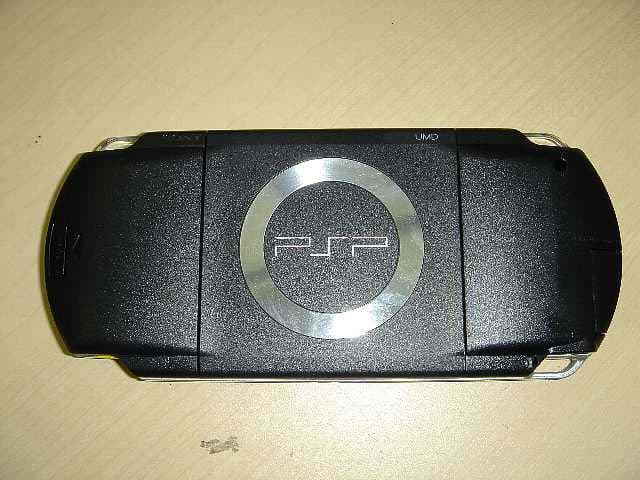
Click to zoom
Application Details
- Equipment Class
- DTS - Digital Transmission System
- Date of Grant
- Nov 09, 2005
- Application Purpose
- Original Equipment
- Date of Application
- Nov 09, 2005
- Equipment Note
- PSP
- Frequency Range
- 2412.00000000 - 2462.00000000
- Company
- Sony Group Corporation
- Country
- Japan
Documents & Files
Document Text
Text extracted from the exhibit documents filed with the FCC. Open a document above to read the original.
Users Manual
2-657-883-12(2) Instruction manual Mode d'emploi PSP-1001 TM filename C:\DataDisk\#Saggyou\1024\835900S PSP1001K_USFR\2649166121_PSP1001K_US\01EN01CO V.fm model name1PSP-1001 2-657-883-12(2) masterpage:Right US FR Encontrará un manual de instrucciones en español en nuestro sitio Web en http://www.us.playstation.com/psp/manuals.aspx 01EN01COV.fm Page 1 Monday, October 24, 2005 1:32 PM masterpage:Left filename C:\DataDisk\#Saggyou\1024\835900S PSP1001K_USFR\2649166121_PSP1001K_US\01EN02WA R.fm model name1PSP-1001 2-657-883-12(2) 2 WARNINGS To avoid electrical shock, do not open the cabinet. Refer servicing to qualified personnel only. Use the supplied AC adaptor only. If you use other types, it may cause fire, electrical shocks or a malfunction. For customers in the U.S.A. and Canada Caution Use of controls or adjustments or performance of procedures other than those specified herein may result in hazardous radiation exposure. The use of optical instruments with this product will increase eye hazard. This appliance is classified as a CLASS 1 LASER product under IEC60825-1: 2001. WARNINGS 01EN02WAR.fm Page 2 Monday, October 24, 2005 1:33 PM 3 filename H:\#Sagyocyu\#10 OCT\1007\2649166121_PSP1001K_US\01EN02WAR.fm US model name1PSP-1001 2-657-883-12(1) WARNINGS masterpage:Right For customers in the U.S.A. NOTE: This equipment has been tested and found to comply with the limits for a Class B digital device, pursuant to Part 15 of the FCC rules. These limits are designed to provide reasonable protection against harmful interference in a residential installation. This equipment generates, uses, and can radiate radio frequency energy and, if not installed and used in accordance with the instructions, may cause harmful interference to radio communications. However, there is no guarantee that interference will not occur in a particular installation. If this equipment does cause harmful interference to radio or television reception, which can be determined by turning the equipment off and on, the user is encouraged to try to correct the interference by one or more of the following measures: – Reorient or relocate the receiving antenna. – Increase the separation between the equipment and receiver. – Connect the equipment into an outlet on a circuit different from that to which the receiver is connected. – Consult the dealer or an experienced radio/TV technician for help. If you have questions about this product, call our technical support line at 1-800-345-7669, or write to: Sony Computer Entertainment America Consumer Services/Technical Support PO Box 5888, San Mateo, CA 94402-0888 U.S.A. This device complies with Part 15 of the FCC Rules. Operation is subject to the following two conditions: (1) this device may not cause harmful interference, and (2) this device must accept any interference received, including interference that may cause undesired operation. Declaration of Conformity Trade Name : Model No. : Responsible Party : Address : Telephone No. : SONY PSP-1001 Sony Electronics Inc. 16450 W. Bernardo Dr. San Diego, CA 92127 U.S.A. 858-942-2230 01PSP-1001 EN.book Page 3 Friday, October 7, 2005 6:12 PM masterpage:Left filename H:\#Sagyocyu\#10 OCT\1007\2649166121_PSP1001K_US\01EN02WAR.fm model name1PSP-1001 2-657-883-12(1) 4 WARNINGS You are cautioned that any changes or modifications not expressly approved in this manual could void your authority to operate this equipment. FCC Radiation Exposure Statement This transmitter complies with FCC radiation exposure limit set forth for an uncontrolled environment. To comply with the FCC RF exposure compliance requirements, no change to the antenna or the device is permitted. Any changes to the antenna or the device could result in the device exceeding the RF exposure requirements and void user authorization to operate the equipment. In addition, this transmitter must not be co-located or operating in conjunction with any other antenna or transmitter. Owner's Record The model and serial numbers are located inside the battery compartment of the unit. Record the serial number in the space provided below. Refer to the number whenever you call for technical assistance at 1-800-345-7669. Model No. PSP-1001 Serial No.______________ For customers in Canada This Class B digital apparatus complies with Canadian ICES-003. The term "IC" before the equipment certification number only signifies that the Industry Canada technical specifications were met. Operation is subject to the following two conditions: (1) this device may not cause interference, and (2) this device must accept any interference, including interference that may cause undesired operation of the device. IC Radiation Exposure Statement This transmitter complies with IC radiation exposure limit set forth for an uncontrolled environment. To comply with the IC RF exposure compliance requirements, no change to the antenna or the device is permitted. Any changes to the antenna or the device could result in the device exceeding the RF exposure requirements and void user authorization to operate the equipment. In addition, this transmitter must not be co-located or operating in conjunction with any other antenna or transmitter. 01PSP-1001 EN.book Page 4 Friday, October 7, 2005 6:12 PM 5 filename H:\#Sagyocyu\#10 OCT\1007\2649166121_PSP1001K_US\01EN02WAR.fm US model name1PSP-1001 2-657-883-12(1) WARNINGS masterpage:Right Photosensitivity A very small percentage of individuals may experience epileptic seizures when exposed to certain light patterns or flashing lights. Exposure to certain patterns or backgrounds on a television screen or while playing video games, including games played on the PSP™ system, may trigger an epileptic seizure in these individuals. Certain conditions may trigger previously undetected epileptic symptoms even in persons who have no history of prior seizures or epilepsy. If you, or anyone in your family, has an epileptic condition, consult your physician prior to playing. If you expe…
Text truncated - open the document above for the full version.
Users Manual
41 filename H:\#Sagyocyu\#10 OCT\1007\2649166121_PSP1001K_US\01EN07BAS.fm Basic operations US model name1PSP-1001 2-657-883-12(1) Battery masterpage:Right Hint The battery pack lifespan varies depending on how it is stored, the conditions of use and environmental factors, such as temperature. For safety reasons, turn off the system and remove the power cord from the electrical outlet before replacing the battery pack. Also read "Battery pack precautions" (page 17) before handling the battery pack. Hint If the system is left unused after the battery pack has been removed, the date and time settings may be reset. If this occurs, the date and time setting screen will be displayed the next time the PSP™ system is turned on. When the system will not be used for an extended period of time, remove the battery pack from the system. Store the battery pack in a cool, dry place out of the reach of children. Replacing the battery pack Storing the battery pack 01PSP-1001 EN.book Page 41 Friday, October 7, 2005 6:12 PM masterpage:Left filename H:\#Sagyocyu\#10 OCT\1007\2649166121_PSP1001K_US\01EN08GAM.fm model name1PSP-1001 2-657-883-12(1) 42 Playing a game 1Select from the home menu. 2Insert a UMD™ (page 33). The UMD™ icon is displayed. 3With the game icon selected, press the button. The game starts. Icons displayed under Game In addition to playing games, the following features are available under Game. Game Playing a game Game Sharing You can use ad hoc mode (page 108) to receive game data from another PSP™ system. For details, refer to the software manual supplied with the game. Saved Data Utility You can copy, delete or view information about saved data on a Memory Stick Duo™ (page 45). UMD™ You can play games. If you select the icon, a thumbnail is displayed. PSP™ Update You can update the system software of the PSP™ system. This icon is displayed only when a UMD™ that contains update data is inserted (page 121). Memory Stick™ You can perform an update by accessing the update data saved on a Memory Stick Duo™ (page 121). 01PSP-1001 EN.book Page 42 Friday, October 7, 2005 6:12 PM 43 filename H:\#Sagyocyu\#10 OCT\1007\2649166121_PSP1001K_US\01EN08GAM.fm Game US model name1PSP-1001 2-657-883-12(1) Playing a game masterpage:Right Hints • If (Restricted Content) is displayed when you select the (UMD™) icon, parental control restrictions have been set on the system. You must enter the password as described below to access the game. See "Parental Control Level" (page 103) for details. 1Select (Restricted Content), and then press the button. 2Enter the 4-digit password using the directional buttons, and then press the button. • If you press the home button during gameplay, you can check the remaining battery power. • Title names and thumbnail images used in this manual are not of actual products. 1Press the home button while playing a game. The message "Do you want to quit the game?" is displayed. 2Select "Yes", and then press the button. The game ends and the home menu is displayed. Quitting a game 01PSP-1001 EN.book Page 43 Friday, October 7, 2005 6:12 PM masterpage:Left filename H:\#Sagyocyu\#10 OCT\1007\2649166121_PSP1001K_US\01EN08GAM.fm model name1PSP-1001 2-657-883-12(1) 44 Game options menu You can view game information or copy or delete saved data by displaying the options menu. 1Select an icon, and then press the button. The options menu is displayed. 2Select a menu item, and then press the button. Closing the options menu Press the button or the button. List of options The options menu items available vary depending on the icon selected. Game options menu StartStarts a game or update data Copy Copies the saved data on a Memory Stick Duo™ to another Memory Stick Duo™ (page 45) DeleteDeletes the data on a Memory Stick Duo™ InformationDisplays information about the selected icon IconsOptions menu 01PSP-1001 EN.book Page 44 Friday, October 7, 2005 6:12 PM 45 filename H:\#Sagyocyu\#10 OCT\1007\2649166121_PSP1001K_US\01EN08GAM.fm Game US model name1PSP-1001 2-657-883-12(1) Copying and deleting saved data masterpage:Right You can copy or delete saved game data that is saved on a Memory Stick Duo™ using the saved data utility. You can copy saved data to another Memory Stick Duo™. It is recommended that important data be copied as a backup. 1Select , and then press the button. 2Select the saved data that you want to copy, and then press the button. The options menu is displayed. 3Select "Copy", and then press the button. 4Follow the on-screen instructions. If there is not enough space available Delete data in the destination Memory Stick Duo™ or replace it with another Memory Stick Duo™. If you display the options menu (page 44), you can delete saved data or check the amount of free space available. Hint Depending on the type of Memory Stick Duo™ used, the file size displayed for the same data item may vary. You can delete saved data on a Memory Stick Duo™ by selecting "Delete" in step 3 of "Copying saved data". Copying and deleting saved data Copying saved data Deleting saved data 01PSP-1001 EN.book Page 45 Friday, October 7, 2005 6:12 PM masterpage:Left model name1PSP-1001 2-657-883-12(1) 46 Watching a video filename H:\#Sagyocyu\#10 OCT\1007\2649166121_PSP1001K_US\01EN09VID.fm \ You can watch UMD™VIDEO and videos saved on a Memory Stick Duo™. 1Select from the home menu. 2Insert a UMD™ or Memory Stick Duo™ (pages 33, 34). An icon for the inserted media is displayed. 3Select the icon, and then press the button. UMD™VIDEO playback begins. If you select , icons for each video data item will be displayed. Select the video that you want to play, and then press the button. Icons displayed under Video Video Watching a video UMD™ You can play UMD™VIDEO. If you select the icon, a thumbnail is displayed. Memory Stick™You can play video saved on a Memory Stick Duo™. 01PSP-1001 EN.book Page 46 Friday, October 7, 2005 6:12 PM 47 Video US model name1PSP-1001 2-657-883-12(1) Watching a video masterpage:Right filen…
Text truncated - open the document above for the full version.
Users Manual
91 Settings US model name1PSP-1001 2-657-883-12(1) Settings for the PSP™ system masterpage:Right filename H:\#Sagyocyu\#10 OCT\1007\2649166121_PSP1001K_US\01EN13SET.fm Icons displayed under Settings Network Update Provides access to updates for the system software (page 115) USB Connection Allows for connection to a PC using a USB cable (page 106) Video Settings Includes settings for UMD™VIDEO Menu Language, Audio Language and Subtitle Language (page 92) Photo Settings Includes settings for adjusting the slideshow speed (page 93) System Settings Includes settings for the System Language and Nickname, and provides an option to format Memory Stick Duo™ media (page 94) Theme Settings Allows the user to change the background color and display an image as wallpaper (page 97) Date & Time Settings Allows the user to set the date and time as well as adjust for daylight saving time (page 98) Power Save Settings Includes settings to automatically turn off the backlight and put the system in sleep mode (page 99) Sound Settings Provides access to settings for AVLS (Automatic Volume Limiter System) and Key Tone (page 101) Security Settings Allows the user to change the password and adjust the level setting for the parental control feature (page 102) Network Settings Provides access to settings for connecting to a wireless local area network (WLAN) (page 108) 01PSP-1001 EN.book Page 91 Friday, October 7, 2005 6:12 PM masterpage:Left model name1PSP-1001 2-657-883-12(1) 92 Video Settings filename H:\#Sagyocyu\#10 OCT\1007\2649166121_PSP1001K_US\01EN13SET.fm You can set the UMD™VIDEO language or boost UMD™VIDEO volume. Notice Depending on the UMD™VIDEO, playback conditions may be set in advance by the software developer. In such cases, certain options may not be available, even if you follow the instructions in this manual. Hint The settings at the time of purchase are as follows: – "Menu Language" and "Subtitle Language" are set to "English". – "Audio Language" is set to "Original Language". – "UMD™Video Volume" is set to "Normal". Video Settings Menu LanguageSelect a language for the UMD™VIDEO menu. Audio LanguageSelect a language for the audio. Subtitle LanguageSelect a language for subtitles. UMD™Video Volume Adjust the volume when UMD™VIDEO output level is low. The volume increases in the following order: "Normal", "+1" and "+2". 01PSP-1001 EN.book Page 92 Friday, October 7, 2005 6:12 PM 93 Settings US model name1PSP-1001 2-657-883-12(1) Photo Settings masterpage:Right filename H:\#Sagyocyu\#10 OCT\1007\2649166121_PSP1001K_US\01EN13SET.fm You can set the Slideshow Speed. The default setting for the menu item is underlined. Photo Settings FastDisplays images at a faster rate Normal Displays images at normal speed SlowDisplays images at a slower rate 01PSP-1001 EN.book Page 93 Friday, October 7, 2005 6:12 PM masterpage:Left model name1PSP-1001 2-657-883-12(1) 94 System Settings filename H:\#Sagyocyu\#10 OCT\1007\2649166121_PSP1001K_US\01EN13SET.fm You can adjust the settings for and display information about the PSP™ system, or format a Memory Stick Duo™. The nickname you selected in the initial setup can be changed. Use the on- screen keyboard to enter a new nickname. For details on entering text, see "How to use the keyboard" (page 118). Sets the language for system menus, such as the home menu. The default setting for the menu item is underlined. System Settings Nickname System Language DeutschDisplays messages in German English Displays messages in English EspañolDisplays messages in Spanish FrançaisDisplays messages in French ItalianoDisplays messages in Italian NederlandsDisplays messages in Dutch PortuguêsDisplays messages in Portuguese PyccкийDisplays messages in Russian Displays messages in Japanese Displays messages in Korean 01PSP-1001 EN.book Page 94 Friday, October 7, 2005 6:12 PM 95 Settings US model name1PSP-1001 2-657-883-12(1) System Settings masterpage:Right filename H:\#Sagyocyu\#10 OCT\1007\2649166121_PSP1001K_US\01EN13SET.fm You can set the character code to be applied to music and other types of files. Usually it is not necessary to adjust this setting. Hint The default setting is "US (437)". You can display information about the system battery. * The number of hours as calculated by the system is shown as an estimate. Hint There may be a slight difference between the display information and actual battery performance. This is due to variations in actual usage conditions and environmental factors (such as temperature). Character Set For File NamesSets the character code to be used in music and other file names For Text in FilesSets the character code for text in m3u and other types of files Battery Information Charge LevelDisplays the battery charge level as a percentage Hours Left * Displays the remaining hours of battery duration (except when charging) Power SourceDisplays the current source of power: "External" or "Battery" Battery Status Displays the status of the battery: "In Use", "Charging" or "Charge Complete" 01PSP-1001 EN.book Page 95 Friday, October 7, 2005 6:12 PM masterpage:Left model name1PSP-1001 2-657-883-12(1) 96 System Settings filename H:\#Sagyocyu\#10 OCT\1007\2649166121_PSP1001K_US\01EN13SET.fm You can format Memory Stick Duo™ media using the system. Follow the on- screen instructions to perform this operation. Notice When you format, all software and data stored on the Memory Stick Duo™ will be deleted and cannot be recovered. Be careful not to accidentally erase important data. You can restore settings to the values as set at the time of purchase. Follow the on-screen instructions to perform this operation. Notices • When the default settings are restored, the current settings will be lost and cannot be recovered. • After an update has been performed, this feature cannot be used to go back to a previous version of the system software. You can display information about the PSP™ system. Displays trademark and copyright information related to software used by …
Text truncated - open the document above for the full version.
External Photos
External Photo Sony Corporation Model: PSP-1001 FCC ID: AK8PSP1001B IC Number: 409B-PSP1001B Front View Rear View External Photo Sony Corporation Model: PSP-1001 FCC ID: AK8PSP1001B IC Number: 409B-PSP1001B Top Vi e w Bottom View External Photo Sony Corporation Model: PSP-1001 FCC ID: AK8PSP1001B IC Number: 409B-PSP1001B Right Side View Left Side View
ID Label/Location Info
Label Location Sony Corporation Model: PSP-1001 FCC ID: AK8PSP1001B IC Number: 409B-PSP1001B Label Front View
Internal Photos
Internal Photo Sony Corporation Model: PSP-1001 FCC ID: AK8PSP1001B IC Number: 409B-PSP1001B Front View of WLAN Module (with shield cover) Front View of WLAN Module (without shield cover) Internal Photo Sony Corporation Model: PSP-1001 FCC ID: AK8PSP1001B IC Number: 409B-PSP1001B Rear View of WLAN Module Internal Photo Sony Corporation Model: PSP-1001 FCC ID: AK8PSP1001B IC Number: 409B-PSP1001B WLAN Module Location of WLAN Module Antenna Location of Antenna Internal Photo Sony Corporation Model: PSP-1001 FCC ID: AK8PSP1001B IC Number: 409B-PSP1001B Front View of Antenna (UBA-CUW1000) Rear View of Antenna (UBA-CUW1000) Internal Photo Sony Corporation Model: PSP-1001 FCC ID: AK8PSP1001B IC Number: 409B-PSP1001B Front View of Antenna (HFS11-SO01) Rear View of Antenna (HFS11-SO01)
RF Exposure Info
Test report No. : 26CE0050-HO-6a Page : 2 of 77 FCC ID : AK8PSP1001B Issued date : October 31, 2005 Revised date : November 8, 2005 UL Apex Co., Ltd. Head Office EMC Lab. 4383-326 Asama-cho, Ise-shi, Mie-ken 516-0021 JAPAN Telephone: +81 596 24 8116 Facsimile: +81 596 24 8124 CONTENTS PAGE SECTION 1 : Client information............................................................................................................................................ 3 SECTION 2 : Equipment under test (E.U.T.)........................................................................................................................ 3 2.1 Identification of E.U.T. ...................................................................................................................................... 3 2.3 Identification of Wireless LAN Module ............................................................................................................. 4 SECTION 3 : Test standard information............................................................................................................................... 5 3.1 Requirements for compliance testing defined by the FCC ................................................................................. 5 3.2 Exposure limit .................................................................................................................................................... 6 SECTION 4 : Test result ......................................................................................................................................................... 7 4.1 Result of Max. SAR value .................................................................................................................................. 7 4.2 Test Location ...................................................................................................................................................... 7 SECTION 5 : Operation of E.U.T. during testing................................................................................................................. 8 5.1 Operating modes................................................................................................................................................. 8 5.2 Measurement procedure ..................................................................................................................................... 8 5.3 Test setup of EUT............................................................................................................................................... 9 SECTION 6 : Test surrounding.............................................................................................................................................. 10 6.1 Measurement uncertainty...................................................................................................................................... 10 SECTION 7 : Confirmation before testing ............................................................................................................................ 11 7.1 Conducted power .................................................................................................................................................. 11 7.2 Power drift measurement ...................................................................................................................................... 12 SECTION 8 : Measurement results........................................................................................................................................ 13 8.1 ANT. UBA-CUW1000 ......................................................................................................................................... 13 8.2 ANT. HFS11-SO01 .............................................................................................................................................. 14 APPENDIX 1 : Photographs of test setup............................................................................................................................ 15 APPENDIX 2 : Test instruments.......................................................................................................................................... 26 Equipment & calibration information ..................................................................................................................... 27 1. Equipment used................................................................................................................................................... 27 2. Dosimetry assessment setup................................................................................................................................ 28 3. Configuration and peripherals............................................................................................................................. 29 4. System components ............................................................................................................................................ 30 5. Test system specifications................................................................................................................................... 32 6. Simulated Tissues Composition of 2450MHz..................................................................................................... 33 7. Validation Measurement ..................................................................................................................................... 33 8. System validation data ........................................................................................................................................ 34 9. Validation uncertainty......................................................................................................................................... 35 10. Validation Measurement data .......................................................................…
Text truncated - open the document above for the full version.
RF Exposure Info
Test report No. : 26CE0050-HO-6a Page : 15 of 77 FCC ID : AK8PSP1001B Issued date : October 31, 2005 Revised date : November 8, 2005 UL Apex Co., Ltd. Head Office EMC Lab. 4383-326 Asama-cho, Ise-shi, Mie-ken 516-0021 JAPAN Telephone: +81 596 24 8116 Facsimile: +81 596 24 8124 APPENDIX 1 : Photographs of test setup Test report No. : 26CE0050-HO-6a Page : 16 of 77 FCC ID : AK8PSP1001B Issued date : October 31, 2005 Revised date : November 8, 2005 UL Apex Co., Ltd. Head Office EMC Lab. 4383-326 Asama-cho, Ise-shi, Mie-ken 516-0021 JAPAN Telephone: +81 596 24 8116 Facsimile: +81 596 24 8124 Photograph EUT Front Back Top Bottom Right Side Left Side Antenna Test report No. : 26CE0050-HO-6a Page : 17 of 77 FCC ID : AK8PSP1001B Issued date : October 31, 2005 Revised date : November 8, 2005 UL Apex Co., Ltd. Head Office EMC Lab. 4383-326 Asama-cho, Ise-shi, Mie-ken 516-0021 JAPAN Telephone: +81 596 24 8116 Facsimile: +81 596 24 8124 Photograph Antenna location Photograph EUT with Accessary Antenna Test report No. : 26CE0050-HO-6a Page : 18 of 77 FCC ID : AK8PSP1001B Issued date : October 31, 2005 Revised date : November 8, 2005 UL Apex Co., Ltd. Head Office EMC Lab. 4383-326 Asama-cho, Ise-shi, Mie-ken 516-0021 JAPAN Telephone: +81 596 24 8116 Facsimile: +81 596 24 8124 (1) Front Test report No. : 26CE0050-HO-6a Page : 19 of 77 FCC ID : AK8PSP1001B Issued date : October 31, 2005 Revised date : November 8, 2005 UL Apex Co., Ltd. Head Office EMC Lab. 4383-326 Asama-cho, Ise-shi, Mie-ken 516-0021 JAPAN Telephone: +81 596 24 8116 Facsimile: +81 596 24 8124 (2) Back Test report No. : 26CE0050-HO-6a Page : 20 of 77 FCC ID : AK8PSP1001B Issued date : October 31, 2005 Revised date : November 8, 2005 UL Apex Co., Ltd. Head Office EMC Lab. 4383-326 Asama-cho, Ise-shi, Mie-ken 516-0021 JAPAN Telephone: +81 596 24 8116 Facsimile: +81 596 24 8124 (3) Top Test report No. : 26CE0050-HO-6a Page : 21 of 77 FCC ID : AK8PSP1001B Issued date : October 31, 2005 Revised date : November 8, 2005 UL Apex Co., Ltd. Head Office EMC Lab. 4383-326 Asama-cho, Ise-shi, Mie-ken 516-0021 JAPAN Telephone: +81 596 24 8116 Facsimile: +81 596 24 8124 (4) Bottom Test report No. : 26CE0050-HO-6a Page : 22 of 77 FCC ID : AK8PSP1001B Issued date : October 31, 2005 Revised date : November 8, 2005 UL Apex Co., Ltd. Head Office EMC Lab. 4383-326 Asama-cho, Ise-shi, Mie-ken 516-0021 JAPAN Telephone: +81 596 24 8116 Facsimile: +81 596 24 8124 (5) Left Side Test report No. : 26CE0050-HO-6a Page : 23 of 77 FCC ID : AK8PSP1001B Issued date : October 31, 2005 Revised date : November 8, 2005 UL Apex Co., Ltd. Head Office EMC Lab. 4383-326 Asama-cho, Ise-shi, Mie-ken 516-0021 JAPAN Telephone: +81 596 24 8116 Facsimile: +81 596 24 8124 (6) Left Front (5mm) 5mm Test report No. : 26CE0050-HO-6a Page : 24 of 77 FCC ID : AK8PSP1001B Issued date : October 31, 2005 Revised date : November 8, 2005 UL Apex Co., Ltd. Head Office EMC Lab. 4383-326 Asama-cho, Ise-shi, Mie-ken 516-0021 JAPAN Telephone: +81 596 24 8116 Facsimile: +81 596 24 8124 (7) Left Front (10mm) 10mm Test report No. : 26CE0050-HO-6a Page : 25 of 77 FCC ID : AK8PSP1001B Issued date : October 31, 2005 Revised date : November 8, 2005 UL Apex Co., Ltd. Head Office EMC Lab. 4383-326 Asama-cho, Ise-shi, Mie-ken 516-0021 JAPAN Telephone: +81 596 24 8116 Facsimile: +81 596 24 8124 (8) Left Front (15mm) 15mm
RF Exposure Info
Test report No. : 26CE0050-HO-6a Page : 26 of 77 FCC ID : AK8PSP1001B Issued date : October 31, 2005 Revised date : November 8, 2005 UL Apex Co., Ltd. Head Office EMC Lab. 4383-326 Asama-cho, Ise-shi, Mie-ken 516-0021 JAPAN Telephone: +81 596 24 8116 Facsimile: +81 596 24 8124 APPENDIX 2 : Test instruments Test report No. : 26CE0050-HO-6a Page : 27 of 77 FCC ID : AK8PSP1001B Issued date : October 31, 2005 Revised date : November 8, 2005 UL Apex Co., Ltd. Head Office EMC Lab. 4383-326 Asama-cho, Ise-shi, Mie-ken 516-0021 JAPAN Telephone: +81 596 24 8116 Facsimile: +81 596 24 8124 Equipment & calibration information 1. Equipment used Calibration Name of Equipment Manufacture Model number Serial number Last Cal due date Power Meter Agilent E4417A GB41290639 2004/11/09 2005/11/08 Power Sensor Agilent E9300B US40010300 2004/11/15 2005/11/14 Power Sensor Agilent E9327A US40440545 2004/11/23 2005/11/22 Spectrum Analyzer Agilent E4448A MY44020357 2005/09/16 2006/09/15 S-Parameter Network Analyzer Agilent 8753ES US39174808 2003/10/23 2006/10/22 Signal Generator Rohde&Schwarz SML40 100023 2005/01/05 2006/01/04 RF Amplifier OPHIR 5056F 1005 2005/05/20 2006/05/19 Dosimetric E-Field Probe Schmid&Partner Engineering AG EX3DV3 3507 2005/04/12 2006/04/11 Data Acquisition Electronics Schmid&Partner Engineering AG DAE3 516 2005/03/10 2006/03/09 Robot,SAM Phantom Schmid&Partner Engineeri…
Text truncated - open the document above for the full version.
Contact Information
Applicant
Kazuyuki Hori(Chief EMC/RF Compliance Specialist)
Technical Contact
UL Apex Co., Ltd.Hiroka Umeyama
[email protected]81-596-24-8116
4383-326 Asama-cho · Ise-shi Mie-ken · Japan
Test Firm
UL Japan, Inc. Yokowa EMC Lab.Masamichi Ishii
Technical Specifications
| # | Rule Parts | Frequency Range | Power Output |
|---|---|---|---|
| 1 | 15C | 2.41 GHz - 2.46 GHz | 30.00 mW |
Other Applications from Sony Group Corporation
AK8WW81782
Aug 21, 2026Radio Equipment
Equipment Class
DSS - Part 15 Spread Spectrum TransmitterAK8CFIZCP2
Aug 03, 2026Wireless Controller
Equipment Class
DSS - Part 15 Spread Spectrum TransmitterAK8OEV321MUH
Apr 14, 2026LCD Monitor
Equipment Class
JAD - Part 15 Class A Digital DeviceAK8OEV431MUH
Apr 14, 2026LCD Monitor
Equipment Class
JAD - Part 15 Class A Digital DeviceAK8OEV271MUH
Apr 14, 2026LCD Monitor
Equipment Class
JAD - Part 15 Class A Digital Device