AK8SRSX1Personal Audio System
Sony Group Corporation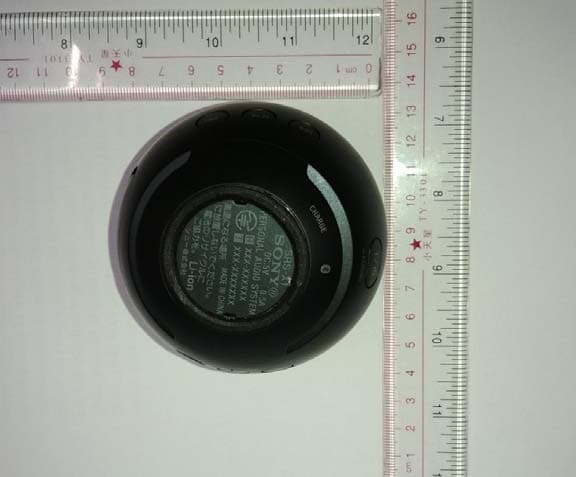
Click to zoom
Application Details
- Equipment Class
- DSS - Part 15 Spread Spectrum Transmitter
- Date of Grant
- May 14, 2014
- Application Purpose
- Original Equipment
- Date of Application
- May 13, 2014
- Equipment Note
- Personal Audio System
- Frequency Range
- 2402.00000000 - 2480.00000000
- Company
- Sony Group Corporation
- Country
- Japan
Documents & Files
Document Text
Text extracted from the exhibit documents filed with the FCC. Open a document above to read the original.
Users Manual
SRS-X1 [UC] (US, CaFR, LaES) 4-541-635-11(1) English Manuals supplied Quick Start Guide (this document) Provides you with instructions on how to connect the unit with BLUETOOTH devices and basic operations. Reference Guide Provides you with precautions and product specifications. Help Guide Read the Help Guide on your computer or smartphone, when you want to know how to use the unit in greater detail. The Help Guide also contains a troubleshooting guide which provides you with remedies for the problems you might encounter. URL: http://rd1.sony.net/help/speaker/srs-x1/h_uc/ Two-dimensional code: Charging the Unit This unit has a built-in lithium-ion rechargeable battery. Charge the battery before using the unit for the first time. When charging starts, the CHARGE indicator lights up orange. Charging is completed in about 3 hours and the indicator goes off. 1 Open the cap on the rear side of the speaker. 2 Charge the unit via the micro-USB cable (supplied). To charge the battery from a PC Micro-USB cable (supplied) DC IN Lit (orange) To charge the battery from an AC outlet Micro-USB cable (supplied) USB AC adaptor (commercially- available) DC IN Lit (orange) Hint When using a commercially-available USB AC adaptor, make sure to use an adaptor with a power output of 0.5 A or more. Charging via other types of adaptors is not covered by the warranty. How to Make Wireless Connection with BLUETOOTH Devices Select your case from the 3 pairing types, below. BLUETOOTH devices need to be “paired” with each other beforehand. Pairing and connecting with a BLUETOOTH device The unit can be paired with up to eight BLUETOOTH devices. When pairing with two or more BLUETOOTH devices, perform the following pairing procedure for each device. 1 Press the / (power) PAIRING button to turn on this unit. The (BLUETOOTH) indicator begins to flash blue. Flashing (blue) 2 Press and hold the / (power) PAIRING button until beeps are heard and the (BLUETOOTH) indicator begins to flash blue quickly. The unit enters pairing mode. Hint When you turn on the unit for the first time, it enters pairing mode automatically. Fast flashing (blue) 3 Perform the pairing procedure on the BLUETOOTH device to detect this unit. When a list of detected devices appears on the display of the BLUETOOTH device, select “SONY:SRS-X1.” If passkey input is required on the display of a BLUETOOTH device, input “ 0000.” 4 Make the BLUETOOTH connection from the BLUETOOTH device. When the BLUETOOTH connection is established, the (BLUETOOTH) indicator on the unit stays lit. Connecting with a paired BLUETOOTH device 1 Turn on this unit. The (BLUETOOTH) indicator begins to flash blue. 2 Make the BLUETOOTH connection from the BLUETOOTH device. When the BLUETOOTH connection is established, the (BLUETOOTH) indicator on the unit stays lit. Connecting with a smartphone by One-touch (NFC) By touching the unit with a smartphone, the unit is turned on automatically and then proceeds to pairing and BLUETOOTH connection. Compatible smartphones NFC-compatible smartphones with Android 2.3.3 or later installed NFC NFC (Near Field Communication) is a technology enabling short-range wireless communication between various devices, such as smartphones and IC tags. Thanks to the NFC function, data communication - for example, BLUETOOTH pairing - can be achieved easily by simply touching NFC compatible devices together (i.e., at the N-Mark symbol or location designated on each device). 1 Set the NFC function of the smartphone to on. For details, refer to the operating instructions supplied with the smartphone. • If your smartphone OS is Android 2.3.3 or later, and less than Android 4.1: proceed to step 2. • If your smartphone OS is Android 4.1 or later: proceed to step 4. 2 Download and install the app “NFC Easy Connect.” “NFC Easy Connect” is a free Android app you can download from Google Play. Download the app by searching for “NFC Easy Connect” or access it by using the following two-dimensional code. Fees may be charged for downloading the app. To download by the two-dimensional code, use a two-dimensional code reader app. Note • The app may not be available in some countries and/or regions. 3 Start “NFC Easy Connect” on the smartphone. Make sure that the app screen is displayed. 4 Touch this unit with the smartphone. Unlock the screen of the smartphone beforehand. Keep touching the smartphone on the N marked part of the unit until the smartphone responds. If the unit is off, it will turn on when the smartphone touches it. Smartphone responds (unit recognized) Follow the on-screen instructions to establish the connection. When the BLUETOOTH connection is established, the (BLUETOOTH) indicator on the unit stays lit. To disconnect, touch the unit with the smartphone again. Hint If you cannot connect the unit, try the following. • Start the app on the smartphone, and move the smartphone slowly over the N marked part of the unit. • If the smartphone is in a case, remove it from the case. • Make sure that the app screen is displayed on the smartphone. Listening and Calling Operate the unit after making BLUETOOTH connection with your BLUETOOTH device. Listening to music Profile: A2DP, AVRCP Start playback on the BLUETOOTH device, and adjust the volume. Set the volume at an appropriate level on the connected device, and adjust the volume with the VOL –/+ buttons on the unit. Operate a track by using (play/pause) and (previous)/ (next) buttons. The (play/pause) and VOL + button have a tactile dot. Making a call/Receiving a call Profile: HSP, HFP Operate your smartphone to make a call. To terminate a call, press the (call) button on the unit. Press the (call) button on the unit when an incoming call arrives. Operate in the same way when an incoming call arrives while you are listening to music. Microphone The (call) button has a tactile dot. Connecting two speakers and a BLUETOOTH device (Stereo pairing function) You can listen to stereo sound by using two speake…
Text truncated - open the document above for the full version.
Users Manual
SRS-X1 UC (US/CaFR/LaES) 4-541-634-11(1) EnglishPersonal Audio System Before operating the system, please read this guide thoroughly and retain it for future reference. Owner’s Record The serial number is located on the bottom of the product. Record the serial number in the space provided below. Refer to them whenever you call upon your Sony dealer regarding this product. Model No. SRS-X1 Serial No. For customers in the USA Please register this product on line at http://www.sony.com/productregistration Proper registration will enable us to send you periodic updates about new products, services and other important announcements. Registering your product will also allow us to contact you in the unlikely event that the product needs adjustment or modification. Thank you. WARNING To reduce the risk of fire or electric shock, do not expose this apparatus to rain or moisture. To reduce the risk of fire, do not cover the ventilation opening of the apparatus with newspapers, tablecloths, curtains, etc. Do not place the naked flame sources such as lighted candles on the apparatus. To reduce the risk of fire or electric shock, do not expose this apparatus to dripping or splashing, and do not place objects filled with liquids, such as vases, on the apparatus. Do not install the appliance in a confined space, such as a bookcase or built-in cabinet. Do not expose the batteries (battery pack or batteries installed) to excessive heat such as sunshine, fire or the like for a long time. The nameplate indicating Sony trademark, model number and electrical rating is located on the bottom exterior of this system. CAUTION You are cautioned that any changes or modifications not expressly approved in this manual could void your authority to operate this equipment. For customers in the USA This device complies with Part 15 of the FCC Rules. Operation is subject to the following two conditions: (1) This device may not cause harmful interference, and (2) this device must accept any interference received, including interference that may cause undesired operation. NOTE: This equipment has been tested and found to comply with the limits for a Class B digital device, pursuant to Part 15 of the FCC Rules. These limits are designed to provide reasonable protection against harmful interference in a residential installation. This equipment generates, uses, and can radiate radio frequency energy and, if not installed and used in accordance with the instructions, may cause harmful interference to radio communications. However, there is no guarantee that interference will not occur in a particular installation. If this equipment does cause harmful interference to radio or television reception, which can be determined by turning the equipment off and on, the user is encouraged to try to correct the interference by one or more of the following measures: Reorient or relocate the receiving antenna. Increase the separation between the equipment and receiver. Connect the equipment into an outlet on a circuit different from that to which the receiver is connected. Consult the dealer or an experienced radio/TV technician for help. This equipment must not be co-located or operated in conjunction with any other antenna or transmitter. For customers in the USA and Canada This equipment complies with FCC/IC radiation exposure limits set forth for an uncontrolled environment and meets the FCC radio frequency (RF) Exposure Guidelines and RSS-102 of the IC radio frequency (RF) Exposure rules. This equipment has very low levels of RF energy that are deemed to comply without testing of specific absorption ratio (SAR). For the state of California, USA only Perchlorate Material - special handling may apply, See www.dtsc.ca.gov/hazardouswaste/perchlorate Perchlorate Material : Lithium battery contains perchlorate For customers in Canada This device complies with Industry Canada licence-exempt RSS standard(s). Operation is subject to the following two conditions: (1) this device may not cause interference, and (2) this device must accept any interference, including interference that may cause undesired operation of the device. CAN ICES-3 B/NMB-3 B Precautions Note when using with a mobile phone For details on operation of your mobile phone when receiving a telephone call while transmitting the sound using the BLUETOOTH connection, refer to the operating instructions supplied with the mobile phone. On safety Before operating the system, be sure that the operating voltage of the system is identical with that of your local power supply. About micro-USB cables To charge, use a micro-USB cable and connect the system to: an AC outlet by using a commercially-available USB AC adaptor (5 V, at least 0.5 A). a USB port of a computer. Make sure to use the following supplied micro-USB cable. USB Type A plug (connects to a PC, USB AC adaptor) USB Micro-B plug (connects to the system) On placement Do not set the speaker in an inclined position. Do not leave the system in a location near heat sources, in a place subject to direct sunlight, excessive dust, moisture, rain, or mechanical shock, or in a car with its windows closed. Do not leave any objects susceptible to magnetism (cash cards, floppy disks with magnetic coding, etc.) near the system. On operation Do not insert any small objects, etc., into the jacks or ventilation hole on the rear of the system. The system may short out or malfunction. On cleaning Do not use alcohol, benzine, or thinner to clean the cabinet. Others If the system is not used for a long time, the battery may be quickly depleted. However, after a few recharges, the battery life will improve. Even if you do not intend to use the system for a long time, charge the battery to its full capacity once every 6 months to maintain its performance. If the system is not used for a long time, it may take longer to charge the battery. If you have any questions or problems concerning this system that are not co…
Text truncated - open the document above for the full version.
Cover Letter(s)
SONY Sony Corporation 1-7-1 Konan Minato-Ku, Tokyo 108-0075 Japan AGENCY AUTHORIZATION LETTER FCC ID: AK8SRSX1 Date: 15 th April, 2014 To whom it may concern: We, the undersigned, hereby authorize Audix Technology (ShenZhen) Co.,Ltd to act on our behalf, as our agent, in the following matters related to the FCC approval of our products: report submittal, related correspondence, the signing of all documents relating to these matters, and any other lawful activity necessary to obtain such certification. Any act carried out by Audix within the scope of this authorization shall have the same effects as our own. This authorization shall expire 6 months form original date. If you have any Questions regarding the authorization, please don’t hesitate to contact us. Thank you. Sincerely, Kazunaga Kinjo Senior Product Safety Manager Products Safety & CR section, Quality Assurance Division, Home Entertainment&Sound Business Group Sony Corporation Tel: +81-50-3750-7634 Fax: +81-50-3750-6572 E-mail: [email protected]
Cover Letter(s)
SONY Sony Corporation 1-7-1 Konan Minato-Ku, Tokyo 108-0075 Japan Date: 15 th April, 2014 Federal Communications Commission Authorization and Evaluation Division FCC ID: AK8SRSX1 Confidentiality Request Pursuant to Sections 0.457 and 0.459 of the Commission’s Rules, the Applicant hereby requests confidential treatment of information accompanying this application as outlined below: 1. Block diagram 2. Schematics 3. Operation Description The above materials contain trade secrets and proprietary information not customarily released to the public. The public disclosure of these matters might to harmful to the applicant and provide unjustified benefits to its competitors. The applicant understands that pursuant to Rule 0.457, disclosure of this application and all accompanying documentation will not be made before the date of the grant for this application. Sincerely, Kazunaga Kinjo Senior Product Safety Manager Products Safety & CR section, Quality Assurance Division, Home Entertainment&Sound Business Group Sony Corporation Tel: +81-50-3750-7364 Fax: +81-03-3750-6572 E-mail: [email protected]
External Photos
SRS‐X1 Outside view
Internal Photos
Inside view No shield on the Bluetooth module Antenna BT module NFC module
RF Exposure Info
Product Name:Personal Audio System Model Number: SRS-X1 FCCID: AK8SRSX1 RADIO FRREQUENCY EXPOSURE COMPLIANCE RESULT : PASS Test standard : FCC KDB Publication 447498 D01 V05 Since maximum peak output power of the transmitter is<10mW, i.e. 1.422mW<10mW, hence the EUT is exclueded from SAR evaluation according to FCC KDB Publication 447498 D01:General RF Exposure Guidance V05.
Test Report
R AUDIX Technology (Shenzhen) Co., Ltd. FCC ID:AK8SRSX1 Audix Technology (Shenzhen) Co., Ltd. Report No. ACS-F14147 FCC PART 15C TEST REPORT FOR CERTIFICATION On Behalf of Sony Corporation Personal Audio System Brand Name Model No. Sony SRS-X1 FCC ID: AK8SRSX1 Prepared for : Sony Corporation 1-7-1 Konan, Minato-ku, Tokyo, 108-0075 Japan Prepared By : Audix Technology (Shenzhen) Co., Ltd. No. 6, Ke Feng Rd., 52 Block, Shenzhen Science & Industrial Park, Nantou, Shenzhen, Guangdong, China Tel: (0755) 26639496 Report Number : ACS-F14147 Date of Test : Apr.10~19, 2014 Date of Report : May.08, 2014 R AUDIX Technology (Shenzhen) Co., Ltd. FCC ID:AK8SRSX1 Audix Technology (Shenzhen) Co., Ltd. Report No. ACS-F14147 TABLE OF CONTENTS Description Page 1. SUMMARY OF STANDARDS AND RESULTS ......................................................... 1-1 1.1. Description of Standards and Results .................................................................................. 1-1 2. GENERAL INFORMATION ......................................................................................... 2-1 2.1. Description of Device (EUT) ............................................................................................... 2-1 2.2. Tested Supporting System Details ....................................................................................... 2-2 2.3. Block Diagram of connection between EUT and simulators ............................................... 2-2 2.4. Test information ................................................................................................................... 2-3 2.5. Test Facility.......................................................................................................................... 2-4 2.6. Measurement Uncertainty (95% confidence levels, k=2) .................................................... 2-4 3. POWER LINE CONDUCTED EMISSION MEASUREMENT ................................. 3-1 3.1. Test Equipment .................................................................................................................... 3-1 3.2. Block Diagram of Test Setup ............................................................................................... 3-1 3.3. Power Line Conducted Emission Test Limits...................................................................... 3-1 3.4. Configuration of EUT on Test ............................................................................................. 3-1 3.5. Operating Condition of EUT................................................................................................ 3-2 3.6. Test Procedure...................................................................................................................... 3-2 3.7. Conducted Emission at Mains Terminals Test Results ........................................................ 3-2 4. RADIATED EMISSION MEASUREMENT ................................................................ 4-1 4.1. Test Equipment .................................................................................................................... 4-1 4.2. Block Diagram of Test Setup ............................................................................................... 4-2 4.3. Radiated Emission Limit Standard: FCC 15.209 ................................................................. 4-3 4.4. EUT Configuration on Test.................................................................................................. 4-3 4.5. Operating Condition of EUT................................................................................................ 4-3 4.6. Test Procedure...................................................................................................................... 4-3 4.7. Radiated Emission Test Results ........................................................................................... 4-4 5. CONDUCTED SPURIOUS EMISSIONS ..................................................................... 5-1 5.1. Test Equipment .................................................................................................................... 5-1 5.2. Limit..................................................................................................................................... 5-1 5.3. Test Procedure...................................................................................................................... 5-1 5.4. Test result ............................................................................................................................. 5-1 6. CARRIER FREQUENCY SEPARATION TEST ........................................................ 6-1 6.1. Test Equipment .................................................................................................................... 6-1 6.2. Limit..................................................................................................................................... 6-1 6.3. Test Results. ......................................................................................................................... 6-1 7. 20 DB BANDWIDTH TEST ........................................................................................... 7-1 7.1. Test Equipment .................................................................................................................... 7-1 7.2. Limit..................................................................................................................................... 7-1 7.3. Test Results .......................................................................................................................... 7-1 8. NUMBER OF HOPPING FREQUENCY TEST .......................................................... 8-1 8.1. Test Equipment .................................................................................................................... 8-1 8.2. Limit.......................................................................…
Text truncated - open the document above for the full version.
Test Setup Photos
R AUDIX Technology (Shenzhen) Co., Ltd. FCC ID:AK8SRSX1 page Audix Technology (Shenzhen) Co., Ltd. Report No. ACS-F14147 13-1 13. HOTOGRAPH OF TEST 13.1.Photos of Power Line Conducted Emission Test R AUDIX Technology (Shenzhen) Co., Ltd. FCC ID:AK8SRSX1 page Audix Technology (Shenzhen) Co., Ltd. Report No. ACS-F14147 13-2 13.2.Photos of Radiated Emission Test 30-1000MHz R AUDIX Technology (Shenzhen) Co., Ltd. FCC ID:AK8SRSX1 page Audix Technology (Shenzhen) Co., Ltd. Report No. ACS-F14147 13-3 Above 1000MHz
Contact Information
Applicant
Kazuyuki Hori(Chief EMC/RF Compliance Specialist)
Technical Contact
AUDIX Technology (Shenzhen) Co., Ltd.Sunny Lu
[email protected]86-755-26639497
52 Block Shenzhen Science&Industry · Shenzhen · China
Non-Technical Contact
AUDIX Technology (Shenzhen) Co., Ltd.Kris Zhen
[email protected]86-755-26639497
Test Firm
Audix Technology (Shenzhen) Co., Ltd.Smart Tsai
Technical Specifications
| # | Rule Parts | Frequency Range | Power Output |
|---|---|---|---|
| 1 | 15C | 2.40 GHz - 2.48 GHz | 1.42 mW |
Other Applications from Sony Group Corporation
AK8WW81782
Aug 21, 2026Radio Equipment
Equipment Class
DSS - Part 15 Spread Spectrum TransmitterAK8CFIZCP2
Aug 03, 2026Wireless Controller
Equipment Class
DSS - Part 15 Spread Spectrum TransmitterAK8OEV321MUH
Apr 14, 2026LCD Monitor
Equipment Class
JAD - Part 15 Class A Digital DeviceAK8OEV431MUH
Apr 14, 2026LCD Monitor
Equipment Class
JAD - Part 15 Class A Digital DeviceAK8OEV271MUH
Apr 14, 2026LCD Monitor
Equipment Class
JAD - Part 15 Class A Digital Device