AK8TMRRF945RRF Stereo Transmitter
Sony Group Corporation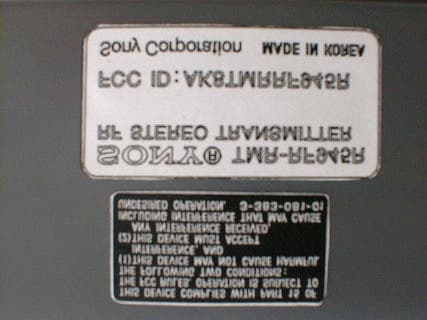
Click to zoom
Application Details
- Equipment Class
- DXX - Part 15 Low Power Communication Device Transmitter
- Date of Grant
- Apr 03, 2001
- Application Purpose
- Original Equipment
- Date of Application
- Mar 26, 2001
- Equipment Note
- RF Stereo Transmitter
- Frequency Range
- 913.50000000 - 914.50000000
- Company
- Sony Group Corporation
- Country
- Japan
Documents & Files
Document Text
Text extracted from the exhibit documents filed with the FCC. Open a document above to read the original.
Users Manual
DC IN 9V OFF ON FILTERNOISE 123 CHANNEL RBAL AUDIO IN DC IN 9V OFF ON FILTERNOISE 123 CHANNEL RBAL AUDIO IN RECYCLING NICKEL-CADMIUM BATTERIES Nickel-Cadmium batteries are recyclable. You can help preserve our environment by returning your unwanted batteries to your nearest point for collection, recycling or proper disposal. Note: In some areas the disposal of nickel- cadmium batteries in household or business trash may be prohibited. RBRC (Rechargeable Battery Recycling Corporation) advises you about spent battery collection by the following phone number. Call toll free number: 1-800-822-8837 (United States and Canada only) Caution: Do not handle damaged or leaking nickel-cadmium batteries. To recharge the headphone battery after use Since little electric current is used for charging, there is no need to worry about overcharging. Charging and using hours * at 1 kHz, 1 mW + 1 mW output ** The hours required to fully charge empty battery N Operating the system Listening to a program 1First turn on the audio/video equipment and start playing. 2Remove the headphones from the transmitter. The transmitter’s power indicator will light in red. 3Select the radio frequency with the CHANNEL selector. 4When you put on the headphones the headphone power turns on automatically. 5-ATurn up the volume to a moderate level with the VOL control. Press the TUNING button briefly for automatic tuning of the headphones. If you do not receive a clear audio signal, press it again. A MDR-RF945RK 5-BTurn up the volume to a moderate level with the VOL control, then tune the headphones in to the frequency of the transmitter with the TUNING control until you can hear the audio signal loud and clear. B MDR-RF915RK Try the above steps 3 and 5 until the receiving performance becomes better. CTo connect to TV, etc. If noise occurs when the transmitter is connected to the headphone jack of your TV or VCR, set the NOISE FILTER switch to ON. Notes • If you connect the transmitter to LINE OUT or REC OUT jack, do not set the NOISE FILTER switch to ON. Otherwise, the volume will be limited. • The NOISE FILTER switch effects the sound only in cases such as connection diagram C. In diagrams A and B, the switch has no effect. • When the transmitter is placed on or near a TV, it may pick up a noise. In such case, place the transmitter away from the TV. 2Connect the transmitter to an AC outlet using the supplied AC power adaptor. Notes • Use only the supplied AC power adaptor. Do not use any other AC power adaptor. Polarity of the plug • When you connect the connecting cord directly to an earphone jack, the audio signal will not be output through the right channel. In such a case, use the separately sold PC-236HG plug adaptor. • If the connected equipment has the AVLS (Automatic Volume Limiter System) function, be sure to turn the function off when using the transmitter. Otherwise, you will have to turn up the volume of the headphones, and that may cause noise. • Do not place the transmitter near a fluorescent lamp, etc. when using the system. * WALKMAN is a registered trademark of Sony Corporation. Charging the headphone battery Using the headphones for the first time When you use the headphones for the first time, charge the battery in the following manner. 1Connect the transmitter to a power source. 2Place the headphones on the transmitter. Place the headphone on the transmitter such that the charging pins on the transmitter engage the charging contacts on the bottom of the right-hand housing. The charge indicator on the transmitter will light in green to indicate that the battery is being charged. Setting up the transmitter 1Connect the transmitter to audio/video equipment. Select one of the hookups below depending on the jack type: ATo connect to a headphones jack BTo connect to LINE OUT or REC OUT jacks DC IN 9V OFF ON FILTERNOISE 123 CHANNEL RBAL AUDIO IN Operating Instructions Manual de instrucciones Wireless Stereo Headphone System Sony Corporation © 2001 Printed in Korea MDR-RF945RK MDR-RF915RK 3-233-607-11(1) Sending RF signals from the Transmitter The transmitter starts sending the RF signals automatically, when it detects audio signals from the equipment connected. If it does not detect an audio signal for more than approximately four minutes, the transmitter will stop sending RF signals, and the power indicator turns off. When the transmitter receives an audio signal again, it starts sending the RF signals, and the power indicator will light in red again. If the audio signal is very weak, the transmitter does not send RF signals. If the transmitter is connected to a headphone jack, make sure the volume of the equipment connected is set to 5 – 6 or higher. You may not hear the beginning of the sound from the headphones until the transmitter starts sending the RF signals after detecting an audio signal. Note If the transmitter is connected to the headphones jack of the source equipment, set the volume of that equipment as high as possible without distorting the audio signal. Auto power on/off function When you remove the headphones from your head, the power turns off automatically. Do not allow the self adjusting band to be pulled up, otherwise the headphones will be switched on. The power turns on. Note If a hissing noise is heard move closer to the transmitter. After listening to a program Take the headphones off and rest them away on the transmitter, and recharge them. Note Do not hang the headphones by the self adjusting band, otherwise, the self adjusting band will be pulled up and the headphones will be switched on. The effective areas of the transmitter The optimum distance is up to approximately 150 feet (46 m) without the system picking up some interference. However, the distance may vary according to the surroundings and environment. If the system picks up some noise while using it within the above mentioned distance, reduce the distance between the transmitter unit and the headphones, or select the other cha…
Text truncated - open the document above for the full version.
External Photos
External Photos 1 Model: TMR-RF945R FCC ID: AK8TMRRF945R External Photos 2 Model: TMR-RF945R FCC ID: AK8TMRRF945R External Photos 3 Model: TMR-RF945R FCC ID: AK8TMRRF945R
ID Label/Location Info
ID Label Location Information Model: TMR-RF945R FCC ID: AK8TMRRF945R
Internal Photos
Internal Photos 1 Model: TMR-RF945R FCC ID: AK8TMRRF945R Internal Photos 2 Model: TMR-RF945R FCC ID: AK8TMRRF945R
Contact Information
Applicant
Kazuyuki Hori(Chief EMC/RF Compliance Specialist)
Technical Contact
Sony CorporationMasako Seguchi
[email protected]+81-3-5769-5640
Sinagawa INTERCITY C Tower · Tokyo · Japan
Non-Technical Contact
Sony CorporationMasako Seguchi
[email protected]+81-3-5769-5640
Test Firm
Japan Quality Assurance Org.Tetsuo Kato
Technical Specifications
| # | Rule Parts | Frequency Range | Power Output | Tolerance |
|---|---|---|---|---|
| 1 | 15C | 913.5 MHz - 914.5 MHz | - | ppm |
Other Applications from Sony Group Corporation
AK8WW81782
Aug 21, 2026Radio Equipment
Equipment Class
DSS - Part 15 Spread Spectrum TransmitterAK8CFIZCP2
Aug 03, 2026Wireless Controller
Equipment Class
DSS - Part 15 Spread Spectrum TransmitterAK8OEV321MUH
Apr 14, 2026LCD Monitor
Equipment Class
JAD - Part 15 Class A Digital DeviceAK8OEV431MUH
Apr 14, 2026LCD Monitor
Equipment Class
JAD - Part 15 Class A Digital DeviceAK8OEV271MUH
Apr 14, 2026LCD Monitor
Equipment Class
JAD - Part 15 Class A Digital Device