AK8VGPWMS1Wireless Mouse
Sony Group Corporation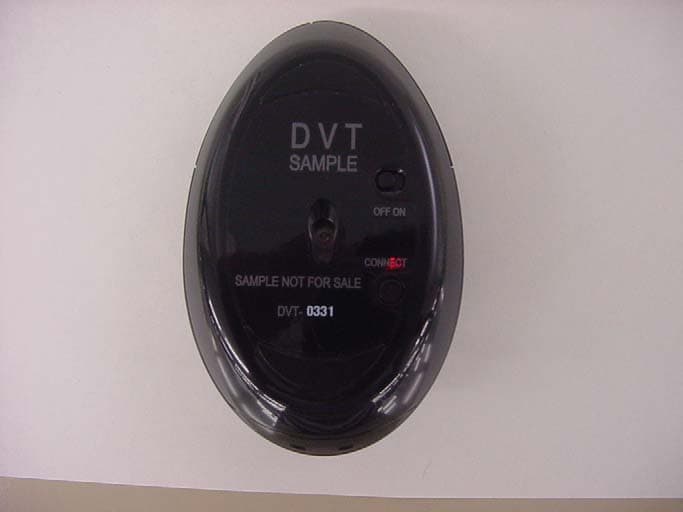
Click to zoom
Application Details
- Equipment Class
- DTS - Digital Transmission System
- Date of Grant
- Aug 17, 2004
- Application Purpose
- Original Equipment
- Date of Application
- Aug 17, 2004
- Equipment Note
- Wireless Mouse
- Frequency Range
- 2402.00000000 - 2479.00000000
- Company
- Sony Group Corporation
- Country
- Japan
Documents & Files
Document Text
Text extracted from the exhibit documents filed with the FCC. Open a document above to read the original.
Users Manual
Sony Corporation © 2004 Printed in Japan VGP-WKB1 Wireless Keyboard Operating Instructions English WARNING To prevent fire or shock hazard, do not expose the unit to rain or moisture. Owner’s Record The model number and the serial number are located on the bottom of the mouse. Record the serial number in the space provided below. Refer to this number whenever you call your Sony dealer regarding this product. Model No. VGP-WKB1 Serial No. ___________________ For customers in the U.S.A. You are cautioned that any changes or modifications not expressly approved in this manual could void your authority to operate this equipment. This device contains the following wireless devices; This equipment has been tested and found to comply with the limits for a Class B digital device, pursuant to Part 15 of the FCC Rules. These limits are designed to provide reasonable protection against harmful interference in a residential installation. This equipment generates, uses, and can radiate radio frequency energy and, if not installed and used in accordance with the instructions, may cause harmful interference to radio communications. However, there is no guarantee that interference will not occur in a particular installation. If this equipment does cause harmful interference to radio or television reception, which can be determined by turning the equipment off and on, the user is encouraged to try to correct the interference by one or more of the following measures: – Reorient or relocate the receiving antenna. – Increase the separation between the equipment and receiver. – Connect the equipment into an outlet on a circuit different from that to which the receiver is connected. – Consult the dealer or an experienced radio/TV technician for help. For questions regarding your product or for the Sony Service Center nearest you, call 1-888-476-6972 in the United States. The number below is for FCC related matters only. Declaration of Conformity Trade Name: SONY Model No.: VGP-WRC1 Responsible Party: Sony Electronics Inc. Address: 16450 W. Bernardo Dr., San Diego, CA 92127 U.S.A. Telephone No.: 858-942-2230 The device complies with Part 15 of the FCC Rules. Operation is subject to the following two conditions: (1) This device may not cause harmful interference, and (2) this device must accept any interference received, including interference that may cause undesired operation. This device complies with Part 15 of the FCC rules. Operation is subject to the following two conditions: (1) This device may not cause harmful interference, and (2) this device must accept any interference received, including interference that may cause undesired operation. • VAIO and are trademarks of Sony Corporation. • Microsoft and Windows are registered trademarks of Microsoft Corporation in the United States and/or other countries. • All other names of systems, products, and services are trademarks of their respective owners. In this manual, Microsoft ® Windows ® XP Home Edition, Microsoft ® Windows ® XP Professional and Microsoft ® Windows ® XP Media Center Edition are referred to as Windows XP. In this manual, the ™ or ® marks are not specified. Before Use Before using the mouse, read this manual thoroughly and retain it for future reference. The Wireless mouse is designed for use with Sony VAIO ® computers (Windows XP models only). This keyboard is not recommended for use with any other computer. Names of Parts Wireless mouse Wireless receiver 4Confirm the following: 1Click the “+” mark on the left of “Human Interface Devices” and confirm that “USB Human Interface Device” is displayed. 2Click the “+” mark on the left of “Mice and other pointing devices” and confirm that “HID-compliant mouse” is displayed. Using the Wireless Mouse When you move the mouse, the pointer displayed on your screen moves in the same direction. This section describes basic mouse operations and how to use the wheel button. Note The optical mouse may not operate correctly on the following surfaces: • Transparent surfaces (such as glass) • Surfaces that reflect light (such as highly polished veneers or mirrors) • Surfaces with a repetitive pattern, such as screening (like that used for printing photos in magazines and newspapers) • Surfaces that are striped or have another distinct, high-contrast pattern If the mouse pointer does not move smoothly across the screen, make sure you are not using the mouse on one of the above mentioned surfaces. z If necessary, you can adjust the mouse pointer speed in the “Mouse Properties” dialog box. To display the “Mouse Properties” dialog box, click “Start”, “Settings”, “Control Panel”, and then double-click “Mouse” (with the Windows XP operating system, select “Printers and Other Hardware” in the “Control Panel”, then select “Mouse”). Operating distance of the mouse The mouse can normally be operated within an area having a radius of about one meter around the receiver. Depending on the usage environment, sometimes the usable distance may be shorter, preventing normal operation. In such a case, take the following measures: • Ensure that the mouse is not closer than 20 cm to the computer, display, and other electronic devices. • Place the receiver closer to the mouse. • Use a mouse pad. Basic operations 1Wheel button Rotate the wheel to scroll up and down. 2Right button Press to perform specific shortcut functions. 3Left button Press to perform specific mouse functions. Precautions Safety If any solid object or liquid falls onto the mouse, disconnect it and have it checked by qualified personnel before continuing its use. Location Do not place the mouse in a location where it is: • On an unstable surface • In very humid areas or where there is no ventilation • Subject to excessive dust • Subject to direct sunlight or extreme heat • Extremely cold Operation If the mouse is brought directly from a cold to a warm location or is placed in a very damp room, moisture may condense on the inside of the mouse. If this occurs, th…
Text truncated - open the document above for the full version.
Cover Letter(s)
American Telecommunications Certification Body Inc. 6731 Whittier Ave, McLean, VA 22101 August 13, 2004 RE: FCC ID: AK8VGPWMS1_ATCB001592 Attention: Yoshiko Mizuta / Naoki Sakamoto I have a few comments on this Application. Please note that further comments may arise in response to answers provided to the questions below. 1. Please provide an operational description (theory of operation) that clearly describes the function of this transmitter. The device appears to be a FHSS device, however it is listed in some of the data as a DSSS. The operational description it is not made clear in the documentation. Please provide an accurate and detailed description of what this device is. 2. If this is an FHSS device, please provide a frequency Hopping table showing the pseudorandom hop sequence. 3. Please note the DSSS stands for Direct Sequence Spread Spectrum. Please note that your radiated emissions charts states “DSSS” modulation. Please note that you state this device has 78 ‘channels’ (1 ‘channel less than a Bluetooth) indicating that this may be a Frequency Hopping Spread Spectrum Device. Also, your technical specs state the device has 78 channels with 1MHz spacing, again indicating a device more in line with an FHSS Bluetooth type device. Please also note that the SAR report (which is not required for this device) states the testing was done with the WLAN and “Bluetooth” device operating simultaneously. While the CYWUSB6934 chip shown in the schematics is classified by Cypress as a DSSS chip, some of the terminologies and some of the other information indicate FHSS. What is this device? Please explain and please provide proof of its pseudorandom nature of the spread spectrum device. 4. If this device is a FHSS device, please provide the dwell time data and the channel separation plots. Dennis Ward mailto:[email protected] The items indicated above must be submitted before processing can continue on the above referenced application. Failure to provide the requested information may result in application termination. Correspondence should be considered part of the permanent submission and may be viewed from the Internet after a Grant of Equipment Authorization is issued. Please do not respond to this correspondence using the email reply button. In order for your response to be processed expeditiously, you must submit your documents through the AmericanTCB.com website. Also, please note that partial responses increase processing time and should not be submitted. Any questions about the content of this correspondence should be directed to the sender.
Cover Letter(s)
August 18, 2004 Subject : FCC ID: AK8VGPWRC1/AK8VGPWKB1/AK8VGPWMS1 Dear Mr. Dennis Ward, Regarding to your comment for the above FCC ID on August 13, 2004 please find the following reply; 1. We provide a documents to describe the function of this transmitter clearly. Please refer to the uploaded file of “CYWUSB6934”. 2. Same as 1. 3. Same as 1. 4. Same as 1. *We assume that the uploaded file could clarify all the comments you have provided. Sincerely yours, Yoshiko Mizuta (Ms.) UL Apex Co., Ltd.
External Photos
FCC ID : AK8VGPWMS1 External Photo (Mouse) Sony Corporation Front Back FCC ID : AK8VGPWMS1 External Photo (Mouse) Sony Corporation Side To p
Internal Photos
FCC ID : AK8VGPWMS1 Internal Photo (Mouse) Sony Corporation Front Back
RF Exposure Info
Applicant: Sony Corporation Type of Equipment : W ireless Mouse Model No. : VGP-WMS1 FCC ID: AK8VGPW MS1 Sony Corporation declares that M odel : W ireless M ouse com plies w ith FC C radiation exposure requirem ent specified in the FCC R ules 2.1093. The “VGP-W M S1“ has 0.37 mW of conducted Peak Output power and 0.3 mW of EIRP. This kind of equipment is below 60/frequency[MHz] W (TCB Exclusion List) so that SA R testing is excluded. Follw ing calculation is reference data for 20cm distance. RF Exposure Calculations: The following information provides the minimum separation distance for the highest gain antenna provided w ith the “V G P-W M S1“ as calculated from FC C O ET Bulletin 65 A ppendix A , Table (B) Lim its for G eneral Population / U ncontrolled Exposure. This calculation is based on the highest EIRP possible from the system, considering maximum power and antenna gain, and considering a 8.0mW /cm^2 uncontrolled exposure lim it. The Friis form ula used w as: S = (P * G) / (4* π * r 2 ) Where P = 0.37 mW (Maximum peak output power) G = 0.81 Numerical Antenna gain; equal -0.93 dBi r =20.0 cm For: VGP-W MS1S = 0.00006 mW/cm 2 No. : 24K E0303-H O RF Exposure / SAR Statement
Test Report
Test report No. : 24KE0303-HO-1 Page : 2 of 183 Issued date : July 23, 2004 FCC ID : AK8VGPWRC1, AK8VGPWKB1, AK8VGPWMS1 UL Apex Co., Ltd. Head Office EMC Lab. 4383-326 Asama-cho, Ise-shi, Mie-ken 516-0021 JAPAN Telephone : +81 596 24 8116 Facsimile : +81 596 24 8124 MF060b(10.04.03) CONTENTS PAGE SECTION 1: Client information ............................................................................................................... 3 SECTION 2: Equipment under test (E.U.T.)........................................................................................... 3 SECTION 3: Test specification, procedures & results ...........................................................................5 SECTION 4: Operation of E.U.T. during testing .................................................................................... 8 SECTION 5: Conducted Emission, Section 15.207 ............................................................................... 11 SECTION 6: Spurious Emission 15.247(c)............................................................................................. 12 SECTION 7: Bandwidth, Section 15.247(a)(2) ...................................................................................... 13 SECTION 8: Maximum Peak Output Power, Section 15.247(b)(3) .................................................... 13 SECTION 9: Peak Power Density, Section 15.247 (d) .......................................................................... 13 APPENDIX 1: Photographs of test setup ............................................................................................... 14 Conducted Emission................................................................................................................................................. 14 Spurious Emission (Radiated) Receiver ................................................................................................................. 15 Spurious Emission (Radiated) Wireless Keyboard................................................................................................ 16 Spurious Emission (Radiated) Wireless Mouse ..................................................................................................... 17 Spurious Emission (Radiated) Transmitting mode of all devices ......................................................................... 18 Worst Case Position.................................................................................................................................................. 19 Worst Case Position (Receiver) ............................................................................................................................... 20 Worst Case Position (Wireless Keyboard).............................................................................................................. 21 Worst Case Position (Wireless Mouse) ................................................................................................................... 22 APPENDIX 2:Test Instruments ............................................................................................................... 23 APPENDIX 3: Data of EMI test............................................................................................................... 24 Conducted Emission................................................................................................................................................. 24 6dB Bandwidth(DSSS and other forms of modulation) ........................................................................................ 28 Maximum Peak OutPut Power (DSSS and other forms of modulation) ............................................................. 34 Radiated Spurious Emission(DSSS and other forms of modulation ).................................................................. 40 Radiated emission Band Edge compliance (DSSS and other forms of modulation) ......................................... 154 Power Density (DSSS and other forms of modulation ) ...................................................................................... 175 99%Occupied Bandwidth(DSSS and other forms of modulation) ..................................................................... 181 Test report No. : 24KE0303-HO-1 Page : 3 of 183 Issued date : July 23, 2004 FCC ID : AK8VGPWRC1, AK8VGPWKB1, AK8VGPWMS1 UL Apex Co., Ltd. Head Office EMC Lab. 4383-326 Asama-cho, Ise-shi, Mie-ken 516-0021 JAPAN Telephone : +81 596 24 8116 Facsimile : +81 596 24 8124 MF060b(10.04.03) SECTION 1: Client information Company Name : Sony Corporation Brand name : SONY Address : 6-7-35 Kitashinagawa Shinagawa-ku, Tokyo, 141-0001 Japan Telephone Number : +81-3-5795-8702 Facsimile Number : +81-3-5795-8981 Contact Person : Michio Kobayashi SECTION 2: Equipment under test (E.U.T.) 2.1 Identification of E.U.T. Type of Equipment : Receiver, Wireless Keyboard, Wireless Mouse Model No. : VGP-WRC1, VGP-WKB1, VGP-WMS1 Serial No. Equipment Serial Number 1 (Used for radiated emission and conducted emission test) Receiver (VGP-WRC1) 2 (Except for radiated emission and conducted emission test) T6000023 (Used for radiated emission and conducted emission test) Wireless Keyboard (VGP-WKB1) T6000010 (Except for radiated emission and conducted emission test) 1 (Used for radiated emission and conducted emission test) Wireless Mouse (VGP-WMS1) 2 (Except for radiated emission and conducted emission test) Rating : Equipment Rating Receiver (VGP-WRC1) DC5V/50mA(USB Port) Wireless Keyboard (VGP-WKB1) DC6V/100mA(Battery) Wireless Mouse (VGP-WMS1) DC3V/100mA(Battery) Country of Manufacture : JAPAN Receipt Date of Sample : July 2, 2004 Condition of EUT : Engineering prototype (Not for Sale: This sample is equivalent to mass-produced items.) Test report No. : 24KE0303-HO-1 Page : 4 of 183 Issued date : July 23, 2004 FCC ID : AK8VGPWRC1, AK8VGPWKB1, AK8VGPWMS1 UL Apex Co., Ltd. Head Office EMC Lab. 4383-326 Asama-cho, Ise-shi, Mie-ken 516-0021 …
Text truncated - open the document above for the full version.
Test Setup Photos
Test report No. : 24KE0303-HO-1 Page : 14 of 183 Issued date : July 23, 2004 FCC ID : AK8VGPWRC1, AK8VGPWKB1, AK8VGPWMS1 UL Apex Co., Ltd. Head Office EMC Lab. 4383-326 Asama-cho, Ise-shi, Mie-ken 516-0021 JAPAN Telephone : +81 596 24 8116 Facsimile : +81 596 24 8124 MF060b(10.04.03) APPENDIX 1: Photographs of test setup Conducted Emission Front Side Test report No. : 24KE0303-HO-1 Page : 15 of 183 Issued date : July 23, 2004 FCC ID : AK8VGPWRC1, AK8VGPWKB1, AK8VGPWMS1 UL Apex Co., Ltd. Head Office EMC Lab. 4383-326 Asama-cho, Ise-shi, Mie-ken 516-0021 JAPAN Telephone : +81 596 24 8116 Facsimile : +81 596 24 8124 MF060b(10.04.03) Spurious Emission (Radiated) Receiver Front Rear Test report No. : 24KE0303-HO-1 Page : 16 of 183 Issued date : July 23, 2004 FCC ID : AK8VGPWRC1, AK8VGPWKB1, AK8VGPWMS1 UL Apex Co., Ltd. Head Office EMC Lab. 4383-326 Asama-cho, Ise-shi, Mie-ken 516-0021 JAPAN Telephone : +81 596 24 8116 Facsimile : +81 596 24 8124 MF060b(10.04.03) Spurious Emission (Radiated) Wireless Keyboard Front Rear Test report No. : 24KE0303-HO-1 Page : 17 of 183 Issued date : July 23, 2004 FCC ID : AK8VGPWRC1, AK8VGPWKB1, AK8VGPWMS1 UL Apex Co., Ltd. Head Office EMC Lab. 4383-326 Asama-cho, Ise-shi, Mie-ken 516-0021 JAPAN Telephone : +81 596 24 8116 Facsimile : +81 596 24 8124 MF060b(10.04.03) Spurious Emission (Radiated) Wireless Mouse Front Rear Test report No. : 24KE0303-HO-1 Page : 18 of 183 Issued date : July 23, 2004 FCC ID : AK8VGPWRC1, AK8VGPWKB1, AK8VGPWMS1 UL Apex Co., Ltd. Head Office EMC Lab. 4383-326 Asama-cho, Ise-shi, Mie-ken 516-0021 JAPAN Telephone : +81 596 24 8116 Facsimile : +81 596 24 8124 MF060b(10.04.03) Spurious Emission (Radiated) Transmitting mode of all devices Front Rear Front (Zoom)
Contact Information
Applicant
Kazuyuki Hori(Chief EMC/RF Compliance Specialist)
Technical Contact
UL Apex Co., LtdNaoki Sakamoto
[email protected]81-596-248116
4383-326 Asama-cho · Ise-shi, Mei-ken · Japan
Test Firm
UL Apex Co., Ltd.Tetsuya Hashimoto
Technical Specifications
| # | Rule Parts | Frequency Range | Power Output |
|---|---|---|---|
| 1 | 15C | 2.40 GHz - 2.48 GHz | 373.00 µW |
Other Applications from Sony Group Corporation
AK8WW81782
Aug 21, 2026Radio Equipment
Equipment Class
DSS - Part 15 Spread Spectrum TransmitterAK8CFIZCP2
Aug 03, 2026Wireless Controller
Equipment Class
DSS - Part 15 Spread Spectrum TransmitterAK8OEV321MUH
Apr 14, 2026LCD Monitor
Equipment Class
JAD - Part 15 Class A Digital DeviceAK8OEV431MUH
Apr 14, 2026LCD Monitor
Equipment Class
JAD - Part 15 Class A Digital DeviceAK8OEV271MUH
Apr 14, 2026LCD Monitor
Equipment Class
JAD - Part 15 Class A Digital Device