APIJ46BTBlue tooth headset
Harman International Industries, Inc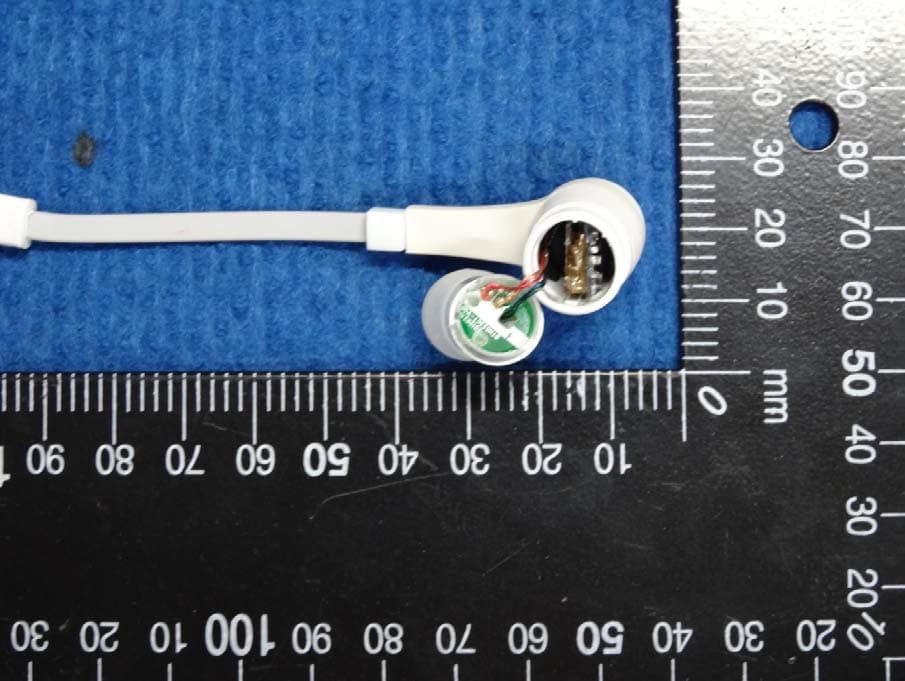
Click to zoom
Application Details
- Equipment Class
- DTS - Digital Transmission System
- Date of Grant
- Sep 09, 2013
- Application Purpose
- Original Equipment
- Date of Application
- Sep 08, 2013
- Equipment Note
- Blue tooth headset
- Frequency Range
- 2402.00000000 - 2480.00000000
- Country
- United States
Documents & Files
Document Text
Text extracted from the exhibit documents filed with the FCC. Open a document above to read the original.
Users Manual
J46BT Bluetooth stereo headset User’s manual Contents Brief introduction......................................................1 1. Bluetooth wireless communication technology..........................1 2. About J46BT ............................................................1 Before use..............................................................2 1. Overview..................................................................2 2. Charging for Headset.....................................................3 Getting started........................................................3 1. Turning on/off the headset.................................................3 2. Pairing headset with Bluetooth devices..................................4 1) How to enter pairing mode ............................................4 2) Pairing headset with Bluetooth cell phone ...........................4 3) Pairing headset with Bluetooth transmitter ...........................5 4) Pairing headset with Multi-devices ...................................5 3. Reconnecting the headsets with devices ...............................6 4. Making a call with the headset ........................................6 5. Playing music .............................................................9 6. LED indicator ...........................................................9 7. Indication tone ..........................................................10 8. Factory Reset ............................................................10 Care and maintenance..............................................10 Specification...........................................................12 Welcome to use this Bluetooth stereo headset, J46BT. Please read this user’s manual carefully before use. Brief introduction 1. Bluetooth wireless communication technology Bluetooth is a standard of close range wireless communication technology that was drawn up by Ericsson, IBM, Intel, Nokia and Toshiba. With Bluetooth technology, we can achieve the highest transmission rate among cell phones, computers, printers, PDAs and other devices. The max transmission range of class II is 10 meters while the max transmission ranges of class I can reach up to 100 meters. 2. About J46BT J46BT is a Bluetooth stereo headset. It supports the following Bluetooth profiles: HSP —— Headset Profile HFP —— Hands-free Profile A2DP—— Advanced Audio Distribution Profile AVRCP——Audio/Video Remote Control Profile You can enjoy music wirelessly by using J46BT. It has the following features: 1) Pairing with a Bluetooth cell phone or PDA supporting HFP profile. Answer a call, end a call and reject a call Redial last number Voice dial Adjust the volume Call transfer between the headset and your Bluetooth cell phone Microphone mute 2) Pairing with a Bluetooth cell phone or Bluetooth transmitter supporting A2DP profile. Enjoy music wirelessly Adjust the volume Remote control pause/play Remote control previous/next track 1 3) Easy to switch between the call and music, you will not miss the incoming call during listening to music. 4) Every time the headset is turned on, it will connect to last connected device automatically. Note: In order to complete above function, the Bluetooth profiles of paired device must be same as the headset. And even though the paired device and the headset support the same Bluetooth profiles, functions may vary due to specification differences of the paired devices. Before use 1. Overview 1 LED indicator 5 Multi-functions button(MFB): pause /play 2 Charging jack 6 Volume down/next song 3 Built-in microphone 7 Right speaker 4 Volume up/last song 8 Left speaker 2 2. Charging for headset The headset comes with a built-in rechargeable battery, prior to using it, it is recommended to charge the battery fully for the first time. When the headset is low power, the headset emits five “Dong” tones every 5 minutes and the red LED flashes instead of blue LED. Please recharge the battery of the headset. The way of charging as following: Using USB cable 1. Plug the special charging clip into the charging jack of headset, make it clip the headset as pictures shown : 2. Plug another side of cable to the USB port of PC Red light on: Charging Red light off: Finish charging 3. It will takes about 2 hours to finfish charging Remarks: 1) The battery is recyclable. 2) Batteries (battery pack or batteries installed) shall not be exposed to excessive heat place, such as sunshine, fire or the like. Getting started 1. Turning on/off the headset Functions Operation LED indicator Turning on Press and holdMFBbutton about 4 seconds until blue LED flashes Blue LED on one second Turning off Press and hold MFB button about 4 seconds until red LED flashes Red LED on one second Remark: In order to save power, the headset will turn off automatically if no devices can be connected after 5 minutes. 3 2. Pairing the headset with Bluetooth devices 1) How to enter pairing mode Functions OperationLED indicator Entering pairing mode Ensure the headset is off, otherwise please turn it off first. And then press and hold MFB button about 8 seconds until red and blue LED flash alternatel y Red and blue LED flash alternately Remark: Pairing mode will last 2 minutes. If no devices can be connected after 2 minutes, it will return to standby mode automatically. 2) Pairing headset with Bluetooth cell phone Prior to using the headset for the first time, you have to pair it with a Bluetooth-enabled cell phone. The pairing procedures are subject to different models of cell phones. Please refer to your cell phone user’s manual for further information. The general pairing procedures are as follows: 1) Keep your headset and phone within 1 meter when pairing; 2) Make the headset enter pairing mode (please refer to “How to enter pairing mode); 3) Activate your cell phone’s Bluetooth function and set your cell phone to search for Bluetooth devices within range, and select “J46BT” from the list of…
Text truncated - open the document above for the full version.
Cover Letter(s)
Harman International Industries, Inc. 8500 Balboa Blvd, Nothridge, CA 91329 UNITED STATES 022311 – 6 Request for Confidentiality Date: _ August 2 , 2013__ _ Subject: Confidentiality Request for: __ ___ __ Pursuant to FCC 47 CRF 0.457(d) and 0.459 and IC RSP-100, Section 10, the applicant requests that a part of the subject FCC application be held confidential. Type of Confidentiality Requested Exhibit Short Term √ Permanent Block Diagrams Short Term Permanent External Photos Short Term Permanent* 2 Internal Photos Short Term √ Permanent Operation Description/Theory of Operation Short Term √ Permanent Parts List & Placement/BOM Short Term Permanent Tune-Up Procedure Short Term √ Permanent Schematics Short Term Permanent Test Setup Photos Short Term Permanent* User’s Manual *Note: ______(Insert Explanation as Necessary)______ __ Harman International Industries, Inc. __ has spent substantial effort in developing this product and it is one of the first of its kind in industry. Having the subject information easily available to "competition" would negate the advantage they have achieved by developing this product. Not protecting the details of the design will result in financial hardship. Permanent Confidentiality: The applicant requests the exhibits listed above as permanently confidential be permanently withheld from public review due to materials that contain trade secrets and proprietary information not customarily released to the public. Short-Term Confidentiality: The applicant requests the exhibits selected above as short term confidential be withheld from public view for a period of __0 _ days from the date of the Grant of Equipment Authorization and prior to marketing. This is to avoid premature release of sensitive information prior to marketing or release of the product to the public. Applicant is also aware that they are responsible to notify ACB in the event information regarding the product or the product is made available to the public. ACB will then release the documents listed above for public disclosure pursuant to FCC Public Notice DA 04-1705. NOTE for Industry Canada Applications: The applicant understands that until such time that IC distinguishes between Short Term and Permanent Confidentiality, either type of marked exhibit above will simply be marked Confidential when submitted to IC. Sincerely, By: __________________________ ____ Fernando Reyes_ ____ (Signature/Title 3 ) (Print name) 2 - The asterisked items (*) require further justification before permanent confidentiality will be allowed. These also currently require review by the FCC under their Permit-But-Ask policy before the grant is issued and can delay completion of an application. Further justification should be added to the note above. One such example for a potted device would be: “The EUT is FULLY potted using a non-removable epoxy based material. Removal of potting material causes irreparable damage to internal circuitry. See photographs exhibits that outline the device before and after potting.” 3 - Must be signed by applicant contact given for applicant on the FCC site, or by the authorized agent if an appropriate 26 APIJ46BT
External Photos
External photos
ID Label/Location Info
R L 01 M odel Name: J46BT Rating:DC5V FCC ID: APIJ46BT
Internal Photos
Internal photos The one with BT module The one of Charge FCC ID: APIJ46BT Antenna Location Antenna
RF Exposure Info
RF Exposure Compliance Requirement 1. LIMITS According 447498 D01 General RF Exposure Guidance v05r01 Appendix A SAR Test Exclusion Thresholds for 100 MHz– 6 GHz and ≤ 50 mm Approximate SAR Test Exclusion Power Thresholds at Selected Frequencies and Test Separation Distances are illustrated in the following Table. The equation and threshold in section 4.3.1 must be applied to determine SAR test exclusion. Frequency Distance(mm) SAR Test Exclusion Threshold 2450MHz 5 10mW(10dBm) 2. EUT RF Exposure The Max Conducted Peak Output Power is 6.96dBm (4.97mW) in 2402MHz of GFSK; The antenna gain of this antenna is 2dBi. 2dB logarithmic terms convert to numeric result is nearly 1.58. EIRP= P x G = 4.97mW x 1.58 = 7.85 mW. SAR requirement :S=10mw EIRP < S So the SAR report is not required.
Test Report
Report No.: EM201300517-8 Application No.: ZJ00032392 Page 1 of 51 FCC ID: APIJ46BT TEST REPORT Report No.: EM201300517-8 Application No.: ZJ00032392 Client: Harman International Industries, Incorporated Address: 8500 Balboa Blvd, Northridge, CA 91329, United States Sample Description: Bluetooth headset Model: J46BT Adding Model: / FCC ID APIJ46BT Test Specification: FCC Part 15,Subpart C:2012 (Section 15.247) Test Date: 2013-07-27 to 2013-08-07 Issue Date: 2013-08-08 Test Result: Pass. Prepared By: Reviewed By: Approved By: Lynn Xiao / Test Engineer Jane Cao / Test Engineer Gavin Wu / Manager Date:2013-08-08 Date:2013-08-08 Date:2013-08-08 Other Aspects: / Abbreviations: ok / P = passed; fail / F = failed; n.a. / N = not applicable The test result in this test report refers exclusively to the presented test sample. This report shall not be reproduced except in full, without the written approval of GRGT. GRG Metrology and Test Co., Ltd. Address: 163, Pingyun Road, West of Huangpu Avenue, Guangzhou, Guangdong, P.R. China Tel:+86-20-38699960 Fax:+86-20-38695185 Email: [email protected] http://www.grgtest.com Ver.:2.0 / 01.Jan.2012 Report No.: EM201300517-8 Application No.: ZJ00032392 Page 2 of 51 FCC ID: APIJ46BT DIRECTIONS OF TEST 1. This station carries out test task according to the national regulation of verifications which can be traced to National Primary Standards and BIPM. 2. The test report merely corresponds to the test sample. It is not permitted to copy extracts of these test result without the written permission of the test laboratory. 3. If there is any objection concerning the test, the client should inform the laboratory within 15 days from the date of receiving the test report. Report No.: EM201300517-8 Application No.: ZJ00032392 Page 3 of 51 FCC ID: APIJ46BT Table of Contents 1. TEST RESULT SUMMARY ......................................................................................................................................... 5 2. GENERAL DESCRIPTION OF EUT .......................................................................................................................... 6 2.1 APPLICANT .............................................................................................................................................................. 6 2.2 MANUFACTURER ................................................................................................................................................... 6 2.3 BASIC DESCRIPTION OF EQUIPMENT UNDER TEST ....................................................................................... 6 3. LABORATORY AND ACCREDITATIONS ............................................................................................................... 7 3.1 LABORATORY ........................................................................................................................................................ 7 3.2 ACCREDITATIONS ................................................................................................................................................. 7 3.3 MEASUREMENT UNCERTAINTY ........................................................................................................................ 7 3.4 LIST OF USED TEST EQUIPMENT AT GRGT....................................................................................................... 8 4. TEST RESULTS ............................................................................................................................................................. 9 4.1 E.U.T. TEST CONDITIONS ...................................................................................................................................... 9 4.2 ANTENNA REQUIREMENT ................................................................................................................................. 10 5.1 LIMITS ................................................................................................................................................................ 11 5.2 TEST PROCEDURES ......................................................................................................................................... 11 5.3 TEST SETUP ....................................................................................................................................................... 12 5.4 TEST RESULTS ................................................................................................................................................... 13 6. RADIATED ELECTROMAGNETIC DISTURBANCE .......................................................................................... 14 6.1 LIMITS ................................................................................................................................................................ 14 6.2 TEST PROCEDURES ......................................................................................................................................... 14 6.3 TEST SETUP ....................................................................................................................................................... 15 6.4 TEST RESULTS ................................................................................................................................................... 17 7. 6DB BANDWIDTH TESTING .................................................................................................................................... 23 7.1 LIMITS ................................................................................................................................................................ 23 7.2 TEST PROCEDURES ......................................................................................................................................... 23 7.3 TEST SETUP ........................................................................................................…
Text truncated - open the document above for the full version.
Test Setup Photos
FCC ID: APIJ46BT TEST SETUP PHOTOS RSE(Below 1GHz) RSE(Above 1GHz)
Contact Information
Applicant
Terry Shi(Prin.Engineer,Regulatory Compliance, Quality)
Technical Contact
GUANGZHOU GRG METROLOGY&TEST CO.,LTD.Jane Cao
86-20-39699960
163 Ping Yun Rd,West of HuangPu Ave, · China
Test Firm
Guangzhou GRG Metrology And Test Technology LTD.Gavin Wu
Technical Specifications
| # | Rule Parts | Frequency Range | Power Output |
|---|---|---|---|
| 1 | 15C | 2.40 GHz - 2.48 GHz | 4.81 mW |
Other Applications from Harman International Industries, Inc
APITUNEBEAM3
Jul 30, 2026BLUETOOTH HEADSET
Equipment Class
DTS - Digital Transmission SystemAPITUNEBUDS3
Jul 30, 2026BLUETOOTH HEADSET
Equipment Class
DSS - Part 15 Spread Spectrum TransmitterAPITUNEFLEX3
Jul 29, 2026BLUETOOTH HEADSET
Equipment Class
DTS - Digital Transmission SystemAPIJBLVBUDS3
Jul 21, 2026BLUETOOTH HEADSET
Equipment Class
DTS - Digital Transmission SystemAPIJBLGO5H
Jul 21, 2026PORTABLE BLUETOOTH SPEAKER
Equipment Class
DSS - Part 15 Spread Spectrum Transmitter