APIJBLV700BTBluetooth Headphone
Harman International Industries, Inc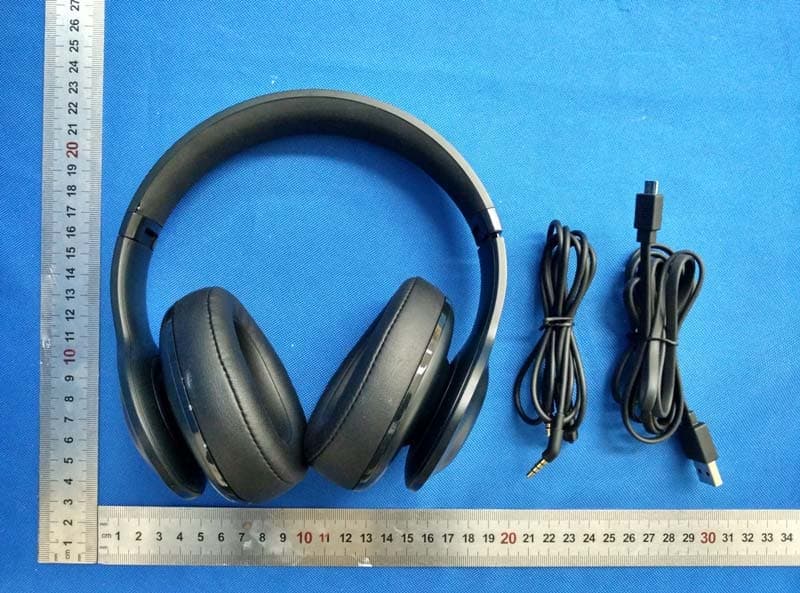
Click to zoom
Application Details
- Equipment Class
- DSS - Part 15 Spread Spectrum Transmitter
- Date of Grant
- Aug 29, 2015
- Application Purpose
- Original Equipment
- Date of Application
- Aug 27, 2015
- Equipment Note
- Bluetooth Headphone
- Frequency Range
- 2402.00000000 - 2480.00000000
- Country
- United States
Documents & Files
Document Text
Text extracted from the exhibit documents filed with the FCC. Open a document above to read the original.
Users Manual
RSS standard(s). This device complies with Industry Canada's licence-exempt RSSs. Le présent appareil est conforme aux CNR d'Industrie Canada applicables aux appareils radio exempts de licence. L'exploitation est autorisée aux deux conditions suivantes : (1) l'appareil ne doit pas produire de brouillage, et (2) l'utilisateur de l'appareil doit accepter tout brouillage radioélectrique subi, même si le brouillage est susceptible d'en compromettre le fonctionnement. AVERTISSEMENT : Ne pas ingérer BATTERIE, BURN RISQUE CHIMIQUE [La télécommande fournie avec] Ce produit contient une pile pièce / bouton. Si la pile pièce / bouton est avalé, il peut causer des brûlures internes graves en seulement 2 heures et peut conduire à la mort. Gardez piles neuves et usagées de portée des enfants. Si vous pensez que les batteries pourraient avoir été avalé ou placé à l'intérieur d'une partie du corps, consulter immédiatement un médecin.
Users Manual
Everest 300/700 Everest 700 Everest 300 Overview – Buttons & LEDs Quick Start Guide Guide de démarrage rapide Everest 300/700 3 hr / Everest 700 2 hr / Everest 300 Cable connections 1 To turn on Bluetooth to pair 2 ON 2.0s OFF 2.0s Quick Start Guide Guide de démarrage rapide Everest 300/700 To pair Bluetooth with the device 3 JBL Everest 700 JBL Everest 700 JBL Everest 300 JBL Everest 300 Quick Start Guide Guide de démarrage rapide LED Status LED behaviors Power on Bluetooth connected Bluetooth disconnected ON Flashing ON Everest 300/700 4 Connectors in Everest right earcups Quick Start Guide Guide de démarrage rapide To turn off Bluetooth radio when battery is low. Listen to music using audio cable LED Status LED behaviors Battery level is low Charging battery Battery is charged full Everest 300/700 Quick Start Guide Guide de démarrage rapide To use ShareMe ™ 2.0 5 ShareMe ™ 2.0 ShareMe 2.0 enables sharing your audio with another set of Bluetooth wireless headphones of any brand. 1 2 Everest 300/700 Quick Start Guide Guide de démarrage rapide 5a EN Step 1: Pair and connect JBL Everest headphone to a source device Step 2: Pause music or disengage the voice call from the source device Step 3: Press “ShareMe 2.0” button, the white LED starts blinking. JBL Everest headphone is ready to connect to the other headphone. Step 4: Turn on the pairing function in the other headphone. Keep both headphones near each other. The white LED stops flashing and remains lit after two headphones connect. Step 5: Press the play button in the source device to share audio between two headphones. Step 6: Press “ShareMe 2.0” button to turn off this feature. The white LED is off. FR Step 1: Pair and connect JBL Everest headphone to a source device Step 2: Pause music or disengage the voice call from the source device Step 3: Press “ShareMe 2.0” button, the white LED starts blinking. JBL Everest headphone is ready to connect to the other headphone. Step 4: Turn on the pairing function in the other headphone. Keep both headphones near each other. The white LED stops flashing and remains lit after two headphones connect. Step 5: Press the play button in the source device to share audio between two headphones. Step 6: Press “ShareMe 2.0” button to turn off this feature. The white LED is off. ES Step 1: Pair and connect JBL Everest headphone to a source device Step 2: Pause music or disengage the voice call from the source device Step 3: Press “ShareMe 2.0” button, the white LED starts blinking. JBL Everest headphone is ready to connect to the other headphone. Step 4: Turn on the pairing function in the other headphone. Keep both headphones near each other. The white LED stops flashing and remains lit after two headphones connect. Step 5: Press the play button in the source device to share audio between two headphones. Step 6: Press “ShareMe 2.0” button to turn off this feature. The white LED is off. PT Step 1: Pair and connect JBL Everest headphone to a source device Step 2: Pause music or disengage the voice call from the source device Step 3: Press “ShareMe 2.0” button, the white LED starts blinking. JBL Everest headphone is ready to connect to the other headphone. Step 4: Turn on the pairing function in the other headphone. Keep both headphones near each other. The white LED stops flashing and remains lit after two headphones connect. Step 5: Press the play button in the source device to share audio between two headphones. Step 6: Press “ShareMe 2.0” button to turn off this feature. The white LED is off. DE Step 1: Pair and connect JBL Everest headphone to a source device Step 2: Pause music or disengage the voice call from the source device Step 3: Press “ShareMe 2.0” button, the white LED starts blinking. JBL Everest headphone is ready to connect to the other headphone. Step 4: Turn on the pairing function in the other headphone. Keep both headphones near each other. The white LED stops flashing and remains lit after two headphones connect. Step 5: Press the play button in the source device to share audio between two headphones. Step 6: Press “ShareMe 2.0” button to turn off this feature. The white LED is off. IT Step 1: Pair and connect JBL Everest headphone to a source device Step 2: Pause music or disengage the voice call from the source device Step 3: Press “ShareMe 2.0” button, the white LED starts blinking. JBL Everest headphone is ready to connect to the other headphone. Step 4: Turn on the pairing function in the other headphone. Keep both headphones near each other. The white LED stops flashing and remains lit after two headphones connect. Step 5: Press the play button in the source device to share audio between two headphones. Step 6: Press “ShareMe 2.0” button to turn off this feature. The white LED is off. NL Step 1: Pair and connect JBL Everest headphone to a source device Step 2: Pause music or disengage the voice call from the source device Step 3: Press “ShareMe 2.0” button, the white LED starts blinking. JBL Everest headphone is ready to connect to the other headphone. Step 4: Turn on the pairing function in the other headphone. Keep both headphones near each other. The white LED stops flashing and remains lit after two headphones connect. Step 5: Press the play button in the source device to share audio between two headphones. Step 6: Press “ShareMe 2.0” button to turn off this feature. The white LED is off. NO Step 1: Pair and connect JBL Everest headphone to a source device Step 2: Pause music or disengage the voice call from the source device Step 3: Press “ShareMe 2.0” button, the white LED starts blinking. JBL Everest headphone is ready to connect to the other headphone. Step 4: Turn on the pairing function in the other headphone. Keep both headphones near each other. The white LED stops flashing and remains lit after two headphones connect. Step 5: Press the play button in the source device to share audio between two headphones. Step 6: Press “ShareMe 2.0” button to turn off this feature.…
Text truncated - open the document above for the full version.
External Photos
Dongguan Dongdian Testing Service Co., Ltd Report No.: DDT-R15Q0731-1E12 Page 55 of 66 14. Photos of the EUT Dongguan Dongdian Testing Service Co., Ltd Report No.: DDT-R15Q0731-1E12 Page 56 of 66 Dongguan Dongdian Testing Service Co., Ltd Report No.: DDT-R15Q0731-1E12 Page 57 of 66
Internal Photos
Dongguan Dongdian Testing Service Co., Ltd Report No.: DDT-R15Q0731-1E12 Page 58 of 66 Dongguan Dongdian Testing Service Co., Ltd Report No.: DDT-R15Q0731-1E12 Page 59 of 66 Dongguan Dongdian Testing Service Co., Ltd Report No.: DDT-R15Q0731-1E12 Page 60 of 66 Dongguan Dongdian Testing Service Co., Ltd Report No.: DDT-R15Q0731-1E12 Page 61 of 66 Dongguan Dongdian Testing Service Co., Ltd Report No.: DDT-R15Q0731-1E12 Page 62 of 66 Dongguan Dongdian Testing Service Co., Ltd Report No.: DDT-R15Q0731-1E12 Page 63 of 66 Dongguan Dongdian Testing Service Co., Ltd Report No.: DDT-R15Q0731-1E12 Page 64 of 66 Dongguan Dongdian Testing Service Co., Ltd Report No.: DDT-R15Q0731-1E12 Page 65 of 66 Dongguan Dongdian Testing Service Co., Ltd Report No.: DDT-R15Q0731-1E12 Page 66 of 66 END OF REPORT
RF Exposure Info
RF Exposure evaluation FCC ID: APIJBLV300BT According to 447498 D01 General RF Exposure Guidance v05 The 1-g and 10-g SAR test exclusion thresholds for 100 MHz to 6 GHz at test separation distances İ 50 mm are determined by: [(max. power of channel, including tune-up tolerance, mW)/(min. test separation distance, mm)] g[Ĝf(GHz)]İ 3.0 for 1-g SAR and İ 7.5 for 10-g extremity SAR, where: f(GHz) is the RF channel transmit frequency in GHz Power and distance are rounded to the nearest mW and mm before calculation The result is rounded to one decimal place for comparison Worse case is as below: [2441MHz, 1.80dBm (1.51mW) output power] (1.51/5) g[Ĝ2.441(GHz)]= 0.472 <3.0 for 1-g SAR Then SAR evaluation is not required APIJBLV700BT
Test Report
Dongguan Dongdian Testing Service Co., Ltd Report No.: DDT-R15Q0731-1E12 Page 1 of 52 FCC AND IC CERTIFICATION TEST REPORT FOR Issued By: Dongguan Dongdian Testing Service Co., Ltd. Add: No. 17, Zongbu Road 2, Songshan Lake Sci&Tech, Industry Park, Dongguan City, Guangdong Province, China, 523808 Tel: +86-0769-22891499 Http://www.dgddt.com Applicant : Harman International Industries, Incorporated Address : 8500 Balboa Boulevard, Northridge, CA 91329, UNITED STATES Equipment under Test : Bluetooth Headphone Model No : V700BT Trade Mark : JBL FCC ID : APIJBLV700BT IC : 6132A-JBLV700BT Manufacturer : Harman International Industries, Incorporated Address : 8500 Balboa Boulevard, Northridge, CA 91329, UNITED STATES Report No.: DDT-R15Q0731-1E12 Issued Date: Aug. 14, 2015 Dongguan Dongdian Testing Service Co., Ltd Report No.: DDT-R15Q0731-1E12 Page 2 of 52 TABLE OF CONTENTS Test report declares......................................................................................................................4 1. Summary of test results ............................................................................................................... 5 2. General test information .............................................................................................................. 6 2.1. Description of EUT ..................................................................................................................... 6 2.2. Accessories of EUT ..................................................................................................................... 6 2.3. Assistant equipment used for test ................................................................................................ 6 2.4. Block diagram of EUT configuration for test ............................................................................. 6 2.5. Test environment conditions ....................................................................................................... 7 2.6. Test laboratory ............................................................................................................................. 7 2.7. Measurement uncertainty ............................................................................................................ 7 3. Maximum Peak Output Power .................................................................................................... 8 3.1. Test equipment ............................................................................................................................ 8 3.2. Block diagram of test setup ......................................................................................................... 8 3.3. Limits .......................................................................................................................................... 8 3.4. Test Procedure ............................................................................................................................. 8 3.5. Test Result ................................................................................................................................... 9 4. 20dB Bandwidth and 99% Bandwidth ...................................................................................... 10 4.1. Test equipment .......................................................................................................................... 10 4.2. Block diagram of test setup ....................................................................................................... 10 4.3. Limits ........................................................................................................................................ 10 4.4. Test Procedure ........................................................................................................................... 10 4.5. Test Result ................................................................................................................................. 11 4.6. Original test data ....................................................................................................................... 11 5. Carrier Frequency Separation .................................................................................................... 18 5.1. Test equipment .......................................................................................................................... 18 5.2. Block diagram of test setup ....................................................................................................... 18 5.3. Limits ........................................................................................................................................ 18 5.4. Test Procedure ........................................................................................................................... 18 5.5. Test Result ................................................................................................................................. 18 5.6. Original test data ....................................................................................................................... 19 6. Number Of Hopping Channel ................................................................................................... 20 6.1. Test equipment .......................................................................................................................... 20 6.2. Block diagram of test setup ....................................................................................................... 20 6.3. Limits ........................................................................................................................................ 20 6.4. Test Procedure ........................................................................................................................... 20 6.5. Test Result ..................................................................................…
Text truncated - open the document above for the full version.
Contact Information
Applicant
Terry Shi(Prin.Engineer,Regulatory Compliance, Quality)
Technical Contact
Test Firm
Dongguan Dongdian Testing Service Co.,LtdJamy Yu
[email protected]086-0769-22891499
Technical Specifications
| # | Rule Parts | Frequency Range | Power Output |
|---|---|---|---|
| 1 | 15C | 2.40 GHz - 2.48 GHz | 1.51 mW |
Other Applications from Harman International Industries, Inc
APITUNEBEAM3
Jul 30, 2026BLUETOOTH HEADSET
Equipment Class
DTS - Digital Transmission SystemAPITUNEBUDS3
Jul 30, 2026BLUETOOTH HEADSET
Equipment Class
DSS - Part 15 Spread Spectrum TransmitterAPITUNEFLEX3
Jul 29, 2026BLUETOOTH HEADSET
Equipment Class
DTS - Digital Transmission SystemAPIJBLVBUDS3
Jul 21, 2026BLUETOOTH HEADSET
Equipment Class
DTS - Digital Transmission SystemAPIJBLGO5H
Jul 21, 2026PORTABLE BLUETOOTH SPEAKER
Equipment Class
DSS - Part 15 Spread Spectrum Transmitter