APIMD100WJBL PowerUp Wireless Charging Speaker for Nokia
Harman International Industries, Inc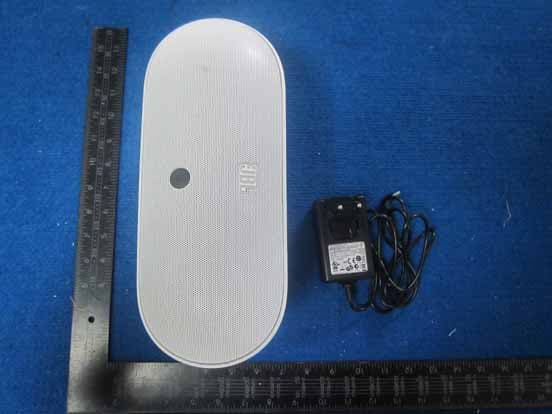
Click to zoom
Application Details
- Equipment Class
- 8CC - Part 18 Consumer Device
- Date of Grant
- Sep 20, 2012
- Application Purpose
- Original Equipment
- Date of Application
- Sep 18, 2012
- Equipment Note
- JBL PowerUp Wireless Charging Speaker for Nokia
- Frequency Range
- 0.11200000 - 0.20500000
- Country
- United States
Documents & Files
Document Text
Text extracted from the exhibit documents filed with the FCC. Open a document above to read the original.
Users Manual
JBL PowerUp Wireless Charging Speaker for Nokia MD-100W Issue 1 Contents About your speaker3 About Qi3 About Bluetooth connectivity4 Keys and parts5 Switch the speaker on6 Pair your device7 Pair and connect7 Pair the speaker using NFC7 Pair the speaker manually8 Clear the pairings8 Play music8 Charge another device wirelessly10 Connect to another device on the go10 Support11 Product and safety information11 2Contents © 2012 Nokia. All rights reserved. About your speaker With the Nokia MD-100W wireless speaker, you can listen to music in high audio quality from your phone or other compatible device, such as a music player. You can connect to another device without stopping the music. You can also use a standard audio cable (3.5 mm) to connect your device to the audio connector in the speaker. The product comes with an audio cable. The Nokia MD-100W wireless speaker can also be used as a wireless charger. To charge a Qi compatible device, place it on the wireless charging area, on top of the speaker. Warning: This product may contain small parts. Keep them out of the reach of small children. Parts of the product are magnetic. Metallic materials may be attracted to the product. Do not place credit cards or other magnetic storage media near the product, because info stored on them may be erased. The surface of this product is nickel-free. About Qi Qi is a global standard that makes wireless charging possible for your device. With a Qi-compatible device, you don't need to connect any cables. You just place your device on the charging surface. About your speaker3 © 2012 Nokia. All rights reserved. Qi works using magnetic induction, and is currently designed for devices that use 5 watts of power or less, such as mobile phones. Qi chargers and devices use the same frequency, so as long as their active areas are touching, all Qi products are compatible, regardless of manufacturer or brand. For more details, see the user guides of both devices. About Bluetooth connectivity You can use Bluetooth to make a wireless connection to other compatible devices, such as mobile phones. Devices do not need to be in direct line-of-sight, but they must be within 10 metres (33 feet) of each other. The connection may be affected by obstructions such as walls or other electronic devices. This device is compliant with Bluetooth Specification 2.1 + EDR supporting the following profiles: A2DP and AVRCP. Check with the manufacturers of other devices to determine their compatibility with this device. 4About Bluetooth connectivity © 2012 Nokia. All rights reserved. Keys and parts 1Volume down key 2Volume up key 3NFC area 4Skip to previous track 5Play or pause key 6Skip to next track 7Power and Bluetooth status indicator 8Bluetooth key Keys and parts5 © 2012 Nokia. All rights reserved. 9Wireless charging area 10Wireless charging status indicators 11Power key 12Connector for power supply 13Service connector 14Audio connector (3.5 mm) Switch the speaker on 1Connect the power supply cable to the connector on the speaker. 2Connect a suitable plug to the AC-adapter of the power supply. 3Plug the power supply into a wall outlet. 4Press the power key. If you've never paired your speaker with a device, or you've cleared the pairings, the speaker goes into pairing mode automatically when it is switched on, and the Bluetooth indicator light starts to flash slowly. If you've already paired the speaker with one or more devices, the speaker connects to the last device it was used with. If the speaker is not connected to another device, or has no audio connection or other activity for 30 minutes, it switches to standby mode, and all the indicator lights switch off. 6Switch the speaker on © 2012 Nokia. All rights reserved. Pair your device Pair and connect Before using your speaker with a phone or other compatible device for the first time, you must pair and connect it to the device. You can only connect the speaker to one device at a time, but you can connect to another device on the go. When the speaker is paired, the Bluetooth status indicator light is blue. If the connected device goes out of Bluetooth range, the speaker tries to reconnect for 3 minutes. When the device comes back into range, the speaker reconnects automatically. You can also use a standard audio cable (3.5 mm) to connect your device to the audio connector in the speaker. When you connect your speaker and device using a wired connection, Bluetooth is switched off automatically, and the Bluetooth indicator light turns white. Pair the speaker using NFC With Near Field Communication (NFC), you can easily pair and connect your speaker to your compatible device. If your device supports NFC, switch NFC on, and touch the NFC area of the speaker with the NFC area of your device. The speaker connects to your device automatically. Some devices may ask for confirmation on connection. For details on NFC, see your device user guide. Tapping the NFC area with an already connected NFC-capable phone disconnects the Bluetooth connection. Pair your device7 © 2012 Nokia. All rights reserved. If your device doesn't support NFC, pair the speaker manually. Pair the speaker manually You can pair your speaker manually with Bluetooth. 1Switch on your speaker and phone or other compatible device. 2If you've previously paired your speaker with another device, press and hold for 2 seconds to switch Bluetooth on. 3Within 3 minutes, switch Bluetooth on in your phone, and search for Bluetooth devices. For details, see your phone user guide. 4On your phone, select the speaker from the list of found devices. 5If asked, type in the passcode 0000. Clear the pairings You can clear the paired devices list on your speaker. Switch the speaker off, then press and hold and the power key for 5 seconds. The white and red indicator lights alternate. After you've cleared the pairings, you must pair the speaker before you can use it again. When you switch on the speaker, pairing mode goes on automatically. Pla…
Text truncated - open the document above for the full version.
Cover Letter(s)
Harman International Industries, Inc. 8500 Balboa Blvd, Nothridge, CA 91329 UNITED STATES 022311 – 6 Authority to Act as Agent Date: _Aug 6, 2012_ ___ American Certification Body, Inc. 6731 Whittier Avenue Suite C110 McLean, VA 22101 To Whom It May Concern: __ GUANGZHOU GRG METROLOGY&TEST CO.,LTD.__ is authorized to act on our behalf, until otherwise notified, for applications to American Certification Body, Inc. (ACB). We certify that we are not subject to denial of federal benefits, that includes FCC benefits, pursuant to Section 5301 of the Anti-Drug Abuse Act of 1988, 21 U.S.C. 862. Further, no party, as defined in 47 CFR 1.2002 (b), to the application is subject to denial of federal benefits, that includes FCC benefits. Thank you, Agency Agreement Expiration Date: ____9 Months___ By: _______________________ __ Fernando Reyes____ ____ (Signature 1 ) (Print name) Title: ___Director, Global Quality___ On behalf of: ___ Harman International Industries, Inc.____ (Company Name) Telephone: ___+1-818-895-8173_____ ______ 1 - Must be signed by applicant contact given for applicant on the FCC site, or by the authorized agent if an appropriate authorized agent letter has been provided. Letters should be placed on appropriate letterhead.
ID Label/Location Info
Label location The label is on the bottom of the device.
Internal Photos
Bluetooth module NFC module Wireless charging module Wireless charging module Wireless charging module
RF Exposure Info
Maximum Permissible Exposure Compliance Requirement 1. STANDARD REQUIREMENT The provisions of §1.1307 (c) and (d) 2. LIMITS 2.1 Basic Restrictions Reference levels Occupational/Controlled exposure limits Frequency rangeMHz Electric field strength(E) V/m Magnetic field strength(H) (A/m) Power density(S) (mW/cm²) Averaging time (minutes) 0.3-3.0 614 1.63 (100)* 6 3.0-30 1842/f 4.89/f (900/f²)* 6 30-300 61.4 0.163 1.0 6 300-1500 -- -- f/300 6 1500-100,000 -- -- 5 6 General Population/Uncontrolled exposure limits Frequency rangeMHz Electric field strength(E) V/m Magnetic field strength(H) (A/m) Power density(S) (mW/cm²) Averaging time (minutes) 0.3-3.0 614 1.63 (100)* 30 3.0-30 824/f 2.19/f (180/f²)* 30 30-300 27.5 0.073 0.2 30 300-1500 -- -- f/1500 30 1500-100,000 -- -- 1.0 30 *Plane-wave equivalent power density f = frequency in MHz 2.2 Limit calculations for radiated electric field strength measurement Frequency Electric Field Strength @0.1m (V/m) Electric Field Strength @3m (dBuV/m) 300kHz~3MHz 614 86 3. EUT RF EXPOSURE The Max radiated emission electric field strength is E = 53.10 dBuV/m; EElectric Field Strength @3m So the MPE comply the requirement.
Test Report
Page 1 of 16 TEST REPORT Report No.: EM201200386-3 Application No.: ZJ00018316 Client: Harman International Industries, Incorporated Address: 8500 Balboa Blvd, Northridge, CA 91329, UNITED STATES Sample Description: JBL Power Up Wireless Charging Speaker for Nokia Model: MD-100W Test Location: Guangzhou GRG Metrology and Test Co., Ltd. Test Specification: FCC PART 18:2010 Test Date: 2012-07-25 to 2012-09-20 Issue Date: 2012-09-20 Test Result: Pass. Prepared By: Reviewed By: Approved By: Eddy Zong / Test Engineer Jane Cao / Manager Gavin Wu / Manager Date:2012-09-20 Date:2012-09-20 Date:2012-09-20 Other Aspects: None Abbreviations: ok / P = passed; fail / F = failed; n.a. / N = not applicable The test result in this test report refers exclusively to the presented test sample. This report shall not be reproduced except in full, without the written approval of GRGT. GRG Metrology and Test Co., Ltd. Address: 163, Pingyun Road, West of Huangpu Avenue, Guangzhou, Guangdong, P.R. China Tel:+86-20-38699960 Fax:+86-20-38695185 Email: [email protected] http://www.grgtest.com Ver.:2.0/ 01. Jan. 2012 Report No.: EM201200386-3 Application No.: ZJ00018316 Page 2 of 16 DIRECTIONS OF TEST 1. This station carries out test task according to the national regulation of verifications which can be traced to National Primary Standards and BIPM. 2. The test report merely corresponds to the test sample. It is not permitted to copy extracts of these test result without the written permission of the test laboratory. 3. If there is any objection concerning the test, the client should inform the laboratory within 15 days from the date of receiving the test report. Report No.: EM201200386-3 Application No.: ZJ00018316 Page 3 of 16 Table of Contents 1. TEST RESULT SUMMARY ........................................................................................................................................ 4 2. GENERAL DESCRIPTION OF TUT........................................................................................................................... 5 2.1 APPLICANT ............................................................................................................................................................. 5 2.2 MANUFACTURER .................................................................................................................................................. 5 2.3 BASIC DESCRIPTION OF EQUIPMENT UNDER TEST ......................................................................................... 5 2.4 LOCAL SUPPORTIVE INSTRUMENTS .................................................................................................................. 5 3. LABORATORY AND ACCREDITATIONS ............................................................................................................... 6 3.1 LABORATORY ........................................................................................................................................................ 6 3.2 ACCREDITATIONS ................................................................................................................................................. 6 3.3 MEASUREMENT UNCERTAINTY ......................................................................................................................... 6 3.4 LIST OF USED TEST EQUIPMENT AT GRGT ........................................................................................................ 7 4. EMISSION TEST .......................................................................................................................................................... 8 4.1 RADIATED ELECTROMAGNETIC DISTURBANCE MEASUREMENT ................................................................ 8 4.1.1 LIMITS .............................................................................................................................................................. 8 4.1.2 TEST PROCEDURE .......................................................................................................................................... 8 4.1.3 TEST SETUP ..................................................................................................................................................... 9 4.1.4 TEST RESULTS ............................................................................................................................................... 10 4.2 CONDUCTED EMISSION MEASUREMENT ........................................................................................................ 13 4.2.1 LIMITS ............................................................................................................................................................ 13 4.2.2 TEST PROCEDURES ...................................................................................................................................... 13 4.2.3 TEST SETUP ................................................................................................................................................... 14 4.2.4 TEST RESULTS ............................................................................................................................................... 15 Report No.: EM201200386-3 Application No.: ZJ00018316 Page 4 of 16 1. TEST RESULT SUMMARY FCC PART 18:2010 Standard Item Limit / Severity Result FCC PART 18:2010 Conducted Emission 18.307 PASS Radiated Emission 18.305 PASS Report No.: EM201200386-3 Application No.: ZJ00018316 Page 5 of 16 2. GENERAL DESCRIPTION OF TUT 2.1 APPLICANT Name: Harman International Industries, Incorporated Address: 8500 Balboa Blvd, Northridge, CA 91329, UNITED STATES 2.2 MANUFACTURER Name: Harman International Industries, Incorporated Address: 8500 Balboa Blvd, Northridge, CA 91329, UNITED STATES 2.3 BASIC DESCRIPTION OF EQUIPMENT UNDER TEST Equipment: JBL PowerUp Wireless Charging Speaker for Nokia Model No.: MD-100W Trade Name: JBL,NOKIA Power supply: Input: AC …
Text truncated - open the document above for the full version.
Test Setup Photos
1. Test setup photo for wireless charging-Part 18 RE (Below 30MHz) RE (30MHz to 1GHz) CE
Contact Information
Applicant
Terry Shi(Prin.Engineer,Regulatory Compliance, Quality)
Technical Contact
GUANGZHOU GRG METROLOGY&TEST CO.,LTD.Liu Angel
[email protected]020-38699960
163 Ping Yun Rd, West of HuangPu Ave, Guangzhou · Guangzhou · China
Test Firm
Guangzhou GRG Metrology And Test Technology LTD.Huang Yingling
Technical Specifications
| # | Rule Parts | Frequency Range | Power Output |
|---|---|---|---|
| 1 | 18 | 0.112 MHz - 0.205 MHz | - |
Other Applications from Harman International Industries, Inc
APITUNEBEAM3
Jul 30, 2026BLUETOOTH HEADSET
Equipment Class
DTS - Digital Transmission SystemAPITUNEBUDS3
Jul 30, 2026BLUETOOTH HEADSET
Equipment Class
DSS - Part 15 Spread Spectrum TransmitterAPITUNEFLEX3
Jul 29, 2026BLUETOOTH HEADSET
Equipment Class
DTS - Digital Transmission SystemAPIJBLVBUDS3
Jul 21, 2026BLUETOOTH HEADSET
Equipment Class
DTS - Digital Transmission SystemAPIJBLGO5H
Jul 21, 2026PORTABLE BLUETOOTH SPEAKER
Equipment Class
DSS - Part 15 Spread Spectrum Transmitter