APISNDFAIRLOPlug-in AirPlay speaker
Harman International Industries, Inc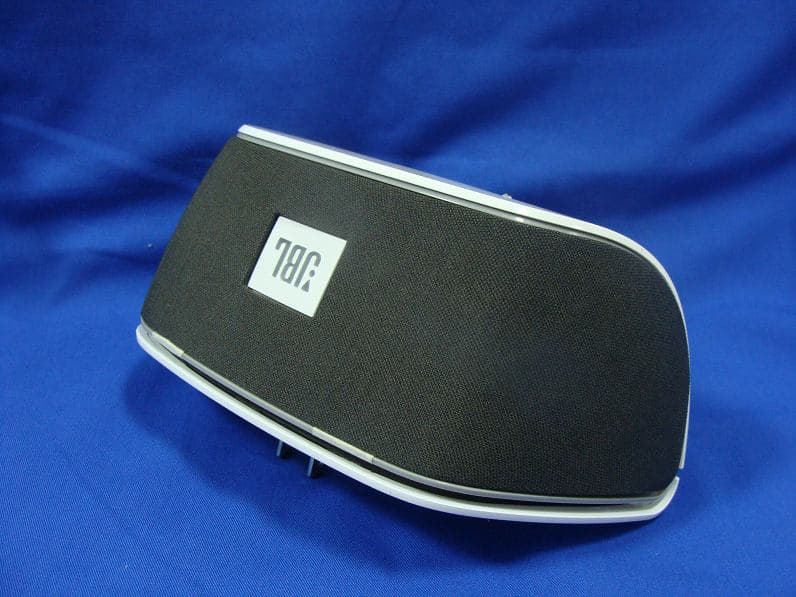
Click to zoom
Application Details
- Equipment Class
- DTS - Digital Transmission System
- Date of Grant
- Jul 01, 2012
- Application Purpose
- Original Equipment
- Date of Application
- Jul 01, 2012
- Equipment Note
- Plug-in AirPlay speaker
- Frequency Range
- 2412.00000000 - 2462.00000000
- Country
- United States
Documents & Files
Document Text
Text extracted from the exhibit documents filed with the FCC. Open a document above to read the original.
Users Manual
Quick Setup Guide JBL SoundfLy ™ AiR Plug-in AirPlay speaker Welcome Thank you for purchasing the JBL Soundfly™ Air plug-in AirPlay speaker. Soundfly Air will fill your room with sound from your iPod, iPhone, iPad, Mac or PC computer with iTunes, while plugging directly into an AC outlet and remaining practically invisible. Included Items JBL Soundfly Air Unit AC Plug Adapter (varies with region) Support Pad (varies with region) 2 Plug soundfly AIr Into An Ac outlet * If multiple adapters are supplied, use the one that provides the most secure fit in the AC outlet. ON turnIng soundfly AIr on And off ON SLEEP ECO-STANDBY 3 sec. Note: Soundfly Air will automatically enter the Sleep mode after 10 minutes of inactivity. 3 www.jbl.com English JoIn soundfly AIr WItH your WI-fI ® netWorK Before you can stream audio to your Soundfly Air via AirPlay, you will need to join your Soundfly Air with your home Wi-Fi ® network. You will only need to perform this operation one time. IMPORTANT: Before performing the following steps, be sure your home Wi-Fi network is operating. 1. Make sure the Wi-Fi logo button’s LED is flashing amber. 2. Touch the Wi-Fi logo button for at least three seconds. The button’s LED will alternately flash green and amber and Soundfly Air will be in the Connect mode. 3. Open your iPod’s, iPhone’s or iPad’s Wi-Fi settings page and connect to the “JBL Soundfly Air” network. Select “JBL Soundfly” Network 4 4. Once the iPod, iPhone or iPad is connected to the “JBL Soundfly Air” network, open the device’s Web browser (Safari, Firefox, Internet Explorer, etc.) and enter the following Web address: 192.168.1.1. This address will display the JBL Soundfly Air’s Setup page. • In the “Wireless Network SSID” drop-down box, select your home Wi-Fi network’s name. • If your network requires a password, enter it in the “WPA/WPA2 Passphrase” field. 5. Once the configuration is complete, Soundfly Air will connect to your home Wi-Fi network, and its Wi-Fi button LED will change to solid green. IMPORTANT: Restore your iPod, iPhone or iPad Wi-Fi settings back to your home Wi-Fi network. Restore Device to Your Home Wi-Fi Network You’re now ready to enjoy AirPlay streaming audio from your iOS device! 5 www.jbl.com English If The WI-fI CONNeCTION WAs UNsUCCessfUl If Soundfly Air was unable to connect to your Wi-Fi network, the Wi-Fi logo button LED will flash amber. If this happens: a) Touch the Wi-Fi button for more than three seconds to begin the connection process again. b) Repeat steps 2 – 5 to connect to your Wi-Fi network. streAm AudIo to soundfly AIr Your JBL Soundfly Air can play audio files or an Internet radio station that is streaming from iTunes 10.1 (or newer) on a networked computer, or from an iPod, iPhone or iPad with iOS 4.2 or later. NOTE: Before you can begin AirPlay streaming, the JBL Soundfly Air must be joined in the Wi-Fi network. (See Join Soundfly Air With Your Wi-Fi Network, on page 3.) To initiate streaming from the computer, launch iTunes, click on the AirPlay button that appears at the bottom of the iTunes window, and select “JBL Soundfly Air” in the pop-up list that appears. AirPlay button Select “JBL Soundfly” from pop-up list To initiate streaming from an iPod, iPhone or iPad tap the AirPlay button on the screen and select “JBL Soundfly Air” in the speaker-selection list that appears. • If Soundfly Air is in the Sleep mode when you press Play in iTunes or on the iPod, iPhone or iPad, Soundfly Air will automatically turn on, and begin playing the streaming audio. usIng tHe soundfly APP’s eAsy setuP functIon The free JBL Soundfly App has an easy setup function that simplifies Soundfly Air’s Wi-Fi setup procedure. 1. Visit the iTunes App Store and download the JBL Soundfly Air app into your iPod, iPhone or iPad. 6 2. Unplug Soundfly Air from the wall outlet and remove its grille as shown below. 3. Connect your iPod, iPhone or iPad to Soundfly Air’s USB port. 4. Plug Soundfly Air back into the wall outlet and wait until the power LED illuminates solid white. 5. Launch the Soundfly Air app on your iPod, iPhone or iPad, and select “Easy Setup.” 6. Follow the prompts in the app to complete the Wi-Fi setup. 7. Remove Soundfly Air from the wall outlet, remove the USB cable from Soundfly Air and replace the grille as shown below. 8. Plug Soundfly Air back into the wall outlet. After the power LED illuminates solid white the Wi-Fi LED should illuminate solid green to indicate that Soundfly Air is joined with your Wi-Fi network. NOTE: The JBL Soundfly App also allows you to change the EQ setting to get the best sound wherever you plug in Soundfly Air. 7 www.jbl.com English troublesHootIng syMPTOMPOssIble PRObleMsOlUTIONNOTe No sound (Power button LED is not illuminated) Faulty AC connectionMake sure that Soundfly Air is plugged into a working AC outlet. The Power button LED glows white or amber when the unit is receiving AC power. No sound (Power button LED glows amber.) Soundfly Air is in Sleep mode.Touch the Power button.The Power button LED glows white when the unit is on. No sound (Power button LED glows white.) Soundfly Air is not joined with your home Wi-Fi network. Join Soundfly Air with your home Wi-Fi network. See Join Soundfly Air With Your Wi-Fi Network, on page 3. The Wi-Fi LED illuminates solid green when Soundfly Air is joined with a Wi-Fi network. The iOS device is out of range of Soundfly Air Move the device closer to Soundfly Air. Soundfly Air’s operational range is approximately 33 feet (10m). Sound crackles, hisses or is distorted The iOS device is overloading Soundfly Air. • Turn down the volume on the iOS device. • Set the EQ on the device to “Off”. Loud hum or buzzingThere is a ground loop with the AC wiring. • Unplug Soundfly Air and plug it into a different AC outlet. 8 sPecIfIcAtIons Amplifier power: 10 watts x 2 Frequency response: 60Hz – 20kHz Signal-to-noise ratio: 80dB Power requirement: 100V – 240V AC, 50Hz/60Hz Power consumption: <0.5W (standby); 30W (…
Text truncated - open the document above for the full version.
Cover Letter(s)
RF_160, Issue 01 Declaration of Authorization We Name: Harman International Industries, Incorporated Address: 8500 Balboa Blvd, Northridge, CA 91329, UNITED STATES City: Northridge . Country: UNITED STATES.. Declare that: Name: QuieTek Corp. Address: Fl.2, No.345, Xin-hu 2 nd Rd., Nei-hu District City: Taipei Country Taiwan R.O.C. is authorized to apply for Certification of the following product(s): Product description: Plug-in AirPlay speaker Type designation: JBL SoundFly Air Trademark: Harman International Industries, Incorporated on our behalf. Date: 2012/05/28. City: ... Northridge .. Name: ...Fernando Reyes / Director, Global Quality............... Signature:
External Photos
Report No.: 125269R-RFUSP42V01 Page : 1 of 14 Attachment 2 : EUT Detailed Photographs (1) EUT Photo (2) EUT Photo
ID Label/Location Info
Harman International Industries, Incorporated FCC ID.: APISNDFAIRLO 8500 Balboa Blvd, Northridge, CA 91329, UNITED STATESTel : 818-895-8173 FCC ID Label LABEL HERE
ID Label/Location Info
Harman International Industries, Incorporated FCC ID.: APISNDFAIRLO 8500 Balboa Blvd, Northridge, CA 91329, UNITED STATESTel : 818-895-8173 The FCC ID and will be placed on the equipment as shown in the photograph below.
Internal Photos
Report No.: 125269R-RFUSP42V01 Page : 2 of 14 (3) EUT Photo (4) EUT Photo Report No.: 125269R-RFUSP42V01 Page : 3 of 14 (5) EUT Photo (6) EUT Photo Report No.: 125269R-RFUSP42V01 Page : 4 of 14 (7) EUT Photo (8) EUT Photo Report No.: 125269R-RFUSP42V01 Page : 5 of 14 (9) EUT Photo (10) EUT Photo Report No.: 125269R-RFUSP42V01 Page : 6 of 14 (11) EUT Photo (12) EUT Photo Report No.: 125269R-RFUSP42V01 Page : 7 of 14 (13) EUT Photo (14) EUT Photo Report No.: 125269R-RFUSP42V01 Page : 8 of 14 (15) EUT Photo (16) EUT Photo Report No.: 125269R-RFUSP42V01 Page : 9 of 14 (17) EUT Photo (18) EUT Photo Report No.: 125269R-RFUSP42V01 Page : 10 of 14 (19) EUT Photo (20) EUT Photo Report No.: 125269R-RFUSP42V01 Page : 11 of 14 (21) EUT Photo (22) EUT Photo Report No.: 125269R-RFUSP42V01 Page : 12 of 14 (23) EUT Photo (24) EUT Photo Report No.: 125269R-RFUSP42V01 Page : 13 of 14 (25) EUT Photo (26) EUT Photo (LABEL) Report No.: 125269R-RFUSP42V01 Page : 14 of 14 (27) EUT Photo
RF Exposure Info
Report No. 125269R-RFUSP42V01 Page: 1 of 3 RF Exposure Evaluation declaration Product Name Plug-in AirPlay speaker Model No. JBL SoundFly Air FCC ID APISNDFAIRLO Applicant Harman International Industries, Incorporated Address 8500 Balboa Blvd, Northridge, CA 91329, UNITED STATES Date of Receipt May 14, 2012 Date of Declaration May 28, 2012 Report No. 125269R-RFUSP42V01 The declaration results relate only to the samples calculated. The declaration shall not be reproduced except in full without the written approval of QuieTek Corporation. This report must not be used to claim product endorsement by NVLAP any agency of the U.S. Government Report No. 125269R-RFUSP42V01 Page: 2 of 3 1. RF Exposure Evaluation 1.1. Limits According to FCC 1.1310: The criteria listed in the following table shall be used to evaluate the environment impact of human exposure to radio frequency (RF) radiation as specified in 1.1307(b) LIMITS FOR MAXIMUM PERMISSIBLE EXPOSURE (MPE) Frequency Range (MHz) Electric Field Strength (V/m) Magnetic Field Strength (A/m) Power Density (mW/cm 2 ) Average Time (Minutes) (A) Limits for Occupational/ Control Exposures 300-1500 -- -- F/300 6 1500-100,000 -- -- 5 6 (B) Limits for General Population/ Uncontrolled Exposures 300-1500 -- -- F/1500 6 1500-100,000 -- -- 1 30 F= Frequency in MHz Friis Formula Friis transmission formula: Pd = (Pout*G)/(4*pi*r 2 ) Where Pd = power density in mW/cm 2 Pout = output power to antenna in mW G = gain of antenna in linear scale Pi = 3.1416 R = distance between observation point and center of the radiator in cm Pd id the limit of MPE, 1 mW/cm 2 . If we know the maximum gain of the antenna and the total power input to the antenna, through the calculation, we will know the distance r where the MPE limit is reached. 1.2. Test Procedure Software provided by client enabled the EUT to transmit and receive data at lowest, middle and highest channel individually. The temperature and related humidity: 18°Cand 78% RH. Report No. 125269R-RFUSP42V01 Page: 3 of 3 1.3. Test Result of RF Exposure Evaluation Product : Plug-in AirPlay speaker Test Item : RF Exposure Evaluation Test Site : No.3 OATS 802.11b (1Mbps) Output Power Into Antenna & RF Exposure Evaluation Distance (3.81dBi): Channel Frequency (MHz) Output Power to Antenna (mW) Power Density at R = 20 cm (mW/cm2) 1 2412.00 86.2979 0.041279 6 2437.00 89.5365 0.042828 11 2462.00 87.7001 0.041950 Power density in column 4 is much lower than the limit (1 mW/cm 2 ). 802.11g (6Mbps) Output Power Into Antenna & RF Exposure Evaluation Distance (3.81dBi): Channel Frequency (MHz) Output Power to Antenna (mW) Power Density at R = 20 cm (mW/cm2) 1 2412.00 265.4606 0.126979 6 2437.00 252.9298 0.120985 11 2462.00 261.8183 0.125236 Power density in column 4 is much lower than the limit (1 mW/cm 2 ).
Test Report
Report No. 125269R-RFUSP42V01 Page : 1 of 71 Test Report Product Name Plug-in AirPlay speaker Model No JBL SoundFly Air FCC ID. APISNDFAIRLO Applicant Harman International Industries, Incorporated Address 8500 Balboa Blvd, Northridge, CA 91329, UNITED STATES Date of Receipt May 14, 2012 Issue Date May 28, 2012 Report No. 125269R-RFUSP42V01 Report Version V1.0 The test results relate only to the samples tested. The test report shall not be reproduced except in full without the written approval of QuieTek Corporation. This report must not be used to claim product endorsement by NVLAP any agency of the U.S. Government Report No. 125269R-RFUSP42V01 Page : 2 of 71 Test Report Certification Issue Date: May 28, 2012 Report No.: 125269R-RFUSP42V01 Product Name Plug-in AirPlay speaker Applicant Harman International Industries, Incorporated Address 8500 Balboa Blvd, Northridge, CA 91329, UNITED STATES Manufacturer Harman International Industries, Incorporated Model No. JBL SoundFly Air FCC ID. APISNDFAIRLO EUT Rated Voltage AC 100-240V, 50-60Hz EUT Test Voltage AC 120V/60Hz Trade Name Harman International Industries, Incorporated Applicable Standard FCC CFR Title 47 Part 15 Subpart C: 2010 FCC KDB 558074, ANSI C63.4: 2003 Test Result Complied The test results relate only to the samples tested. The test report shall not be reproduced except in full without the written approval of QuieTek Corporation. This report must not be used to claim product endorsement by NVLAP any agency of the U.S. Government Documented By : ( Senior Adm. Specialist / Rita Huang ) Tested By : ( Engineer / Nowal Kuo ) Approved By : ( Manager / Vincent Lin ) Accredited by NIST (NVLAP) NVLAP Lab Code: 200533-0 Report No. 125269R-RFUSP42V01 Page : 3 of 71 TABLE OF CONTENTS Description Page 1. GENERAL INFORMATION .....................................................................................................5 1.1. EUT Description............................................................................................................................5 1.2. Operational Description ................................................................................................................7 1.3. Tested System Details....................................................................................................................8 1.4. Configuration of Tested System ....................................................................................................8 1.5. EUT Exercise Software .................................................................................................................9 1.6. Test Facility .................................................................................................................................10 2. Conducted Emission.................................................................................................................. 11 2.1. Test Equipment............................................................................................................................11 2.2. Test Setup ....................................................................................................................................11 2.3. Limits ..........................................................................................................................................12 2.4. Test Procedure .............................................................................................................................12 2.5. Uncertainty ..................................................................................................................................12 2.6. Test Result of Conducted Emission.............................................................................................13 3. Peak Power Output ...................................................................................................................15 3.1. Test Equipment............................................................................................................................15 3.2. Test Setup ....................................................................................................................................15 3.3. Limits ..........................................................................................................................................15 3.4. Test Procedure .............................................................................................................................15 3.5. Uncertainty ..................................................................................................................................15 3.6. Test Result of Peak Power Output...............................................................................................16 4. Radiated Emission .....................................................................................................................18 4.1. Test Equipment............................................................................................................................18 4.2. Test Setup ....................................................................................................................................19 4.3. Limits ..........................................................................................................................................20 4.4. Test Procedure .............................................................................................................................21 4.5. Uncertainty ..................................................................................................................................21 4.6. Test Result of Radiated Emission................................................................................................22 5. RF antenna conducted test........................................................................................................30 5.1. Test Equipment.........…
Text truncated - open the document above for the full version.
Test Setup Photos
Report No.: 125269R-RFUSP42V01 Page : 1 of 3 Attachment 1: EUT Test Setup Photographs Front View of Conducted Test Back View of Conducted Test Report No.: 125269R-RFUSP42V01 Page : 2 of 3 Front View of Radiated Test Back View of Radiated Test Report No.: 125269R-RFUSP42V01 Page : 3 of 3 Front View of Radiated Test (Horn) Back View of Radiated Test (Horn)
Contact Information
Applicant
Terry Shi(Prin.Engineer,Regulatory Compliance, Quality)
Technical Contact
QuieTek CorporationSabina Chen
[email protected]886-2-8601-3788
No. 5-22, Rueishu Keng, Linkou Dist., · New Taipei City · Taiwan
Test Firm
DEKRA Testing and Certification Co., Ltd.Sky Hsu
Technical Specifications
| # | Rule Parts | Frequency Range | Power Output |
|---|---|---|---|
| 1 | 15C | 2.41 GHz - 2.46 GHz | 265.00 mW |
Other Applications from Harman International Industries, Inc
APITUNEBEAM3
Jul 30, 2026BLUETOOTH HEADSET
Equipment Class
DTS - Digital Transmission SystemAPITUNEBUDS3
Jul 30, 2026BLUETOOTH HEADSET
Equipment Class
DSS - Part 15 Spread Spectrum TransmitterAPITUNEFLEX3
Jul 29, 2026BLUETOOTH HEADSET
Equipment Class
DTS - Digital Transmission SystemAPIJBLVBUDS3
Jul 21, 2026BLUETOOTH HEADSET
Equipment Class
DTS - Digital Transmission SystemAPIJBLGO5H
Jul 21, 2026PORTABLE BLUETOOTH SPEAKER
Equipment Class
DSS - Part 15 Spread Spectrum Transmitter